Page 62 of 1771
InspectionTension Adjustmen t
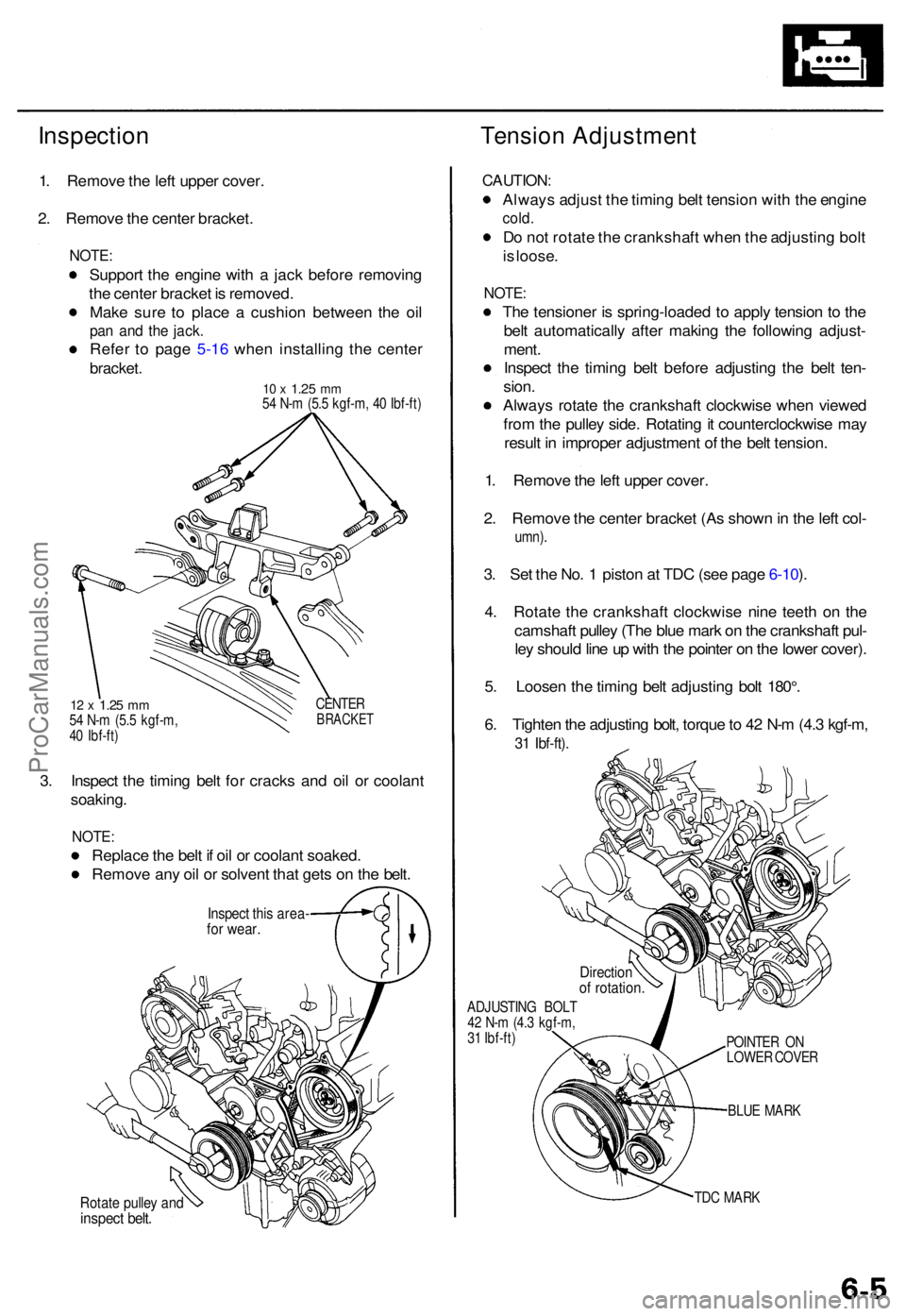
1. Remov e th e lef t uppe r cover .
2 . Remov e th e cente r bracket .
NOTE:
Suppor t th e engin e wit h a jac k befor e removin g
th e cente r bracke t i s removed .
Mak e sur e t o plac e a cushio n betwee n th e oi l
pan an d th e jack .
Refe r t o pag e 5-1 6 whe n installin g th e cente r
bracket .
10 x 1.2 5 mm54 N- m (5. 5 kgf-m , 4 0 Ibf-ft )
12 x 1.2 5 mm54 N- m (5. 5 kgf-m ,
4 0 Ibf-ft ) CENTE
RBRACKE T
3. Inspec t th e timin g bel t fo r crack s an d oi l o r coolan t
soaking .
NOTE:
Replac e th e bel t i f oi l o r coolan t soaked .
Remov e an y oi l o r solven t tha t get s o n th e belt .
Inspec t thi s area -for wear .
Rotate pulle y an dinspec t belt .
CAUTION :
Always adjus t th e timin g bel t tensio n wit h th e engin e
cold.
Do no t rotat e th e crankshaf t whe n th e adjustin g bol t
i s loose .
NOTE :
The tensione r i s spring-loade d t o appl y tensio n t o th e
bel t automaticall y afte r makin g th e followin g adjust -
ment .
Inspec t th e timin g bel t befor e adjustin g th e bel t ten -
sion .
Alway s rotat e th e crankshaf t clockwis e whe n viewe d
fro m th e pulle y side . Rotatin g it counterclockwis e ma y
resul t i n imprope r adjustmen t o f th e bel t tension .
1 . Remov e th e lef t uppe r cover .
2 . Remov e th e cente r bracke t (A s show n in th e lef t col -
umn) .
3. Se t th e No . 1 pisto n a t TD C (se e pag e 6-10 ).
4 . Rotat e th e crankshaf t clockwis e nin e teet h o n th e
camshaf t pulle y (Th e blu e mar k o n th e crankshaf t pul -
le y shoul d lin e u p wit h th e pointe r o n th e lowe r cover) .
5 . Loose n th e timin g bel t adjustin g bol t 180° .
6 . Tighte n th e adjustin g bolt , torqu e to 4 2 N- m (4. 3 kgf-m ,
31 Ibf-ft) .
ADJUSTIN G BOL T
4 2 N- m (4. 3 kgf-m ,
3 1 Ibf-ft )
BLUE MAR K
TD C MAR K
POINTE
R O N
LOWE R COVE R
Directio nof rotation .
ProCarManuals.com
Page 66 of 1771
Timing Bel t
Installatio n
Install th e timin g bel t i n th e revers e orde r o f removal ;
Onl y ke y point s ar e describe d here .
CAUTION : D o no t rotat e th e crankshaf t pulle y o r
camshaf t pulley s wit h th e timin g bel t removed . Th e pis -
ton s ma y hi t th e valve s an d caus e damage .
1 . Remov e th e spar k plugs .
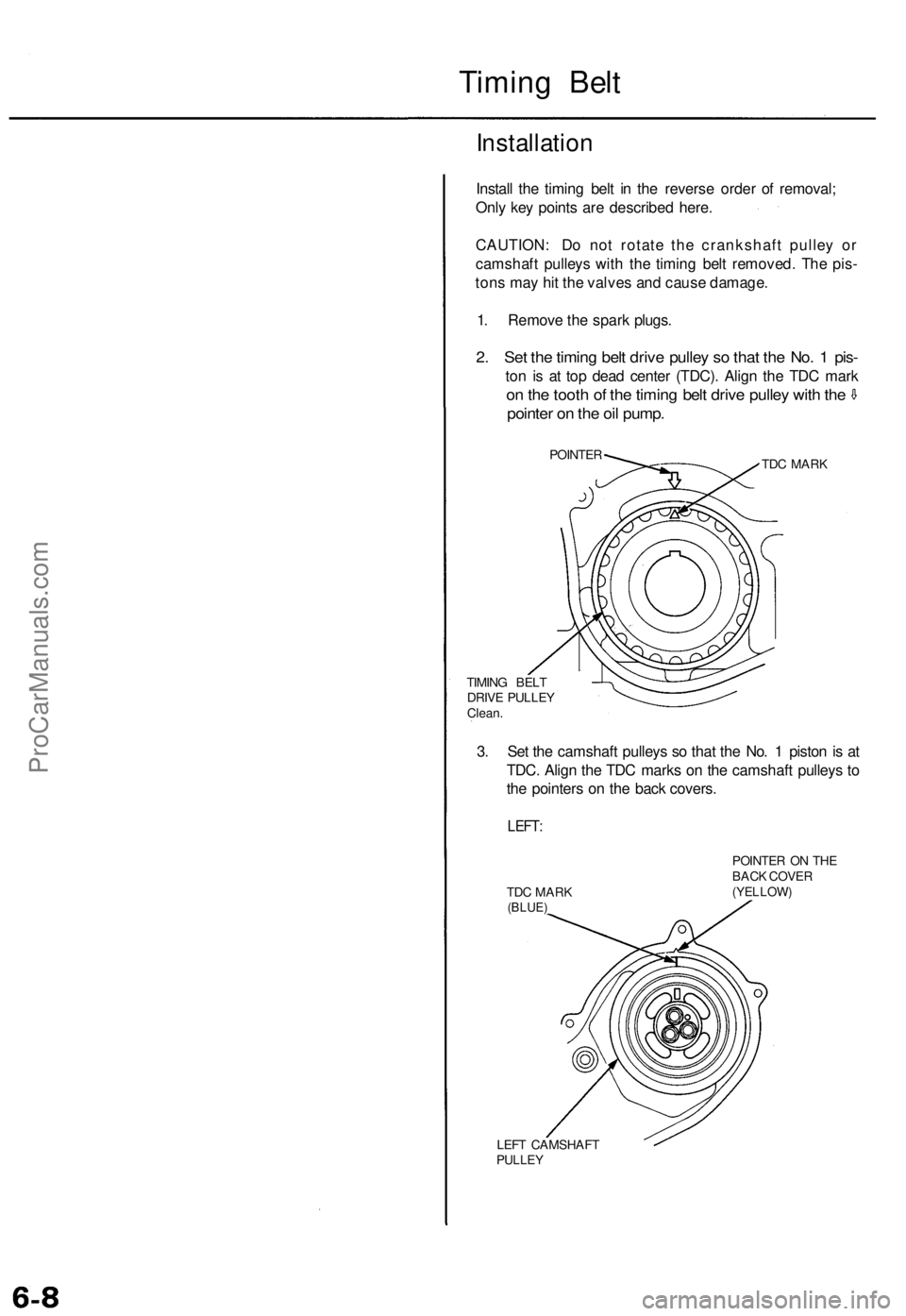
2. Se t th e timin g bel t driv e pulle y s o tha t th e No . 1 pis -
ton i s a t to p dea d cente r (TDC) . Alig n th e TD C mar k
on th e toot h o f th e timin g bel t driv e pulle y wit h th e
pointe r o n th e oi l pump .
POINTE R
TIMIN G BEL T
DRIV E PULLE Y
Clean . TD
C MAR K
3. Se t th e camshaf t pulley s s o tha t th e No . 1 pisto n is a t
TDC . Alig n th e TD C mark s o n th e camshaf t pulley s t o
th e pointer s o n th e bac k covers .
LEFT:
TDC MAR K(BLUE )
POINTE R O N TH E
BAC K COVE R
(YELLOW )
LEFT CAMSHAF TPULLEY
ProCarManuals.com
Page 68 of 1771
Timing Bel t
Installatio n (cont'd )
9. Adjus t th e timin g bel t tensio n (se e pag e 6-5 ).
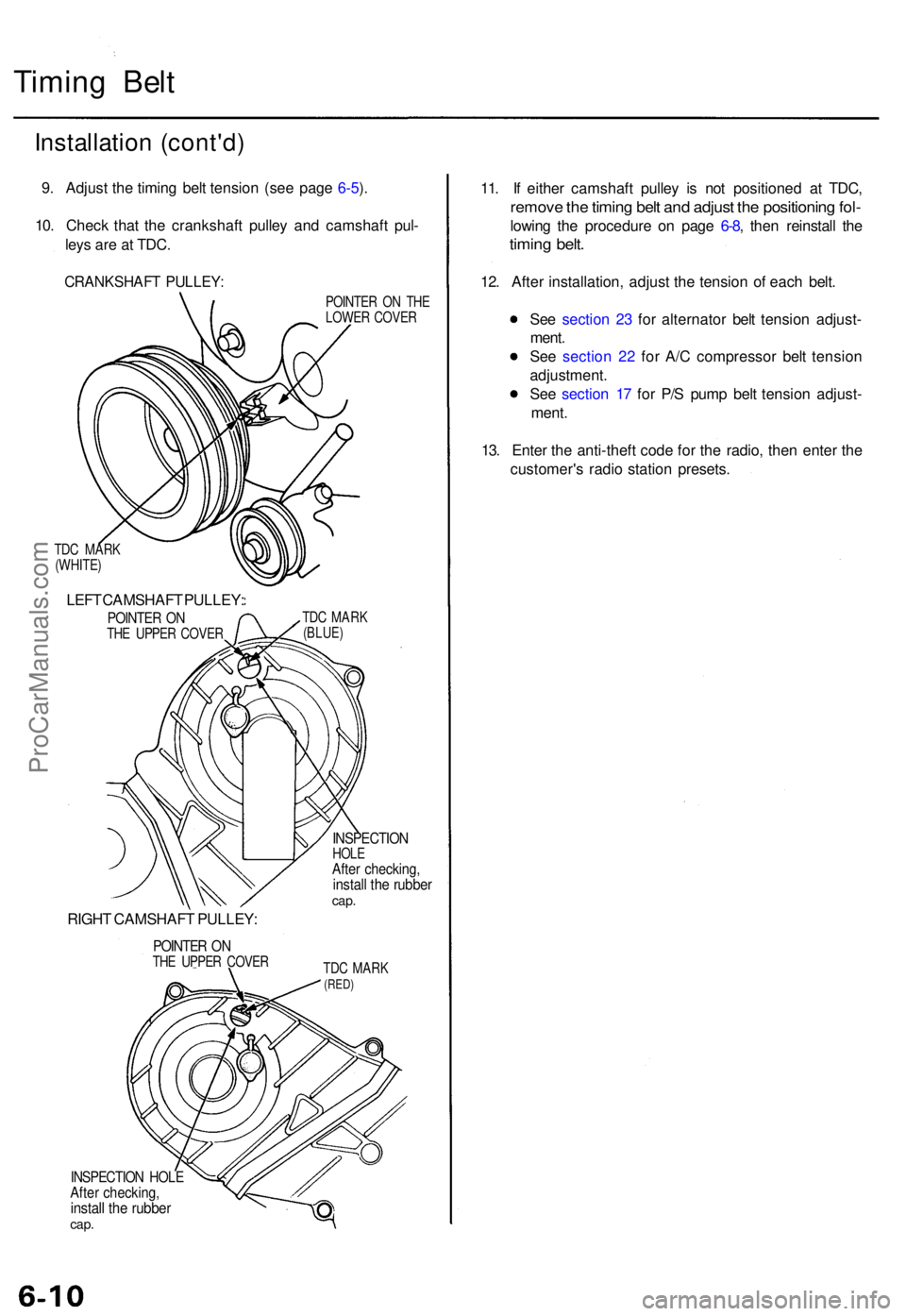
10 . Chec k tha t th e crankshaf t pulle y an d camshaf t pul -
ley s ar e a t TDC .
CRANKSHAF T PULLEY :
TDC MAR K
(WHITE )
LEFT CAMSHAF T PULLEY :
POINTER O NTH E UPPE R COVE R
RIGHT CAMSHAF T PULLEY :
POINTER O NTH E UPPE R COVE R POINTE
R O N TH E
LOWE R COVE R
TD C MAR K
(BLUE )
INSPECTIO NHOLEAfter checking ,install th e rubbe rcap.
TDC MAR K(RED)
INSPECTIO N HOL EAfter checking ,install th e rubbe rcap.
11. I f eithe r camshaf t pulle y i s no t positione d a t TDC ,
remov e th e timin g bel t an d adjus t th e positionin g fol -
lowin g th e procedur e o n pag e 6-8 , the n reinstal l th e
timin g belt .
12. Afte r installation , adjus t th e tensio n o f eac h belt .
Se e sectio n 2 3 fo r alternato r bel t tensio n adjust -
ment .
Se e sectio n 2 2 fo r A/ C compresso r bel t tensio n
adjustment .
Se e sectio n 1 7 fo r P/ S pum p bel t tensio n adjust -
ment .
13 . Ente r th e anti-theft code fo r th e radio , the n ente r th e
customer' s radi o statio n presets .
ProCarManuals.com
Page 1538 of 1771
Five-step Troubleshooting
1. Verify The Complaint
Turn on all the components in the problem circuit to
verify the customer complaint. Note the symptoms.
Do not begin disassembly or testing until you have
narrowed down the problem area.
2. Analyze The Schematic
Look up the schematic for the problem circuit.
Determine how the circuit is supposed to work by
tracing the current paths from the power feed
through the circuit components to ground. If several
circuits fail at the same time, the fuse or ground is a
likely cause.
Based on the symptoms and your understanding of
the circuit operation, identify one or more possible
causes of the problem.
3. Isolate The Problem By Testing The Circuit
Make circuit tests to check the diagnosis you made
in step 2. Keep in mind that a logical, simple proce-
dure is the key to efficient troubleshooting. Test for
the most likely cause of failure first. Try to make
tests at points that are easily accessible.
4. Fix The Problem
Once the specific problem is identified, make the
repair. Be sure to use proper tools and safe proce-
dures.
5. Make Sure The Circuit Works
Turn on all components in the repaired circuit in all
modes to make sure you've fixed the entire prob-
lem. If the problem was a blown fuse, be sure to
test all of the circuits on the fuse. Make sure no new
problems turn up and the original problem does not
recur.
Wire Color Codes
The following abbreviations are used to identify wire
colors in the circuit schematics:
WHT .............................White
YEL ............................... Yellow
BLK .............................. Black
BLU
..............................
Blue
GRN ............................. Green
RED
..............................
Red
ORN ............................. Orange
PNK.............................. Pink
BRN .............................. Brown
GRY.............................. Gray
PUR .............................. Purple
LT BLU ......................... Light Blue
LT GRN ........................ Light Green
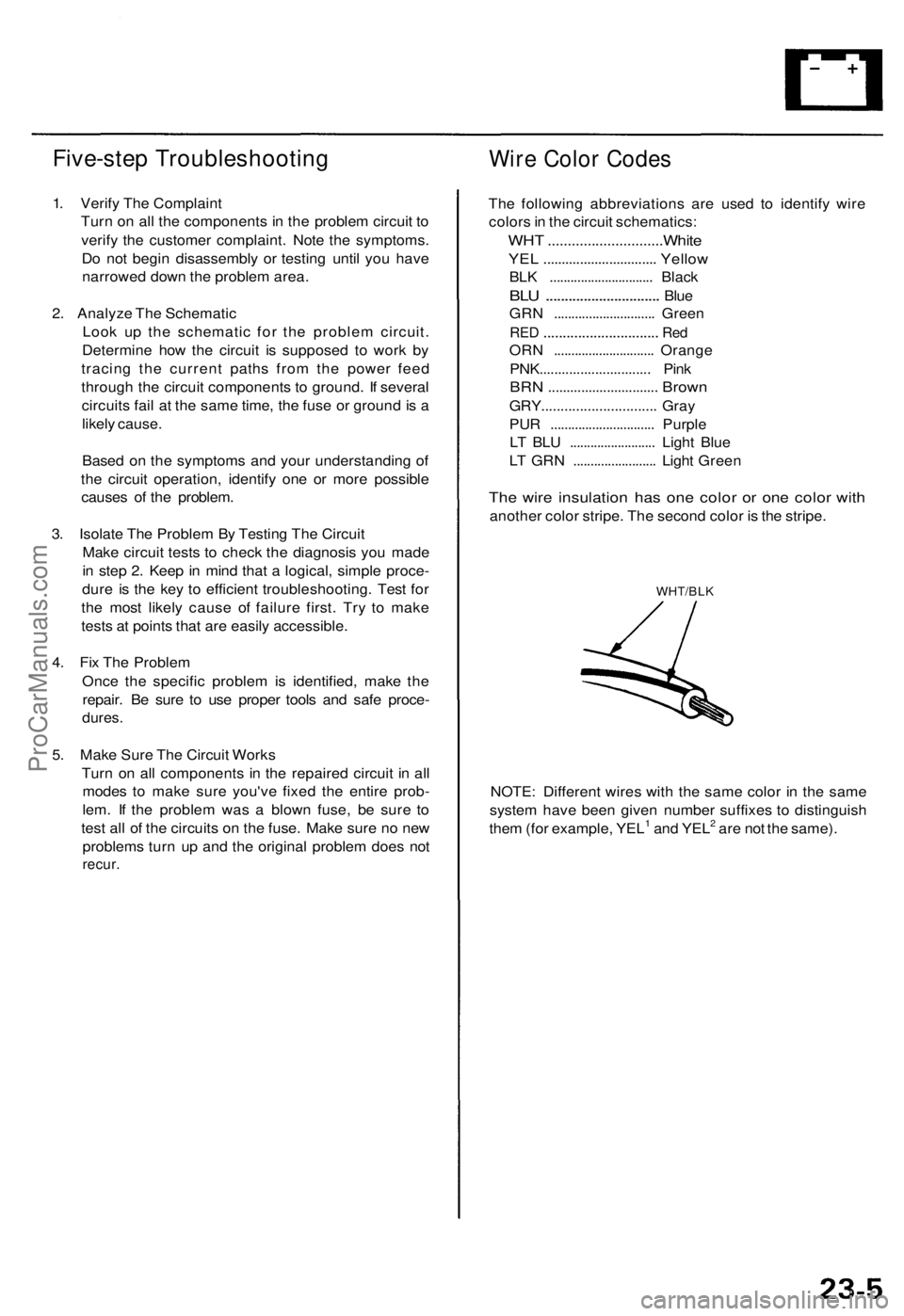
The wire insulation has one color or one color with
another color stripe. The second color is the stripe.
WHT/BLK
NOTE: Different wires with the same color in the same
system have been given number suffixes to distinguish
them (for example, YEL1 and YEL2 are not the same).ProCarManuals.com