1990 VOLKSWAGEN TRANSPORTER warning
[x] Cancel search: warningPage 38 of 165
Downloaded from www.Manualslib.com manuals search engine
CONTROLS
AND
EQUIPMENT
•
Never shift into Reverse (R) or Park
(P) when the vehicle is in motion.
•
Do not remove the key from the ig
nition steering lock until you have
parked the vehicle, because removal
of the key
will
lock the steering wheel.
•
If the selector lever is unintention
ally moved into Neutral (N)
while
driv
ing,
take
your foot off the accelerator pedal and
wait
until the engine speed
has
dropped to idling before selecting
a driving position.
Maneuvering
•'/hen
alternating between forward and
-averse
- for
instance,
while
maneuvering
ne
vehicle
into a tight parking
space
-
:nly
shift when the
vehicle
has
come
to a
full stop and the
engine
is running at idle
soeed.
Stuck
in snow, mud or sand
When
alternating between forward and
reverse
in an effort to free the
vehicle,
depress
the
accelerator
pedal
slightly
while
the
transmission
is in
gear,
and
release
the
accelerator
pedal
while
shifting.
Do not
race
the
engine
and
avoid
spinning
the
wheels.
Do not repeat
"rocking"
back and
forth
with
wheels
spinning
at high engine speed and heavy
throttle,
as serious damage may
be caused to the automatic transmis
sion
and other critical parts.
Kickdown
device
The
kickdown
device
gives
maximum
acceleration
when the
accelerator
pedal
is
pressed
down
past
the full throttle
posi
tion.
Depending
on
road
speed
and
engine
speed,
either the upshift is
delayed
(forced
throttle) or the box
changes
down
into
the next lower
gear.
WARNING
Be
careful when using the kickdown on
slippery
roads. Rapid acceleration may
cause
skidding.
Stopping
•
When
stopping briefly, at a traffic light
for
example,
it is not
necessary
to
move
the
selector
lever
to
Neutral.
Simply
apply
the
brakes.
To start
again
release
brake
and
accelerate.
•
The driving
positions
must
never
be
used
for holding the
vehicle
at rest
uphill.
Always
use your foot
brakes
when
stopped
on
inclines.
WARNING
•
Never get out of the driver's seat
when the engine is running and the
selector
lever is not securely locked in
the P position.
•
If you must leave the vehicle move
the selector lever securely into the P
position
and apply parking brake
firmly.
Towing
To
tow the
vehicle
see instructions
"Emergency
towing" on
page
138.
www.westfaliaT3.info - a useful website for owners and enthusiasts of VW Westfalia T25 / T3 Campervans
Page 39 of 165
Downloaded from www.Manualslib.com manuals search engine
CONTROLS AND EQUIPMENT
STEERING LOCK/IGNITION/STARTER
SWITCH
The
steering is equipped
with
an
antitheft
ignition lock.
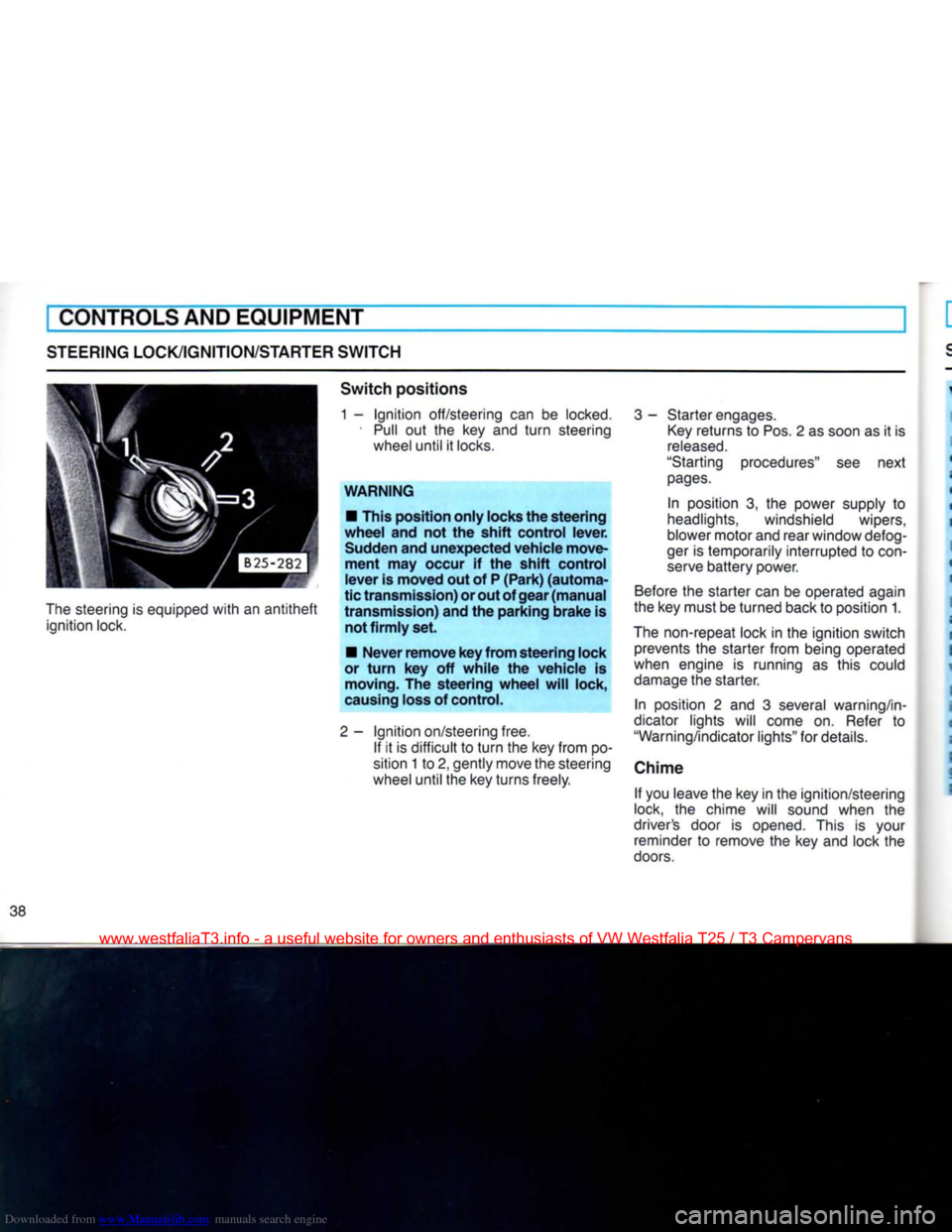
Switch
positions
1 -
Ignition
off/steering can be
locked.
•
Pull
out the key and
turn
steering wheel until it
locks.
WARNING
• This position
only
locks the
steering
wheel
and not the
shift
control
lever.
Sudden and
unexpected
vehicle
move
ment
may occur if the
shift
control
lever
is
moved
out of P
(Park)
(automa
tic
transmission)
or out of
gear
(manual
transmission)
and the
parking
brake
is not
firmly
set.
•
Never
remove
key
from
steering
lock
or
turn
key off
while
the
vehicle
is moving. The
steering
wheel
will
lock,
causing loss of control.
2-
Ignition
on/steering free. If it is difficult to
turn
the key from po
sition 1 to 2, gently move the steering
wheel until the key turns freely.
3
- Starter engages.
Key
returns to Pos. 2 as soon as it is
released.
"Starting procedures" see next
pages.
In position 3, the power supply to
headlights, windshield wipers,
blower motor and rear window defog-
ger
is temporarily interrupted to
con
serve
battery power.
Before
the starter can be operated again
the key must be turned back to position 1.
The
non-repeat lock in the ignition switch prevents the starter from being operated
when engine is running as this could
damage
the starter.
In position 2 and 3 several warning/in
dicator lights will come on.
Refer
to
"Warning/indicator lights" for details.
Chime If you leave the key in the ignition/steering
lock, the chime will sound when the
driver's door is opened. This is your reminder to remove the key and lock the
doors.
www.westfaliaT3.info - a useful website for owners and enthusiasts of VW Westfalia T25 / T3 Campervans
Page 40 of 165
Downloaded from www.Manualslib.com manuals search engine
CONTROLS
AND
EQUIPMENT
STARTING
PROCEDURES
WARNING
•
Fasten safety belts before driving.
•
Never
start or let the engine run in a
confined or enclosed, unventilated
area.
Exhaust fumes from the engine
contain carbon monoxide, which is a
colorless
and odorless gas. Carbon monoxide can be
fatal
if inhaled.
•
Never
leave engine idling unatten
ded.
An unattended vehicle with a run
ning
engine is potentially hazardous.
•
Do not park or operate the vehicle in
areas
where the hot exhaust system may come in contact with dry grass,
brush,
fuel
spill
or other
material,
which can cause a fire.
•
Do not leave engine unattended at
idle.
When starting engine, be ready to
drive off immediately. Maintain moder
ate
speed until the engine is
com
pletely warm. Remember that
your
en
gine performs best at operating
tem
perature.
Automatic
Transmission
Engine will only start with selector lever in
Neutral or Park.
Manual
Transmission
Start with gearshift lever in Neutral, clutch
pedal
depressed, so that the starter only
has
to crank the engine.
Starting
engine
•
Do not depress accelerator pedal
when starting. At extrem low temperatures
the engine will probably start better, if you depress accelerator pedal slighly.
•
As soon as the engine starts, release
the ignition key.
•
If the engine does not start the first time
or
stalls,
turn
the ignition off and restart. Depress the accelerator pedal slowly
during the second starting attempt.
•
Operate the starter for no more than
10
seconds.
•
Allow about 30 seconds between each
starting
attempt.
STOPPING
ENGINE
Do not stop engine immediately after
hard or extended driving. Keep engine
running for about two minutes to pre
vent
excessive heat build-up.
WARNING
•
Before you check anything in the
engine compartment, stop the engine and let it cool down. Hot components
can
burn skin on contact.
•
The radiator fan switches on auto
matically
when the coolant reaches a cer
tain
temperature and will continue to run
(even
with ignition off) until the coolant
temperature drops.
39
www.westfaliaT3.info - a useful website for owners and enthusiasts of VW Westfalia T25 / T3 Campervans
Page 41 of 165
Downloaded from www.Manualslib.com manuals search engine
CONTROLS
AND
EQUIPMENT
INSTRUMENTCLUSTER
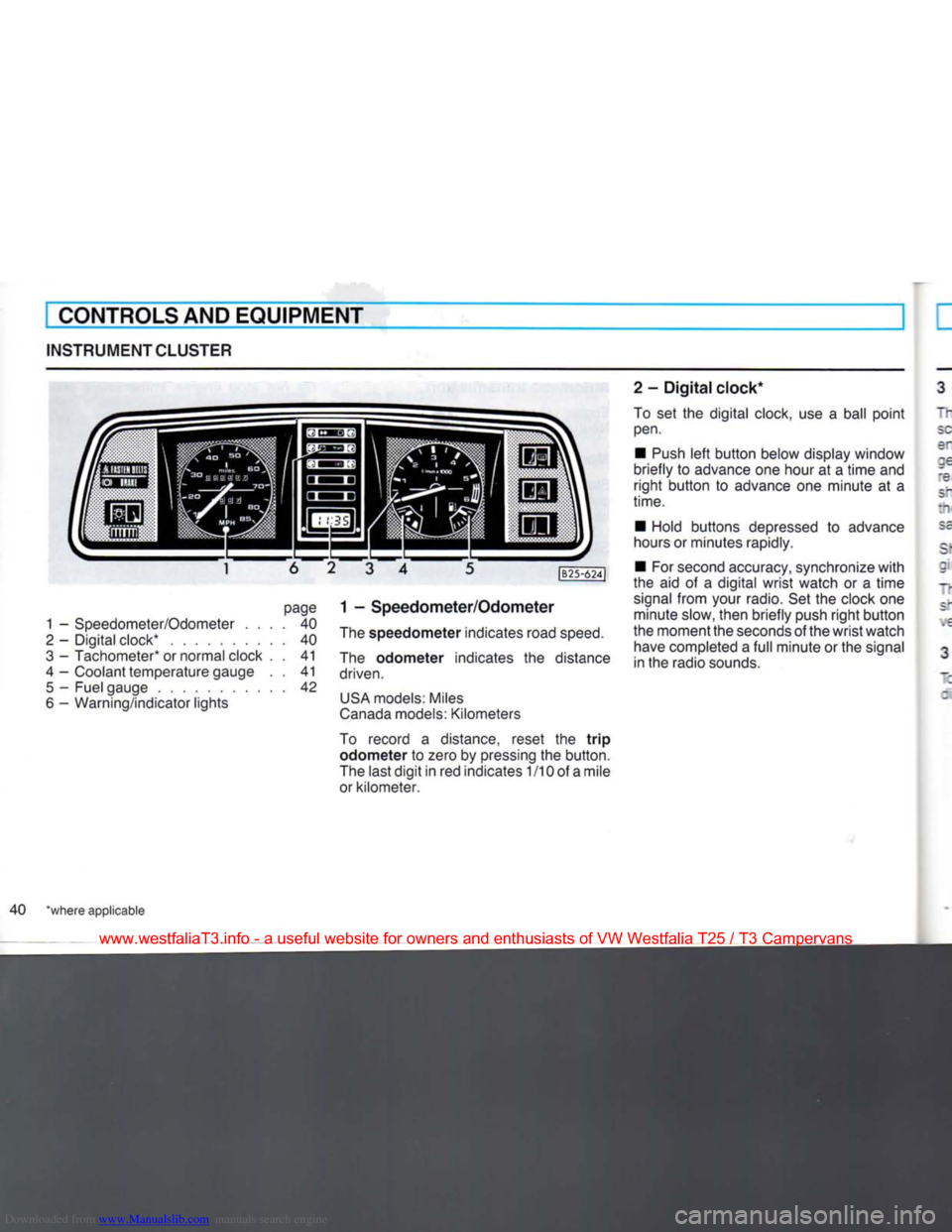
page
1 -
Speedometer/Odometer
.... 40
2
-
Digital clock*
40
3
-
Tachometer* or normal clock
. . 41
4
-
Coolant temperature gauge
. . 41
5
-
Fuel gauge
42
6
-
Warning/indicator lights
|B25-624J
1 -
Speedometer/Odometer
The
speedometer
indicates road
speed.
The
odometer
indicates
the
distance
driven.
USA
models: Miles
Canada
models: Kilometers
To record
a
distance, reset
the
trip
odometer to
zero by pressing the button.
The last
digit
in red indicates
1
/10 of a mile
or kilometer. 2
-
Digital
clock*
To
set the
digital clock, use
a
ball
point
pen.
•
Push
left
button
below display window
briefly
to
advance one hour
at a
time
and
right
button
to
advance
one
minute
at a
time.
•
Hold buttons depressed
to
advance
hours or minutes rapidly.
•
For second accuracy, synchronize
with
the
aid of a
digital
wrist
watch
or a
time
signal
from
your radio. Set the clock one minute slow, then briefly push
right
button
the moment the seconds of the
wrist
watch have completed a
full
minute or the signal
in the radio sounds.
40 *where applicable
www.westfaliaT3.info - a useful website for owners and enthusiasts of VW Westfalia T25 / T3 Campervans
Page 42 of 165
Downloaded from www.Manualslib.com manuals search engine
CONTROLS AND EQUIPMENT
I - Tachometer*
"he red shaded area at the end of the scale indicates the maximum permissible
engine rpm (revolutions per minute) for all gears after the break-in period. Before
'eaching this area, the next higher gear
snould be selected or the foot eased off
the accelerator pedal. Earlier shifting saves fuel and reduces noise.
Sniff to the next lower gear when the en-
; ne rpm drops below 1500 rpm.
~ne green shaded area on the scale snows the speed at which the engine is de-
•
eloping its most favourable torque.
3 - Normal clock*
~J
set the clock, depress the knob in the : al center and
turn.
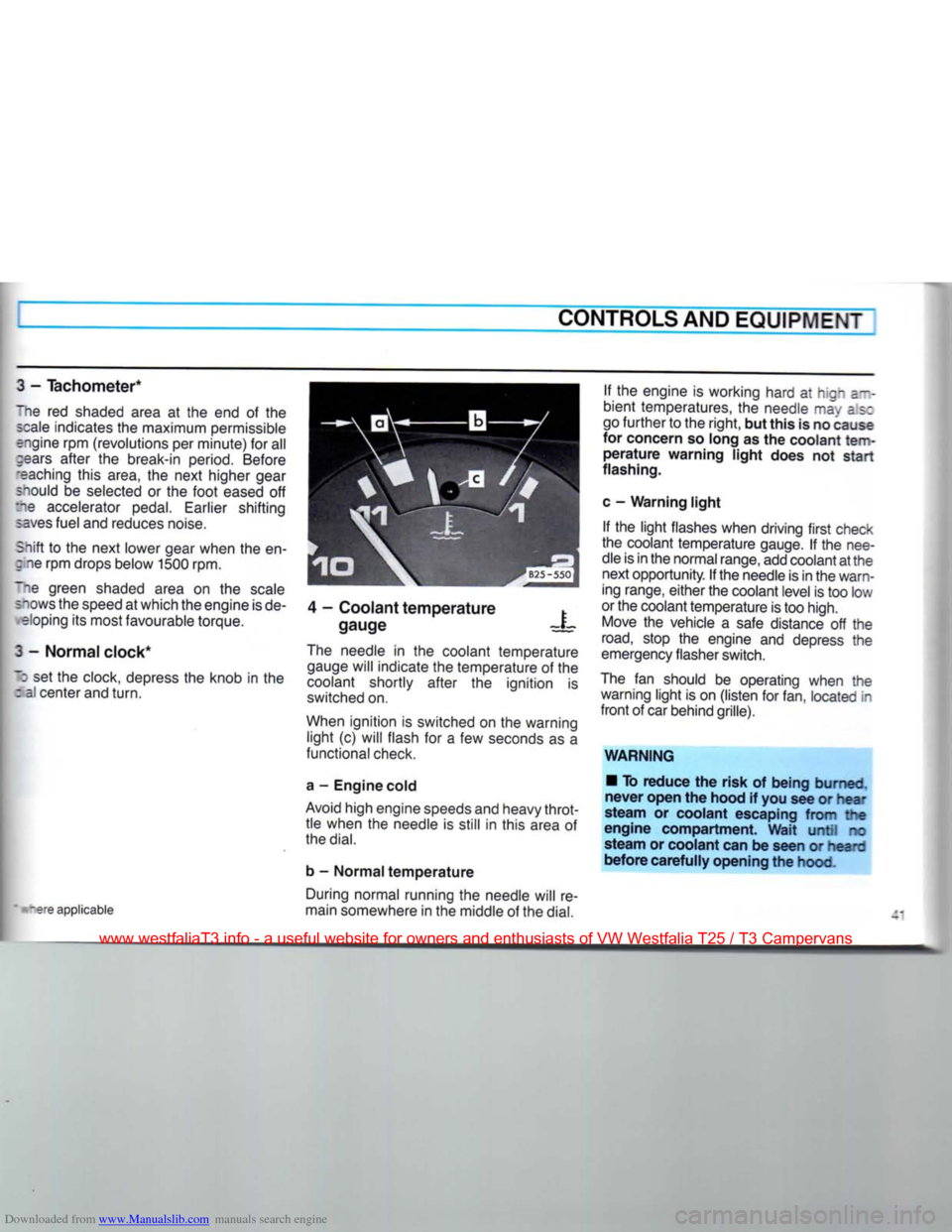
4 - Coolant temperature
gauge X
tare applicable The needle in the coolant temperature
gauge will indicate the temperature of the
coolant shortly after the ignition is
switched on.
When ignition is switched on the warning light (c) will flash for a few seconds as a
functional check.
a - Engine cold
Avoid high engine speeds and heavy throt tle when the needle is still in this area of
the
dial.
b - Normal temperature During normal running the needle will re
main somewhere in the middle of the
dial.
If the engine is working hard at hign a--
bient temperatures, the needle may as:
go further to the right, but this is no cause
for concern so long as the coolant
tem
perature warning light does not start
flashing.
c - Warning light If the light flashes when driving first check
the coolant temperature gauge. If the nee
dle is in the normal range, add coolant at the next opportunity. If the needle is in the warn
ing range, either the coolant level is too low
or the coolant temperature is too high. Move the vehicle a safe distance off the
road,
stop the engine and depress the
emergency flasher switch.
The fan should be operating when the warning light is on (listen for fan, located in
front of car behind grille).
WARNING • To reduce the risk of being burned,
never open the hood if you see or hear
steam or coolant escaping from the
engine compartment. Wait until no
steam or coolant can be seen or heard
before carefully opening the hood.
www.westfaliaT3.info - a useful website for owners and enthusiasts of VW Westfalia T25 / T3 Campervans
Page 43 of 165
Downloaded from www.Manualslib.com manuals search engine
CONTROLS
AND
EQUIPMENT
WARNING continned •
The
engine compartment
of any
motor vehicle
is a
potentially hazard
ous
area.
Before you check anything in the engine compartment, stop
the
engine and
let it
cool down. Always
exercise extreme caution when work
ing
one the
engine. Heed
all of the
WARNINGS on page
97.
Reduce the risk
of
scalding from
hot
coolant by following these steps.
• If the coolant reservoir cap must be
removed, wait until
the
engine
has
cooled down.
• Protect face, hands
and
arms
by
covering
the cap
with
a
large, thick
rag
to
protect against escaping fluid
and
steam.
• Carefully and slowly
turn
cap
one
turn
to
allow excess pressure
to es
cape before completely removing
cap.
•
To
help avoid being burned,
do not
spill
antifreeze
or
coolant
on the ex
haust system
or hot
engine parts.
Under
some conditions, the ethylene
glycol
in
engine coolant
is
combusti
ble.
If a
visual check shows that coolant level
and V-belt
are
normal,
but the
warning light continues to
flash,
contact
your
near
est dealer
to
have
the
cause located
and
corrected.
For more details see "Cooling system"
on
page 104.
If the
coolant gauge needle nears
the
upper end
of
the scale and the engine ap
pears
to be
overheating,
turn
off the air
conditioner.
Do
not
install accessories
(fog
lights
or
in
sect screens,
for
example)
on top of the
front
bumper.
They
may
restrict engine
cooling.
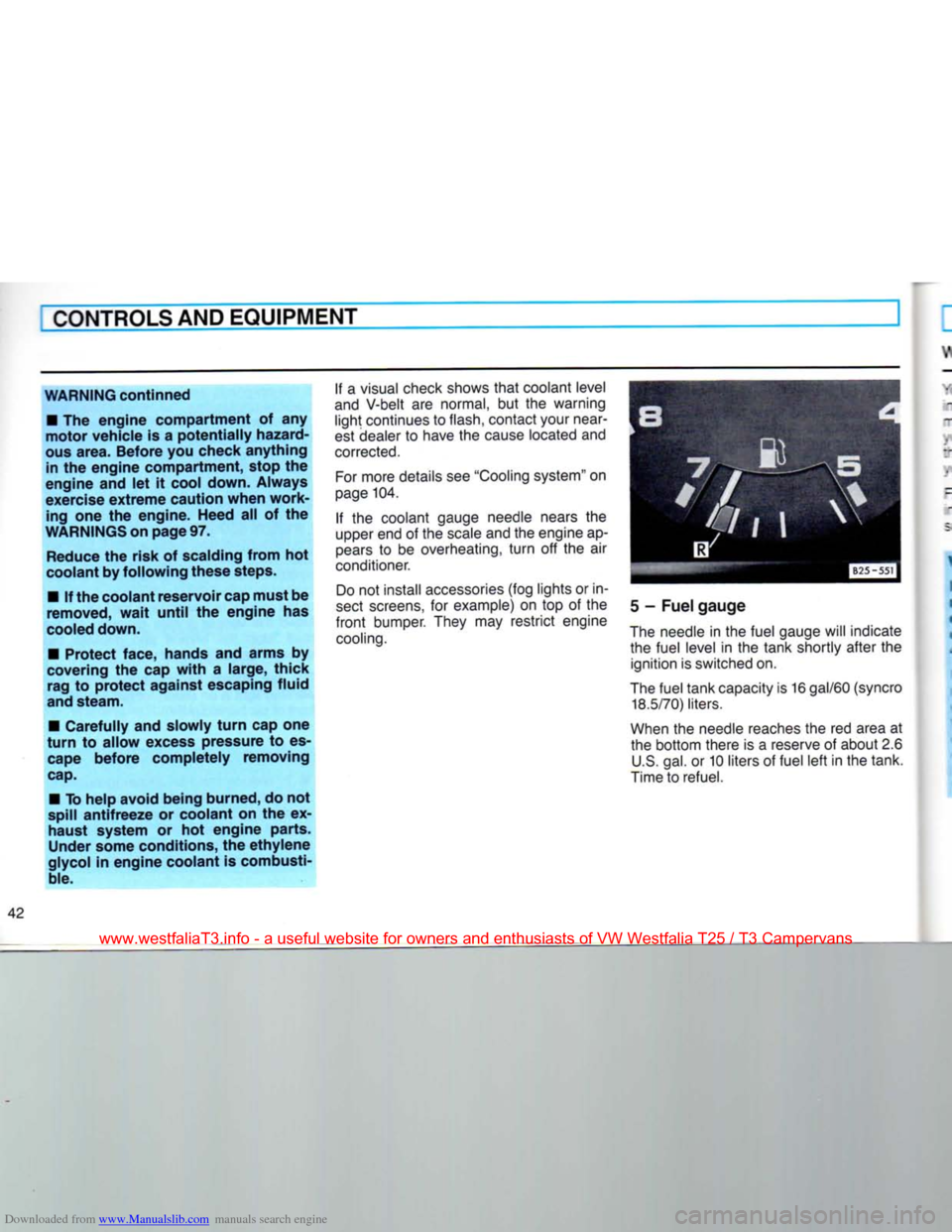
5
-
Fuel gauge
The needle
in
the fuel gauge will indicate the fuel level
in the
tank shortly after
the
ignition is switched on.
The fuel tank capacity is
16
gal/60
(syncro
18.5/70)
liters.
When
the
needle reaches the
red
area
at
the bottom there
is a
reserve
of
about 2.6 U.S. gal.
or
10 liters
of
fuel left in the tank.
Time to refuel.
www.westfaliaT3.info - a useful website for owners and enthusiasts of VW Westfalia T25 / T3 Campervans
Page 44 of 165
Downloaded from www.Manualslib.com manuals search engine
CONTROLS
AND
EQUIPMENT
WARNING
/ INDICATOR
LIGHTS
1 2 3 4 5 6 7 8
your vehicle is equipped
with
several
•nportant indicator and warning devices to
~ionitor the continued reliable operation of .our vehicle. Familiarize yourself
with
:hese
devices so if one should come on .ou know what to do.
-allure to heed applicable warnings and "nportant vehicle information may result in
serious
personal injury or vehicle damage.
WARNING
•
Whenever
stalled
or stopped for
epair,
move
the
vehicle
a
safe
distance
off the road, stop the
engine
and
turn
on the
emergency
flasher
(see
page
46).
• The
engine
compartment
of any
-lotor
vehicle
is a
potentially
hazard
ous
area.
Before
you check
anything
in
?ie
engine
compartment,
stop the
engine
and let it cool down.
Always
exercise
extreme
caution
when
work
ing
under
the
engine
hood.
Heed
all of
re
WARNINGS
on
page
97.
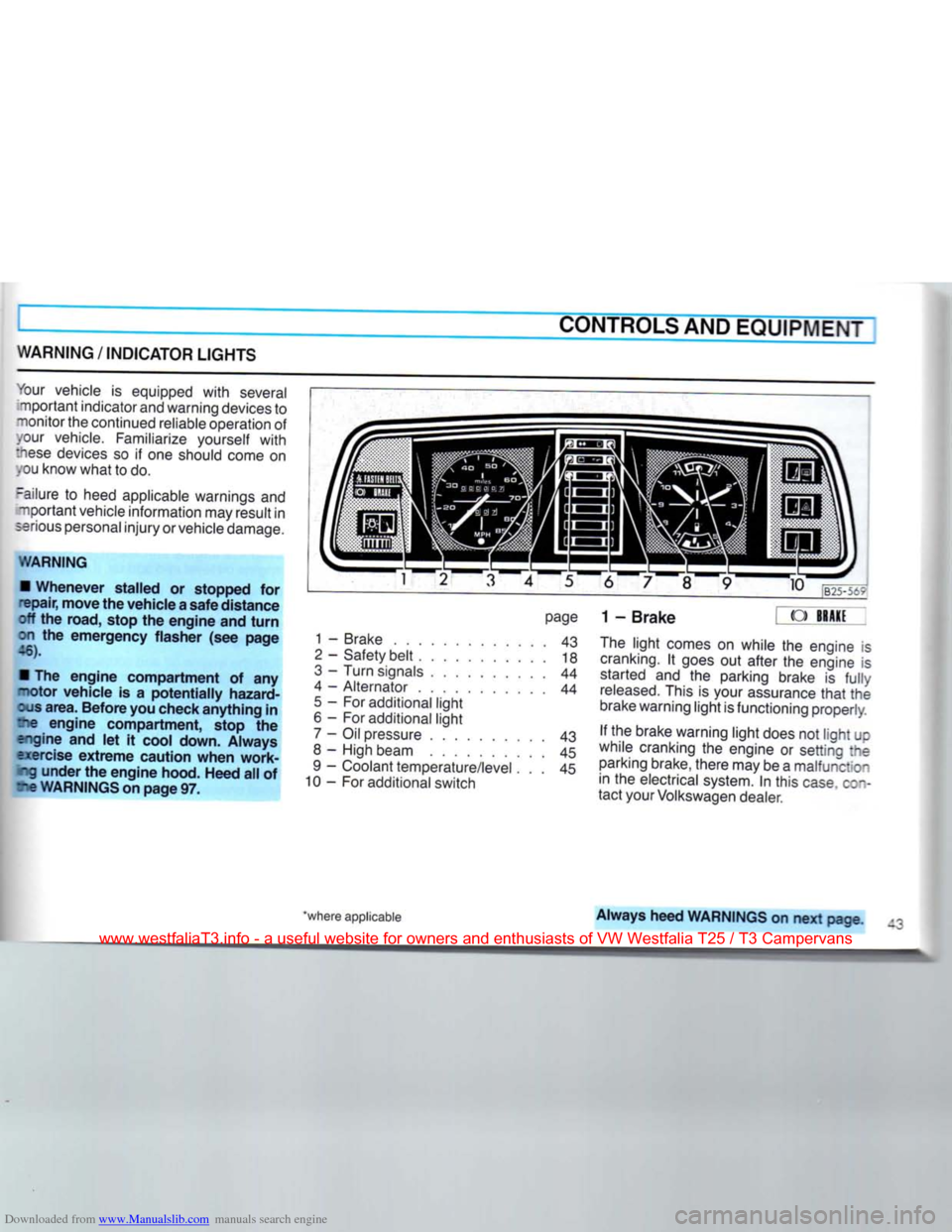
page
1 - Brake 43
2
- Safety belt 18
3
- Turn signals 44
4 - Alternator 44
5
- For additional light
6 - For additional light 7 - Oil pressure 43
8 - High beam 45
9 - Coolant temperature/level . . . 45
10 - For additional switch 9 10
B25-5t?
1-Brake
« ->
The
light comes on while the engine is
cranking.
It goes out after the engine is started and the parking brake is
fully
released.
This is your assurance
that
the
brake warning light is functioning properly.
If the brake warning light does not light JC
while cranking the engine or setting :ne parking brake, there may be a malfunction in the electrical system. In this
case
c;~-
tact your Volkswagen dealer.
'where applicable
Always
heed
WARNINGS
on next page
www.westfaliaT3.info - a useful website for owners and enthusiasts of VW Westfalia T25 / T3 Campervans
Page 45 of 165
Downloaded from www.Manualslib.com manuals search engine
I CONTROLSAND EQUIPMENT
WARNING If the brake warning
light
does not go
out
with
the engine running and the parking brake released or lights up
while driving, the fluid level
in
the brake
fluid reservoir may
be
too low.
This might be
due
to
a
leak in one of the two independently functioning brake circuits.
If the brake pedal travel has increased,
one of the brake circuits may have
failed.
Avoid driving the vehicle and have it towed to the nearest Volkswa
gen dealer or qualified workshop for re pair.
If brake pedal travel has not increased
and
braking performance remains un
impaired,
proceed carefully to
your
nearest Volkswagen dealer or qualified
workshop to have the braking system inspected and corrected.
For detailed information see
"Brakes" on
page 29. 2-
Safety belt
|
A
FASTEN
BELTS
Refer
to
"Safety belts"
on
page
14 for
details.
3
-
Turn
signals E^
Refer
to
"Turn
signal/headlight dimmer
switch lever" on page 49 for details.
4
- Alternator
This
light comes
on
when
the
ignition
is
turned on and goes out after the engine
is
started.
If the
light does
not go out
after
starting
and
revving-up
the
engine
momentarily
or
lights
up
while driving,
there may be a malfunction
in
the electrical system
or
the V-belt
to
the alternator may be loose
or
broken.
In
this
case,
turn
the engine off and
contact
your
Volkswagen dealer.
5
- For additional
light
6
- For additional
light
7
- Engine Oil pressure
When
the
ignition
is
turned
on, the oil
pressure warning light comes on for a bulb
check.
It
should
go out
after
the
engine
has
started.
If the
warning light does
not go out or
flashes
while driving
(above
2000
engine rpm a buzzer
will
sound simultaneously),
it
indicates,
that the oil pressure is too low.
Stop the engine immediately, check the
engine
oil
level
and add
oil, if necessary.
If engine oil level is normal, but the
light
continues to flash, do not continue to
operate the vehicle. This could damage
the engine.
Turn
the engine off and contact the nearest Volkswagen dealer for assistance.
The oil pressure warning
light
is not an indicator for low engine oil level. To
check
the oil level, always use dipstick
(see page 99).
Make
it a habit to have the engine oil
level checked
with
every
fuel filling.
www.westfaliaT3.info - a useful website for owners and enthusiasts of VW Westfalia T25 / T3 Campervans