1990 VOLKSWAGEN TRANSPORTER warning
[x] Cancel search: warningPage 47 of 165
Downloaded from www.Manualslib.com manuals search engine
CONTROLS AND EQUIPMENT
SWITCHES
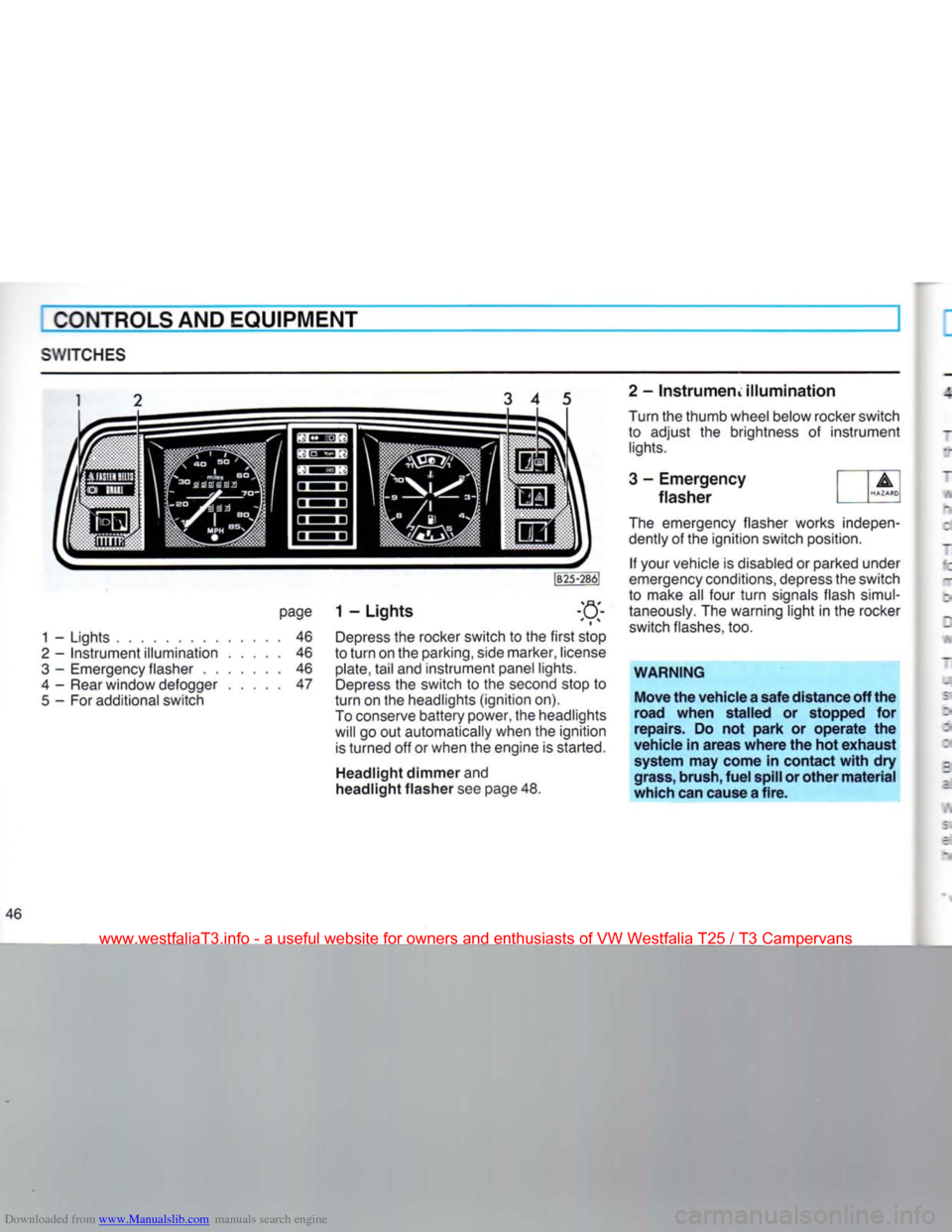
3 4 5
page
1 - Lights
1
-
Lights
46
2
-
Instrument illumination
46
3
-
Emergency flasher
46
4
-
Rear window defogger
47
5
- For
additional switch Depress
the
rocker switch
to the
first stop
to turn
on the
parking, side marker, license
plate,
tail
and
instrument panel lights. Depress
the
switch
to the
second stop
to
turn
on the
headlights (ignition
on).
To conserve battery power,
the
headlights will
go out
automatically when
the
ignition is turned
off or
when
the
engine
is
started.
Headlight dimmer and
headlight flasher see
page
48. 2 - InstrumeriL illumination
Turn
the
thumb wheel below rocker switch
to adjust
the
brightness
of
instrument
lights.
3 - Emergency
flasher
The emergency flasher works indepen dently
of the
ignition switch position.
If your vehicle
is
disabled
or
parked under
emergency conditions, depress the switch
to make
all
four turn signals flash simul
taneously.
The
warning light
in the
rocker
switch flashes,
too.
WARNING
Move the vehicle a safe distance off the
road when stalled or stopped for
repairs. Do not park or operate the
vehicle in areas where the hot exhaust system may come in contact with dry
grass, brush, fuel spill or other material
which can cause a fire.
46
www.westfaliaT3.info - a useful website for owners and enthusiasts of VW Westfalia T25 / T3 Campervans
Page 50 of 165
Downloaded from www.Manualslib.com manuals search engine
I
CONTROLS AND
EQUIPMENT
CRUISE
CONTROL*
JB33-509
The cruise control allows you
to
maintain a constant cruising speed above
22 mph
35
km/h),
without
actuating
the ac
celerator pedal.
Any
manual operation, such
as
acceler ating, gearshifting
or
braking can be done independently
of
the cruise control.
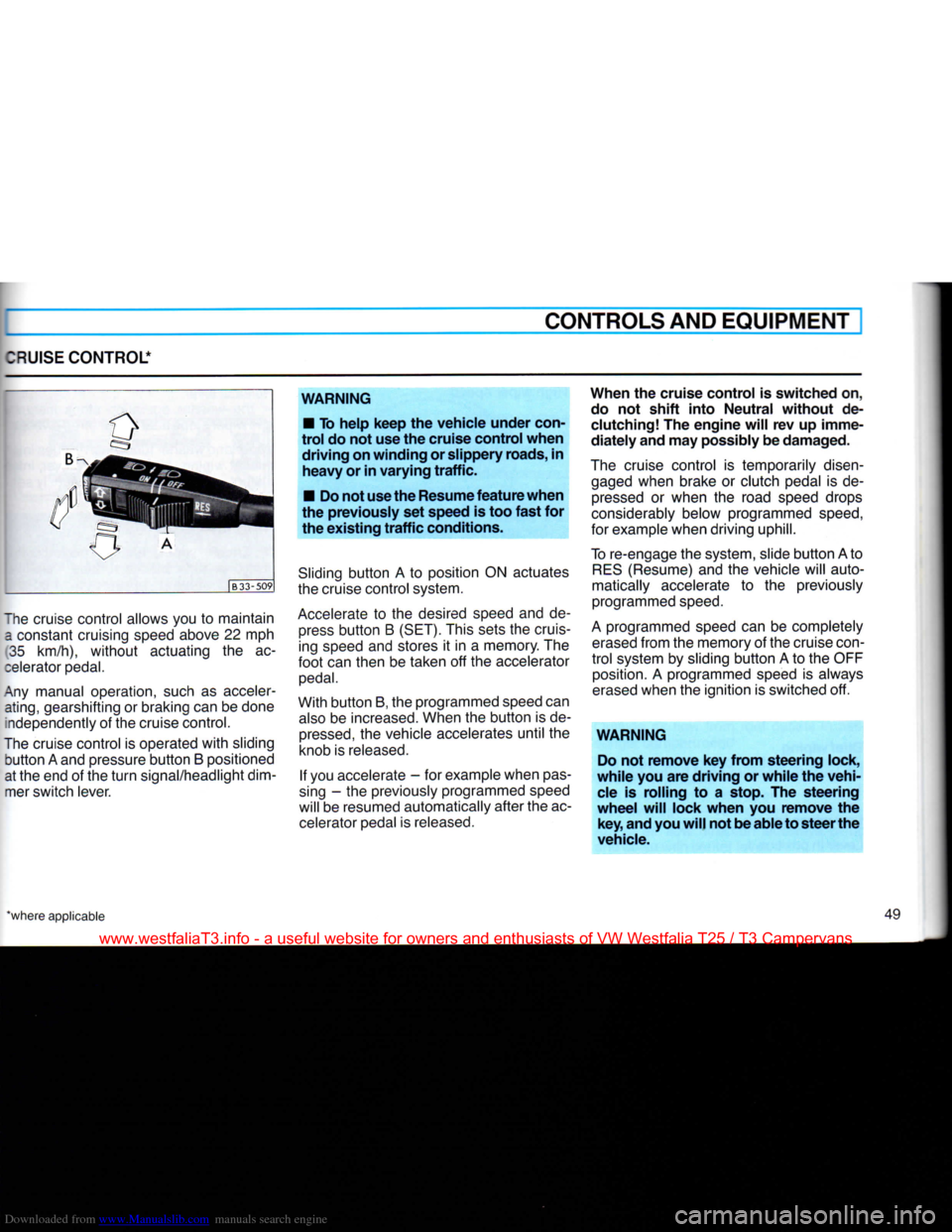
The cruise control
is
operated
with
sliding
button
A
and pressure
button
B
positioned
at the end
of
the
turn
signal/headlight dim mer switch lever.
WARNING
•
To help keep the vehicle under
con
trol do not use the cruise control when driving on winding or slippery
roads,
in heavy or in varying traffic.
•
Do not
use
the
Resume
feature when
the previously set speed is too fast for the existing traffic
conditions.
Sliding
button
A to
position
ON
actuates
the cruise control system.
Accelerate
to the
desired speed
and de
press
button
B
(SET).
This sets
the
cruising speed and stores
it in a
memory. The
foot
can then
be
taken
off the
accelerator
pedal.
With
button
B, the programmed speed can
also
be
increased. When
the
button
is
de
pressed,
the
vehicle accelerates
until
the
knob
is
released.
If
you accelerate
- for
example when
pas
sing
- the
previously programmed speed
will
be
resumed automatically after the ac celerator pedal
is
released.
When the cruise control is switched on,
do
not shift into Neutral without de
clutching!
The engine
will
rev up imme
diately and may
possibly
be damaged.
The cruise control
is
temporarily disen gaged when brake
or
clutch pedal
is de
pressed
or
when
the
road speed drops
considerably below programmed
speed,
for example when driving uphill.
To
re-engage the system, slide
button
A to
RES
(Resume) and
the
vehicle will auto
matically accelerate
to the
previously
programmed
speed.
A
programmed speed can
be
completely
erased
from the memory
of
the cruise
con
trol
system
by
sliding
button
A to the
OFF position.
A
programmed speed
is
always
erased
when the ignition
is
switched
off.
WARNING
Do
not remove key from steering lock,
while you are driving or while the vehi
cle
is rolling to a stop. The steering
wheel
will
lock when you remove the key, and
you
will
not be able to steer the
vehicle.
'where applicable 49
www.westfaliaT3.info - a useful website for owners and enthusiasts of VW Westfalia T25 / T3 Campervans
Page 51 of 165
Downloaded from www.Manualslib.com manuals search engine
CONTROLS AND EQUIPMENT
WIPER
AND WASHER SYSTEM
The
wiper and washer systems only work when the ignition is on.
Always
loosen blades
frozen
to glass be
fore
operating
wipers
to
prevent
damage
to the
wiping
system.
Windshield
Brief
wiping
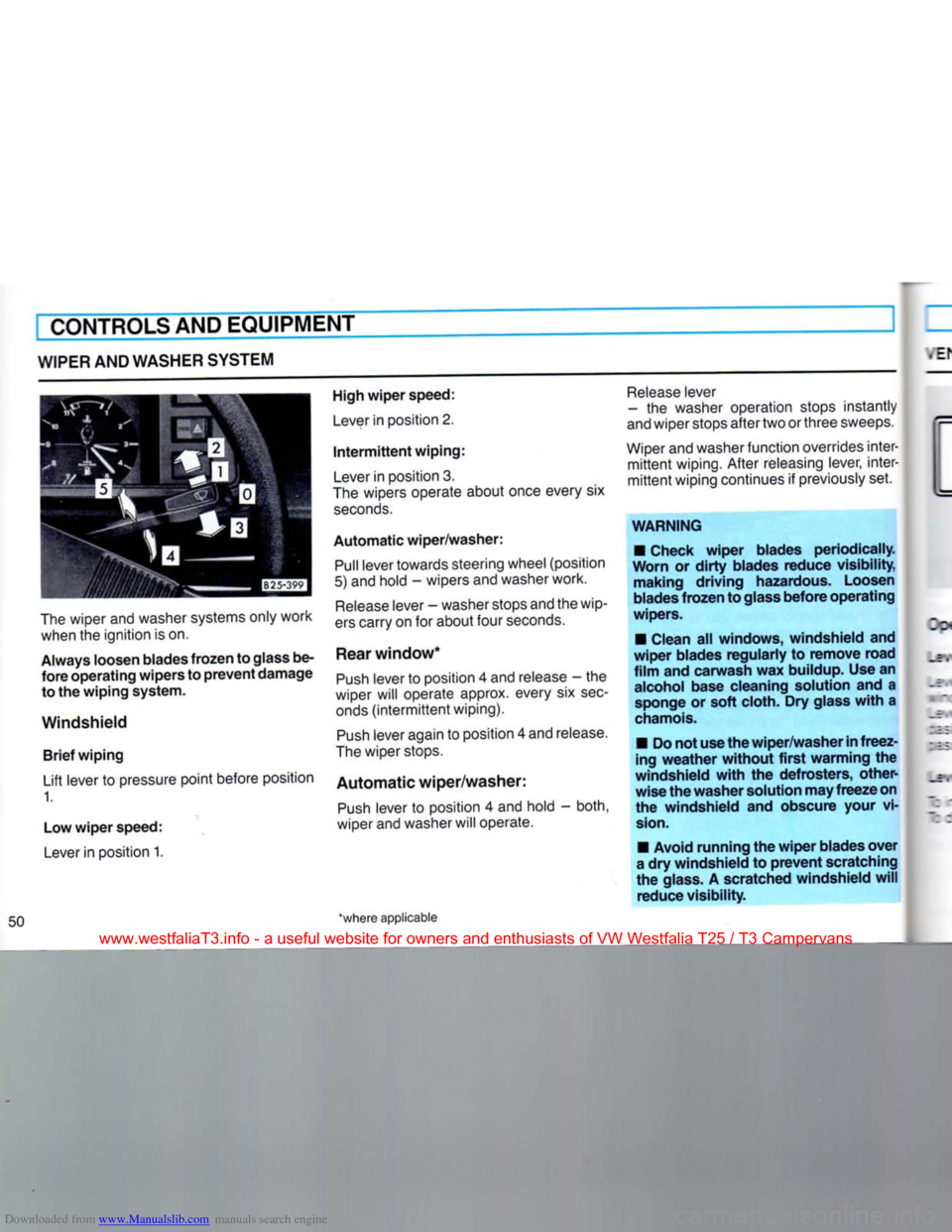
Lift lever to pressure point before position 1.
Low
wiper
speed:
Lever
in position 1.
High
wiper
speed:
Lever
in position 2.
Intermittent
wiping:
Lever
in position 3.
The
wipers operate about once every six
seconds.
Automatic
wiper/washer:
Pull
lever towards steering wheel (position
5) and hold - wipers and washer work.
Release
lever - washer stops and the wip
ers
carry on for about four
seconds.
Rear
window*
Push
lever to position 4 and release - the
wiper will operate approx. every six
sec
onds
(intermittent
wiping).
Push
lever again to position 4 and release.
The
wiper stops.
Automatic
wiper/washer:
Push
lever to position 4 and hold - both,
wiper and washer will operate.
*where applicable
Release
lever
- the washer operation stops instantly
and
wiper stops after two or three sweeps.
Wiper
and washer function overrides inter
mittent
wiping. After releasing lever, inter
mittent
wiping continues if previously set.
WARNING
• Check
wiper
blades
periodically.
Worn
or
dirty
blades
reduce
visibility,
making
driving
hazardous. Loosen
blades
frozen
to glass
before
operating
wipers.
• Clean all
windows,
windshield
and
wiper
blades
regularly
to
remove
road
film
and
carwash
wax buildup. Use an alcohol base cleaning solution and a sponge or
soft
cloth. Dry glass
with
a
chamois.
• Do not use the
wiper/washer
in
freez
ing
weather
without
first
warming
the
windshield
with
the
defrosters,
other
wise
the
washer
solution may
freeze
on
the
windshield
and obscure your vi
sion.
• Avoid
running
the
wiper
blades
over
a dry
windshield
to
prevent
scratching
the glass. A scratched
windshield
will
reduce
visibility.
www.westfaliaT3.info - a useful website for owners and enthusiasts of VW Westfalia T25 / T3 Campervans
Page 52 of 165
Downloaded from www.Manualslib.com manuals search engine
EMULATION/HEATING
CONTROLS
AND EQUIPMENT
I
perating
Controls
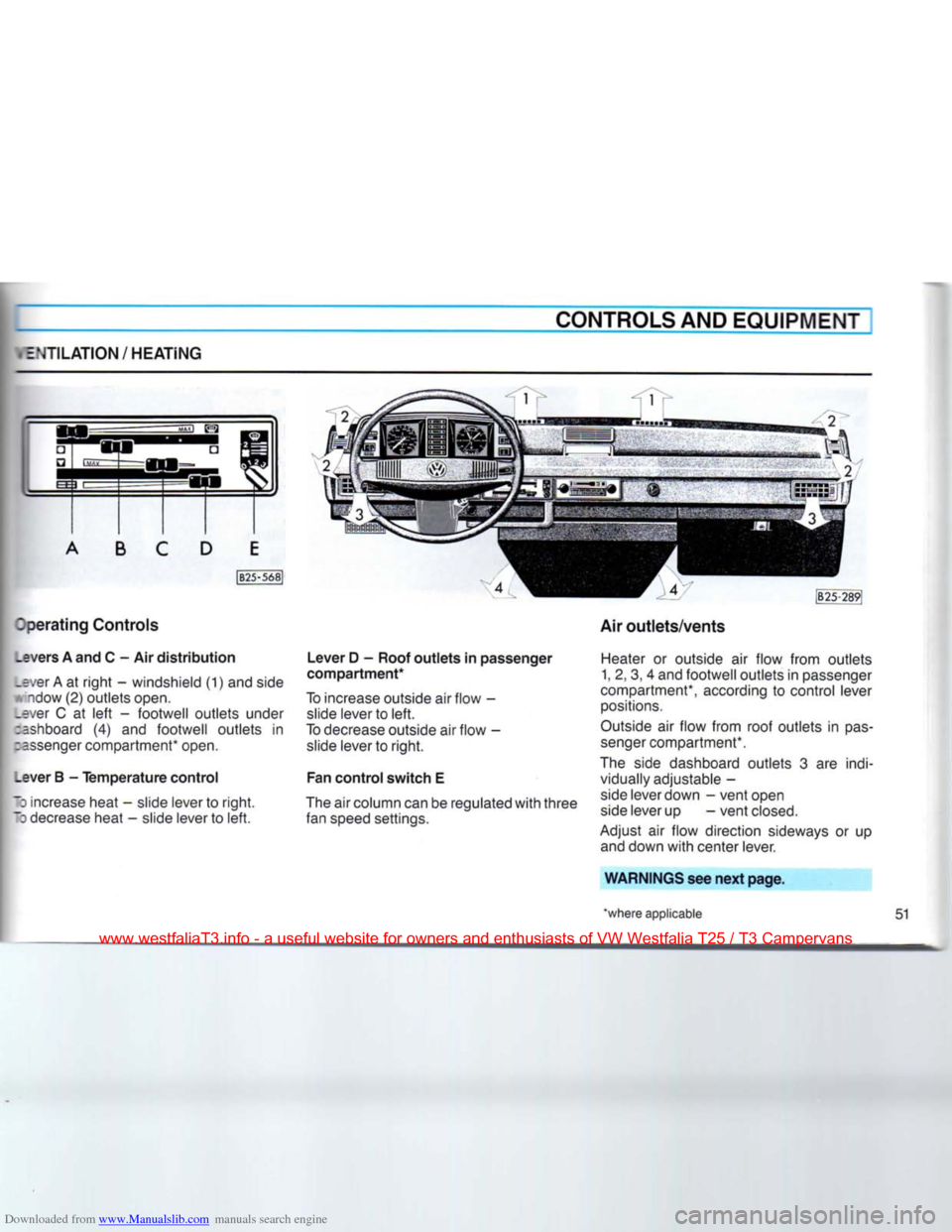
_evers
A and C - Air
distribution
.ever A at
right
- windshield (1) and side
A'ndow
(2)
outlets
open,
•ver C at
left
-
footwell
outlets
under
:ashboard (4) and
footwell
outlets
in
:=ssenger compartment* open.
_ever
B -
Temperature
control
•
increase heat - slide lever to
right.
~3
decrease heat - slide lever to
left.
Lever
D -
Roof
outlets
in
passenger
compartment*
To increase outside air
flow
- slide lever to
left.
To decrease outside air
flow
- slide lever to
right.
Fan
control
switch
E
The air column can be regulated
with
three
fan speed settings. Air
outlets/vents
Heater or outside air
flow
from
outlets
1, 2, 3, 4 and
footwell
outlets
in passenger
compartment*, according to control lever positions.
Outside air
flow
from
roof
outlets
in
pas
senger compartment*.
The side dashboard
outlets
3 are indi vidually adjustable -
side lever down -
vent
open side lever up
-vent
closed.
Adjust air
flow
direction sideways or up and down
with
center lever.
WARNINGS
see
next
page.
'where
applicable
51
www.westfaliaT3.info - a useful website for owners and enthusiasts of VW Westfalia T25 / T3 Campervans
Page 53 of 165
Downloaded from www.Manualslib.com manuals search engine
CONTROLS
AND EQUIPMENT
WARNING
• Good
visibility
comes
with
windows
free
of
fog,
condensation and
frost.
• For clear
visibility
and safe
driving
it
is
extremely
important
that
you
thor
oughly
familiarize
yourself
with
and fol low the
operating
instructions
pertain
ing to the proper use and
function
of
the
ventilation/heating
and defogging/
defrosting
system in
this
manual. If in
doubt,
consult your Volkswagen
dealer.
•
Maximum
heating
output
and
fast
defrosting
can be
obtained
only
after
the
engine
has reached
operating
tem
perature.
Defogging and
defrosting
wind
shield and side
windows
• Slide all control levers to the extreme
right and
turn
fan control switch E to speed
setting 2.
• The fan control switch for the
secon
dary heat exchanger should be
OFF.
Warming
up vehicle
interior
quickly • Slide levers
A,
B and D to extreme right.
• Slide lever C to extreme left.
• Open air outlets 3.
• Turn fan control switch E to speed
setting 2.
Warming
up vehicle
interior
normally
Once
the windshield and side windows
are
clear and the vehicle interior is warm,
you may want to set the controls as fol
lows:
• Slide lever A to the left.
• Slide lever B to desired temperature
setting.
• Slide lever C toward center.
• Turn fan control switch E to speed
setting 1.
Outside air
ventilation
With lever B at extreme left, outside air is emitted from all open outlets.
Hints
• All operating controls, except fan
con
trol
switch E and fan control switch for the
secondary
heat exchanger can be ad
justed to any intermediate position.
• Stale air is drawn out of the vehicle
interior through vents on the inside
front
door
panels. The vents can be opened or
closed
by sliding the lever forward or
rearward.
52
www.westfaliaT3.info - a useful website for owners and enthusiasts of VW Westfalia T25 / T3 Campervans
Page 55 of 165
Downloaded from www.Manualslib.com manuals search engine
CONTROLS
AND EQUIPMENT
AIR
CONDITIONER*
WARNING
• Good
visibility
comes
with
windows
free
of fog, condensation and
frost.
• For clear
visibility
and safe
driving
it
is
extremely
important
that
you
thor
oughly
familiarize
yourself
with
and fol low the
operating
instructions
pertain
ing to the proper use and
function
of
the
ventilation/heating,
defogging/de-
frosting
and air conditioning system in
this
manual. If in
doubt,
consult your
Volkswagen
dealer.
The
air conditioning unit is installed under
the roof of the driver's cab. Ten air outlets permit interior cooling throughout the
vehicle.
Two
climate control switches are located
on the instrument panel.
The
unit operates on the air recirculation
principle.
Air is sucked in through the two
large
air intake grilles at the rear portion of
the unit.
Because
the air conditioner is not normally used at low ambient temperatures it
is
designed to operate only when outside
temperature is above 41° F or + 5° C.
When
the air conditioner is on, tempera
ture as well as humidity inside the vehicle
is
controlled. During high outside humidi
ty you can prevent windshield and win
dows
from fogging by setting the controls
accordingly.
Maximum
cooling is maintained with
standard
heating/ventilation controls
turned off and the windows
closed.
However,
when the vehicle interior is very
hot from standing in the sun, open a win
dow for a few minutes to permit hot air to
escape.
• iHBll
1
m
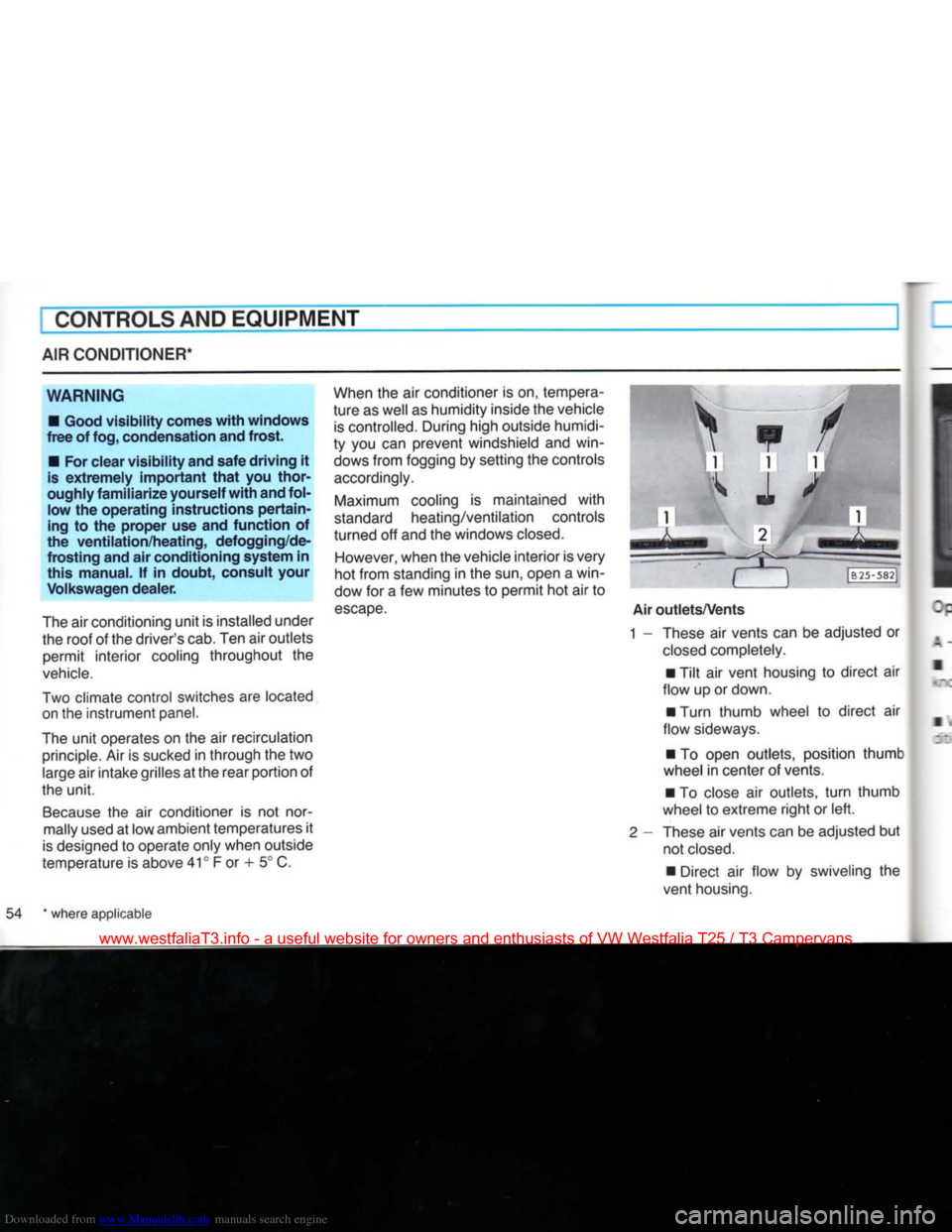
Air
outlets/Vents
1 - These air vents can be adjusted or
closed
completely.
• Tilt air vent housing to direct air
flow up or down.
• Turn thumb wheel to direct air
flow sideways.
• To open outlets, position thumb
wheel
in center of vents.
• To close air outlets,
turn
thumb
wheel
to extreme right or left.
2
- These air vents can be adjusted but not
closed.
• Direct air flow by swiveling the
vent housing.
54 * where applicable
www.westfaliaT3.info - a useful website for owners and enthusiasts of VW Westfalia T25 / T3 Campervans
Page 59 of 165
Downloaded from www.Manualslib.com manuals search engine
CONTROLS AND EQUIPMENT
Engine
running
Heater
on -
Turn knob clockwise to position 2. Switch knob control light will come on. Adjust
temperature by turning knob between positions 2 and 3.
Heater
off -
Turn switch knob counter-clockwise to position 0. Switch knob control light will go
out.
Notes
• Every time the heater is switched off,
the warm air and combustion air blowers continue running briefly to cool the heater
down quicker.
• To avoid draining the battery, do not
run the heater repeatedly when the engine
is
not running.
• When the heater is running on the
clockwork time switch, it must be switched
off by hand before attempting to start the
engine at low temperatures so
that
the
full
battery capacity is available to
turn
the
engine.
WARNING
Never
start
the
heater
or let the
engine
or the
heater
run in an enclosed, un-
ventilated
area.
Exhaust
fumes
from
the
engine
or the
heater
contain
carbon monoxide,
which
is colorless and
odorless. Carbon monoxide,
however
is a
very
harmful
gas, and may be
fatal
if inhaled.
Due to the
risk
of
fire
the
heater
must
not be used
when
vehicle
is
parked
on
dry grass, brush or leaves.
Maintenance
During the winter and when driving over
very poor roads, mud or snow may tend to
accumulate
in the exhaust and combus
tion air intake pipes. Have these pipes
checked
for blockage from time to time so
that
the heater can continue to work.
58
www.westfaliaT3.info - a useful website for owners and enthusiasts of VW Westfalia T25 / T3 Campervans
Page 61 of 165
Downloaded from www.Manualslib.com manuals search engine
I
CONTROLS AND EQUIPMENT
AUXILIARY HEATER* (Syncro models only)
The auxiliary heater* heats the coolant in the heating circuit and supplies the heat exchanger in the normal heating system
and the additional heat exchanger* for the
passenger compartment heating with heated coolant.
The system is switched off and on or the
switch-
on time preselected by means of a
switch and indicator unit located on the left under the instrument panel.
Air distribution and regulation is done with the controls of the normal heating and
ven
tilation system (see "Ventilation/Heating"
on page 51).
The auxiliary heater can be used with vehicle stationary or when it is moving.
When vehicle is stationary, the heater only runs for a maximum of 30 minutes in order
to avoid draining the battery. It also switches off automatically when a coolant
temperature of 80° C (175° F) is reached.
When the coolant temperature drops below 70° C (158° F) the heater is automatically switched on again. The heater runs on fuel from the vehicle
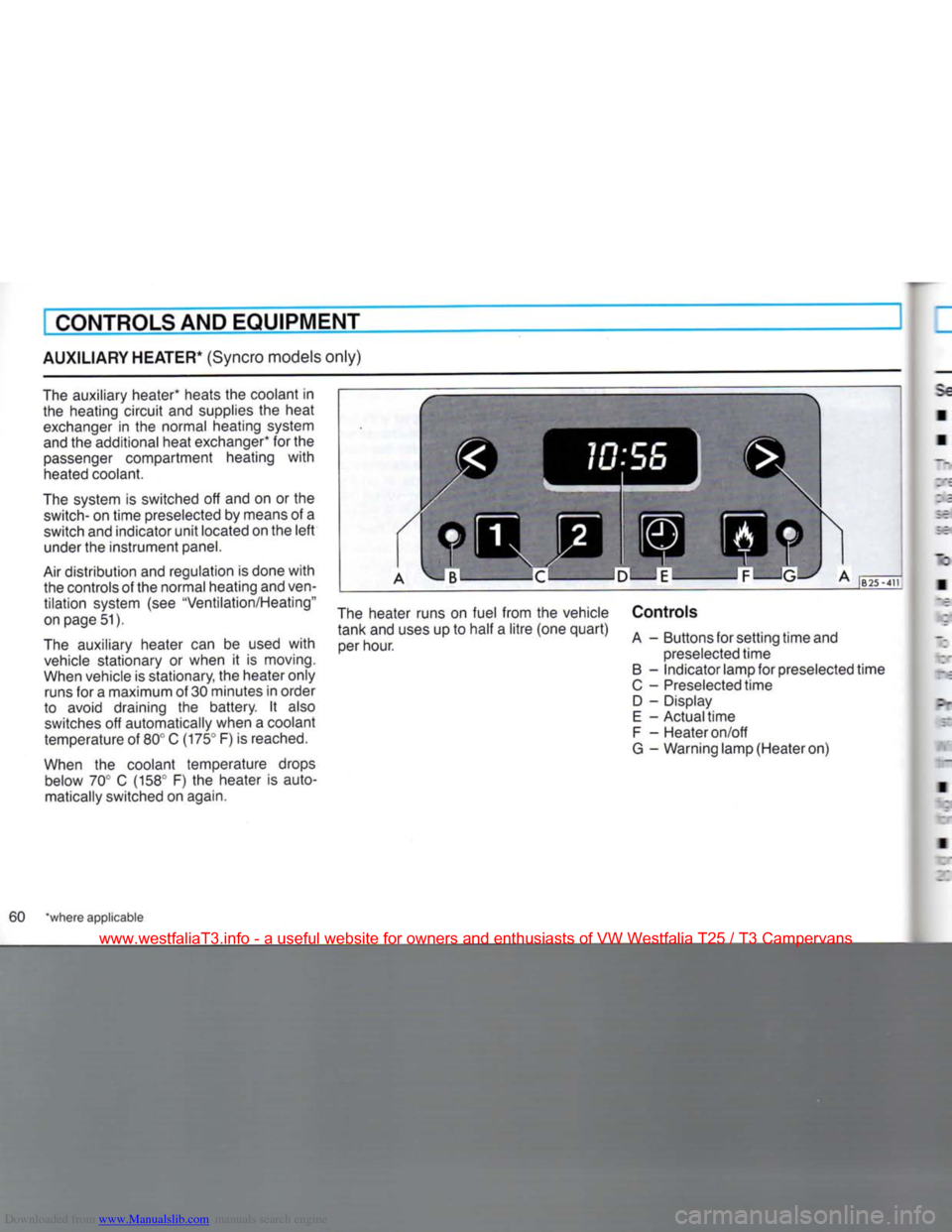
tank and uses up to half a litre (one quart) per hour. Controls
A - Buttons for setting time and
preselected time
B - Indicator lamp for preselected time
C - Preselected time D - Display
E - Actual time
F - Heater on/off
G - Warning lamp (Heater on)
60 "where applicable
www.westfaliaT3.info - a useful website for owners and enthusiasts of VW Westfalia T25 / T3 Campervans