Page 929 of 2389

4. INSPECT SENSOR SIGNAL LEVEL
Drive the vehicle straight ahead at about 4 ±6 km/h (2.5
± 3.7 mph), and check that the warning light turns on after
a 1 second pause.
If the warning light turns on without blinking when the ve-
hicle speed is not within the specified speed range above,
stop the vehicle and read the diagnostic code, and repair
the malfunctioning parts.
(See step S on page BR±79)
HINT: If the warning light turns on while the vehicle speed
is within specified speed range above, the check is com-
pleted. And when the vehicle speed exceeds 6 km/h
(3.7mph), the warning light will blink again. In this condi-
tion, speed sensors are OK.
NOTICE: While the warning light is off, do not give any
shocks to vehicle such as acceleration, deceleration, brak-
ing, shift change, steering or shocks from the road condi-
tion.
(4WD)
(a) Remove the rubber cap from the Ts connector lo-
cated in front of the actuator.
(b) Connect the terminals of Ts connector.
(c) Pull the parking brake lever up, and start the engine.
NOTICE: Do not depress the brake pedal.
(d) Check that the warning light blinks about 4 times ev-
ery 1 second as shown.
± BRAKE SYSTEMAnti±lock Brake System (A.B.S.)BR±78
Page 933 of 2389

Deceleration Sensor Operation
Diagnosis System (For 4WD)
PRECAUTION
While checking the deceleration sensor diagnosis
system, A.B.S. does not work and brake system works as
normal brake system.
INSPECTION OF DIAGNOSIS SYSTEM
1. INSPECT BATTERY VOLTAGE
Inspect that the battery voltage is about 12 V.
2. CHECK THAT WARNING LIGHT TURNS ON
(a) Turn the ignition switch on.
(b) Check that the ºANTILOCKº warning light turns on for
3 seconds.
If not, inspect and repair or replace the fuse, bulb and wire
harness.
(e) Check that the ºANTILOCKº warning light turns off.
(d) Turn the ignition switch off.
3. PERFORM FOLLOWING STEPS
(a) Remove the rubber cap from the Ts connector lo-
cated in front of the actuator.
(b) Connect the terminals of Ts connector.
(c) Pull the parking brake lever up and depress the brake
pedal, and start the engine.
4. INSPECT SENSOR DETECTION POINT
(a) Jack up the rear side of the vehicle slowly as shown.
HINT: When measuring the height, measure at the center
of the rear bumper lower edge.
(b) Check that the warning light does not turn on.
(c) Jack down the vehicle and check that the warning
light blinking. (d) Check that the warning light blinks about 1 time every
1 second as shown.
If the warning light does not blink, inspect the parking brake
switch, stop light switch, Ts connector, deceleration sensor
installation and computer.
± BRAKE SYSTEMAnti±lock Brake System (A.B.S.)BR±82
Page 934 of 2389

(d) Jack up the front side of the vehicle slowly as shown.
HINT: When measuring the height, measure at the center
of the lower body or spoiler edge of the vehicle.
(e) Check that the warning light does not turn on.
(f) Jack down the vehicle and check that the warning
light blinking.
If the warning light turns on, inspect the deceleration se
sor installation. And if the sensor installation is ±OK, r
place the deceleration sensor.
(e) Drive the vehicle straight ahead at about 20 km/h
(12.4 mph) or more, depress the brake pedal strong±
ly.
(f) Check that the warning light light pattern changes af-
ter braking as shown.
If the operation is not as specified, inspect the deceleration
sensor installation. And if the sensor installation is OK, r
place the deceleration sensor. 5. INSPECT SENSOR OPERATION
(a) Drive the vehicle straight ahead at about 10 km/h l6.2
mph) or more, lightly depress the brake pedal.
(b) Check that there is no change in the warning light
light pattern.
(c) Drive the vehicle straight ahead at about 20 km/h
(12.4 mph) or more, depress the brake pedal a little
strong.
(d) Check that the warning light turns on while braking.
6. REMOVE SHORT PIN
(a) Stop the engine.
(b) Remove the short pin or wire from the Ts connector.
(c) Install the rubber cap to the Ts connector.
± BRAKE SYSTEMAnti±lock Brake System (A.B.S.)BR±83
Page 936 of 2389

3. CONNECT ACTUATOR CHECKER (SST) TO
ACTUATOR
(a) Connect the actuator checker (SST) to the actuator
and body side wire harness through the sub±wire
harness (SST) as shown.
SST 09990±00150
(b) Connect the red cable of the checker to the battery
positive i
+y terminal and black to the negative (±¿ter-
minal. Connect the black cable of the sub±wire har-
ness to the battery negative (±) terminal or body
ground.
(c) Place the ºSHEET Aº (SST) on the actuator checker.
SST 09990±00163
4. INSPECT BRAKE ACTUATOR OPERATION
(a) Start the engine, and run it at idle.
(b) Turn the selector switch of the actuator checker to
ºFRONT RHº position.
(c) Push and hold in the MOTOR switch for a few sec-
onds.
(d) Depress the brake pedal and hold it until the step 1gf
is completed.
(e) Push the POWER SWITCH, and check that the
brake pedal does not go down.
NOTICE: Do not keep the POWER SWITCH pushing more
than 10 seconds.
(f) Release the switch, and check that the pedal goes
down. 2. DISCONNECT CONNECTORS FROM ACTUATOR
Disconnect the three connectors from the actuator as
shown.
(g) Push and hold in the MOTOR switch for a few sec-
onds, and check that the pedal returns.
(h) Release the brake pedal.
± BRAKE SYSTEMAnti±lock Brake System (A.B.S.)BR±85
Page 954 of 2389
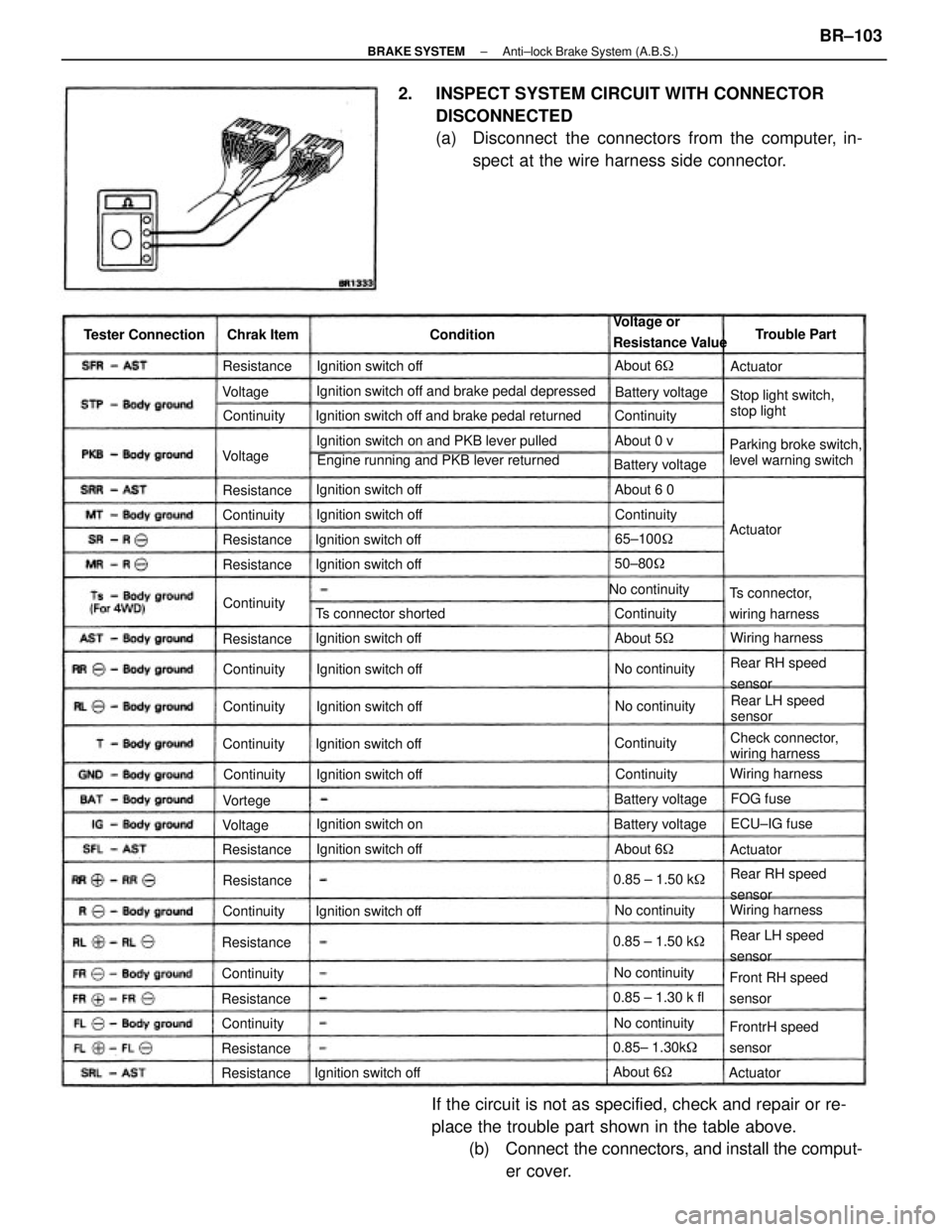
2. INSPECT SYSTEM CIRCUIT WITH CONNECTOR
DISCONNECTED
(a) Disconnect the connectors from the computer, in-
spect at the wire harness side connector.
If the circuit is not as specified, check and repair or re-
place the trouble part shown in the table above.
(b) Connect the connectors, and install the comput-
er cover.
Ignition switch off and brake pedal depressed
Engine running and PKB lever returned Ignition switch off and brake pedal returned
Ignition switch on and PKB lever pulled
Parking broke switch,
level warning switchStop light switch,
stop light Voltage or
Resistance Value
Check connector,
wiring harness
Front RH speed
sensor
FrontrH speed
sensor Ts connector,
wiring harness
Rear RH speed
sensor
Rear RH speed
sensor
Rear LH speed
sensorRear LH speed
sensor Ts connector shorted
Ignition switch offIgnition switch off
Ignition switch off
Ignition switch off Ignition switch off Tester Connection
Ignition switch offIgnition switch off
Ignition switch off
Ignition switch off Ignition switch off Ignition switch off
Ignition switch offIgnition switch off
Ignition switch onBattery voltage
No continuity
Battery voltage
0.85 ± 1.30 k fl
0.85± 1.30k� Battery voltage
Wiring harnessWiring harness
Wiring harness Battery voltage
0.85 ± 1.50 k� 0.85 ± 1.50 k�
No continuityNo continuity
No continuityNo continuityNo continuityTrouble Part
65±100�
ECU±IG fuse Chrak Item
50±80�
About 6� ContinuityResistance
Resistance
About 5� ResistanceAbout 6 0
Resistance
ResistanceAbout 6�
ResistanceContinuity Resistance
Resistance
ResistanceContinuity
ResistanceAbout 6�
ResistanceContinuity
Continuity
Continuity
ContinuityContinuity Continuity
Continuity Continuity
About 0 v
Continuity Continuity
Continuity
Continuity
FOG fuse Condition
ActuatorActuator
Actuator Voltage
VoltageVortege
Actuator Voltage
± BRAKE SYSTEMAnti±lock Brake System (A.B.S.)BR±103
Page 958 of 2389
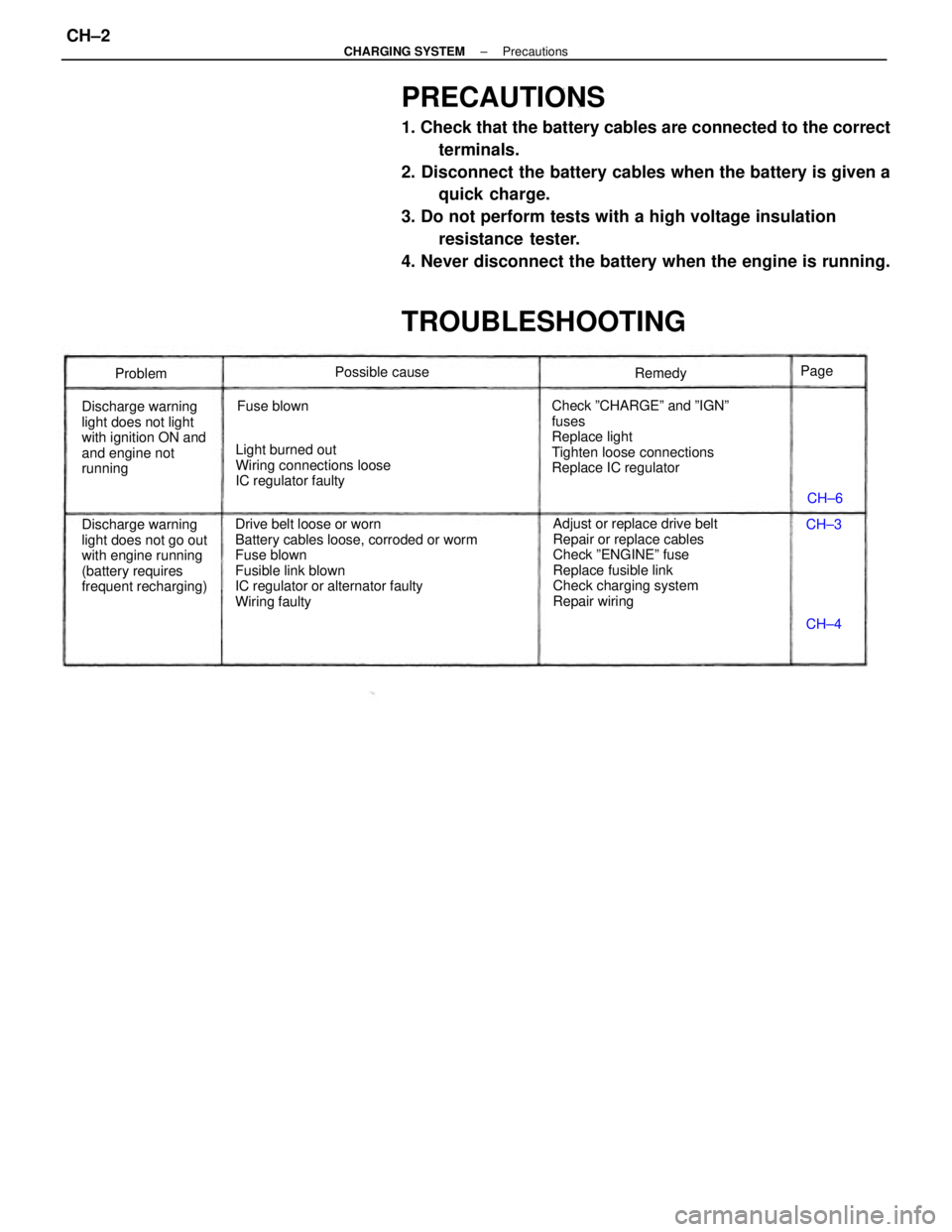
PRECAUTIONS
1. Check that the battery cables are connected to the correct
terminals.
2. Disconnect the battery cables when the battery is given a
quick charge.
3. Do not perform tests with a high voltage insulation
resistance tester.
4. Never disconnect the battery when the engine is running.
TROUBLESHOOTING
Drive belt loose or worn
Battery cables loose, corroded or worm
Fuse blown
Fusible link blown
IC regulator or alternator faulty
Wiring faultyAdjust or replace drive belt
Repair or replace cables
Check ºENGINEº fuse
Replace fusible link
Check charging system
Repair wiring Check ºCHARGEº and ºIGNº
fuses
Replace light
Tighten loose connections
Replace IC regulator
Discharge warning
light does not go out
with engine running
(battery requires
frequent recharging) Discharge warning
light does not light
with ignition ON and
and engine not
runningLight burned out
Wiring connections loose
IC regulator faultyPossible cause
Fuse blownRemedy
Problem
CH±6
CH±4 CH±3 Page
± CHARGING SYSTEMPrecautionsCH±2
Page 959 of 2389
PRECAUTIONS
1. Check that the battery cables are connected to the correct
terminals.
2. Disconnect the battery cables when the battery is given a
quick charge.
3. Do not perform tests with a high voltage insulation
resistance tester.
4. Never disconnect the battery when the engine is running.
TROUBLESHOOTING
Drive belt loose or worn
Battery cables loose, corroded or worm
Fuse blown
Fusible link blown
IC regulator or alternator faulty
Wiring faultyAdjust or replace drive belt
Repair or replace cables
Check ºENGINEº fuse
Replace fusible link
Check charging system
Repair wiring Check ºCHARGEº and ºIGNº
fuses
Replace light
Tighten loose connections
Replace IC regulator
Discharge warning
light does not go out
with engine running
(battery requires
frequent recharging) Discharge warning
light does not light
with ignition ON and
and engine not
runningLight burned out
Wiring connections loose
IC regulator faultyPossible cause
Fuse blownRemedy
Problem
CH±6
CH±4 CH±3 Page
± CHARGING SYSTEMTroubleshootingCH±2
Page 960 of 2389
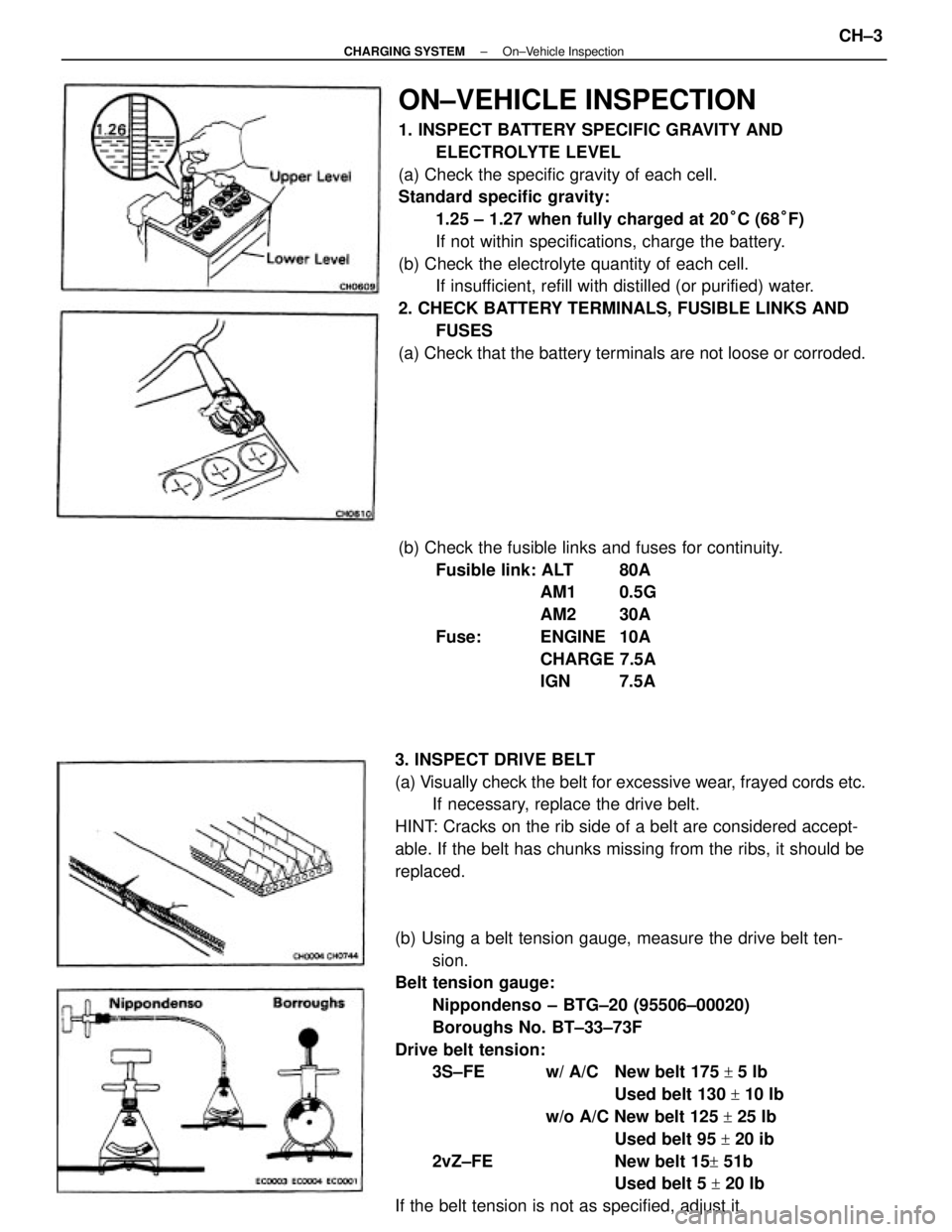
ON±VEHICLE INSPECTION
1. INSPECT BATTERY SPECIFIC GRAVITY AND
ELECTROLYTE LEVEL
(a) Check the specific gravity of each cell.
Standard specific gravity:
1.25 ± 1.27 when fully charged at 20°C (68°F)
If not within specifications, charge the battery.
(b) Check the electrolyte quantity of each cell.
If insufficient, refill with distilled (or purified) water.
2. CHECK BATTERY TERMINALS, FUSIBLE LINKS AND
FUSES
(a) Check that the battery terminals are not loose or corroded.
(b) Using a belt tension gauge, measure the drive belt ten-
sion.
Belt tension gauge:
Nippondenso ± BTG±20 (95506±00020)
Boroughs No. BT±33±73F
Drive belt tension:
3S±FE w/ A/C New belt 175
+ 5 Ib
Used belt 130
+ 10 Ib
w/o A/C New belt 125
+ 25 Ib
Used belt 95
+ 20 ib
2vZ±FE New belt 15
+ 51b
Used belt 5
+ 20 Ib
If the belt tension is not as specified, adjust it. 3. INSPECT DRIVE BELT
(a) Visually check the belt for excessive wear, frayed cords etc.
If necessary, replace the drive belt.
HINT: Cracks on the rib side of a belt are considered accept-
able. If the belt has chunks missing from the ribs, it should be
replaced.(b) Check the fusible links and fuses for continuity.
Fusible link: ALT 80A
AM1 0.5G
AM2 30A
Fuse: ENGINE 10A
CHARGE 7.5A
IGN 7.5A
± CHARGING SYSTEMOn±Vehicle InspectionCH±3