2023 FORD F150 display
[x] Cancel search: displayPage 434 of 786
HOW DOES TRAILER SWAY
CONTROL WORK
Trailer Sway Control
The system applies the brakes to theindividual wheels and reduces enginetorque to aid vehicle stability.
If the trailer begins to sway, the stabilitycontrol lamp flashes and the messageTrailer Sway Reduce Speed appears inthe information display.
Stop your vehicle as soon as it is safe todo so. Check the vertical weight on thetow ball and trailer load distribution.
TRAILER SWAY CONTROL
PRECAUTIONS
WARNING: Turning off trailer swaycontrol increases the risk of loss ofvehicle control, serious injury or death.Ford does not recommend disabling thisfeature except in situations where speedreduction may be detrimental (such ashill climbing), the driver has significanttrailer towing experience, and can controltrailer sway and maintain safe operation.
Note:This feature only activates whensignificant trailer sway occurs.
Note:This feature does not prevent trailersway, but reduces it once it begins.
Note:This feature cannot stop all trailersfrom swaying.
Note:In some cases, if vehicle speed is toohigh, the system may activate multipletimes, gradually reducing vehicle speed.
SWITCHING TRAILER SWAY
CONTROL ON AND OFF
1.Press Features on the touchscreen.
2.Press Towing.
3.Switch Trailer Sway Control on or off.
The system turns on each time you startyour vehicle.
430
2023 F-150 (TFD) Canada/United States of America, enUSA, Edition date: 202206, DOMTrailer Sway Control
Page 445 of 786

Note:Your vehicle has two options fortrailer backup assistance set up. The systemdefaults to the camera based system. SeeApplying the Trailer Reversing Aid Sticker(page 441). You can also set up the systemwith the trailer sensor that you can purchasefrom your authorized dealer. You mustconnect the sensor to your vehicle to set upthe system. See Trailer SensorInstallation (page 441).
Note:If you configure the trailer and installa sensor, the system saves the trailer withthat sensor information. If you want to usethis trailer with the sticker, you need todelete the trailer from the system andrepeat the setup process.
APPLYING THE TRAILERREVERSING AID STICKER
Place the sticker in an area visible by therear view camera. The entire sticker mustbe within 4–19 in (10–48 cm) from thecenter of the hitch ball, as shown in thefollowing illustration.
Use the supplied sticker placement card,a tape measure and pen to carefully markthe area to attach the sticker. The stickeris in the back cover pocket of your quickstart guide. Make sure the entire sticker iswithin the green zone between the twoarcs or distance markers on the diagram,and is also visible in the rear view cameradisplay.
Once you have found the correct location,place the sticker.
Note:Make sure nothing can obstruct therear view camera's view of the sticker suchas a jack handle or wiring.
Note:Position the sticker on a flat, dry andclean horizontal surface. For best results,apply the sticker when temperatures areabove 32°F (0°C).
Note:Do not move stickers after placingthem. Do not re-use any stickers if removed.
Note:You can purchase additional stickersthrough your authorized dealer.
Note:If you previously setup the trailer withthe trailer sensor, make sure it is not pluggedin before configuring the trailer and placingthe sticker.
TRAILER SENSOR INSTALLATION
441
2023 F-150 (TFD) Canada/United States of America, enUSA, Edition date: 202206, DOMTrailer Backup Assistance (If Equipped)E333148 E315959
Page 447 of 786
Note:During calibration, the systemdetermines the trailer length. The systemsupports trailer lengths of 6–33 ft(1.85–10.05 m) distance from the hitchpoint to the center of the axle or axles. Thesystem is designed to work with drawbarsthat have a license plate to hitch ball centermeasurement of 9–18 in (23–46 cm) wheninstalled. Do not attempt to use drawbarsor trailers that have a length outside of thisrange as the system performance degradesand could cause improper system function.
Note:The touchscreen shows if you aregoing too slow or fast. Calibration pauses ifthe speed is outside the required range of2–9 mph (4–15 km/h).
Note:You need to complete at least a 90°turn, and longer trailers could require a 180°turn. Camera trailer tracking requires thesystem to locate the hitch ball as well asdetermine the trailer length. Some trailerscould require you to drive straight then turnmultiple times before calibration completes.The touchscreen provides instructions andnotifies you when calibration completes.
Note:For best results, do not calibrate thesystem at night when calibrating the systemwith the sticker.
SWITCHING TRAILER BACKUP
ASSISTANCE ON AND OFF
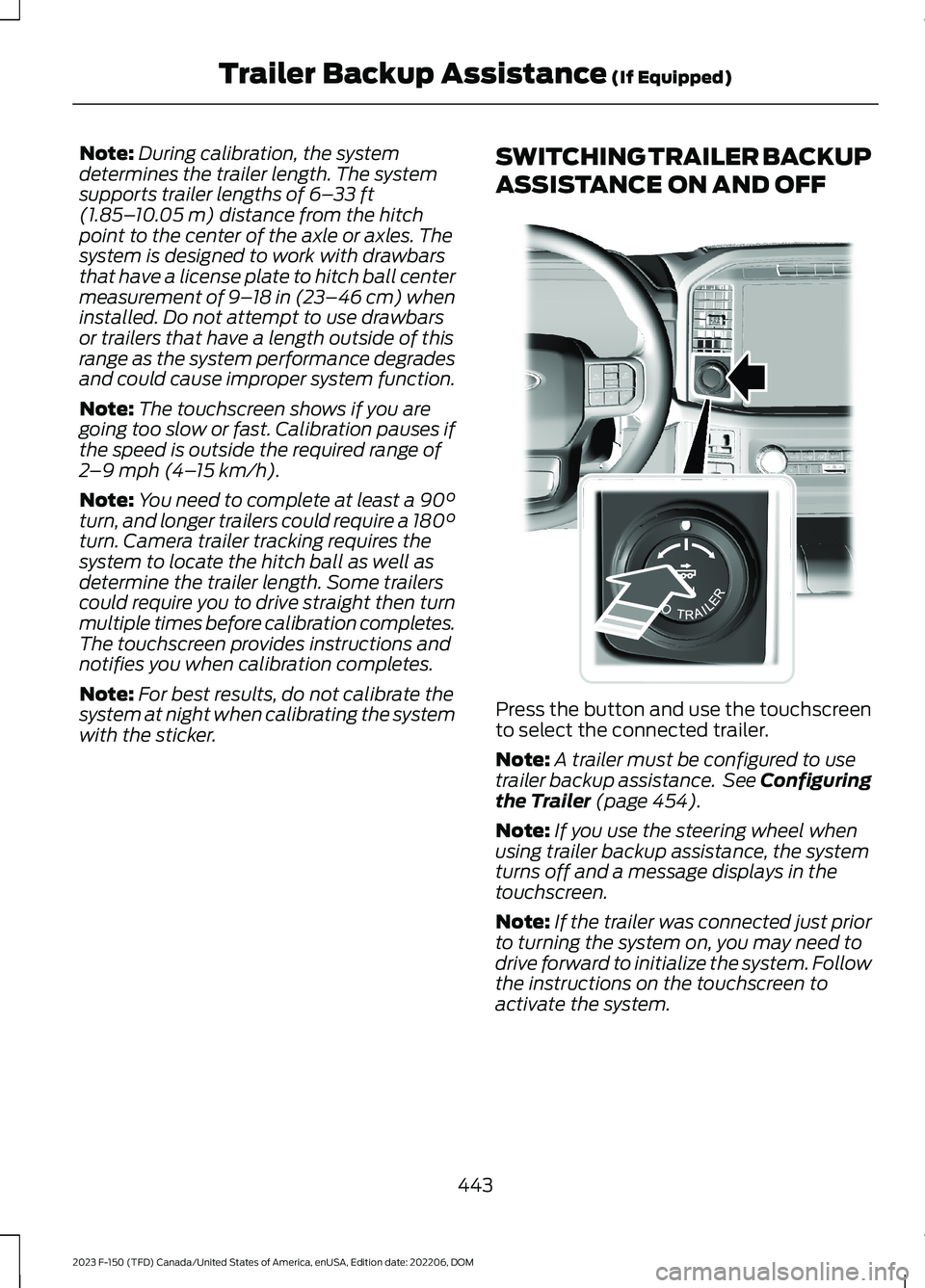
Press the button and use the touchscreento select the connected trailer.
Note:A trailer must be configured to usetrailer backup assistance. See Configuringthe Trailer (page 454).
Note:If you use the steering wheel whenusing trailer backup assistance, the systemturns off and a message displays in thetouchscreen.
Note:If the trailer was connected just priorto turning the system on, you may need todrive forward to initialize the system. Followthe instructions on the touchscreen toactivate the system.
443
2023 F-150 (TFD) Canada/United States of America, enUSA, Edition date: 202206, DOMTrailer Backup Assistance (If Equipped)E310335
Page 451 of 786
TRAILER BACKUP ASSISTANCE – TROUBLESHOOTING
TRAILER BACKUP ASSISTANCE – INFORMATION MESSAGES
DescriptionMessage
Displays when the system turns on and isinitializing.Detecting Trailer Please Wait…
A condition exists that prevents the systemfrom turning on. If the message continuesto display, visit your authorized dealer tohave your vehicle checked.
Pro Trailer Backup Assist™ System is NotAvailable
The steering system needs to learn internalparameters to fully enable the feature.Drive your vehicle straight forward above25 mph (40 km/h) for approximately 5minutes.
Pro Trailer Backup Assist™ Driving Requiredto Initialize Steering Press Knob to Exit
Displays when you reach the maximumcontrollable trailer angle for the system.Place your vehicle in drive (D) and pullforward to get the truck and trailer back toan in-line position.
Pro Trailer Backup Assist™ Stop nowMaximum trailer angle Press Knob to Exit
If this message consistently displays, youmay need to repeat the trailer calibration.Delete the trailer from the system andrepeat the setup and calibration process.
Displays when you exceed the maximumcontrollable trailer angle for the system.Place your vehicle in drive (D) and pullforward to get your vehicle and trailer backto an in-line position, then activate thesystem by selecting the connected trailerand following the instructions on thetouchscreen.
Stop now. Deactivated by trailer angle.
If this message consistently displays, youmay need to repeat the trailer setup andcalibration. Delete the trailer from thesystem and repeat the setup and calibra-tion process.
Displays when the system can no longersteer the vehicle and you must take oversteering.
Pro Trailer Backup Assist™ Stop Now TakeControl of Steering Wheel
447
2023 F-150 (TFD) Canada/United States of America, enUSA, Edition date: 202206, DOMTrailer Backup Assistance (If Equipped)
Page 452 of 786

DescriptionMessage
Displays when the system does not detectthe sensor. Check the sensor connection,check that there is no damaged wiringbetween the connector and sensor andcheck that there is only one sensorconnected.If you do not want to use the sensor for thistrailer, delete the trailer in the touchscreenthen repeat the setup process with thesticker.
Pro Trailer Backup Assist™ Sensor NotDetected Refer to Owner's Manual PressKnob to Exit
These messages display when the systemdoes not detect the trailer.If your trailer is setup with a sticker, makesure the rear camera is clean, and thesticker is clearly visible in the camera image.You can also move the trailer forward orbackward to change the trailer position andlighting conditions.If your trailer is setup with a sensor, checkthat the sensor is correctly installed andthe trailer length is within the allowedrange.If these messages continue to display, visityour authorized dealer to have your vehiclechecked.
Pro Trailer Backup Assist™ Trailer NotDetected. Shift to Park Press Knob to Exit
Pro Trailer Backup Assist™ Trailer NotDetected. Refer to Owner's Manual. PressKnob to Exit
448
2023 F-150 (TFD) Canada/United States of America, enUSA, Edition date: 202206, DOMTrailer Backup Assistance (If Equipped)
Page 453 of 786

DescriptionMessage
If your trailer is setup with a sticker, thismessage displays when the camera systemcannot detect the trailer and requires trailermovement to enable trailer detection. Driveforward above 2 mph (3 km/h) to initializethe system.If your trailer is setup with a sensor, thismessage displays when your vehicle hasnot moved after the trailer sensor isconnected or extended operation below1 mph (1 km/h). Drive forward above 2 mph(3 km/h) to initialize the system.
Pro Trailer Backup Assist™ Trailer NotDetected Pull Forward to Initialize PressKnob to Exit
Displays when your vehicle is backing upbut the system is not activated. Select theconnected trailer on the touchscreen andfollow the instructions to activate thesystem.This message also displays when you backup during the calibration process.
Pro Trailer Backup Assist™ Stop NowSystem Not Active Press Knob to Exit
Displays when the system turns on and isavailable to use.Pro Trailer Backup Assist™ Backup SlowlyTurn Knob to Steer Press Knob to Exit
449
2023 F-150 (TFD) Canada/United States of America, enUSA, Edition date: 202206, DOMTrailer Backup Assistance (If Equipped)
Page 455 of 786

•The system could have difficultiesrecognizing the sticker based onenvironmental factors. You could needto move to a different area to changethe lighting and background or youcould need to change the direction youare driving. You could also try settingup the system at a different time ofday.
•Some trailers are not compatible withthe sticker and camera system. If theissue persists, set up the trailer with asensor purchased from your authorizeddealer. See Trailer SensorInstallation (page 441).
What does it mean if the systempauses during calibration?
•There could be steering input or trailermovement during the straight driveportion of the calibration process.
What does it mean if the systemdisplays hold steering steadyduring turn?
•Part of the calibration process for thesticker setup requires a steady turn. Ifyou are continually moving the steeringwheel during the turn, this delays thecalibration process. To enable thecalibration process, hold the steeringwheel at the same position whenturning.
What does it mean if the systemdisplays that it is not available?
•There could be a sub-system that thesystem uses that is not correctlyoperating. If the system continues todisplay it is not available, visit yourauthorized dealer to have your vehiclechecked.
•There could be a battery voltage issue.Make sure the battery is correctlycharged. If the system continues todisplay it is not available, visit yourauthorized dealer to have your vehiclechecked.
What does it mean if the systemdisplays that driving is required toinitialize steering?
•The steering system needs to learninternal parameters to fully turn on thefeature. Drive your vehicle straightforward above 25 mph (40 km/h) forapproximately 5 minutes.
•Your vehicle is new, there is a batteryvoltage issue or you have serviced thesteering system.
What does it mean if the systemrequires you to pull forward toinitialize?
•This occurs when the vehicle has notmoved during the current key cycleafter you connect and select the trailerin the touchscreen, or you operate thesystem at speeds below 1 mph(1 km/h) for an extended period oftime. Drive forward above 2 mph(3 km/h) and the system indicateswhen it initializes.
451
2023 F-150 (TFD) Canada/United States of America, enUSA, Edition date: 202206, DOMTrailer Backup Assistance (If Equipped)
Page 460 of 786

APPLYING THE TRAILERREVERSE AID STICKER
Place the sticker in an area visible by therear view camera. The entire sticker mustbe within 4–19 in (10–48 cm) from thecenter of the hitch ball, as shown in thefollowing illustration.
Use the supplied sticker placement card,a tape measure and pen to carefully markthe area to attach the sticker. The stickeris in the back cover pocket of your quickstart guide. Make sure the entire sticker iswithin the green zone between the twoarcs or distance markers on the diagram,and is also visible in the rear view cameradisplay.
Once you have found the correct location,place the sticker.
Note:Make sure nothing can obstruct therear view camera's view of the sticker suchas a jack handle or wiring.
Note:Position the sticker on a flat, dry andclean horizontal surface. For best results,apply the sticker when temperatures areabove 32°F (0°C).
Note:Do not move stickers after placingthem. Do not re-use any stickers if removed.
Note:You can purchase additional stickersthrough your authorized dealer.
Note:If you previously setup the trailer withthe trailer sensor, make sure it is not pluggedin before configuring the trailer and placingthe sticker.
TRAILER SENSOR INSTALLATION
456
2023 F-150 (TFD) Canada/United States of America, enUSA, Edition date: 202206, DOMTrailer Reverse Guidance (If Equipped)E333148 E315959 E359954