Page 382 of 786
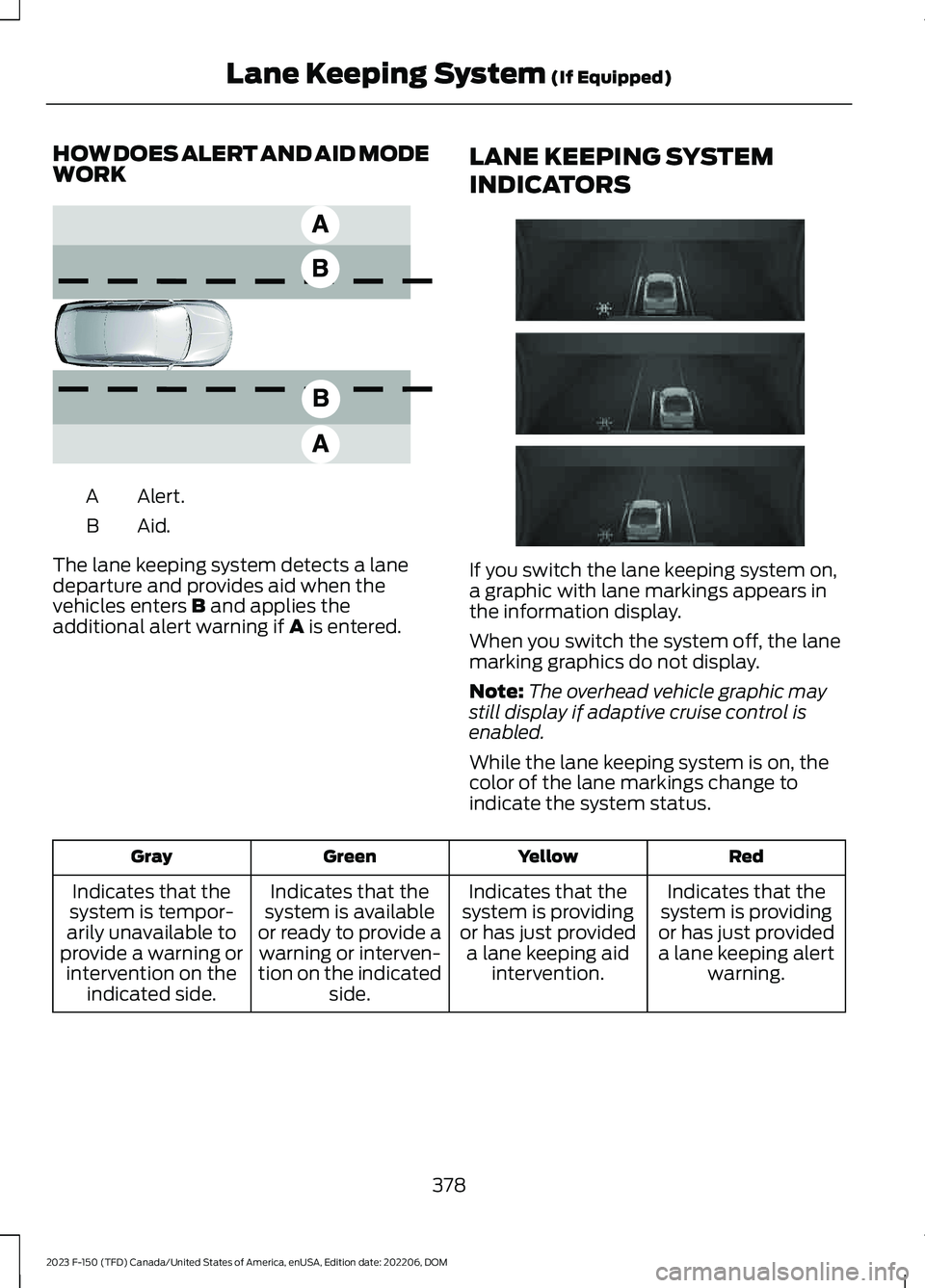
HOW DOES ALERT AND AID MODEWORK
Alert.A
Aid.B
The lane keeping system detects a lanedeparture and provides aid when thevehicles enters B and applies theadditional alert warning if A is entered.
LANE KEEPING SYSTEM
INDICATORS
If you switch the lane keeping system on,a graphic with lane markings appears inthe information display.
When you switch the system off, the lanemarking graphics do not display.
Note:The overhead vehicle graphic maystill display if adaptive cruise control isenabled.
While the lane keeping system is on, thecolor of the lane markings change toindicate the system status.
RedYellowGreenGray
Indicates that thesystem is providingor has just provideda lane keeping alertwarning.
Indicates that thesystem is providingor has just provideda lane keeping aidintervention.
Indicates that thesystem is availableor ready to provide awarning or interven-tion on the indicatedside.
Indicates that thesystem is tempor-arily unavailable toprovide a warning orintervention on theindicated side.
378
2023 F-150 (TFD) Canada/United States of America, enUSA, Edition date: 202206, DOMLane Keeping System (If Equipped)E165517 E335296
Page 387 of 786

SWITCHING BLIND SPOT
INFORMATION SYSTEM ON
AND OFF
To switch blind spot information systemon or off, use the touchscreen:
1.Press Features on the touchscreen.
2.Press Driver Assistance.
3.Press Blind Spot Information System.
4.Switch the feature on or off.
When you switch blind spot informationsystem off, a warning lamp illuminates.When you switch the system on or off, thealert indicators flash twice.
Note:The system remembers the lastsetting when you start your vehicle.
To permanently switch the system off,contact an authorized dealer.
LOCATING THE BLIND SPOT
INFORMATION SYSTEM
SENSORS
The sensors are inside the brake lamp onboth sides of your vehicle.
Note:Keep the sensors free from snow, iceand large accumulations of dirt.
Note:Do not cover the sensors with bumperstickers, repair compound or other objects.
Note:Bike and cargo racks could causefalse alerts due to obstruction of the sensor.We recommend switching the feature offwhen using a bike or cargo rack.
Note:Blocked sensors may affect systemaccuracy.
If the sensors become blocked, a messageappears in the instrument cluster display.See Blind Spot Information System –Information Messages (page 386). Thealert indicators illuminate but the systemdoes not alert you.
BLIND SPOT INFORMATION
SYSTEM WITH TRAILER
COVERAGE (IF EQUIPPED)
WHAT IS BLIND SPOTINFORMATION SYSTEM WITHTRAILER COVERAGE
Blind spot information system detectsvehicles that may have entered the blindspot zone. The detection area is on bothsides your vehicle and trailer, extendingrearward from the exterior mirrors to theend of your trailer.
383
2023 F-150 (TFD) Canada/United States of America, enUSA, Edition date: 202206, DOMBlind Spot Information System (If Equipped)E310325 E225007
Page 390 of 786
BLIND SPOT INFORMATION SYSTEM – TROUBLESHOOTING
BLIND SPOT INFORMATION SYSTEM – INFORMATION MESSAGES
ActionMessage
A fault with the system has occurred. Haveyour vehicle checked as soon as possible.Blind Spot System Fault
Something is blocking the sensors. Cleanthe sensors.Blind Spot Not Available Sensor BlockedSee Manual
The system automatically turns off anddisplays this message when you connect atrailer to the vehicle that does not have atrailer blind spot system or when you switchthe trailer blind spot system off through thetouchscreen.
Blind Spot Alert Deactivated TrailerAttached
386
2023 F-150 (TFD) Canada/United States of America, enUSA, Edition date: 202206, DOMBlind Spot Information System (If Equipped)
Page 392 of 786

Cross Traffic Alert Limitationswith a Trailer Attached
The system remains on when you attacha trailer in vehicles with blind spotinformation system with trailer tow underthe following conditions:
•You connect a trailer.
•The trailer is a bike rack or cargo rackwith a maximum length of 3 ft (1 m).
•You set the trailer length to 3 ft (1 m)in the instrument cluster display.
Note:The system may not correctly operatewhen towing a trailer. For vehicles with anapproved trailer tow module and tow bar,the system turns off when you attach atrailer. For vehicles with an aftermarkettrailer tow module or tow bar, werecommend that you switch the system offwhen you attach a trailer.
SWITCHING CROSS TRAFFIC
ALERT ON AND OFF
To switch cross traffic alert on or off usethe touchscreen.
1.Press Features on the touchscreen.
2.Press Driver Assistance.
3.Switch Cross Traffic Alert on or off.
Note:The system switches on every timeyou switch the ignition on. To permanentlyswitch the system off, contact an authorizeddealer.
LOCATING THE CROSS
TRAFFIC ALERT SENSORS
The sensors are inside the brake lamp onboth sides of your vehicle.
Note:Keep the sensors free from snow, iceand large accumulations of dirt.
Note:Do not cover the sensors with bumperstickers, repair compound or other objects.
Note:Blocked sensors may affect systemaccuracy.
If something is blocking the sensors, amessage may appear in the informationdisplay when you shift into reverse (R).
Note:Bike and cargo racks could causefalse alerts due to obstruction of the sensor.We recommend switching the feature offwhen using a bike or cargo rack.
CROSS TRAFFIC ALERT
INDICATORS
When the cross traffic alertdetects an approaching vehicle,a tone sounds, a warning lampilluminates in the relevant exterior mirrorand arrows appear in the instrumentcluster display to show which side thevehicle is approaching from.
388
2023 F-150 (TFD) Canada/United States of America, enUSA, Edition date: 202206, DOMCross Traffic Alert (If Equipped)E310325 E268294
Page 393 of 786
If the system malfunctions, a messageappears in the instrument cluster display.Have your vehicle checked as soon aspossible.
Note:If arrows do not display, a messageappears in the instrument cluster display.
Note:In some conditions, the system couldalert you, even when there is nothing in thedetection zone, for example a vehiclepassing further away from your vehicle.
CROSS TRAFFIC ALERT – TROUBLESHOOTING
CROSS TRAFFIC ALERT – INFORMATION MESSAGES
ActionMessage
Displays instead of indication arrows whenthe system detects a vehicle. Check forapproaching traffic.
Cross Traffic Alert
Indicates blocked cross traffic alert systemsensors. Clean the sensors. If the messagecontinues to appear, have your vehiclechecked as soon as possible.
Cross Traffic Not Available Sensor BlockedSee Manual
The system has malfunctioned. Have yourvehicle checked as soon as possible.Cross Traffic System Fault
Displays if you attach a trailer to yourvehicle.Cross Traffic Alert Deactivated TrailerAttached
389
2023 F-150 (TFD) Canada/United States of America, enUSA, Edition date: 202206, DOMCross Traffic Alert (If Equipped)
Page 397 of 786

Note:Automatic emergency braking andevasive steering turn on every time youswitch the ignition on.
Note:If your vehicle has a radar sensor, werecommend that you switch the system offif you install a snow plow or similar objectin such a way that it may block the radarsensor. Your vehicle remembers the selectedsetting across key cycles.
Note:If you switch automatic emergencybraking off, evasive steering assist switchesoff.
LOCATING THE PRE-
COLLISION ASSIST SENSORS
Camera.1.
Radar sensor (if equipped).2.
If a message regarding a blocked sensoror camera appears in the informationdisplay, something is obstructing the radarsignals or camera images. The radar sensoris behind the fascia cover in the center ofthe lower grille. With a blocked sensor orcamera, the system may not function, orperformance may reduce. SeePre-Collision Assist – InformationMessages (page 397).
Note:Proper system operation requires aclear view of the road by the camera. Haveany windshield damage in the area of thecamera's field of view repaired.
Note:If something hits the front end of yourvehicle or damage occurs and your vehiclehas a radar sensor, the radar sensing zonecould change. This could cause missed orfalse vehicle detections. Have your vehicleserviced to have the radar checked forproper coverage and operation.
Note:If your vehicle detects excessive heatat the camera or a potential misalignmentcondition, a message could display in theinformation display indicating temporarysensor unavailability. When operationalconditions are correct, the messagedeactivates. For example, when the ambienttemperature around the sensor decreasesor the sensor recalibrates successfully.
DISTANCE INDICATION
WHAT IS DISTANCE INDICATION
Distance indication displays the gapbetween your vehicle and the vehicleahead of you.
Note:The graphic does not display if youswitch on cruise control or adaptive cruisecontrol.
393
2023 F-150 (TFD) Canada/United States of America, enUSA, Edition date: 202206, DOMPre-Collision Assist (If Equipped)E328125
Page 399 of 786
SWITCHING DISTANCEINDICATION ON AND OFF
To switch the system on or off, use thetouchscreen:
1.Press Features on the touchscreen.
2.Press Driver Assistance.
3.Press Pre-Collision Assist.
4.Switch Distance Indication on or off.
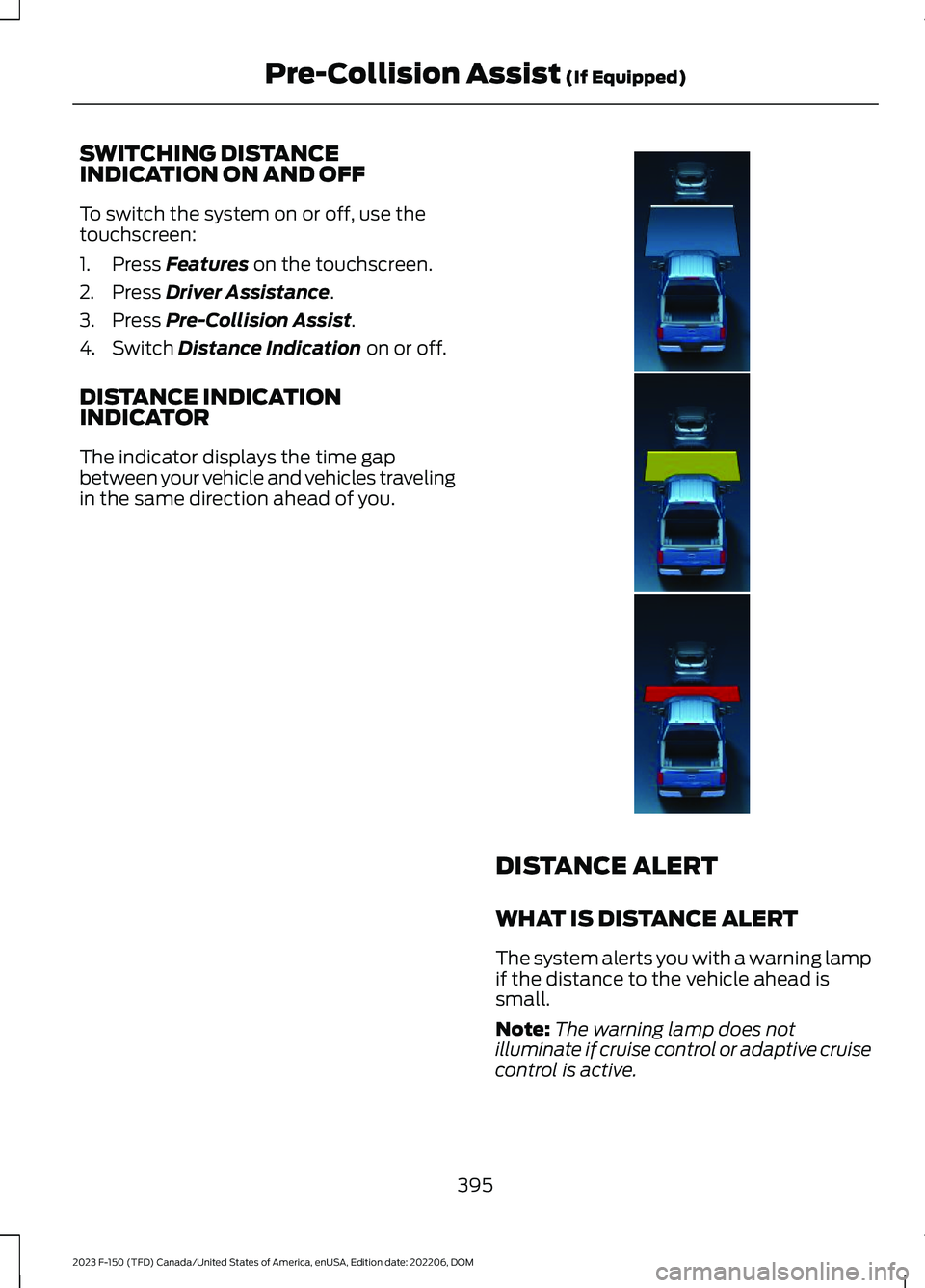
DISTANCE INDICATIONINDICATOR
The indicator displays the time gapbetween your vehicle and vehicles travelingin the same direction ahead of you.
DISTANCE ALERT
WHAT IS DISTANCE ALERT
The system alerts you with a warning lampif the distance to the vehicle ahead issmall.
Note:The warning lamp does notilluminate if cruise control or adaptive cruisecontrol is active.
395
2023 F-150 (TFD) Canada/United States of America, enUSA, Edition date: 202206, DOMPre-Collision Assist (If Equipped)E358909
Page 402 of 786
PRE-COLLISION ASSIST –FREQUENTLY ASKED QUESTIONS
Camera Troubleshooting
The windshield in front of the camerais dirty or obstructed.
Clean the outside of the windshield infront of the camera.
The windshield in front of the camerais clean, but the message remains inthe instrument cluster display.
Wait a short time. It could take severalminutes for the camera to detect thatthere is no obstruction.
Radar Troubleshooting (If Equipped)
The surface of the radar in the grille isdirty or obstructed.
Clean the grille surface in front of theradar or remove the object causing theobstruction.
The surface of the radar in the grille isclean, but the message remains in theinstrument cluster display.
Wait a short time. It could take severalminutes for the radar to detect thatthere is no obstruction.
Heavy rain, spray or fog is interferingwith the radar signals.
The pre-collision assist system istemporarily disabled. Pre-collisionassist reactivates a short time afterthe weather conditions improve.
Swirling water or snow or ice on thesurface of the road could interfere withthe radar signals.
The pre-collision assist system istemporarily disabled. Pre-collisionassist reactivates a short time afterthe weather conditions improve.
Radar is out of alignment due to a frontend impact.
Have your vehicle serviced to have theradar checked for proper coverage andoperation.
398
2023 F-150 (TFD) Canada/United States of America, enUSA, Edition date: 202206, DOMPre-Collision Assist (If Equipped)