2023 FORD F150 display
[x] Cancel search: displayPage 315 of 786
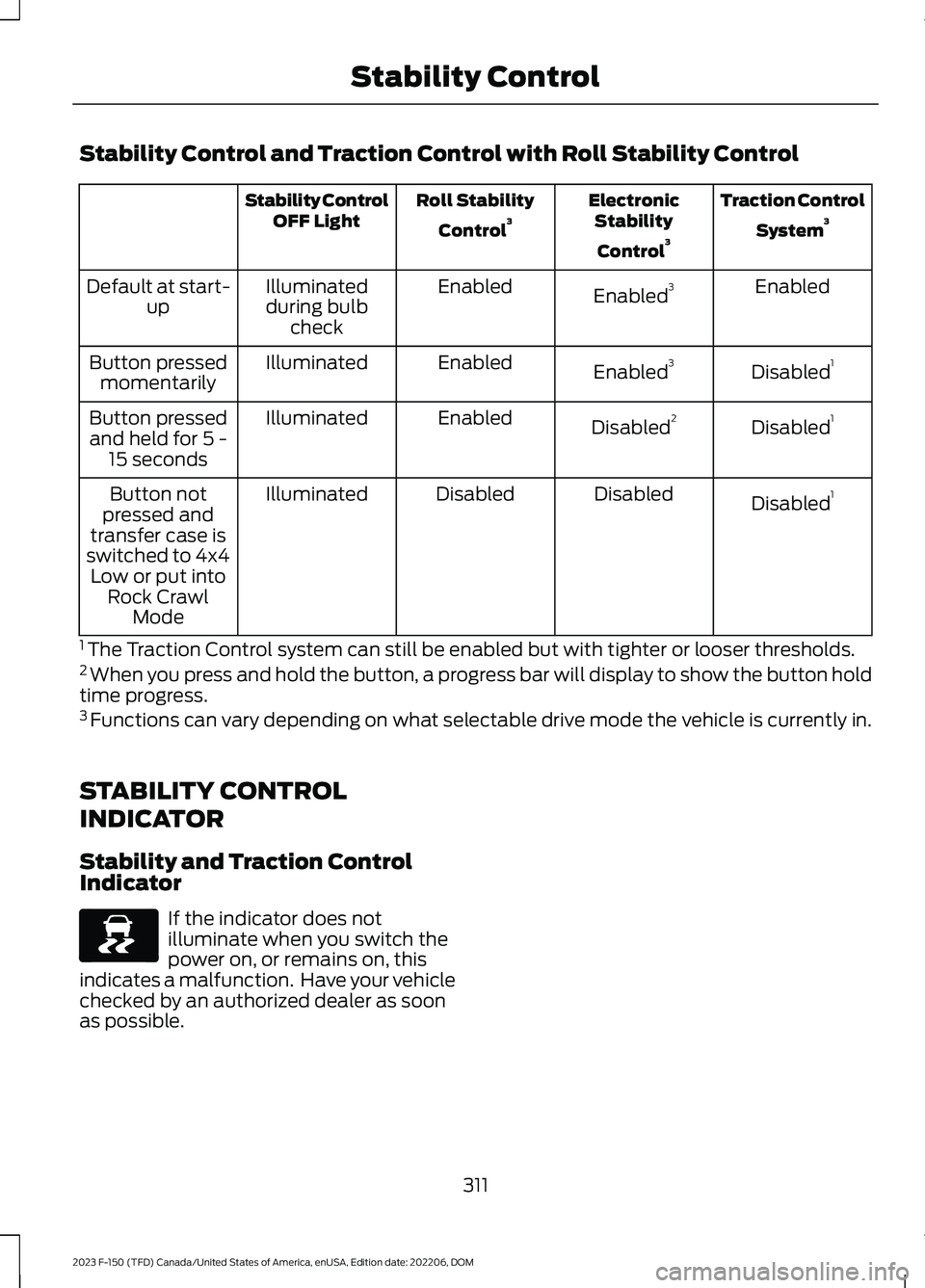
Stability Control and Traction Control with Roll Stability Control
Traction Control
System3ElectronicStability
Control3
Roll Stability
Control3Stability ControlOFF Light
EnabledEnabled3EnabledIlluminatedduring bulbcheck
Default at start-up
Disabled1Enabled3EnabledIlluminatedButton pressedmomentarily
Disabled1Disabled2EnabledIlluminatedButton pressedand held for 5 -15 seconds
Disabled1DisabledDisabledIlluminatedButton notpressed andtransfer case isswitched to 4x4Low or put intoRock CrawlMode
1 The Traction Control system can still be enabled but with tighter or looser thresholds.2 When you press and hold the button, a progress bar will display to show the button holdtime progress.3 Functions can vary depending on what selectable drive mode the vehicle is currently in.
STABILITY CONTROL
INDICATOR
Stability and Traction ControlIndicator
If the indicator does notilluminate when you switch thepower on, or remains on, thisindicates a malfunction. Have your vehiclechecked by an authorized dealer as soonas possible.
311
2023 F-150 (TFD) Canada/United States of America, enUSA, Edition date: 202206, DOMStability ControlE138639
Page 318 of 786
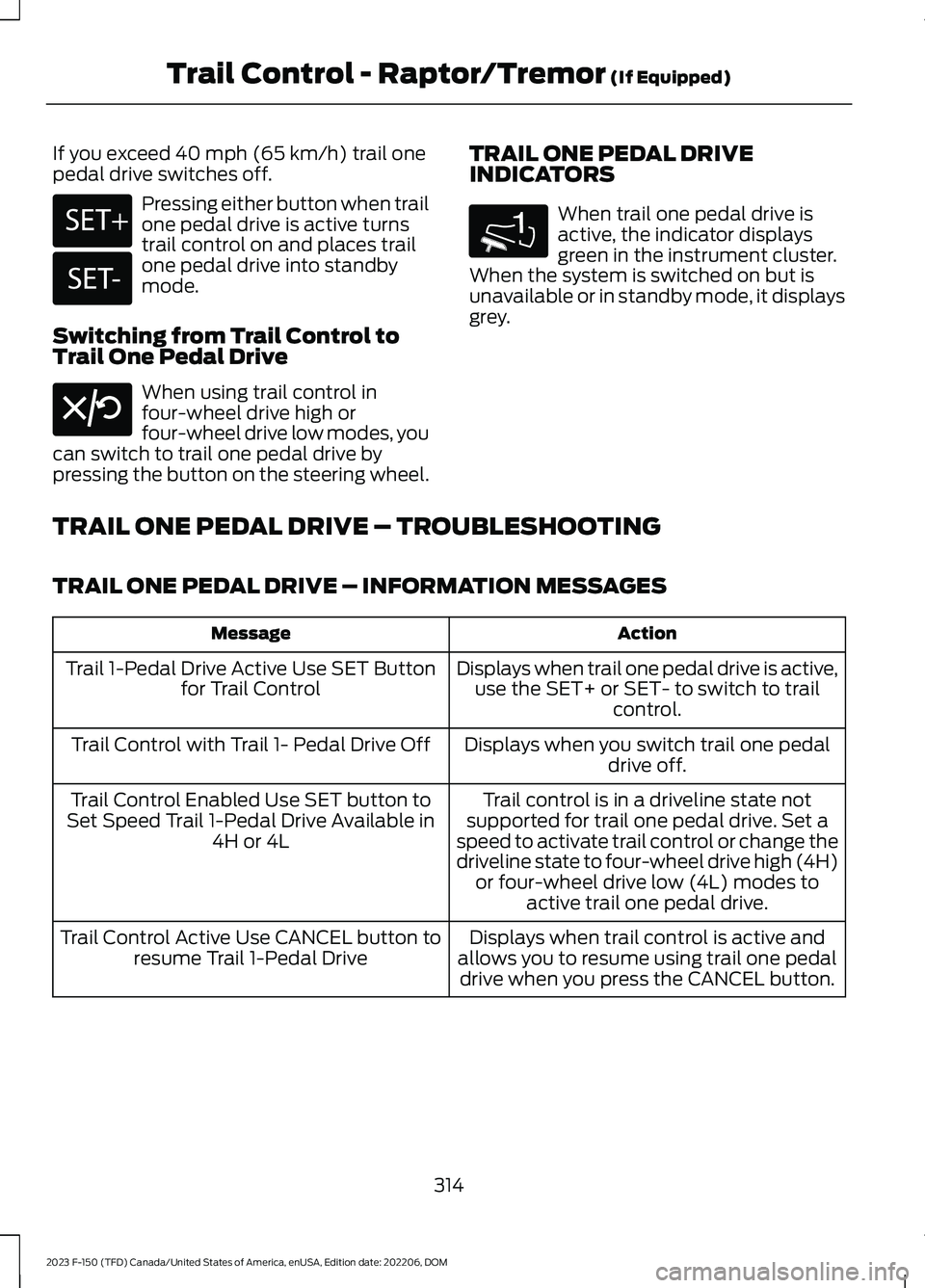
If you exceed 40 mph (65 km/h) trail onepedal drive switches off.
Pressing either button when trailone pedal drive is active turnstrail control on and places trailone pedal drive into standbymode.
Switching from Trail Control toTrail One Pedal Drive
When using trail control infour-wheel drive high orfour-wheel drive low modes, youcan switch to trail one pedal drive bypressing the button on the steering wheel.
TRAIL ONE PEDAL DRIVEINDICATORS
When trail one pedal drive isactive, the indicator displaysgreen in the instrument cluster.When the system is switched on but isunavailable or in standby mode, it displaysgrey.
TRAIL ONE PEDAL DRIVE – TROUBLESHOOTING
TRAIL ONE PEDAL DRIVE – INFORMATION MESSAGES
ActionMessage
Displays when trail one pedal drive is active,use the SET+ or SET- to switch to trailcontrol.
Trail 1-Pedal Drive Active Use SET Buttonfor Trail Control
Displays when you switch trail one pedaldrive off.Trail Control with Trail 1- Pedal Drive Off
Trail control is in a driveline state notsupported for trail one pedal drive. Set aspeed to activate trail control or change thedriveline state to four-wheel drive high (4H)or four-wheel drive low (4L) modes toactive trail one pedal drive.
Trail Control Enabled Use SET button toSet Speed Trail 1-Pedal Drive Available in4H or 4L
Displays when trail control is active andallows you to resume using trail one pedaldrive when you press the CANCEL button.
Trail Control Active Use CANCEL button toresume Trail 1-Pedal Drive
314
2023 F-150 (TFD) Canada/United States of America, enUSA, Edition date: 202206, DOMTrail Control - Raptor/Tremor (If Equipped)E246884 E246885 E308130 1E328584
Page 319 of 786
TRAIL CONTROL – TROUBLESHOOTING
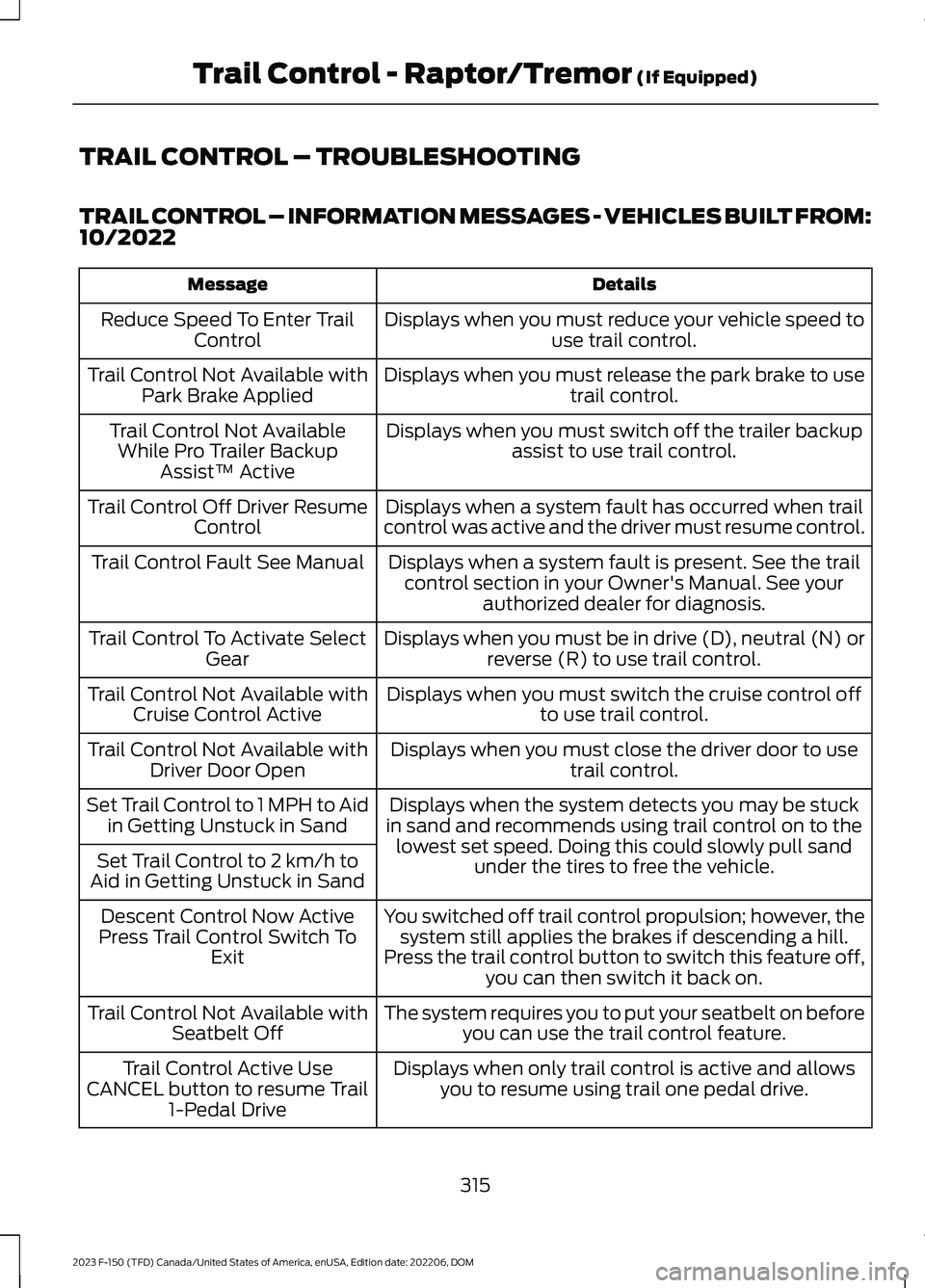
TRAIL CONTROL – INFORMATION MESSAGES - VEHICLES BUILT FROM:10/2022
DetailsMessage
Displays when you must reduce your vehicle speed touse trail control.Reduce Speed To Enter TrailControl
Displays when you must release the park brake to usetrail control.Trail Control Not Available withPark Brake Applied
Displays when you must switch off the trailer backupassist to use trail control.Trail Control Not AvailableWhile Pro Trailer BackupAssist™ Active
Displays when a system fault has occurred when trailcontrol was active and the driver must resume control.Trail Control Off Driver ResumeControl
Displays when a system fault is present. See the trailcontrol section in your Owner's Manual. See yourauthorized dealer for diagnosis.
Trail Control Fault See Manual
Displays when you must be in drive (D), neutral (N) orreverse (R) to use trail control.Trail Control To Activate SelectGear
Displays when you must switch the cruise control offto use trail control.Trail Control Not Available withCruise Control Active
Displays when you must close the driver door to usetrail control.Trail Control Not Available withDriver Door Open
Displays when the system detects you may be stuckin sand and recommends using trail control on to thelowest set speed. Doing this could slowly pull sandunder the tires to free the vehicle.
Set Trail Control to 1 MPH to Aidin Getting Unstuck in Sand
Set Trail Control to 2 km/h toAid in Getting Unstuck in Sand
You switched off trail control propulsion; however, thesystem still applies the brakes if descending a hill.Press the trail control button to switch this feature off,you can then switch it back on.
Descent Control Now ActivePress Trail Control Switch ToExit
The system requires you to put your seatbelt on beforeyou can use the trail control feature.Trail Control Not Available withSeatbelt Off
Displays when only trail control is active and allowsyou to resume using trail one pedal drive.Trail Control Active UseCANCEL button to resume Trail1-Pedal Drive
315
2023 F-150 (TFD) Canada/United States of America, enUSA, Edition date: 202206, DOMTrail Control - Raptor/Tremor (If Equipped)
Page 320 of 786
WHAT IS TRAIL TURN ASSIST
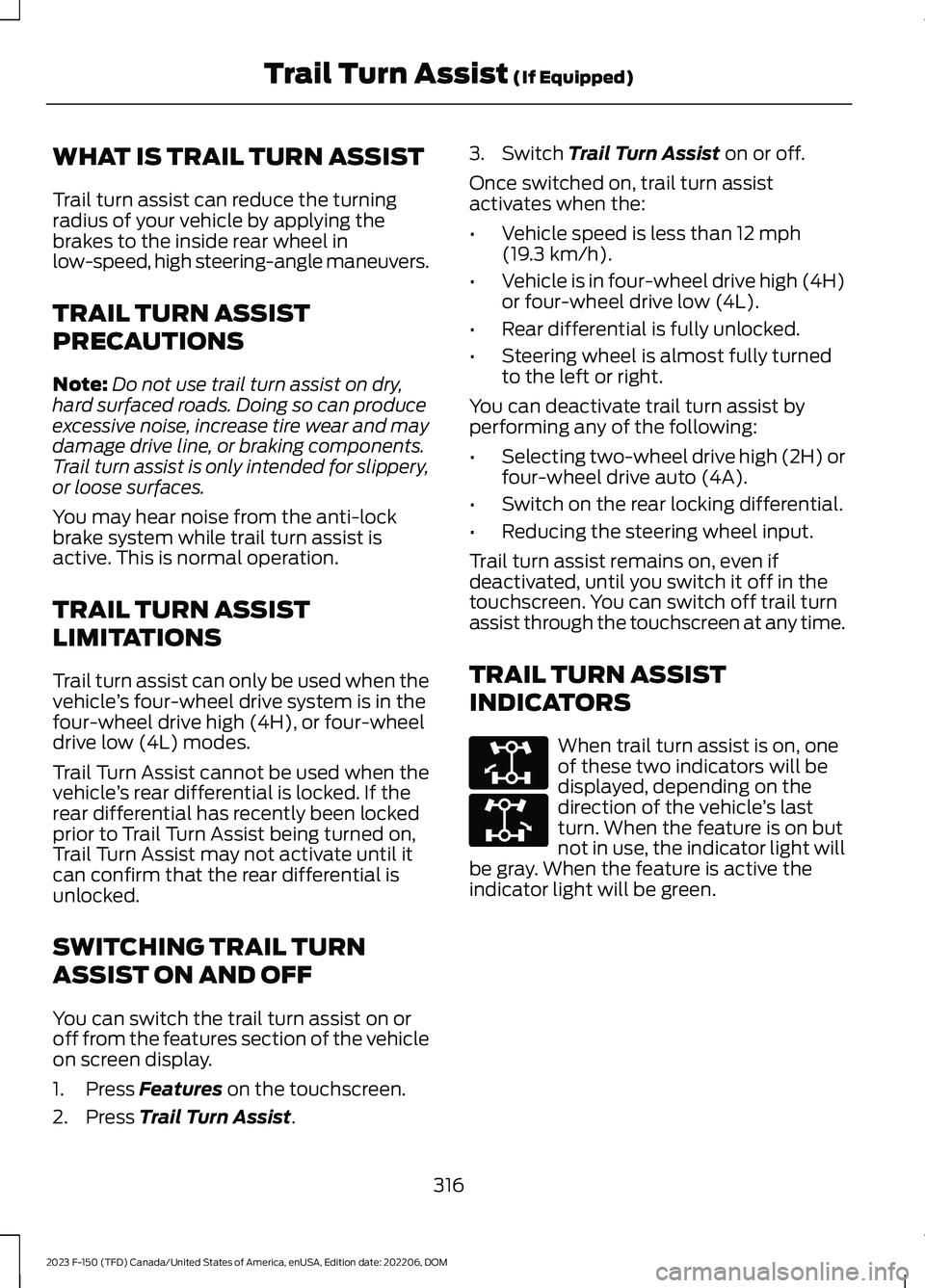
Trail turn assist can reduce the turningradius of your vehicle by applying thebrakes to the inside rear wheel inlow-speed, high steering-angle maneuvers.
TRAIL TURN ASSIST
PRECAUTIONS
Note:Do not use trail turn assist on dry,hard surfaced roads. Doing so can produceexcessive noise, increase tire wear and maydamage drive line, or braking components.Trail turn assist is only intended for slippery,or loose surfaces.
You may hear noise from the anti-lockbrake system while trail turn assist isactive. This is normal operation.
TRAIL TURN ASSIST
LIMITATIONS
Trail turn assist can only be used when thevehicle’s four-wheel drive system is in thefour-wheel drive high (4H), or four-wheeldrive low (4L) modes.
Trail Turn Assist cannot be used when thevehicle’s rear differential is locked. If therear differential has recently been lockedprior to Trail Turn Assist being turned on,Trail Turn Assist may not activate until itcan confirm that the rear differential isunlocked.
SWITCHING TRAIL TURN
ASSIST ON AND OFF
You can switch the trail turn assist on oroff from the features section of the vehicleon screen display.
1.Press Features on the touchscreen.
2.Press Trail Turn Assist.
3.Switch Trail Turn Assist on or off.
Once switched on, trail turn assistactivates when the:
•Vehicle speed is less than 12 mph(19.3 km/h).
•Vehicle is in four-wheel drive high (4H)or four-wheel drive low (4L).
•Rear differential is fully unlocked.
•Steering wheel is almost fully turnedto the left or right.
You can deactivate trail turn assist byperforming any of the following:
•Selecting two-wheel drive high (2H) orfour-wheel drive auto (4A).
•Switch on the rear locking differential.
•Reducing the steering wheel input.
Trail turn assist remains on, even ifdeactivated, until you switch it off in thetouchscreen. You can switch off trail turnassist through the touchscreen at any time.
TRAIL TURN ASSIST
INDICATORS
When trail turn assist is on, oneof these two indicators will bedisplayed, depending on thedirection of the vehicle’s lastturn. When the feature is on butnot in use, the indicator light willbe gray. When the feature is active theindicator light will be green.
316
2023 F-150 (TFD) Canada/United States of America, enUSA, Edition date: 202206, DOMTrail Turn Assist (If Equipped)E338899 E338900
Page 324 of 786

ELECTRIC POWER STEERING
HOW DOES ELECTRIC POWERSTEERING WORK
Adaptive Learning
Adaptive learning helps correct roadirregularities and improves overall handlingand steering. It communicates with thebrake system to help operate advancedstability control and crash avoidancesystems.
Note:When the battery is disconnected ora new battery is installed, you must driveyour vehicle a short distance before thesystem relearns the strategy and reactivatesall systems.
Steering Tips
If the steering wanders or pulls, check for:
•An improperly inflated tire.
•Uneven tire wear.
•Loose or worn suspensioncomponents.
•Improper vehicle alignment.
Note:A high crown in the road or highcrosswinds could also make the steeringwander or pull.
ELECTRIC POWER STEERINGPRECAUTIONS
WARNING: The electric powersteering system has diagnostic checksthat continuously monitor the system. Ifa fault is detected, a message displaysin the information display. Stop yourvehicle as soon as it is safe to do so.Switch the vehicle off. After at least 10
seconds, switch the vehicle on andwatch the information display for asteering system warning message. If asteering system warning messagereturns, have the system checked assoon as possible.
WARNING: If the system detectsan error, you may not feel a difference inthe steering, however a serious conditionmay exist. Have your vehicle checked assoon as possible. Failure to do so mayresult in loss of steering control.
Adapt your speed and driving behavioraccording to reduced steering assist.
Extreme continuous steering may increasethe effort to steer. This occurs to preventinternal overheating and damage to thesteering system. If this occurs, you will notlose the ability to steer your vehiclemanually nor will it cause damage to thesystem. Normal steering and driving allowsthe system to cool down and steeringassist returns to normal.
Note:There is no fluid reservoir to check orfill.
ELECTRIC POWER STEERINGADAPTIVE STEERING - VEHICLESWITH: ACTIVE STEERING
Electric Power-Assisted Steering (EPAS)
The adaptive steering system changes thesteering ratio with changes to vehiclespeed, optimizing the steering response inall conditions. The system also changeswhen you switch on the transmissiontow/haul feature. When you select thetow/haul button, the adaptive steeringsystem reduces vehicle sensitivity tosteering inputs at higher vehicle speeds,while maintaining the ease of parking andmaneuverability at low speeds.
320
2023 F-150 (TFD) Canada/United States of America, enUSA, Edition date: 202206, DOMSteering
Page 325 of 786
Note:The adaptive steering systemcontinuously monitors for faults. If thesystem detects a fault, a message appearsin the information display. If a red warningmessage displays, stop your vehicle as soonas it is safe to do so. The message couldclear if the fault is no longer present. If anadaptive steering system warning messageappears each time you start your vehicle,have the system checked as soon aspossible.
Note:The system has a locking device. Itremains mechanically locked at a fixedsteering ratio with the lock engaged. Youmay notice a click when you turn yourvehicle on or off.
Note:If your vehicle loses electrical poweror detects a fault when you are driving, thesystem shuts down and you retain a normalsteering function with a fixed steering ratio.During this time, it is possible that thesteering wheel could not be straight whenthe vehicle is driving straight ahead. Inaddition, you could notice that the steeringwheel angle required to steer your vehiclecould be different.
Note:During parking maneuvers, theadaptive steering system balances the driverworkload for various steering wheel inputsand vehicle loading conditions. Underextreme operating conditions the systemlocking device could engage. This strategyprevents overheating and permanentdamage to the adaptive steering system.Typical steering and driving maneuversallow the system to cool and return tonormal operation.
Adaptive Learning
Adaptive learning helps correct roadirregularities and improves overall handlingand steering. It communicates with thebrake system to help operate advancedstability control and crash avoidancesystems. Additionally, whenever youdisconnect the battery or install a newbattery, you must drive your vehicle a shortdistance before the system relearns thestrategy and reactivates all systems.
STEERING –
TROUBLESHOOTING
STEERING – WARNINGINDICATORS
The electric power steeringsystem indicator illuminates ifthe system detects a fault duringthe continuous diagnostic checks.
Note:If a red warning message displays,stop your vehicle as soon as it is safe to doso.
321
2023 F-150 (TFD) Canada/United States of America, enUSA, Edition date: 202206, DOMSteeringE223375
Page 331 of 786

The side parking sensors are in the frontand rear bumpers.
SIDE PARKING AID AUDIBLEWARNINGS
When the side parking aid detects anobject within the coverage area and thedriving path of your vehicle, an audiblewarning sounds. As your vehicle movescloser to the object, the rate of the toneincreases.
PARKING AID INDICATORS
The system provides object distanceindication through the information display.
•As the distance to the objectdecreases, the indicator blocksilluminate and move toward the vehicleicon.
•If there is no object detected, thedistance indicator blocks are grey.
Visual indication remains on when thetransmission is in reverse (R). When youstop your vehicle, visual indication turnsoff after four seconds.
If the parking aids are not available, theside distance indicator blocks do notdisplay.
PARKING AIDS –
TROUBLESHOOTING
PARKING AIDS – INFORMATIONMESSAGES
If a fault is present in the parking aids, awarning message appears in theinstrument cluster or the touchscreen.
Note:When the front or rear park aidpresents a fault message, the side parkingaid also disables.
Note:Depending on your vehicle type, thisfeature could include a light on the parkingaid button that momentarily flashes toindicate a system fault. The light remainson until you resolve the concern.
327
2023 F-150 (TFD) Canada/United States of America, enUSA, Edition date: 202206, DOMParking AidsE310320
Page 332 of 786

ActionMessage
The system detects a condition thatrequires service. Have your vehicle checkedas soon as possible.
Park Aid Fault
Inclement weather, ice, mud, or water isblocking the sensor, causing the system tobecome unavailable. You can typicallyclean the sensor to resolve.
Sensor Blocked
A correct trailer connection is sensed duringa given ignition cycle.Trailer Connected
Displays the park aid status.Front Park Aid On Off
Displays the park aid status.Rear Park Aid On Off
328
2023 F-150 (TFD) Canada/United States of America, enUSA, Edition date: 202206, DOMParking Aids