2022 TOYOTA SUPRA ESP
[x] Cancel search: ESPPage 164 of 498
1623-1. CONTROLS
This chapter describes all standard,
country-specific and special equip-
ment available for the model series.
It may therefore describe equip-
ment and functions which are not
installed in your vehicle, for exam-
ple on account of the special equip-
ment selected or the country
specification. This also applies to
safety-relevant functions and sys-
tems. Please comply with the rele-
vant laws and regulations when
using the corresponding functions
and systems.
The instrument cluster is a variable
display. When the sport mode
switch is used to change the driving
mode, the instrument cluster dis-
plays change to match the driving
mode.
Changes to the displays in the
instrument cluster can be deacti-
vated via Toyota Supra Command.
The displays in the instrument clus-
ter can sometimes differ from the
illustrations in th is Owner's Manual.
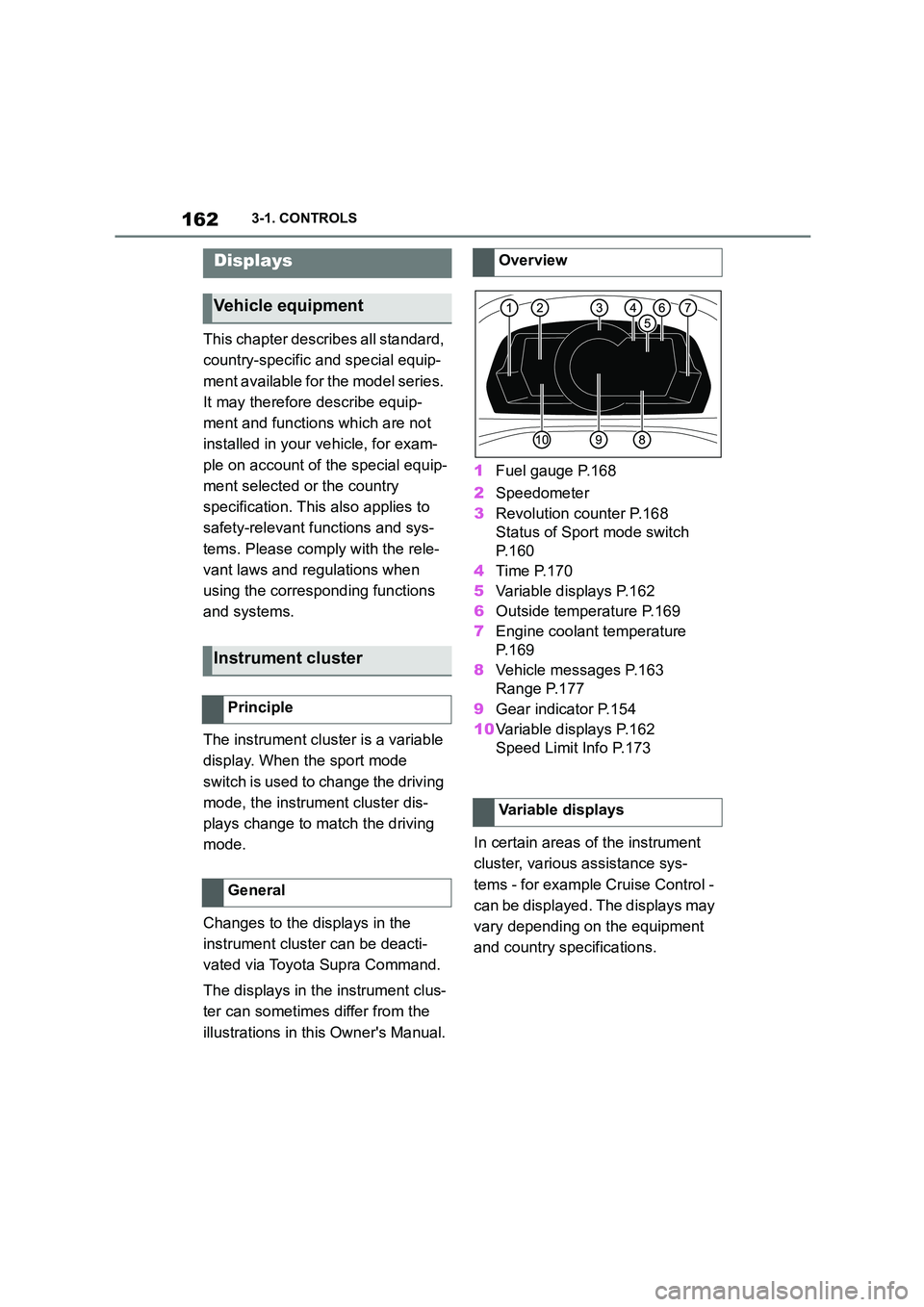
1 Fuel gauge P.168
2 Speedometer
3 Revolution counter P.168
Status of Sport mode switch
P. 1 6 0
4 Time P.170
5 Variable displays P.162
6 Outside temperature P.169
7 Engine coolant temperature
P. 1 6 9
8 Vehicle messages P.163
Range P.177
9 Gear indicator P.154
10 Variable displays P.162
Speed Limit Info P.173
In certain areas of the instrument
cluster, various assistance sys-
tems - for example Cruise Control -
can be displayed. The displays may
vary depending on the equipment
and country specifications.
Displays
Vehicle equipment
Instrument cluster
Principle
General
Overview
Variable displays
Page 174 of 498

1723-1. CONTROLS
The system is controlled using the
following sensors:
• Cameras behind the windscreen.
For further information:
Sensors of the vehicle, see page
50.
Depending on the equipment,
Speed Limit Info is displayed per-
manently in the instrument cluster
or via Toyota Supra Command.
1 "My vehicle"
2 "System settings"
3 "Displays"
4 "Instrument cluster"
5 "Traffic signs"
The display flashes if the detected
speed limit has been exceeded.
Depending on the equipment ver-
sion, an additional symbol with dis-
tance information may also be
displayed to indicate that a change
in speed limit is ahead. Depending
on the equipment, temporary speed
limits may also be displayed; for
example, speed limits at road-
works or traffic management sys-
tems.
Temporary speed limits can only be
displayed if the following services
are selected in the data protection
menu, see page 75, for the naviga-
tion system:
"Map update"
Safety note
WA R N I N G
The system does not relieve you of
your personal responsibility to assess the visibility conditions and traffic situ-
ation correctly. There is a danger of
accidents. Adapt your driving style to the traffic conditions. Observe the
traffic situation and intervene actively
if the situation warrants it.
Overview
Sensors
Displaying Speed Limit Info
General
Display via Toyota Supra Com-
mand
Display
Speed Limit Info
Present speed limit.
Depending on the vehicle
equipment, Speed Limit
Info may not be available.
Speed Limit Info with preview
Page 175 of 498

173
3
3-1. CONTROLS
CONTROLS
Via Toyota Supra Command:
1 "My vehicle"
2 "System settings"
3 "Displays"
4 "Instrument cluster"
5 Select the desired setting:
"Warning when speeding": acti-
vate or deactivate the flashing of
the Speed Limit Info display in
the instrument cluster and the
Head-Up Display when the cur-
rently applicable speed limit is
exceeded.
"Show speeding": the speed limit
detected by the Speed Limit Info
is indicated by a mark in the
speedometer in the instrument
cluster.
For further information:
• Cameras, see page P.50.
Functionality may be limited or
incorrect information may be dis-
played in some situations such as:
If road signs are fully or partially
obscured by objects, stickers or
paint.
If the vehicle is too close to the
vehicle ahead.
If the speed limits stored in the
navigation system or road data
are incorrect.
In the case of speed limits that
depend or the time of day or day
of the week.
In areas not covered by the navi-
gation system.
If there are navigation discrepan-
cies, for example due to changes
in road layout.
In the case of electronic road
signs.
When overtaking buses or trucks
with roadsign stickers.
If traffic signs do not correspond
to the standard.
If signs are detected that apply to
a parallel road.
In the case of country-specific
signs or road layouts.
Speed Limit Info shows the cur-
rently applicable speed limit in the
instrument cluster and the Head-Up
Display, as well as additional signs
where applicable, for example in
wet conditions.
Settings
System limits
System limits of the sensors
Functional limitations
Speed Limit Info with over-
taking restriction display
Speed Limit Info
Principle
Page 176 of 498

1743-1. CONTROLS
The camera in the area of the inte-
rior rear-view mirror detects traffic
signs at the edge of the road as
well as variable overhead signs.
Road signs with additional instruc-
tions, for example restrictions appli-
cable in wet weather, are taken into
account and correlated with infor-
mation in the vehicle, such as the
windscreen wiper signal. The road
sign and corresponding additional
signs are then displayed in the
instrument cluster and the Head-Up
Display, if applicable, or ignored,
depending on the situation. Some
additional signs are taken into
account in the evaluation of the
speed limit, but are not displayed in
the instrument cluster.
The system considers the informa-
tion saved in the navigation system
as applicable and also displays the
speed limits present on unmarked
sections of road.
Overtaking restriction signs and
end of restriction signs that are
detected by the camera are indi-
cated by corresponding symbols in
the instrument cluster and, if appli-
cable, the Head-Up Display.
The system considers overtaking
restrictions and ends of restrictions
that are indicated by means of
signs.
Nothing will be displayed in the fol-
lowing situations:
In countries where overtaking
restrictions are primarily shown
by road markings.
On routes without signs.
In the case of railway crossings,
lane markings and other situa-
tions which indicate an overtak-
ing restriction but which are not
signposted to this effect.
Depending on the equipment ver-
sion, an additional symbol with dis-
tance information may also be
displayed to indicate the end of the
overtaking restriction display.
The system is controlled using the
General
Overtaking restriction dis-
play
Principle
General
Safety note
WA R N I N G
The system does not relieve you of
your personal responsibility to assess the visibility conditions and traffic situ-
ation correctly. There is a danger of
accidents. Adapt your driving style to the traffic conditions. Observe the
traffic situation and intervene actively
if the situation warrants it.
Overview
Sensors
Page 178 of 498
1763-1. CONTROLS
Via Toyota Supra Command:
1 "My vehicle"
2 "System settings"
3 "Displays"
4 "Instrument cluster"
5 Select the desired setting:
"Warning when speeding": acti-
vate or deactivate the flashing of
the Speed Limit Info display in
the instrument cluster and the
Head-Up Display when the cur-
rently applicable speed limit is
exceeded.
"Show speeding": the speed limit
detected by the Speed Limit Info
is indicated by a mark in the
speedometer in the instrument
cluster.
The function may be restricted and
may display incorrec t information in
the following situations, for exam-
ple:
In thick fog, wet conditions or
snow.
If signs are fully or partially
obscured by objects, stickers or
paint.
If the vehicle is too close to the
vehicle ahead.
In the case of bright oncoming
light or strong reflections.
When the windscreen in front of
the rear-view mirror is covered
with condensation, dirt, stickers,
etc.
If the camera has overheated
due to excessively high tempera-
tures and has been temporarily
deactivated.
As a result of incorrect detection
by the camera.
If the speed limits stored in the
navigation system or road data
are incorrect.
In the case of speed limits that
depend or the time of day or day
of the week.
In areas not covered by the navi-
gation system.
If there are deviations in relation
to navigation, for example due to
changes in road routing.
In the case of electronic road
signs.
When overtaking buses or trucks
with road sign stickers.
If traffic signs do not correspond
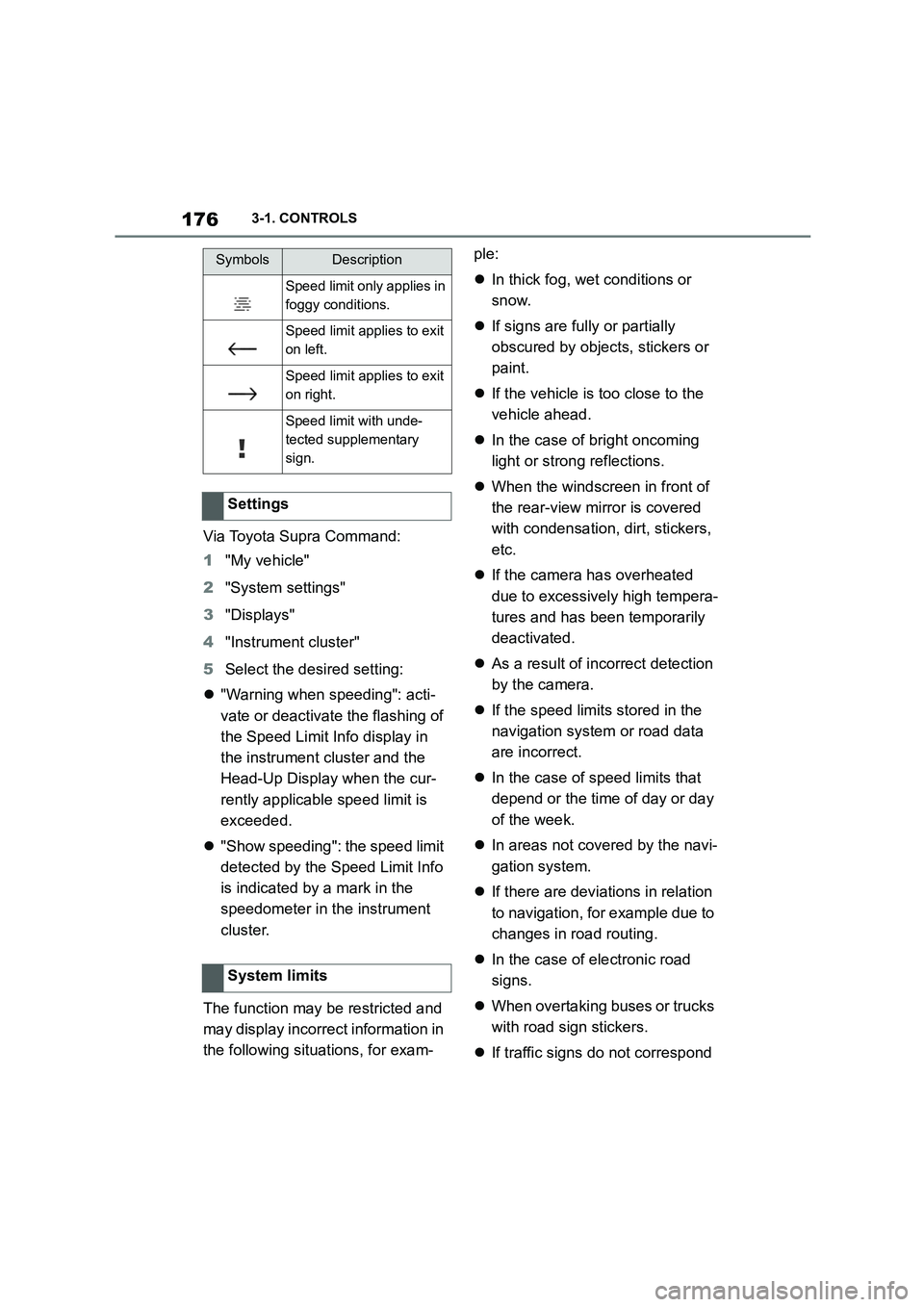
Speed limit only applies in
foggy conditions.
Speed limit applies to exit
on left.
Speed limit applies to exit
on right.
Speed limit with unde-
tected supplementary
sign.
Settings
System limits
SymbolsDescription
Page 186 of 498
1843-1. CONTROLS
cover.
Dirt on the inside or outside of
the windscreen.
Sunglasses with certain polarisa-
tion filters.
Wet road.
Unfavourable lighting conditions.
If the image is di storted, have the
default settings checked by any
authorized Toyota retailer or Toyota
authorized repairer, or any reliable
repairer.
The windscreen is an integral part
of the system.
The shape of the windscreen ena-
bles a sharp image to be projected.
A film in the windscreen prevents
double images occurring.
Therefore if the special windscreen
needs to be replaced, it is strongly
recommended that this be carried
out by any authorized Toyota
retailer or Toyota authorized
repairer, or any reliable repairer if
required.
This chapter describes all standard,
country-specific and special equip-
ment available for the model series.
It may therefore describe equip-
ment and functions which are not
installed in your vehicle, for exam-
ple on account of the special equip-
ment selected or the country
specification. This also applies to
safety-relevant functions and sys-
tems. Please comply with the rele-
vant laws and regulations when
using the corresponding functions
and systems.
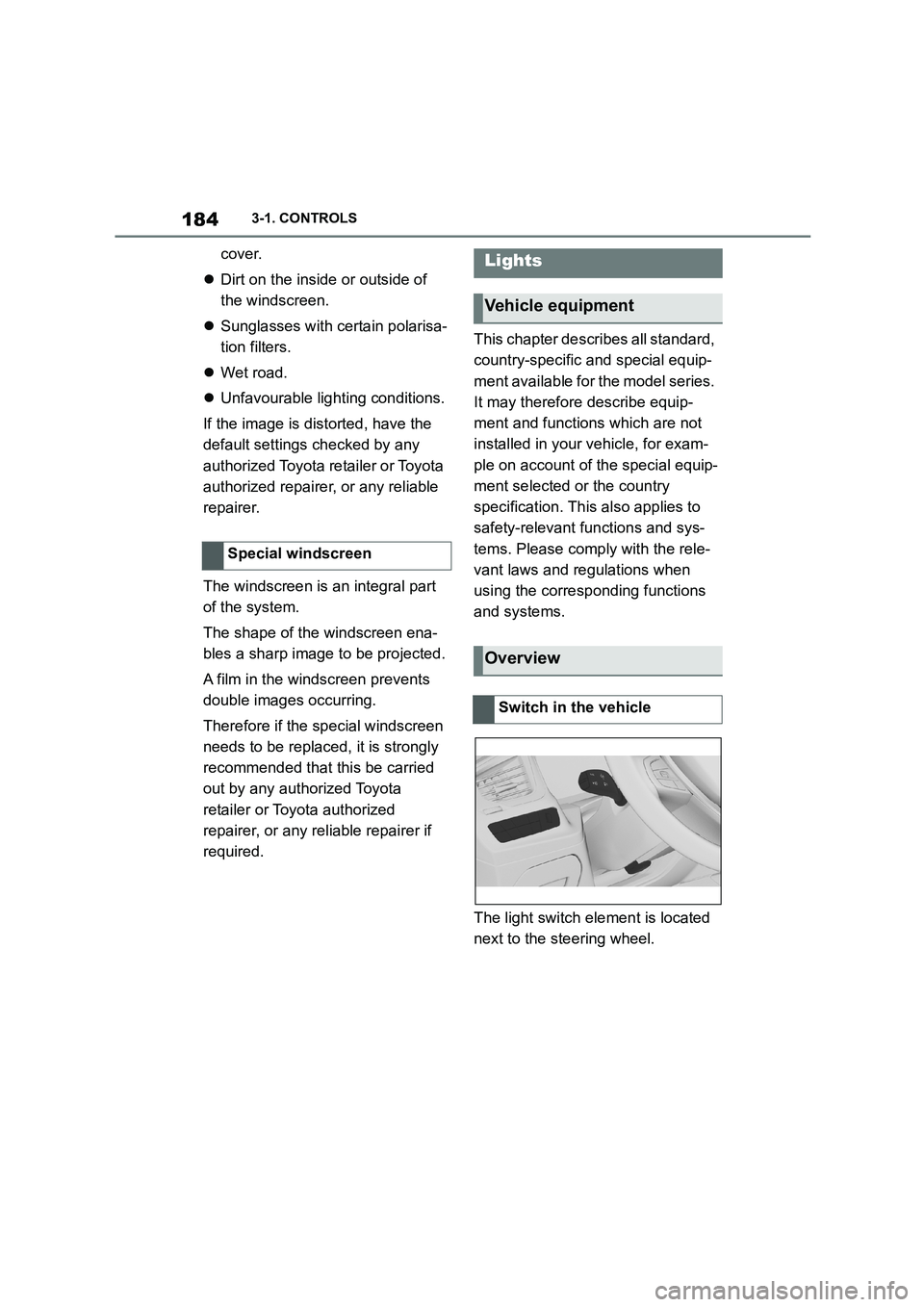
The light switch element is located
next to the steering wheel.
Special windscreen
Lights
Vehicle equipment
Overview
Switch in the vehicle
Page 190 of 498
1883-1. CONTROLS
4"Daytime driving lights"
Variable light distribution enables
even better illumination of the car-
riageway.
The light distribution is automati-
cally adapted to the speed.
If equipment includes a navigation
system, the light distribution is
automatically adapted depending
on the navigation data and speed.
The illuminated area of the
low-beam headlights is extended at
the sides.
The range of the low-beam head-
lights is increased.
In sharp turns up to a specified
speed, for example in hairpin bends
or when turning off, a cornering
light is added to illuminate the
inside area of the bend.
The cornering light is activated
automatically depending on the
steering angle or use of the turn
indicators.
The cornering light may be acti-
vated automatically when driving in
reverse, irrespective of the steer-
ing angle.
Automatic high-beam detects other
road users in good time and acti-
vates or deactivates the high beam
depending on the traffic situation.
Automatic high-beam ensures that
the high-beam headlights are
switched on when the traffic situa-
tion allows. The high-beam head-
lights are not switched on by the
system in the low speed range.
The system responds to the lights
from oncoming traffic and traffic
driving ahead of you, and to ambi-
ent lighting, for example in built-up
areas.
The high-beam headlights can be
switched on and off manually at any
time.
If the vehicle is equipped with daz-
zle-free Automatic high-beam, the
high-beam headlights are not
switched off for oncoming vehicles
or vehicles driving ahead of you;
instead, the system masks those
Variable light distribution
Principle
General
City light
Motorway beam pattern
Cornering light
Automatic high-beam
Principle
General
Page 194 of 498
1923-1. CONTROLS
This chapter describes all standard, country-specific and special equipment
available for the model series. It may therefore describe equipment and
functions which are not installed in your vehicle, for example on account of
the special equipment selected or t he country specification. This also
applies to safety-relevant functions and systems. Please comply with the
relevant laws and regulations when using the corresponding functions and
systems.
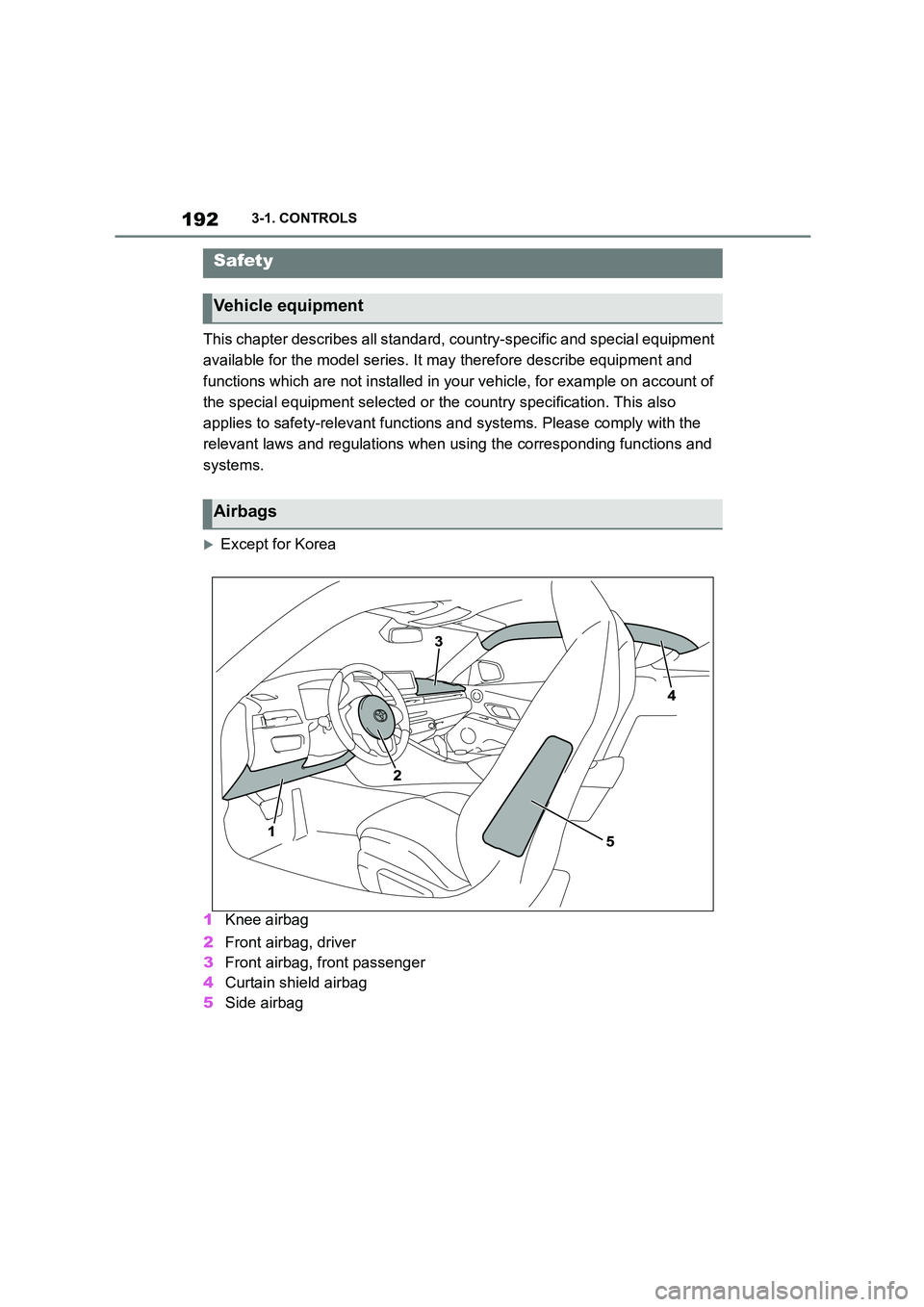
Except for Korea
1 Knee airbag
2 Front airbag, driver
3 Front airbag, front passenger
4 Curtain shield airbag
5 Side airbag
Safety
Vehicle equipment
Airbags