2022 TOYOTA SUPRA ESP
[x] Cancel search: ESPPage 245 of 498
243
3
3-1. CONTROLS
CONTROLS
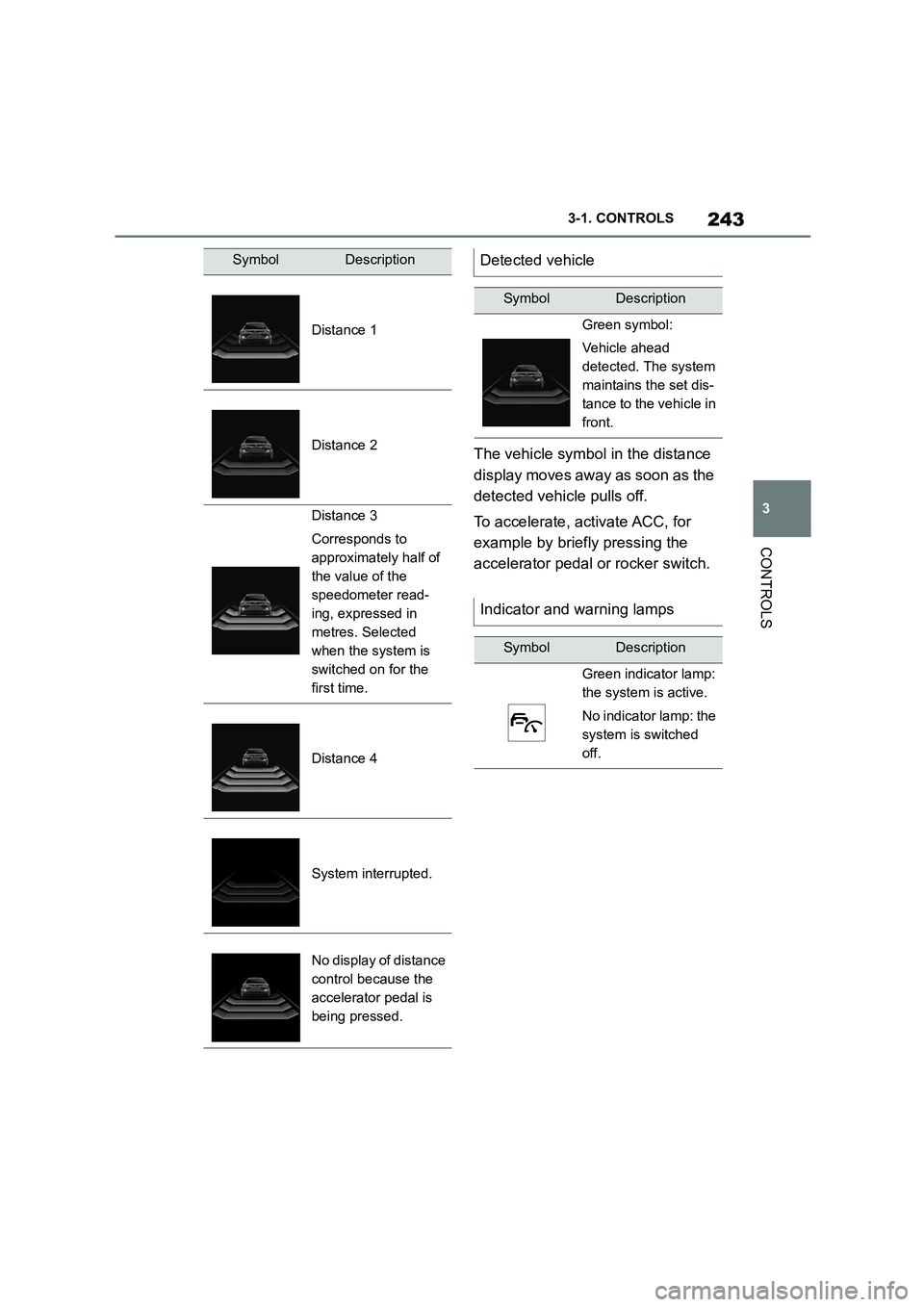
The vehicle symbol in the distance
display moves away as soon as the
detected vehicle pulls off.
To accelerate, activate ACC, for
example by briefly pressing the
accelerator pedal or rocker switch.
SymbolDescription
Distance 1
Distance 2
Distance 3
Corresponds to
approximately half of
the value of the
speedometer read-
ing, expressed in
metres. Selected
when the system is
switched on for the
first time.
Distance 4
System interrupted.
No display of distance
control because the
accelerator pedal is
being pressed.
Detected vehicle
SymbolDescription
Green symbol:
Vehicle ahead
detected. The system
maintains the set dis-
tance to the vehicle in
front.
Indicator and warning lamps
SymbolDescription
Green indicator lamp:
the system is active.
No indicator lamp: the
system is switched
off.
Page 247 of 498
245
3
3-1. CONTROLS
CONTROLS
road users.
For red traffic lights.
For crossing traffic.
For oncoming vehicles.
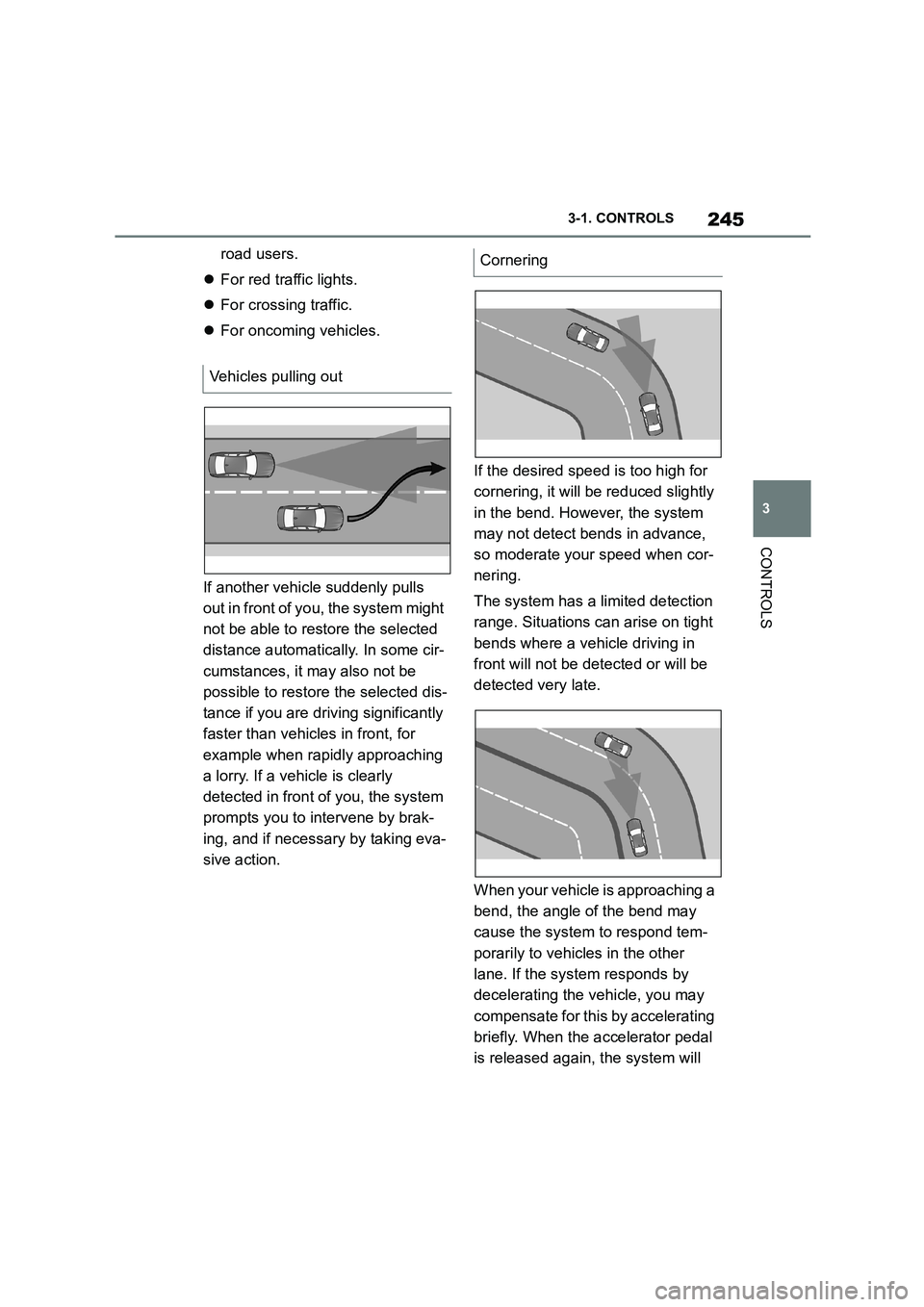
If another vehicle suddenly pulls
out in front of you, the system might
not be able to restore the selected
distance automatically. In some cir-
cumstances, it may also not be
possible to restore the selected dis-
tance if you are driving significantly
faster than vehicles in front, for
example when rapidly approaching
a lorry. If a vehicle is clearly
detected in front of you, the system
prompts you to intervene by brak-
ing, and if necessary by taking eva-
sive action.
If the desired speed is too high for
cornering, it will be reduced slightly
in the bend. However, the system
may not detect bends in advance,
so moderate your speed when cor-
nering.
The system has a limited detection
range. Situations can arise on tight
bends where a vehicle driving in
front will not be detected or will be
detected very late.
When your vehicle is approaching a
bend, the angle of the bend may
cause the system to respond tem-
porarily to vehicles in the other
lane. If the system responds by
decelerating the vehicle, you may
compensate for this by accelerating
briefly. When the accelerator pedal
is released again, the system will
Vehicles pulling out
Cornering
Page 248 of 498
2463-1. CONTROLS
resume control of the vehicle's
speed.
The vehicle cannot drive off auto-
matically in some situations, for
example:
On steep upward gradients.
Before bumps or rises in the
road.
In such cases, de press the acceler-
ator pedal.
The following restrictions may apply
if the weather or lighting conditions
are unfavourable:
Impaired detection of vehicles.
Brief interruptions when vehicles
have already been detected.
Examples of unfavourable weather
or lighting conditions:
Wet roads.
Snowfall.
Slush.
Fog.
Oncoming light.
Pay attention when driving and
respond to the prev ailing traffic con-
ditions. If necessary, intervene
actively, for example by braking,
steering or taking evasive action.
The desired speed is also main-
tained when driving downhill. The
vehicle may drive slower than the
desired speed on uphill gradients if
there is not enough engine power.
*: if equipped
When the systems in the vehicle
(Speed Limit Info, for example)
detect a change in the speed limit
on the route, it is possible to adopt
this new speed lim it value for the
following systems:
Manual Speed Limiter.
Cruise Control.
Dynamic radar cruise control
with full-speed range.
The speed value is proposed as a
new desired speed for adopting.
The relevant system must be acti-
vated for the speed value to be
adopted.
Driving off
Weather
Engine power
Speed Limit Assist*
Principle
Page 249 of 498
247
3
3-1. CONTROLS
CONTROLS
Via Toyota Supra Command:
1 "My vehicle"
2 "Vehicle settings"
3 "Speed Assistant"
A message is displayed in the
instrument cluster if the system and
the Cruise Control are switched on.
In manual mode, a detected speed
limit can be manually adopted for
Cruise Control.
Safety notes
WA R N I N G
The system does not relieve you of
your personal responsibility to assess the traffic situation correctly. Due to
system limitations, it cannot respond
independently and appropriately in all traffic conditions. There is a danger of
accidents. Adapt your driving style to
the traffic conditions. Observe the
traffic situation and intervene actively if the situation warrants it.
WA R N I N G
The desired speed may be acciden-tally set incorrectly or called up by
mistake. There is a danger of acci-
dents. Adjust the desired speed to the traffic conditions. Observe the traffic
situation and intervene actively if the
situation warrants it.
Overview
Buttons on the steering wheel
ButtonFunction
Adopt the suggested
speed manually.
Switching on/off and setting
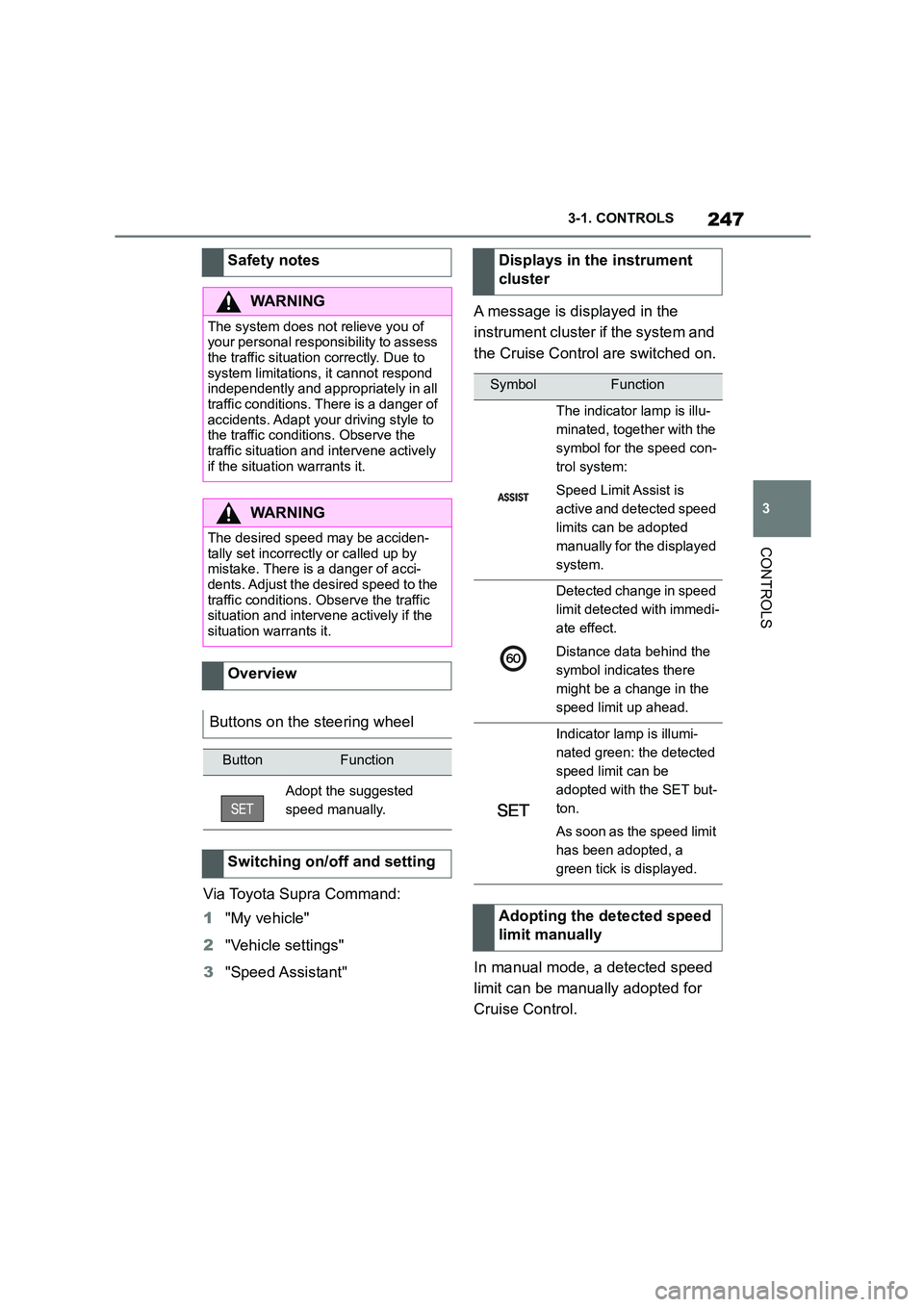
Displays in the instrument
cluster
SymbolFunction
The indicator lamp is illu-
minated, together with the
symbol for the speed con-
trol system:
Speed Limit Assist is
active and detected speed
limits can be adopted
manually for the displayed
system.
Detected change in speed
limit detected with immedi-
ate effect.
Distance data behind the
symbol indicates there
might be a change in the
speed limit up ahead.
Indicator lamp is illumi-
nated green: the detected
speed limit can be
adopted with the SET but-
ton.
As soon as the speed limit
has been adopted, a
green tick is displayed.
Adopting the detected speed
limit manually
Page 250 of 498

2483-1. CONTROLS
It is possible to set whether the
speed limit should be accepted
exactly, or with a tolerance of –15
km/h, –10 mph to +15 km/h, +10
mph.
Via Toyota Supra Command:
1 "My vehicle"
2 "Vehicle settings"
3 "Speed Assistant"
4 "Adjust speed limits"
5 Confirm the desired setting.
Speed Limit Assist based on the
Speed Limit Info system.
Take into account the Speed Limit
Info system limits, see page 176.
Depending on the country, dis-
played speed limits may not be
available for acceptance, or only
available with restrictions, for
example with speed information
from the navigation system.
Cruise Control without distance
control: depending on the system, it
may not be possible to adopt speed
limits automatically.
Speed limits that are ahead may
only be adopted for Dynamic radar
cruise control.
The system may not respond to
speed limits if the navigation sys-
tem cannot determine the position
of the vehicle with certainty.
Parking Sensor provides assis-
tance when parking the vehicle.
Objects in front of or behind the
vehicle as it slowly approaches are
indicated by means of acoustic sig-
nals and a display on the Control
Display.
Depending on the equipment ver-
sion: obstacles at the side of the
vehicle that are detected by the
side ultrasonic sensors may also be
reported by the flank protection,
see page 252, function.
The ultrasonic sensors for measur-
ing distances are located in the
bumpers, and if applicable on the
side of the vehicle.
Their range is approximately 2 m, 6
ft, depending on the obstacle and
environment.
An acoustic warning is given when
the vehicle is approx. 70 cm, 27 in
away from an obje ct and a collision
is imminent.
For objects behind the vehicle, the
acoustic warning is given sooner, at
When the SET symbol illumi-
nates in white, press the but-
ton.
Setting the speed adjustment
System limits
Parking Sensors
Principle
General
Page 251 of 498
249
3
3-1. CONTROLS
CONTROLS
a distance of approx. 1.50 m, 5 ft.
The system is controlled using the
following sensors:
• Ultrasonic sensors in the bump-
ers.
For further information:
Sensors of the vehicle, see page
52.
The system switches on automati-
cally in the follo wing situations:
If selector lever position R is
engaged while the engine is run-
ning.
Depending on the equipment
version: when approaching
detected obstacles, if the speed
is below approximately 4 km/h,
2.5 mph. The activation distance
depends on the individual situa-
tion.
Automatic activation on detection of
obstacles can be enabled and disa-
bled.
Via Toyota Supra Command:
1 "My vehicle"
2 "Vehicle settings"
3 "Parking"
4 If applicable: "Automatic Parking
Sensors activation"
5 "Automatic Parking Sensors
activ."
Safety notes
WA R N I N G
The system does not relieve you of
your personal responsibility to assess the traffic situation correctly. Due to
system limitations, it cannot respond
independently and appropriately in all
traffic conditions. There is a danger of accidents. Adapt your driving style to
the traffic conditions. Observe the
traffic situation and intervene actively if the situation warrants it.
WA R N I N G
If the vehicle is travelling at high speed when Parking Sensors is acti-
vated, there may be a delayed warn-
ing because of physical conditions. There is a danger of injury or damage
to property. Avoid approaching an
object at speed. Avoid moving off at
speed while Parking Sensors is not yet active.
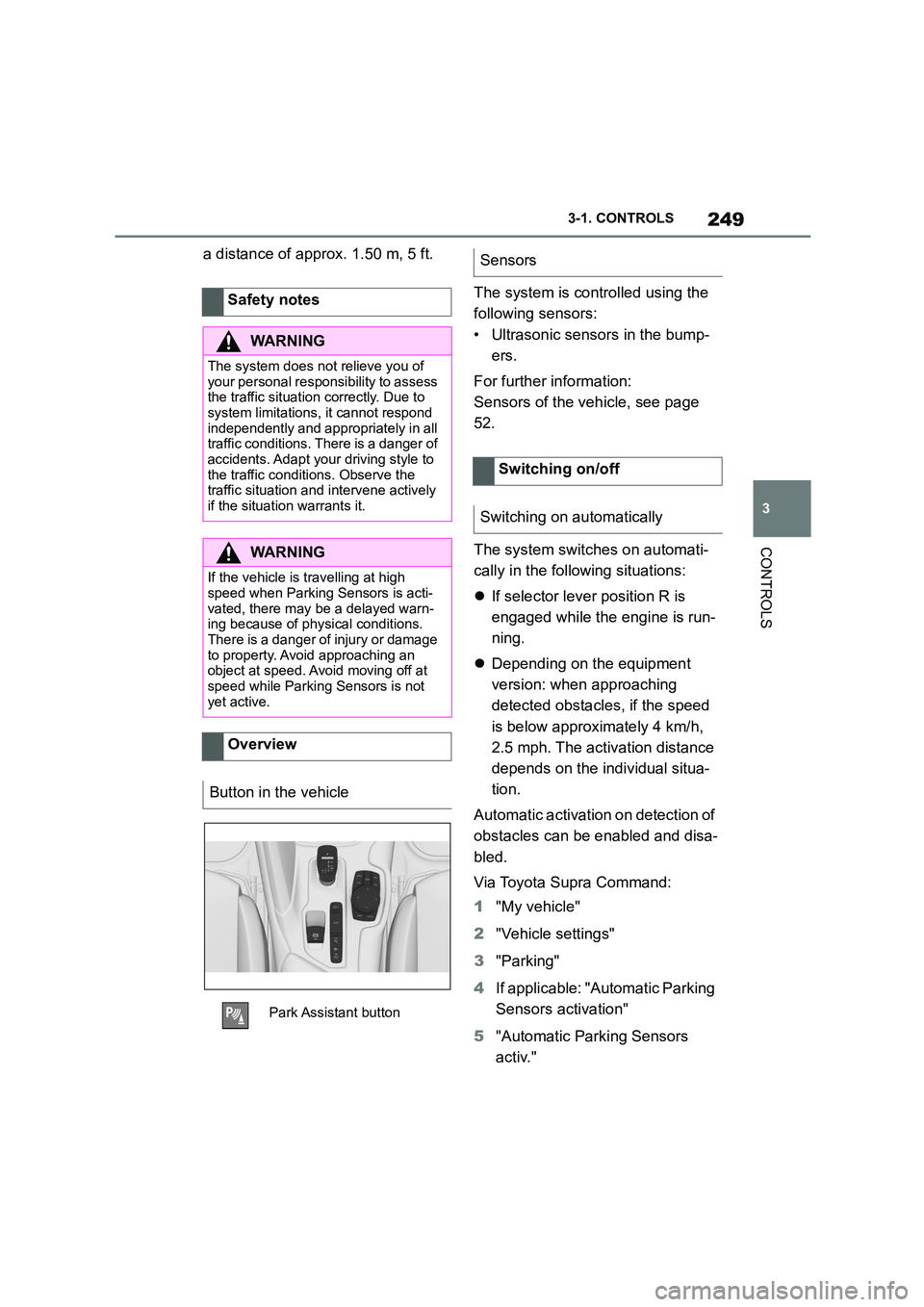
Overview
Button in the vehicle
Park Assistant button
Sensors
Switching on/off
Switching on automatically
Page 252 of 498

2503-1. CONTROLS
Depending on the equipment ver-
sion, a respective camera view is
switched on additionally.
The system switches off when a
certain distance or speed is
exceeded.
Switch the system back on if neces-
sary.
On: the LED is illuminated.
Off: the LED is extinguished.
The image from the rear-view cam-
era is shown when reverse gear is
engaged and the Park Assistant
button is pressed.
Depending on the equipment, the
system cannot be switched off
manually when reverse gear is
engaged.
■General
An intermittent so und indicates the
position of an object accordingly as
the vehicle approaches it. For
instance, if an object is identified to
the rear left of the vehicle, the
acoustic signal is emitted from the
rear left loudspeaker.
The shorter the distance to an
object, the shorter the intervals
become.
A continuous tone sounds if the dis-
tance to a detected object is less
than approximately 20 cm, 8 in.
If there are objects in front of and
behind the vehicle at the same
time, and they are at a distance of
less than approximately 20 cm, 8
in, an alternating continuous tone
sounds.
The intermittent tone and the con-
tinuous tone are switched off when
selector lever position P is
engaged.
With the vehicle at a standstill, the
intermittent sound is switched off
after a short period of time.
■Volume control
The Parking Sensor acoustic signal
volume can be adjusted.
Via Toyota Supra Command:
1 "My vehicle"
2 "System settings"
3 "Sounds"
4 "Volume settings"
5 "Parking Sensor"
6 Set the desired value.
Switching off automatically when
moving forwards
Switching on/off manually
Press the Park Assistant but-
ton.
Warning
Acoustic signals
Page 254 of 498

2523-1. CONTROLS
Via Toyota Supra Command:
1 "My vehicle"
2 "Vehicle settings"
3 "Parking"
4 "Active PDC emergency inter-
vention"
5 "Active PDC emergency interv."
The system warns about obstacles
at the side of the vehicle.
The system uses the ultrasonic
sensors of Parking Sensor and
Park Assistant.
Obstacle markings are displayed at
the sides of the vehicle to protect
the vehicle's flanks.
Coloured markings: warning that
obstacles have been detected.
Grey markings, hatched sur-
face: no obstacles have been
detected.
No markings, black surface: the
area adjacent to the vehicle has
not yet been detected.
The system only shows stationary
obstacles that were previously
detected by the sensors when driv-
ing past.
The system does not detect
whether an obstacle subsequently
moves. The markings are shown in
black after a certain time when the
vehicle is stationary. The area next
to the vehicle needs to be scanned
again.
Safety note
WA R N I N G
The system does not relieve you of
your personal responsibility to assess the traffic situation correctly. There is
a risk of accident. Adapt your driving
style to the traffic conditions. Addition- ally, look directly to check the traffic
situation and the area around the
vehicle and intervene actively where
appropriate.
Activating/deactivating the system
Depending on the equipment
version: lateral parking aid
Principle
General
Display
Lateral parking aid limits