2022 TOYOTA COROLLA CROSS engine
[x] Cancel search: enginePage 130 of 612
1303-4. Adjusting the steering wheel and mirrors
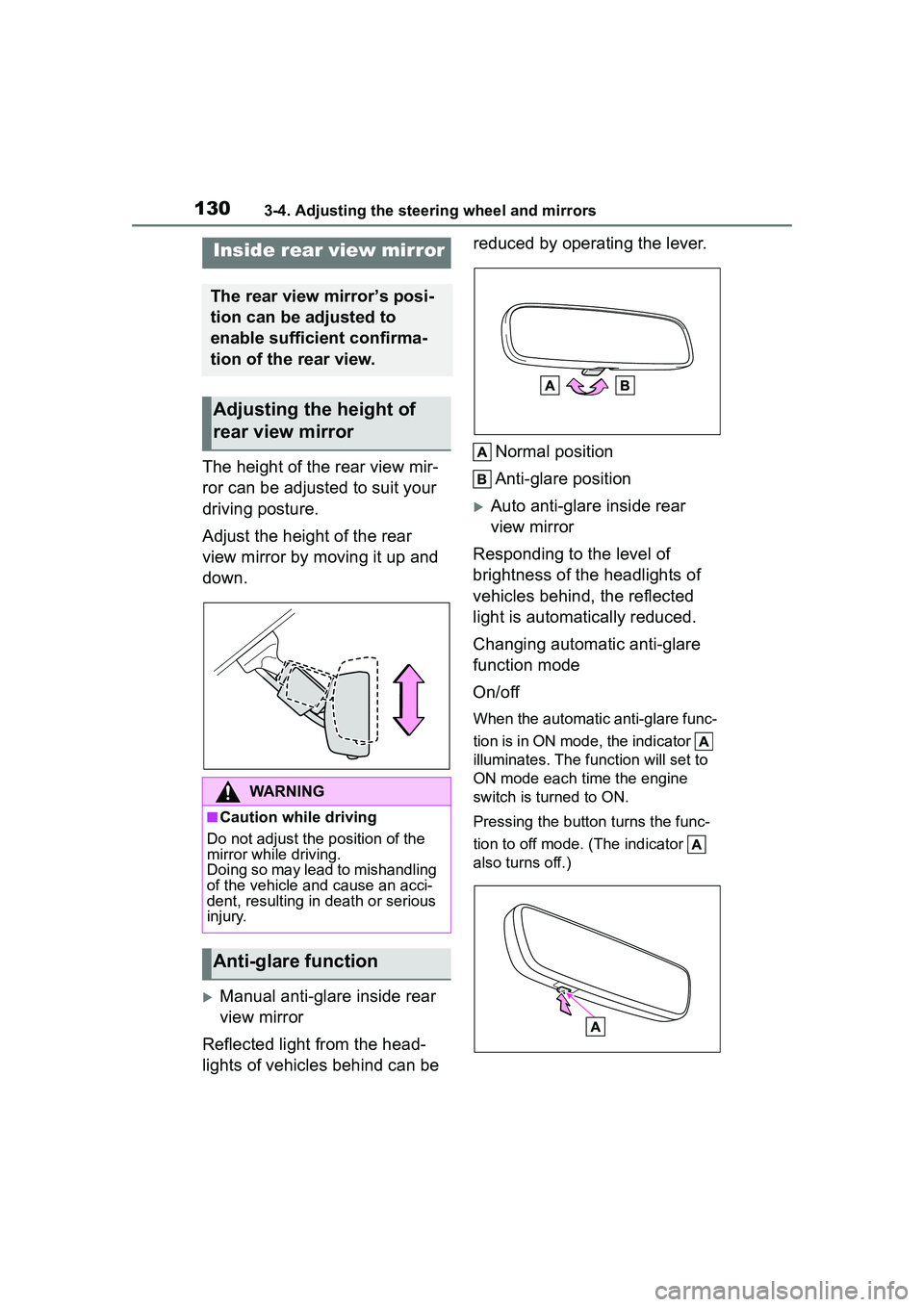
The height of the rear view mir-
ror can be adjusted to suit your
driving posture.
Adjust the height of the rear
view mirror by moving it up and
down.
Manual anti-glare inside rear
view mirror
Reflected light from the head-
lights of vehicles behind can be reduced by operating the lever.
Normal position
Anti-glare position
Auto anti-glare inside rear
view mirror
Responding to the level of
brightness of the headlights of
vehicles behind, the reflected
light is automatically reduced.
Changing automatic anti-glare
function mode
On/off
When the automatic anti-glare func-
tion is in ON mode, the indicator
illuminates. The function will set to
ON mode each time the engine
switch is turned to ON.
Pressing the button turns the func-
tion to off mode. (The indicator
also turns off.)
Inside rear view mirror
The rear view mirror’s posi-
tion can be adjusted to
enable sufficient confirma-
tion of the rear view.
Adjusting the height of
rear view mirror
WARNING
■Caution while driving
Do not adjust the position of the
mirror while driving.
Doing so may lead to mishandling
of the vehicle and cause an acci-
dent, resulting in death or serious
injury.
Anti-glare function
Page 132 of 612
1323-4. Adjusting the steering wheel and mirrors
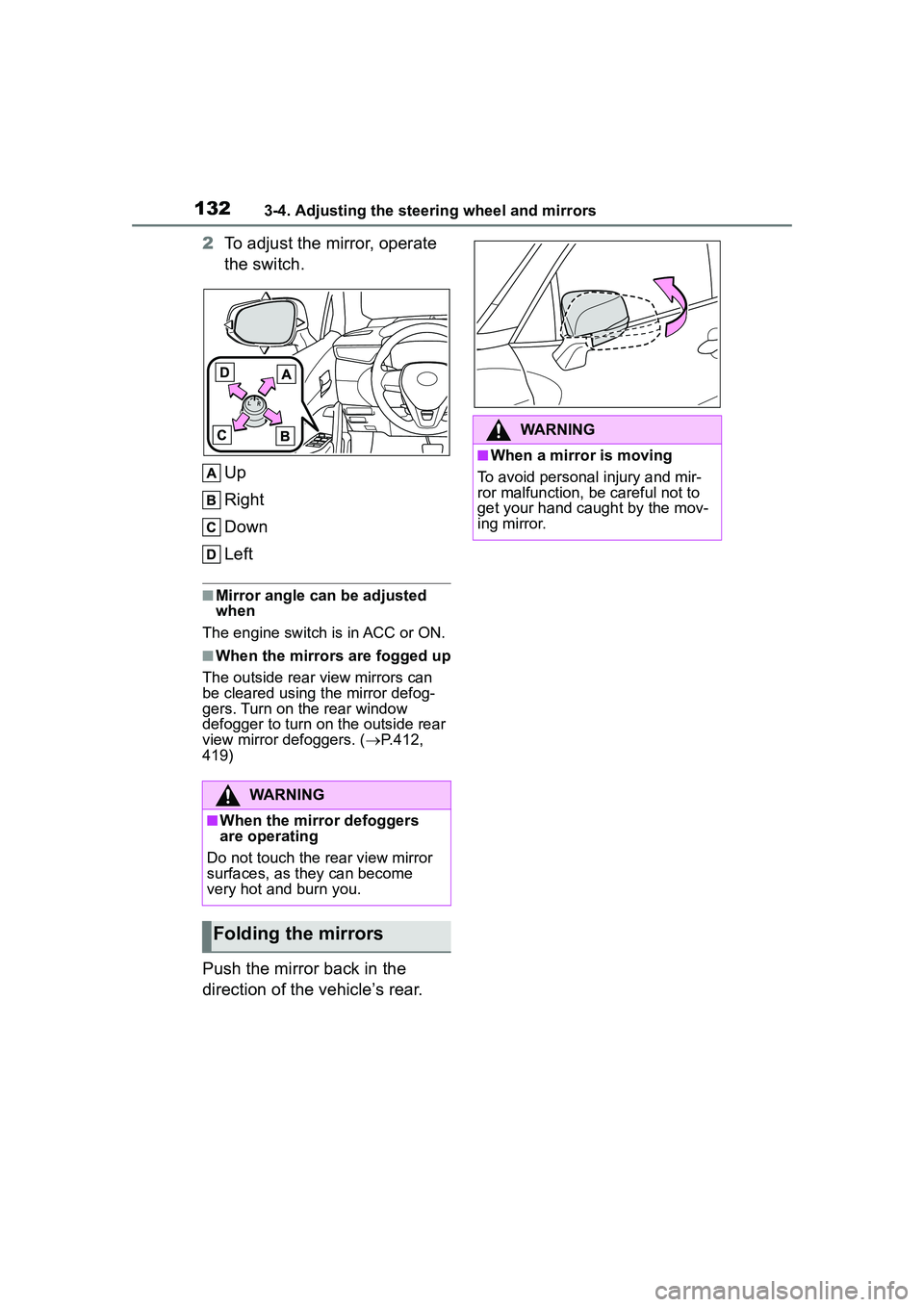
2To adjust the mirror, operate
the switch.
Up
Right
Down
Left
■Mirror angle can be adjusted
when
The engine switch is in ACC or ON.
■When the mirrors are fogged up
The outside rear view mirrors can
be cleared using the mirror defog-
gers. Turn on the rear window
defogger to turn on the outside rear
view mirror defoggers. ( P.412,
419)
Push the mirror back in the
direction of the vehicle’s rear.
WARNING
■When the mirror defoggers
are operating
Do not touch the rear view mirror
surfaces, as they can become
very hot and burn you.
Folding the mirrors
WARNING
■When a mirror is moving
To avoid personal injury and mir-
ror malfunction, be careful not to
get your hand caught by the mov-
ing mirror.
Page 133 of 612
1333-5. Opening and closing the windows
3
Before driving
3-5.Opening and closing the windows
The power windows can be
opened and closed using the
switches.
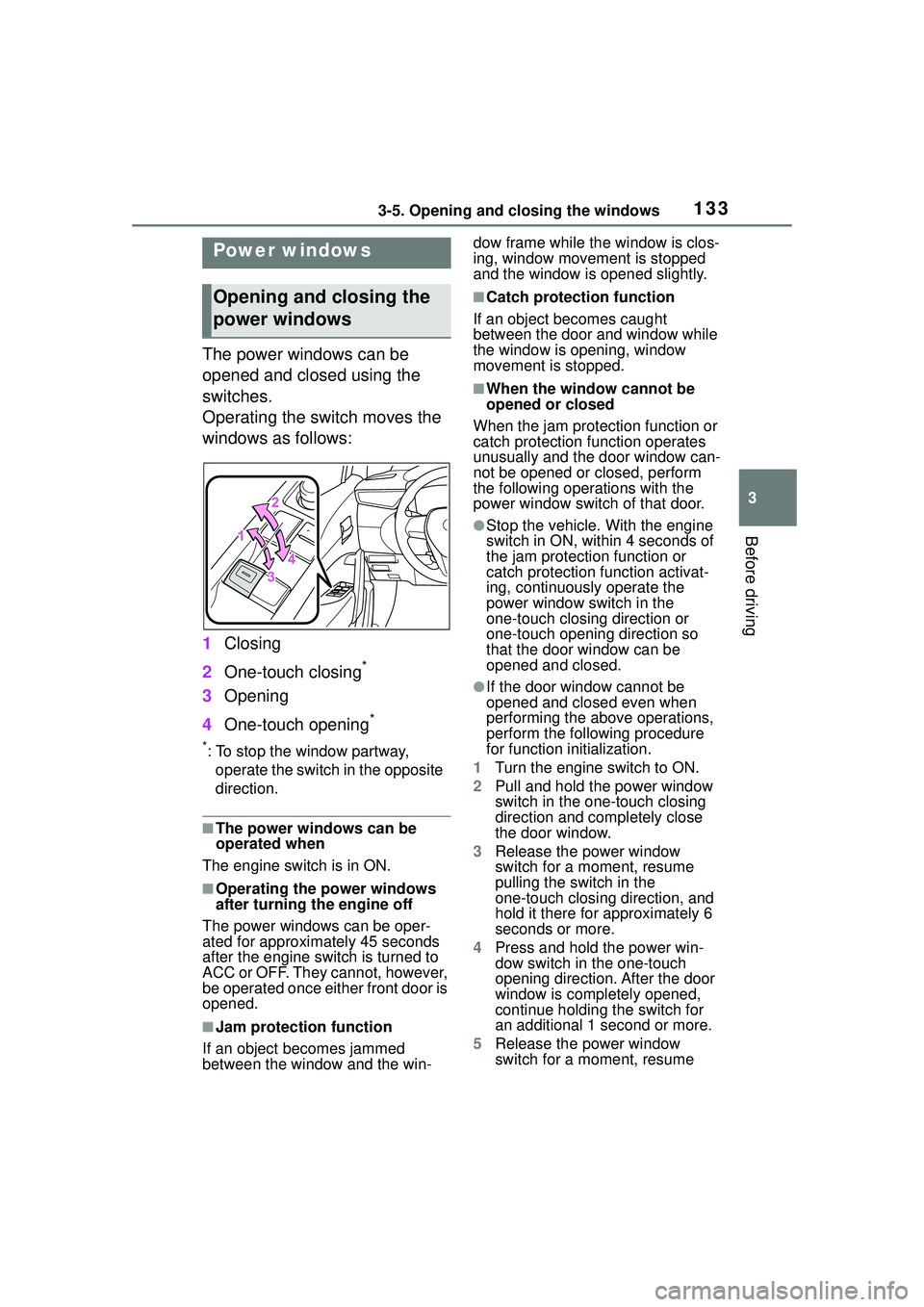
Operating the switch moves the
windows as follows:
1Closing
2 One-touch closing
*
3Opening
4 One-touch opening
*
*: To stop the window partway,
operate the switch in the opposite
direction.
■The power windows can be
operated when
The engine switch is in ON.
■Operating the power windows
after turning the engine off
The power windows can be oper-
ated for approximately 45 seconds
after the engine switch is turned to
ACC or OFF. They cannot, however,
be operated once either front door is
opened.
■Jam protection function
If an object becomes jammed
between the window and the win- dow frame while the window is clos-
ing, window movement is stopped
and the window is opened slightly.
■Catch protection function
If an object becomes caught
between the door and window while
the window is opening, window
movement is stopped.
■When the window cannot be
opened or closed
When the jam protection function or
catch protection function operates
unusually and the door window can-
not be opened or closed, perform
the following operations with the
power window switch of that door.
●Stop the vehicle. With the engine
switch in ON, within 4 seconds of
the jam protection function or
catch protection function activat-
ing, continuously operate the
power window switch in the
one-touch closing direction or
one-touch opening direction so
that the door window can be
opened and closed.
●If the door window cannot be
opened and closed even when
performing the above operations,
perform the following procedure
for function initialization.
1 Turn the engine switch to ON.
2 Pull and hold the power window
switch in the one-touch closing
direction and completely close
the door window.
3 Release the power window
switch for a moment, resume
pulling the switch in the
one-touch closing direction, and
hold it there for approximately 6
seconds or more.
4 Press and hold the power win-
dow switch in the one-touch
opening direction. After the door
window is completely opened,
continue holding the switch for
an additional 1 second or more.
5 Release the power window
switch for a moment, resume
Power windows
Opening and closing the
power windows
Page 134 of 612

1343-5. Opening and closing the windows
pushing the switch in the
one-touch opening direction, and
hold it there for approximately 4
seconds or more.
6 Pull and hold the power window
switch in the one-touch closing
direction again. After the door
window is completely closed,
continue holding the switch for a
further 1 second or more.
If you release the switch while the
window is moving, start again from
the beginning.
If the window reverses and cannot
be fully closed or opened, have the
vehicle inspected by your Toyota
dealer.
■Door lock linked window opera-
tion
●Vehicles without a smart key sys-
tem: The power windows can be
opened and closed using the key.
*
( P.105)
Vehicles with a smart key system:
The power windows can be
opened and closed using the
mechanical key.
* ( P.531)
●The power windows can be
opened using the wireless remote
control.
* ( P.104)
*: These settings must be custom-
ized at your Toyota dealer.
■Customization
Some functions can be customized.
( P.563)
WARNING
Observe the following precau-
tions. Failure to do so may result
in death or serious injury.
■Closing the windows
●The driver is responsible for all
the power window operations,
including the operation for the
passengers. In order to prevent
accidental operation, especially
by a child, do not let a child
operate the power windows. It is
possible for children and other
passengers to have body parts
caught in the power window.
Also, when riding with a child, it
is recommended to use the win-
dow lock switch. (
P.135)
●Check to make sure that all pas-
sengers do not have any part of
their body in a position where it
could be caught when a window
is being operated.
●When using the wireless remote
control, key or mechanical key
and operating the power win-
dows, operate the power win-
dow after checking to make
sure that there is no possibility
of any passenger having any of
their body parts caught in the
window. Also do not let a child
operate window by the wireless
remote control, key or mechani-
cal key. It is po ssible for children
and other passengers to get
caught in the power window.
●When exiting the vehicle, turn
the engine switch off, carry the
key and exit the vehicle along
with the child. There may be
accidental operation, due to
mischief, etc., that may possibly
lead to an accident.
Page 135 of 612
1353-5. Opening and closing the windows
3
Before driving
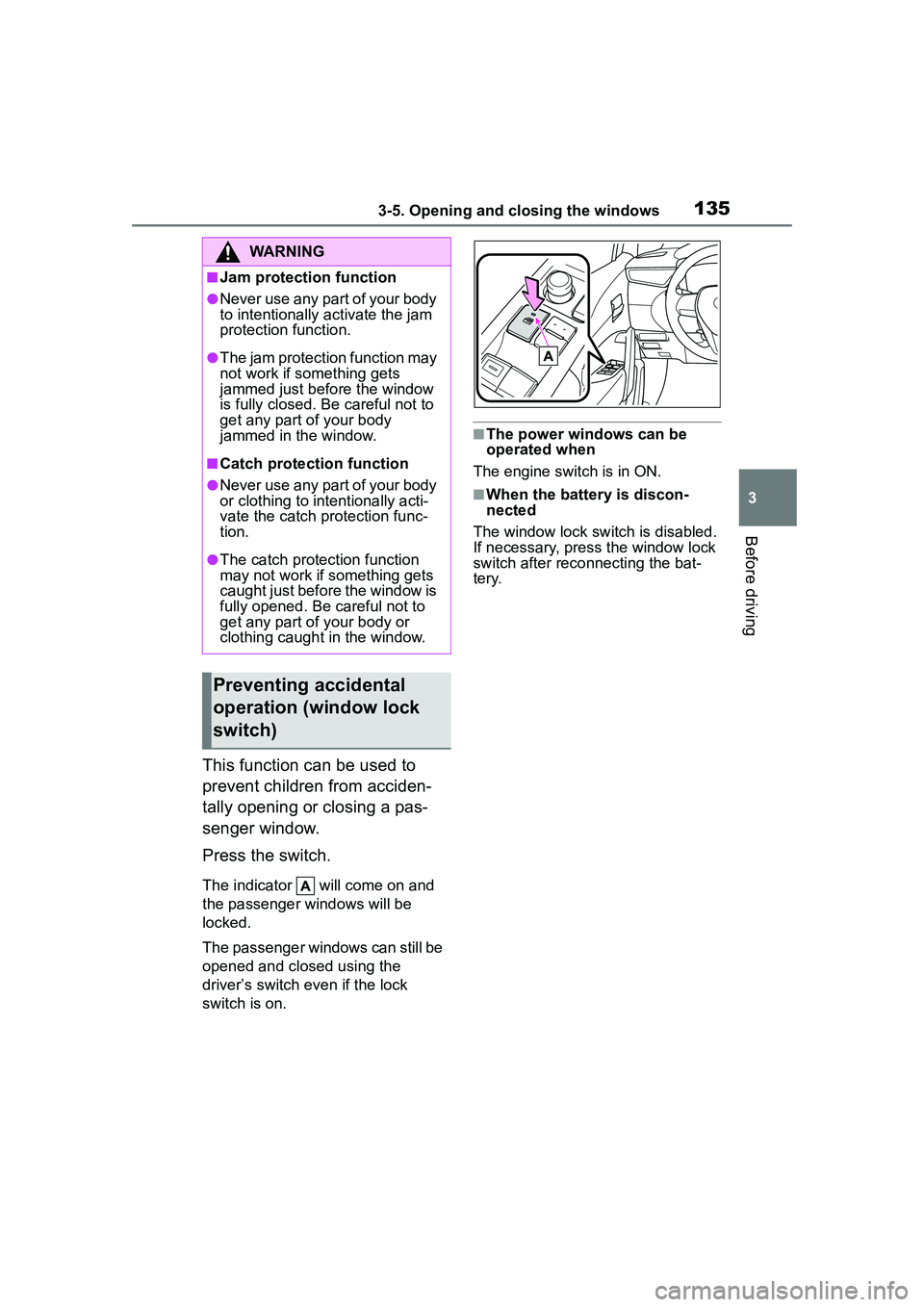
This function can be used to
prevent children from acciden-
tally opening or closing a pas-
senger window.
Press the switch.
The indicator will come on and
the passenger windows will be
locked.
The passenger windows can still be
opened and closed using the
driver’s switch even if the lock
switch is on.
■The power windows can be
operated when
The engine switch is in ON.
■When the battery is discon-
nected
The window lock switch is disabled.
If necessary, press the window lock
switch after reco nnecting the bat-
tery.
WARNING
■Jam protection function
●Never use any part of your body
to intentionally activate the jam
protection function.
●The jam protection function may
not work if something gets
jammed just before the window
is fully closed. Be careful not to
get any part of your body
jammed in the window.
■Catch protection function
●Never use any part of your body
or clothing to intentionally acti-
vate the catch protection func-
tion.
●The catch protection function
may not work if something gets
caught just before the window is
fully opened. Be careful not to
get any part of your body or
clothing caught in the window.
Preventing accidental
operation (window lock
switch)
Page 136 of 612
1363-5. Opening and closing the windows
*: If equipped
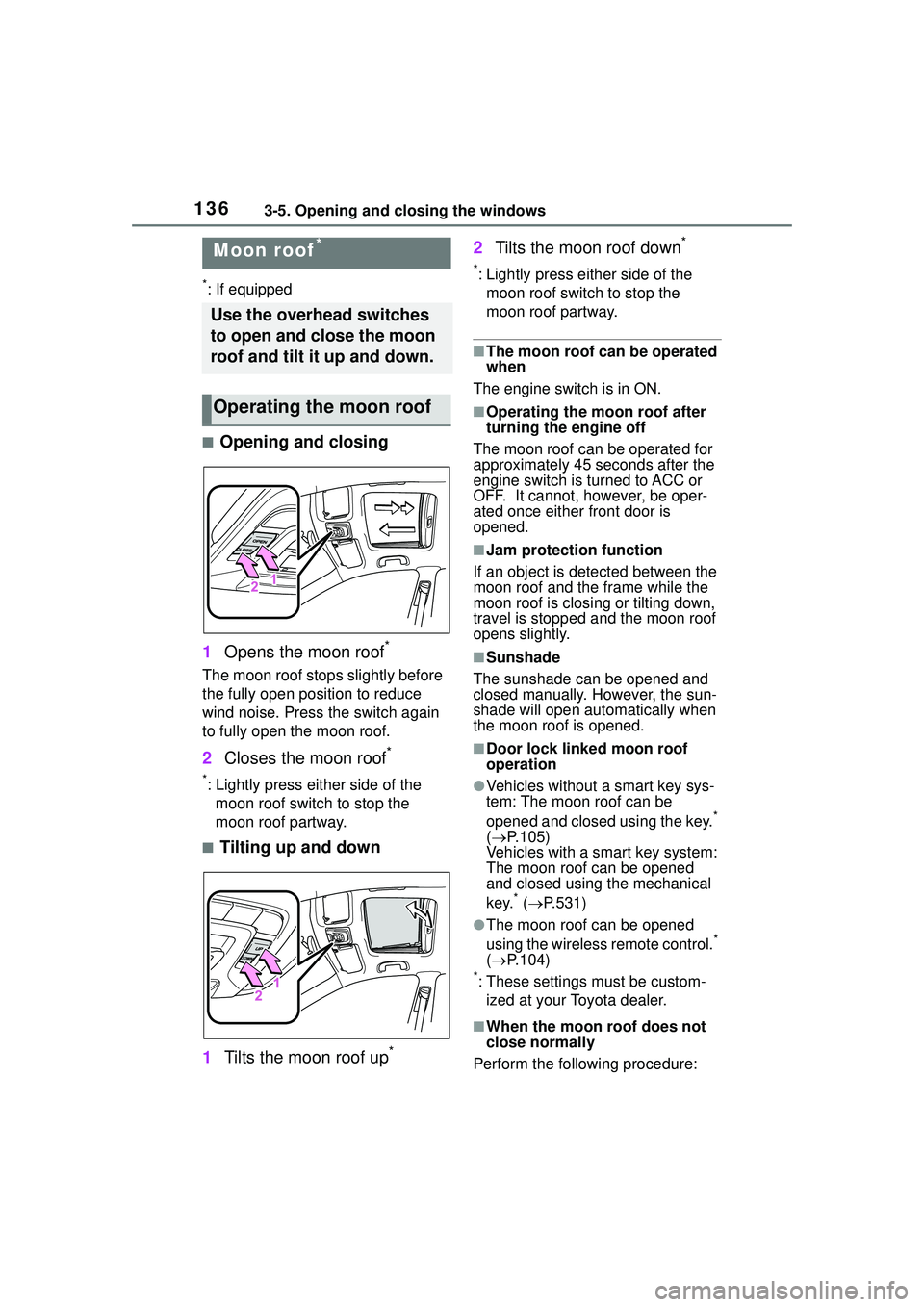
■Opening and closing
1 Opens the moon roof
*
The moon roof stops slightly before
the fully open position to reduce
wind noise. Press the switch again
to fully open the moon roof.
2Closes the moon roof*
*: Lightly press either side of the
moon roof switch to stop the
moon roof partway.
■Tilting up and down
1 Tilts the moon roof up
*
2Tilts the moon roof down*
*: Lightly press either side of the
moon roof switch to stop the
moon roof partway.
■The moon roof can be operated
when
The engine switch is in ON.
■Operating the moon roof after
turning the engine off
The moon roof can be operated for
approximately 45 seconds after the
engine switch is turned to ACC or
OFF. It cannot, however, be oper-
ated once either front door is
opened.
■Jam protection function
If an object is detected between the
moon roof and the frame while the
moon roof is closing or tilting down,
travel is stopped and the moon roof
opens slightly.
■Sunshade
The sunshade can be opened and
closed manually. However, the sun-
shade will open autom atically when
the moon roof is opened.
■Door lock linked moon roof
operation
●Vehicles without a smart key sys-
tem: The moon roof can be
opened and closed using the key.
*
( P.105)
Vehicles with a smart key system:
The moon roof can be opened
and closed using the mechanical
key.
* ( P.531)
●The moon roof can be opened
using the wireless remote control.*
( P.104)
*: These settings must be custom-
ized at your Toyota dealer.
■When the moon roof does not
close normally
Perform the following procedure:
Moon roof*
Use the overhead switches
to open and close the moon
roof and tilt it up and down.
Operating the moon roof
Page 138 of 612

1383-5. Opening and closing the windows
WARNING
●Check to make sure that all pas-
sengers do not have any part of
their body in a position where it
could be caught when the moon
roof is being operated.
●When using the wireless remote
control, key or mechanical key
and operating the moon roof,
operate the moon roof after
checking to make sure that
there is no possibility of any
passenger having any of their
body parts caught in the moon
roof. Also, do not let a child
operate moon roof by the wire-
less remote control, key or
mechanical key. It is possible for
children and other passengers
to get caught in the moon roof.
●When exiting the vehicle, turn
the engine switch off, carry the
key and exit the vehicle along
with the child. There may be
accidental operation, due to
mischief, etc., that may possibly
lead to an accident.
■Jam protection function
●Never use any part of your body
to intentionally activate the jam
protection function.
●The jam protection function may
not work if something gets
caught just before the moon
roof is fully closed. Also, the jam
protection function is not
designed to operate while the
moon roof switch is being
pressed. Take care so that your
fingers, etc. do not get caught.
Page 139 of 612

139
4
4
Driving
Driving
.4-1. Before drivingDriving the vehicle....... 141
Cargo and luggage ..... 147
Vehicle load limits ....... 150
Trailer towing............... 151
Dinghy towing ............. 161
4-2. Driving procedures Engine (ignition) switch (vehicles without a smart
key system) ............... 162
Engine (ignition) switch (vehicles with a smart key
system)...................... 163
Continuously variable trans- mission ...................... 167
Turn signal lever.......... 170
Parking brake .............. 171
Brake Hold .................. 174
4-3. Operating the lights and wipers
Headlight switch .......... 177
Automatic High Beam . 180
Fog light switch ........... 184
Windshield wipers and washer....................... 184
Rear windshield wiper and washer....................... 186
4-4. Refueling Opening the fuel tank cap.................................. 1884-5. Using the driving support
systems
Toyota Safety Sense 2.0 .................................. 190
PCS (Pre-Collision System) .................................. 195
LTA (Lane Tracing Assist) .................................. 203
RSA (Road Sign Assist) .................................. 213
Dynamic radar cruise con- trol with full-speed range
.................................. 216
Stop & Start system .... 227
BSM (Blind Spot Monitor) .................................. 233
RCTA (Rear Cross Traffic Alert) .......................... 238
Rear view monitor system .................................. 243
Intuitive parking assist . 251
PKSB (Parking Support Brake) ........................ 258
Parking Support Brake func- tion (static objects) .... 264
Parking Support Brake func- tion (rear-crossing vehi-
cles) ........................... 267
Driving assist systems .................................. 269
4-6. Driving tips Winter driving tips........ 274