2022 TOYOTA COROLLA CROSS engine
[x] Cancel search: enginePage 168 of 612

1684-2. Driving procedures
out, the vehicle can be driven again.
If the warning message does not go
out after waiting a while, have your
vehicle inspected by your Toyota
dealer.
■Restraining sudden start
(Drive-Start Control)
P. 1 4 7
■After recharging/reconnecting
the battery
P. 5 3 4
:While the engine switch is in
ON and the brake pedal
depressed
*, shift the shift lever while pushing the shift release
button on the shift knob.
:Shift the shift lever while
pushing the shift release button
on the shift knob.
:Shift the shift lever normally.
When shifting the shift lever
between P and D, make sure that
the vehicle is completely stopped
and the brake pedal is depressed.
*: For the vehicle be able to be shifted from P, the brake pedal
must be depressed before the
shift release button is pushed. If
the shift release button is pushed
first, the shift lock will not be
released.
■Continuously variable transmis-
sion fail-safe control
The system detects malfunctioning
parts targeted (all of the solenoids
that perform the shifting function) by
the On-Board Diagnostics, and per-
forms fail-safe me chanisms, such
as restricting the shifting function or
transmission ratio control.
In this event, the malfunction indica-
tor lamp turns on.
■Shift lock system
The shift lock system is a system to
prevent accidental operation of the
shift lever in starting.
The shift lever can be shifted from P
only when the engine switch is in
ON and the brake pedal is being
depressed.
■If the shift lever cannot be
shifted from P
First, check whether the brake pedal
is being depressed.
If the shift lever cannot be shifted
with your foot on the brake pedal,
there may be a problem with the
shift lock system. Have the vehicle
WARNING
■When driving on slippery
road surfaces
Do not accelerate or shift the shift
gears suddenly.
Sudden changes in engine brak-
ing may cause the vehicle to spin
or skid, resulting in an accident.
Shifting the shift lever
Page 169 of 612
1694-2. Driving procedures
4
Driving
inspected by your Toyota dealer
immediately.
The following steps may be used as
an emergency measure to ensure
that the shift lever can be shifted.
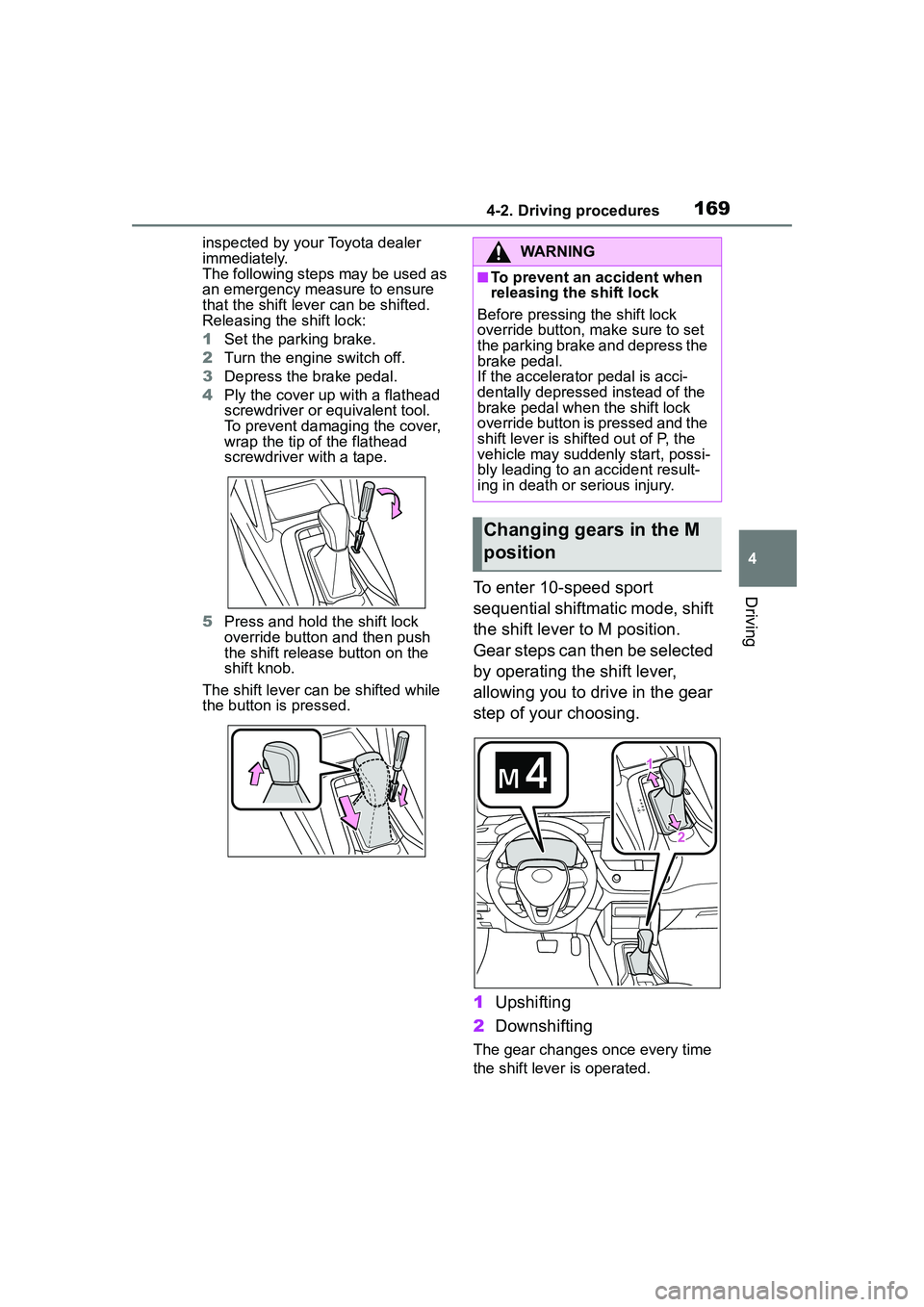
Releasing the shift lock:
1Set the parking brake.
2 Turn the engine switch off.
3 Depress the brake pedal.
4 Ply the cover up with a flathead
screwdriver or equivalent tool.
To prevent damaging the cover,
wrap the tip of the flathead
screwdriver with a tape.
5 Press and hold the shift lock
override button and then push
the shift release button on the
shift knob.
The shift lever can be shifted while
the button is pressed.
To enter 10-speed sport
sequential shiftmatic mode, shift
the shift lever to M position.
Gear steps can then be selected
by operating the shift lever,
allowing you to drive in the gear
step of your choosing.
1 Upshifting
2 Downshifting
The gear changes once every time
the shift lever is operated.
WARNING
■To prevent an accident when
releasing the shift lock
Before pressing the shift lock
override button, ma ke sure to set
the parking brake and depress the
brake pedal.
If the accelerator pedal is acci-
dentally depressed instead of the
brake pedal when the shift lock
override button is pressed and the
shift lever is shifted out of P, the
vehicle may suddenly start, possi-
bly leading to an accident result-
ing in death or serious injury.
Changing gears in the M
position
Page 170 of 612

1704-2. Driving procedures
The selected gear step, from M1 to
M10, will be displayed on the
multi-information display.
However, even when in the M
position, the gear steps will be
automatically changed if the
engine speed is too high, or too
low.
■Gear step functions
●You can choose from 10 levels of
engine braking force.
●A lower gear step will provide
greater engine braking force than
a higher gear step, and the engine
speed will also increase.
■When the vehicle comes to a
stop with the shift lever in the M
position
●The transmission will automati-
cally downshift to M1 once the
vehicle is stopped.
●After a stop, the vehicle will start
off in M1.
●When the vehicle is stopped, the
transmission is set at M1.
■Downshifting restriction warn-
ing buzzer
To help ensure safety and driving
performance, downshifting opera-
tion may sometimes be restricted. In
some circumstances, downshifting
may not be possible even when the
shift lever is oper ated. (A buzzer will
sound twice.)
■If the 10-speed sport sequential
shiftmatic mode indicator does
not come on even after shifting
the shift lever to M
This may indicate a malfunction in
the continuously variable transmis-
sion system. Have the vehicle
inspected by your Toyota dealer
immediately.
(In this situation, the transmission
will operate in the same manner as
when the shift lever is in D.)
1 Right turn
2 Lane change to the right
(move the lever partway and
release it)
The right hand signals will flash 3
times.
3Lane change to the left
(move the lever partway and
release it)
The left hand signals will flash 3
times.
4Left turn
■Turn signals can be operated
when
The engine switch is in ON.
■If the indicator flashes faster
than usual
Check that a light bulb in the front or
rear turn signal lights has not
Tur n signal lever
Operating instructions
Page 172 of 612

1724-2. Driving procedures
switch if an emergency occurs and
it is necessary to operate the park-
ing brake while driving.
2Push the switch to release
the parking brake
• Operate the parking brake switch
while depressing the brake pedal.
• Using the parking brake auto- matic release function, the park-
ing brake can be released by
depressing the accelerator pedal.
When using this function, slowly
depress the accelerator pedal.
Make sure that the parking brake
indicator and parking brake light
turn off.
■Turning automatic mode on
While the vehicle is stopped,
pull and hold the parking brake
switch until “EPB Shift Interlock
Function Activated” will be dis-
played on the multi-information
display.
When the automatic mode is
turned on, the parking brake
operates as follows.
When the shift lever is moved
out of P, the parking brake will
be released, and the parking
brake indicator and parking
brake light will turn off.
When the shift lever is moved
into P, the parking brake will
be set, and the parking brake
indicator and parking brake
light will turn on.
Operate the shift lever with the
vehicle stopped and the brake
pedal depressed.
The parking brake may not operate
automatically if the shift lever is
moved quickly.
In this case, it is necessary to oper-
ate the parking brake switch.
( P.171)
■Turning automatic mode off
While the vehicle is stopped,
press and hold the parking
brake switch until “EPB Shift
Interlock Function Deactivated”
will be displayed on the
multi-information display.
■Parking brake operation
●When the engine switch is not in
ON, the parking brake cannot be
released using the parking brake
switch.
●When the engine switch is not in
ON, automatic mode (automatic
brake setting and releasing) is not
available.
Page 173 of 612

1734-2. Driving procedures
4
Driving
■Parking brake automatic
release function
The parking brake is automatically
released when slowly depress the
accelerator pedal.
The parking brake will be released
automatically under the following
conditions:
●The driver’s door is closed
●The driver is wearing the seat belt
●The shift lever is a forward or
reverse position.
●The malfunction in dicator lamp or
brake system warning light is not
illuminated.
If the automatic release function
does not operate, manually release
the parking brake.
■Parking brake automatic lock
function
The parking brake will be set auto-
matically under the following condi-
tions:
●The driver does not operate the
brake pedal.
●The driver’s door is not closed.
●The driver is not wearing the seat
belt.
●The shift lever posi tion is not in P
or N.
●The malfunction in dicator lamp or
brake system warning light is not
illuminated.
■If “Parking Brake Temporarily
Unavailable” is displayed on
the multi-information display
If the parking brake is operated
repeatedly over a short period of
time, the system may restrict opera-
tion to prevent overheating. If this
happens, refrain from operating the
parking brake. Norm al operation will
return after about 1 minute.
■If “Parking Brake Unavailable”
is displayed on the multi-infor-
mation display
Operate the parking brake switch. If the message does not disappear
after operating the switch several
times, the system may be malfunc-
tioning. Have the vehicle inspected
by your Toyota dealer.
■Parking brake operation sound
When the parking brake operates, a
motor sound (whirring sound) may
be heard. This does not indicate a
malfunction.
■Parking brake operation
●Depending on the engine switch
mode, the parking brake indicator
and parking brake light will turn on
and stay on as described below:
ON: Comes on until the parking
brake is released.
Not in ON: Stays on for approxi-
mately 15 seconds.
●When the engine switch is turned
off with the parking brake set, the
parking brake indicator and park-
ing brake light will stay on for
about 15 seconds. This does not
indicate a malfunction.
■When the parking brake switch
malfunctions
Automatic mode (automatic brake
setting and releas ing) will be turned
on automatically.
■Parking the vehicle
P.141
■Parking brake engaged warning
buzzer
A buzzer will sound if the vehicle is
driven with the parking brake
engaged. “Parking Brake ON” is dis-
played on the multi-information dis-
play.
■If the brake system warning
light comes on
P.505
■Usage in winter time
P.274
Page 176 of 612
1764-2. Driving procedures
NOTICE
■When parking the vehicle
The brake hold system is not
designed for use when parking
the vehicle for a long period of
time. Turning the engine switch off
while the system is holding the
brake may release the brake,
which would cause the vehicle to
move. When operating the engine
switch, depress the brake pedal,
shift the shift lever to P and set
the parking brake.
Page 177 of 612
1774-3. Operating the lights and wipers
4
Driving
4-3.Operating the lights and wipers
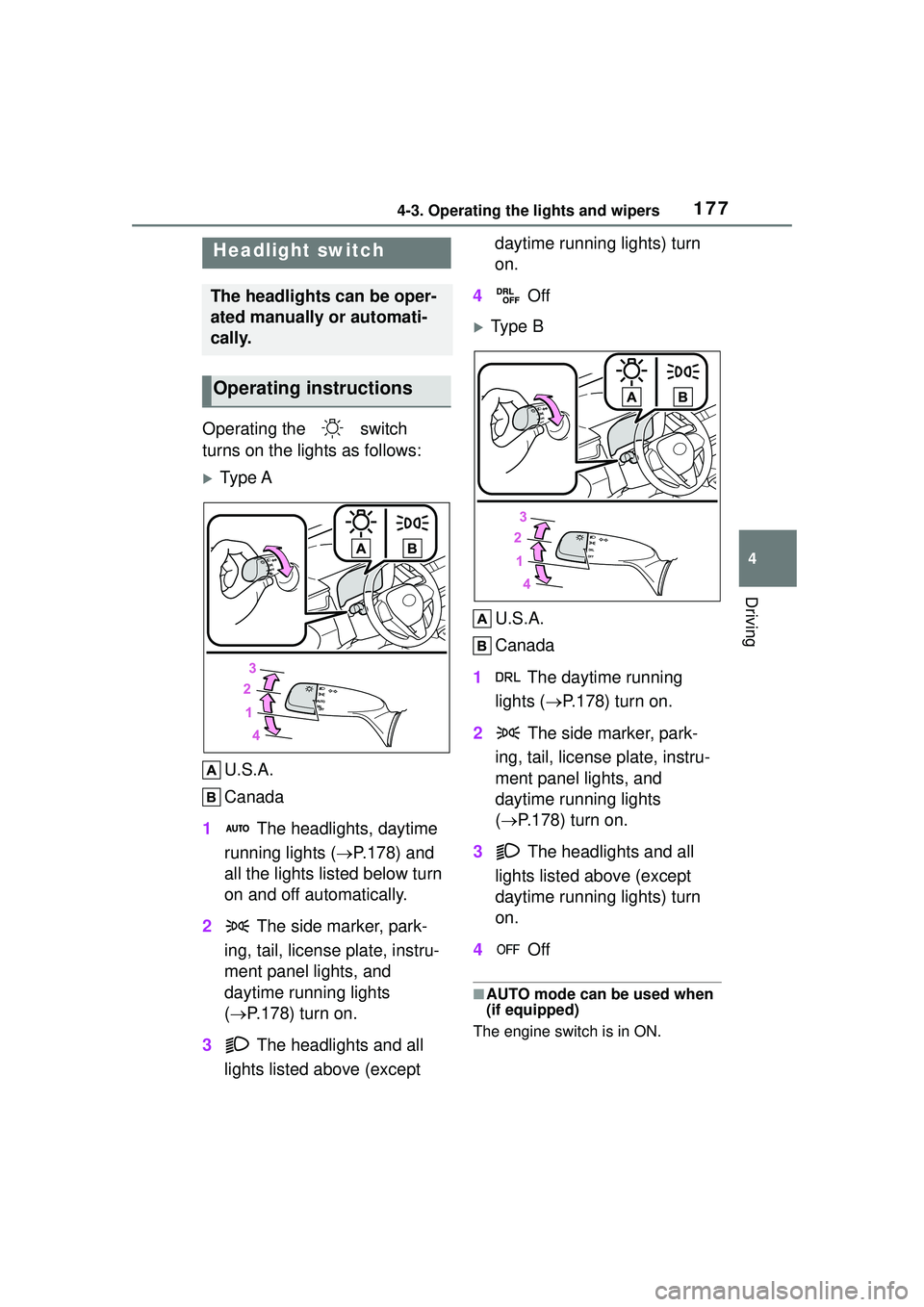
Operating the switch
turns on the lights as follows:
Ty p e AU.S.A.
Canada
1 The headlights, daytime
running lights ( P.178) and
all the lights listed below turn
on and off automatically.
2 The side marker, park-
ing, tail, license plate, instru-
ment panel lights, and
daytime running lights
( P.178) turn on.
3 The headlights and all
lights listed above (except daytime running lights) turn
on.
4 Off
Type B
U.S.A.
Canada
1 The daytime running
lights ( P.178) turn on.
2 The side marker, park-
ing, tail, license plate, instru-
ment panel lights, and
daytime running lights
( P.178) turn on.
3 The headlights and all
lights listed above (except
daytime running lights) turn
on.
4 Off
■AUTO mode can be used when
(if equipped)
The engine switch is in ON.
Headlight switch
The headlights can be oper-
ated manually or automati-
cally.
Operating instructions
Page 178 of 612

1784-3. Operating the lights and wipers
■Daytime running light system
●Vehicles without a smart key sys-
tem :The daytime running lights
illuminate using the same lights as
the headlights and illuminate
darker than the headlights.
Vehicles with a smart key system
:The daytime running lights illumi-
nate using the same lights as the
parking lights and illuminate darker
than the parking lights.
●To make your vehicle more visible
to other drivers during daytime
driving, the daytime running lights
turn on automatically when all of
the following conditions are met.
(The daytime running lights are
not designed for use at night.)
• The engine is running
• The parking brake is released
• Type A: The headlight switch is in
the or
* position
Type B: The headlight switch is in
the or position
*: When the surroundings are bright
The daytime running lights remain
on after they illuminate, even if the
parking brake is set again.
●Daytime running lights can be
turned off by operating the switch.
●Compared to turning on the head-
lights, the daytime running light
system offers greater durability
and consumes less electricity, so
it can help improve fuel economy.
■Headlight control sensor (if
equipped)
The sensor may not function prop-
erly if an object is placed on the sen- sor, or anything that blocks the
sensor is affixed to the windshield.
Doing so interferes with the sensor
detecting the level of ambient light
and may cause the automatic head-
light system to
malfunction.
■Automatic light off system
●When the headlights are on: The
headlights and tail lights turn off
30 seconds after the driver’s door
is opened and closed if the engine
switch is turned to ACC or OFF.
(The lights turn off immediately if
on the key is pressed after all
the doors are closed.)
●When only the tail lights are on:
The tail lights turn off automati-
cally if the engine switch is turned
to ACC or OFF and the driver’s
door is opened.
To turn the lights on again, turn the
engine switch to ON, or turn the light
switch off once and then back to
or .
■Light reminder buzzer
A buzzer sounds when the engine
switch is turned to OFF or ACC and
the driver’s door is opened while the
lights are turned on.
■Automatic headlight leveling
system (if equipped)
The level of the headlights is auto-
matically adjusted according to the
number of passengers and the load-
ing condition of the vehicle to
ensure that the headlights do not
interfere with other road users.
■Windshield wiper linked head-
light illumination (vehicles with
a headlight control sensor )
When driving during daytime with
the headlight switch turned to , if
the windshield wipers are used, the
headlights will turn on automatically
after several se conds to help
enhance the visibility of your vehi-
cle.