2022 TOYOTA COROLLA CROSS oil level
[x] Cancel search: oil levelPage 5 of 612

5TABLE OF CONTENTS
1
2
3
4
5
6
7
8
9
10
7-2. MaintenanceMaintenance requirements......................................... 452
General maintenance ......... 453
Emission inspection and mainte- nance (I/M) programs....... 456
7-3. Do-it-yourself maintenance Do-it-yourself service precau-tions ................................. 457
Hood .................................. 459
Positioning a floor jack ....... 460
Engine compartment .......... 461
Tires ................................... 468
Tire inflation pressure......... 478
Wheels ............................... 480
Air conditioning filter ........... 482
Wireless remote control/elec- tronic key battery.............. 483
Checking and replacing fuses ......................................... 486
Headlight aim ..................... 488
Light bulbs .......................... 489
8-1. Essential information Emergency flashers ........... 496
If your vehicle has to be stopped in an emergency .............. 496
If the vehicle is submerged or water on the road is rising
......................................... 498
8-2. Steps to take in an emergency If your vehicle needs to be towed......................................... 499
If you think something is wrong ......................................... 503
Fuel pump shut off system ......................................... 504
If a warning light turns on or a warning buzzer sounds .... 505If a warning message is dis-
played .............................. 515
If you have a flat tire........... 518
If the engine will not start ... 528
If you lose your keys .......... 530
If the electronic key does not operate properly............... 530
If the vehicle battery is dis- charged ............................ 532
If your vehicle overheats .... 536
If the vehicle becomes stuck ......................................... 538
9-1. Specifications Maintenance data (fuel, oil level, etc.) .................................. 542
Fuel information ................. 550
Tire information .................. 552
9-2. Customization Customizable features ....... 563
9-3. Initialization Items to initialize ................ 572
10-1. For owners Reporting safety defects for U.S.
o wners ............................. 574
Reporting safety defects for Canadian owners ............. 574
Seat belt instructions for Cana- di
an owners (in French) ... 575
SRS airbag instructions for Canadian owners (in French)......................................... 576
8When trouble arises
9Vehicle specifications
10For owners
Page 77 of 612

772-1. Instrument cluster
2
Vehicle status information and indicators
7-inch display (when digital speedometer is displayed)
Warning lights inform the driver
of malfunctions in the indicated
vehicle’s systems.
Warning lights
(U.S.A.)
Brake system warning
light
*1 ( P.505)
(Red)
(Canada)
Brake system warning
light
*1 ( P.505)
(Yellow)
Brake system warning
light
*1 ( P.505)
High coolant temperature
warning light
*2 ( P.505)
Charging system warning
light
*1 ( P.506)
Low engine oil pressure
warning light
*2 ( P.506)
(U.S.A.)
Malfunction indicator
lamp
*1 ( P.506)
(Canada)
Malfunction indicator
lamp
*1 ( P.506)
SRS warning light
*1
( P.506)
(U.S.A.)
ABS warning light*1
( P.507)
(Canada)
ABS warning light*1
( P.507)
Inappropriate pedal opera-
tion warning light
*2
( P.507)
(Red/yel-
low)
Electric power steering
system warning light
*1
( P.507)
Low fuel level warning
light ( P.508)
Driver’s and front passen-
ger’s seat belt reminder
light ( P.508)
Rear passengers’
seat belt reminder
lights ( P.508)
Page 210 of 612

2104-5. Using the driving support systems
Inside of displayed lines is
black
Indicates that the system is not
able to recognize white (yellow)
lines or a course
* or is temporar-
ily canceled.
*: Boundary between asphalt and the side of the road, such as
grass, soil, or a curb
Follow-up cruising display
Displayed when the multi-informa-
tion display is switched to the driv-
ing support system information
display.
Indicates that steering assist of the
lane centering function is operating
by monitoring the position of a pre-
ceding vehicle.
When the follow-up cruising display
is displayed, if the preceding vehi-
cle moves, your vehicle may move
in the same way. Always pay care-
ful attention to your surroundings
and operate the steering wheel as
necessary to correct the path of the
vehicle and ensure safety.
■Operation conditions of each
function
●Lane departure alert function
This function operates when all of
the following conditions are met.
• LTA is turned on. • Vehicle speed is approximately 32
mph (50 km/h) or more.
*1
• System recognizes white (yellow) lane lines or a course*2. (When a
white [yellow] line or course*2 is
recognized on only one side, the
system will operate only for the
recognized side.)
• Width of traffic lane is approxi- mately 9.8 ft. (3 m) or more.
• Turn signal lever is not operated. (Vehicle with BSM: Except when
another vehicle is in the lane on
the side where the turn signal was
operated)
• Vehicle is not being driven around
a sharp curve.
• No system malfunctions are detected. ( P.212)
*1: The function operates even if the
vehicle speed is less than
approximately 32 mph (50 km/h)
when the lane centering function
is operating.
*2: Boundary between asphalt and the side of the road, such as
grass, soil, or a curb
●Steering assist function
This function operates when all of
the following conditions are met in
addition to the operation conditions
for the lane departure alert function.
• Setting for “Steering Assist” in of the multi-information display is
set to “ON”. ( P.563)
• Vehicle is not accelerated or decelerated by a fixed amount or
more.
• Steering wheel is not operated with a steering force level suitable
for changing lanes.
• ABS, VSC, TRAC and PCS are not operating.
• TRAC or VSC is not turned off.
• Hands off steering wheel warning
is not displayed. ( P.212)
●Vehicle sway warning function
This function operates when all of
Page 211 of 612

2114-5. Using the driving support systems
4
Driving
the following conditions are met.
• Setting for “Sway Warning” in of the multi-information display is
set to “ON”. ( P.563)
• Vehicle speed is approximately 32
mph (50 km/h) or more.
• Width of traffic lane is approxi- mately 9.8 ft. (3 m) or more.
• No system malfunctions are detected. ( P.212)
●Lane centering function
This function operates when all of
the following conditions are met.
• LTA is turned on.
• Setting for “Steering Assist” and “Lane Center” in of the
multi-information di splay are set to
“ON”. ( P.563)
• This function recognizes white (yellow) lane lines or the position
of a preceding vehicle (except
when the preceding vehicle is
small, such as a motorcycle).
• The dynamic radar cruise control
with full-speed range is operating
in vehicle-to-vehicle distance con-
trol mode.
• Width of traffic lane is approxi- mately 10 to 13 ft. (3 to 4 m).
• Turn signal lever is not operated.
• Vehicle is not being driven around
a sharp curve.
• No system malfunctions are
detected. ( P.212)
• Vehicle does not accelerate or decelerate by a fixed amount or
more.
• Steering wheel is not operated with a steering force level suitable
for changing lanes.
• ABS, VSC, TRAC and PCS are not operating.
• TRAC or VSC is not turned off.
• Hands off steering wheel warning
is not displayed. ( P.212)
• The vehicle is being driven in the
center of a lane.
• Steering assist function is not operating.
■Temporary cancelation of func-
tions
●When operation conditions are no
longer met, a function may be
temporarily canceled. However,
when the operation conditions are
met again, operation of the func-
tion is automatically restored.
( P.210)
●If the operation conditions
( P.208) are no longer met while
the lane centering function is
operating, the buzzer may sound
to indicate that the function has
been temporarily canceled.
■Steering assist function/lane
centering function
●Depending on the vehicle speed,
lane departure situation, road con-
ditions, etc., the driver may not
feel the function is operating or
the function may not operate at
all.
●The steering control of the func-
tion is overridden by the driver’s
steering wheel operation.
●Do not attempt to test the opera-
tion of the steering assist function.
■Lane departure alert function
●The warning buzzer may be diffi-
cult to hear due to external noise,
audio playback, etc.
●If the edge of the course* is not
clear or straight, the lane depar-
ture alert function may not oper-
ate.
●Vehicle with BSM: It may not be
possible for the system to deter-
mine if there is a danger of a colli-
sion with a vehicle in an adjacent
lane.
●Do not attempt to test the opera-
tion of the lane departure alert
function.
*: Boundary between asphalt and
the side of the road, such as
grass, soil, or a curb
Page 274 of 612

2744-6. Driving tips
4-6.Driving tips
Use fluids that are appropriate
to the prevailing outside tem-
peratures.
• Engine oil
• Engine coolant
• Washer fluid
Have a service technician
inspect the condition of the
battery.
Have the vehicle fitted with
four snow tires.
Ensure that all tires are the same
size and brand.
Perform the following according
to the driving conditions:
Do not try to forcibly open a
window or move a wiper that
is frozen. Pour warm water
over the frozen area to melt
the ice. Wipe away the water
immediately to prevent it from
freezing.
To ensure proper operation of
the climate control system
fan, remove any snow that
has accumulated on the air
inlet vents in front of the wind-
shield.
Check for and remove any
Winter driving tips
Carry out the necessary
preparations and inspec-
tions before driving the
vehicle in winter. Always
drive the vehicle in a man-
ner appropriate to the pre-
vailing weather conditions.
Pre-winter preparations
WARNING
■Driving with snow tires
Observe the following precautions
to reduce the risk of accidents.
Failure to do so may result in a
loss of vehicle control and cause
death or serious injury.
●Use tires of the size specified.
●Maintain the recommended
level of air pressure.
●Do not drive in excess of 75
mph (120 km/h), regardless of
the type of snow tires being
used.
●Use snow tires on all, not just
some wheels.
NOTICE
■Driving with tire chains
Do not fit tire chains. Tire chains
may damage the vehicle body
and suspension, and adversely
affect driving performance.
■Repairing or replacing snow
tires
Request repairs or replacement of
snow tires from Toyota dealers or
legitimate tire retailers.
This is because the removal and
attachment of snow tires affects
the operation of the tire pressure
warning valves and transmitters.
Before driving the vehicle
Page 453 of 612

4537-2. Maintenance
7
Maintenance and care
■Resetting the message indicat-
ing maintenance is required
After the required maintenance is
performed according to the mainte-
nance schedule, please reset the
message.
To reset the message, follow the
procedure described below:
1 Press or of the meter
control switch to select .
2 Press or to select “Vehi-
cle Settings” and then press and
hold .
3 Press or to select
“Scheduled Maintenance” and
then press .
4 Press or to select “Yes”
and then press .
A message will be displayed on the
multi-information display when the
reset procedure has been com-
pleted.
You can perform some mainte-
nance procedures by yourself.
Please be aware that do-it-your-
self maintenance may affect
warranty coverage.
The use of Toyota repair manuals is
recommended.
For details about warranty cover-
age, refer to the separate “Owner’s
Warranty Information Booklet” or
“Owner’s Manual Supplement”.
Do-it-yourself mainte-
nance
General maintenance
Listed below are the general
maintenance items that
should be performed at the
intervals specified in the
“Owner’s Warranty Informa-
tion Booklet” or “Owner’s
Manual Supplement/Sched-
uled Maintenance Guide”. It
is recommended that any
problem you notice should
be brought to the attention
of your Toyota dealer or
qualified service shop for
advice.
WARNING
■If the engine is running
Turn the engine off and ensure
that there is adequate ventilation
before performing maintenance
checks.
Engine compartment
ItemsCheck points
BatteryCheck the connec-
tions. ( P.465)
Brake fluid
Is the brake fluid at
the correct level?
( P.464)
Engine coolant
Is the engine cool-
ant at the correct
level? ( P.463)
Engine oil
Is the engine oil at
the correct level?
( P.461)
Page 457 of 612
4577-3. Do-it-yourself maintenance
7
Maintenance and care
7-3.Do-it-yourself maintenance
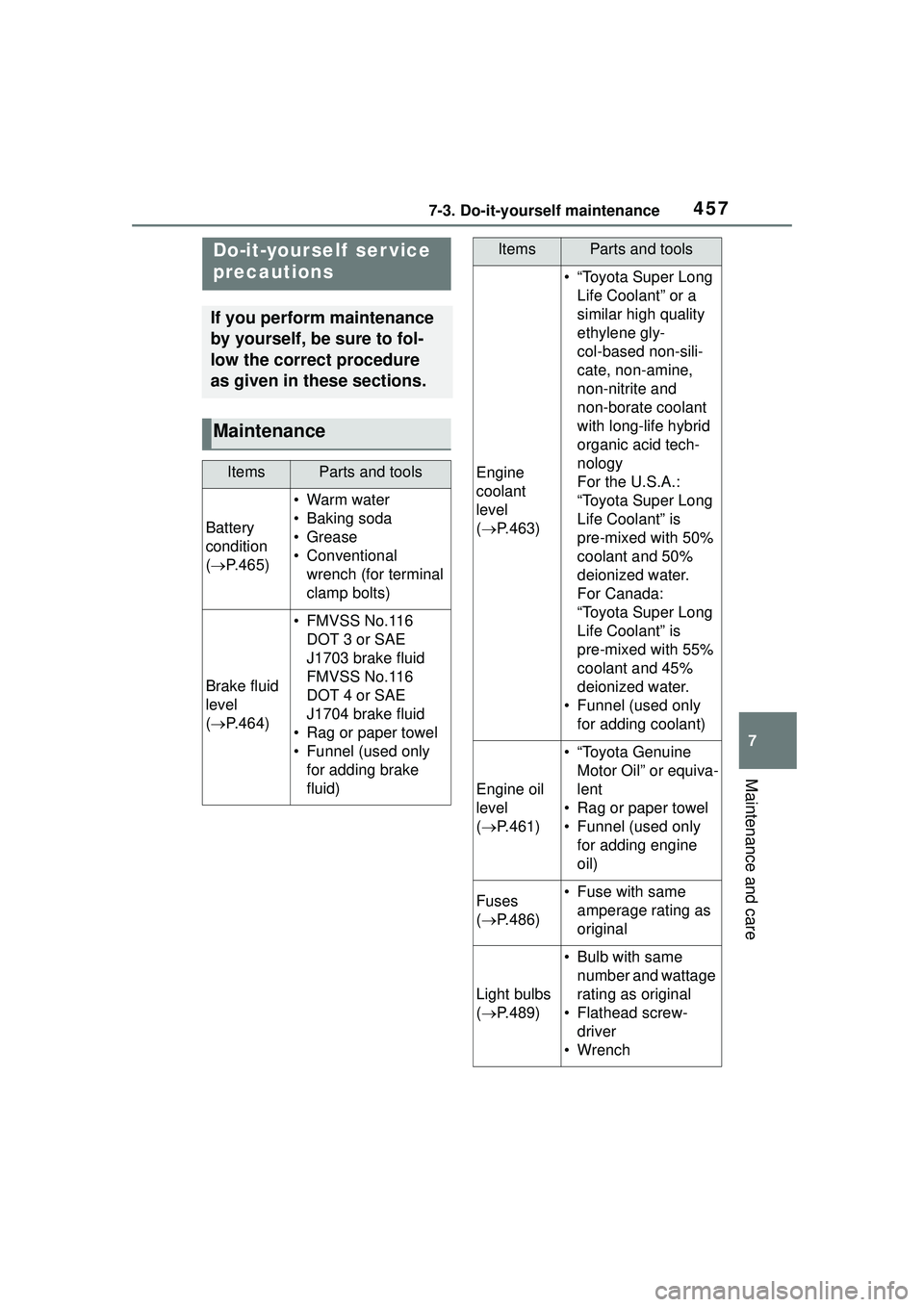
Do-it-yourself ser vice
precautions
If you perform maintenance
by yourself, be sure to fol-
low the correct procedure
as given in these sections.
Maintenance
ItemsParts and tools
Battery
condition
( P.465)
•Warm water
• Baking soda
•Grease
• Conventional
wrench (for terminal
clamp bolts)
Brake fluid
level
( P.464)
• FMVSS No.116
DOT 3 or SAE
J1703 brake fluid
FMVSS No.116
DOT 4 or SAE
J1704 brake fluid
• Rag or paper towel
• Funnel (used only for adding brake
fluid)
Engine
coolant
level
( P.463)
• “Toyota Super Long
Life Coolant” or a
similar high quality
ethylene gly-
col-based non-sili-
cate, non-amine,
non-nitrite and
non-borate coolant
with long-life hybrid
organic acid tech-
nology
For the U.S.A.:
“Toyota Super Long
Life Coolant” is
pre-mixed with 50%
coolant and 50%
deionized water.
For Canada:
“Toyota Super Long
Life Coolant” is
pre-mixed with 55%
coolant and 45%
deionized water.
• Funnel (used only for adding coolant)
Engine oil
level
( P.461)
• “Toyota Genuine
Motor Oil” or equiva-
lent
• Rag or paper towel
• Funnel (used only for adding engine
oil)
Fuses
( P.486)• Fuse with same
amperage rating as
original
Light bulbs
( P.489)
• Bulb with same
number and wattage
rating as original
• Flathead screw- driver
•Wrench
ItemsParts and tools
Page 461 of 612

4617-3. Do-it-yourself maintenance
7
Maintenance and care
Washer fluid tank (P.467)
Engine coolant reservoir ( P.463)
Engine oil filler cap ( P.462)
Engine oil level dipstick ( P.461)
Battery ( P.465)
Brake fluid reservoir ( P.464)
Fuse boxes ( P.486)
Radiator ( P.464)
Condenser ( P.464)
Electric cooling fan
With the engine at operating
temperature and turned off,
check the oil level on the dip- stick.
■Checking the engine oil
1 Park the vehicle on level
ground. After warming up the
engine and turning it off, wait
Engine compar tment
Components
Checking and adding the
engine oil