2022 TOYOTA COROLLA CROSS engine
[x] Cancel search: enginePage 78 of 612

782-1. Instrument cluster
*1: These lights come on when the engine switch is turned to ON to
indicate that a system check is
being performed. They will turn
off after the engine is started, or
after a few seconds. There may
be a malfunction in a system if
the lights do not come on, or turn off. Have the vehicle inspected
by your Toyota dealer.
*2: This light illuminates on the
multi-information display.
The indicators inform the driver
of the operating state of the
vehicle’s various systems.
Tire pressure warning
light
*1 ( P.509)
(Orange)
LTA indicator ( P.509)
(Flashes) Stop & Start cancel indica-
tor
*1 (
P.509)
BSM OFF indicator
*1 (if
equipped) ( P.510)
Intuitive parking assist
OFF indicator (if
equipped) ( P.510)
RCTA OFF indicator
*1 (if
equipped) ( P.510)
PKSB OFF indicator (if
equipped) ( P.511)
(Flashes
or illumi- nates)PCS warning light*1
( P.511)
Slip indicator
*1 ( P.511)
(Flashes)
(U.S.A.)
Parking brake indicator
( P.512)
(Flashes)
(Canada)
Parking brake indicator
( P.512)
(Flashes)
Brake hold operated indi-
cator ( P.512)
WARNING
■If a safety system warning
light does not come on
Should a safety system light such
as the ABS and SRS warning light
not come on when you start the
engine, this could mean that
these systems are not available to
help protect you in an accident,
which could result in death or seri-
ous injury. Have the vehicle
inspected by your Toyota dealer
immediately if this occurs.
Indicators
Turn signal indicator
( P.170)
(U.S.A.)
Headlight indicator
( P.177)
(Canada)
Tail light indicator
( P.177)
Headlight high beam indi-
cator ( P.179)
Automatic High Beam
indicator ( P.180)
Fog light indicator (if
equipped) ( P.184)
PCS warning light
*1, 2
( P.195)
Dynamic radar cruise con-
trol indicator ( P.216)
Page 79 of 612

792-1. Instrument cluster
2
Vehicle status information and indicators
*1: These lights come on when the engine switch is turned to ON to
indicate that a system check is
being performed. They will turn
off after the engine is started, or
after a few sec onds. There may
be a malfunction in a system if
the lights do not come on, or turn
off. Have the vehicle inspected
by your Toyota dealer.
*2: This light comes on when the system is turned off.
*3: Depending on the operating con-dition, the color and illuminat-
ing/flashing state of the light
change.
*4: In order to confirm operation, the BSM outside rear view mirror
indicators illumina te in the follow-
ing situations:
• When the engine switch is
turned to ON, the BSM func-
tion is enabled on of the
multi-information display.
• When the BSM function is
enabled on of the
multi-information display, the
engine switch is turned to ON.
If the system is functioning cor-
rectly, the BSM outside rear view
mirror indicators will turn off after a
few seconds.
Cruise control “SET” indi-
cator (
P.216)
*3
LTA indicator ( P.209)
BSM outside rear view
mirror indicators
*4, 5 (if
equipped) ( P.233)
BSM OFF indicator
*1, 2 (if
equipped) ( P.233)
Intuitive parking assist
OFF indicator
*2 (if
equipped) ( P.252)
RCTA OFF indicator
*1, 2
(if equipped) ( P.238)
PKSB OFF indicator
*2 (if
equipped) ( P.259)
Stop & Start indicator
( P.227)
Stop & Start cancel indica-
tor
*1, 2 ( P.228)
(Flashes)
Slip indicator*1 ( P.270)
VSC OFF indicator
*1, 2
( P.270)
Smart key system indica-
tor
*6 (if equipped)
( P.163)
(U.S.A.)
Parking brake indicator
( P.171)
(Canada)
Parking brake indicator
( P.171)
Brake hold standby indi-
cator ( P.174)
Brake hold operated indi-
cator ( P.174)
Eco Driving Indicator
Light
*1 ( P. 9 2 )
Low outside temperature
indicator
*7 ( P.81, 85)
Security indicator ( P. 7 1 ,
72)
“AIR BAG ON/OFF”
indicator
*1, 8 ( P. 4 0 )
Page 81 of 612
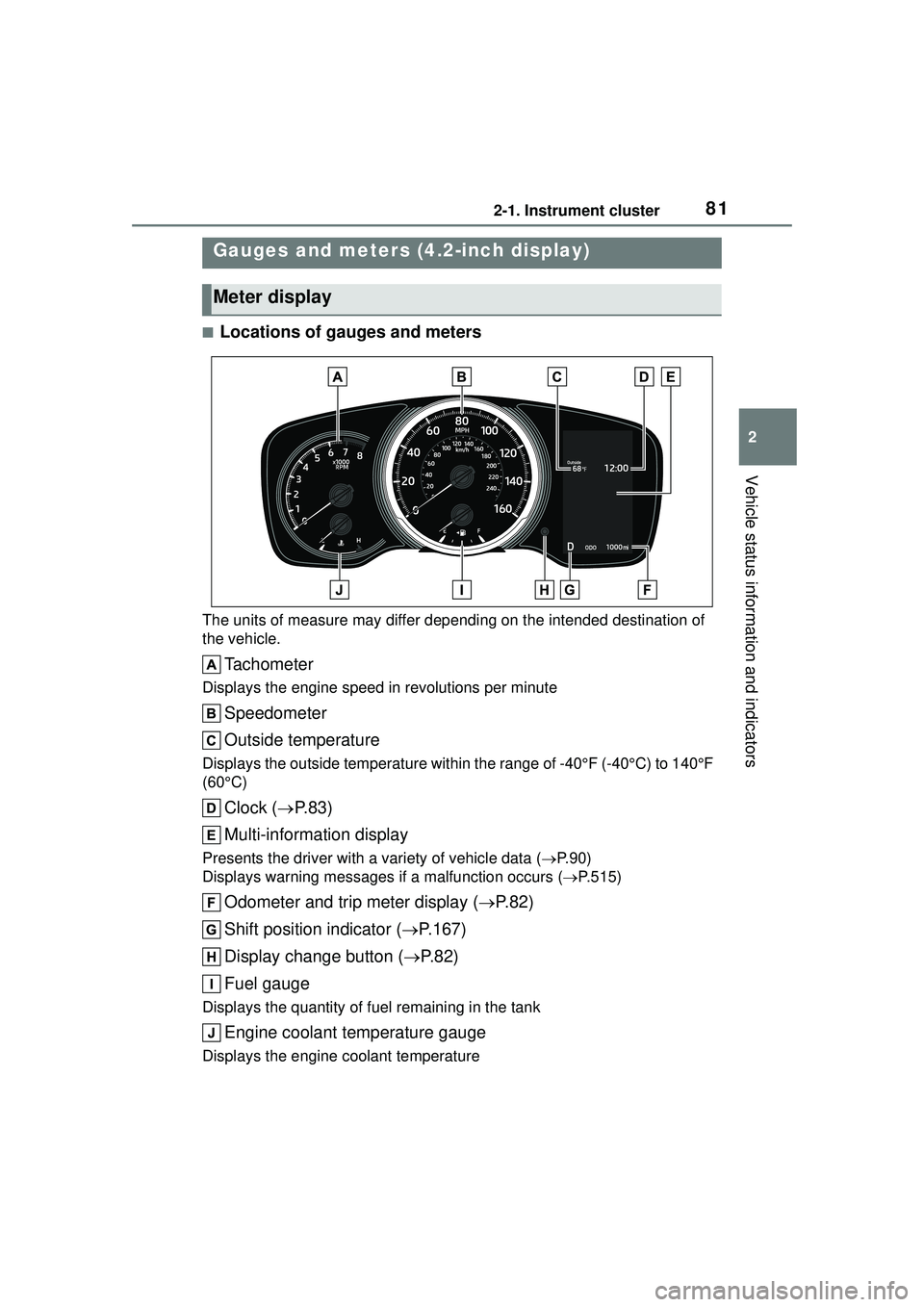
812-1. Instrument cluster
2
Vehicle status information and indicators
■Locations of gauges and meters
The units of measure may differ depending on the intended destination of
the vehicle.
Tachometer
Displays the engine speed in revolutions per minute
Speedometer
Outside temperature
Displays the outside temperature within the range of -40°F (-40°C) to 140°F
(60°C)
Clock (P. 8 3 )
Multi-information display
Presents the driver with a variety of vehicle data ( P.90)
Displays warning me ssages if a malfunction occurs ( P.515)
Odometer and trip meter display ( P.82)
Shift position indicator ( P.167)
Display change button ( P.82)
Fuel gauge
Displays the quantity of fuel remaining in the tank
Engine coolant temperature gauge
Displays the engine coolant temperature
Gauges and meters (4.2-inch display)
Meter display
Page 82 of 612

822-1. Instrument cluster
■Outside temperature display
●In the following situations, the cor-
rect outside temperature may not
be displayed, or the display may
take longer than normal to
change:
• When stopped, or driving at low
speeds (less than 16 mph [25
km/h])
• When the outside temperature
has changed suddenly (at the
entrance/exit of a garage, tunnel,
etc.)
●When “--” or “E” is displayed, the
system may be malfunctioning.
Take your vehicle to your Toyota
dealer.
■Liquid crystal display
P. 9 1
■Changing the display
Press the display change button
until the desired item is dis-
played.
■Display items
Odometer
Displays the total distance the vehi-
cle has been driven.
Trip meter A/Trip meter B
Displays the distance the vehicle
has been driven since the meter
was last reset. Trip meters A and B
can be used to record and display
WARNING
■The information display at
low temperatures
Allow the interior of the vehicle to
warm up before using the liquid
crystal information display. At
extremely low temperatures, the
information display monitor may
respond slowly, and display
changes may be delayed.
For example, there is a lag
between the driver’s shifting and
the new gear number appearing
on the display. This lag could
cause the driver to downshift
again, causing rapid and exces-
sive engine braking and possibly
an accident resulting in death or
injury.
NOTICE
■To prevent damage to the
engine and its components
●Do not let the indicator needle
of the tachometer enter the red
zone, which indicates the maxi-
mum engine speed.
●The engine may be overheating
if the engine coolant tempera-
ture gauge is in the red zone
(H). In this case, immediately
stop the vehicle in a safe place,
and check the engine after it
has cooled completely.
( P.536)
Odometer and trip meter
display
Page 85 of 612

852-1. Instrument cluster
2
Vehicle status information and indicators
■Locations of gauges and meters
Analog speedometer
The units of measure may differ depending on the intended destination of
the vehicle.
Tachometer
Displays the engine speed in revolutions per minute
Speedometer
Sub speedometer
Clock (P. 8 8 )
Fuel gauge
Displays the quantity of fuel remaining in the tank
Engine coolant temperature gauge
Displays the engine coolant temperature
Display change button ( P.87)
Odometer and trip meter display ( P.87)
Multi-information display
Presents the driver with a variety of vehicle data ( P.90)
Displays warning me ssages if a malfunction occurs ( P.515)
Outside temperature
Displays the outside temperature within the range of -40°F (-40°C) to 140°F
Gauges and meters (7-inch display)
Meter display
Page 86 of 612

862-1. Instrument cluster
(60°C)
Shift position indicator (P.167)
Digital speedometer
The units of measure may differ depending on the intended destination of
the vehicle.
Tachometer
Displays the engine speed in revolutions per minute
Speedometer
Clock ( P. 8 8 )
Fuel gauge
Displays the quantity of fuel remaining in the tank
Engine coolant temperature gauge
Displays the engine coolant temperature
Display change button ( P.87)
Odometer and trip meter display ( P.87)
Multi-information display
Presents the driver with a variety of vehicle data ( P.90)
Displays warning me ssages if a malfunction occurs ( P.515)
Outside temperature
Displays the outside temperature within the range of -40°F (-40°C) to 140°F
(60°C)
Shift position indicator ( P.167)
■Outside temperature display●In the following situations, the cor-
rect outside temperature may not
Page 87 of 612

872-1. Instrument cluster
2
Vehicle status information and indicators
be displayed, or the display may
take longer than normal to
change:
• When stopped, or driving at low speeds (less than 16 mph [25
km/h])
• When the outside temperature has changed suddenly (at the
entrance/exit of a garage, tunnel,
etc.)
●When “--” or “E” is displayed, the
system may be malfunctioning.
Take your vehicle to your Toyota
dealer.
■Liquid crystal display
P. 9 1
■Customization
The gauges and meters can be cus-
tomized in of the multi-informa-
tion display. ( P. 9 4 )
■Changing the display
Press the display change button
until the desired item is dis-
played.
■Display items
Odometer
Displays the total distance the vehi-
cle has been driven.
Trip meter A/Trip meter B
Displays the distance the vehicle
has been driven since the meter
was last reset. Trip meters A and B
can be used to record and display
WARNING
■The information display at
low temperatures
Allow the interior of the vehicle to
warm up before using the liquid
crystal information display. At
extremely low temperatures, the
information display monitor may
respond slowly, and display
changes may be delayed.
For example, there is a lag
between the driver’s shifting and
the new gear number appearing
on the display. This lag could
cause the driver to downshift
again, causing rapid and exces-
sive engine braking and possibly
an accident resulting in death or
injury.
NOTICE
■To prevent damage to the
engine and its components
●Do not let the indicator needle
of the tachometer enter the red
zone, which indicates the maxi-
mum engine speed.
●The engine may be overheating
if the engine coolant tempera-
ture gauge is in the red zone
(H). In this case, immediately
stop the vehicle in a safe place,
and check the engine after it
has cooled completely.
( P.536)
Odometer and trip meter
display
Page 92 of 612

922-1. Instrument cluster
■Speedometer display/Driv-
ing range (4.2-inch display)
Speedometer display
Driving range
Displays driving range with remain-
ing fuel. Use the displayed values
as a reference only.
This distance is computed based
on your average fuel consumption.
As a result, the actual distance that
can be driven may differ from that
displayed.
When only a small amount of fuel is
added to the tank, the display may
not be updated.
When refueling, turn the engine
switch off. If the vehicle is refueled
without turning the engine switch
off, the display may not be updated.
■Fuel economy
Use the displayed values as a ref-
erence only.
Average fuel economy (after
reset)
To reset the average fuel economy
display, press and hold the
meter control switch.
Current fuel consumption
Displays instantaneous current fuel
consumption.
Driving range
Displays driving range with remain-
ing fuel.
This distance is computed based
on your average fuel consumption.
As a result, the actual distance that
can be driven may differ from that
displayed.
When only a small amount of fuel is
added to the tank, the display may
not be updated.
When refueling, turn the engine
switch off. If the vehicle is refueled
without turning the engine switch
off, the display may not be updated.
The average fuel economy dis-
play can be changed in .
( P.94)
Average fuel economy (after
start)
Displays the average fuel con-
sumption since engine start.
Average fuel economy (after
refuel)
Displays the average fuel con-
sumption since the vehicle was
refueled.
■Eco Driving Indicator/Driv-
ing range
Eco Driving Indicator