2022 TOYOTA COROLLA CROSS cruise control
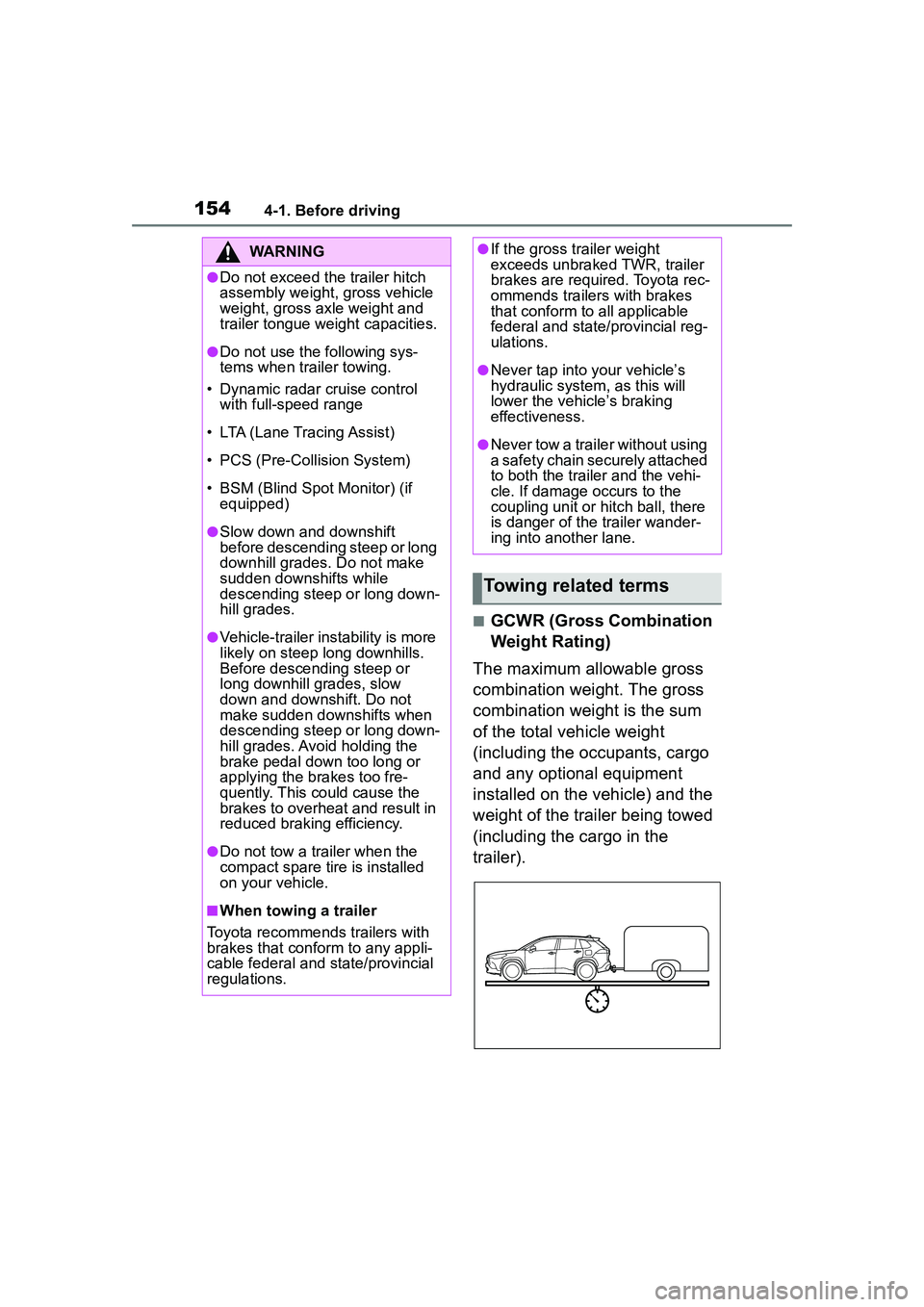
[x] Cancel search: cruise controlPage 3 of 612

3TABLE OF CONTENTS
1
2
3
4
5
6
7
8
9
10
Parking brake .....................171
Brake Hold ......................... 174
4-3. Operating the lights and wip- ers
Headlight switch ................. 177
Automatic High Beam ........ 180
Fog light switch .................. 184
Windshield wipers and washer ......................................... 184
Rear windshield wiper and washer ............................. 186
4-4. Refueling Opening the fuel tank cap .. 188
4-5. Using the driving support sys- tems
Toyota Safety Sense 2.0 .... 190
PCS (Pre-Collision System) ......................................... 195
LTA (Lane Tracing Assist)... 203
RSA (Road Sign Assist) ..... 213
Dynamic radar cruise control with full-speed range ........ 216
Stop & Start system ........... 227
BSM (Blind Spot Monitor)... 233
RCTA (Rear Cross Traffic Alert) ......................................... 238
Rear view monitor system .. 243
Intuitive parking assist ........ 251
PKSB (Parking Support Brake) ......................................... 258
Parking Support Brake function (static objects) .................. 264
Parking Support Brake function (rear-crossing vehicles).... 267
Driving assist systems........ 269
4-6. Driving tips Winter driving tips............... 274
Utility vehicle precautions... 2765-1. Basic function
Buttons overview................ 281
Menu screen ...................... 283
Status icon ......................... 284
“Setup” screen ................... 286
5-2. Basic information before oper- ation
Initial screen ....................... 287
Touch screen...................... 288
Home screen...................... 290
Entering letters and num- bers/list screen operation......................................... 291
Screen adjustment ............. 294
Linking multi-information display and the system ................ 295
5-3. Connectivity settings Registering/Connecting a Blue-
tooth
® device ................... 296
Setting Bluetooth
® details .. 300
Wi-Fi
® Hotspot ................... 308
Apple CarPlay/ Android Auto .................... 312
5-4. Other settings General settings ................. 319
Voice settings ..................... 323
Vehicle settings .................. 324
5-5. Using the audio/visual system Quick reference.................. 326
Some basics ...................... 327
5-6. Radio operation
AM radio/FM radio/SiriusXM
®
Satellite Radio(SXM) ....... 331
Internet radio ...................... 336
5-7. Media operation USB memory...................... 337
5Audio
Page 19 of 612

19Pictorial index
Meter control switches ........................................................ P.91
Vehicle-to-vehicle distance swit ch ................................... P.222
Cruise control switches
Dynamic radar cruise control wit h full-speed range ............. P.216
Audio remote control switches
*....................................... P.347
LTA (Lane Tracing Assist) switch ..................................... P.203
Phone switch
*..................................................................... P.370
Talk switch
*......................................................................... P.358
*: Vehicles with Audio Plus, refer to “MULTIMEDIA OWNER’S MANUAL”.
Heated steering wheel switch
*.......................................... P.425
Seat heater switches
*........................................................ P.425
VSC OFF switch ................................................................. P.270
Stop & Start cancel switch ................................................ P.228
Parking brake switch ......................................................... P.171
Precautions for winter season.... .......................................... P.275
Brake hold switch .............................................................. P.174
*: If equipped
Page 79 of 612

792-1. Instrument cluster
2
Vehicle status information and indicators
*1: These lights come on when the engine switch is turned to ON to
indicate that a system check is
being performed. They will turn
off after the engine is started, or
after a few sec onds. There may
be a malfunction in a system if
the lights do not come on, or turn
off. Have the vehicle inspected
by your Toyota dealer.
*2: This light comes on when the system is turned off.
*3: Depending on the operating con-dition, the color and illuminat-
ing/flashing state of the light
change.
*4: In order to confirm operation, the BSM outside rear view mirror
indicators illumina te in the follow-
ing situations:
• When the engine switch is
turned to ON, the BSM func-
tion is enabled on of the
multi-information display.
• When the BSM function is
enabled on of the
multi-information display, the
engine switch is turned to ON.
If the system is functioning cor-
rectly, the BSM outside rear view
mirror indicators will turn off after a
few seconds.
Cruise control “SET” indi-
cator (
P.216)
*3
LTA indicator ( P.209)
BSM outside rear view
mirror indicators
*4, 5 (if
equipped) ( P.233)
BSM OFF indicator
*1, 2 (if
equipped) ( P.233)
Intuitive parking assist
OFF indicator
*2 (if
equipped) ( P.252)
RCTA OFF indicator
*1, 2
(if equipped) ( P.238)
PKSB OFF indicator
*2 (if
equipped) ( P.259)
Stop & Start indicator
( P.227)
Stop & Start cancel indica-
tor
*1, 2 ( P.228)
(Flashes)
Slip indicator*1 ( P.270)
VSC OFF indicator
*1, 2
( P.270)
Smart key system indica-
tor
*6 (if equipped)
( P.163)
(U.S.A.)
Parking brake indicator
( P.171)
(Canada)
Parking brake indicator
( P.171)
Brake hold standby indi-
cator ( P.174)
Brake hold operated indi-
cator ( P.174)
Eco Driving Indicator
Light
*1 ( P. 9 2 )
Low outside temperature
indicator
*7 ( P.81, 85)
Security indicator ( P. 7 1 ,
72)
“AIR BAG ON/OFF”
indicator
*1, 8 ( P. 4 0 )
Page 90 of 612

902-1. Instrument cluster
■Display
4.2-inch displayDriving support system status
display area
Displays an image when the follow-
ing systems are operating and a
menu icon other than is
selected:
• LTA (Lane Tracing Assist)
• Dynamic radar cruise control with full-speed range
• RSA (Road Sign Assist) (if equipped) ( P.213)
Content display area
By selecting menu icons on the
multi-information display, a variety
of driving-relate d information can
be displayed. The multi-information
display can also be used to change
display settings and other vehicle
settings.
Warning or advice pop-up displays
are also displayed in certain situa-
tions.
7-inch display
Driving support system status
display area
Displays an image when the follow-
ing systems are operating and a
menu icon other than is
selected:
• LTA (Lane Tracing Assist)
• Dynamic radar cruise control with full-speed range
• RSA (Road Sign Assist) (if equipped) ( P.213)
Content display area
By selecting menu icons on the
multi-information di splay, a variety
of driving-related information can
be displayed. The multi-information
display can also be used to change
display settings and other vehicle
settings.
Warning or advice pop-up displays
are also displayed in certain situa-
tions.
■Menu icons
The menu icons will be dis-
played by pressing the or
meter control switch.
Multi-infor mation dis-
play
Display and menu icons
Page 93 of 612

932-1. Instrument cluster
2
Vehicle status information and indicators
Eco Driving Indicator Light
During Eco-friendly acceleration
(Eco driving), the Eco Driving Indi-
cator Light will turn on. When the
acceleration exceeds the Zone of
Eco driving, or when the vehicle is
stopped, the light turns off.
Eco Driving Indicator Zone
Display
Suggests the Zone of Eco driving
with current Eco driving ratio based
on acceleration.
Eco driving ratio based on
acceleration
If the acceleration exceeds the
Zone of Eco driving, the right side
of the Eco Driving Indicator Zone
Display will illuminate.
At this time, the Eco Driving Indica-
tor Light will turn off.
Zone of Eco driving
Driving range
Displays driving range with remain-
ing fuel. Use the displayed values
as a reference only. This distance is computed based
on your average fuel consumption.
As a result, the actual distance that
can be driven may differ from that
displayed.
When only a small amount of fuel is
added to the tank, the display may
not be updated.
When refueling, turn the engine
switch off. If the vehicle is refueled
without turning the engine switch
off, the display may not be updated.
■Eco Driving Indicator
Eco Driving Indicator will not oper-
ate under the following conditions:
●The shift lever is in any position
other than D.
●The vehicle speed is approxi-
mately 80 mph (130 km/h) or
higher.
■Driving support system
information
Select to display the operational
status of the following systems:
LTA (Lane Tracing Assist)
( P.203)
Dynamic radar cruise control
with full-speed range
( P.216)
RSA (Road Sign Assist) (if
equipped) ( P.213)
Select to enable selection of an
Driving support system
information display
Audio system-linked dis-
play
Page 154 of 612
1544-1. Before driving
■GCWR (Gross Combination
Weight Rating)
The maximum allowable gross
combination weight. The gross
combination weight is the sum
of the total vehicle weight
(including the occupants, cargo
and any optional equipment
installed on the vehicle) and the
weight of the trailer being towed
(including the cargo in the
trailer).
WARNING
●Do not exceed the trailer hitch
assembly weight, gross vehicle
weight, gross axle weight and
trailer tongue weight capacities.
●Do not use the following sys-
tems when trailer towing.
• Dynamic radar cruise control with full-speed range
• LTA (Lane Tracing Assist)
• PCS (Pre-Collision System)
• BSM (Blind Spot Monitor) (if equipped)
●Slow down and downshift
before descending steep or long
downhill grades. Do not make
sudden downshifts while
descending steep or long down-
hill grades.
●Vehicle-trailer instability is more
likely on steep long downhills.
Before descending steep or
long downhill grades, slow
down and downshift. Do not
make sudden downshifts when
descending steep or long down-
hill grades. Avoi d holding the
brake pedal down too long or
applying the brakes too fre-
quently. This could cause the
brakes to overheat and result in
reduced braking efficiency.
●Do not tow a trailer when the
compact spare tire is installed
on your vehicle.
■When towing a trailer
Toyota recommends trailers with
brakes that conform to any appli-
cable federal and state/provincial
regulations.
●If the gross trailer weight
exceeds unbraked TWR, trailer
brakes are required. Toyota rec-
ommends trailers with brakes
that conform to all applicable
federal and state/provincial reg-
ulations.
●Never tap into your vehicle’s
hydraulic system, as this will
lower the vehicle’s braking
effectiveness.
●Never tow a traile r without using
a safety chain securely attached
to both the trailer and the vehi-
cle. If damage occurs to the
coupling unit or hitch ball, there
is danger of the trailer wander-
ing into another lane.
Towing related terms
Page 190 of 612

1904-5. Using the driving support systems
4-5.Using the driving support systems
■PCS (Pre-Collision System)
P.195
■LTA (Lane Tracing Assist)
P.203
■AHB (Automatic High
Beam)
P.180
■RSA (Road Sign Assist)*
P.213
*: If equipped
■Dynamic radar cruise con-
trol with full-speed range
P.216 Two types of sensors, located
behind the front grille and wind-
shield, detect information neces-
sary to operate the drive assist
systems.
Radar sensor
Front camera
Toyota Safety Sense
2.0
The Toyota Safety Sense 2.0
consists of the following
drive assist systems and
contributes to a safe and
comfortable driving experi-
ence:
Driving assist system
WARNING
■Toyota Safety Sense 2.0
The Toyota Safety Sense 2.0 is
designed to operate under the
assumption that the driver will
drive safely, and is designed to
help reduce the impact to the
occupants and the vehicle in the
case of a collision or assist the
driver in normal driving condi-
tions.
As there is a limit to the degree of
recognition accuracy and control
performance that this system can
provide, do not overly rely on this
system. The driver is always
responsible for paying attention to
the vehicle’s surroundings and
driving safely.
Sensors
Page 208 of 612

2084-5. Using the driving support systems
■Lane centering function
This function is linked with
dynamic radar cruise control
with full-speed range and pro-
vides the required assistance by
operating the steering wheel to
keep the vehicle in its current
lane.
When dynamic radar cruise control
with full-speed range is not operat-
ing, the lane centering function
does not operate.
In situations where the white (yel-
low) lane lines are difficult to see or
are not visible, such as when in a
traffic jam, this function will operate
to help follow a preceding vehicle
by monitoring the position of the
preceding vehicle.
If the system detects that the steer-
ing wheel has not been operated
for a fixed amount of time or the
steering wheel is not being firmly
gripped, a warning is displayed on the multi-information display and
the function is temporarily can-
celed.
Press the LTA switch to turn the
LTA system on.
The LTA indicator illuminates and a
message is displayed on the
multi-information display.
Press the LTA switch again to turn
the LTA system off.
When the LTA system is turned on
or off, operation of the LTA system
continues in the same condition the
next time the engine is started.
Turning LTA system on