2022 TOYOTA COROLLA CROSS engine
[x] Cancel search: enginePage 93 of 612

932-1. Instrument cluster
2
Vehicle status information and indicators
Eco Driving Indicator Light
During Eco-friendly acceleration
(Eco driving), the Eco Driving Indi-
cator Light will turn on. When the
acceleration exceeds the Zone of
Eco driving, or when the vehicle is
stopped, the light turns off.
Eco Driving Indicator Zone
Display
Suggests the Zone of Eco driving
with current Eco driving ratio based
on acceleration.
Eco driving ratio based on
acceleration
If the acceleration exceeds the
Zone of Eco driving, the right side
of the Eco Driving Indicator Zone
Display will illuminate.
At this time, the Eco Driving Indica-
tor Light will turn off.
Zone of Eco driving
Driving range
Displays driving range with remain-
ing fuel. Use the displayed values
as a reference only. This distance is computed based
on your average fuel consumption.
As a result, the actual distance that
can be driven may differ from that
displayed.
When only a small amount of fuel is
added to the tank, the display may
not be updated.
When refueling, turn the engine
switch off. If the vehicle is refueled
without turning the engine switch
off, the display may not be updated.
■Eco Driving Indicator
Eco Driving Indicator will not oper-
ate under the following conditions:
●The shift lever is in any position
other than D.
●The vehicle speed is approxi-
mately 80 mph (130 km/h) or
higher.
■Driving support system
information
Select to display the operational
status of the following systems:
LTA (Lane Tracing Assist)
( P.203)
Dynamic radar cruise control
with full-speed range
( P.216)
RSA (Road Sign Assist) (if
equipped) ( P.213)
Select to enable selection of an
Driving support system
information display
Audio system-linked dis-
play
Page 94 of 612

942-1. Instrument cluster
audio source or track on the
meter using the meter control
switches.
This menu icon can be set to be
displayed/not displayed in .
■Drive information
Displays drive information such as
the following:
Drive information type
Drive information items
Displays the following depend-
ing on which drive information
type and drive information items
were selected in . ( P.94)
After start
• Distance: Displays the distance
driven since engine start
• Elapsed time: Displays the elapsed time since engine start
• Average vehicle speed: Displays the average vehicle speed since
engine start
After reset
• Distance: Displays the distance
driven since the display was reset
*
• Elapsed time: Displays the
elapsed time since the display
was reset
*
• Average vehicle speed: Displays the average vehicle speed since
the display was reset
*
*
: To reset, display the desired item and press and hold the
meter control switch.
■Tire pressure
P.470
■AWD Control (if equipped)
Torque distribution display
Displays the drive status of each
wheel in 6 steps from 0 to 5.
■Meter display settings that
can be changed
Language
Select to change the language dis-
played.
Units
Select to change the units of mea-
sure displayed.
Speedometer display (7-inch
Vehicle information dis-
play
Settings display
Page 95 of 612

952-1. Instrument cluster
2
Vehicle status information and indicators
display)
Select to set the display of the
speedometer to analog/digital.
Eco Driving Indicator Light
Select to enable/disable the Eco
Driving Indicator Light.
Fuel economy display
Select to change the average fuel
consumption display between after
start/after reset. ( P. 9 2 )
Select to display/not display the
audio system linked display.
Select to change the displayed con-
tent of the following:
• Drive information type
Select to change the drive informa-
tion type display between after
start/after reset.
• Drive information items
Select to set the first and second
items of the drive information dis-
play to any of the following: aver-
age vehicle
speed/distance/elapsed time.
Pop-up display
Select to enable/disable pop-up
displays for each relevant system.
Multi-information display off
Select to turn the multi-information
display off.
To turn the multi-information display
on again, press any of the following
meter control switches //// /.
Default setting
Select to reset the meter display
settings to the default setting.
■Vehicle functions and set-
tings that can be changed
P.563
■Suspension of the settings dis-
play
●Some settings cannot be changed
while driving. When changing set-
tings, park the vehicle in a safe
place.
●If a warning message is displayed,
operation of the settings display
will be suspended.
Stop & Start system opera-
WARNING
■Cautions during setting up
the display
If the engine is running when
changing the display settings,
ensure that the vehicle is parked
in a place with adequate ventila-
tion. In a closed area such as a
garage, exhaust gases including
harmful carbon monoxide (CO)
may collect and enter the vehicle.
This may lead to death or a seri-
ous health hazard.
NOTICE
■During setting up the display
To prevent battery discharge,
ensure that the engine is running
while setting up the display fea-
tures.
Stop & Start system infor-
mation
Page 96 of 612

962-1. Instrument cluster
tion time (after start)/status
notification
Displays the current amount of time
the engine has been stopped by the
operation of the Stop & Start sys-
tem.
Also shows the status of the Stop &
Start system with a pop-up display.
( P.230)
Stop & Start system settings
The length of time of the Stop &
Start system will operate when the
“A/C” switch of the air conditioning
system is on can be set to 2 differ-
ent levels in of the multi-infor-
mation display. ( P.230)
Displays suggestions to the
driver in the following situations.
To select a response to a dis-
played suggestion, use the
meter control switches.
■Suggestion to enable the
power back door (if
equipped)
If the power back door system is
disabled (setting on set to
off) and the power back door
switch on the instrument panel
is operated, a suggestion mes-
sage will be displayed asking if
you wish to enable the power
back door system.
To enable the power back door
system, select “Yes”.
After enabling the power back door
system, press the power back door switch again to open or close the
power back door.
■Suggestion to turn off the
headlights (if equipped)
If the headlights are left on for a
certain amount of time after the
engine switch has been turned
off, if the headlight switch is in
the “AUTO” position, a sugges-
tion message will be displayed
asking if you wish to turn the
headlights off.
To turn the headlights off, select
“Yes”.
If the driver's door is opened after
the engine switch is turned off, this
suggestion message will not be dis-
played.
■Customization
Some functions can be customized.
( P.563)
Suggestion function
Page 97 of 612

972-1. Instrument cluster
2
Vehicle status information and indicators
Audio system screen
■Trip information
Without DCM
1 Press the “MENU” button.
2 Select “Info” on the “Menu”
screen.
If a screen other than “Trip Informa-
tion” is displayed, select “Trip Infor-
mation”.
With DCM
1 Press the “MENU” button.
2 Select “Info” on the “Menu”
screen.
3 Select “ECO” on the “Infor-
mation” screen.
If a screen other than “Trip Informa-
tion” is displayed, select “Trip Infor- mation”.
Resetting the consumption
data
Fuel consumption in the past
15 minutes
Current fuel consumption
Average vehicle speed since
the engine was started.
Elapsed time since the
engine was started.
Cruising range
Average fuel consumption for
the past 15 minutes is divided
by color into past averages and
averages attained since the
engine switch was last turned to
ON. Use the displayed average
fuel consumption as a refer-
ence.
The image is an example only, and
may vary slightly from actual condi-
tions.
■History
Without DCM
1 Press the “MENU” button.
2 Select “Info” on the “Menu”
screen.
If a screen other than “History” is
Fuel consumption
infor mation
Fuel consumption informa-
tion can be displayed on the
audio system screen.
System components
Consumption
Page 100 of 612

1003-1. Key information
3-1.Key information
The following keys are provided
with the vehicle.
Vehicles without a smart key
systemKeys
Operating the wireless remote con-
trol function ( P.102)
Key number plate
Vehicles with a smart key sys-
tem
Electronic keys
• Operating the smart key system ( P.119)
• Operating the wireless remote control function ( P.102)
Mechanical keys
Key number plate
■When riding in an aircraft
When bringing a key or an elec-
tronic key onto an aircraft, make
sure you do not press any buttons
on the key or the electronic key
while inside the aircraft cabin. If you
are carrying a key or an electronic
key in your bag, etc., ensure that the
buttons are not likely to be pressed
accidentally. Pressing a button may
cause the key or the electronic key
to emit radio waves that could inter-
fere with the operation of the air-
craft.
■Key battery depletion
Vehicles without a smart key sys-
tem
●The standard battery life is 1 to 2
years.
●The battery will be come depleted
even if the key is not used. The
following symptoms indicate that
the key battery may be depleted.
Replace the battery when neces-
sary. ( P.483)
• The wireless remote control does
not operate.
• The detection area becomes smaller.
Vehicles with a smart key system
●The standard battery life is 1 to 2
years.
●If the battery becomes low, an
alarm will sound in the cabin and a
message will be shown on the
multi-information display when the
engine is stopped.
●To reduce key battery depletion
when the electronic key is to not
be used for long periods of time,
set the electronic key to the bat-
tery-saving mode. ( P.120)
●As the electronic key always
receives radio waves, the battery
will become depleted even if the
electronic key is not used. The fol-
lowing symptoms indicate that the
electronic key battery may be
depleted. Replace the battery
Keys
The keys
Page 105 of 612

1053-2. Opening, closing and locking the doors
3
Before driving
other doors.
Press and hold to open the win-
dows
*1and moon roof*1, 2.
*1: This setting must be customized at your Toyota dealer.
*2: If equipped
■Key
Turning the key operates the
doors as follows:
Vehicles without a smart key
system
1 Unlocks all the doors
Turning the key unlocks the driver’s
door. Turning the key again unlocks
the other doors.
Turn and hold to open the win-
dows
*.
2Locks all the doors
Turn and hold to close the win-
dows
*.
*: This setting must be customized
at your Toyota dealer.
Vehicles with a smart key sys-
tem
The doors can also be locked
and unlocked with the mechani-
cal key. ( P.530)
■Switching the door unlock func-
tion (vehicles with a smart key
system)
It is possible to set which doors the
entry function unlocks using the
wireless remote control.
1 Turn the engine switch off.
2 When the indicator light on the
key surface is not on, press and
hold , (if equipped) or
for approximately 5 sec-
onds while pressing and holding
.
The setting changes each time an
operation is performed, as shown
below. (When changing the setting
continuously, release the buttons,
wait for at least 5 seconds, and
repeat step 2.)
For vehicles with an alarm: To pre-
vent unintended triggering of the
alarm, unlock the doors using the
wireless remote control and open
and close a door once after the set-
tings have been changed. (If a door
is not opened within 60 seconds
after is pressed, the doors will
Multi-informa-
tion display/BeepUnlocking func- tion
Beeps 3 times
Holding the
driver’s door
handle unlocks
only the driver’s
door.
Holding the front
passenger’s
door handle
unlocks all the
doors.
Beeps twice
Holding either
front door handle
unlocks all the
doors.
Page 108 of 612
1083-2. Opening, closing and locking the doors
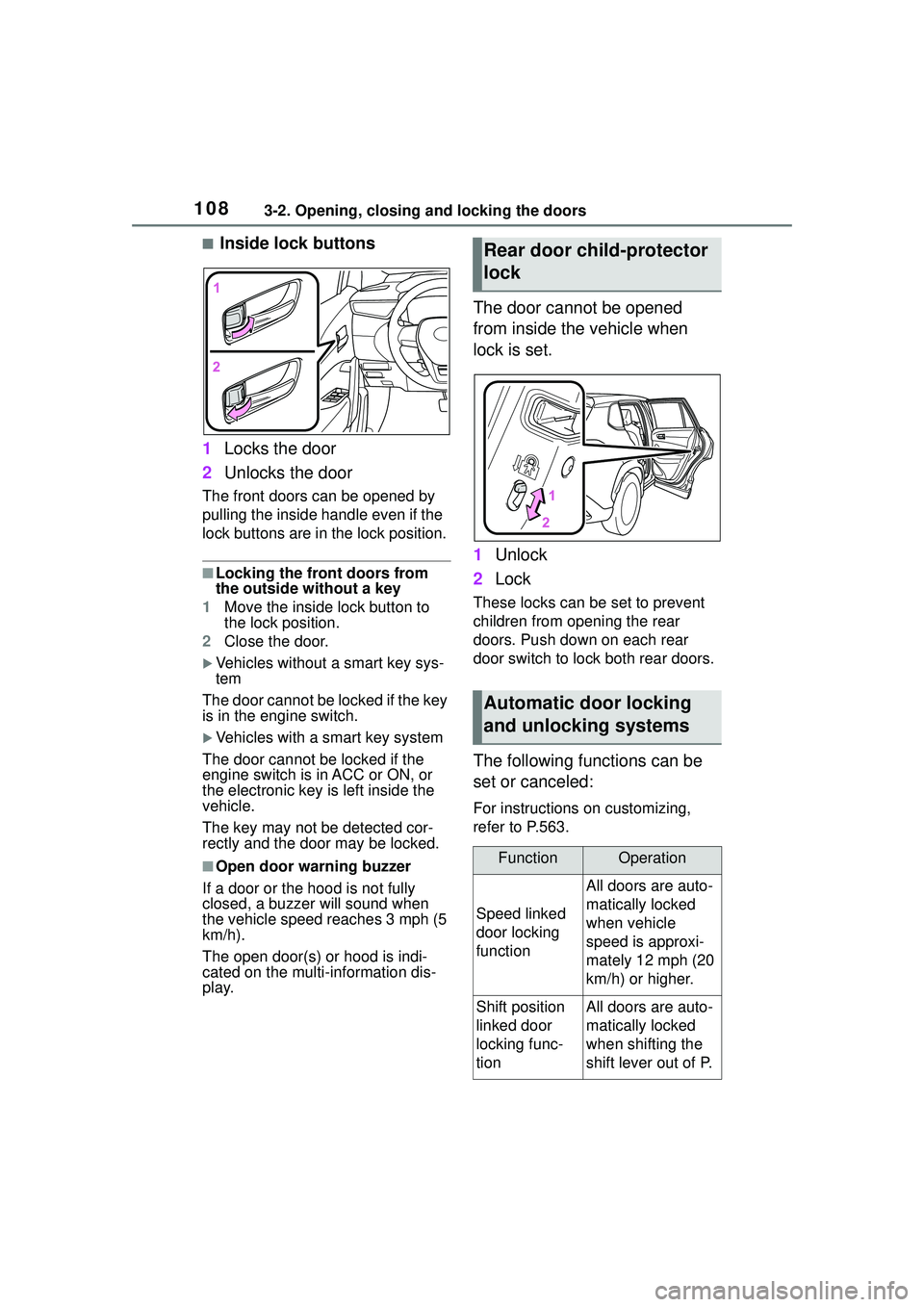
■Inside lock buttons
1 Locks the door
2 Unlocks the door
The front doors can be opened by
pulling the inside ha ndle even if the
lock buttons are in the lock position.
■Locking the front doors from
the outside without a key
1 Move the inside lock button to
the lock position.
2 Close the door.
Vehicles without a smart key sys-
tem
The door cannot be locked if the key
is in the engine switch.
Vehicles with a smart key system
The door cannot be locked if the
engine switch is in ACC or ON, or
the electronic key is left inside the
vehicle.
The key may not be detected cor-
rectly and the door may be locked.
■Open door warning buzzer
If a door or the hood is not fully
closed, a buzzer will sound when
the vehicle speed reaches 3 mph (5
km/h).
The open door(s) or hood is indi-
cated on the multi-information dis-
play.
The door cannot be opened
from inside the vehicle when
lock is set.
1 Unlock
2 Lock
These locks can be set to prevent
children from opening the rear
doors. Push down on each rear
door switch to lock both rear doors.
The following functions can be
set or canceled:
For instructions on customizing,
refer to P.563.
Rear door child-protector
lock
Automatic door locking
and unlocking systems
FunctionOperation
Speed linked
door locking
function
All doors are auto-
matically locked
when vehicle
speed is approxi-
mately 12 mph (20
km/h) or higher.
Shift position
linked door
locking func-
tionAll doors are auto-
matically locked
when shifting the
shift lever out of P.