2022 TOYOTA COROLLA CROSS wheel size
[x] Cancel search: wheel sizePage 197 of 612

1974-5. Using the driving support systems
4
Driving
■Enabling/disabling the
pre-collision system
The pre-collision system can be
enabled/disabled on
( P.563) of the multi-informa-
tion display.
The system is automatically
enabled each time the engine
switch is turned to ON.
If the system is disabled, the
PCS warning light will turn on
and a message will be displayed
on the multi-information display.
■Changing the pre-collision
warning timing
The pre-collision warning timing
can be changed on
( P.563) of the multi-informa-
tion display.
The warning timing setting is
retained when the engine switch is
turned off. However, if the pre-colli-
sion system is disabled and
re-enabled, the operation timing will
return to the default setting (mid-
dle).
WARNING
●When your vehicle is towing
another vehicle
●When transporting the vehicle
via truck, boat, train or similar
means of transportation
●When the vehicle is raised on a
lift with the engine running and
the tires are allowed to rotate
freely
●When inspecting the vehicle
using a drum tester such as a
chassis dynamometer or speed-
ometer tester, or when using an
on vehicle wheel balancer
●When a strong impact is applied
to the front bumper or front
grille, due to an accident or
other reasons
●If the vehicle cannot be driven in
a stable manner, such as when
the vehicle has been in an acci-
dent or is malfunctioning
●When the vehicle is driven in a
sporty manner or off-road
●When the tires are not properly
inflated
●When the tires are very worn
●When tires of a size other than
specified are installed
●When tire chains are installed
●When a compact spare tire or
an emergency tire puncture
repair kit is used
●If equipment (snow plow, etc.)
that may obstruct the radar sen-
sor or front camera is temporar-
ily installed to the vehicle
Changing settings of the
pre-collision system
Page 199 of 612
1994-5. Using the driving support systems
4
Driving
The system may not operate in the following situations:
●If a battery terminal has been disconnected and reconnected and then the
vehicle has not been driven for a certain amount of time
●If the shift lever is in R
●When the VSC OFF indicator is illuminated (only the pre-collision warning
function will be operational)
■Object detection function
The system detects objects based
on their size, profile, motion, etc.
However, an object may not be
detected depending on the sur-
rounding brightness and the motion,
posture, and angle of the detected
object, preventing the system from
operating properly. ( P.200)
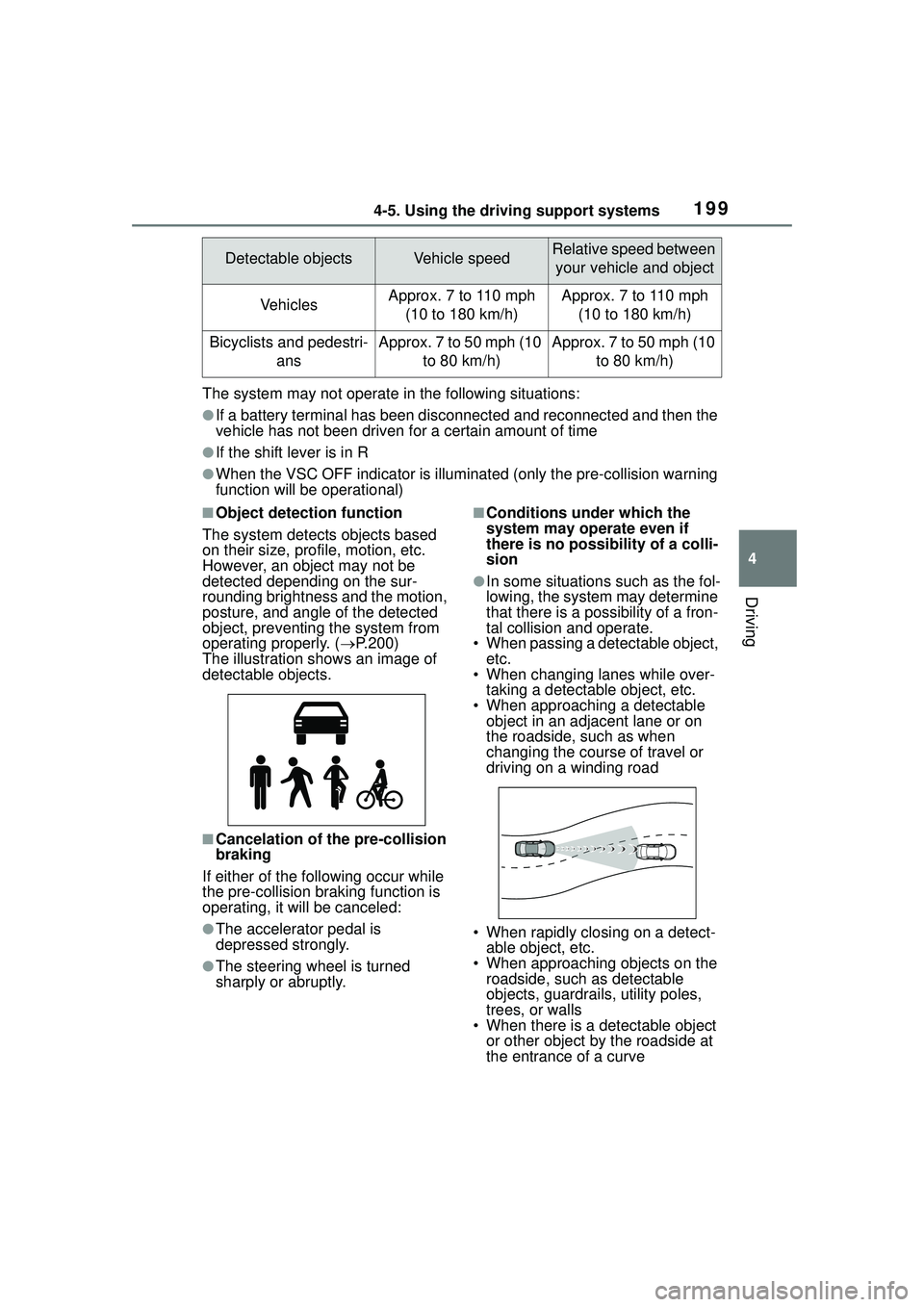
The illustration shows an image of
detectable objects.
■Cancelation of the pre-collision
braking
If either of the following occur while
the pre-collision braking function is
operating, it will be canceled:
●The accelerator pedal is
depressed strongly.
●The steering wheel is turned
sharply or abruptly.
■Conditions under which the
system may operate even if
there is no possibility of a colli-
sion
●In some situations such as the fol-
lowing, the system may determine
that there is a possibility of a fron-
tal collision and operate.
• When passing a detectable object, etc.
• When changing lanes while over-
taking a detectable object, etc.
• When approaching a detectable object in an adjace nt lane or on
the roadside, such as when
changing the course of travel or
driving on a winding road
• When rapidly closing on a detect- able object, etc.
• When approaching objects on the roadside, such as detectable
objects, guardrails, utility poles,
trees, or walls
• When there is a detectable object or other object by the roadside at
the entrance of a curve
Detectable objectsVehicle speedRelative speed between
your vehicle and object
VehiclesApprox. 7 to 110 mph (10 to 180 km/h)Approx. 7 to 110 mph (10 to 180 km/h)
Bicyclists and pedestri- ansApprox. 7 to 50 mph (10 to 80 km/h)Approx. 7 to 50 mph (10 to 80 km/h)
Page 201 of 612
2014-5. Using the driving support systems
4
Driving
swerving, acceleration or deceler-
ation)
• When your vehicle approaches a
detectable object rapidly
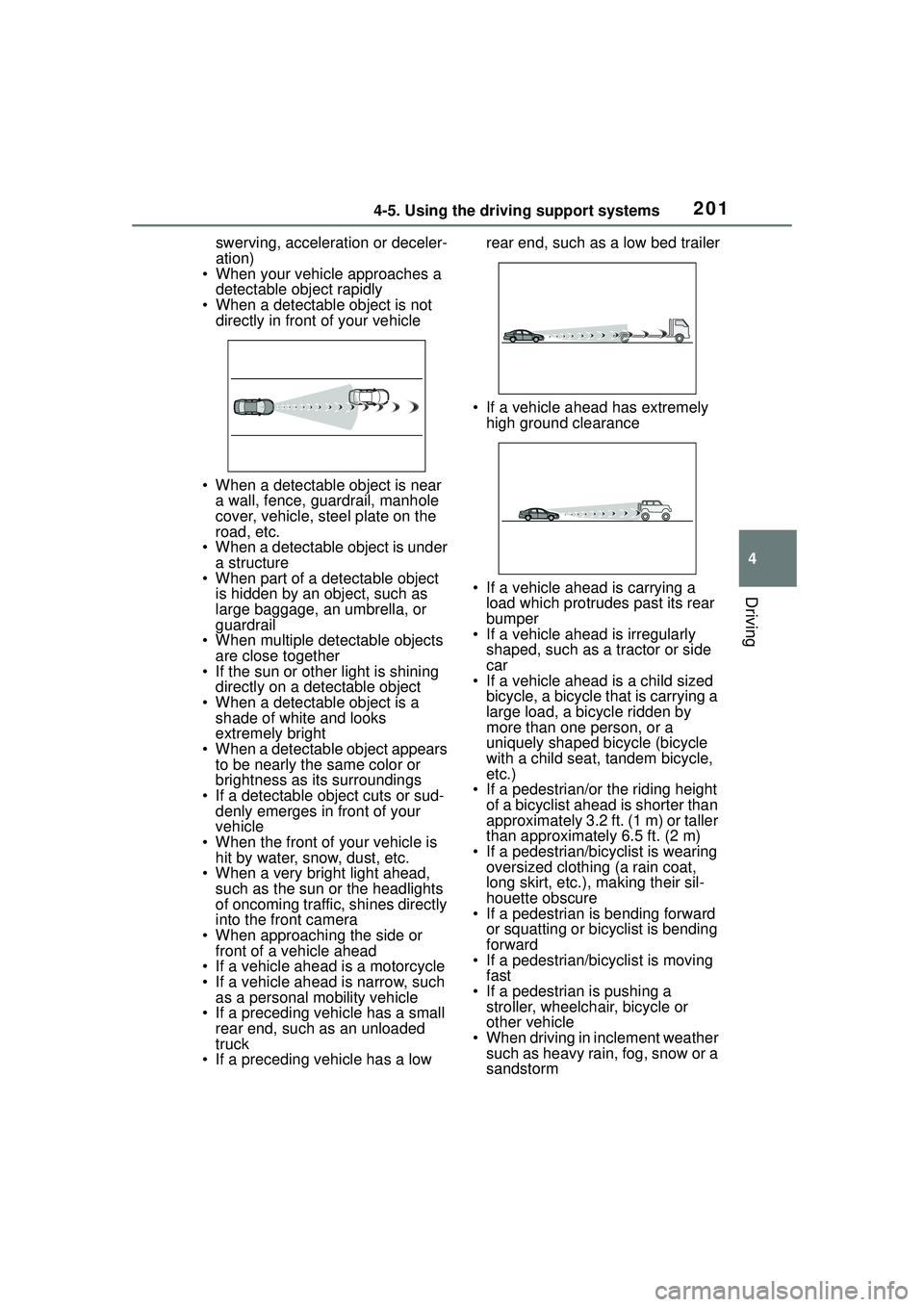
• When a detectable object is not directly in front of your vehicle
• When a detectable object is near a wall, fence, guardrail, manhole
cover, vehicle, steel plate on the
road, etc.
• When a detectable object is under
a structure
• When part of a detectable object is hidden by an object, such as
large baggage, an umbrella, or
guardrail
• When multiple de tectable objects
are close together
• If the sun or other light is shining directly on a detectable object
• When a detectable object is a shade of white and looks
extremely bright
• When a detectable object appears to be nearly the same color or
brightness as its surroundings
• If a detectable object cuts or sud- denly emerges in front of your
vehicle
• When the front of your vehicle is hit by water, snow, dust, etc.
• When a very bright light ahead,
such as the sun or the headlights
of oncoming traffic, shines directly
into the front camera
• When approaching the side or front of a vehicle ahead
• If a vehicle ahead is a motorcycle
• If a vehicle ahead is narrow, such as a personal mobility vehicle
• If a preceding vehicle has a small rear end, such as an unloaded
truck
• If a preceding vehicle has a low rear end, such as a low bed trailer
• If a vehicle ahead has extremely high ground clearance
• If a vehicle ahead is carrying a load which protrudes past its rear
bumper
• If a vehicle ahead is irregularly
shaped, such as a tractor or side
car
• If a vehicle ahead is a child sized
bicycle, a bicycle that is carrying a
large load, a bicycle ridden by
more than one person, or a
uniquely shaped bicycle (bicycle
with a child seat, tandem bicycle,
etc.)
• If a pedestrian/or the riding height of a bicyclist ahead is shorter than
approximately 3.2 ft. (1 m) or taller
than approximately 6.5 ft. (2 m)
• If a pedestrian/bicyclist is wearing oversized clothing (a rain coat,
long skirt, etc.), making their sil-
houette obscure
• If a pedestrian is bending forward
or squatting or bicyclist is bending
forward
• If a pedestrian/bicyclist is moving
fast
• If a pedestrian is pushing a stroller, wheelchair, bicycle or
other vehicle
• When driving in inclement weather such as heavy rain, fog, snow or a
sandstorm
Page 206 of 612

2064-5. Using the driving support systems
■Lane departure alert func-
tion
When the system determines that the vehicle might depart
from its lane or course
*, a warn-
ing is displayed on the
multi-information display, and a
warning buzzer will sound to
alert the driver.
When the warning buzzer sounds,
check the area around your vehicle
and carefully operate the steering
wheel to move the vehicle back to
the center of the lane.
Vehicle with BSM: When the sys-
tem determines that the vehicle
might depart from its lane and that
the possibility of a collision with an
overtaking vehicle in the adjacent
lane is high, the lane departure
alert will operate even if the turn
signals are operating.
*: Boundary between asphalt and the side of the road, such as
grass, soil, or a curb
■Steering assist function
When the system determines
WARNING
●The traffic lane is excessively
narrow or wide.
●The vehicle is extremely tilted
due to carrying heavy luggage
or having improper tire pres-
sure.
●The distance to the preceding
vehicle is extremely short.
●The vehicle is moving up and
down a large amount due to
road conditions during driving
(poor roads or road seams).
●When driving in a tunnel or at
night with the headlights off or
when a headlight is dim due to
its lens being dirty or it being
misaligned.
●The vehicle is struck by a cross-
wind.
●The vehicle is affected by wind
from a vehicle driven in a
nearby lane.
●The vehicle has just changed
lanes or crossed an intersec-
tion.
●Tires which differ by structure,
manufacturer, brand or tread
pattern are used.
●When tires of a size other than
specified are installed.
●Snow tires, etc. are equipped.
●The vehicle is being driven at
extremely high speeds.
Functions included in LTA
system
Page 250 of 612

2504-5. Using the driving support systems
WARNING
■When using the rear view
monitor system
The rear view monitor system is a
supplemental device intended to
assist the driver when backing up.
When backing up, be sure to visu-
ally check all around the vehicle
both directly and using the mirrors
before proceeding. Observe the
following precautions to avoid an
accident that could result in death
or serious injuries.
●Never depend on the rear view
monitor system entirely when
backing up. The image and the
position of the guide lines dis-
played on the screen may differ
from the actual state. Use cau-
tion, just as you would when
backing up any vehicle.
●Be sure to back up slowly,
depressing the brake pedal to
control vehicle speed.
●The instructions given are only
guide lines. When and how
much to turn the steering wheel
will vary according to traffic con-
ditions, road surface condi-
tions, vehicle condition, etc.
when parking. It is necessary to
be fully aware of this before
using the rear view monitor sys-
tem.
●When parking, be sure to check
that the parking space will
accommodate your vehicle
before maneuvering into it.
●Do not use the rear view moni-
tor system in the following
cases:
• On icy or slick road surfaces, or in snow
• When using tire chains or emer- gency tires
• When the luggage compartment is not closed completely
• On roads that are not flat or straight, such as curves or
slopes
●In low temperatures, the screen
may darken or the image may
become faint. The image could
distort when the vehicle is mov-
ing, or you may become unable
to see the image on the screen.
Be sure to visually check all
around the vehicle both directly
and using the mirrors before
proceeding.
●If the tire sizes are changed, the
position of the fixed guide lines
displayed on the screen may
change.
●The camera uses a special lens.
The distances between objects
and pedestrians that appear in
the image displayed on the
screen will differ from the actual
distances. ( P.245)
NOTICE
■How to use the camera
●The rear view monitor system
may not operate properly in the
following cases.
• If the back of the vehicle is hit, the position and mounting angle
of the camera may change.
• As the camera has a water proof construction, do not
detach, disassemble or modify
it. This may cause incorrect
operation.
Page 273 of 612
2734-5. Using the driving support systems
4
Driving
WARNING
■When the TRAC/VSC is acti-
vated
The slip indicator light flashes.
Always drive carefully. Reckless
driving may cause an accident.
Exercise particular care when the
indicator light flashes.
■When the TRAC/VSC systems
are turned off
Be especially careful and drive at
a speed appropriate to the road
conditions. As these are the sys-
tems to help ensure vehicle stabil-
ity and driving force, do not turn
the TRAC/VSC systems off
unless necessary.
■Replacing tires
Make sure that all tires are of the
specified size, brand, tread pat-
tern and total load capacity. In
addition, make sure that the tires
are inflated to the recommended
tire inflation pressure level.
The ABS, TRAC and VSC sys-
tems will not function correctly if
different tires are installed on the
vehicle.
Contact your Toyota dealer for fur-
ther information when replacing
tires or wheels.
■Handling of tires and the sus-
pension
Using tires with any kind of prob-
lem or modifying the suspension
will affect the driving assist sys-
tems, and may cause a system to
malfunction.
■Secondary Collision Brake
Do not rely solely upon the Sec-
ondary Collision Brake. This sys-
tem is designed to help reduce
the possibility of further damage
due to a secondary collision, how-
ever, that effect changes accord-
ing to various conditions. Overly
relying on the system may result
in death or serious injury.
Page 274 of 612

2744-6. Driving tips
4-6.Driving tips
Use fluids that are appropriate
to the prevailing outside tem-
peratures.
• Engine oil
• Engine coolant
• Washer fluid
Have a service technician
inspect the condition of the
battery.
Have the vehicle fitted with
four snow tires.
Ensure that all tires are the same
size and brand.
Perform the following according
to the driving conditions:
Do not try to forcibly open a
window or move a wiper that
is frozen. Pour warm water
over the frozen area to melt
the ice. Wipe away the water
immediately to prevent it from
freezing.
To ensure proper operation of
the climate control system
fan, remove any snow that
has accumulated on the air
inlet vents in front of the wind-
shield.
Check for and remove any
Winter driving tips
Carry out the necessary
preparations and inspec-
tions before driving the
vehicle in winter. Always
drive the vehicle in a man-
ner appropriate to the pre-
vailing weather conditions.
Pre-winter preparations
WARNING
■Driving with snow tires
Observe the following precautions
to reduce the risk of accidents.
Failure to do so may result in a
loss of vehicle control and cause
death or serious injury.
●Use tires of the size specified.
●Maintain the recommended
level of air pressure.
●Do not drive in excess of 75
mph (120 km/h), regardless of
the type of snow tires being
used.
●Use snow tires on all, not just
some wheels.
NOTICE
■Driving with tire chains
Do not fit tire chains. Tire chains
may damage the vehicle body
and suspension, and adversely
affect driving performance.
■Repairing or replacing snow
tires
Request repairs or replacement of
snow tires from Toyota dealers or
legitimate tire retailers.
This is because the removal and
attachment of snow tires affects
the operation of the tire pressure
warning valves and transmitters.
Before driving the vehicle
Page 469 of 612
4697-3. Do-it-yourself maintenance
7
Maintenance and care
Summer tires are high-speed perfor-
mance tires best suited to highway
driving under dry conditions. Since
summer tires do not have the same
traction performance as snow tires,
summer tires are inadequate for
driving on snow-covered or icy
roads. For driving on snow-covered
roads or icy roads, the use of snow
tires is recommended. When install-
ing snow tires, be sure to replace all
four tires.
●All season tires
All season tires are designed to pro-
vide better traction in snow and to
be adequate for driving in most win-
ter conditions as well as for use
year-round. All season tires, how-
ever, do not have adequate traction
performance compared with snow
tires in heavy or loose snow. Also,
all season tires fall short in accelera-
tion and handling performance com-
pared with summer tires in highway
driving.
●Snow tires
For driving on snow-covered roads
or icy roads, we recommend using
snow tires. If you need snow tires,
select tires of the same size, con-
struction and load capacity as the
originally installed tires. Since your
vehicle has radial tires as original
equipment, make sure your snow
tires also have radial construction.
Do not install studded tires without
first checking local regulations for
possible restrictions. Snow tires
should be installed on all wheels.
( P.274)
■If the tread on snow tires wears
down below 0.16 in. (4 mm)
The effectiveness of the tires as
snow tires is lost.
■Checking the tire valves
When replacing the tires, check the
tire valves for deformation, cracks,
and other damage.
WARNING
■When inspecting or replacing
tires
Observe the following precautions
to prevent accidents.
Failure to do so may cause dam-
age to parts of the drive train as
well as dangerous handling char-
acteristics, which may lead to an
accident resulting in death or seri-
ous injury.
●Do not mix tires of different
makes, models or tread pat-
terns.
Also, do not mix tires of remark-
ably different treadwear.
●Do not use tire sizes other than
those recommended by Toyota.
●Do not mix differently con-
structed tires (radial, bias-belted
or bias-ply tires).
●Do not mix summer, all season
and snow tires.
●Do not use tires that have been
used on another vehicle.
Do not use tires if you do not
know how they were used previ-
ously.
●Do not tow if your vehicle has a
compact spare tire installed.
NOTICE
■If tire inflation pressure of
each tire becomes low while
driving
Do not continue driving, or your
tires and/or wheels may be
ruined.