2022 TOYOTA COROLLA CROSS instrument panel
[x] Cancel search: instrument panelPage 16 of 612

16Pictorial index
■Instrument panel
Engine switch ............................................................. P.162, 163
Starting the engine/changing the positions
*1....................... P.162
Starting the engine/changing the modes
*2........................... P.163
Emergency stop of the engine ............................................. P.496
When the engine will not start .............................................. P.528
Warning messages .............................................................. P.515
Shift lever............................................................................ P.167
Changing the shift position................................................... P.167
Precautions for towing . ........................................................ P.499
When the shift lever does not move..................................... P.168
Meters ............................................................................. P.81, 85
Reading the meters/adjusting the instrument panel light . P.81, 85
Warning lights/indicator lights ................................................ P.76
When a warning light turns on ............................................. P.505
Multi-information display ........... ......................................... P.90
Display ................................................................................... P.90
Page 18 of 612
18Pictorial index
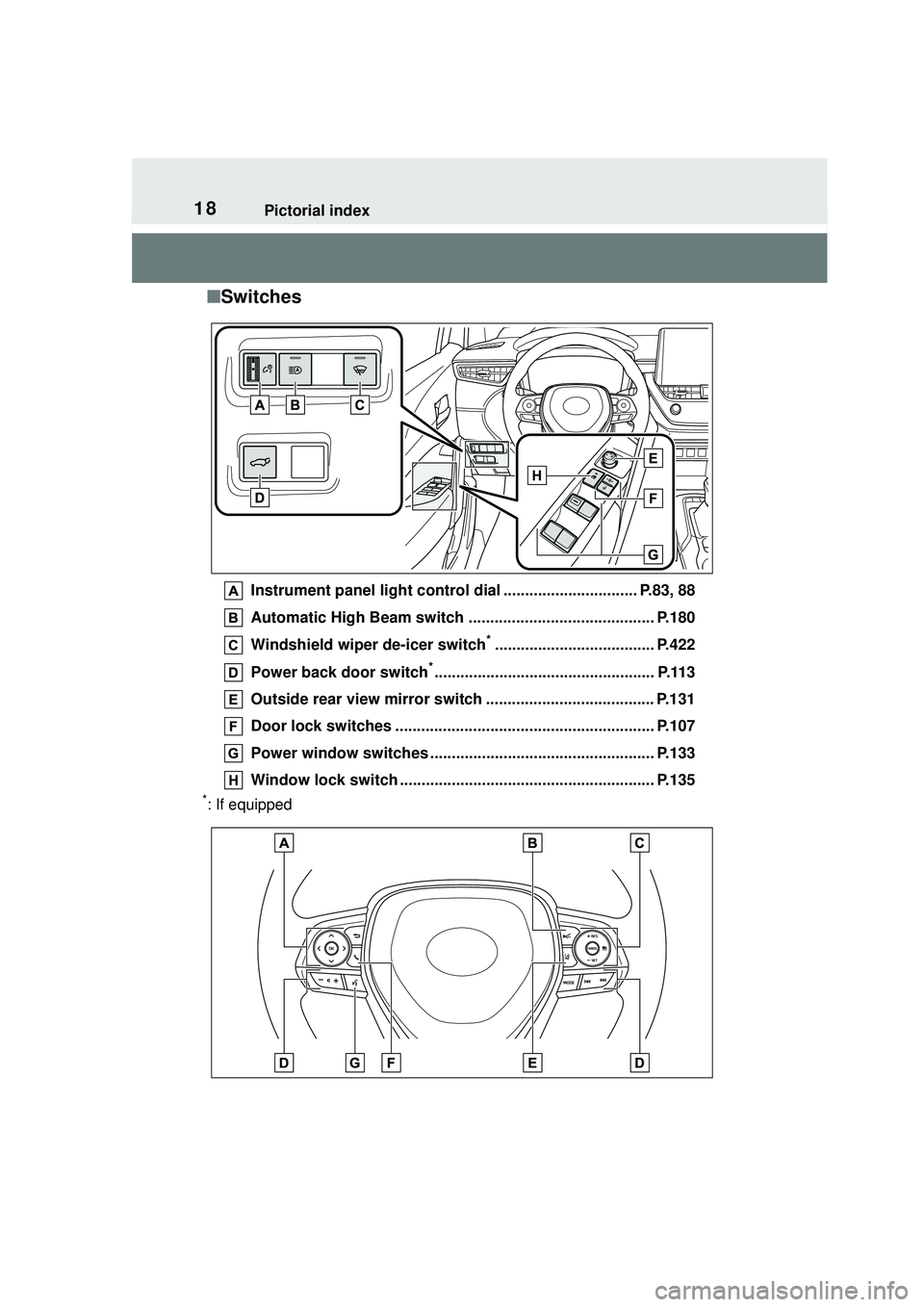
■Switches
Instrument panel light control dial ............................... P.83, 88
Automatic High Beam switch ........................................... P.180
Windshield wiper de-icer switch
*..................................... P.422
Power back door switch
*................................................... P.113
Outside rear view mirror switch ....................................... P.131
Door lock switches ............................................................ P.107
Power window switches ................................. ................... P.133
Window lock switch .... ................................................ ....... P.135
*: If equipped
Page 35 of 612
351-1. For safe use
1
For safety and security
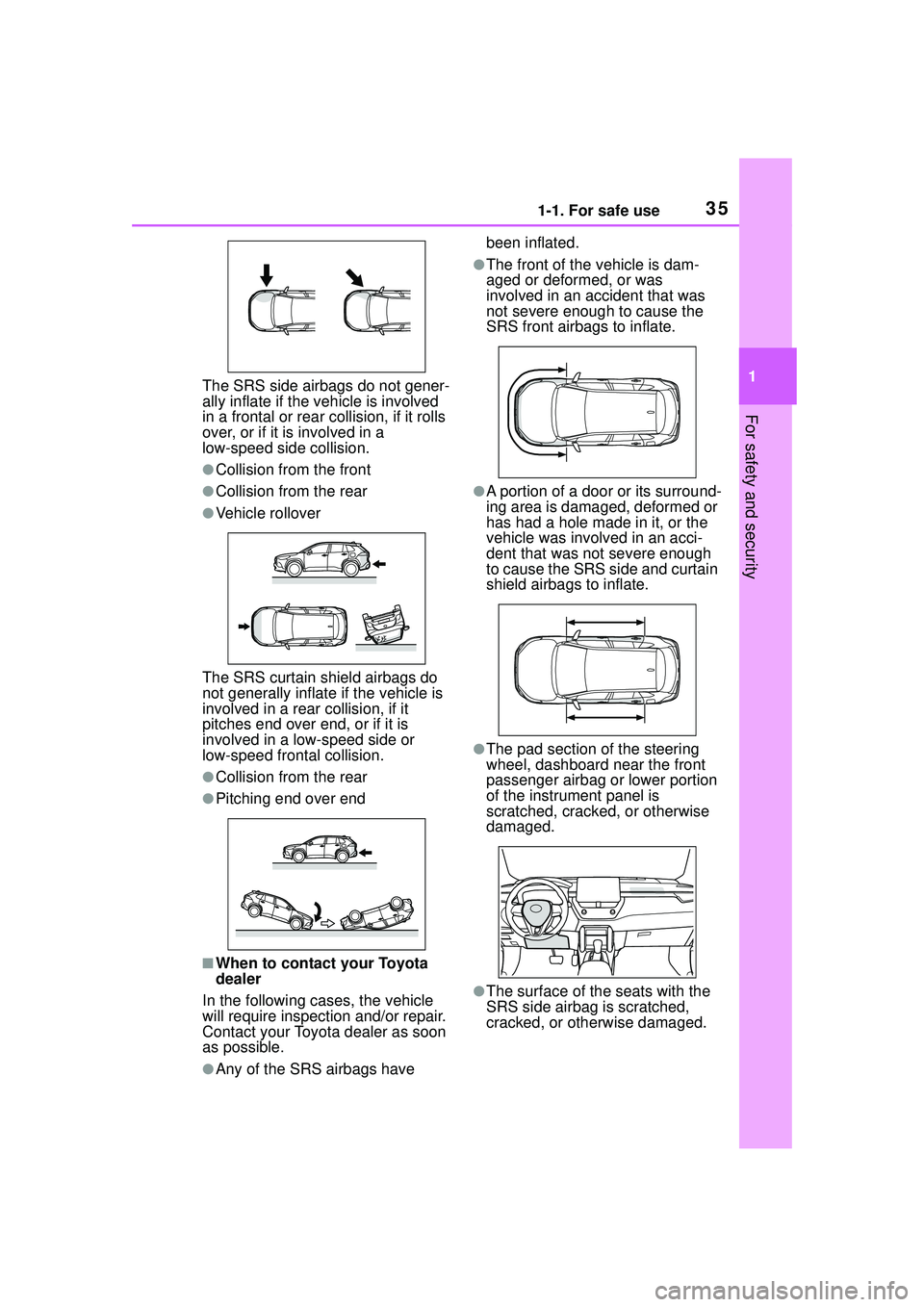
The SRS side airbags do not gener-
ally inflate if the vehicle is involved
in a frontal or rear collision, if it rolls
over, or if it is involved in a
low-speed side collision.
●Collision from the front
●Collision from the rear
●Vehicle rollover
The SRS curtain shield airbags do
not generally inflate if the vehicle is
involved in a rear collision, if it
pitches end over end, or if it is
involved in a low-speed side or
low-speed fron tal collision.
●Collision from the rear
●Pitching end over end
■When to contact your Toyota
dealer
In the following cases, the vehicle
will require inspection and/or repair.
Contact your Toyota dealer as soon
as possible.
●Any of the SRS airbags have been inflated.
●The front of the vehicle is dam-
aged or deformed, or was
involved in an accident that was
not severe enough to cause the
SRS front airbags to inflate.
●A portion of a door or its surround-
ing area is damaged, deformed or
has had a hole made in it, or the
vehicle was involved in an acci-
dent that was not severe enough
to cause the SRS side and curtain
shield airbags to inflate.
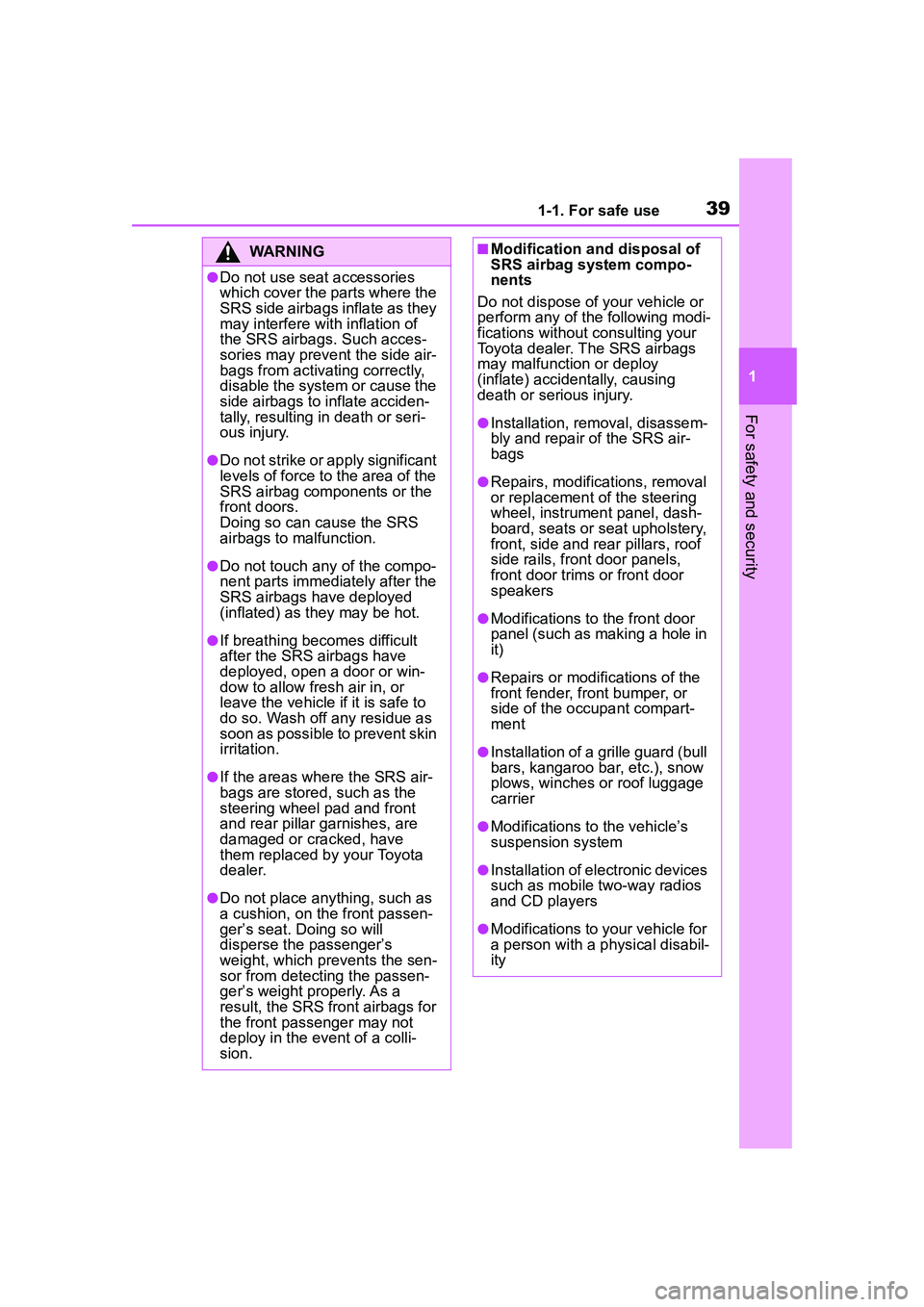
●The pad section of the steering
wheel, dashboard near the front
passenger airbag or lower portion
of the instrument panel is
scratched, cracked, or otherwise
damaged.
●The surface of the seats with the
SRS side airbag is scratched,
cracked, or otherwise damaged.
Page 36 of 612
361-1. For safe use
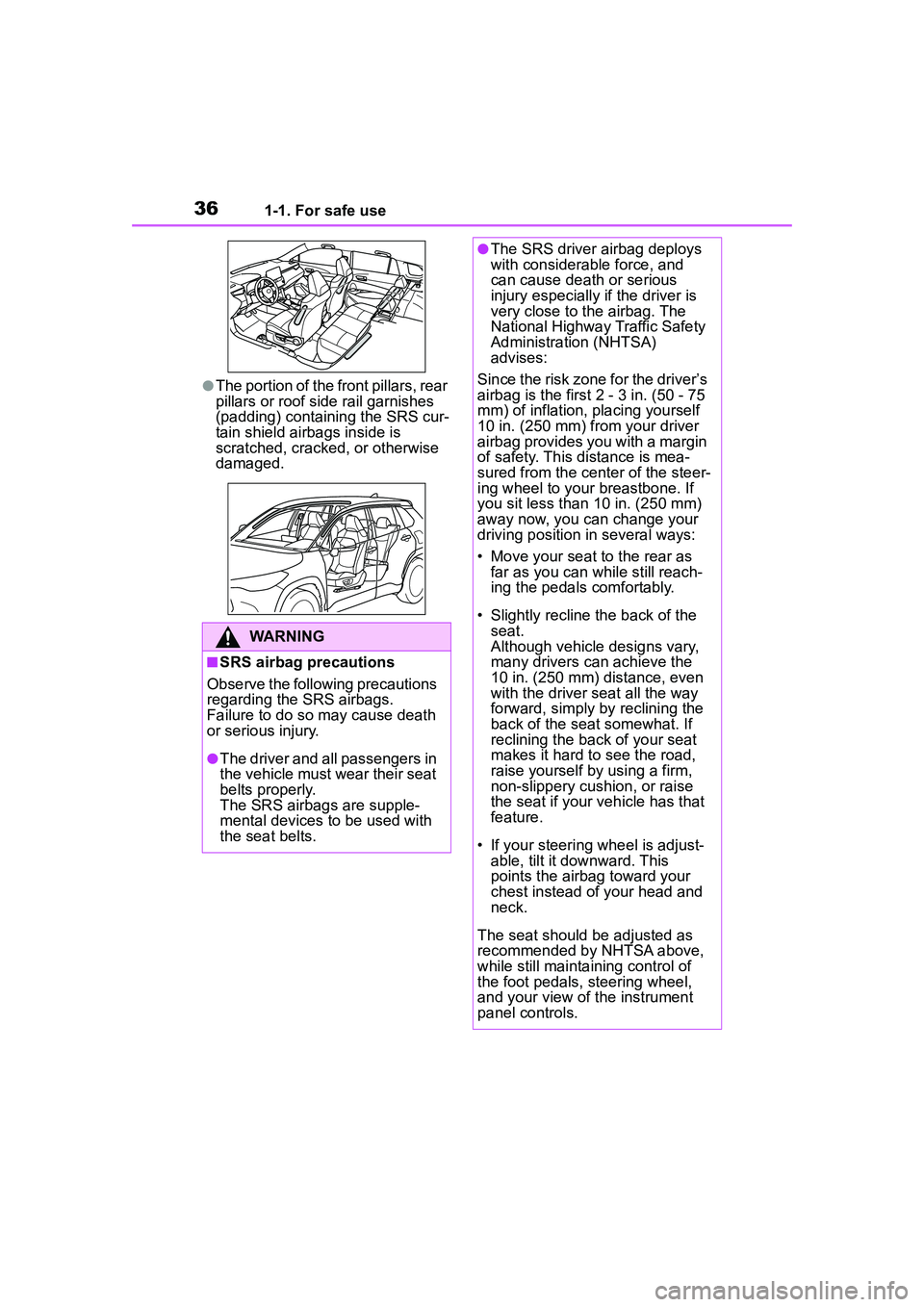
●The portion of the front pillars, rear
pillars or roof side rail garnishes
(padding) containing the SRS cur-
tain shield airbags inside is
scratched, cracked, or otherwise
damaged.
WARNING
■SRS airbag precautions
Observe the following precautions
regarding the SRS airbags.
Failure to do so may cause death
or serious injury.
●The driver and all passengers in
the vehicle must wear their seat
belts properly.
The SRS airbags are supple-
mental devices to be used with
the seat belts.
●The SRS driver airbag deploys
with considerable force, and
can cause death or serious
injury especially if the driver is
very close to the airbag. The
National Highway Traffic Safety
Administration (NHTSA)
advises:
Since the risk zone for the driver’s
airbag is the first 2 - 3 in. (50 - 75
mm) of inflation, placing yourself
10 in. (250 mm) from your driver
airbag provides you with a margin
of safety. This distance is mea-
sured from the center of the steer-
ing wheel to your breastbone. If
you sit less than 10 in. (250 mm)
away now, you can change your
driving position in several ways:
• Move your seat to the rear as far as you can while still reach-
ing the pedals comfortably.
• Slightly recline the back of the seat.
Although vehicle designs vary,
many drivers can achieve the
10 in. (250 mm) distance, even
with the driver seat all the way
forward, simply by reclining the
back of the seat somewhat. If
reclining the back of your seat
makes it hard to see the road,
raise yourself by using a firm,
non-slippery cushion, or raise
the seat if your vehicle has that
feature.
• If your steering wheel is adjust- able, tilt it downward. This
points the airbag toward your
chest instead of your head and
neck.
The seat should be adjusted as
recommended by NHTSA above,
while still maintaining control of
the foot pedals, steering wheel,
and your view of the instrument
panel controls.
Page 38 of 612

381-1. For safe use
WARNING
●Do not lean against the door,
the roof side rail or the front,
side and rear pillars.
●Do not allow anyone to kneel on
the passenger seats toward the
door or put their head or hands
outside the vehicle.
●Do not attach anything to or
lean anything against areas
such as the dashboard, steering
wheel pad and lower portion of
the instrument panel.
These items can become pro-
jectiles when the SRS driver,
front passenger and knee air-
bags deploy.
●Do not attach anything to areas
such as a door, windshield, side
windows, front or rear pillar, roof
side rail and assist grip.
●Vehicles without a smart key
system: Do not attach any
heavy, sharp or hard objects
such as keys and accessories
to the key. The objects may
restrict the SRS knee airbag
inflation or be thrust into the
driver’s seat area by the force of
the deploying airbag, thus caus-
ing a danger.
●Do not hang hangers or other
hard objects on the coat hooks.
All of these items could become
projectiles and may cause
death or serious injury, should
the SRS curtain shield airbags
deploy.
●If a vinyl cover is put on the area
where the SRS driver’s knee
airbag will deploy, be sure to
remove it.
Page 39 of 612
391-1. For safe use
1
For safety and security
WARNING
●Do not use seat accessories
which cover the parts where the
SRS side airbags inflate as they
may interfere with inflation of
the SRS airbags. Such acces-
sories may prevent the side air-
bags from activating correctly,
disable the system or cause the
side airbags to inflate acciden-
tally, resulting in death or seri-
ous injury.
●Do not strike or apply significant
levels of force to the area of the
SRS airbag components or the
front doors.
Doing so can cause the SRS
airbags to malfunction.
●Do not touch any of the compo-
nent parts immediately after the
SRS airbags have deployed
(inflated) as they may be hot.
●If breathing becomes difficult
after the SRS airbags have
deployed, open a door or win-
dow to allow fresh air in, or
leave the vehicle if it is safe to
do so. Wash off any residue as
soon as possible to prevent skin
irritation.
●If the areas where the SRS air-
bags are stored, such as the
steering wheel pad and front
and rear pillar garnishes, are
damaged or cracked, have
them replaced by your Toyota
dealer.
●Do not place anything, such as
a cushion, on the front passen-
ger’s seat. Doing so will
disperse the passenger’s
weight, which prevents the sen-
sor from detecting the passen-
ger’s weight properly. As a
result, the SRS front airbags for
the front passenger may not
deploy in the event of a colli-
sion.
■Modification and disposal of
SRS airbag system compo-
nents
Do not dispose of your vehicle or
perform any of the following modi-
fications without consulting your
Toyota dealer. The SRS airbags
may malfunction or deploy
(inflate) accidentally, causing
death or serious injury.
●Installation, removal, disassem-
bly and repair of the SRS air-
bags
●Repairs, modifications, removal
or replacement of the steering
wheel, instrument panel, dash-
board, seats or seat upholstery,
front, side and rear pillars, roof
side rails, front door panels,
front door trims or front door
speakers
●Modifications to the front door
panel (such as making a hole in
it)
●Repairs or modifications of the
front fender, front bumper, or
side of the occupant compart-
ment
●Installation of a grille guard (bull
bars, kangaroo bar, etc.), snow
plows, winches or roof luggage
carrier
●Modifications to the vehicle’s
suspension system
●Installation of electronic devices
such as mobile two-way radios
and CD players
●Modifications to your vehicle for
a person with a physical disabil-
ity
Page 76 of 612

762-1. Instrument cluster
2-1.Instrument cluster
For the purpose of explanation, the following illustrations display all
warning lights and indicators illuminated.
4.2-inch display
7-inch display (when analog speedometer is displayed)
War ning lights and indicators
The warning lights and indicators on the instrument cluster,
center panel and outside rear view mirrors inform the driver of
the status of the vehicle’s various systems.
Warning lights and indicators displayed on the instru-
ment cluster
Page 83 of 612

832-1. Instrument cluster
2
Vehicle status information and indicators
different distances independently.
To reset, display the desired trip
meter and press and hold the dis-
play change button.
The brightness of the instrument
panel lights can be adjusted.
1Brighter
2 Darker
■Instrument panel light bright-
ness adjustment
The brightness of the instrument
panel lights can be adjusted sepa-
rately for when the tail lights are on
and off.
■Clock adjustment
The clocks on the following can
be adjusted on the audio system
screen.
Multi-information display
Audio system screen
■Setting the clock to be
adjusted automatically by
GPS (Audio [for
U.S.A.]/Audio Plus)
1 Press the “MENU” button.
2 Select “Setup” on the “Menu”
screen.
3 Select “General” on the
“Setup” screen.
4 Select “Clock”.
5 Select “Auto Adjust by GPS”
to set to on.
■Adjusting the clock manu-
ally
Audio (except for U.S.A.)
1 Press the “MENU” button.
2 Select “Setup” on the “Menu”
screen.
3 Select “General” on the
“Setup” screen.
4 Select “Clock”.
5 Adjust the displayed time.
Hour: Select “-” or “+” of
“Hours” to adjust the hour.
Minute: Select “-” or “+” of
“Minutes” to adjust the min-
ute.
“:00”: Select to set the clock to
the beginning of the nearest
hour.
e.g.
1:00 to 1:29 1:00
1:30 to 1:59 2:00
Audio (for U.S.A.)/Audio Plus
1 Press the “MENU” button.
Changing the instrument
panel light brightness
Adjusting the clock