2022 TOYOTA COROLLA CROSS AUX
[x] Cancel search: AUXPage 334 of 612

3345-6. Radio operation
game, every NASCAR® race,
NHL® games, 24/7 talk channels
dedicated to the biggest leagues,
and more. You get all kinds of
commercial-free mu sic, including
artist-dedicated channels and
more, plus sports, news, talk and
entertainment.
●Radio operation
• Look for the Sirius, XM, SiriusXM,
Band, SAT, AUX, Radio or Source
button and you’re in. If you can’t
hear us, it’s easy to get started:
U.S.A.:
Locate your Radio ID by turning to
Channel 0. If you don’t see your
number there, go to siri-
usxm.com/activationhelp to find it.
Visit siriusxm.com/refresh
or call
1-855-MYREFRESH (697-3373)
to send a refresh signal to your
radio.
Canada:
Locate your Radio ID by turning to
Channel 0.
Visit siriusxm.ca/refresh
to send a
refresh signal to your radio or call 1-888-539-7474 for service.
Each SiriusXM tuner is identified
with a unique radio ID. The radio
ID is required when activating
an SiriusXM service or when
reporting a problem.
If “Ch 000” is selected using
the “TUNE SCROLL” knob,
the ID code, which is 8 alpha-
numeric characters, will be
displayed. If another channel
is selected, the ID code will no
longer be displayed. The
channel (000) alternates
between displaying the radio
ID and the specific radio
code.
When problems occur with the SiriusXM tuner, a message will
appear on the screen. Referring to the table below to identify the
problem, take the suggested corrective action.
Displaying the radio ID
Refer to the table below to identify the problem and take
the suggested corrective action
MessageExplanation
“Check
Antenna”
The SiriusXM antenna is not connected. Check whether the
SiriusXM antenna cable is attached securely. Contact your
Toyota dealer for assistance.
A short circuit occurs in the antenna or the surrounding
antenna cable. Contact your Toyota dealer for assistance.
“No Signal”The SiriusXM signal is too weak at the current location. Wait
until your vehicle reaches a location with a stronger signal.
Page 432 of 612
4326-3. Using the storage features
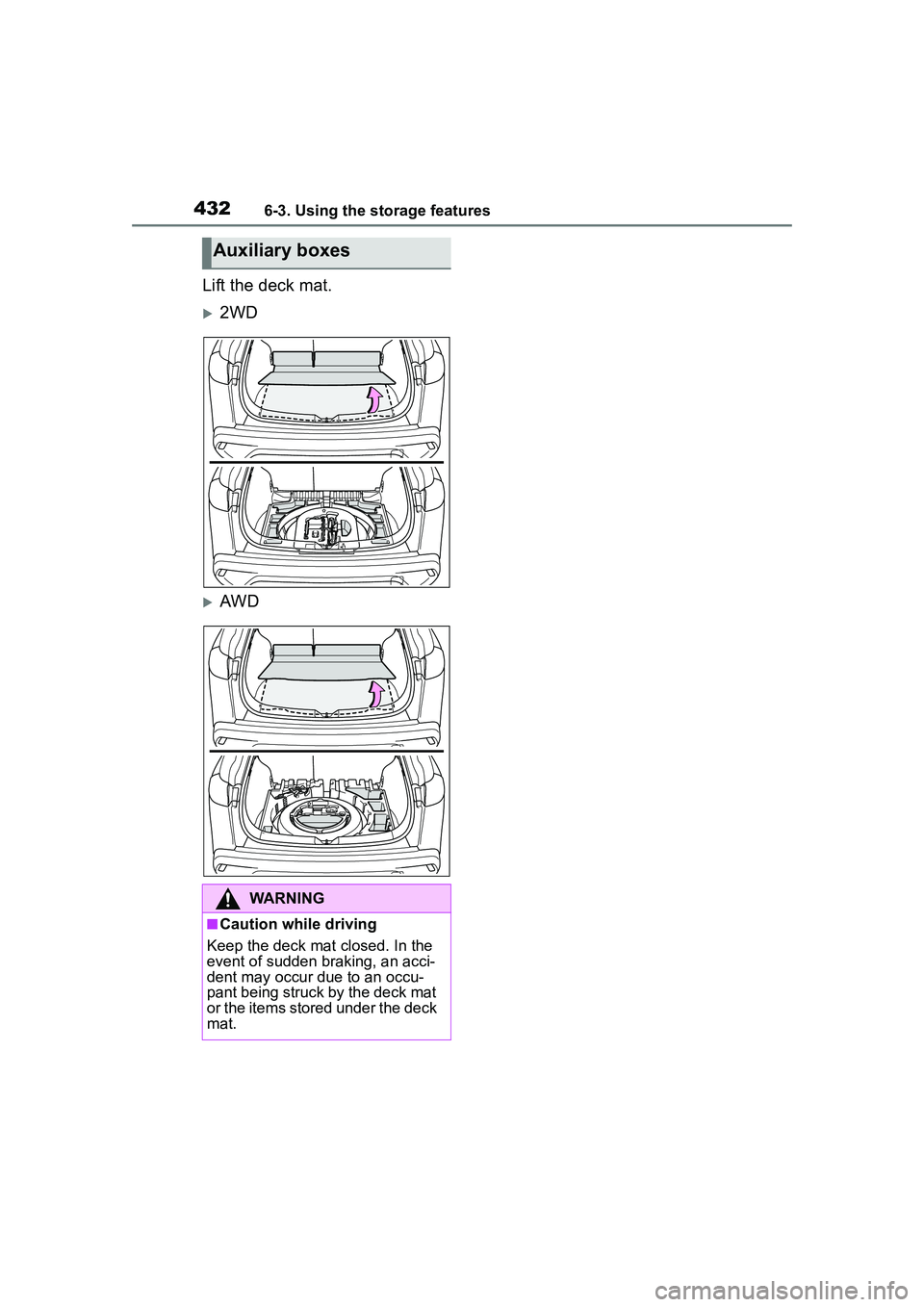
Lift the deck mat.
2WD
AWD
Auxiliary boxes
WARNING
■Caution while driving
Keep the deck mat closed. In the
event of sudden braking, an acci-
dent may occur due to an occu-
pant being struck by the deck mat
or the items stored under the deck
mat.
Page 441 of 612
4416-4. Other interior features
6
Interior features
WARNING
●Do not charge portable devices
with aluminum stickers or other
metallic objects attached to the
side which touches the charging
area.
●Do not store items on the wire-
less charger instead of in an
auxiliary box.
●Do not apply force or impact to
the wireless charger.
●Do not disassemble, modify or
remove the wireless charger.
●Do not attempt to charge porta-
ble devices which are not com-
patible with the Qi wireless
charging standard.
●Do not allow magnetic objects
to come near the wireless char-
ger.
●Do not perform charging if the
charging area is dirty.
●When not using the wireless
charger, to prevent foreign mat-
ter or liquids from contacting it,
make sure to close the lid.
●Do not cover the wireless char-
ger with a cloth or other object
while charging.
NOTICE
■To prevent failure or damage
to data
●Do not place magnetic cards,
such as a credit card, or mag-
netic recording media, close to
the wireless charger while
charging. Otherwise, data may
be erased due to the influence
of magnetism.
Additionally, do not bring preci-
sion instruments such as wrist
watches, close to the wireless
charger, as such objects may
malfunction.
●Do not perform charging with a
contactless smart card, such as
a credit card, between the
charging surface of a portable
device and the charging area.
The IC chip in the card may
become extremely hot, possibly
damaging the portable device or
smart card.
Be extra careful to not charge a
portable device with a case or
cover which a contactless smart
card can be inserted.
●Do not leave portable devices in
the cabin. The temperature
inside the cabin may become
high when parked in the sun,
and cause damage to the
device.
■When the OS of a smartphone
has been updated
When the OS version of a smart-
phone has been changed, the
charging specifications may have
changed. If the WPC compatibility
version is changed, the rapid
charging function may no longer
be able to be us ed. For details,
check for information on the web-
site for the smartphone manufac-
turer.
Page 459 of 612
4597-3. Do-it-yourself maintenance
7
Maintenance and care
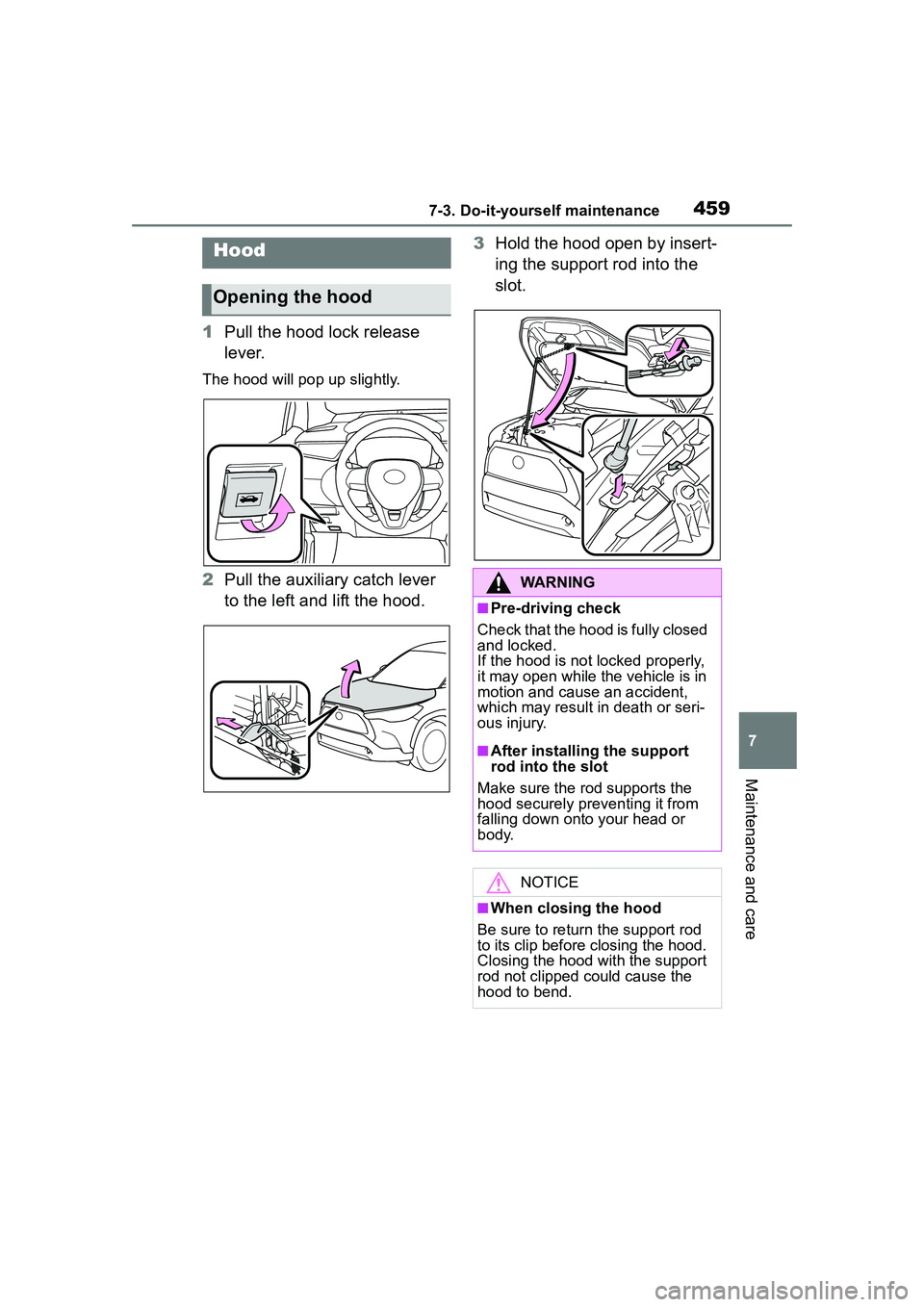
1Pull the hood lock release
lever.
The hood will pop up slightly.
2Pull the auxiliary catch lever
to the left and lift the hood. 3
Hold the hood open by insert-
ing the support rod into the
slot.
Hood
Opening the hood
WARNING
■Pre-driving check
Check that the hood is fully closed
and locked.
If the hood is not locked properly,
it may open while the vehicle is in
motion and cause an accident,
which may result in death or seri-
ous injury.
■After installing the support
rod into the slot
Make sure the rod supports the
hood securely preventing it from
falling down onto your head or
body.
NOTICE
■When closing the hood
Be sure to return the support rod
to its clip before closing the hood.
Closing the hood with the support
rod not clipped could cause the
hood to bend.
Page 471 of 612

4717-3. Do-it-yourself maintenance
7
Maintenance and care
■How to change the unit
1 Park the vehicle in a safe
place and turn the engine
switch off.
Changing the unit cannot be per-
formed while the vehicle is moving.
2Turn the engine switch to
ON.
3 Press or of the meter
control switch to select .
4 Press or to select
“Vehicle Settings” and then
press and hold .
5 Press or to select
“TPWS setting” and then
press .
6 Press or to select
“Setting Unit”.
7 Press or to select the
desired unit and then press
.
■Routine tire inflation pressure
checks
The tire pressure warning system
does not replace routine tire inflation
pressure checks. Make sure to
check tire inflation pressure as part
of your routine of daily vehicle
checks.
■Tire inflation pressure
●It may take a few minutes to dis-
play the tire inflation pressure
after the engine switch is turned to
ON. It may also take a few min-
utes to display the tire inflation
pressure after inflation pressure
has been adjusted.
●Tire inflation pressure changes
with temperature.
The displayed values may also be
different from the values mea-
sured using a tire pressure gauge.
■Situations in which the tire
pressure warning system may
not operate properly
●In the following cases, the tire
pressure warning system may not
operate properly.
• If non-genuine Toyota wheels are
used.
• A tire has been replaced with a tire that is not an OE (Original
Equipment) tire.
• A tire has been replaced with a tire that is not of the specified size.
• Tire chains, etc. are equipped.
• An auxiliary-sup ported run-flat tire
is equipped.
• If a window tint that affects the radio wave signals is installed.
• If there is a lot of snow or ice on
the vehicle, particularly around the
wheels or wheel housings.
• If the tire inflation pressure is
extremely higher than the speci-
fied level.
• If wheel without tire pressure
warning valves and transmitters
are used.
• If the ID code on the tire pressure
warning valves and transmitters is
not registered in the tire pressure
warning computer.
●Performance may be affected in
the following situations.
• Near a TV tower, electric power plant, gas station, radio station,
large display, airport or other facil-
ity that generates strong radio
waves or electrical noise
• When carrying a portable radio,
cellular phone, cordless phone or
other wireless communication
device
●If tire position information is not
correctly displayed due to the
radio wave conditions, the display
may be corrected by driving and
changing the radio wave condi-
Page 576 of 612
57610-1. For owners
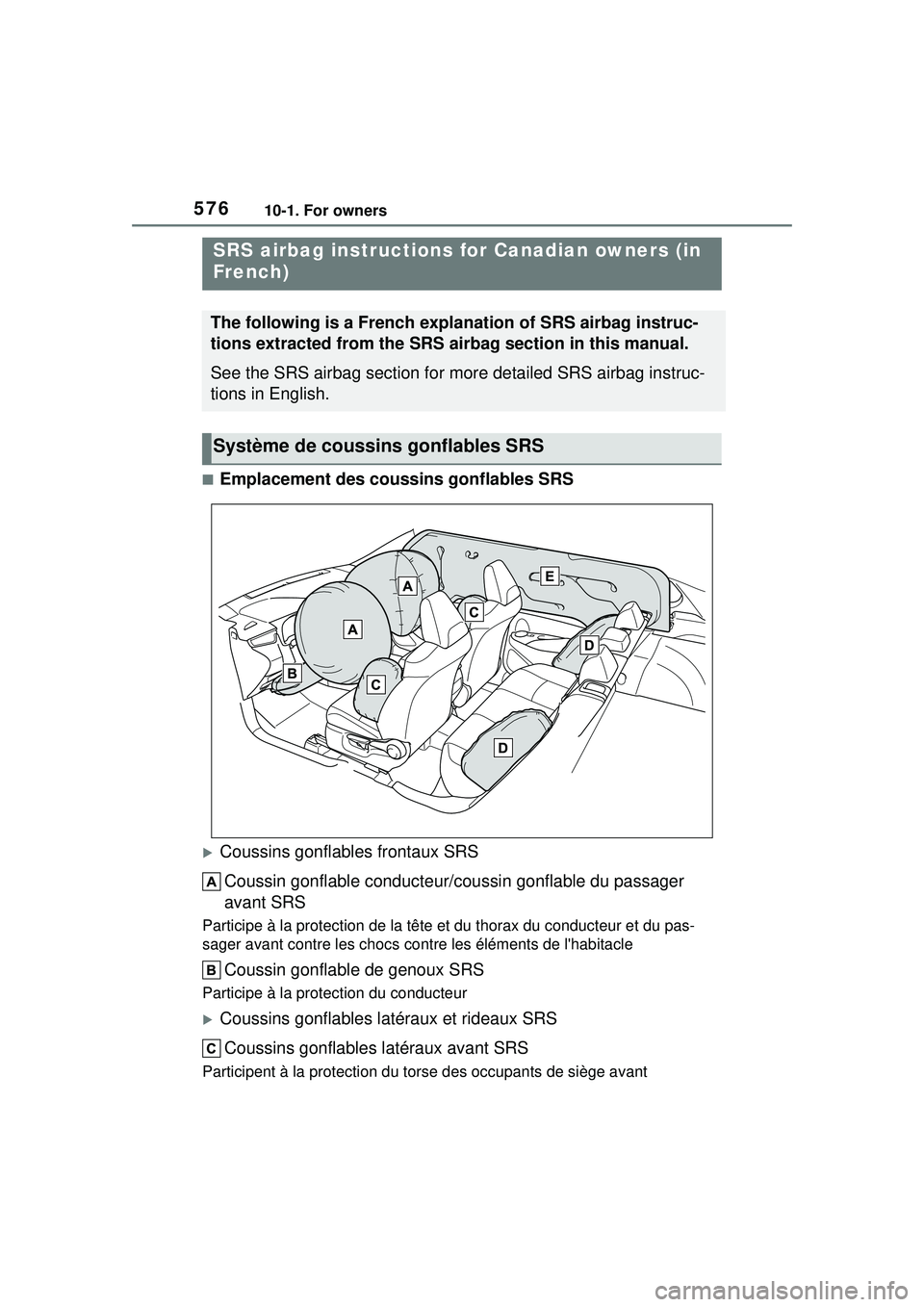
■Emplacement des coussins gonflables SRS
Coussins gonflables frontaux SRSCoussin gonflable conducteur/c oussin gonflable du passager
avant SRS
Participe à la protection de la tête et du thorax du conducteur et du pas-
sager avant contre les chocs cont re les éléments de l'habitacle
Coussin gonflable de genoux SRS
Participe à la protection du conducteur
Coussins gonflables latéraux et rideaux SRS
Coussins gonflables latéraux avant SRS
Participent à la protection du to rse des occupants de siège avant
SRS airbag instructions for Canadian owners (in
French)
The following is a French explanation of SRS airbag instruc-
tions extracted from the SRS airbag section in this manual.
See the SRS airbag section for more detailed SRS airbag instruc-
tions in English.
Système de coussi ns gonflables SRS
Page 577 of 612
57710-1. For owners
10
For owners
Coussins gonflables latéraux arrière SRS
Participent à la protection du torse des occupants des sièges latéraux
arrière
Coussins gonflables rideaux SRS
• Participent principalement à la protection de la tête des occupants des sièges latéraux
• Peut contribuer à empêcher les occupant s d’être éjectés du véhicule en
cas de tonneau
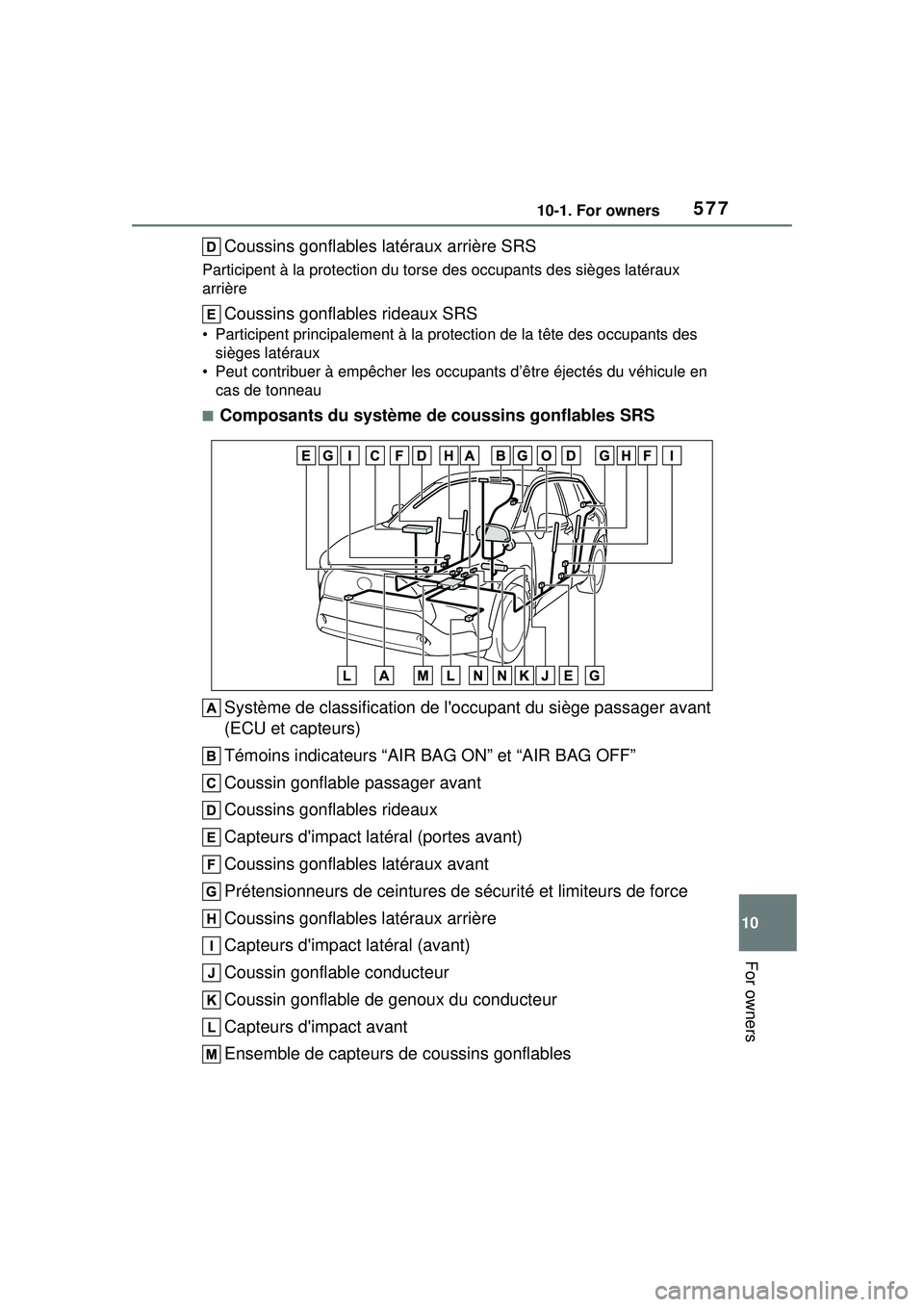
■Composants du système de coussins gonflables SRS
Système de classification de l'occupant du siège passager avant
(ECU et capteurs)
Témoins indicateurs “AIR BAG ON” et “AIR BAG OFF”
Coussin gonflable passager avant
Coussins gonflables rideaux
Capteurs d'impact latéral (portes avant)
Coussins gonflables latéraux avant
Prétensionneurs de ceintures de sécurité et limiteurs de force
Coussins gonflables latéraux arrière
Capteurs d'impact latéral (avant)
Coussin gonflable conducteur
Coussin gonflable de genoux du conducteur
Capteurs d'impact avant
Ensemble de capteurs de coussins gonflables
Page 578 of 612
57810-1. For owners
Capteurs de classification de l'occupant du siège passager avant
Témoin d'avertissement SRS
Votre véhicule est équipé de COUSSINS GONFLABLES INTELLI-
GENTS conçus selon les normes de sécurité américaines applica-
bles aux véhicules à moteur (FMVSS208). L'ensemble de capteurs
de coussins gonflables (ECU) régule le déploiement des coussins
gonflables sur la base des informations qu'il reçoit des capteurs,
etc., indiqués ci-dessus dans le schéma illustrant les composants du
système. Parmi ces informations figurent la gravité du choc et l'occu-
pation du véhicule par les passagers. Le déploiement rapide des
coussins gonflables est obtenu au moyen d'une réaction chimique
dans les dispositifs pyrotechniques, qui produit un gaz inoffensif per-
mettant d'amortir le mouvement des occupants.
WARNING
■Précautions relatives aux
coussins gonflables SRS
Respectez les précautions suiva-
ntes concernant les coussins gon-
flables SRS.
Le non-respect de ces précau-
tions peut occasionner des bless-
ures graves, voire mortelles.
●Le conducteur et tous les pas-
sagers du véhicule doivent por-
ter correctement leur ceinture
de sécurité.
Les coussins gonflables SRS
sont des dispos itifs supplémen-
taires à utiliser avec les cein-
tures de sécurité.
●Le coussin gonflable conduc-
teur SRS se déploie avec une
force considérable, pouvant
occasionner des blessures
graves, voire mortelles, si le
conducteur se trouve très près
du coussin gonflable. L'autorité
fédérale chargée de la sécurité
routière aux États-Unis
(NHTSA) conseille:
La zone à risque du coussin gon-
flable conducteur se situant dans
les premiers 2 à 3 in. (50 à 75
mm) de déploiement, vous placer
à 10 in. (250 mm) de votre cous-
sin gonflable conducteur vous
garantit une marge de sécurité.
Cette distance est à mesurer
entre le centre du volant et le ster-
num. Si vous êtes assis à moins
de 10 in. (250 mm), vous pouvez
changer votre position de con-
duite de plusieurs façons:
• Reculez votre siège le plus pos- sible, de manière à pouvoir
encore atteindre confortable-
ment les pédales.