2022 TOYOTA COROLLA CROSS air filter
[x] Cancel search: air filterPage 5 of 612

5TABLE OF CONTENTS
1
2
3
4
5
6
7
8
9
10
7-2. MaintenanceMaintenance requirements......................................... 452
General maintenance ......... 453
Emission inspection and mainte- nance (I/M) programs....... 456
7-3. Do-it-yourself maintenance Do-it-yourself service precau-tions ................................. 457
Hood .................................. 459
Positioning a floor jack ....... 460
Engine compartment .......... 461
Tires ................................... 468
Tire inflation pressure......... 478
Wheels ............................... 480
Air conditioning filter ........... 482
Wireless remote control/elec- tronic key battery.............. 483
Checking and replacing fuses ......................................... 486
Headlight aim ..................... 488
Light bulbs .......................... 489
8-1. Essential information Emergency flashers ........... 496
If your vehicle has to be stopped in an emergency .............. 496
If the vehicle is submerged or water on the road is rising
......................................... 498
8-2. Steps to take in an emergency If your vehicle needs to be towed......................................... 499
If you think something is wrong ......................................... 503
Fuel pump shut off system ......................................... 504
If a warning light turns on or a warning buzzer sounds .... 505If a warning message is dis-
played .............................. 515
If you have a flat tire........... 518
If the engine will not start ... 528
If you lose your keys .......... 530
If the electronic key does not operate properly............... 530
If the vehicle battery is dis- charged ............................ 532
If your vehicle overheats .... 536
If the vehicle becomes stuck ......................................... 538
9-1. Specifications Maintenance data (fuel, oil level, etc.) .................................. 542
Fuel information ................. 550
Tire information .................. 552
9-2. Customization Customizable features ....... 563
9-3. Initialization Items to initialize ................ 572
10-1. For owners Reporting safety defects for U.S.
o wners ............................. 574
Reporting safety defects for Canadian owners ............. 574
Seat belt instructions for Cana- di
an owners (in French) ... 575
SRS airbag instructions for Canadian owners (in French)......................................... 576
8When trouble arises
9Vehicle specifications
10For owners
Page 412 of 612

4126-1. Using the air conditioning system and defogger
■Defogging the rear window
and outside rear view mir-
rors
Defoggers are used to defog the
rear window, and to remove
raindrops, dew and frost from
the outside rear view mirrors.
Press the rear window and out-
side rear view mirror defoggers
switch.
The defoggers will automatically
turn off after a while.
When the rear window and outside
rear view mirror defoggers switch is
on, the indicator illuminates on the
rear window and outside rear view
mirror defoggers switch.
■Fogging up of the windows
●The windows will easily fog up
when the humidity in the vehicle is
high. Turning “A/C” switch is on
will dehumidify the air from the
outlets and defog the windshield
effectively.
●If you turn “A/C” switch is off, the
windows may fog up more easily.
●The windows may fog up if the
recirculated air mode is used.
■When driving on dusty roads
Close all windows. If dust thrown up
by the vehicle is still drawn into the
vehicle after closing the windows, it
is recommended that the air intake
mode be set to outside air mode and
the fan speed to any setting except
off.
■Outside/recirculated air mode
Setting to the recirculated air mode
temporarily is recommended in pre-
venting dirty air from entering the
vehicle interior and helping to cool
the vehicle when the outside air
temperature is high.
■When the outside temperature
falls to nearly 32°F (0°C)
The dehumidification function may
not operate even when “A/C” switch
is pressed.
■Ventilation and air conditioning
odors
●To let fresh air in, set the air condi-
tioning system to the outside air
mode.
●During use, various odors from
inside and outside the vehicle may
enter into and accumulate in the
air conditioning system. This may
then cause odor to be emitted
from the vents.
●It is recommended that the air
conditioning system be set to out-
side air mode prior to turning the
vehicle off.
●When parking, the system auto-
matically switches to outside air
mode to encourage better air cir-
culation throughout the vehicle,
helping to reduce odors that occur
when starting the vehicle.
■Air conditioning filter
P.482
■Air conditioning system refrig-
erant
●A label regarding the refrigerant of
the air conditioning system is
attached to the hood at the loca-
tion shown in th e following illustra-
tion.
●The meaning of each symbol on
the label are as follows:
Page 420 of 612

4206-1. Using the air conditioning system and defogger
■When the outside temperature
falls to nearly 32°F (0°C)
The dehumidification function may
not operate even when “A/C” switch
is pressed.
■Ventilation and air conditioning
odors
●To let fresh air in, set the air condi-
tioning system to the outside air
mode.
●During use, various odors from
inside and outside the vehicle may
enter into and accumulate in the
air conditioning system. This may
then cause odor to be emitted
from the vents.
●To reduce potential odors from
occurring:
• It is recommended that the air conditioning system be set to out-
side air mode prio r to turning the
vehicle off.
• The start timing of the blower may be delayed for a short period of
time immediately after the air con-
ditioning system is started in auto-
matic mode.
●When parking, the system auto-
matically switches to outside air
mode to encourage better air cir-
culation throughout the vehicle,
helping to reduce odors that occur
when starting the vehicle.
■Air conditioning filter
P. 4 8 2
■Air conditioning system refrig-
erant
●A label regarding the refrigerant of
the air conditioning system is
attached to the ho od at the loca-
tion shown in the following illustra-
tion.
●The meaning of each symbol on
the label are as follows:
■Customization
Some functions can be customized.
( P.563)
Caution
Air conditioning sys-
tem
Air conditioning sys-
tem lubricant type
Requires registered
technician to service
air conditioning sys-
tem
Flammable refrigerant
WARNING
■To prevent the windshield
from fogging up
Do not use the windshield defog-
ger switch during cool air opera-
tion in extremely humid weather.
The difference between the tem-
perature of the outside air and
that of the windshield can cause
the outer surface of the wind-
shield to fog up, blocking your
vision.
Page 445 of 612

445
7
7
Maintenance and care
Maintenance and care
.7-1. Maintenance and careCleaning and protecting the vehicle exterior .......... 446
Cleaning and protecting the vehicle interior ........... 449
7-2. Maintenance Maintenance requirements.................................. 452
General maintenance.. 453
Emission inspection and maintenance (I/M) pro-
grams ........................ 456
7-3. Do-it-yourself mainte- nance
Do-it-yourself service pre- cautions ..................... 457
Hood ........................... 459
Positioning a floor jack .................................. 460
Engine compartment ... 461
Tires ............................ 468
Tire inflation pressure.. 478
Wheels ......... ...............480
Air conditioning filter .... 482
Wireless remote con- trol/electronic key battery.................................. 483
Checking and replacing fuses.......................... 486
Headlight aim .............. 488
Light bulbs................... 489
Page 458 of 612

4587-3. Do-it-yourself maintenance
Radiator
and con-
denser
( P.464)
Tire infla-
tion pres-
sure
( P.478)• Tire pressure gauge
• Compressed air
source
Washer
fluid
( P.467)
• Water or washer
fluid containing anti-
freeze (for winter
use)
• Funnel (used only for adding water or
washer fluid)
WARNING
The engine compartment contains
many mechanisms and fluids that
may move suddenly, become hot,
or become electrically energized.
To avoid death or serious injury,
observe the following precautions.
■When working on the engine
compartment
●Keep hands, clothing and tools
away from the moving fan and
engine drive belt.
●Be careful not to touch the
engine, radiator, exhaust mani-
fold, etc. right after driving as
they may be hot. Oil and other
fluids may also be hot.
●Do not leave anything that may
burn easily, such as paper and
rags, in the engine compart-
ment.
●Do not smoke, cause sparks or
expose an open flame to fuel or
the battery. Fuel and battery
fumes are flammable.
ItemsParts and tools●Be extremely cautious when
working on the battery. It con-
tains poisonous and corrosive
sulfuric acid.
■When working near the elec-
tric cooling fan or radiator
grille
Be sure the engine switch is OFF.
With the engine switch in ON, the
electric cooling fan may automati-
cally start to run if the air condi-
tioning is on and/or the coolant
temperature is high. ( P.464)
■Safety glasses
Wear safety glasses to prevent
flying or falling material, fluid
spray, etc. from getting in your
eyes.
NOTICE
■If you remove the air cleaner
filter
Driving with the air cleaner filter
removed may cause excessive
engine wear due to dirt in the air.
Page 482 of 612

4827-3. Do-it-yourself maintenance
1Turn the engine switch off.
2 Open the glove box. Slide off
the damper.
3 Push in the glove box on the
vehicle’s outer side to discon-
nect the claws. Then pull out
the glove box and disconnect
the lower claws.
4 Unlock the filter cover ( ),
pull the filter cover out of the claws ( ), and remove the
filter cover.
5 Remove the filter case.
6 Remove the air conditioning
filter from the filter case and
replace it with a new one.
The “ UP” marks shown on the
filter and the filter case should be
pointing up.
■Checking interval
Replace the air conditioning filter
according to the maintenance
schedule. In dusty areas or areas
with heavy traffic flow, early replace-
Air condition ing filter
The air conditioning filter
must be changed regularly
to maintain air conditioning
efficiency.
Removing the air condi-
tioning filter
Page 483 of 612
4837-3. Do-it-yourself maintenance
7
Maintenance and care
ment may be required. (For sched-
uled maintenance information,
please refer to the “Scheduled
Maintenance Guide” or “Owner’s
Manual Supplement”.)
■If air flow from the vents
decreases dramatically
The filter may be clogged. Check
the filter and replace if necessary.*: If equipped
■If the key battery is depleted
The following symptoms may occur:
●The smart key system (if
equipped) and wireless remote
control will not function properly.
●The operational range will be
reduced.
Flathead screwdriver
Small flathead screwdriver
Lithium battery CR2016 (vehi-
cles without a smart key sys-
tem) or CR2450 (vehicles with
a smart key system)
■Use a CR2016 or CR2450 lith-
ium battery
●Batteries can be purchased at
your Toyota dealer, local electrical
appliance shops or camera stores.
●Replace only with the same or
equivalent type recommended by
the manufacturer.
●Dispose of used batteries accord-
NOTICE
■When using the air condition-
ing system
Make sure that a filter is always
installed.
Using the air conditioning system
without a filter may cause damage
to the system.
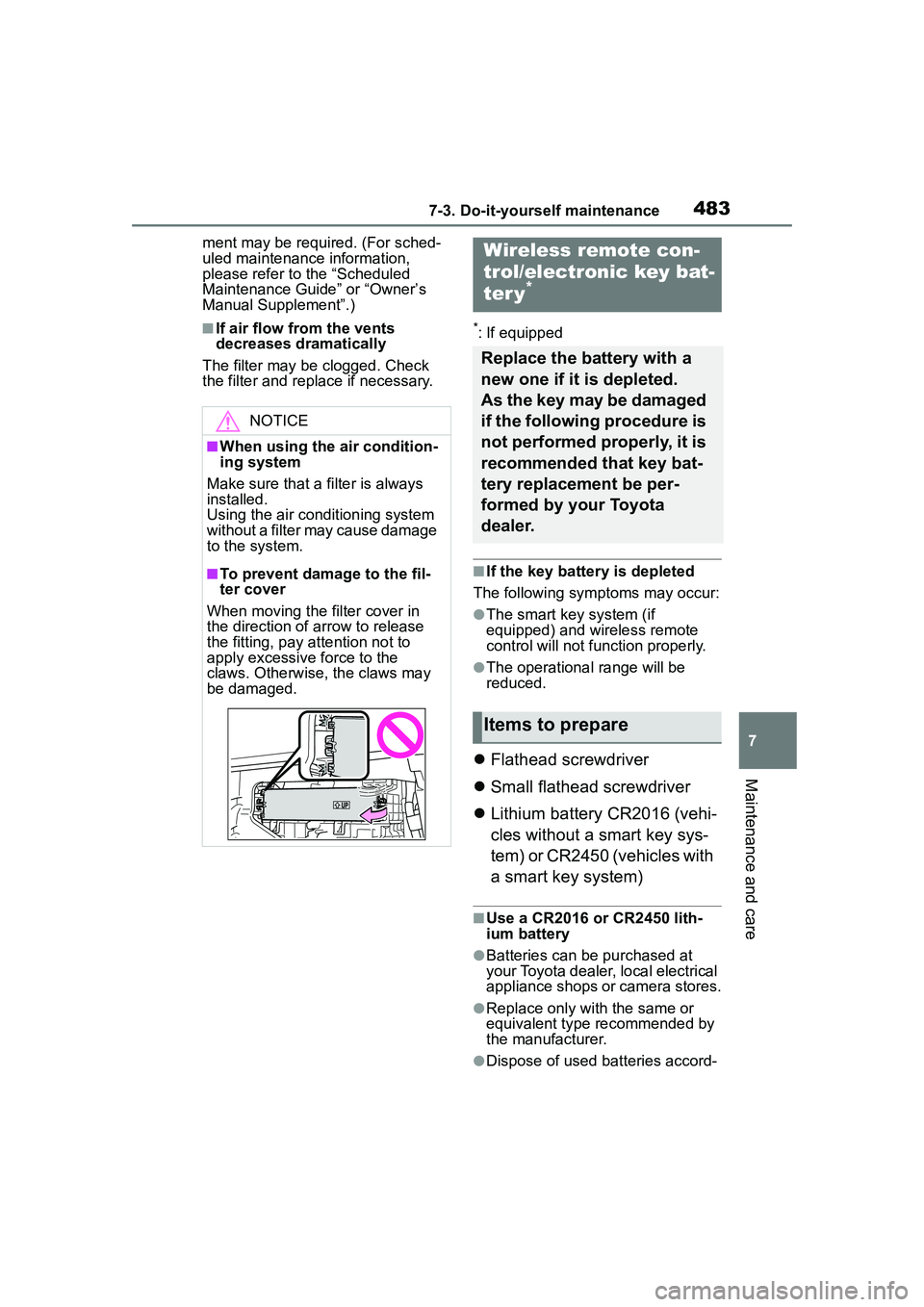
■To prevent damage to the fil-
ter cover
When moving the filter cover in
the direction of arrow to release
the fitting, pay attention not to
apply excessive force to the
claws. Otherwise, the claws may
be damaged.
Wireless remote con-
trol/electronic key bat-
ter y
*
Replace the battery with a
new one if it is depleted.
As the key may be damaged
if the following procedure is
not performed properly, it is
recommended that key bat-
tery replacement be per-
formed by your Toyota
dealer.
Items to prepare
Page 587 of 612
587Alphabetical Index
Alphabetical Index
A
A/CAir conditioning filter ............. 482
Automatic air conditioning sys-tem ..................................... 416
Front seat concentrated airflow mode (S-FLOW) ................. 421
Manual air conditioning system ........................................... 410
ABS (Anti-lock Brake System) ............................................... 269Warning light ........................ 507
ACA (Active Cornering Assist) ............................................... 269
Active Cornering Assist (ACA) ............................................... 269
Adaptive Front-lighting System (AFS)...................................... 180
AFS (Adaptive Front-lighting System) ................................. 180
Air conditioning filter ............. 482
Air conditioning system Air conditioning filter ............. 482
Automatic air conditioning sys-tem ..................................... 416
Front seat concentrated airflow mode (S-FLOW) ................. 421
Manual air conditioning system ........................................... 410
Airbags Airbag operating conditions.... 33
Airbag precautions for your child............................................. 36
Correct driving posture ........... 25
Curtain shield airbag operating conditions ............................. 34
Curtain shield airbag precautions ............................................. 36
Front passenger occupant clas- sification system ................... 40
General airbag precautions .... 36 Locations of airbags ...............31
Modification and disposal of air-
bags......................................39
Side airbag operating conditions .............................................34
Side airbag precautions..........36
Side and curtain shield airbags operating conditions .............34
Side and curtain shield airbags precautions ...........................36
SRS airbags ...........................31
SRS warning light .................506
Alarm Alarm ......................................72
Warning buzzer ....................505
AM ............................................331
Anchor brackets .................48, 64
Android Auto ...........................342
Antennas (smart key system) 119
Anti-lock Brake System (ABS) ...............................................269Warning light.........................507
Apple CarPlay/Android Auto .312 Troubleshooting ....................315
Approach warning ..................223
Apps button (Menu screen) ...283
Armrest ......... ......................... ..442
Assist grips .............................442
Audio .......................................326 Audio source ........................327
Operating information ...........350
Reordering the audio source 327
Screen adjustment ...............329
Some basics .........................327
Sound settings......................328
Turning the system on and off...........................................327
USB port ...............................328
Voice command system .......330
AUDIO button ..........................281
Audio button (Menu screen) ..283
Audio buttons overview .........281