2019 VOLVO S60 TWIN ENGINE ad blue
[x] Cancel search: ad bluePage 147 of 645

DISPLAYS AND VOICE CONTROL
}}
145
Commands for specific functions, such as phoneand audio, are described in the sections relatedto that function.
Numbers
Number commands can be given in differentways depending on the function to be controlled:
Phone numbers and zip codes should begiven by stating each number individually, e.g.zero three one two two four four three(03122443).
Addresses can be given by stating eachnumber individually or in a group, e.g. two twoor twenty-two (22). For English and Dutchlanguage settings, groups of numbers canalso be said in sequence, e.g. twenty-twotwenty-two (22 22). For English, double ortriple digits can also be used, e.g. doublezero (00). Numbers in the range 0-2300 canbe used.
Frequencies can be given as ninety-eightpoint eight (98.8), one hundred four pointtwo, or hundred four point two (104.2).
Speech rate and repeat mode
The speed at which the voice commands aregiven can be adjusted.
With repeat mode on, the system will repeat whatyou have said.
To change the speech rate or activate/deactivaterepeat mode:
1.Tap Settings in the Top view.
2.Tap SystemVoice Control and selectsettings.
Repeat Voice Command
Speech Rate
Related information
Voice control (p. 143)
Voice control for cellular phones (p. 145)
Voice control for radio and media (p. 146)
Climate control system voice commands(p. 197)
Voice control settings (p. 147)
Voice control for cellular phones17
Call a contact in the phone book, have a textmessage read aloud or dictate short messagesusing voice commands to a Bluetooth-con-nected phone.
To access a contact in the phone book, the voicecommand must contain the contact informationentered in the phone book. If a contact, e.g.Robyn Smith, has several phone numbers listedin the phone book, a number category such ashome or cellular can also be specified, i.e. "CallRobyn Smith cellular".
Tap and say one of the following commands:
"Call [contact]" - call the selected contactfrom the phone book.
"Call [phone number]" - call a phone num-ber.
"Recent calls" - display the list of recentcalls.
"Read message" - read a text messagealoud. If there are several messages, selectthe message to read aloud.
"Message to [contact]" - the user isprompted to dictate a short message. Themessage will then be read aloud and the
user can choose to send18 or re-dictate themessage. The vehicle must be connected tothe Internet to access this function.
Page 148 of 645

||
DISPLAYS AND VOICE CONTROL
* Option/accessory.146
Related information
Voice control (p. 143)
Using voice commands (p. 144)
Voice control for radio and media (p. 146)
Climate control system voice commands(p. 197)
Voice control settings (p. 147)
Internet-connected vehicle* (p. 494)
Voice control for radio and media19
Voice commands for the radio and media play-ers are shown below.
Tap and say one of the following commands:
"Media" - initiates a dialog for media andradio and displays examples of commands.
"Play [artist]" - plays music by the selectedartist.
"Play [song title]" - plays the selectedsong.
"Play [song title] from [album]" - playsthe selected song from the selected album.
"Play [radio station]" - starts the selectedradio station.
"Tune to [frequency]" - tunes to theselected radio frequency in the currentlyactive waveband. If no radio source is active,the FM band will be started as default.
"Tune to [frequency] [waveband]" - tunesto the selected radio frequency on theselected waveband.
"Radio" - starts FM radio.
"Radio FM" - starts FM radio.
"SiriusXM" - starts SiriusXM radio*.
"CD" - starts playback from CD*.
"USB" - starts playback from USB.
"iPod" - starts playback from iPod.
"Bluetooth" - starts playback from a Blue-tooth-connected media source.
"Similar music" - plays music from a USB-connected device with music similar to thatcurrently playing.
Related information
Voice control (p. 143)
Using voice commands (p. 144)
Voice control for cellular phones (p. 145)
Climate control system voice commands(p. 197)
Voice control settings (p. 147)
17Certain markets only.18Only certain phones can send messages via the vehicle. For additional information on compatibility, see support.volvocars.com.19Certain markets only.
Page 157 of 645

LIGHTING
}}
155
High beams
The high beams can be activated when the
lighting ring is in mode 2 or .Activate high beams by moving the steeringwheel lever forward. Deactivate by movingthe steering wheel lever backward.
When the high beams are activated, the symbol will be illuminated in the instrument panel.
Related information
Lighting control and panel (p. 150)
Active high beam (p. 155)
Active high beam
Active high beams is a function that uses cam-era sensors in the upper edge of the windshieldto detect the headlights of approaching vehiclesor the taillights of the vehicle directly ahead.When either of these is detected, the vehicle'sheadlights will automatically switch from highbeams to low beams.
Active high beams is indicated by the symbol.
This function can be used in dark conditionswhen the vehicle's speed is approx. 20 km/h(approx. 12 mph) or higher. The function can alsodetect street lighting. When the camera sensorno longer detects an approaching vehicle or avehicle ahead, the headlights will return to highbeams after a second or two.
Activating active high beams
Active high beams can be activated and deacti-vated by turning the lighting ring on the right-side
steering wheel lever to position . The light-
ing ring will then return to . When active
high beams are activated, a white symbolwill be displayed in the instrument panel. Whenhigh beams are on, the symbol will be blue.
If active high beams are deactivated when thehigh beams are on, the headlights will automati-cally switch to low beams.
Limitations for active high beams
The camera sensor on which the function isbased has limitations.
If this symbol and the message ActiveHigh Beam Temporarilyunavailable is displayed in the instru-ment panel, switching between highand low beams must be done manually. The
symbol will go out when the message isdisplayed.
The same applies if this symbol alongwith the message Windscreensensor Sensor blocked, seeOwner's manual is displayed.
Active high beams may be temporarily unavailablein certain situations, e.g. heavy fog or rain. When
2When the low beams are on.
Page 201 of 645

CLIMATE CONTROL
* Option/accessory.199
Clean Zone*
The Clean Zone function monitors the condi-tions affecting good air quality in the passengercompartment and indicates whether they are ful-filled or not.
The indicator is shown in the center display'sClimate view.
The indicator is shown in the climate barwhen Climate view is not open.
If the conditions are not met, the text CleanZone will be shown in white. When all the condi-tions are met, the text will change to blue.
The following conditions must be met:
All doors and trunk lid are closed.
All side windows and panoramic roof* areclosed.
The Interior Air Quality System* is activated.
The blower is activated.
Air recirculation is deactivated.
NOTE
Clean Zone does not indicate that the airquality is good, but only that the conditions forgood air quality have been met.
Related information
Air quality (p. 198)
Clean Zone Interior Package* (p. 199)
Interior Air Quality System* (p. 200)
Passenger compartment air filter (p. 201)
Clean Zone Interior Package*
Clean Zone Interior Package (CZIP) is a seriesof modifications that filters even more allergy andasthma-inducing substances from the passengercompartment.
CZIP includes the following:
An enhanced function that starts the blowerwhen the vehicle is unlocked using theremote key. The blower will then fill the pas-senger compartment with fresh air. The func-tion starts when required and switches offautomatically after a period of time or whenone of the passenger compartment doors isopened. The amount of time the blower runsgradually decreases due to reduced need upuntil the vehicle is 4 years old.
The fully automatic Interior Air QualitySystem (IAQS).
Related information
Air quality (p. 198)
Clean Zone* (p. 199)
Interior Air Quality System* (p. 200)
Passenger compartment air filter (p. 201)
Page 381 of 645

HYBRID INFORMATION
379
Charging cable components
Charge module
240 V adapter clip
240 V adapter
Charge coupler
Release button
Related information
Charging cable residual current device(p. 379)
Charging cable temperature monitoring(p. 380)
Charging the hybrid battery (p. 375)
Charging status in the charging cable'scharging module (p. 383)
Charging cable residual currentdevice
The charging cable has a circuit breaker thathelps protect against current overloads and ther-mal overheating.
WARNING
Charging the hybrid battery may only be donefrom approved, grounded 120/240 V outlets(AC, alternating current). If the electrical cir-cuit or electrical socket's capacity is notknown, let a licensed electrician inspect theelectrical circuit's capacity. Using a chargelevel that exceeds the electrical circuit's orelectrical outlet's capacity may start a fire ordamage the electrical circuit.
WARNING
The charging cable's residual currentbreaker helps protect the vehicle's charg-ing system but cannot ensure that an cur-rent overload will never occur.
Never use visibly worn or damaged elec-trical sockets. Doing so could lead to firesor serious injury.
Never connect the charging cable to anextension cord.
Maintenance or replacement of the hybridbattery may only be performed by atrained and qualified Volvo service techni-cian.
If the charging cable's residual current device istriggered, the blue indicator light in the chargingmodule will not illuminate when the chargingcable is plugged into an electrical outlet (or thered warning light will glow steadily). Have the out-let checked by a licensed electrician or try usinganother wall outlet.
Related information
Charge cable (p. 377)
Charging status in the charging cable'scharging module (p. 383)
Page 385 of 645

HYBRID INFORMATION
383
LED indicatorlight's colorMeaning
WhiteCourtesy light.
YellowWait modeA – waiting forcharging to start.
Flashing greenCharging is in progressB.
GreenCharging completedC.
RedMalfunction.
AE.g. after a door has been opened or if the charging cable han-dle is not locked in place.BThe more slowly the light flashes, the closer the battery is tobeing fully charged.CThe light will go out after a short time.
Related information
Charging the hybrid battery (p. 375)
Charging status in the instrument panel(p. 384)
Charging status in the charging cable'scharging module (p. 383)
Stopping hybrid battery charging (p. 386)
Charging status in the chargingcable's charging module
The red and blue lights in the charging moduleindicate the status of ongoing and completedcharging.
Charge module: 1. Red warning light, 2. Blue status indi-cator
When the charge module is initially plugged intoa wall outlet, the red warning light will flash onceto indicate that a startup safety check has beenperformed. When the safety check has beencompleted, the blue status indicator will glowsteadily and the red warning light will be off. Thecharger is now ready to be used. If the red warn-ing light continues to flash or glows steadily, afault has been detected and the charger will notdeliver power to the vehicle. Contact a Volvoretailer or a certified Volvo service technician.
When the charging cable is connected to thevehicle's charging socket, the blue light will flashonce.
Charging cable connected to the vehicle's charg-ing socket:
Indicatorlight's colorMeaning
FlashingblueCharging is in progress. Thelight flashes about once everyother second
Solid blueCharging completed. This willalso be indicated in the instru-ment panel
Related information
Charging the hybrid battery (p. 375)
Charging status in the vehicle's chargingsocket (p. 382)
Charging status in the instrument panel(p. 384)
Stopping hybrid battery charging (p. 386)
Page 386 of 645

HYBRID INFORMATION
384
Charging status in the instrumentpanel
Charging status is indicated in the instrumentpanel using both graphics and messages. This
information is displayed as long as the instru-ment panel is active.
GraphicMessageMeaning
Fully charged at: [Time] displayed along with an animated blue puls-ing light through the charging cable.Charging is in progress and the approximate time at which thebattery will be fully charged is displayed.
Charging complete is displayed. An image will be superimposed overthe graphic of the vehicle with a green LED indicator light in thesocket.
The battery is fully charged.
Charging error will be displayed. The LED indicator light in the charg-ing socket will be red.Malfunction. Make sure the charging cable is correctly con-nected to the vehicle's charging socket and to the 120/240 Voutlet (alternating current).
Page 397 of 645
STARTING AND DRIVING
* Option/accessory.395
Ignition modes
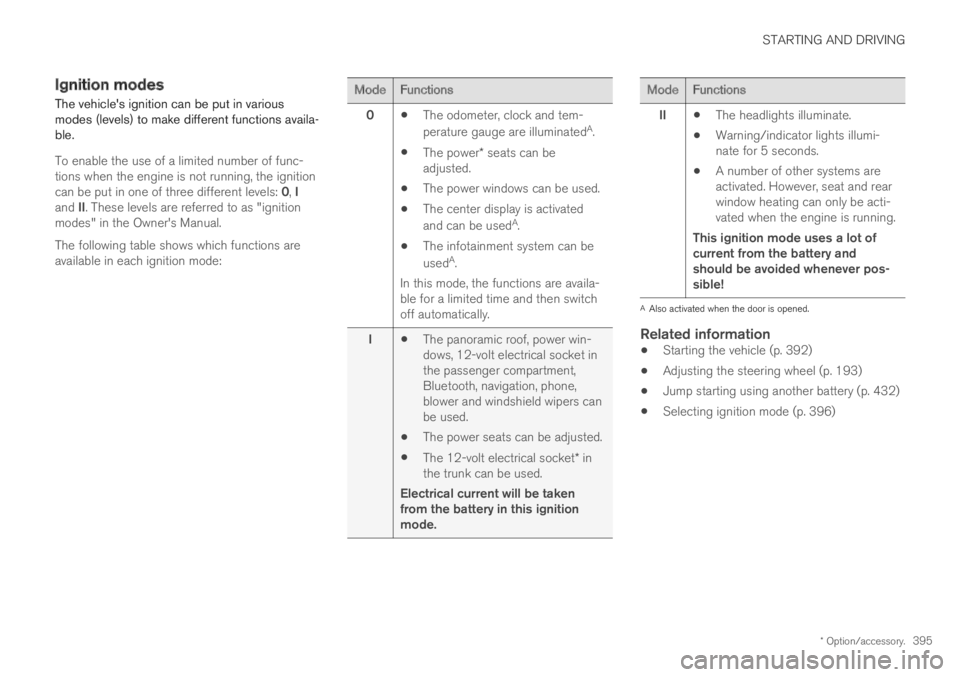
The vehicle's ignition can be put in variousmodes (levels) to make different functions availa-ble.
To enable the use of a limited number of func-tions when the engine is not running, the ignitioncan be put in one of three different levels: 0, Iand II. These levels are referred to as "ignitionmodes" in the Owner's Manual.
The following table shows which functions areavailable in each ignition mode:
ModeFunctions
0The odometer, clock and tem-
perature gauge are illuminatedA.
The power* seats can beadjusted.
The power windows can be used.
The center display is activated
and can be usedA.
The infotainment system can be
usedA.
In this mode, the functions are availa-ble for a limited time and then switchoff automatically.
IThe panoramic roof, power win-dows, 12-volt electrical socket inthe passenger compartment,Bluetooth, navigation, phone,blower and windshield wipers canbe used.
The power seats can be adjusted.
The 12-volt electrical socket* inthe trunk can be used.
Electrical current will be takenfrom the battery in this ignitionmode.
ModeFunctions
IIThe headlights illuminate.
Warning/indicator lights illumi-nate for 5 seconds.
A number of other systems areactivated. However, seat and rearwindow heating can only be acti-vated when the engine is running.
This ignition mode uses a lot ofcurrent from the battery andshould be avoided whenever pos-sible!
AAlso activated when the door is opened.
Related information
Starting the vehicle (p. 392)
Adjusting the steering wheel (p. 193)
Jump starting using another battery (p. 432)
Selecting ignition mode (p. 396)