Page 101 of 357

100
uuCustomized Features u
System Setup
*1: Default SettingSetup
Group Customizable Features Description Selectable Settings
Vehicle
Settings Meter
SetupLanguage Selection
Changes the displayed language on the multi-
information display.
See the owner’s manual. English
*1/
Français /
Español
Adjust Outside Temp.
Display Adjusts the temperature reading by a few degrees.
See the owner’s manual. -5°F ~ ±0°F
*1
~ +5°F
(U.S.)
-3°C ~ ±0°C
*1 ~ +3°C
(Canada)
“Trip A” Reset Timing Changes the setting of how to reset trip meter A,
average fuel economy A, average speed A, and
elapsed time A.
See the owner’s manual. When Refueled
/IGN
Off /Manually Reset
*1
“Trip B” Reset Timing Changes the setting of how
to reset trip meter B,
average fuel economy B, average speed B, and
elapsed time B.
See the owner’s manual. When Refueled
/IGN
Off /Manually Reset*1
Turn by Turn Display*Selects whether the turn-b y-turn display comes on
during the route guidance.
See the owner’s manual. On*1/
Off
Driving
Position
Setup Memory Position Link Turns the driving position memory system on and
off.
See the owner’s manual.
On
*1/
Off
* Not available on all models
16 ACURA RDX NAVI-31TX48300.book 100 ページ 2015年8月5日 水曜日 午後4時12分
Page 104 of 357

103
uuCustomized Features u
Continued
System Setup
*1: Default SettingSetup
Group Customizable Features Description Selectable Settings
Vehicle
Settings Power
Tailgate
Setup
Keyless Open Mode
Changes the keyless setting for when the power
tailgate opens.
See the owner’s manual. Anytime
*1/
When
Unlocked
Power Open by Outer
Handle Selects whether to enable
the power tailgate open
operation using the ta ilgate outer handle.
See the owner’s manual. Off (Manual Only)
/On
(Power/Manual)
*1
Maintenance
Info.Maintenance Reset Resets the engine oil life display when you have
performed the maintenance service.
See the owner’s manual. —
Default Cancels/Resets all cust
omized items in the Vehicle
Settings group as default. Default
/OK
Navi
SettingsPersonal
Information
Address BookStores new addresses or edits your address book.—
Edit Go HomeSets or edits your home address.—
PIN NumberSets or changes your PIN.—
Previous DestinationDeletes the destination history.—
Category HistoryDeletes the place categori es you recently used.—
Download POIEdits and deletes the Imported POI categories.—
16 ACURA RDX NAVI-31TX48300.book 103 ページ 2015年8月5日 水曜日 午後4時12分
Page 105 of 357
104
uuCustomized Features u
System Setup
*1: Default SettingSetup
Group Customizable Features Description Selectable Settings
Navi
SettingsRouting
Route
Preference
Freeways
Change the route preference by selecting
minimum or maximum driving methods.
Max*1/
Min
Toll RoadMax*1/Min
ETC RoadsMax /Min*1
FerriesMax*1/Min
U-turnMax /Min*1
Server RouteView three routes dis tributed from AcuraLink ®.On /Off*1
Unverified RoutingSets whether you use the route guidance in
unverified areas.On*1/Off
Traffic ReroutingSets whether you use automatic recalculation
based on traffic information.On /Off*1
Edit POI Search Radius Along
RouteSets the distance from the route to find waypoints.mile: 1, 2*1, 5, 10mi
km: 1.6, 3*1, 8, 16km
Avoided AreaSpecifies areas to avoid when calculating a route.—
16 ACURA RDX NAVI-31TX48300.book 104 ページ 2015年8月5日 水曜日 午後4時12分
Page 106 of 357
105
uuCustomized Features u
Continued
System Setup
*1: Default SettingSetup
Group Customizable Features Description Selectable Settings
Navi
SettingsGuidance
Guidance ModeSets whether to display only the map screen or a
split map guidance screen.Map*1/
Direction List /
Next Maneuver
Street Name GuidanceSets whether to read out the street names during
voice guidance (U.S. models).On*1/ Off
Non-map ScreensSets whether the guidance screen interrupts the
screen display.On /Off*1
Guidance PointSets whether to display the guidance information
to the destination or the next waypoint.Destination*1/Next
Point
Estimated TimeSets whether to display the remaining time or
arrival time to the guidance point.All On*1/ Off /
Customize
16 ACURA RDX NAVI-31TX48300.book 105 ページ 2015年8月5日 水曜日 午後4時12分
Page 108 of 357
107
uuCustomized Features u
Continued
System Setup
*1: Default SettingSetup
Group Customizable Features Description Selectable Settings
Camera
Settings Rear
CameraFixed Guideline
Selects whether the fixed guidelines come on the
rear camera monitor.
On
*1/
Off
Dynamic Guideline Selects whether the dynami
c guidelines come on
the rear camera monitor. On
*1/
Off
Default Cancels/Resets all customized items in the
Rear
Camera group as default. Default
/OK
Cross
Traffic
Monitor Turns the cross traffic mo
nitor feature on and off.
See the owner’s manual. On
*1/
Off
16 ACURA RDX NAVI-31TX48300.book 107 ページ 2015年8月5日 水曜日 午後4時12分
Page 110 of 357
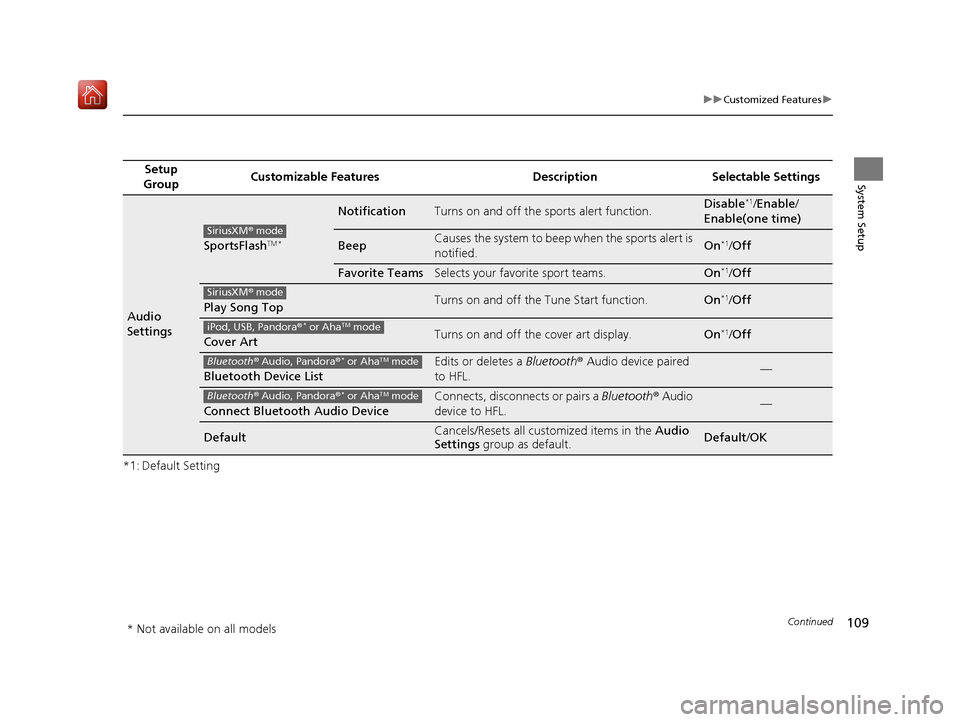
109
uuCustomized Features u
Continued
System Setup
*1: Default SettingSetup
Group Customizable Features Description Selectable Settings
Audio
Settings
SportsFlashTM *
NotificationTurns on and off the sports alert function.Disable*1/
Enable /
Enable(one time)
BeepCauses the system to beep when the sports alert is
notified.On*1/ Off
Favorite TeamsSelects your favorite sport teams.On*1/Off
Play Song TopTurns on and off the Tune Start function.On*1/Off
Cover ArtTurns on and off the cover art display.On*1/Off
Bluetooth Device List
Edits or deletes a Bluetooth® Audio device paired
to HFL.—
Connect Bluetooth Audio Device
Connects, disconnects or pairs a Bluetooth® Audio
device to HFL.—
DefaultCancels/Resets all customized items in the Audio
Settings group as default.Default/OK
SiriusXM ® mode
SiriusXM ® mode
iPod, USB, Pandora ®* or AhaTM mode
Bluetooth® Audio, Pandora ®* or AhaTM mode
Bluetooth® Audio, Pandora ®* or AhaTM mode
* Not available on all models
16 ACURA RDX NAVI-31TX48300.book 109 ページ 2015年8月5日 水曜日 午後4時12分
Page 112 of 357
111
uuCustomized Features u
Continued
System Setup
*1: Default SettingSetup
Group Customizable Features Description Selectable Settings
Phone
Settings Text/
EmailEnable Text/Email
Turns the text/e-mail message function on and off. On
*1/Off
Select Account Selects a text or e-mail message account. —
New Text/Email Alert Selects whether a pop-up alert comes on the
screen when HFL receives a new text/e-mail
message. —
Default Cancels/Resets all customized items in the
Phone
Settings group as default. Default
/OK
16 ACURA RDX NAVI-31TX48300.book 111 ページ 2015年8月5日 水曜日 午後4時12分
Page 113 of 357
112
uuCustomized Features u
System Setup
*1: Default SettingSetup
Group Customizable Features Description Selectable Settings
Info
Settings
Acura
Link
New AcuraLink MessageSelects whether newly
received AcuraLink
messages to be displayed.On*1/ Off
Delete AcuraLink MessageDeletes AcuraLink messages.—
AcuraLink Subscription
StatusDisplays your current AcuraLink subscription
status.—
Clock
Clock/
Wallpaper
TypeClock
See System Settings on P. 95 to P. 98.
Wallpaper
Clock Adjustment
Clock Format
Auto Time Zone
Auto Daylight
Clock Reset
OtherInfo Screen Preference
Selects the top menu when the INFO button is
pressed.
●Info Top - A brief menu pops up.●Info Menu- A full menu pops up.●Off- A menu does not pop up.
Info Top /Info Menu*1/
Off
DefaultCancels/Resets all customized items in the Info
Settings group as default.Default/ OK
16 ACURA RDX NAVI-31TX48300.book 112 ページ 2015年8月5日 水曜日 午後4時12分


