Page 191 of 357

190
Audio
Playing SiriusXM® Radio
Selecting SiriusXM® Mode
1. Press the MENU button. (in AUDIO mode)
2. Rotate to select Change Source. Press .
3. Rotate to select SXM. Press .
u The category, channel list, and presets are displayed on the navigation screen.
1. Select Audio Source.
2. Select the SiriusXM icon.
u The category and channel are displa yed on the On Demand Multi-Use
display
TM.
1 Playing SiriusXM ® Radio
You can control the SiriusXM ® radio using voice
commands.
2 Radio SXM Commands P. 349
In the channel mode, all available channels are
selectable. In the categor y mode, you can select a
channel within a ca tegory (Jazz, Rock, Classical, etc.).
There may be instances when SiriusXM ® Radio does
not broadcast all the data fi elds (artist name, title).
This does not indicate a problem with your audio
system.
SiriusXM ® Radio channels load in ascending order,
which can take about a minute. Once they have
loaded, you can scroll up or down to make your
selections.Interface Dial
On Demand Multi-Use DisplayTM
16 ACURA RDX NAVI-31TX48300.book 190 ページ 2015年8月5日 水曜日 午後4時12分
Page 197 of 357

uuPlaying SiriusXM ® Radio uAudio Screen Control
196
Audio
While listening to other channels, you can receive sports alerts such as scores from
up to five of your favorite teams. The notification message appears on the
navigation screen and On Demand Multi-Use Display
TM when receiving sports alerts.
1. A pop-up appears and notifies you
of a sports alert.
2. Select Listen Now .
u Press the BACK button to
return the previous screen.
u If no operations are performed
for 10 seconds, the system
returns to the previous audio
mode automatically.
The following items are available:
• Check Later: Returns to the previous screen an d stores the received sports alert
in the audio system. If other sports alerts are received in the same game, the
notification message appears again.
• Ignore this Game : Returns to the previous screen and stores the received sports
alert in the audio system. If other sports alerts are received in the same game, the
notification message does not appear.
■ SportsFlashTM Alert1
SportsFlashTM Alert
The notification message does not appears on the
navigation screen under th e following circumstances:
•When you select other than the SiriusXM ® Mode.
•When the start-up screen and Multi-view Rear
Camera screen are displayed.
When a sports alert is received, the SportsFlash
TM
Listen indicator appears on the navigation screen.
You can change the SportsFlash
TM setting.
2 Audio Settings P. 181
SportsFlash
TM is a registered trademark of SiriusXM®
Radio, Inc.
Interface Dial
16 ACURA RDX NAVI-31TX48300.book 196 ページ 2015年8月5日 水曜日 午後4時12分
Page 204 of 357

203
uuPlaying SiriusXM ® Radio uSiriusXM ® Radio Service
Continued
Audio
SiriusXM® Radio Service
1.You need your radio ID ready before regist ering for subscription. To see the ID in
the display: Operate the On Demand Multi-Use DisplayTM until channel 0 appears.
2. Have your radio ID and credit card numb er ready, and either call or visit the
SiriusXM ® website to subscribe.
Switch to the SiriusXM ® mode by pressing the MODE button repeatedly or
operating the On Demand Multi-Use Display
TM, and stay in this mode for about 30
minutes until the service is activated. Make su re your vehicle is in an open area with
good reception.
■ Subscribing to SiriusXM
® Radio
■ Receiving SiriusXM
® Radio
1 Subscribing to SiriusXM ® Radio
Contact Information for SiriusXM ® Radio:
U.S.: SiriusXM ® Radio at www.siriusxm.com or (800)
852-9696
Canada: SiriusXM ® Canada at www.xmradio.ca , or
(877) 209-0079
1 Receiving SiriusXM ® Radio
The SiriusXM ® satellites are in orbit over the equator;
therefore, objects south of the vehicle may cause
satellite reception interruptions. Sa tellite signals are
more likely to be blocked by tall buildings and
mountains the farther north you travel from the
equator.
You may experience rece ption problems under the
following circumstances:
•In a location with an obstruction to the south of
your vehicle
•In tunnels•On the lower level of a multi-tiered road
•Large items carried on the roof rack
16 ACURA RDX NAVI-31TX48300.book 203 ページ 2015年8月5日 水曜日 午後4時12分
Page 206 of 357
205
Audio
Playing a Disc
Your audio system supports audio CDs, CD-Rs and CD-RWs in either MP3, WMA, or
AAC format. With the CD loaded, select the CD mode.
Selecting Disc Mode
1.Insert a disc into the disc slot.
u The disc automatically being playing.
2. Press the MENU button. (in AUDIO mode)
3. Rotate to select Change Source. Press .
4. Rotate to select CD. Press .
1. Insert a disc into the disc slot.
u The disc automatically being playing.
2. Select Audio Source .
3. Select the CD icon.
1Playing a Disc
NOTICE
Do not use CDs with adhesive labels. The label can
cause the CD to jam in the unit.
WMA and ACC files protected by digital rights
management (DRM) cannot be played. The audio
system displays Unplayable File, then skips to the next
file.
Text data appears on the di splay under the following
circumstances:
Page 214 of 357
213
uuPlaying Hard Disc Drive (HDD) Audio uRecording a Music CD to HDD
Audio
Recording a Music CD to HDD
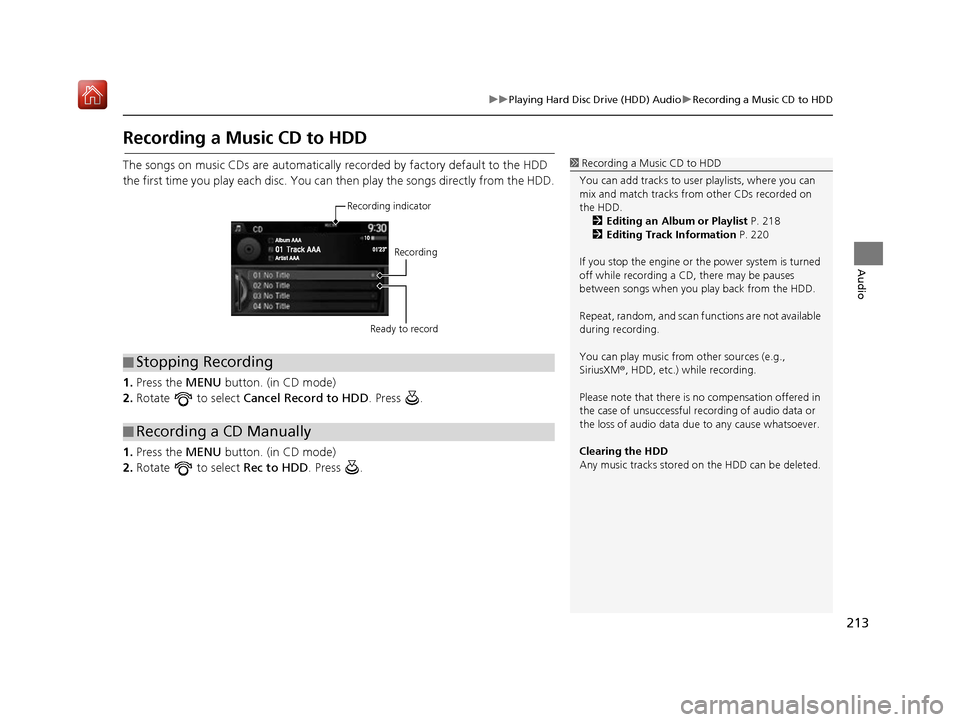
The songs on music CDs are automatically recorded by factory default to the HDD
the first time you play each disc. You ca n then play the songs directly from the HDD.
1. Press the MENU button. (in CD mode)
2. Rotate to select Cancel Record to HDD . Press .
1. Press the MENU button. (in CD mode)
2. Rotate to select Rec to HDD. Press .1Recording a Music CD to HDD
You can add tracks to user playlists, where you can
mix and match tracks from other CDs recorded on
the HDD. 2 Editing an Album or Playlist P. 218
2 Editing Track Information P. 220
If you stop the engine or th e power system is turned
off while recording a CD, there may be pauses
between songs when you play back from the HDD.
Repeat, random, and scan f unctions are not available
during recording.
You can play music from other sources (e.g.,
SiriusXM ®, HDD, etc.) while recording.
Please note that there is no compensation offered in
the case of unsuccessful re cording of audio data or
the loss of audio data due to any cause whatsoever.
Clearing the HDD
Any music tracks stored on the HDD can be deleted.
■ Stopping Recording
■Recording a CD Manually
Recording indicator
Recording
Ready to record
16 ACURA RDX NAVI-31TX48300.book 213 ページ 2015年8月5日 水曜日 午後4時12分
Page 233 of 357

uuPlaying an iPod uSong By VoiceTM (SBV)
232
Audio
1. Set the Song By Voice setting to
On .
2. Press the (Talk) button and say
“Music Search ” to activate the
SBV feature for the HDD and iPod.
3. Say a command.
u Example 1: Say “ (List) ‘Artist
A’ “ to view a list of songs by
that artist. Select the desired
song to start playing.
u Example 2: Say “ Play ‘Artist A’“
to start playing songs by that
artist.
4. To cancel SBV, press the
(Hang-Up/Back) button on the
steering wheel. The selected song
continues playing.
■ Searching for Music Using Song By VoiceTM (SBV)1
Searching for Music Using Song By VoiceTM (SBV)
Song By Voice
TM Commands List
2 Song By Voice Commands P. 349
NOTE:
Song By Voice
TM commands are available for tracks
stored on the HDD or iPod.
You can add phonetic modi fications of difficult
words so that it is easier for SBV to recognize artists,
songs, albums, and composers in voice commands. 2 Phonetic Modification P. 233
SBV may not be able to recognize languages other
than English for the artist name, song title, album
title, and composers.
Once you have canceled this mode, you need to press
the (Talk) button and say “ Music Search” again
to re-activate this mode.
16 ACURA RDX NAVI-31TX48300.book 232 ページ 2015年8月5日 水曜日 午後4時12分
Page 252 of 357
251
B l u e t o o t h® HandsFreeLink ®
This section describes how to operate Bluetooth® HandsFreeLink ®. You can place and
receive phone calls using your vehicle’s audi o system without handling your mobile phone.
Bluetooth® HandsFreeLink® ..................252
Using HFL .............................................252
Pairing a Phone .....................................255
Importing Phonebook Data ...................261
Setting Up Speed Dialing ......................262
Phonebook Phonetic Modification .........268
Phone Settings ......................................273
Making a Call .......................................278
Receiving a Call .....................................283
Options During a Call............................284 Text/E-mail Message
............................ 285
Setting a Text/E-mail Message .............. 285
Selecting a Mail Account ...................... 286
Receiving a Text/E-mail Message .......... 287
Displaying Messages ............................ 288
Roadside Assistance ............................. 292
HFL Menus ............................................. 293
16 ACURA RDX NAVI-31TX48300.book 251 ページ 2015年8月5日 水曜日 午後4時12分
Page 253 of 357
252
Bluetooth® HandsFreeLink ®
Bluetooth® HandsFreeLink ®
Using HFL
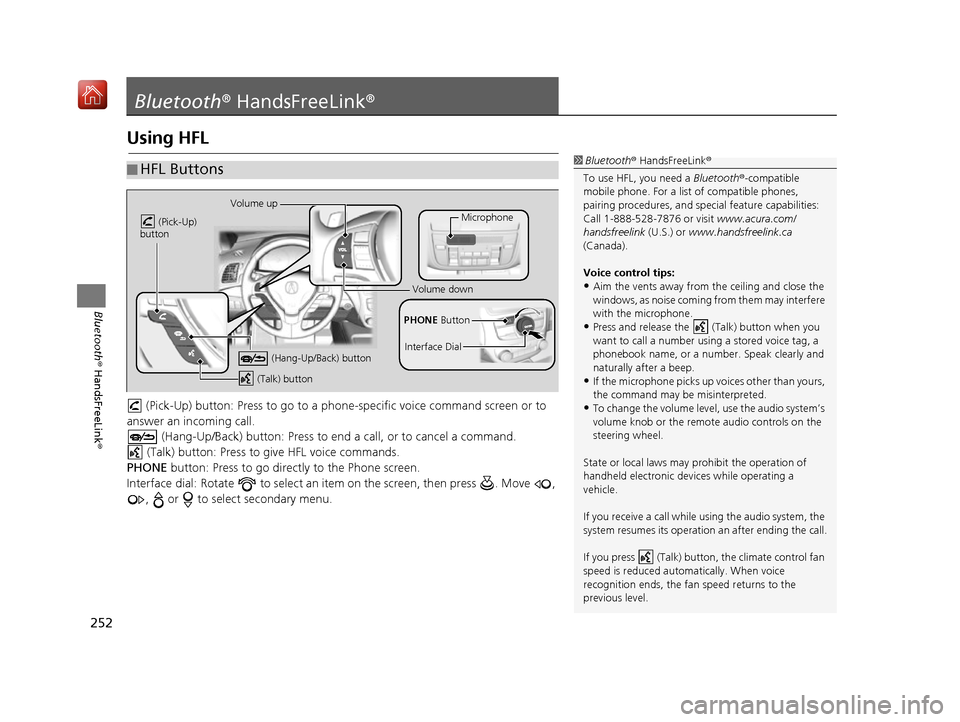
(Pick-Up) button: Press to go to a phon e-specific voice command screen or to
answer an in coming call.
(Hang-Up/Back) button: Press to en d a call, or to cancel a command.
(Talk) button: Press to give HFL voice commands.
PHONE button: Press to go directly to the Phone screen.
Interface dial: Rotate to select an it em on the screen, then press . Move ,
, or to select secondary menu.
■ HFL Buttons1
Bluetooth ® HandsFreeLink ®
To use HFL, you need a Bluetooth®-compatible
mobile phone. For a list of compatible phones,
pairing procedures, and special feat ure capabilities:
Call 1-888-528-7876 or visit www.acura.com/
handsfreelink (U.S.) or www.handsfreelink.ca
(Canada).
Voice control tips:
•Aim the vents away from the ceiling and close the
windows, as noise coming fr om them may interfere
with the microphone.
•Press and release the (Talk) button when you
want to call a number using a stored voice tag, a
phonebook name, or a numbe r. Speak clearly and
naturally after a beep.
•If the microphone picks up vo ices other than yours,
the command may be misinterpreted.
•To change the volume level, use the audio system’s
volume knob or the remote audio controls on the
steering wheel.
State or local laws may pr ohibit the operation of
handheld electronic devi ces while operating a
vehicle.
If you receive a call while using the audio system, the
system resumes its operation an after ending the call.
If you press (Talk) butt on, the climate control fan
speed is reduced automatically. When voice
recognition ends, the fan speed returns to the
previous level.
Volume up
(Pick-Up)
button
(Hang-Up/Back) button
(Talk) button
Microphone
PHONE Button
Interface Dial
Volume down
16 ACURA RDX NAVI-31TX48300.book 252 ページ 2015年8月5日 水曜日 午後4時12分
