Page 90 of 357
89
uuCustomized Features u
Continued
System Setup
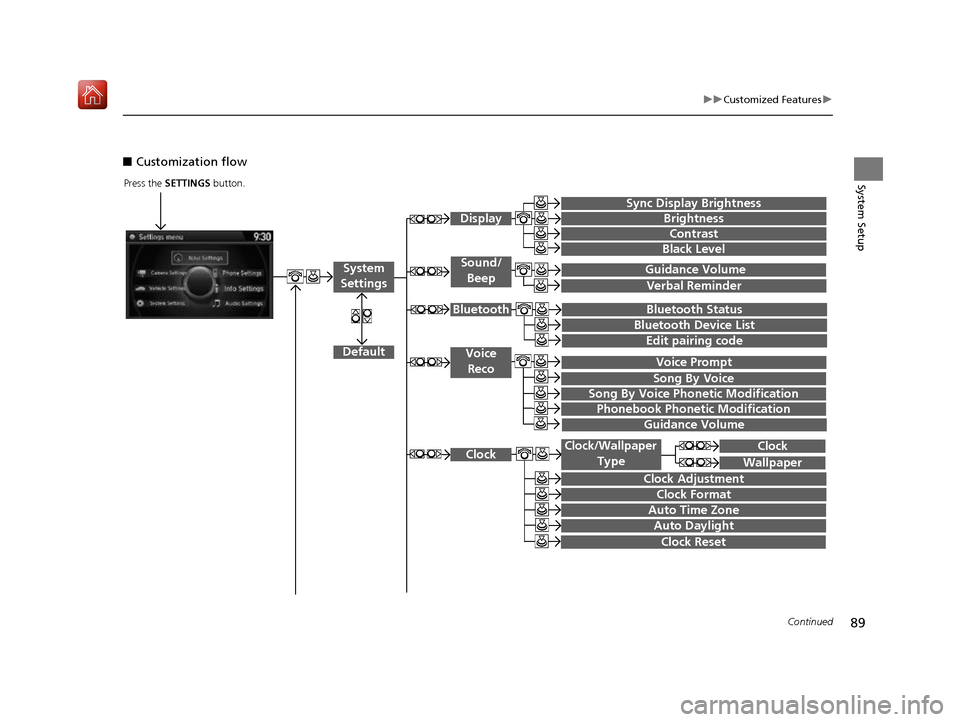
■Customization flow
Press the SETTINGS button.
Guidance Volume
Brightness
Contrast
Black Level
Bluetooth Status
Bluetooth Device List
Edit pairing code
Default
Display
System
Settings
Bluetooth
Voice
Reco
Sync Display Brightness
Clock
Clock Adjustment
Clock Format
Clock Wallpaper
Clock/Wallpaper Type
Guidance Volume Sound/
Beep
Verbal Reminder
Song By Voice
Song By Voice Phonetic Modification
Phonebook Phonetic Modification
Auto Time Zone
Auto Daylight
Clock Reset
Voice Prompt
16 ACURA RDX NAVI-31TX48300.book 89 ページ 2015年8月5日 水曜日 午後4時12分
Page 91 of 357
90
uuCustomized Features u
System Setup
“Trip A” Reset Timing
“Trip B” Reset Timing
Language Selection
Adjust Outside Temp. Display
Forward Collision Warning Distance*
ACC Forward Vehicle Detect Beep*
Turn by Turn Display*
Default
Door Unlock Mode
Keyless Access Light Flash
Vehicle
Settings
Driver
Assist
System
Setup
Keyless Access Setup
Keyless Access Beep
Blind Spot Info*
Driving
Position
Setup
Lane Keeping Assist Suspend Beep*ACC Display Speed Unit*
Remote Start System On/Off*
Memory Position Link
Meter Setup
Keyless Access Beep Volume
Factory Data Reset
Background Color
Header Clock Display
Units
Voice Command Tips*
Others
Language
System Device Information
* Not available on all models
16 ACURA RDX NAVI-31TX48300.book 90 ページ 2015年8月5日 水曜日 午後4時12分
Page 92 of 357
91
uuCustomized Features u
Continued
System Setup
Maintenance ResetMaintenance Info.
Key And Remote Unlock Mode
Keyless Lock Answer Back
Security Relock Timer
Auto Door Lock
Auto Door Unlock
Door
Setup
Power
Tailgate
Setup
Keyless Open Mode
Power Open by Outer Handle
Address Book
Edit Go Home
PIN Number
Personal
Information
Previous Destination
Download POI
Category History
Interior Light Dimming Time
Headlight Auto Off Timer
Auto Light Sensitivity
Lighting
Setup
Navi
Settings
Default
16 ACURA RDX NAVI-31TX48300.book 91 ページ 2015年8月5日 水曜日 午後4時12分
Page 93 of 357
92
uuCustomized Features u
System Setup
Show Icon on Map
Color (Day)
Color (Night)
Map
View
3D Angle Adjustment
Straight Line Guide
Current Location
This function is available
on U.S. models only.
*:
Map Legend
Display Tracking
Delete Tracking
Correct Vehicle Position
System Device Information
Map Data Update
Unverified Routing
Traffic Rerouting
Edit POI Search Radius Along Route
Routing
Avoided Area
Freeways
Toll Road
ETC Roads
Route
Preference
Ferries
U-turn
Server Route
Guidance Mode
Street Name Guidance*
Non-map Screens
Guidance
Guidance Point
Estimated Time
16 ACURA RDX NAVI-31TX48300.book 92 ページ 2015年8月5日 水曜日 午後4時12分
Page 96 of 357
95
uuCustomized Features u
Continued
System Setup
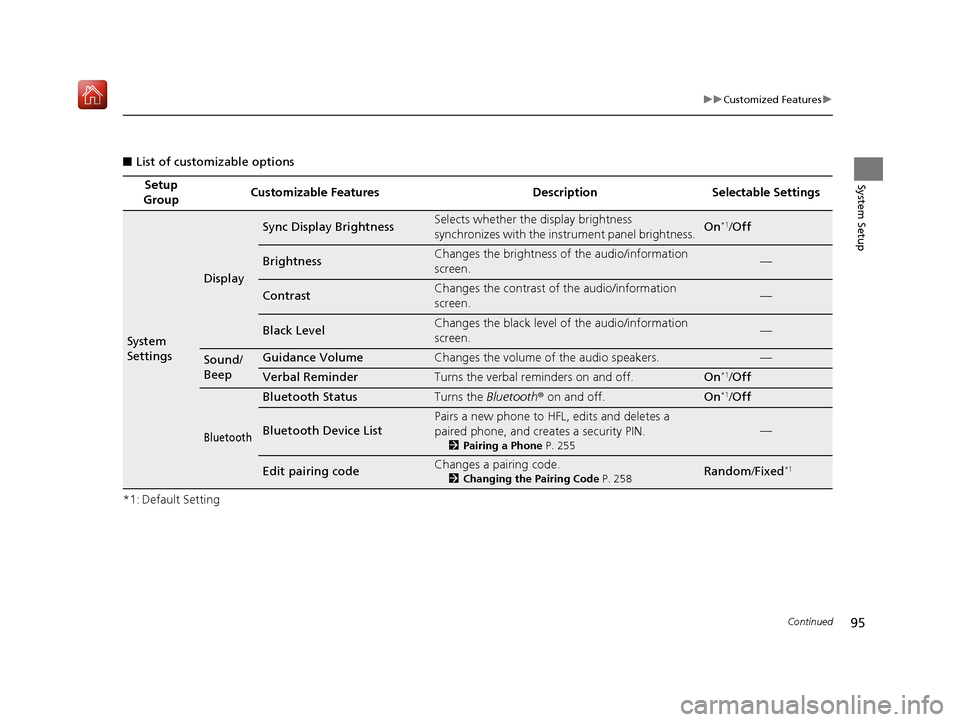
■List of customizable options
*1: Default Setting Setup
Group Customizable Features Description Selectable Settings
System
Settings
Display
Sync Display BrightnessSelects whether the display brightness
synchronizes with the instrument panel brightness.On*1/
Off
BrightnessChanges the brightness of the audio/information
screen.—
ContrastChanges the contrast of the audio/information
screen.—
Black LevelChanges the black level of the audio/information
screen.—
Sound/
BeepGuidance VolumeChanges the volume of the audio speakers.—
Verbal ReminderTurns the verbal reminders on and off.On*1/Off
Bluetooth
Bluetooth StatusTurns the Bluetooth ® on and off.On*1/Off
Bluetooth Device List
Pairs a new phone to HFL, edits and deletes a
paired phone, and creates a security PIN.
2 Pairing a Phone P. 255
—
Edit pairing codeChanges a pairing code.
2Changing the Pairing Code P. 258Random /Fixed*1
16 ACURA RDX NAVI-31TX48300.book 95 ページ 2015年8月5日 水曜日 午後4時12分
Page 97 of 357
96
uuCustomized Features u
System Setup
*1: Default SettingSetup
Group Customizable Features Description Selectable Settings
System
SettingsVoice
Reco
Voice PromptTurns the voice prompt on and off.On*1/
Off
Song By VoiceTurns the Song By VoiceTM on and off.
2 Song By VoiceTM (SBV) P. 231On*1/Off
Song By Voice Phonetic
ModificationModifies a voice command for music stored in the
HDD or an iPod.
2 Phonetic Modification P. 233
—
Phonebook Phonetic
ModificationModifies a voice command for the phonebook.
2Phonebook Phonetic Modification P. 268—
Guidance VolumeChanges the volume of the voice prompt.—
16 ACURA RDX NAVI-31TX48300.book 96 ページ 2015年8月5日 水曜日 午後4時12分
Page 99 of 357
98
uuCustomized Features u
System Setup
*1: Default SettingSetup
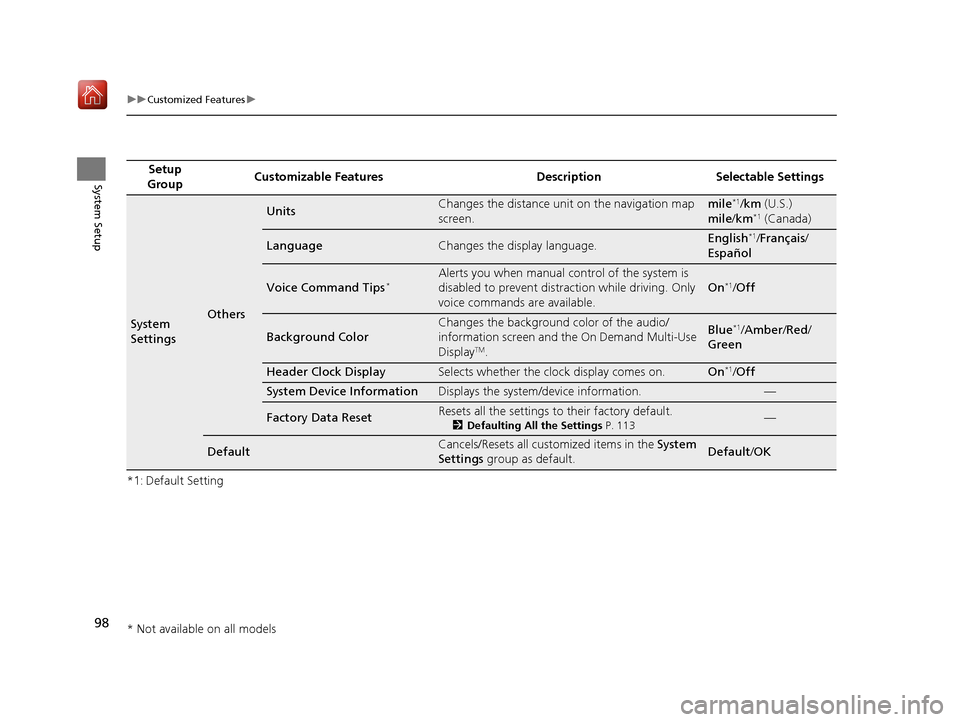
Group Customizable Features Description Selectable Settings
System
SettingsOthers
UnitsChanges the distance unit on the navigation map
screen.mile*1/
km (U.S.)
mile /km*1 (Canada)
LanguageChanges the display language.English*1/Français /
Español
Voice Command Tips*Alerts you when manual control of the system is
disabled to prevent distraction while driving. Only
voice commands are available.
On*1/ Off
Background Color
Changes the background color of the audio/
information screen and the On Demand Multi-Use
Display
TM.
Blue*1/Amber /Red /
Green
Header Clock DisplaySelects whether the clock display comes on.On*1/ Off
System Device InformationDisplays the system /device information.—
Factory Data ResetResets all the settings to their factory default.
2Defaulting All the Settings P. 113—
DefaultCancels/Resets all customized items in the System
Settings group as default.Default/ OK
* Not available on all models
16 ACURA RDX NAVI-31TX48300.book 98 ページ 2015年8月5日 水曜日 午後4時12分
Page 100 of 357
99
uuCustomized Features u
Continued
System Setup
*1: Default SettingSetup
Group Customizable Features Description Selectable Settings
Vehicle
Settings Driver
Assist
System
SetupForward Collision Warning
Distance
*Changes at which distance CMBSTM alerts.
See the owner’s manual. Long
/Normal*1/Short
ACC Forward Vehicle Detect
Beep
*
Causes the system to beep when the system
detects a vehicle, or when the vehicle goes out of
the ACC range.
See the owner’s manual. On
/Off
*1
ACC Display Speed Unit*Changes the speed unit for ACC on the multi-
information display.
See the owner’s manual. mph*1/
km/h (U.S.)
mph /km/h*1 (Canada)
Lane Keeping Assist Suspend
Beep
*
Causes the system to b eep when the LKAS is
suspended.
See the owner’s manual. On
/Off*1
Blind Spot Info*Changes the setting for the blind spot information.
See the owner’s manual. Audible And Visual
Alert*1/
Visual Alert /
Off
* Not available on all models
16 ACURA RDX NAVI-31TX48300.book 99 ページ 2015年8月5日 水曜日 午後4時12分