Page 101 of 272
101
3. FUNCIÓN DE MENSAJES CORTOS
COROLLA_14CY_Navi_ES
3
SISTEMA DE MANOS LIBRES Bluetooth
®
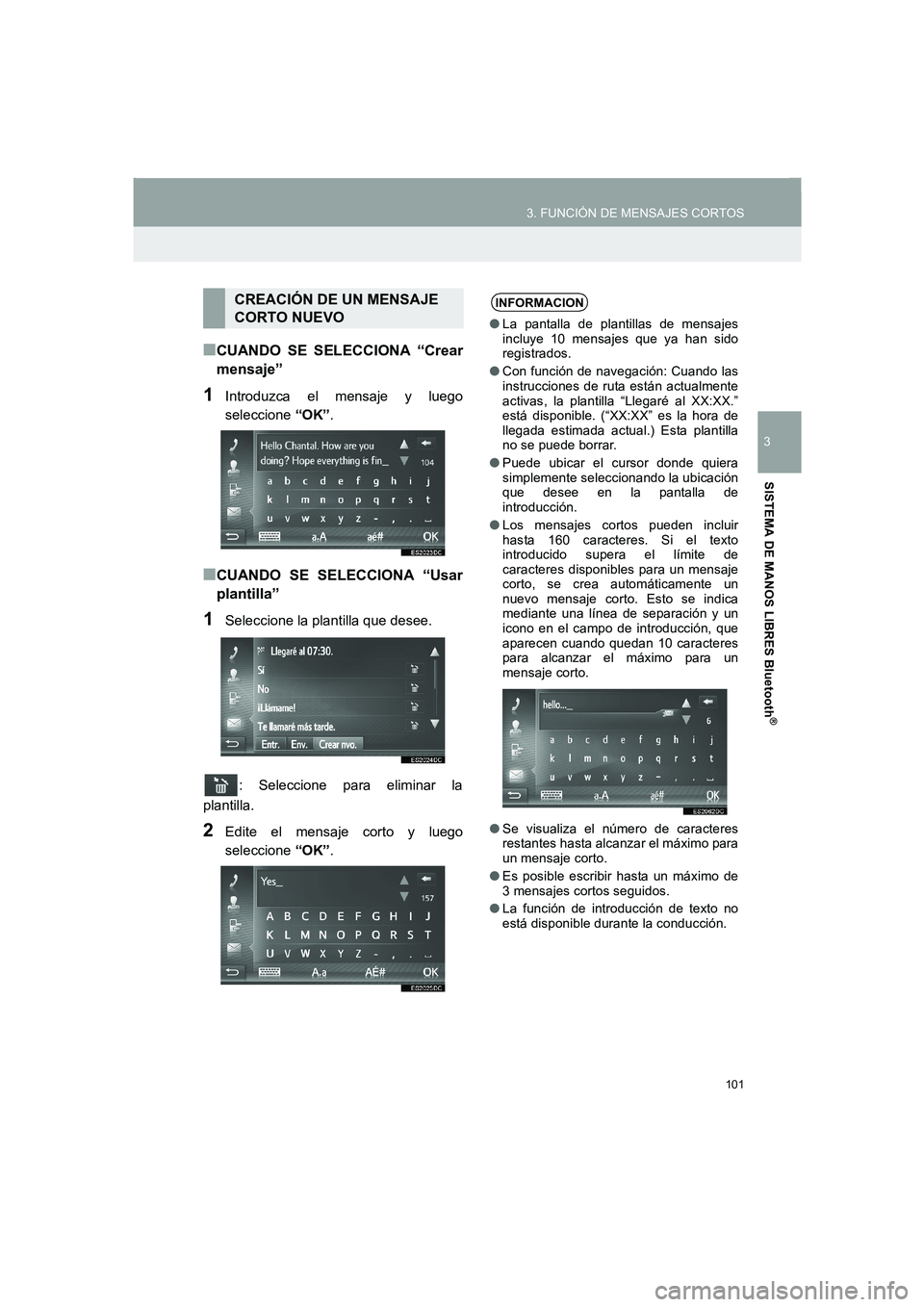
■CUANDO SE SELECCIONA “Crear
mensaje”
1Introduzca el mensaje y luego
seleccione “OK”.
■CUANDO SE SELECCIONA “Usar
plantilla”
1Seleccione la plantilla que desee.
: Seleccione para eliminar la
plantilla.
2Edite el mensaje corto y luego
seleccione “OK”.
CREACIÓN DE UN MENSAJE
CORTO NUEVOINFORMACION
●La pantalla de plantillas de mensajes
incluye 10 mensajes que ya han sido
registrados.
●Con función de navegación: Cuando las
instrucciones de ruta están actualmente
activas, la plantilla “Llegaré al XX:XX.”
está disponible. (“XX:XX” es la hora de
llegada estimada actual.) Esta plantilla
no se puede borrar.
●Puede ubicar el cursor donde quiera
simplemente seleccionando la ubicación
que desee en la pantalla de
introducción.
●Los mensajes cortos pueden incluir
hasta 160 caracteres. Si el texto
introducido supera el límite de
caracteres disponibles para un mensaje
corto, se crea automáticamente un
nuevo mensaje corto. Esto se indica
mediante una línea de separación y un
icono en el campo de introducción, que
aparecen cuando quedan 10 caracteres
para alcanzar el máximo para un
mensaje corto.
●Se visualiza el número de caracteres
restantes hasta alcanzar el máximo para
un mensaje corto.
●Es posible escribir hasta un máximo de
3 mensajes cortos seguidos.
●La función de introducción de texto no
está disponible durante la conducción.
Corolla_Navi_ES_12J60S.book 101 ページ 2015年1月23日 金曜日 午後3時44分
Page 103 of 272
103
COROLLA_14CY_Navi_ES
3
SISTEMA DE MANOS LIBRES Bluetooth
®
4. QUÉ HACER SI...
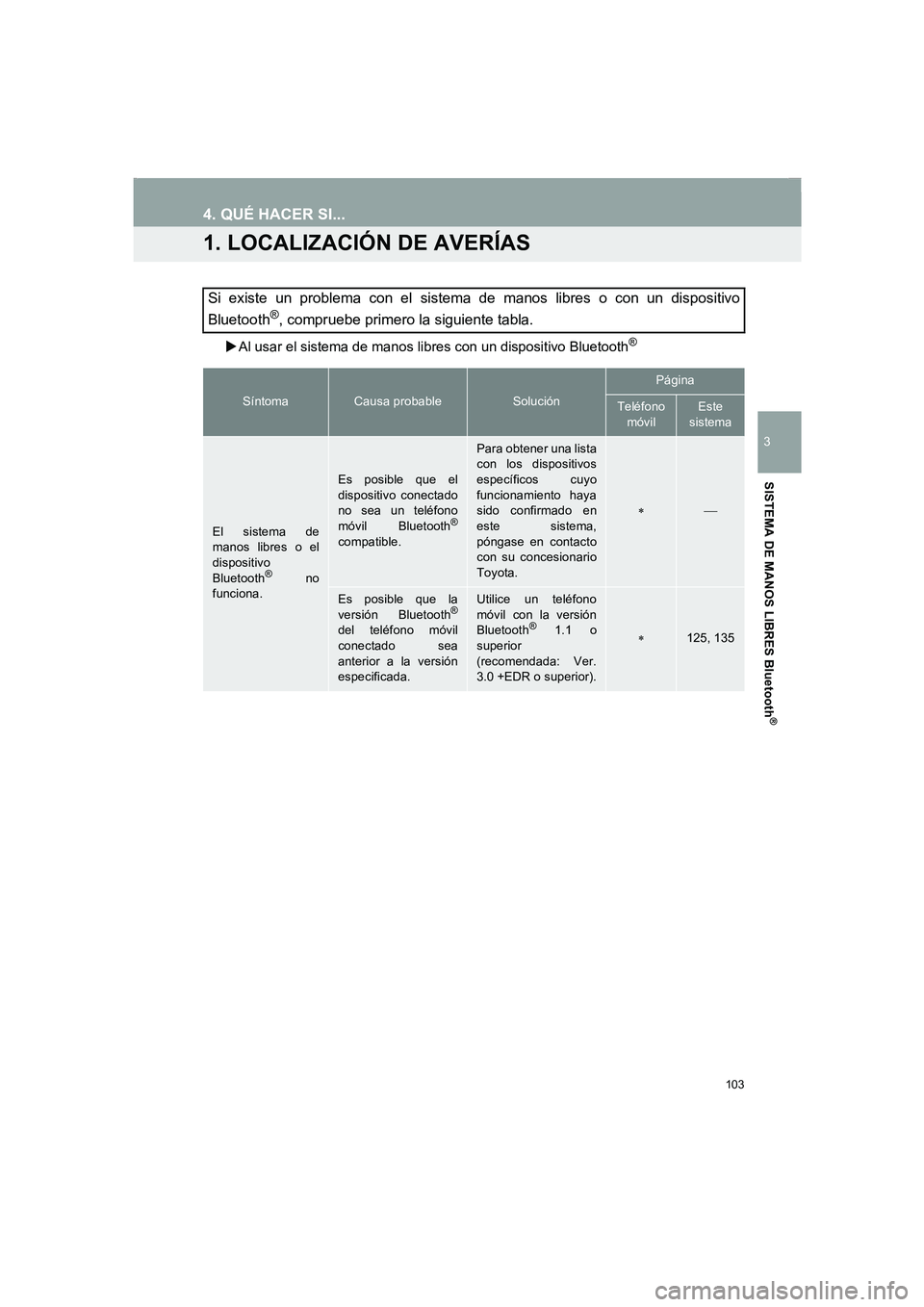
1. LOCALIZACIÓN DE AVERÍAS
XAl usar el sistema de manos libres con un dispositivo Bluetooth®
Si existe un problema con el sistema de manos libres o con un dispositivo
Bluetooth
®, compruebe primero la siguiente tabla.
SíntomaCausa probableSolución
Página
Teléfono
móvilEste
sistema
El sistema de
manos libres o el
dispositivo
Bluetooth
® no
funciona.
Es posible que el
dispositivo conectado
no sea un teléfono
móvil Bluetooth
®
compatible.
Para obtener una lista
con los dispositivos
específicos cuyo
funcionamiento haya
sido confirmado en
este sistema,
póngase en contacto
con su concesionario
Toyota.
∗
Es posible que la
versión Bluetooth®
del teléfono móvil
conectado sea
anterior a la versión
especificada.
Utilice un teléfono
móvil con la versión
Bluetooth
® 1.1 o
superior
(recomendada: Ver.
3.0 +EDR o superior).∗125, 135
Corolla_Navi_ES_12J60S.book 103 ページ 2015年1月23日 金曜日 午後3時44分
Page 105 of 272
105
4. QUÉ HACER SI...
COROLLA_14CY_Navi_ES
3
SISTEMA DE MANOS LIBRES Bluetooth
®
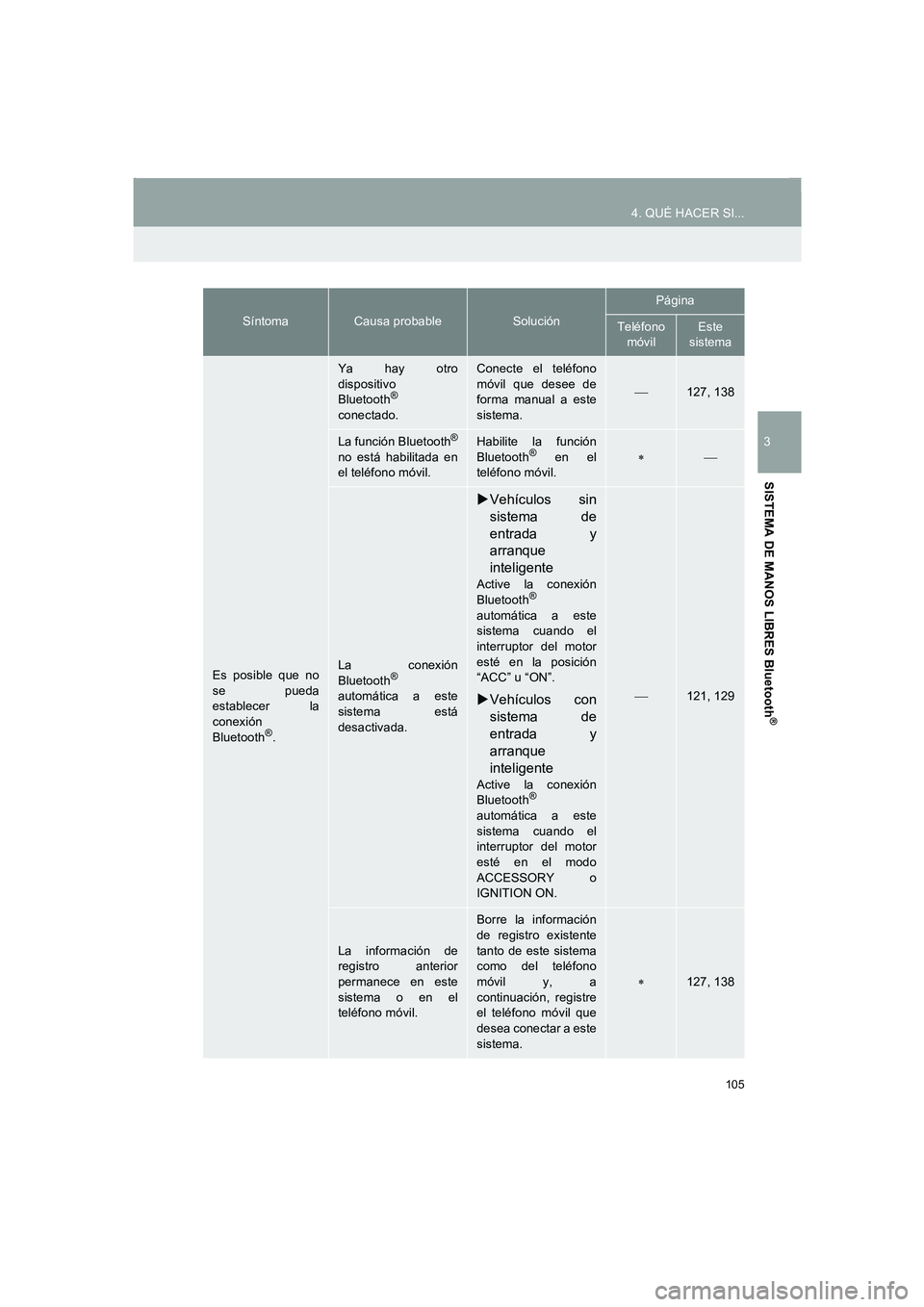
Es posible que no
se pueda
establecer la
conexión
Bluetooth
®.
Ya hay otro
dispositivo
Bluetooth
®
conectado.
Conecte el teléfono
móvil que desee de
forma manual a este
sistema.
127, 138
La función Bluetooth®
no está habilitada en
el teléfono móvil.
Habilite la función
Bluetooth® en el
teléfono móvil.∗
La conexión
Bluetooth®
automática a este
sistema está
desactivada.
XVehículos sin
sistema de
entrada y
arranque
inteligente
Active la conexión
Bluetooth®
automática a este
sistema cuando el
interruptor del motor
esté en la posición
“ACC” u “ON”.
XVehículos con
sistema de
entrada y
arranque
inteligente
Active la conexión
Bluetooth®
automática a este
sistema cuando el
interruptor del motor
esté en el modo
ACCESSORY o
IGNITION ON.
121, 129
La información de
registro anterior
permanece en este
sistema o en el
teléfono móvil.
Borre la información
de registro existente
tanto de este sistema
como del teléfono
móvil y, a
continuación, registre
el teléfono móvil que
desea conectar a este
sistema.
∗127, 138
SíntomaCausa probableSolución
Página
Teléfono
móvilEste
sistema
Corolla_Navi_ES_12J60S.book 105 ページ 2015年1月23日 金曜日 午後3時44分
Page 107 of 272
107
4. QUÉ HACER SI...
COROLLA_14CY_Navi_ES
3
SISTEMA DE MANOS LIBRES Bluetooth
®
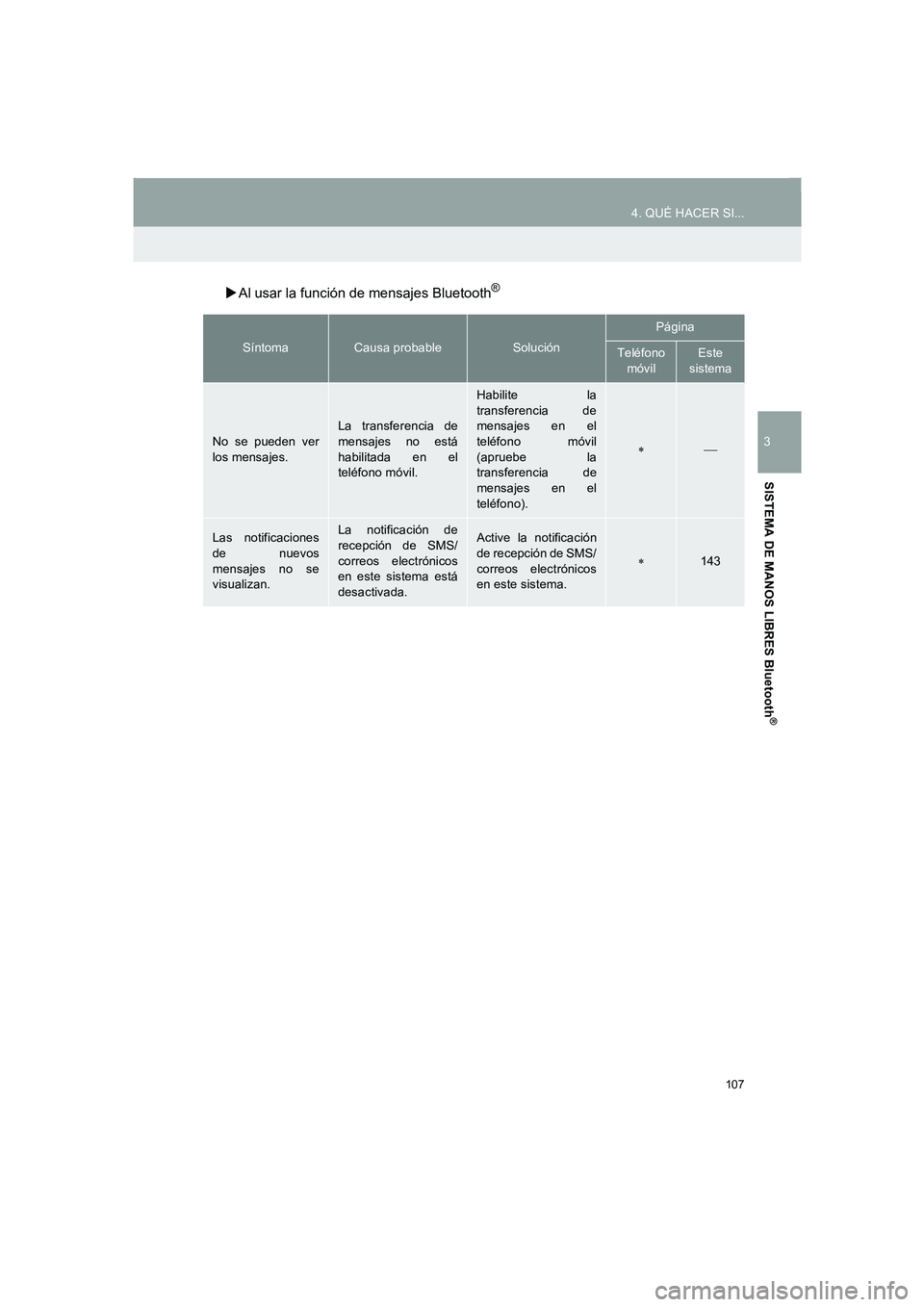
XAl usar la función de mensajes Bluetooth®
SíntomaCausa probableSolución
Página
Teléfono
móvilEste
sistema
No se pueden ver
los mensajes.La transferencia de
mensajes no está
habilitada en el
teléfono móvil.
Habilite la
transferencia de
mensajes en el
teléfono móvil
(apruebe la
transferencia de
mensajes en el
teléfono).
∗
Las notificaciones
de nuevos
mensajes no se
visualizan.La notificación de
recepción de SMS/
correos electrónicos
en este sistema está
desactivada.Active la notificación
de recepción de SMS/
correos electrónicos
en este sistema.
∗143
Corolla_Navi_ES_12J60S.book 107 ページ 2015年1月23日 金曜日 午後3時44分
Page 108 of 272
108
4. QUÉ HACER SI...
COROLLA_14CY_Navi_ES
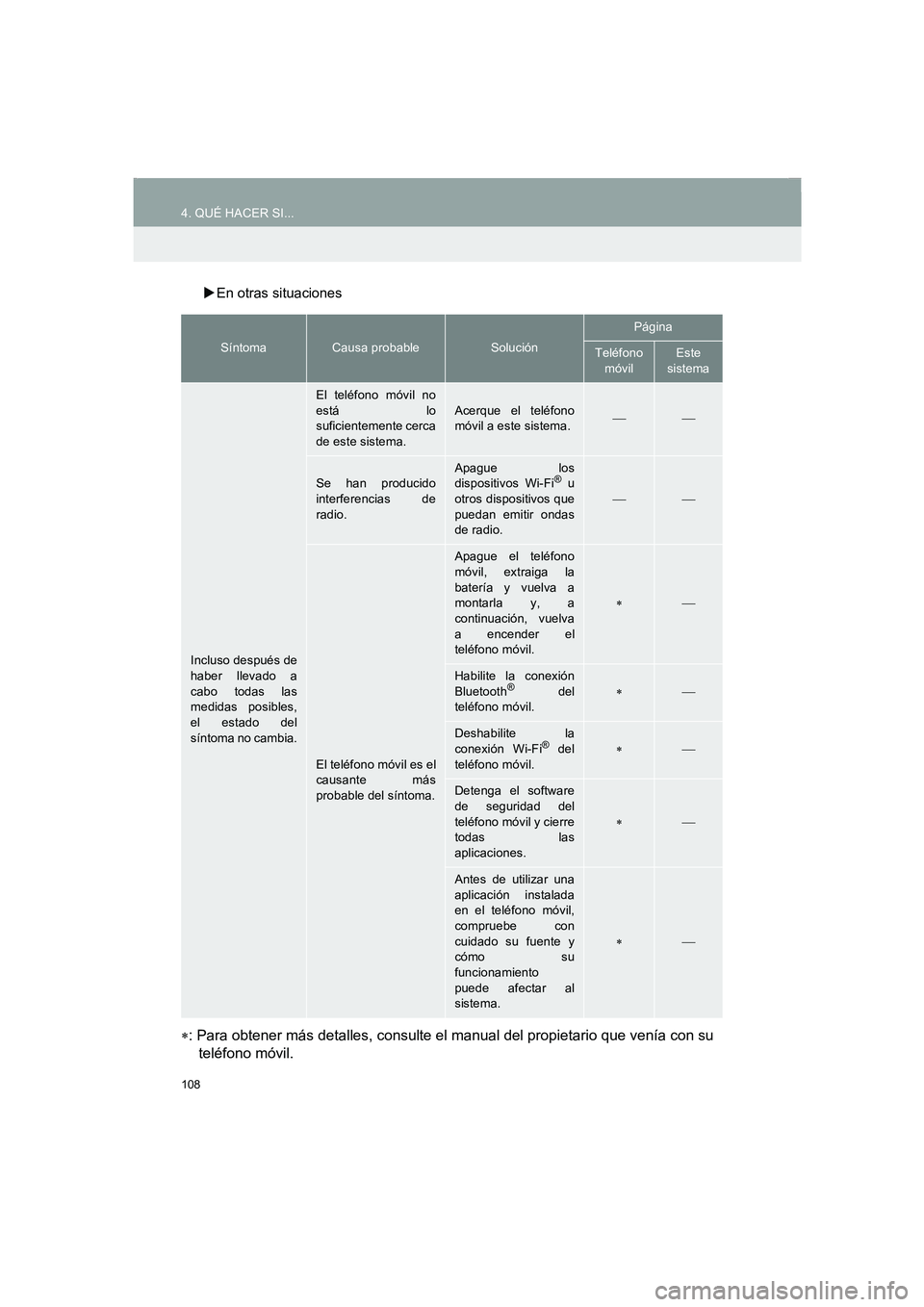
XEn otras situaciones
∗: Para obtener más detalles, consulte el manual del propietario que venía con su
teléfono móvil.
SíntomaCausa probableSolución
Página
Teléfono
móvilEste
sistema
Incluso después de
haber llevado a
cabo todas las
medidas posibles,
el estado del
síntoma no cambia.
El teléfono móvil no
está lo
suficientemente cerca
de este sistema.
Acerque el teléfono
móvil a este sistema.
Se han producido
interferencias de
radio.Apague los
dispositivos Wi-Fi® u
otros dispositivos que
puedan emitir ondas
de radio.
El teléfono móvil es el
causante más
probable del síntoma.
Apague el teléfono
móvil, extraiga la
batería y vuelva a
montarla y, a
continuación, vuelva
a encender el
teléfono móvil.
∗
Habilite la conexión
Bluetooth® del
teléfono móvil.∗
Deshabilite la
conexión Wi-Fi® del
teléfono móvil.∗
Detenga el software
de seguridad del
teléfono móvil y cierre
todas las
aplicaciones.
∗
Antes de utilizar una
aplicación instalada
en el teléfono móvil,
compruebe con
cuidado su fuente y
cómo su
funcionamiento
puede afectar al
sistema.
∗
Corolla_Navi_ES_12J60S.book 108 ページ 2015年1月23日 金曜日 午後3時44分
Page 113 of 272
5
113
1
2
3
4
6
7
COROLLA_14CY_Navi_ES
5
8
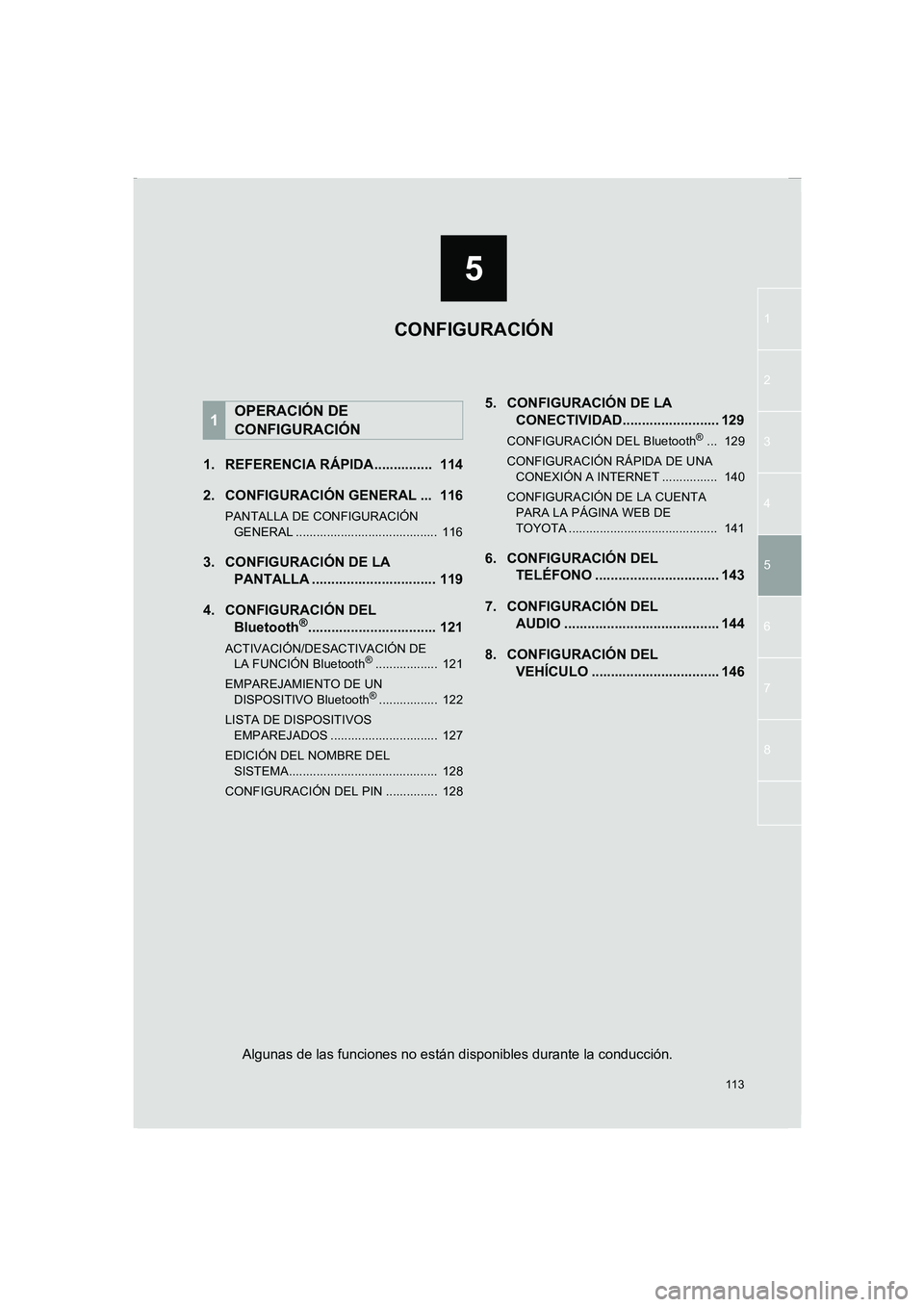
1. REFERENCIA RÁPIDA............... 114
2. CONFIGURACIÓN GENERAL ... 116
PANTALLA DE CONFIGURACIÓN
GENERAL ......................................... 116
3. CONFIGURACIÓN DE LA
PANTALLA ................................ 119
4. CONFIGURACIÓN DEL
Bluetooth
®................................. 121
ACTIVACIÓN/DESACTIVACIÓN DE
LA FUNCIÓN Bluetooth®.................. 121
EMPAREJAMIENTO DE UN
DISPOSITIVO Bluetooth
®................. 122
LISTA DE DISPOSITIVOS
EMPAREJADOS ............................... 127
EDICIÓN DEL NOMBRE DEL
SISTEMA........................................... 128
CONFIGURACIÓN DEL PIN ............... 128
5. CONFIGURACIÓN DE LA
CONECTIVIDAD......................... 129
CONFIGURACIÓN DEL Bluetooth®... 129
CONFIGURACIÓN RÁPIDA DE UNA
CONEXIÓN A INTERNET ................ 140
CONFIGURACIÓN DE LA CUENTA
PARA LA PÁGINA WEB DE
TOYOTA ........................................... 141
6. CONFIGURACIÓN DEL
TELÉFONO ................................ 143
7. CONFIGURACIÓN DEL
AUDIO ........................................ 144
8. CONFIGURACIÓN DEL
VEHÍCULO ................................. 146
1OPERACIÓN DE
CONFIGURACIÓN
CONFIGURACIÓN
Algunas de las funciones no están disponibles durante la conducción.
Corolla_Navi_ES_12J60S.book 113 ページ 2015年1月23日 金曜日 午後3時44分
Page 115 of 272
115
1. OPERACIÓN DE CONFIGURACIÓN
5
CONFIGURACIÓN
COROLLA_14CY_Navi_ES
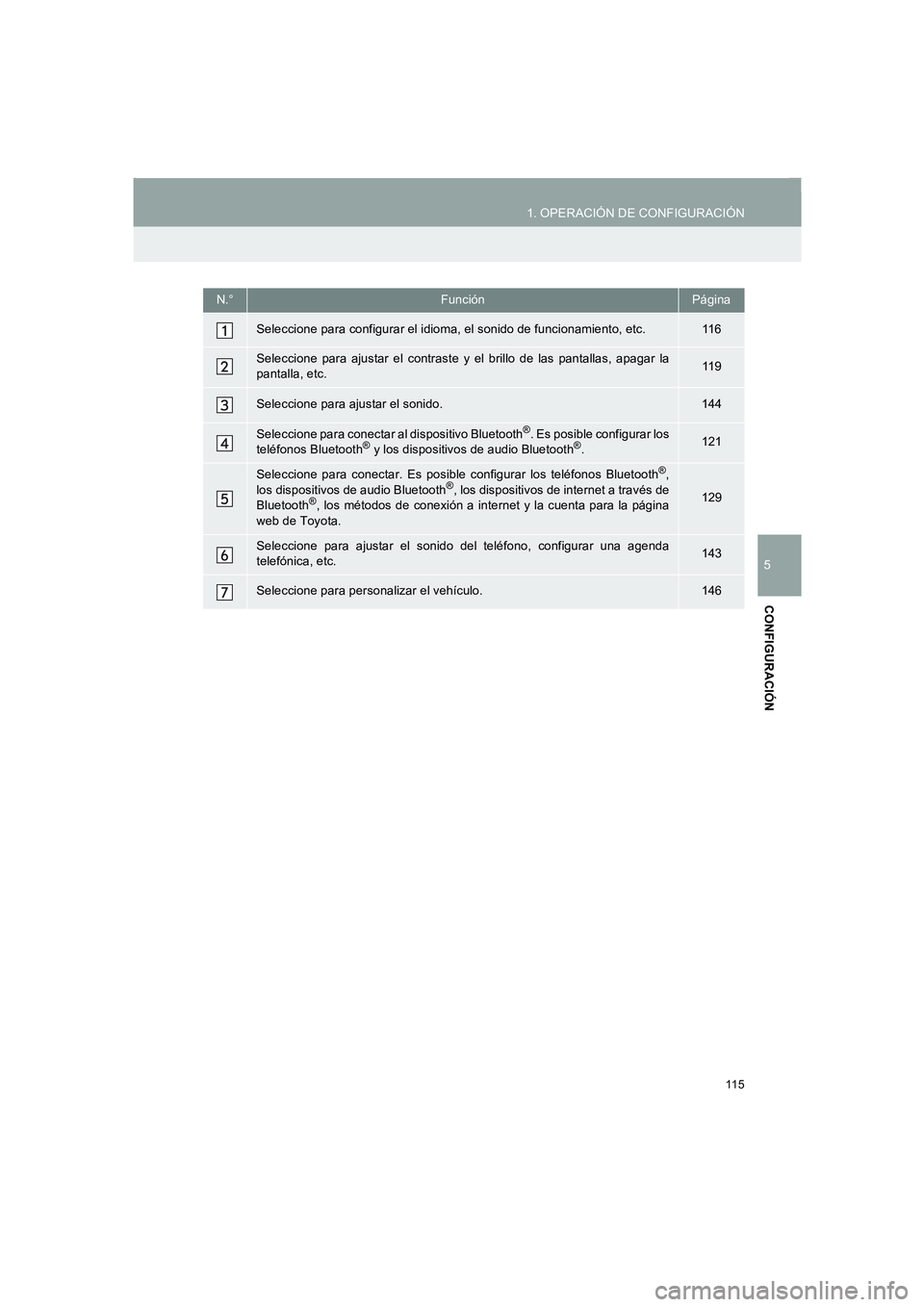
N.°FunciónPágina
Seleccione para configurar el idioma, el sonido de funcionamiento, etc.11 6
Seleccione para ajustar el contraste y el brillo de las pantallas, apagar la
pantalla, etc.11 9
Seleccione para ajustar el sonido.144
Seleccione para conectar al dispositivo Bluetooth®. Es posible configurar los
teléfonos Bluetooth® y los dispositivos de audio Bluetooth®.121
Seleccione para conectar. Es posible configurar los teléfonos Bluetooth®,
los dispositivos de audio Bluetooth®, los dispositivos de internet a través de
Bluetooth®, los métodos de conexión a internet y la cuenta para la página
web de Toyota.129
Seleccione para ajustar el sonido del teléfono, configurar una agenda
telefónica, etc.143
Seleccione para personalizar el vehículo.146
Corolla_Navi_ES_12J60S.book 115 ページ 2015年1月23日 金曜日 午後3時44分
Page 121 of 272
121
COROLLA_14CY_Navi_ES
1. OPERACIÓN DE CONFIGURACIÓN
5
CONFIGURACIÓN
4. CONFIGURACIÓN DEL Bluetooth®
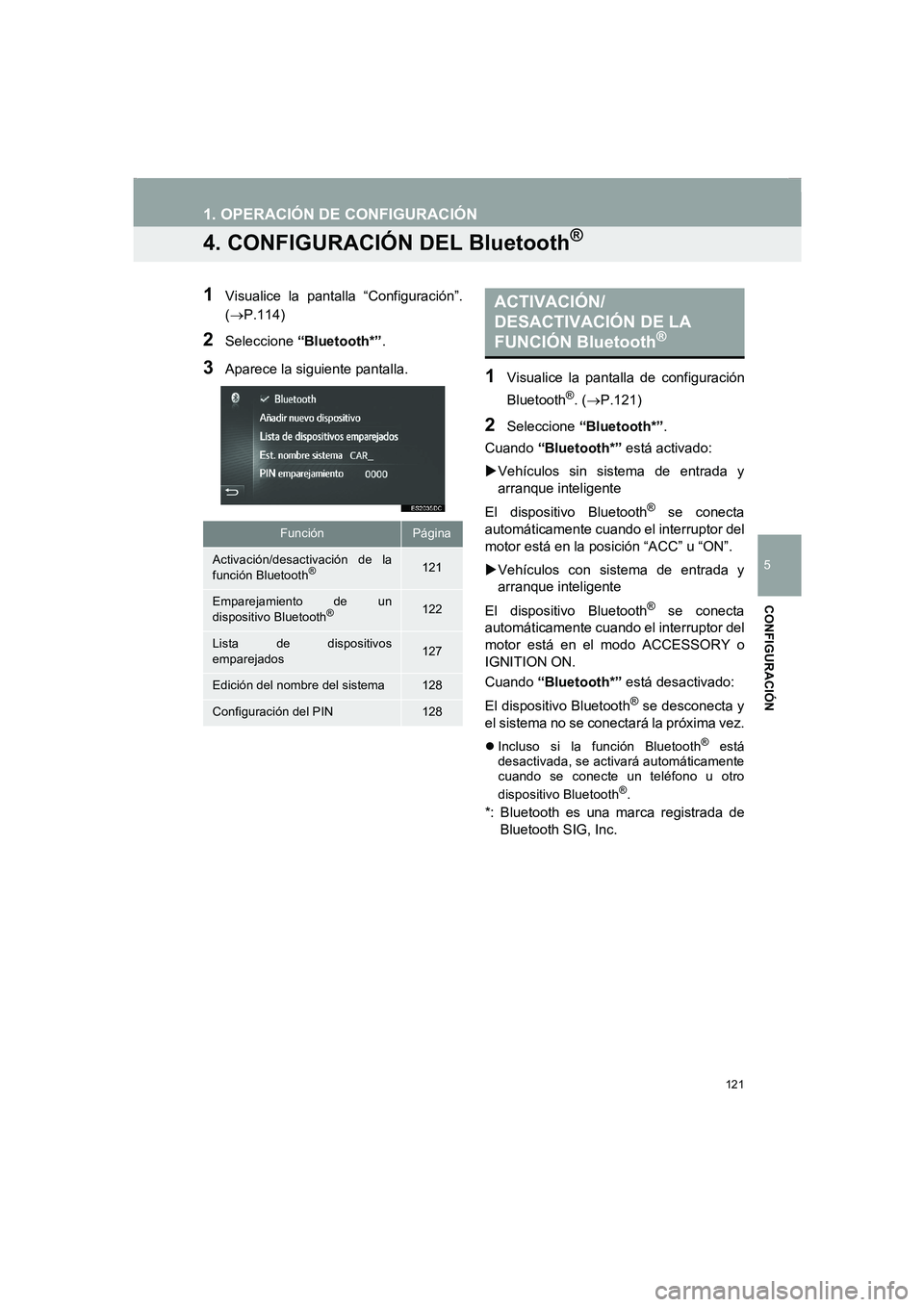
1Visualice la pantalla “Configuración”.
(→P.114)
2Seleccione “Bluetooth*”.
3Aparece la siguiente pantalla.1Visualice la pantalla de configuración
Bluetooth
®. (→P.121)
2Seleccione “Bluetooth*”.
Cuando “Bluetooth*” está activado:
XVehículos sin sistema de entrada y
arranque inteligente
El dispositivo Bluetooth
® se conecta
automáticamente cuando el interruptor del
motor está en la posición “ACC” u “ON”.
XVehículos con sistema de entrada y
arranque inteligente
El dispositivo Bluetooth
® se conecta
automáticamente cuando el interruptor del
motor está en el modo ACCESSORY o
IGNITION ON.
Cuando “Bluetooth*” está desactivado:
El dispositivo Bluetooth
® se desconecta y
el sistema no se conectará la próxima vez.
zIncluso si la función Bluetooth® está
desactivada, se activará automáticamente
cuando se conecte un teléfono u otro
dispositivo Bluetooth
®.
*: Bluetooth es una marca registrada de
Bluetooth SIG, Inc.
FunciónPágina
Activación/desactivación de la
función Bluetooth®121
Emparejamiento de un
dispositivo Bluetooth®122
Lista de dispositivos
emparejados127
Edición del nombre del sistema128
Configuración del PIN128
ACTIVACIÓN/
DESACTIVACIÓN DE LA
FUNCIÓN Bluetooth
®
Corolla_Navi_ES_12J60S.book 121 ページ 2015年1月23日 金曜日 午後3時44分