2014 MITSUBISHI OUTLANDER SPORT specifications
[x] Cancel search: specificationsPage 1 of 388

E09200105565
Thank you for selecting a MITSUBISHI MOTORS prod-uct as your new vehicle.This owner’s manual will add to your understanding and full enjoy-ment of the many fine features of this vehicle.It contains information prepared to acquaint you with the proper wayto operate and maintain your vehicle for the utmost in driving pleasure.MITSUBISHI MOTORS AUSTRALIA LTD., reserves the right tomake changes in design and specifications and/or to make additions toor improvements in this product without obligation to install them onproducts previously manufactured.It is an absolute requirement for the driver to strictly observe all lawsand regulations concerning vehicles.This owner’s manual has been written in compliance with such lawsand regulations, but some of the contents may become contradictorywith later amendment of the laws and regulations.Please leave this owner’s manual in this vehicle at time of resale. Thenext owner will appreciate having access to the information containedin this owner’s manual.Foreword
Throughout this owner’s manual the words
WA R N I N G
and
CAU-
TION
appear.
These serve as reminders to be especially careful. Failure to followinstructions could result in personal injury or damage to your vehi-cle.indicates a strong possibility of severe personal injury or death ifinstructions are not followed.means hazards or unsafe practices that could cause minor per-sonal injury or damage to your vehicle.Yo u w i l l s e e a n o t h e r i m p o r t a n t s y m b o l :NOTE: gives helpful information.
*: indicates optional equipment.It may differ according to the sales classification; refer to thesales catalogue.
©2013 Mitsubishi Motors Corporation
BK0203201EN.book 1 ページ 2013年11月19日 火曜日 午前11時50分
Page 2 of 388
Ta b l e o f c o n t e n t s
12345678910111213
OverviewGeneral informationChargingLocking and unlockingSeat and seat beltsInstruments and controlsStarting and drivingFor pleasant drivingFor emergenciesVehicle careMaintenanceSpecificationsAlphabetical index
BK0203201EN.book 1 ページ 2013年11月19日 火曜日 午前11時50分
Page 24 of 388
Modification/alterations to th
e electrical or fuel systemsGeneral information 2-15
2
zTy r e s a n d w h e e l s w h i c h d o n o t m e e t s p e c -ifications must not be used.Refer to the “Specifications” section forinformation regarding wheel and tyresizes.
Due to large number of accessory andreplacement parts of different manufacturesavailable in the market, it is not possible, notonly for MITSUBISHI MOTORS, but also aMITSUBISHI MOTORS Authorised ServicePoint, to check whether the attachment orinstallation of such parts affects the overallsafety of your MITSUBISHI-vehicle.Even when such parts are officially author-ised, for example by a “general operators per-mit” (an appraisal for the part) or through theexecution of the part in an officially approvedmanner of construction, or when a singleoperation permit following the attachment orinstallation of such parts, it cannot bededuced from that alone, that the drivingsafety of your vehicles has not been affected.Consider also that there basically exists noliability on the part of the appraiser or theofficial. Maximum safety can only be ensuredwith parts recommended, sold and fitted orinstalled by a MITSUBISHI MOTORS
authorised Service Point (MITSUBISHIMOTORS GENUINE replacement parts andMITSUBISHI MOTORS accessories). Thesame also pertains to modifications ofMITSUBISHI vehicles with respect to theproduction specifications. For safety reasons,do not attempt any modifications other thanthose that follow the recommendations of aMITSUBISHI MOTORS authorised ServicePoint.
E00200400368
MITSUBISHI MOTORS CORPORATIONhas always manufactured safe, high qualityvehicles. In order to maintain this safety andquality, it is important that any accessory thatis to be fitted, or any modifications carriedout which involve the electrical or fuel sys-tems, should be carried out in accordancewith MITSUBISHI guidelines.
E00200500499
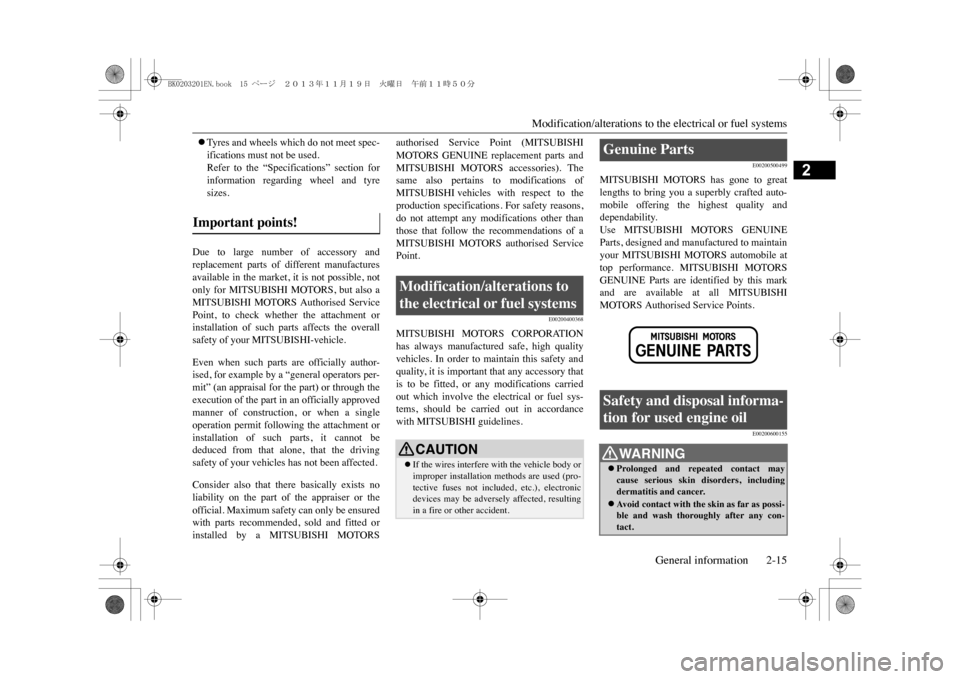
MITSUBISHI MOTORS has gone to greatlengths to bring you a superbly crafted auto-mobile offering the highest quality anddependability.Use MITSUBISHI MOTORS GENUINEParts, designed and manufactured to maintainyour MITSUBISHI MOTORS automobile attop performance. MITSUBISHI MOTORSGENUINE Parts are identified by this markand are available at all MITSUBISHIMOTORS Authorised Service Points.
E00200600155
Important points!
Modification/alterations to the electrical or fuel systems
CAUTIONzIf the wires interfere
with the vehicle body or
improper installation methods are used (pro-tective fuses not included, etc.), electronicdevices may be adversely affected, resultingin a fire or other accident.
Genuine Parts Safety and disposal informa-tion for used engine oil
WA R N I N GzProlonged and repeated contact maycause serious skin disorders, includingdermatitis and cancer.zAv o i d c o n t a c t w i t h t h e s k i n a s f a r a s p o s s i -ble and wash thoroughly after any con-tact.
BK0203201EN.book 15 ページ 2013年11月19日 火曜日 午前11時50分
Page 120 of 388
Multi information display
Instruments and controls 6-11
6
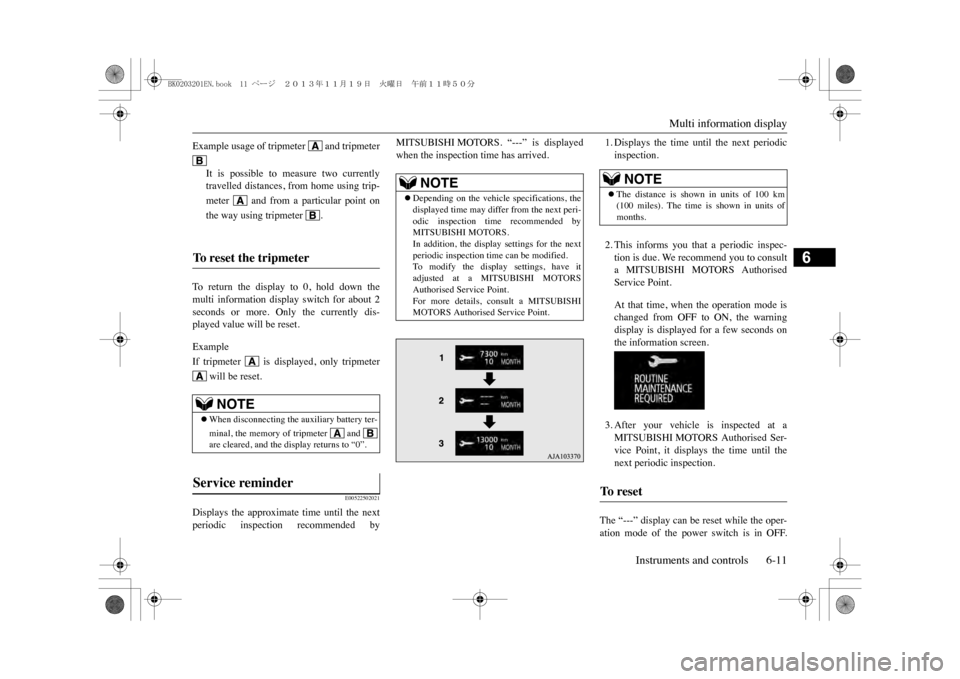
To r e t u r n t h e d i s p l a y t o 0 , h o l d d o w n t h emulti information display switch for about 2seconds or more. Only the currently dis-played value will be reset.ExampleIf tripmeter is displayed, only tripmeter
will be reset.
E00522502021
Displays the approximate time until the nextperiodic inspection recommended by
MITSUBISHI MOTORS. “---” is displayedwhen the inspection time has arrived.
1. Displays the time until the next periodicinspection.2. This informs you that a periodic inspec-tion is due. We recommend you to consulta MITSUBISHI MOTORS AuthorisedService Point.At that time, when the operation mode ischanged from OFF to ON, the warningdisplay is displayed for a few seconds onthe information screen.3. After your vehicle is inspected at aMITSUBISHI MOTORS Authorised Ser-vice Point, it displays the time until thenext periodic inspection.
The “---” display can be reset while the oper-ation mode of the power switch is in OFF.
Example usage of tripmeter and tripmeter
It is possible to measure two currentlytravelled distances, from home using trip-meter and from a particular point onthe way using tripmeter .
To r e s e t t h e t r i p m e t e r
NOTE
zWhen disconnecting the auxiliary battery ter-minal, the memory of tripmeter and are cleared, and the display returns to “0”.
Service reminder
NOTE
zDepending on the vehicle specifications, thedisplayed time may differ from the next peri-odic inspection time recommended byMITSUBISHI MOTORS.In addition, the display settings for the nextperiodic inspection time can be modified.To modify the display settings, have itadjusted at a MITSUBISHI MOTORSAuthorised Service Point.For more details, consult a MITSUBISHIMOTORS Authorised Service Point.
NOTE
zThe distance is show
n in units of 100 km
(100 miles). The time is
shown in units of
months.
To r e s e t
BK0203201EN.book 11 ページ 2013年11月19日 火曜日 午前11時50分
Page 234 of 388
Towing caravans and trailersStarting and driving 7-71
7
E00610401405
Yo u r v e h i c l e h a s q u a l i t i e s w h i c h m a k e i t w e l lsuited for normal towing operations provideda few recommendations are observed. Theseare primarily concerne
d with the prevention
of overloading of the vehicle and with theselection of the proper equipment. If theseprecautions are taken and driving habits areregulated accordingly, the effects of towingtrailers and caravans can be minimized.It should be noted that damage to the vehiclecaused directly or indirectly by operatingunder conditions outside the limits set out onthis page will void the warranty, relative tosuch damage.
The legal authorities require that a trailer orcaravan be fitted with stop, tail and turn sig-nal lamps. An electrical kit can be fitted byyour authorized MITSUBISHI MOTORSdealer which meets legal requirements andcan be left on your vehicle permanently. Itmay be necessary to fit additional rear visionmirrors to both sides of your vehicle to giveclear vision past your trailer or caravan.Ensure that your trailer or caravan complieswith the regulations of the particular State inwhich you are travelling, e. g. lighting, safetychains, brakes, mass, etc. Check that yourtowbar tongue does not obscure your vehi-cle’s number plate when the trailer or caravanis disconnected. If it does, remove the tongueensuring that it is refitted securely when refit-ted.
The maximum payload of the towing vehicledoes not exceed the requirements of eachmaximum mass described in the “Vehiclemass”. See “Specifications” for the payloadinformation.Having established compliance with the Stateregulations for permissible towing loads and
To w i n g c a r a v a n s a n d t r a i l -ers
WA R N I N GzWhen connecting the trailer with ElectricTr a i l e r B r a k e ( E T B )
, use MITSUBISHI
MOTORS GENUINE ETB harness.zIf using an ETB harness other than MIT-SUBISHI MOTORS GENUINE parts, anunexpected reduction in drive force mayoccur when using the manual trailerbrake override which co
uld lead to insta-
bility and increase the risk of an accident.
CAUTIONzMITSUBISHI MOTORS recommends theuse of MITSUBISHI MOTORS towingequipment where it is available. No recom-mendation is made as to the make of equip-ment which may be used if MITSUBISHIMOTORS equipment is not available.zThe loads specified apply only if a MITSUB-ISHI MOTORS GENUINE Parts Tow Barand other specified equipment is used.
State re gulations
Permissible towing load and requirements
CAUTIONzThe trailer brake and towing hitch require-ments as specified are minimum require-ments only and MITSUBISHI MOTORSrecommend that a trailer brake and a loaddistributing hitch is used whenever you aretowing, to improve
stopping distance and
towing stability.When using a load distributing hitch the loadon the trailer tyres increases. Do not exceedthe trailer tyre load rating.With all towing operations it is important tolimit the towing vehicle payload as noted.Failure to do so may result in exceeding themaximum load rating of the tyres. This rat-ing is marked on the tyre placard and mayalso be displayed on
the tyre sidewall.
Setting up for towing
BK0203201EN.book 71 ページ 2013年11月19日 火曜日 午前11時50分
Page 256 of 388
Audio Files (MP3/WMA/AAC)
For pleasant driving 8-19
8
E00736400029
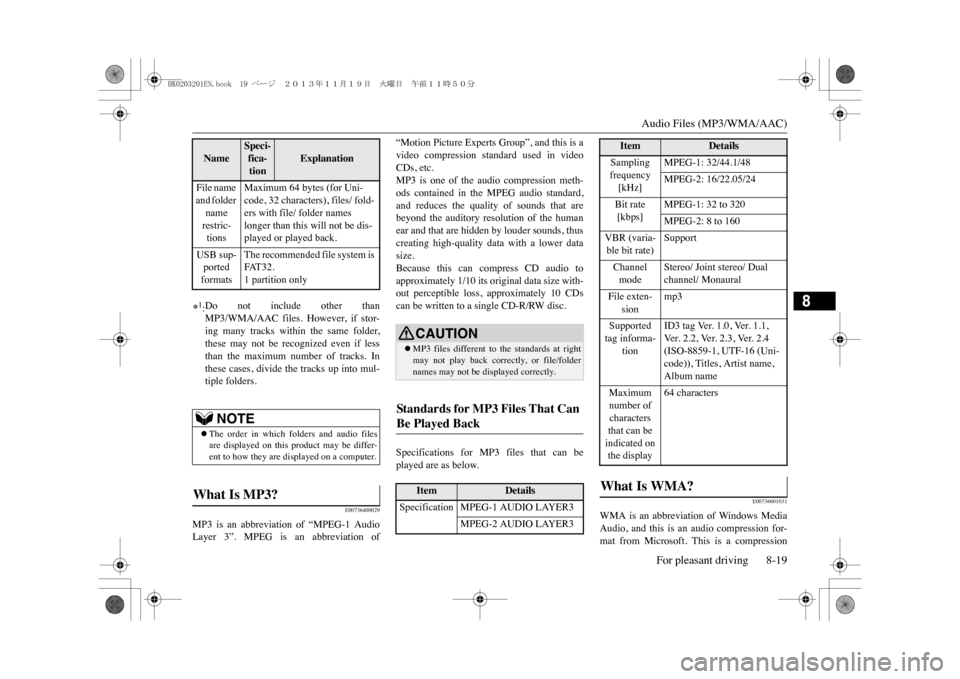
MP3 is an abbreviation of “MPEG-1 AudioLayer 3”. MPEG is an abbreviation of
“Motion Picture Experts Group”, and this is avideo compression standard used in videoCDs, etc.MP3 is one of the audio compression meth-ods contained in the MPEG audio standard,and reduces the quality of sounds that arebeyond the auditory resolution of the humanear and that are hidden by louder sounds, thuscreating high-quality data with a lower datasize.Because this can compress CD audio toapproximately 1/10 its original data size with-out perceptible loss, approximately 10 CDscan be written to a single CD-R/RW disc.Specifications for MP3 files that can beplayed are as below.
E00736601031
WMA is an abbreviation of Windows MediaAudio, and this is an audio compression for-mat from Microsoft. This is a compression
File name and folder name restric-tions
Maximum 64 bytes (for Uni-code, 32 characters), files/ fold-ers with file/ folder names longer than this will not be dis-played or played back.
USB sup-ported formats
The recommended file system is FAT 3 2 .1 partition only
*1:Do not include other thanMP3/WMA/AAC files. However, if stor-ing many tracks within the same folder,these may not be recognized even if lessthan the maximum number of tracks. Inthese cases, divide the tracks up into mul-tiple folders.
NOTE
zThe order in which folders and audio filesare displayed on this product may be differ-ent to how they are displayed on a computer.
What Is MP3? Name
Speci-fica-tion
Explanation
CAUTIONzMP3 files different to the standards at rightmay not play back correctly, or file/foldernames may not be displayed correctly.
Standards for MP3 Files T hat Can Be Played Back
Item
Details
Specification MPEG-1 AUDIO LAYER3
MPEG-2 AUDIO LAYER3
Sampling frequency [kHz]
MPEG-1: 32/44.1/48MPEG-2: 16/22.05/24
Bit rate [kbps]
MPEG-1: 32 to 320MPEG-2: 8 to 160
VBR (varia-ble bit rate)
Support
Channel mode
Stereo/ Joint stereo/ Dual channel/ Monaural
File exten-
sion
mp3
Supported tag informa-
tion
ID3 tag Ver. 1.0, Ver. 1.1, Ve r . 2 . 2 , Ve r. 2 . 3 , Ve r . 2 . 4 (ISO-8859-1, UTF-16 (Uni-code)), Titles, Artist name, Album name
Maximum number of characters that can be indicated on the display
64 characters
What Is WMA?
Item
Details
BK0203201EN.book 19 ページ 2013年11月19日 火曜日 午前11時50分
Page 257 of 388
Audio Files (MP3/WMA/AAC)8-20 For pleasant driving
8
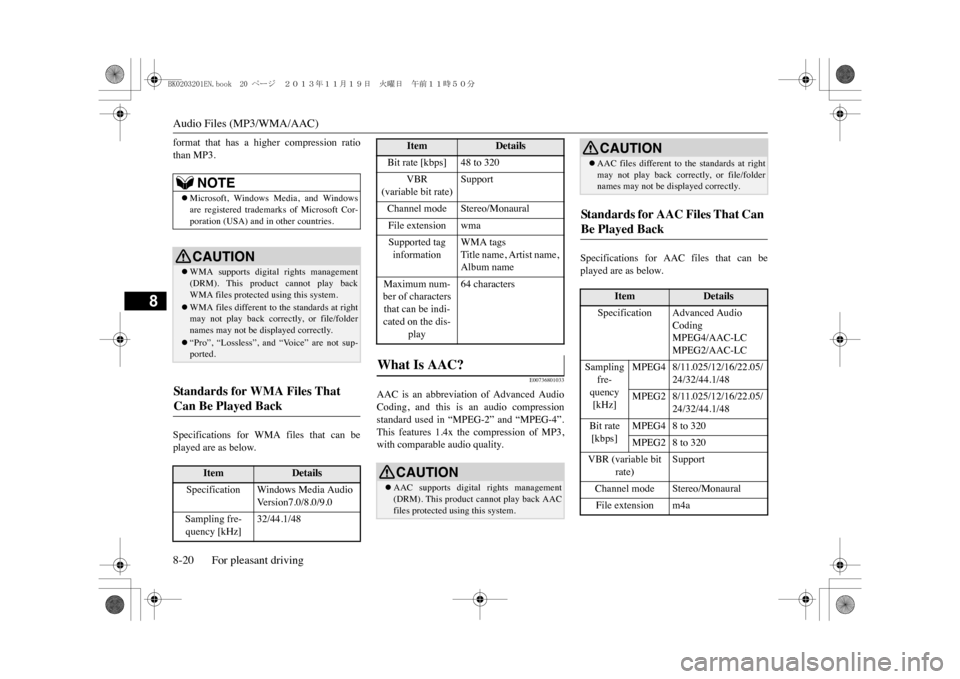
format that has a higher compression ratiothan MP3.Specifications for WMA files that can beplayed are as below.
E00736801033
AAC is an abbreviation of Advanced AudioCoding, and this is an audio compressionstandard used in “MPEG-2” and “MPEG-4”.This features 1.4x the compression of MP3,with comparable audio quality.
Specifications for AAC files that can beplayed are as below.
NOTE
zMicrosoft, Windows Media, and Windowsare registered trademarks of Microsoft Cor-poration (USA) and in
other countries.
CAUTIONzWMA supports digital rights management(DRM). This product cannot play backWMA files protected using this system.zWMA files different to the standards at rightmay not play back correctly, or file/foldernames may not be di
splayed correctly.
z“Pro”, “Lossless”, and “Voice” are not sup-ported.
Standards for WMA Files That Can Be Played Back
Item
Details
Specification Windows Media Audio
Ve r s i o n 7 . 0 / 8 . 0 / 9 . 0
Sampling fre-quency [kHz]
32/44.1/48
Bit rate [kbps] 48 to 320
VBR
(variable bit rate)
Support
Channel mode Stereo/MonauralFile extension wmaSupported tag information
WMA tagsTitle name, Artist name, Album name
Maximum num-ber of characters that can be indi-cated on the dis-
play
64 characters
What Is AAC?
CAUTIONzAAC supports digital rights management(DRM). This product cannot play back AACfiles protected using this system.
Item
Details
zAAC files different to
the standards at right
may not play back correctly, or file/foldernames may not be displayed correctly.
St an d a r d s fo r A A C F il es T h a t C a n Be Played Back
Item
Details
Specification Advanced Audio
CodingMPEG4/AAC-LCMPEG2/AAC-LC
Sampling
fre-quency [kHz]
MPEG4 8/11.025/12/16/22.05/
24/32/44.1/48
MPEG2 8/11.025/12/16/22.05/
24/32/44.1/48
Bit rate [kbps]
MPEG4 8 to 320MPEG2 8 to 320
VBR (variable bit
rate)
Support
Channel mode Stereo/MonauralFile extension m4aCAUTION
BK0203201EN.book 20 ページ 2013年11月19日 火曜日 午前11時50分
Page 265 of 388
Listen to an iPod8-28 For pleasant driving
8
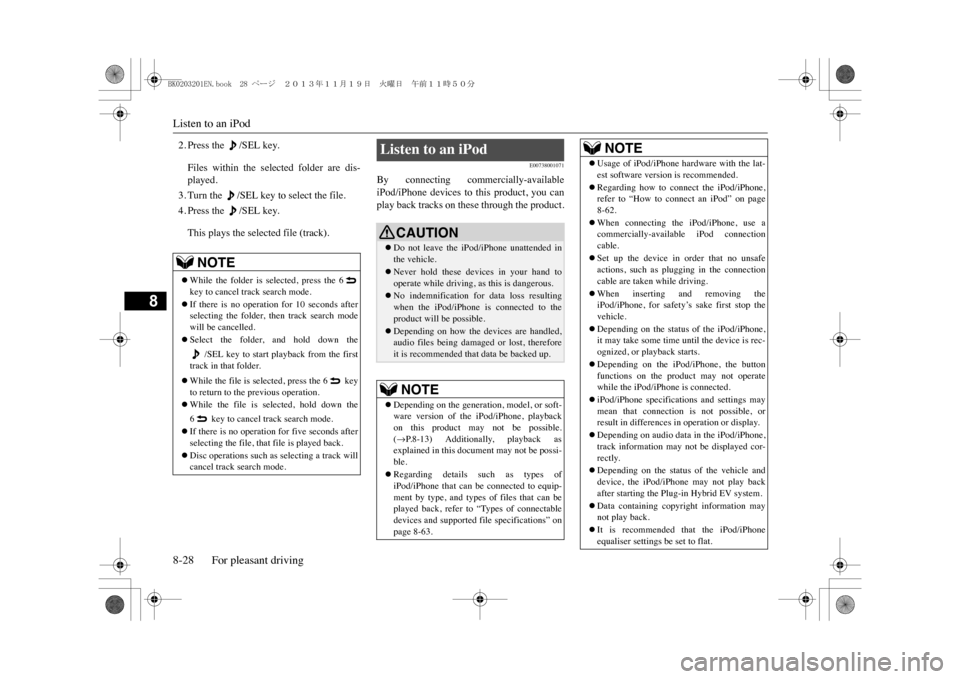
2. Press the /SEL key.Files within the selected folder are dis-played.3. Turn the /SEL key to select the file.4. Press the /SEL key.This plays the selected file (track).
E00738001071
By connecting commercially-availableiPod/iPhone devices to this product, you canplay back tracks on these through the product.
NOTE
zWhile the folder is selected, press the 6key to cancel track search mode.zIf there is no operation for 10 seconds afterselecting the folder, th
en track search mode
will be cancelled.zSelect the folder, and hold down the
/SEL key to start playback from the first
track in that folder.zWhile the file is selected, press the 6 keyto return to the previous operation.zWhile the file is selected, hold down the6 key to cancel track search mode.zIf there is no operation for five seconds afterselecting the file, that file is played back.zDisc operations such as selecting a track willcancel track search mode.
Listen to an iPod
CAUTIONzDo not leave the iP
od/iPhone unattended in
the vehicle.zNever hold these devices in your hand tooperate while driving,
as this is dangerous.
zNo indemnification for data loss resultingwhen the iPod/iPhone is
connected to the
product will be possible.zDepending on how the devices are handled,audio files being damaged or lost, thereforeit is recommended that data be backed up.NOTE
zDepending on the generati
on, model, or soft-
ware version of th
e iPod/iPhone, playback
on this product may not be possible.(mP. 8 - 1 3 ) A d d i t i o n a l l y, p l a y b a c k a s
explained in this docum
ent may not be possi-
ble.zRegarding details such as types ofiPod/iPhone that can be connected to equip-ment by type, and types of files that can beplayed back, refer to “Types of connectabledevices and supported f
ile specifications” on
page 8-63.
zUsage of iPod/iPhone hardware with the lat-est software version is recommended.zRegarding how to connect the iPod/iPhone,refer to “How to connect an iPod” on page8-62.zWhen connecting the iPod/iPhone, use acommercially-available iPod connectioncable.zSet up the device in order that no unsafeactions, such as plugging in the connectioncable are taken while driving.zWhen inserting and removing theiPod/iPhone, for safety’s sake first stop thevehicle.zDepending on the status of the iPod/iPhone,it may take some time until the device is rec-ognized, or playback starts.zDepending on the iPod/iPhone, the buttonfunctions on the product may not operatewhile the iPod/iPhone is connected.ziPod/iPhone specifications and settings maymean that connection is not possible, orresult in differences in operation or display.zDepending on audio data in the iPod/iPhone,track information may not be displayed cor-rectly.zDepending on the status of the vehicle anddevice, the iPod/iPhone may not play backafter starting the Plug-in Hybrid EV system.zData containing copyri
ght information may
not play back.zIt is recommended
that the iPod/iPhone
equaliser settings be set to flat.NOTE
BK0203201EN.book 28 ページ 2013年11月19日 火曜日 午前11時50分