Speed alert
You can define the upper speed limit, which
must not be exceeded by the vehicle.
If this selected speed is exceeded by the
vehicle, amessage will be sent to the
Customer Assistance center. The Customer
Assistance center then forwards this
information to you.
You can select the way in which you receive
this information beforehand. Possible options
include text message, e-mail or an automated
call.
The data you receive contains the following
information:
R the location where the speed limit was
exceeded
R the time at which the speed limit was
exceeded
R the selected speed limit which was
exceeded
Geo fencing Geo fencinga
llowsyou to select areas which
the vehicle should not enter or leave. You will
be informed if the vehicle crosses the
boundaries of the selected areas. You can
select the way in which you receive this
information beforehand. Possible options
include text message, e-mail or an automated
call.
The area can be determined as either acircle
or ap olygon with amaximum of ten corners.
You can specify up to ten areas
simultaneously. Differen tsettings are
possible for each area.
Alternatively, you can trigger an MB Infoc all
and infor mthe customer service
representativ ethat you wish to activat egeo
fencing.
Currently inactive areas can be activated by
textm essage. Triggering the vehicle alarm With this function
,you can trigger the
vehicle's panic alarm via textm essage. An
alarm sounds and the exterior lighting
flashes. Depending on the setting, the panic
alarm lasts five or ten seconds. Afterwards,
the alarm switches off. Garage door opener
Important safet ynotes G
WARNING
When you operate or program the garage door
with the integrated garage door opener,
person sinthe range of movemen tofthe
garage door can become trapped or struck by
the garage door. There is arisk of injury.
When using the integrated garage door
opener, always make sure that nobody is
within the rang eofmovemen tofthe garage
door. G
WARNING
Combustion engines emit poisonous exhaust
gases such as carbo nmonoxide. Inhaling
these exhaust gases leads to poisoning. There
is ar isk of fatal injury. Therefore never leave
the engine runnin ginenclosed spaces
without sufficient ventilation.
The HomeLink ®
garage door opener
integrated in the rear-view mirror allows you
to operate up to three different door and gate
systems.
Use the integrated garage door opener only
on garage doors that:
R have safety stop and reverse features and
R meet current U.S. federal safety standards
When programming agarage door opener,
park the vehicle outside the garage.
i Certain garage door drives are
incompatible with the integrated garage
door opener. If you have difficulty
programming the integrated garage door Features
273Stowage and features Z
opener, contact an authorized Mercedes-
Benz Center.
Alternatively, you can call the following
telephone assistance services:
R
USA: Mercedes-Benz Customer
Assistance Center at
1-800-FOR-MERCedes
R Canada: Customer Servic eat
1-800-387-0100
R HomeLink ®
hotline 1-800-355-3515
(free of charge)
More information on HomeLink ®
and/or
compatible products is also available
online at http://www.homelink.com.
i Notes on the declaration of conformity
(Y page 24).
USA:F CC ID: CB2HMIHL4
Canada: IC: 279B-HMIHL4
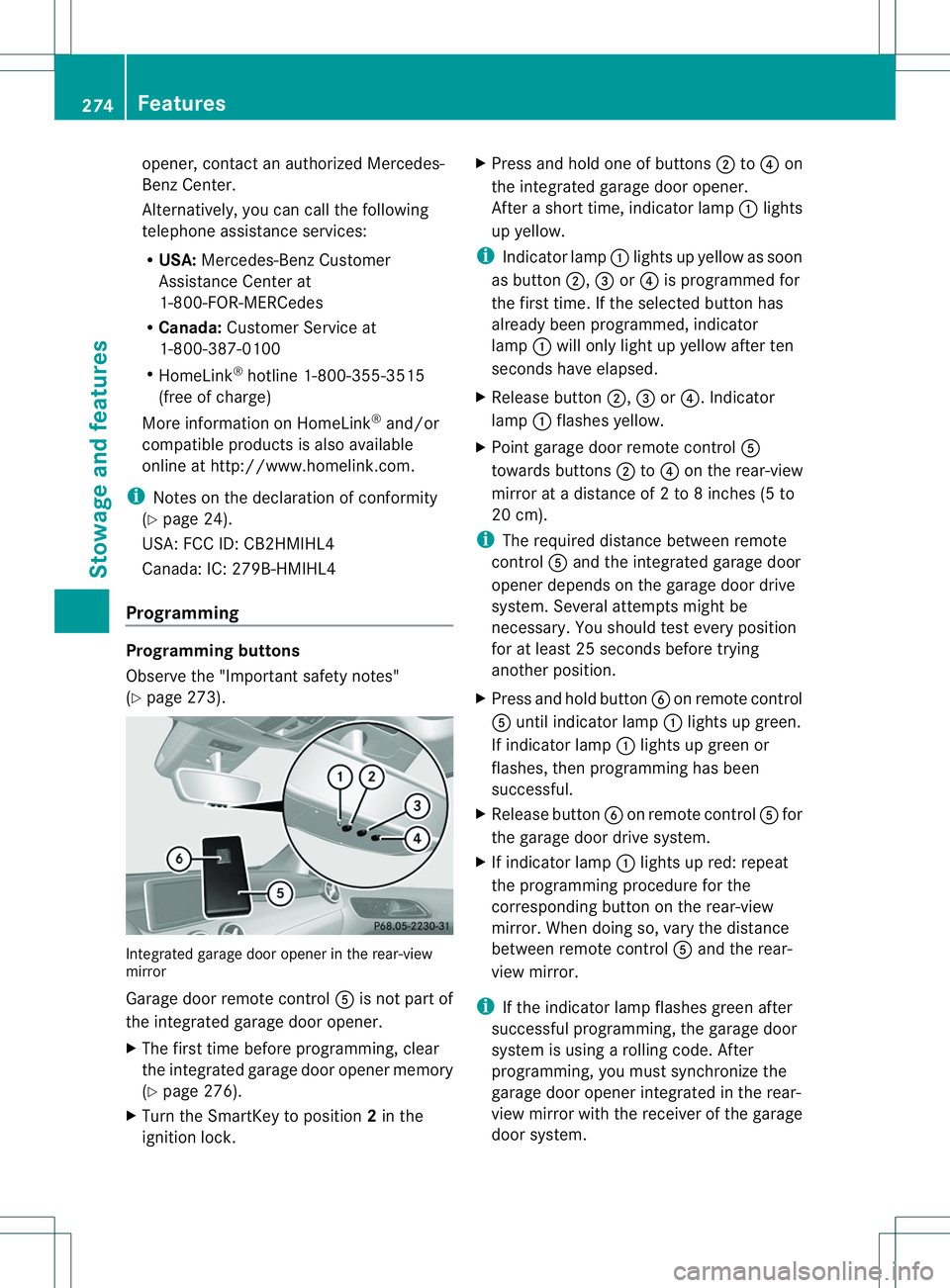
Programming Programming buttons
Observe the "Important safety notes"
(Y page 273). Integrated garage door opener in the rear-view
mirror
Garage door remote control
001Eis not part of
the integrated garage door opener.
X The first time before programming, clear
the integrated garage door opener memory
(Y page 276).
X Turn the SmartKey to position 2in the
ignition lock. X
Press and hold one of buttons 0010to0021 on
the integrated garage door opener.
After ashort time, indicator lamp 001Alights
up yellow.
i Indicator lamp 001Alights up yellow as soon
as button 0010,0023or0021 is programmed for
the first time. If the selected button has
already been programmed, indicator
lamp 001Awill only light up yellow after ten
seconds have elapsed.
X Release button 0010,0023or0021.I ndicator
lamp 001Aflashes yellow.
X Point garage door remote control 001E
towards buttons 0010to0021 on the rear-view
mirror at adistance of 2to8inches (5 to
20 cm).
i The required distance between remote
control 001Eand the integrated garage door
opener depends on the garage door drive
system. Several attempt smight be
necessary. You should tes tevery position
for at least 25 seconds before trying
another position.
X Press and hold button 0024on remote control
001E until indicator lamp 001Alights up green.
If indicator lamp 001Alights up green or
flashes, then programming has been
successful.
X Release button 0024on remote control 001Efor
the garage door drive system.
X If indicator lamp 001Alights up red: repeat
the programming procedure for the
corresponding button on the rear-view
mirror. When doing so, vary the distance
between remote control 001Eand the rear-
view mirror.
i If the indicator lamp flashes green after
successfu lprogramming, the garage door
system is using arolling code. After
programming, you must synchronize the
garage door opener integrated in the rear-
view mirror with the receive rofthe garage
door system. 274
FeaturesStowage and features