2014 MERCEDES-BENZ B-CLASS SPORTS lane assist
[x] Cancel search: lane assistPage 10 of 360
Safety systems
.............................. 208
SmartKey ....................................... 237
Tire s............................................... 231
Vehicle .......................................... .233
Distanc edisplay (on-board
computer) .......................................... 199
Distanc erecorder ............................. 193
see Odometer
see Trip odometer
Distanc ewarning function
Activating/deactivating .................200
Function/notes ................................ 64
Warning lamp ................................. 247
DISTRONIC PLUS
Activatio ncondition s..................... 164
Cruise control leve r....................... 164
Deactivating ................................... 167
Display message ............................ 228
Displaysint he multifunction
displa y........................................... 168
Driving tips .................................... 170
Function/notes ............................. 162
Important safety notes ..................163
Setting the specified minimum
distance ......................................... 167
Warning lamp ................................. 247
Doors
Automatic locking (on-board
computer) ...................................... 205
Automatic locking (switch) .............. .80
Central locking/unlocking
(SmartKey) ...................................... .74
Control panel ................................... 37
Display message ............................ 235
Emergency locking ........................... 81
Emergency unlocking .......................81
Important safety notes ....................79
Opening (from inside) ......................79
Drinking and driving .........................155
Drinks holder see Cuph older
Drive program
Automatic ...................................... 147
Display (DIREC TSELECT lever) ......144
Manual .......................................... .147
Driver's door
see Doors Driving abroad
Mercedes-Benz Service .................285
Symmetrical low bea m.................. 104
Driving on flooded roads ..................159
Driving safety systems ABS (Anti-lock Braking System) .......63
ADAPTIVE BRAKE ............................. 69
Adaptive Brake Assist ......................65
Adaptive brake lamps ......................67
BAS (Brake Assist System) ..............64
COLLISION PREVENTION ASSIST ....64
COLLISION PREVENTION ASSIST
PLUS ................................................ 66
Distance warning function ...............64
Electronic brake force distribution ...69
ESP ®
(Electronic Stability
Program) .................................... 67, 68
ETS (Electroni cTraction System) .....67
Important safety information ...........63
Overview .......................................... 63
STEER CONTROL ............................. 70
Driving systems
Active Parking Assist .....................175
ATTENTION ASSIST ........................183
Blind Spot Assist ............................ 184
Cruise control ................................ 160
Display message ............................ 226
DISTRONI CPLUS ........................... 162
HOLD function ............................... 171
Lane Keeping Assist ......................186
Lane Tracking package ..................184
PARKTRONI C................................. 172
Rea rview camera .......................... 179
Driving tips
Automatic transmission .................146
Brakes ........................................... 157
Break-in period .............................. 136
Checking brake lining thickness ....158
DISTRONI CPLUS ........................... 170
Downhill gradient ........................... 157
Drinking and driving .......................155
Driving abroad ............................... 104
Driving in winter ............................ .160
Driving on flooded road s................ 159
Driving on wet road s...................... 159
Exhaus tcheck ............................... 155
Fuel ................................................ 155
General .......................................... 1558
Index
Page 13 of 360
HOLD function
Deactivating ................................... 172
Display message ............................ 226
Function/notes ............................. 171
Hood
Closing .......................................... .281
Display message ............................ 235
Important safety notes ..................280
Opening ......................................... 280
Hydroplaning ..................................... 159I
Ignitio nlock
see Key positions
Immobilizer .......................................... 70
Indicator lamps see Warning and indicator lamps
Instrument cluster
Overview .......................................... 31
Settings ......................................... 202
Warning and indicator lamps ...........32
Instrument cluster lighting ..............190
Interior lighting ................................. 109
Automatic control ..........................110
Delayeds witch-off (on-board
computer) ...................................... 204
Emergency lighting ........................110
Manual control ............................... 110
Overview ........................................ 109
Reading lamp ................................. 109
Setting the brightness of the
ambient lighting (on-board
computer) ...................................... 204J
Jack Storage location ............................ 294
Using ............................................. 337
Jump starting (engine) ......................303 K
Kickdown Driving tips .................................... 146
Manual drive program ....................149
Kne ebag.............................................. 45 L
Lamps see Warning and indicator lamps
Lane Keepin gAssist
Activating/deactivating .................201
Display message ............................ 227
Function/informatio n.................... 186
Lane Tracking package .....................184
LATCH-type (ISOFIX) child seat
anchors ................................................ 60
Licens eplate lamp
Changing bulbs .............................. 117
Licens eplate lamp (display
message) ............................................ 221
Light function ,active
Display message ............................ 223
Lighting
Ligh tswitc h................................... 104
Lights
Activating/deactivating the
interio rlighting delayed switch-off .204
Automatic headlamp mode ............105
Cornering light function .................107
Display message ............................ 220
Driving abroad ............................... 104
Fog lamps ...................................... 105
Fog lamps (extended) ....................108
Hazard warning lamps ...................107
High bea mflasher .......................... 107
High-beam headlamps ...................106
Low-beam headlamps ....................105
Parking lamps ................................ 106
Rea rfog lamp ................................ 106
Setting the brightness of the
ambient lighting (on-board
computer) ...................................... 204
Standing lamps .............................. 106
Switching Adaptive Highbeam
Assist on/off ................................. 203
Switching the daytime running
lamps on/off (on-board computer) 203
Switching the daytime running
lamps on/off (switch) ....................105
Switching the exterio rlighting
delayed switch-off on/off (on-
board computer )............................ 204 Index
11
Page 173 of 360
example, the detected vehicle turn
sacorner
and reveals an obstacle or stationary vehicle,
DISTRONIC PLUS will not brake for these.
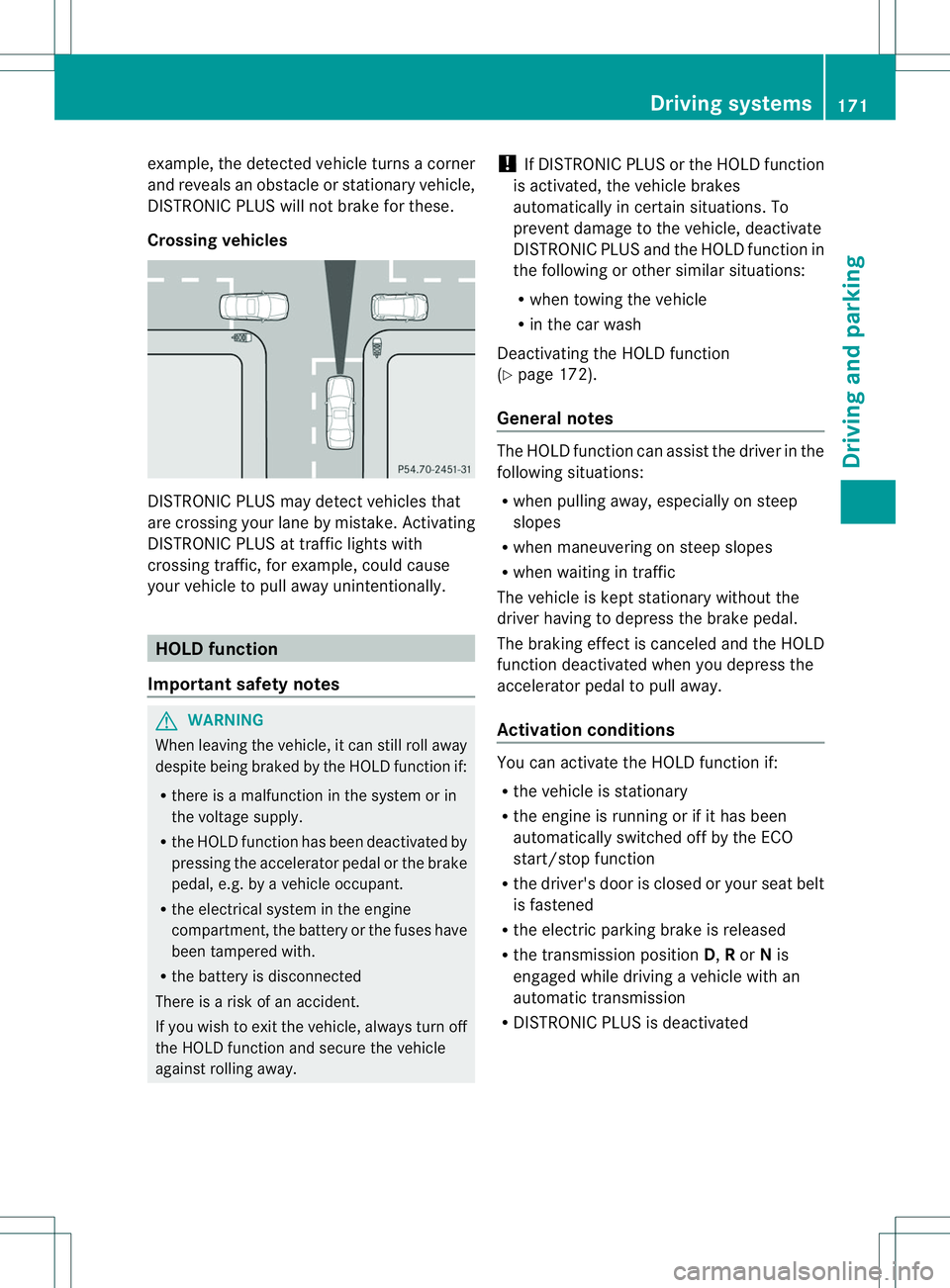
Crossing vehicles DISTRONIC PLUS may detec
tvehicles that
are crossing your lane by mistake. Activating
DISTRONIC PLUS at traffic lights with
crossing traffic, for example, could cause
your vehicle to pull away unintentionally. HOLD function
Important safet ynotes G
WARNING
When leaving the vehicle, it can still roll away
despite being braked by the HOLD function if:
R there is amalfunction in the system or in
the voltage supply.
R the HOLD function has been deactivated by
pressing the accelerator pedal or the brake
pedal, e.g. by avehicle occupant.
R the electrical system in the engine
compartment ,the batter yorthe fuses have
been tampered with.
R the batter yisdisconnected
There is arisk of an accident.
If you wish to exit the vehicle, alway sturn off
the HOLD function and secure the vehicle
against rolling away. !
If DISTRONIC PLUS or the HOLD function
is activated, the vehicle brakes
automatically in certain situations. To
preven tdamage to th evehicle ,deactivate
DISTRONI CPLUS and the HOLD function in
the following or other similar situations:
R when towing the vehicle
R in the car wash
Deactivating the HOLD function
(Y page 172).
General notes The HOLD function can assist the driver in the
following situations:
R
when pulling away, especiallyons teep
slopes
R when maneuvering on steep slopes
R when waiting in traffic
The vehicle is kept stationary withou tthe
driver having to depress the brake pedal.
The braking effect is canceled and the HOLD
function deactivated when you depress the
accelerator pedal to pull away.
Activation conditions You can activate the HOLD function if:
R
the vehicle is stationary
R the engine is running or if it has been
automatically switched off by the ECO
start/stop function
R the driver's door is closed or your seat belt
is fastened
R the electric parking brake is released
R the transmission position D,Ror Nis
engaged while driving avehicle with an
automatic transmission
R DISTRONIC PLUS is deactivated Driving systems
171Driving and parking Z
Page 177 of 360
Problems with PARKTRONIC
Problem Possible causes/consequences and
000B Solutions
Only the red segments
in the PARKTRONIC
warning displaysa
re lit.
You also hear awarning
tone for approximately
two seconds.
PARKTRONIC is
deactivated after
approximately
20 seconds, and the
indicator lamp in the
PARKTRONIC button
lights up. PARKTRONIC has malfunctioned and has switched off.
X
If problems persist, have PARKTRONIC checked at aqualified
specialist workshop. Only the red segments
in the PARKTRONIC
warning displaysa
re lit.
PARKTRONIC is
deactivated after
approximately
20seconds. The PARKTRONIC sensors are dirty or there is interference.
X
Cleant he PARKTRONIC sensors (Y page 289).
X Switch the ignition back on. The problem may be caused by an external source of radio or
ultrasound waves.
X
See if PARKTRONIC functions in adifferent location. Active Parking Assist
General notes Active Parking Assist is an electronic parking
aid with ultrasound. It measures the road on
both sides of the vehicle. Aparking symbol
indicates asuitable parking space. Active
steering interventio ncan assis tyou during
maneuvering and parking. You may also use
PARKTRONIC (Y page 172).
Important safety notes Active Parking Assist is merely an aid. It is not
ar eplacement for your attention to your
immediate surroundings. You are always
responsible for safe maneuvering, parking
and exitin gaparking space. Make sure that
no persons, animals or object sare in the
maneuvering range. When PARKTRONIC is switched off, Active
Parking Assist is also unavailable. G
WARNING
The vehicle swings out when parking and in
doing so could cross into the opposite lane.
This could result in acollision with another
road user. There is arisk of an accident.
Pay attention to other road users when
parking. Stop the vehicle if necessary or
cancel the Active Parking Assist parking
procedure.
! If unavoidable, you should drive over
obstacles such as curbs slowly and not at
as harp angle. Otherwise, you may damage
the wheels or tires. Driving systems
175Driving and parking Z
Page 183 of 360
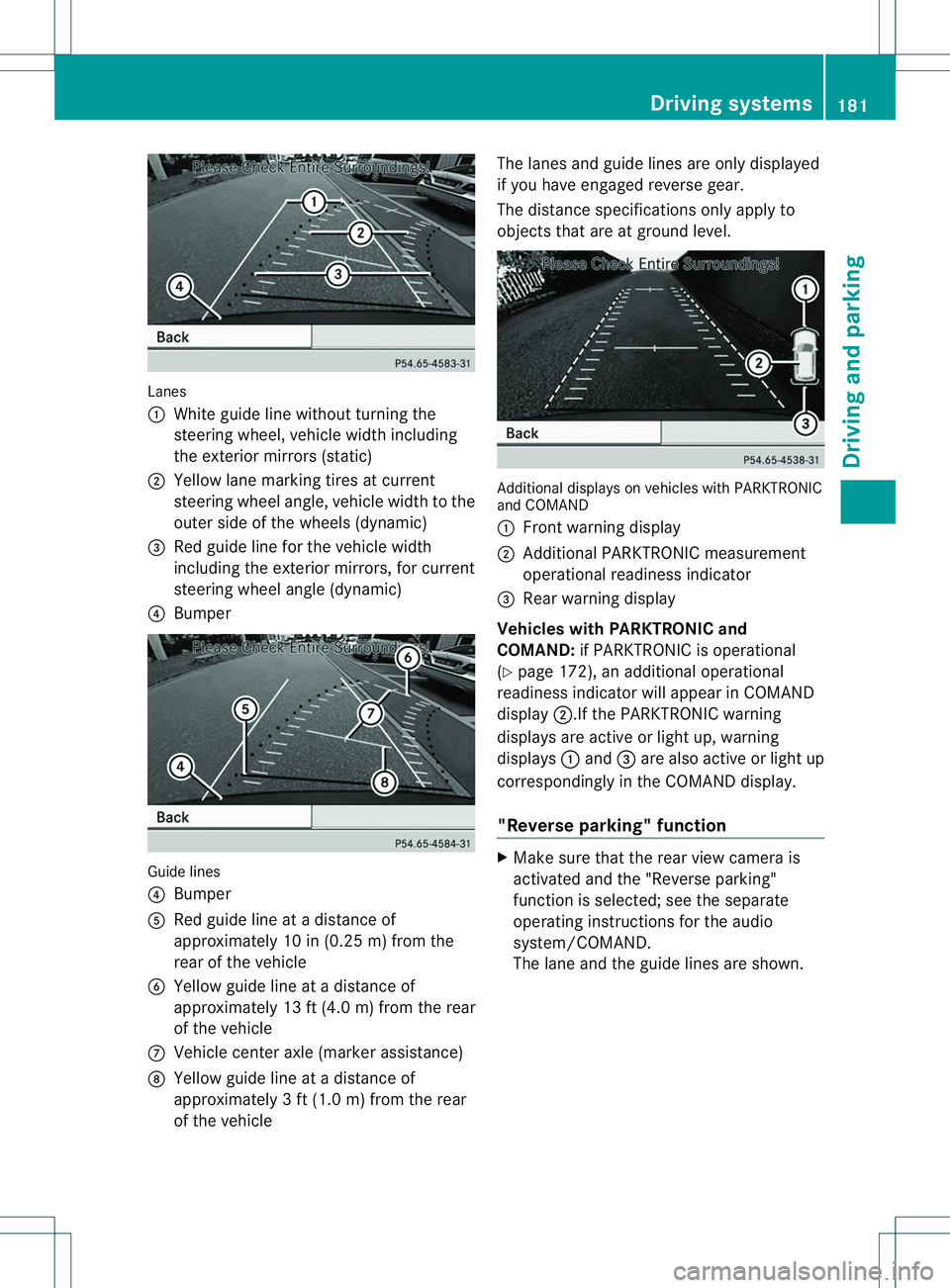
Lanes
001A
White guide line withou tturning the
steering wheel ,vehicl ewidthincluding
th ee xter iorm irror s(static)
0010 Yello wlane markin gtires at current
steering wheel angle, vehicl ewidthtot he
outer side of th ewheel s(dynamic)
0023 Red guide lin efor th evehicl ewidth
includin gthe exterio rmirrors, for current
steering wheel angle (dynamic)
0021 Bumper Guide lines
0021
Bumper
001E Red guide lin eatadistanceof
approximately 10 in (0.25 m) from the
rear of th evehicle
0024 Yellow guide lin eatadistanceof
approximately 13 ft (4.0 m) from the rear
of the vehicle
0007 Vehicle center axle (marker assistance)
0008 Yellow guide line at adistance of
approximately 3ft(1.0 m) from the rear
of the vehicle The lanes and guide line
sare only displayed
if you have engaged reverse gear.
The distance specifications only apply to
objects that are at ground level. Additional display
sonvehicles with PARKTRONIC
and COMAND
001A Front warning display
0010 Additional PARKTRONIC measurement
operational readiness indicator
0023 Rea rwarning display
Vehicles with PARKTRONIC and
COMAND: if PARKTRONIC is operational
(Y page 172), an additional operational
readiness indicator will appear in COMAND
display 0010.Ifthe PARKTRONIC warning
displays are active or light up, warning
displays 001Aand 0023are also active or light up
correspondingly in th eCOMAND display.
"Reverse parking" function X
Mak esure that th erear view camera is
activated and th e"Reverse parking"
function is selected; see th eseparate
operatin ginstruction sfor th eaudio
system/COMAND.
The lane and th eguide lines are shown. Driving systems
181Driving and parking Z
Page 185 of 360
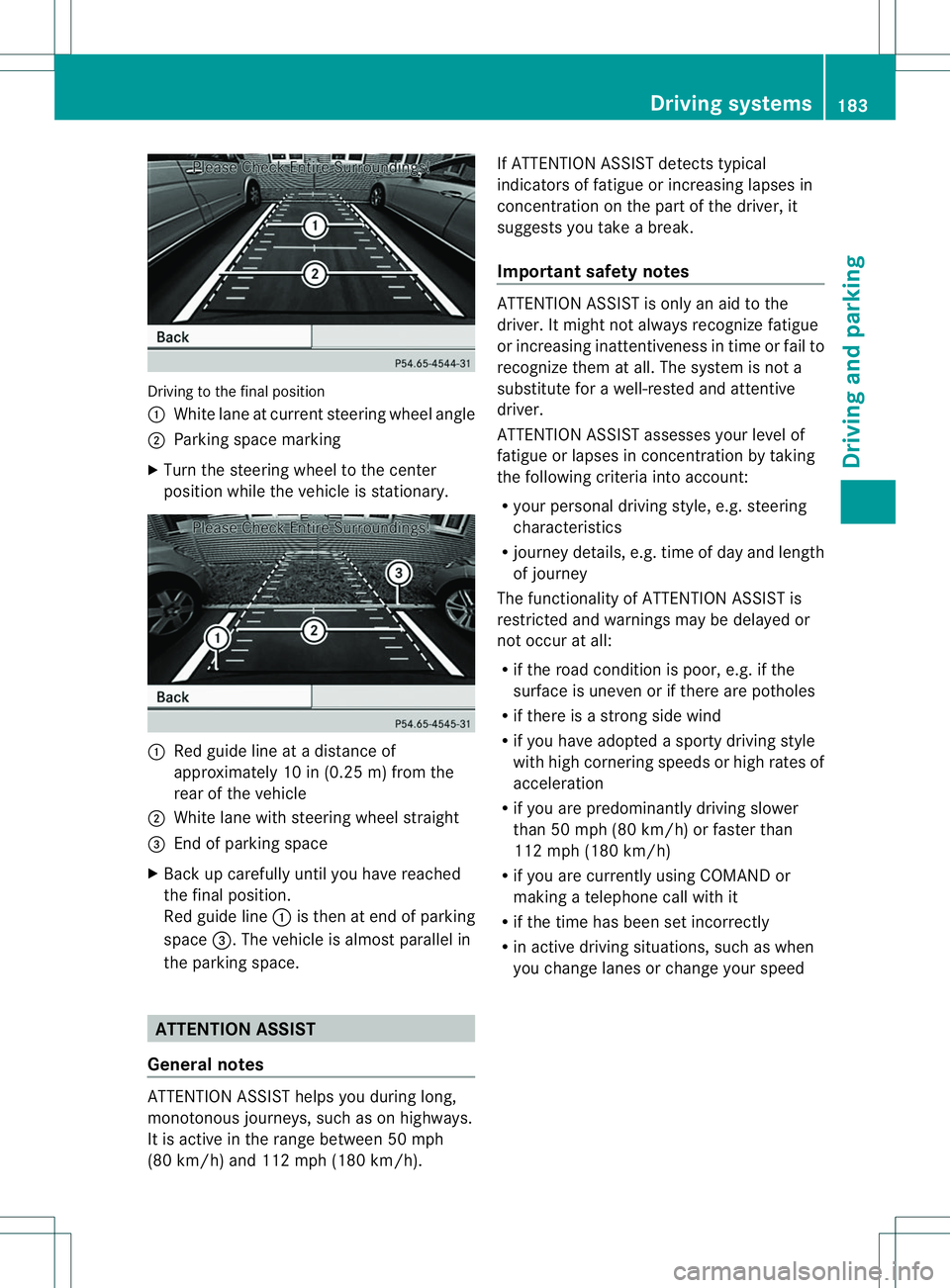
Driving to the fina
lposit ion
001A White lane at current steering whee langle
0010 Parking space marking
X Turn the steering whee ltothe center
positio nwhile the vehicle is stationary. 001A
Red guide line at adistance of
approximately 10 in (0.25 m) from the
rear of the vehicle
0010 White lane with steering wheel straight
0023 End of parking space
X Back up carefully until you have reached
the final position.
Red guide line 001Ais then at end of parking
space 0023.The vehicle is almost parallel in
the parking space. ATTENTION ASSIST
General notes ATTENTION ASSIST helps you during long,
monotonous journeys, such as on highways.
It is active in the range between 50 mph
(80 km/h) and 112 mph (180 km/h). If ATTENTION ASSIST detectst
ypical
indicators of fatigue or increasing lapses in
concentration on the part of the driver, it
suggests you take abreak.
Important safety notes ATTENTION ASSIST is only an aid to the
driver. It might not always recognizef atigue
or increasing inattentiveness in time or fail to
recognizet hem at all. The system is not a
substitute for awell-rested and attentive
driver.
ATTENTION ASSIST assesses your level of
fatigue or lapses in concentration by taking
the following criteria into account:
R your personal driving style, e.g. steering
characteristics
R journey details, e.g. time of day and length
of journey
The functionality of ATTENTION ASSIST is
restricted and warnings may be delayed or
not occur at all:
R if the road condition is poor, e.g. if the
surface is uneven or if there are potholes
R if there is astrongs ide wind
R if you have adopted asporty driving style
with high cornering speeds or high rates of
acceleration
R if you are predominantly driving slower
than 50 mph (80 km/h) or faster than
112 mph (180 km/h)
R if you are currently using COMAND or
making atelephone call with it
R if the time has been set incorrectly
R in active driving situations, such as when
you change lanes or change your speed Driving systems
183Driving and parking Z
Page 186 of 360
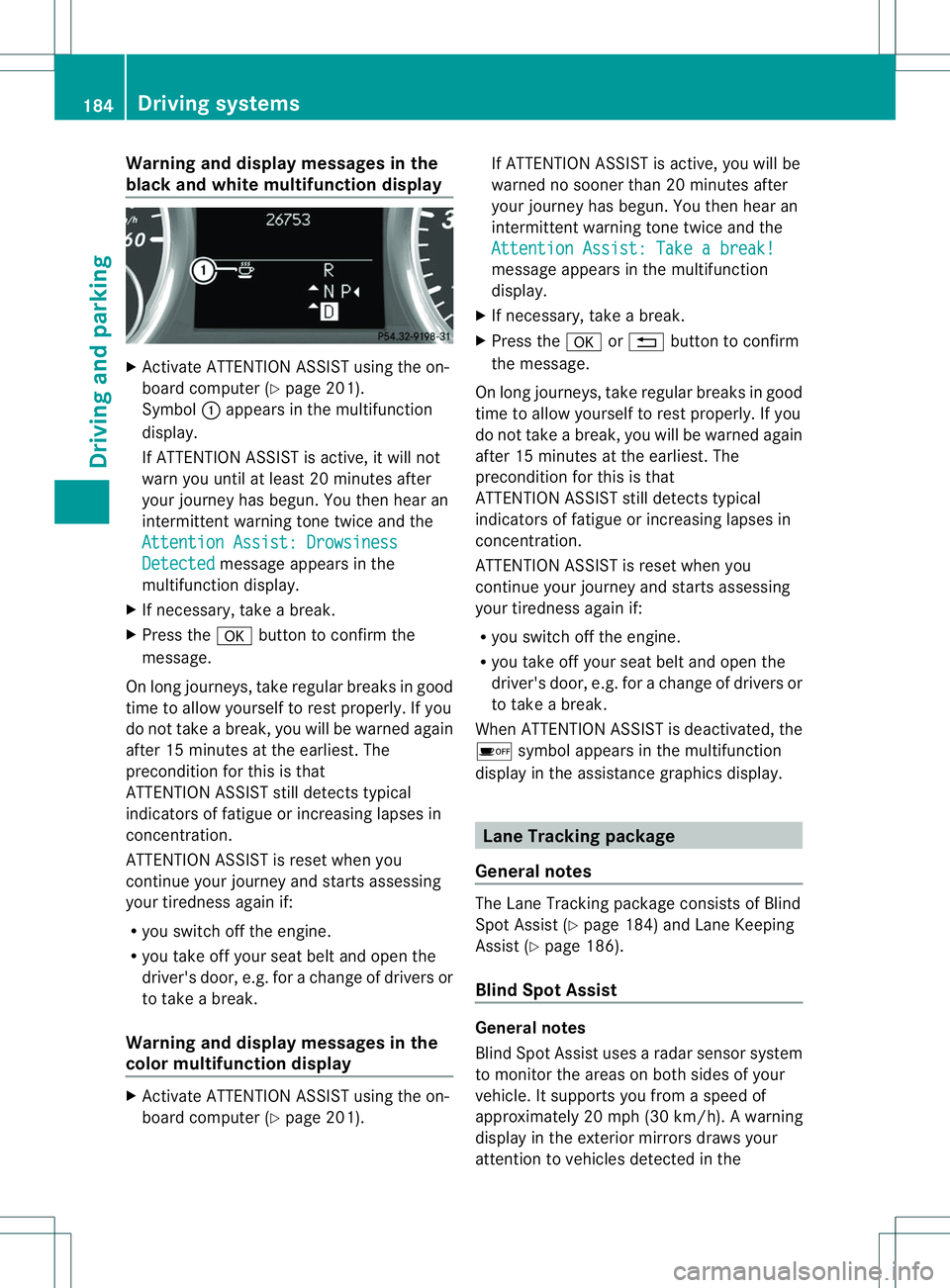
Warning and display messages in the
blac kand white multifunction display X
Activate ATTENTION ASSIST using the on-
board computer (Y page201).
Symbol 001Aappears in the multifunction
display.
If ATTENTION ASSIST is active, it wil lnot
warn you until at least 20 minutes after
you rjourney has begun. You then hear an
intermittent warning tonet wice and the
Attention Assist :Drowsiness Detected message appears in the
multifunction display.
X If necessary, tak eabreak.
X Pres sthe 000C button to confir mthe
message.
On lon gjou rneys, tak eregular break singood
tim etoa llow yourself to rest properly. If you
do not tak eabreak,you will be warned again
after 15 minutes at th eearliest. The
preconditio nfor this is that
ATTENTION ASSIST still detect stypical
indicators of fatigue or increasing lapses in
concentration.
ATTENTION ASSIST is reset when you
continue your journey and startsa ssessing
your tiredness again if:
R you switch off the engine.
R you take off your seat belt and open the
driver's door, e.g. for achange of drivers or
to take abreak.
Warning and display messages in the
colorm ultifunction display X
Activate ATTENTION ASSIST using the on-
board computer (Y page201). If ATTENTION ASSIST is active, you wil
lbe
warned no sooner than 20 minutes after
you rjourney has begun. You then hear an
intermittentw arning tonetwice and the
Attention Assist :Takeab reak! message appears in th
emultifunction
display.
X If necessary, tak eabreak.
X Pres sthe 000C or0002 button to confirm
th em essage.
On lon gjou rneys, tak eregular break singood
tim etoa llow yourself to rest properly. If you
do not tak eabreak,you will be warned again
after 15 minutes at th eearliest. The
preconditio nfor this is that
ATTENTION ASSIST still detect stypical
indicators of fatigue or increasing lapses in
concentration.
ATTENTION ASSIST is reset when you
continue your journey and startsa ssessing
your tiredness again if:
R you switch off the engine.
R you take off your seat belt and open the
driver's door, e.g. for achange of drivers or
to take abreak.
When ATTENTION ASSIST is deactivated, the
0001 symbol appears in the multifunction
display in the assistance graphics display. Lane Tracking package
General notes The Lane Trackin
gpackage consist sofBlind
Spot Assist (Y page 184) and Lane Keeping
Assist (Y page 186).
Blind Spot Assist General notes
Blind Spot Assist uses
aradar sensor system
to monitor the areas on both sides of your
vehicle. It supports you from aspeed of
approximately 20 mph (30k m/h). Awarning
displa yinthe exterio rmirrors draws your
attention to vehicles detected in the 184
Driving systemsDriving and parking
Page 187 of 360
monitored area
.Ifyou then switch on the
corresponding turn signa ltochange lanes,
you willa lsor eceive avisual and audible
collision warning. For this purpose, Blind Spot
Assist uses sensors in the rear bumper.
Important safety notes G
WARNING
Blind Spot Assist does not react to:
R vehicles overtaken too closel yonthe side,
placing them in the blind spot area
R vehicles which approach with alarg espeed
differential and overtake yourv ehicle
As aresult, Blind Spot Assist may not give
warnings in such situations. There is arisk of
an accident.
Always observe the traffic conditions
carefully, and maintain asafe lateral distance.
Blind Spot Assist is only an aid. It may fail to
detec tsome vehicles and is no substitute for
attentive driving.
i USA only:
This device has been approved by the FCC
as a"Vehicular RadarS ystem". The radar
sensor is intended fo ruse in an automotive
radar system only. Removing, tampering
with, or altering the device will void any
warranties, and is not permitted by the
FCC. Do not tamper with, alter, or use in
any non-approved way.
Any unauthorized modification to this
device could void the user’s authority to
operate the equipment.
Monitoring range of the sensors
In particular, the detection of obstacles can
be impaired if:
R dirt on the sensors or anything else
covering the sensors
R there is poor visibility, e.g. due to fog, heavy
rain or snow
R an arrow vehicle traveling in front,e .g. a
motorbike or bicycle
R the road has very wide lanes R
the road has narrow lanes
R you are not driving in the middle of the lane
R there are barriers or similarl ane borders
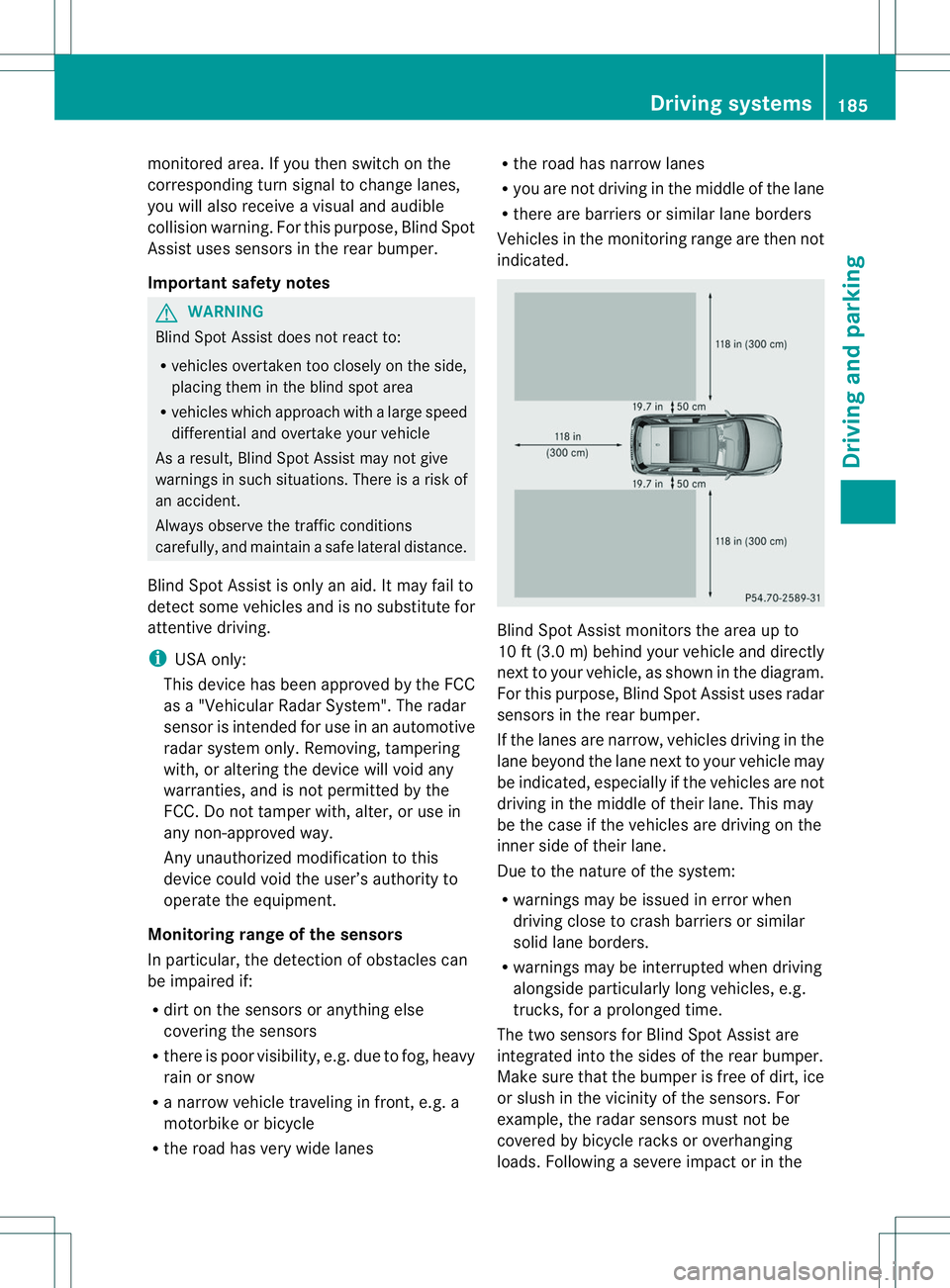
Vehicle sinthemonitorin grang eare then not
indicated. Blin
dSpotA ssist monitors the area up to
10 ft (3.0 m) behind your vehicle and directly
nex ttoy our vehicle, as shown in the diagram.
For this purpose, Blind Spot Assist uses radar
sensors in the rear bumper.
If the lanes are narrow, vehicles driving in the
lane beyond the lane next to your vehicle may
be indicated, especially if the vehicles are not
driving in the middle of their lane. This may
be the case if the vehicles are driving on the
inner side of their lane.
Due to the nature of the system:
R warnings may be issued in error when
driving close to crash barriers or similar
solid lane borders.
R warnings may be interrupted when driving
alongside particularly long vehicles, e.g.
trucks, for aprolonged time.
The two sensors for Blind Spot Assist are
integrated into the sides of the rear bumper.
Make sure that the bumper is free of dirt, ice
or slush in the vicinit yofthe sensors. For
example, the radar sensors must not be
covered by bicycle racks or overhanging
loads. Following asevere impact or in the Driving systems
185Driving and parking Z