2014 MERCEDES-BENZ B-CLASS SPORTS coolant
[x] Cancel search: coolantPage 17 of 360
Restraint system
see SRS (Supplemental Restraint
System)
Reversin gfeature
Panorama sliding sunroof ................86
Roller sunblinds ............................... 87
Side windows ................................... 83
Roadside Assistanc e(breakdown) ....23
Roller sunblind Opening/closing .............................. 88
Panorama roof with power tilt/
sliding pane l..................................... 87
Roof carrier ........................................ 261
Roof lining and carpets (cleaning
guidelines) ......................................... 291
Roof load (maximum) ........................353
Route (navigation) see Route guidance (navigation)
Route guidance (navigation) ............195 S
Safety Childre ninthe vehicle ..................... 56
Child restraint systems ....................56
Occupant Classification System
(OCS) ............................................... 47
Safety system
see Driving safety systems
Seat
Folding the backres t(rear
compartment) forwards/back
(vehicles withou tthe EASY-
VARIO-PLUS system) .....................254
Folding the backres t(rear
compartment) forwards/back
(vehicles with the EASY-VARIO-
PLUS system) ................................ 255
Seat belts
Adjusting the height ......................... 54
Belt force limiters ............................ 55
center rear-compartment sea t......... 54
Cleaning ......................................... 291
Correct usage .................................. 52
Emergency Tensioning Devices ....... .55
Fastening ......................................... 53
Important safety guidelines .............52
Releasing ......................................... 54Safety guidelines
............................. 42
Warning lamp ................................. 237
Warning lamp (function) ................... 55
Seats
Adjusting (electrically). ....................95
Adjusting (manually). .......................94
Adjusting the 4-way lumbar
support ............................................ 96
Adjusting the hea drestraint ............ 95
Cleaning the cover .........................291
Correct driver's sea tposition ........... 92
Important safety notes ....................93
Seat heating problem ......................98
Storing settings (memory function) 101
Switching sea theating on/off .........97
Sensors (cleaning instructions) .......289
Service menu (on-board computer) .202
Service products Brake fluid ..................................... 350
Coolant (engine) ............................ 351
Engine oil ....................................... 349
Fuel ................................................ 348
Important safety notes ..................347
Refrigerant (air-conditioning
system) .......................................... 352
Washer fluid .................................. .352
Service work
see ASSYST PLUS
Settings
Factory (on-board computer) .........206
On-board computer .......................202
Settin gthe air distribution ...............129
Settin gthe airflow ............................ 129
Side impact air bag .............................46
Side marker lamp (display
message) ............................................ 222
Side windows Cleaning ......................................... 288
Convenience closing feature ............84
Convenience opening feature ..........84
Important safety information ...........83
Opening/closing .............................. 83
Problem (malfunction) .....................85
Resetting ......................................... 85
Sliding sunroof
see Panorama roof with power
tilt/sliding panel Index
15
Page 19 of 360
Technical data
Capacities ...................................... 347
Emergency spare wheel .................343
Information .................................... 346
Tires/wheels ................................. 340
Vehicle data ................................... 353
TELEAID
Call priority .................................... 269
Downloading destinations
(COMAND) ..................................... 269
Downloading route s....................... 272
Emergency call .............................. 266
Geo fencing ................................... 273
Locating astolen vehicl e............... 271
MB info call button ........................268
Remote vehicle locking ..................271
Roadside Assistance button ..........267
Search &Send ............................... 270
Self-test ......................................... 266
Speed alert .................................... 273
System .......................................... 266
Triggering the vehicle alarm ........... 273
Vehicle remote malfunction
diagnosi s....................................... 271
Vehicle remote unlocking ..............270
Tele Aid
General notes ................................ 265
Telephone
Accepting acall............................. 198
Display message ............................ 236
Menu (on-board computer) ............197
Number from the phone book ....... .198
Redialing ........................................ 198
Rejecting/ending acall................. 198
Temperature
Coolant .......................................... 190
Outside temperature ..................... .191
Setting (climate control) ................128
Theft deterren tsystems
ATA (Anti-Theft Alarm system) .........70
Immobilize r...................................... 70
Through-loading ................................ 253
Time see separate operating instructions
TIREFIT kit .......................................... 296
Tire pressure Calling up (on-board computer) .....320
Checking manually ........................319Display message
............................ 231
Important safety notes ..................320
Maximum ....................................... 318
Notes ............................................. 317
Not reached (TIREFIT) ....................298
Reached (TIREFIT) ..........................298
Recommended ............................... 315
Tire pressure los swarning
system General notes ................................ 319
Important safety notes ..................319
Restarting ...................................... 319
Tire pressure monitoring system
Checking the tire pressure
electronically ................................. 322
Function/notes ............................. 320
General notes ................................ 320
Important safety notes ..................320
Restarting ...................................... 322
Warning lamp ................................. 248
Warning message .......................... 322
Tires
Aspect ratio (definition) .................335
Averag eweight of the vehicle
occupants (definition) ....................333
Bar (definition) ............................... 333
Changing awheel .......................... 336
Characteristics .............................. 333
Checking ........................................ 313
Definition of terms .........................333
Direction of rotatio n...................... 336
Display message ............................ 231
Distributio nofthe vehicle
occupants (definition) ....................335
DOT, Tire Identification Number
(TIN) .............................................. .332
DOT (Department of
Transportation) (definition) ............333
GAWR (Gross Axle Weight Rating)
(definition) ..................................... 334
GVW (Gross Vehicle Weight)
(definition) ..................................... 334
GVW R(Gross Vehicle Weight
Rating) (definition) .........................334
Important safety notes ..................312
Increase dvehicle weight due to
optional equipment (definition) ......333
Kilopascal (kPa )(definition) ...........334 Index
17
Page 21 of 360
Loading
.......................................... 323
Locking (in an emergency) ...............81
Locking (SmartKey) .......................... 74
Lowering ........................................ 339
Maintenance .................................... 22
Parking for along period ................ 155
Pulling away ................................... 138
Raising ........................................... 337
Reporting problems .........................25
Securing from rolling away ............337
Towing away .................................. 305
Tow-starting ................................... 305
Transporting .................................. 307
Unlocking (in an emergency) ...........81
Unlocking (SmartKey) ......................74
Vehicle data ................................... 353
Vehicle data ....................................... 353
Vehicle dimensions ...........................353
Vehicle emergency locking ................81
Vehicle identification number see VIN
Vehicle identification plate ..............346
Vehicle tool kit .................................. 294
Video (DVD) ........................................ 197
VIN ...................................................... 346W
Warning and indicator lamps ABS ................................................ 239
Brakes ........................................... 239
Check Engine ................................. 245
Coolant .......................................... 245
Distance warning ........................... 247
DISTRONI CPLUS ........................... 247
ESP ®
.............................................. 241
ESP ®
OFF ....................................... 242
Fuel tank ........................................ 245
Overview .......................................... 32
PASSENGER AIR BAG OFF
indicator lamp .................................. 47
Reserve fuel ................................... 245
Seat bel t........................................ 237
SRS ................................................ 244
Tire pressure monitor ....................248
Warranty ............................................ 346
Washer fluid Display message ............................ 236Whee
lboltt ightening torque ...........339
Whee lchock ...................................... 337
Wheels Changing awheel .......................... 336
Checking ........................................ 313
Cleaning ......................................... 287
Cleaning (warning) .........................336
Emergency spare wheel .................342
Important safety notes ..................312
Interchanging/changing ................336
Mounting anew wheel ................... 339
Mounting awheel .......................... 337
Removing awheel .......................... 339
Storing ........................................... 336
Tightening torqu e........................... 339
Whee lsize/tir esize ....................... 340
Windo wcurtain air bag
Display message ............................ 217
Operation ........................................ .47
Windows
see Side windows
Windshield
Defrosting ...................................... 130
Windshiel dwasher system
Adding washer fluid .......................284
Notes ............................................. 352
Windshiel dwipers
Display message ............................ 236
Problem (malfunction) ...................120
Rea rwindow wiper ........................ 118
Replacing the wiper blades ............118
Switching on/off ........................... 117
Winte rdriving
Slippery roa dsurface s................... 160
Snow chains .................................. 315
Winte roperation
General notes ................................ 314
Winte rtires
M+S tires ....................................... 314
Wiper blades
Cleaning ......................................... 288
Important safety notes ..................118
Replacing (rea rwindow) ................ 119
Replacing (windshield )................... 118
Wooden trim (cleaning instructions) 290
Workshops see Qualified specialist workshop Index
19
Page 33 of 360
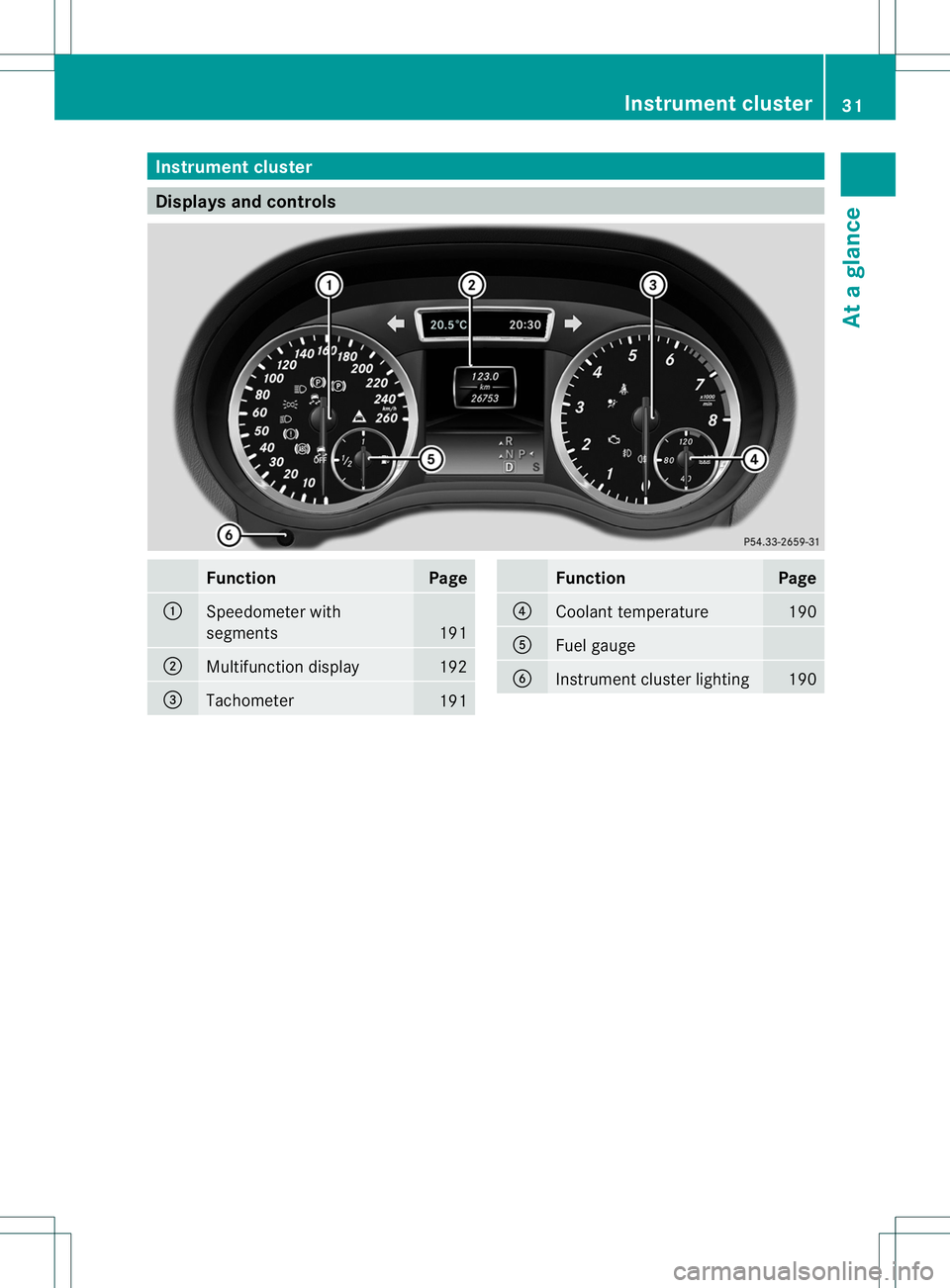
Instrumen
tcluster Display
sand controls Function Page
001A
Speedometer with
segments
191
0010
Multifunction display 192
0023
Tachometer
191 Function Page
0021
Coolant temperature 190
001E
Fuel gauge
0024
Instrument cluster lighting 190Instrument cluster
31Atag lance
Page 34 of 360
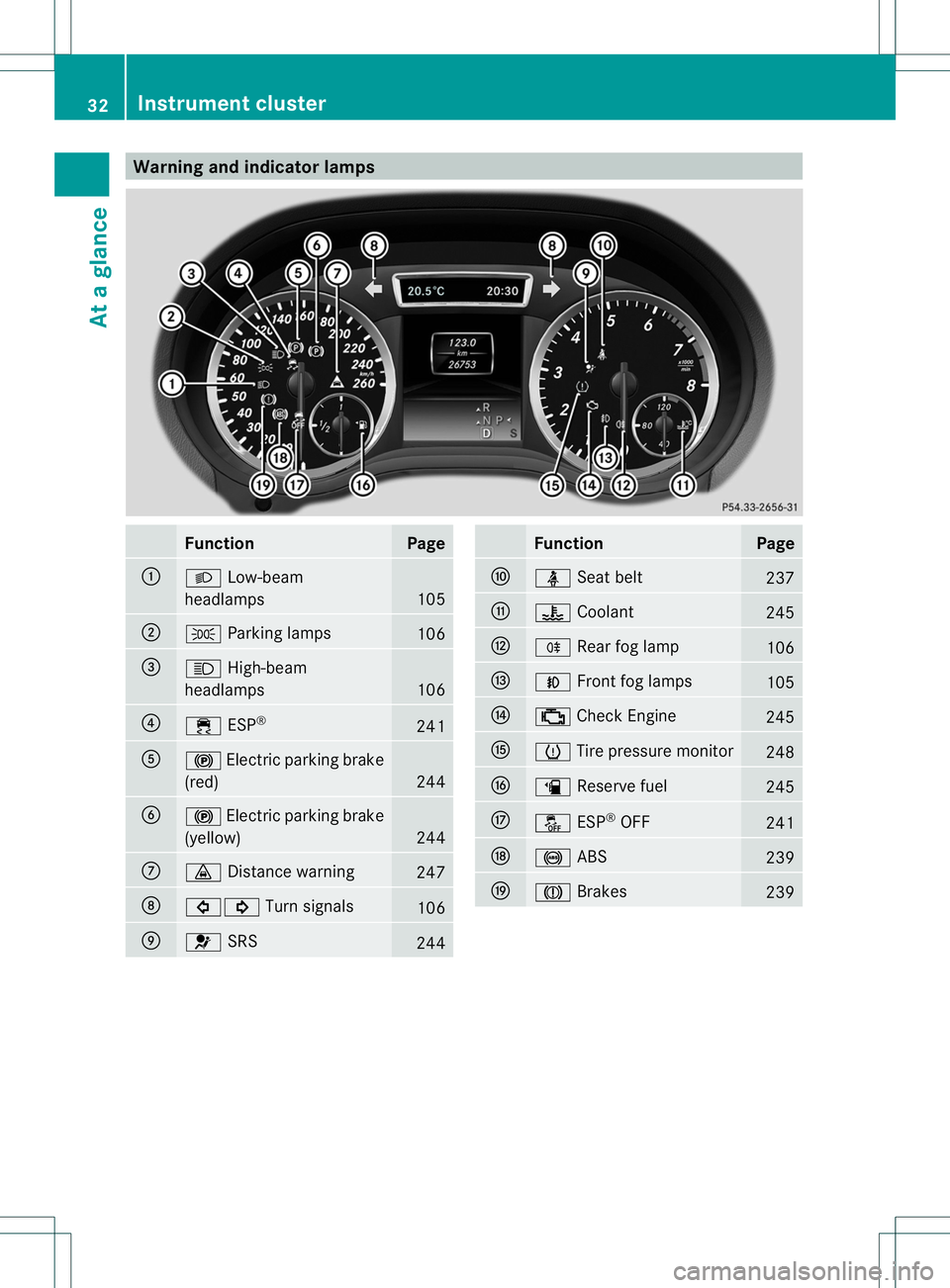
Warning and indicator lamps
Function Page
001A
0005
Low-beam
headlamps 105
0010
000F
Parking lamps 106
0023
0011
High-beam
headlamps 106
0021
000A
ESP® 241
001E
000A
Electric parking brake
(red) 244
0024
000A
Electric parking brake
(yellow) 244
0007
0008
Distance warning 247
0008
00020001
Turn signals 106
0009
0021
SRS 244 Function Page
0016
0016
Seat belt 237
001D
0010
Coolant 245
0004
0006
Rearfog lamp 106
000B
0019
Frontf og lamps 105
001C
000A
Check Engine 245
000E
0005
Tire pressure monitor 248
0013
0007
Reserve fuel 245
0017
0004
ESP®
OFF 241
0022
001C
ABS 239
0020
0001
Brakes 23932
Instrument clusterAt
ag lance
Page 145 of 360
Problem Possible causes/consequences and
000B Solutions
The engine is not
running smoothly and
is misfiring. There is
amalfunction in the engine electronics or in amechanical
componentoft he engine management system.
X Only depress the accelerator pedal slightly.
X Have the cause rectified immediately at aqualified specialist
workshop.
Otherwise, non-combusted fuel may get into the catalytic
converter and damage it. The coolant
temperature display is
showing more than
248
‡(120 †). The
coolant warning lamp
may also be lit and a
warning tone may
sound. The coolant level is too low. The coolant is too hot and the engine
is no longer being cooled sufficiently.
X
Stop as soon as possible and allow the engine and the coolant
to cool down.
X Check the coolant level (Y page 283). Observe the warning
notes as you do so and add coolant if necessary. Automatic transmission
Important safety notes
G
WARNING
If the engine speed is above the idling speed
and you engage transmission position Dor
R,t he vehicle could pull away suddenly. There
is ar isk of an accident.
When engaging transmission position Dor R,
always firmly depress the brake pedal and do
not simultaneously accelerate. G
WARNING
The automatic transmission switches to
neutral position Nwhen you switch off the
engine. The vehicle may roll away.T here is a
risk of an accident.
After switching off the engine, always switch
to parking position P.Prevent the parked
vehicle from rolling away by applying the
parking brake. DIRECTS
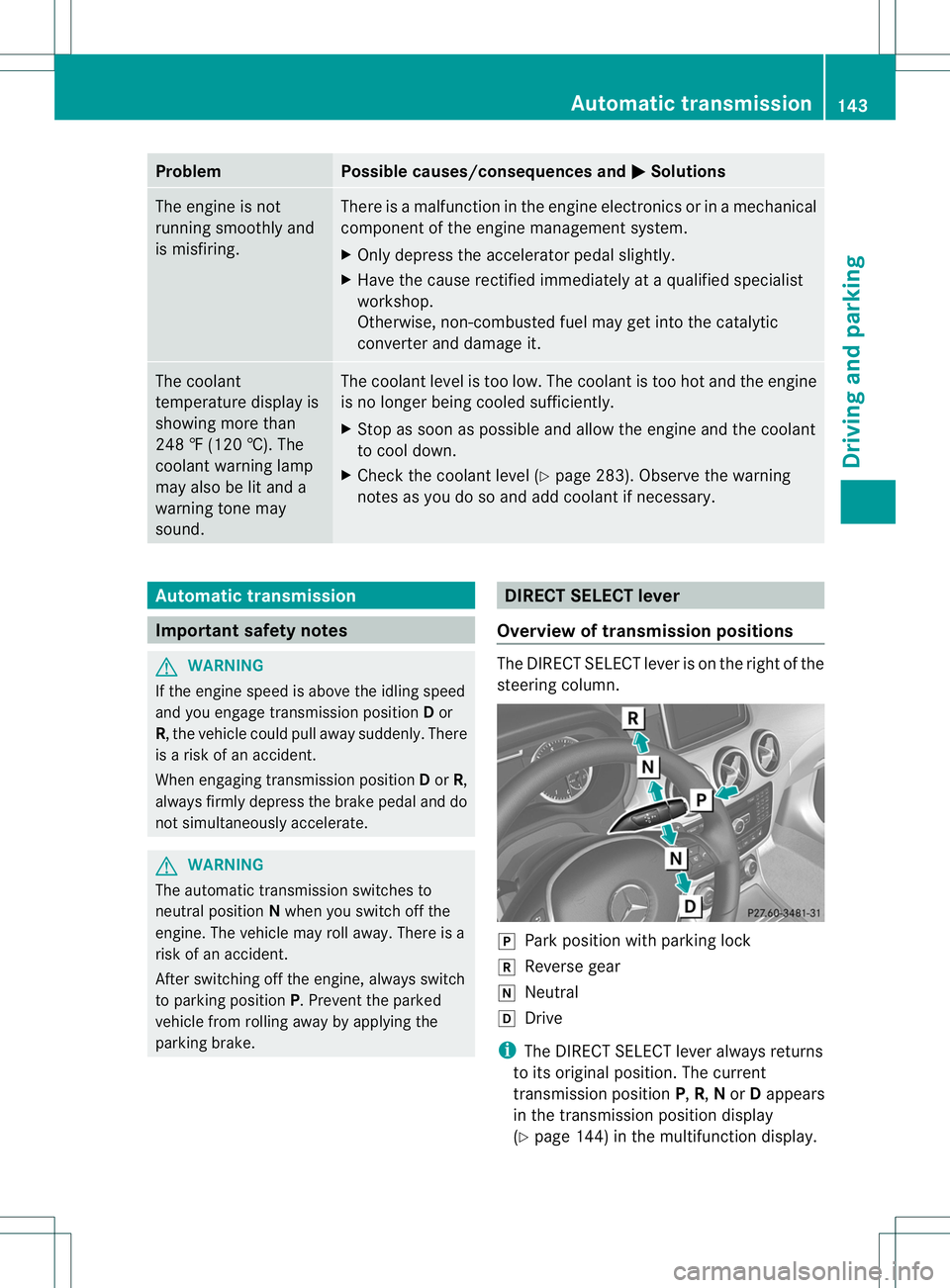
ELECT lever
Overview of transmission positions The DIRECT SELECT leve
risonthe right of the
steering column. 0006
Park position with parking lock
0019 Reverse gear
0018 Neutral
000A Drive
i The DIRECT SELECT lever always returns
to its original position. The current
transmission position P,R, Nor Dappears
in the transmission position display
(Y page 144) in the multifunction display. Automatic transmission
143Driving and parking Z
Page 192 of 360
Useful information
i This Operator's Manual describes all
models and all standard and optional
equipment of your vehicle available at the
time of publication of the Operator's
Manual. Country-specific differences are
possible. Please not ethat your vehicle may
not be equipped with all features
described. This also applies to safety-
related system sand functions.
i Read the information on qualified
specialist workshops: (Y page 25).Important safet
ynotes G
WARNING
If you operate information system sand
communication equipment integrated in the
vehicle while driving, you will be distracted
from traffic conditions. You could also lose
contro lofthe vehicle. There is arisk of an
accident.
Only operate the equipment when the traffic
situatio npermits .Ifyou are not sure that this
is possible, park the vehicle paying attention
to traffic conditions and operate the
equipment when the vehicle is stationary. G
WARNING
If the instrument cluster has failed or
malfunctioned, you may not recognize
function restrictions in systems relevant to
safety. The operating safety of your vehicle
may be impaired. There is arisk of an
accident.
Drive on carefully. Have the vehicle checked
at aq ualified specialist workshop
immediately.
You must observe the legal requirements for
the country in which you are currently driving
when operating the on-board computer.
The on-board computer only shows messages
or warnings from certain systems in the multifunction display
.You should therefore
make sure your vehicle is operating safely at
all times. Otherwise, avehicle that is not
operating safely may cause an accident.
For an overview, see the instrument panel
illustration (Y page 31). Displays and operation
Instrument cluster lighting
The lighting in the instrument cluster, in the
display sand the controls in the vehicle
interior can be adjusted using the brightness
control knob.
The brightness control knob is located on the
bottom left of the instrument cluster
(Y page 31).
X Turn the brightness control knob clockwise
or counter-clockwise.
If the light switch is set to 000C,000For
0005,t he brightness is dependent upon
the brightness of the ambient light.
i The light sensor in the instrument cluster
automatically controls the brightness of
the multifunction display.
In daylight, the display sinthe instrument
cluster are not illuminated. Coolant temperature display
G
WARNING
Opening the hood when the engine is
overheated or when there is afire in the
engine compartment could expose you to hot
gases or other service products. There is a
risk of injury.
Let an overheated engine cool down before
opening the hood. If there is afire in the
engine compartment, keep the hood closed
and contact the fire department.
! Adisplay message is shown if the coolant
temperature is too high. 190
Display
sand operationOn-board computer and displays
Page 193 of 360
If the coolant temperature is over
248 ‡(120 †), do not continue driving. The
engine willo therwisebedamaged.
The coolant temperature gauge is in the
instrument cluster on the right-hand side.
Under normal operating conditions and with
the specified coolant level,t he coolant
temperature may rise to 248 ‡(120 †). Tachometer
! Do not drive in the overrevving range, as
this could damage the engine.
The red band in the tachometer indicates the
engine's overrevving range.
The fuel supply is interrupted to protect the
engine when the red band is reached. Outside temperatur
edisplay
You shouldp ay specialattention to road
conditions when temperature sare around
freezing point.
The outsid etemperature display is in the
multifunction display.
Changes in the outsid etemperature are
displayed after ashort delay. Speedometer with segments
The speedometer is divided into segments on
vehicle swith DISTRONIC PLUS.
The segments in the speedometer indicate
which speed range is available.
R Cruise control activated (Y page 160):
The segments lightupf rom the stored
speed to the maximum speed.
R DISTRONIC PLUS activated (Y page 162):
One or two segments in the set speed
range light up.
R DISTRONIC PLUS detects avehicle in front: The segments between the speed of the
vehicle in fron
tand the stored speed light
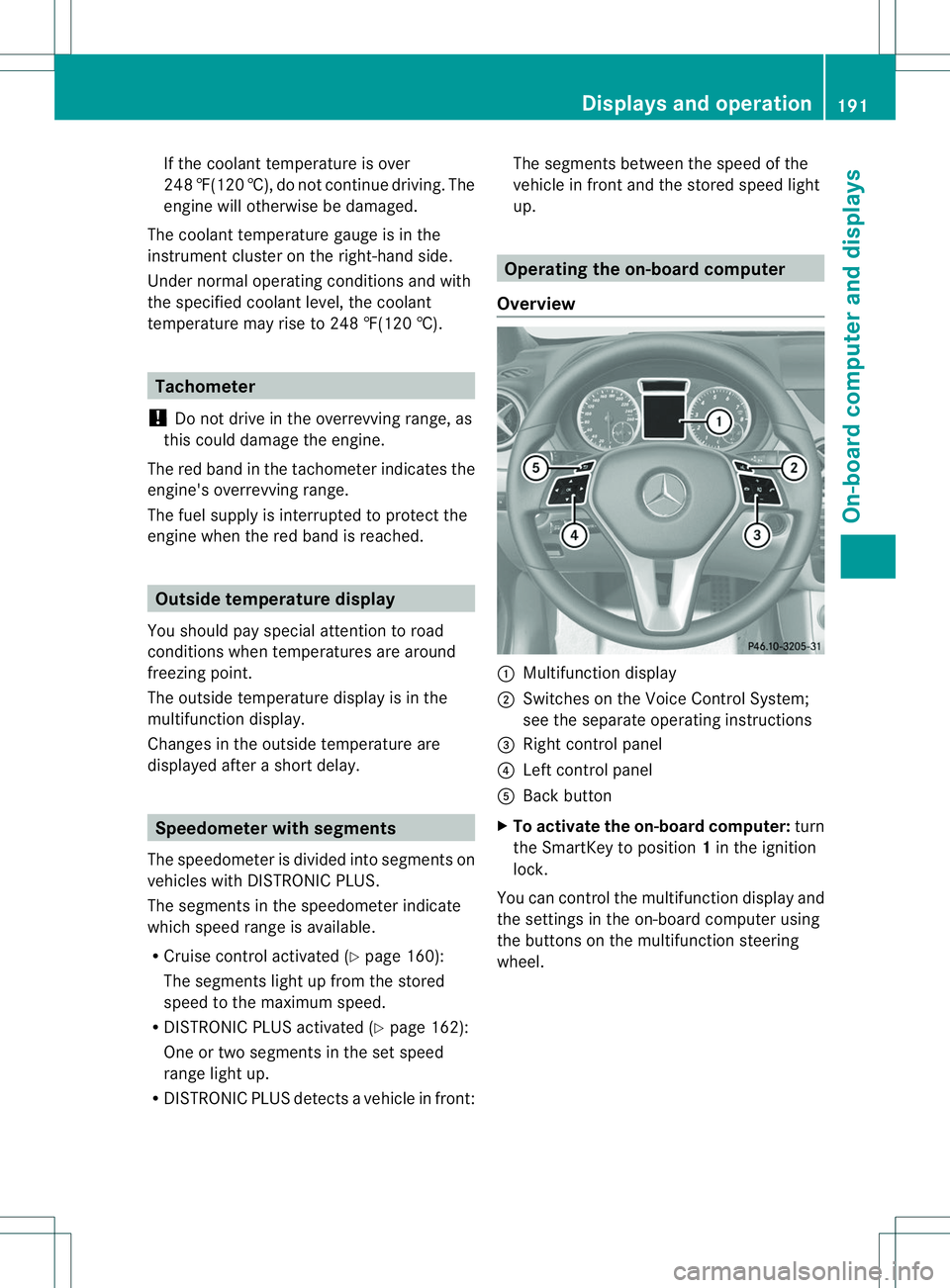
up. Operatin
gthe on-board computer
Overview 001A
Multifunctio ndisplay
0010 Switches on the Voic eControl System;
see the separat eoperating instructions
0023 Right control panel
0021 Left control panel
001E Bac kbutton
X To activat ethe on-board computer: turn
the SmartKey to position 1in the ignition
lock.
You can control the multifunction displaya nd
the settings in the on-board computer using
the buttons on the multifunction steering
wheel. Displays and operation
191On-board computer and displays Z