2014 MERCEDES-BENZ B-CLASS SPORTS brake sensor
[x] Cancel search: brake sensorPage 8 of 360
Exhaus
tpipe .................................. 290
Exterior lights ................................ 289
Gea rors electo rlever .................... 290
Interior ........................................... 290
Matte finish ................................... 288
Notes ............................................. 285
Paint .............................................. 287
Plastic trim .................................... 290
Power washer ................................ 287
Rea rview camera .......................... 289
Roo flining ...................................... 291
Seat bel t........................................ 291
Seat cover ..................................... 291
Sensors ......................................... 289
Steering wheel ............................... 290
Trim pieces .................................... 290
Washing by hand ........................... 286
Wheels ........................................... 287
Windows ........................................ 288
Wiper blades .................................. 288
Wooden trim .................................. 290
Cargo compartment cover ...............258
Cargo compartment enlargement ...254
Important safety notes ..................254
Notes on use ................................. 256
Cargo compartment floor
Height adjustment .........................260
Important safety notes ..................259
Opening/closing ............................ 259
Stowag ewell (under) ..................... 259
Cargo net
Attaching ....................................... 259
Important safety information .........259
Cargo tie dow nrings ......................... 257
Car wash (care) ................................. 286
Center console Lowe rsection .................................. 35
Uppe rsection .................................. 34
Central locking
Automatic locking (on-board
computer) ...................................... 205
Locking/unlocking (SmartKey) ........74
Changing bulbs
Brake lamps ................................... 115
Cornering light function .................114
High-beam headlamps ...................113
License plate lighting .....................117
Low-beam headlamps ....................113Parking lamps
................................ 113
Rea rfog lamp ................................ 115
Reversing lamps ............................ 115
Standing lamps (front) ...................113
Tai llamps ...................................... 115
Turn signals (front) ......................... 114
Turn signals (rear) ..........................115
Child-proof locks
Important safety notes ....................61
Rea rdoors ....................................... 62
Children
In the vehicle ................................... 56
Restraint systems ............................ 56
Child seat
LATCH-typ e(ISOFIX) chil dseat
anchors ............................................ 60
On the front-passenger sea t............ 59
Top Tether ....................................... 60
Cigarette lighter ................................ 264
Climate control Automatic climate control .............123
Automatic climate control (dual-
zone) .............................................. 125
Controlling automatically ...............128
Cooling with aird ehumidification..126
Defrosting the windows .................130
Defrosting the windshield ..............130
Important safety notes ..................122
Indicator lamp ................................ 128
Notes on using automatic climate
control ........................................... 125
Notes on using dual-zone
automatic climate control ..............123
Overview of systems ......................122
Problems with cooling with air
dehumidification ............................ 128
Problem with the rear window
defroster ........................................ 132
Refrigerant ..................................... 352
Refrigerant filling capacity .............353
Setting the aird istribution.............129
Setting the airflow .........................129
Setting the airv ents...................... 133
Setting the temperature ................128
Switching air-recirculation mode
on/off ............................................ 132
Switching on/off ........................... 126
Switching residua lheato n/off ......132 6
Index
Page 17 of 360
Restraint system
see SRS (Supplemental Restraint
System)
Reversin gfeature
Panorama sliding sunroof ................86
Roller sunblinds ............................... 87
Side windows ................................... 83
Roadside Assistanc e(breakdown) ....23
Roller sunblind Opening/closing .............................. 88
Panorama roof with power tilt/
sliding pane l..................................... 87
Roof carrier ........................................ 261
Roof lining and carpets (cleaning
guidelines) ......................................... 291
Roof load (maximum) ........................353
Route (navigation) see Route guidance (navigation)
Route guidance (navigation) ............195 S
Safety Childre ninthe vehicle ..................... 56
Child restraint systems ....................56
Occupant Classification System
(OCS) ............................................... 47
Safety system
see Driving safety systems
Seat
Folding the backres t(rear
compartment) forwards/back
(vehicles withou tthe EASY-
VARIO-PLUS system) .....................254
Folding the backres t(rear
compartment) forwards/back
(vehicles with the EASY-VARIO-
PLUS system) ................................ 255
Seat belts
Adjusting the height ......................... 54
Belt force limiters ............................ 55
center rear-compartment sea t......... 54
Cleaning ......................................... 291
Correct usage .................................. 52
Emergency Tensioning Devices ....... .55
Fastening ......................................... 53
Important safety guidelines .............52
Releasing ......................................... 54Safety guidelines
............................. 42
Warning lamp ................................. 237
Warning lamp (function) ................... 55
Seats
Adjusting (electrically). ....................95
Adjusting (manually). .......................94
Adjusting the 4-way lumbar
support ............................................ 96
Adjusting the hea drestraint ............ 95
Cleaning the cover .........................291
Correct driver's sea tposition ........... 92
Important safety notes ....................93
Seat heating problem ......................98
Storing settings (memory function) 101
Switching sea theating on/off .........97
Sensors (cleaning instructions) .......289
Service menu (on-board computer) .202
Service products Brake fluid ..................................... 350
Coolant (engine) ............................ 351
Engine oil ....................................... 349
Fuel ................................................ 348
Important safety notes ..................347
Refrigerant (air-conditioning
system) .......................................... 352
Washer fluid .................................. .352
Service work
see ASSYST PLUS
Settings
Factory (on-board computer) .........206
On-board computer .......................202
Settin gthe air distribution ...............129
Settin gthe airflow ............................ 129
Side impact air bag .............................46
Side marker lamp (display
message) ............................................ 222
Side windows Cleaning ......................................... 288
Convenience closing feature ............84
Convenience opening feature ..........84
Important safety information ...........83
Opening/closing .............................. 83
Problem (malfunction) .....................85
Resetting ......................................... 85
Sliding sunroof
see Panorama roof with power
tilt/sliding panel Index
15
Page 23 of 360
Protection of the environment
General notes
H
Environmental note
Daimler's declared policy is one of
comprehensive environmental protection.
The objectives are for the natural resources
that form the basis of our existence on this
planet to be used sparingly and in amanner
that takes the requirements of both nature
and humanity into account.
You too can help to protect the environment
by operating your vehicle in an
environmentally responsible manner.
Fuel consumption and the rate of engine,
transmission, brake and tire wear are affected
by these factors:
R operating condition sofyour vehicle
R your personal driving style
You can influence both factors. You should
bear the following in mind:
Operating conditions:
R avoid short trips as these increase fuel
consumption.
R always make sure that the tire pressures
are correct.
R do not carry any unnecessary weight.
R remove roof racks once you no longer need
them.
R ar egularly serviced vehicle will contribute
to environmental protection. You should
therefore adhere to the service intervals.
R always have service work carried out at a
qualified specialist workshop.
Personal driving style:
R do not depress the accelerator pedal when
startingt he engine.
R do not warm up the engine when the vehicle
is stationary.
R drive carefully and maintain asafe distance
from the vehicle in front.
R avoid frequent, sudden acceleration and
braking. R
change gear in good time and use each gear
only up to 001Bof its maximum engine speed.
R switch off the engine in stationary traffic.
R keep an eye on the vehicle's fuel
consumption. Environmental concerns and
recommendations
Wherever the operating instructions require
you to dispose of materials, first try to
regenerate or re-use them. Observe the
relevant environmental rules and regulations
when disposing of materials. In this way you
will help to protect the environment. Genuine Mercedes-Benz parts
H
Environmental note
Daimler AG also suppliesr econditioned major
assemblies and parts which are of the same
quality as new parts. They are covered by the
same Limited Warranty entitlements as new
parts.
! Air bags and Emergency Tensioning
Devices, as well as control units and
sensors for these restraint systems, may be
installed in the following areas of your
vehicle:
R doors
R door pillars
R door sills
R seats
R cockpit
R instrumen tcluster
R center console
Do not install accessories such as audio
systems in these areas. Do not carry out
repairs or welding. You could impair the
operating efficienc yofthe restraint
systems. Introduction
21 Z
Page 47 of 360
function for the vehicle occupants in the
event of acrash.
i After an airb ag has been deployed, have
th ev ehicle towed to th eneares tqualified
specialist workshop, eve nifyour vehicle is
ready to drive.
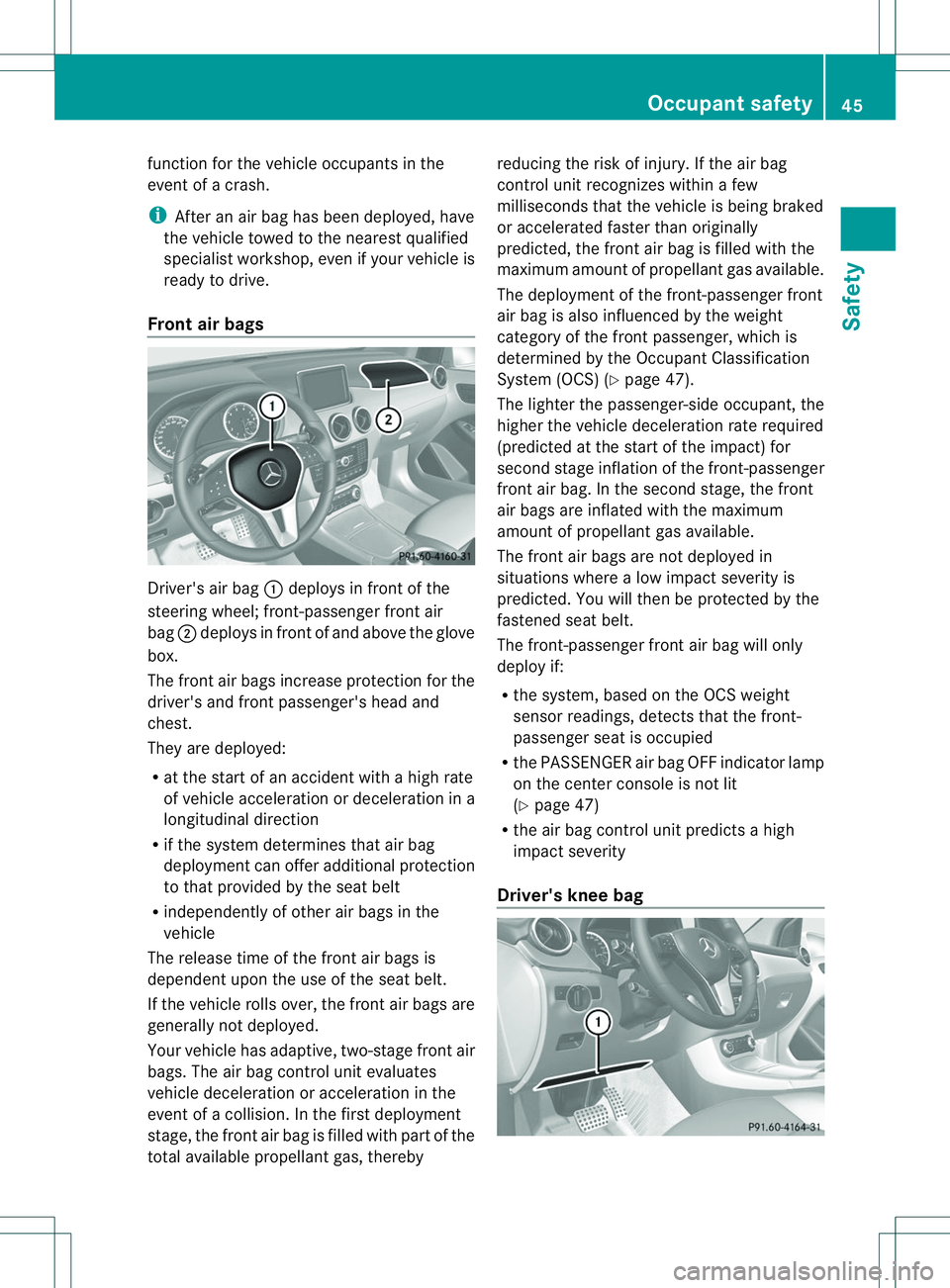
Front air bags Driver'
sair bag 001Adeploys in front of the
steerin gwheel; front-passenger front air
bag 0010deploys in front of and above the glove
box.
The front air bags increase protection for the
driver's and front passenger's head and
chest.
They are deployed:
R at the start of an accident with ahigh rate
of vehicle acceleration or deceleration in a
longitudinal direction
R if the system determines that air bag
deployment can offer additional protection
to that provided by the seat belt
R independently of other air bags in the
vehicle
The release time of the front air bags is
dependent upon the use of the seat belt.
If the vehicle rolls over, the front air bags are
generally not deployed.
Your vehicle has adaptive, two-stage front air
bags. The air bag control unit evaluates
vehicle deceleration or acceleration in the
event of acollision. In the first deployment
stage, the front air bag is filled with part of the
total available propellant gas, thereby reducing the risk of injury. If the air bag
control unit recognizes within
afew
milliseconds that the vehicle is being braked
or accelerated faster than originally
predicted, the front air bag is filled with the
maximum amount of propellant gas available.
The deployment of the front-passenger front
air bag is also influenced by the weight
category of the front passenger, which is
determined by the Occupant Classification
System (OCS) (Y page 47).
The lighter the passenger-side occupant ,the
higher the vehicle deceleration rate required
(predicted at the start of the impact) for
second stage inflation of the front-passenger
front air bag. In the second stage, the front
air bags are inflated with the maximum
amount of propellant gas available.
The front air bags are not deployed in
situations where alow impact severity is
predicted. You will then be protected by the
fastened seat belt.
The front-passenger front air bag will only
deploy if:
R the system, based on the OCS weight
sensor readings, detect sthat the front-
passenger seat is occupied
R the PASSENGER air bag OFF indicator lamp
on the center console is not lit
(Y page 47)
R the air bag control unit predicts ahigh
impact severity
Driver's knee bag Occupant safety
45Safety Z
Page 67 of 360
G
WARNING
The distance warning function cannot always
clearly identify objects and comple xtraffic
situations.
In such cases, the distance warning function
may:
R give an unnecessary warning
R not give awarning
There is arisk of an accident.
Always pay carefu lattention to the traffic
situation and do not rely solely on the distance
warning function.
Function
X To activate/deactivate: activate or
deactivate the distance warning function in
the on-board computer (Y page200).
Vehicles with amonochrome
multifunction display: when thedistance
warning function is activated, the 000E
symbo lappears in th estatus overview in the
multifunction display.
Vehicles with acolor multifunction
display:w hen the distance warning function
is deactivated, the 0002symbol appears in
the assistance graphic in the multifunction
display.
The distance warning function can help you
to minimize the risk of afront-end collision
with avehicle ahead or reduce the effectsof
such acollision. If the distance warning
function detectst hat there isarisk of a
collision, you will be warned visuallya nd
acoustically .Without your intervention, the
distanc ewarnin gfunction cannot prevent a
collision.
Starting at aspeed of aroun d4mph
(7 km/h), the distanc ewarnin gfunction
warns you if you rapidly approac havehicle in
front .Ani ntermitten twarnin gtonew ill then
sound, and the 0008distanc ewarnin glamp
will light up in the instrumen tcluster. X
Brake immediately in order to increase the
distanc efromt he vehicle in front.
or
X Take evasiv eaction provided it is safe to do
so.
Due to the nature of the system, particularly
complicated but non-critical driving
conditions may also cause the system to
display awarning.
With the help of the radar sensor system, the
distanc ewarnin gfunction can detect
obstacles that are in the path of your vehicle
for an extende dperiod of time.
Fro mas peed of aroun d40mph (70 km/h),
the distance warning function can also react
to stationary obstacles, such as stoppe dor
parked vehicles.
If you approach an obstacle and the distance
warning function detects arisk of acollision,
the system will initially alert you both visually
and acoustically.
In particular, the detectio nofobstacles can
be impaired if:
R dirt on the sensors or anythin gelse
covering the sensors
R snow or heavy rain
R interferenc ebyother radar sources
R ther eare strong radar reflections, for
example in parkin ggarages
R an arro wvehicle traveling in front, e.g. a
motorbike
R av ehicle traveling in fron tonadifferent line
relative to the center of your vehicle
Following damage to the fron tend of the
vehicle, have the configuratio nand operation
of the rada rsensor checked at aqualified
specialist workshop. This also applies to
collisions at low speeds where ther eisno
visible damage to the fron tofthe vehicle.
Adaptive Brake Assist i
Observe the "Important safety notes"
section for driving safety systems
(Y page 63). Driving safety systems
65Safety Z
Page 68 of 360
G
WARNING
Adaptive Brake Assist cannot alwaysc learly
identify objects and comple xtraffic
situations. In these cases, Adaptive Brake
Assist may not intervene. There is arisk of an
accident.
Always pay carefu lattention to the traffic
situation and be read ytobrake. G
WARNING
Adaptive Brake Assist does not react:
R to people or animals
R to oncoming vehicles
R to crossing traffic
R to stationary obstacles
R when cornering
As aresult, Adaptive Brake Assist may not
intervene in all critical conditions. There is a
risk of an accident.
Always pay carefu lattention to the traffic
situation and be read ytobrake.
Due to the nature of the system, particularly
complicated but non-critical driving
conditions may alsoc auseBrake Assist to
intervene.
Adaptive Brake Assist aidsy ou in braking
during hazardous situations at speeds above
4m ph (7 km/h) and uses the radar sensor
system to evaluate the traffic situation.
With the help of asenso rsystem, adaptive
Brake Assis tcan detect obstacle sthata re in
th ep athofy our vehicle for an extended
period of time.
Should you approach an obstacle and
Adaptive Brake Assist has detected ariskof
collision, Adaptiv eBrake Assist calculate sthe
braking force necessary to avoid arear-end
collision. Should yo uapply the brakes
vigorously ,Adaptiv eBrake Assist will
automaticall yincreas ethe braking force to a
level suitabl efor the traffic conditions.
X Kee pthe brake pedal depressed unti lthe
emergency braking situation is over.
ABS prevents the wheel sfrom locking. The brakes will work normall
yagain if:
R yo ur elease the brake pedal
R there is no longe rany dange rofarear-end
collision.
R no obstacl eisdetected in front of your
vehicle
Adaptive Brake Assist is then deactivated.
Up to vehicl espeeds of around 155 mph
(250 km/h) ,adaptive Brake Assist is capable
of reacting to moving objects that have
already been recognized as such at least once
over the period of observation. Adaptive
Brake Assist does not react to stationary
obstacles.
If Adaptive Brake Assist is not available due
to am alfunction in the rada rsensor system,
the brake system remains available with full
brake boosting effect and BAS.
In particular, the detection of obstacles can
be impaired if there is:
R dirt on the sensors or anything else
covering the sensors
R snow or heavy rain
R interference by other rada rsources
R there are strongr adar reflections, for
example in parking garages
R an arrow vehicle traveling in front,e .g. a
motorbike
R av ehicle traveling in front on adifferent line
relative to the center of your vehicle
Following damage to the front end of the
vehicle, have the configuration and operation
of the radar sensor checked at aqualified
specialist workshop. This also applies to
collisions at low speeds where there is no
visible damage to the front of the vehicle.
COLLISION PREVENTION ASSIST PLUS General information
COLLISION PREVENTION ASSIST PLUS is
only available on vehicles with DISTRONIC.
COLLISION PREVENTION ASSIST PLUS
extends the functionality of COLLISION
PREVENTION ASSIST with an automatic66
Driving safety systemsSafety
Page 69 of 360
brakin
gfunction .COLLISION PREVENTION
ASSIS TPLUS can help you to minimiz ethe
risk of afront-end collision with avehicle
ahead or reduce the effects of such a
collision. If COLLISION PREVENTION ASSIST
PLUS detects that ther eisarisk ofacollision,
you will be warned visually and acoustically.
In critical situations COLLISION PREVENTION
ASSIST PLUS also initiates automatic
braking.
Function
X To activate/deactivate: activate or
deactivate COLLISION PREVENTION
ASSIST PLUS in the on-board computer
(Y page 201).
If COLLISION PREVENTION ASSIST PLUS is
deactivated, the 0002symbol appears in the
assistance graphics display.
If the driver's seat belt is fastened,
COLLISION PREVENTION ASSIST PLUS can
brake automaticallyw ithinaspeed range of
between 4mph (7 km/h) and 124 mph
(200 km/h).
COLLISION PREVENTION ASSIS TPLUS can
also react to stationary obstacle swith
automatic braking within aspeed range of
betwee n4mph (7 km/h) and 19 mph
(30 km/h).
In particular, the detection of obstacle scan
be impaired if:
R dirt on the sensors or anything else
covering the sensors
R snow or heavy rain
R interference by other radars ources
R there are strongr adar reflections, for
example in parking garages
R an arrow vehicle traveling in front,e .g. a
motorbike
R av ehicle traveling in front on adifferent line
relative to the center of your vehicle
Following damage to the front end of the
vehicle, have the configuration and operation
of the radar sensor checked at aqualified
specialist workshop. This also applies to collisions at low speeds where there is no
visible damage to the front of the vehicle. Adaptive brake lights
Adaptive Brake Assist warns following traffic
in an emergenc ybraking situation:
R by means of flashing brake lamps
R by activatin gthe hazard warning lamps
If you brake sharply from aspeed of more
than 70 km/ht oastandstill, the hazard
warning lamps are activated automatically. If
the brakes are applied again, the brake lamps
light up continuously. The hazard warning
lamps switch off automatically if you travel
faster than 10 km/h. You can also switchoff
the hazar dwarnin glamps using the hazard
warnin gbutton (Y page 107). ESP
®
(Electronic Stability Program)
General notes i
Observe the "Importan tsafet ynotes"
sectio n(Ypage 63).
ESP ®
monitors drivin gstability and traction,
i.e. power transmission between the tires and
the road surface.
If ESP ®
detects that the vehicle is deviating
from the direction desired by the driver, one
or more wheels are braked to stabilize the
vehicle. The engin eoutput is also modified to
keep the vehicle on the desired course within
physical limits. ESP ®
assists the driver when
pulling away on wet or slippery roads. ESP ®
can also stabilize the vehicle during braking.
ETS (Electronic Traction System) i
Observ ethe "Important safety notes"
section (Y page 63).
ETS traction contro lispart of ESP ®
.
ETS brakes the drive wheels individually if
they spin. This enables you to pull away and
accelerate on slippery surfaces ,for example Driving safet
ysystems
67Safety Z
Page 164 of 360
If you do not know the stored speed,s
tore the
desire dspeed again.
X Briefly pullt he cruise control lever towards
you 0021.
X Remove yourf oot from the accelerator
pedal.
The first time cruise control is activated, it
stores the current speed or regulates the
speed of the vehicle to the previously
stored speed.
Setting aspeed Kee
pinm ind tha titmay tak eabriefm oment
until the vehicle has accelerated or braked to
the speed set.
X Press the cruise control lever up 001Afor a
higher speed or down 0010for alower speed.
X To adjust the set speed in 1mph
increments (1 km/h increments): briefly
press the cruise control lever up 001Aor
down 0010to the pressure point.
Every time the cruise control lever is
pressed up 001Aor down 0010the last speed
stored is increased or reduced.
X To adjust the set speed in 5mph
increments (10 km/h increments):
briefly press the cruise control lever
up 001A or down 0010to the pressure point.
Every time the cruise control lever is
pressed up 001Aor down 0010the last speed
stored is increased or reduced.
i Cruise control is not deactivated if you
depress the accelerator pedal. For
example, if you accelerate briefly to
overtake, cruise control adjusts the
vehicle's speed to the last speed stored
after you have finished overtaking. Deactivating cruise control There are several ways to deactivate cruise
control:
X
Briefly press the cruise control lever
forwards 0023.
or
X Brake.
Cruise control is automatically deactivated if:
R the vehicle is secured with the electric
parking brake
R you are driving at less than 20 mph
(30 km/h)
R ESP ®
intervenes or you deactivate ESP ®
R you shift the transmission to position N
while driving
If cruise control is deactivated, you will hear
aw arning tone. You will see the Cruise Control Off message in the multifunction
display for approximately five seconds.
i When you switch off the engine, the last
speed stored is cleared. DISTRONIC PLUS
General notes DISTRONIC PLUS regulates the speed and
automatically helps you maintain the
distance to the vehicle detected in front.
Vehicles are detected with the aid of the radar
sensor system. DISTRONIC PLUS brakes
automatically so that the set speed is not
exceeded.
Change into
alower gear in good time on long
and steep downhill gradients. This is
especially important if the vehicle is laden. By
doing so, you will make use of the braking
effect of the engine. This relieves the load on
the brake system and prevent sthe brakes
from overheating and wearing too quickly.
If DISTRONIC PLUS detect sthat there is arisk
of ac ollision, you will be warned visually and
acoustically. DISTRONIC PLUS cannot
prevent acollision without your intervention. 162
Driving systemsDriving and parking