2009 SUBARU TRIBECA battery
[x] Cancel search: batteryPage 2269 of 2453
CS-17
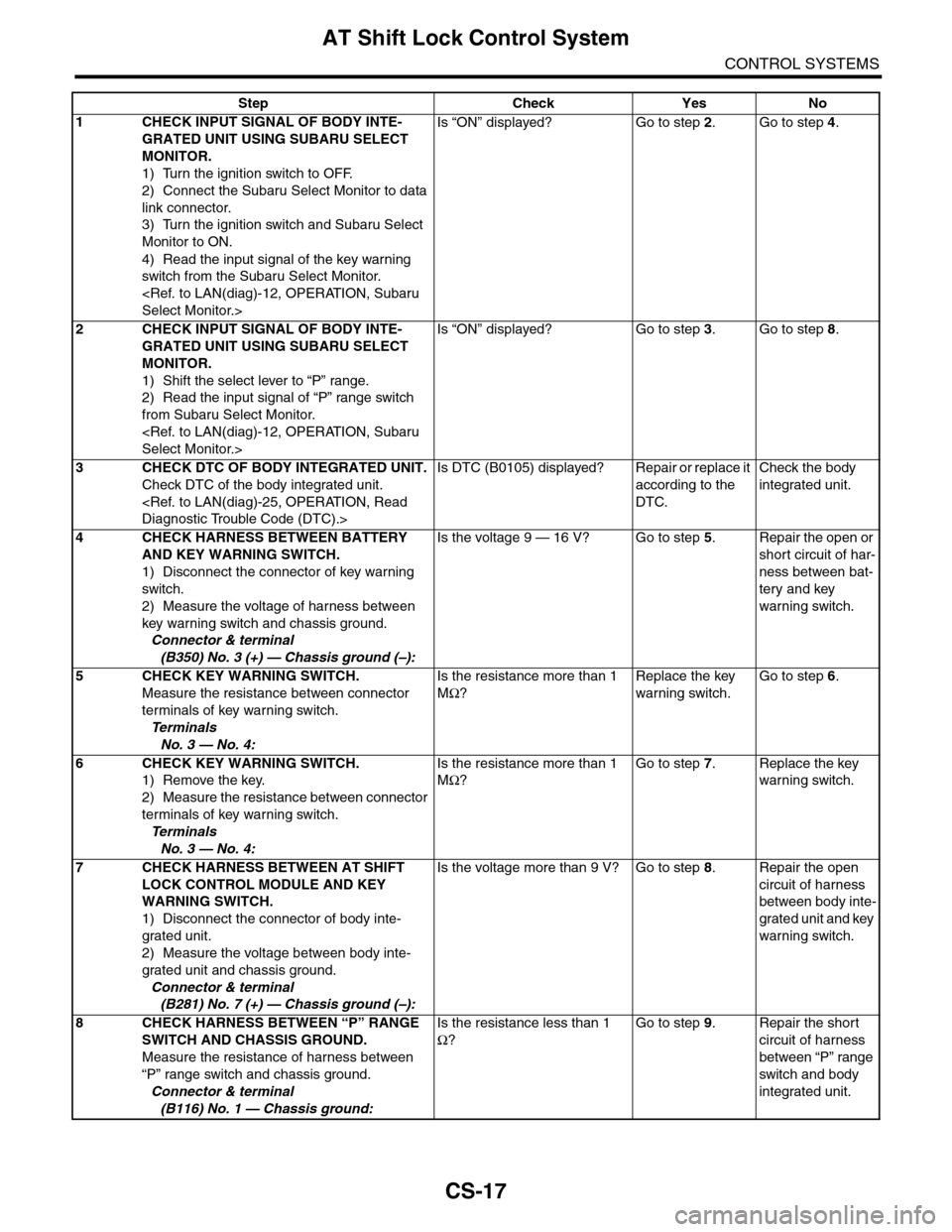
AT Shift Lock Control System
CONTROL SYSTEMS
Step Check Yes No
1CHECK INPUT SIGNAL OF BODY INTE-
GRATED UNIT USING SUBARU SELECT
MONITOR.
1) Turn the ignition switch to OFF.
2) Connect the Subaru Select Monitor to data
link connector.
3) Turn the ignition switch and Subaru Select
Monitor to ON.
4) Read the input signal of the key warning
switch from the Subaru Select Monitor.
Is “ON” displayed? Go to step 2.Go to step 4.
2CHECK INPUT SIGNAL OF BODY INTE-
GRATED UNIT USING SUBARU SELECT
MONITOR.
1) Shift the select lever to “P” range.
2) Read the input signal of “P” range switch
from Subaru Select Monitor.
Is “ON” displayed? Go to step 3.Go to step 8.
3CHECK DTC OF BODY INTEGRATED UNIT.
Check DTC of the body integrated unit.
Is DTC (B0105) displayed? Repair or replace it
according to the
DTC.
Check the body
integrated unit.
4CHECK HARNESS BETWEEN BATTERY
AND KEY WARNING SWITCH.
1) Disconnect the connector of key warning
switch.
2) Measure the voltage of harness between
key warning switch and chassis ground.
Connector & terminal
(B350) No. 3 (+) — Chassis ground (–):
Is the voltage 9 — 16 V? Go to step 5.Repair the open or
short circuit of har-
ness between bat-
tery and key
warning switch.
5 CHECK KEY WARNING SWITCH.
Measure the resistance between connector
terminals of key warning switch.
Te r m i n a l s
No. 3 — No. 4:
Is the resistance more than 1
MΩ?
Replace the key
warning switch.
Go to step 6.
6 CHECK KEY WARNING SWITCH.
1) Remove the key.
2) Measure the resistance between connector
terminals of key warning switch.
Te r m i n a l s
No. 3 — No. 4:
Is the resistance more than 1
MΩ?
Go to step 7.Replace the key
warning switch.
7CHECK HARNESS BETWEEN AT SHIFT
LOCK CONTROL MODULE AND KEY
WARNING SWITCH.
1) Disconnect the connector of body inte-
grated unit.
2) Measure the voltage between body inte-
grated unit and chassis ground.
Connector & terminal
(B281) No. 7 (+) — Chassis ground (–):
Is the voltage more than 9 V? Go to step 8.Repair the open
circuit of harness
between body inte-
grated unit and key
warning switch.
8CHECK HARNESS BETWEEN “P” RANGE
SWITCH AND CHASSIS GROUND.
Measure the resistance of harness between
“P” range switch and chassis ground.
Connector & terminal
(B116) No. 1 — Chassis ground:
Is the resistance less than 1
Ω?
Go to step 9.Repair the short
circuit of harness
between “P” range
switch and body
integrated unit.
Page 2271 of 2453
CS-19
Select Lever
CONTROL SYSTEMS
3. Select Lever
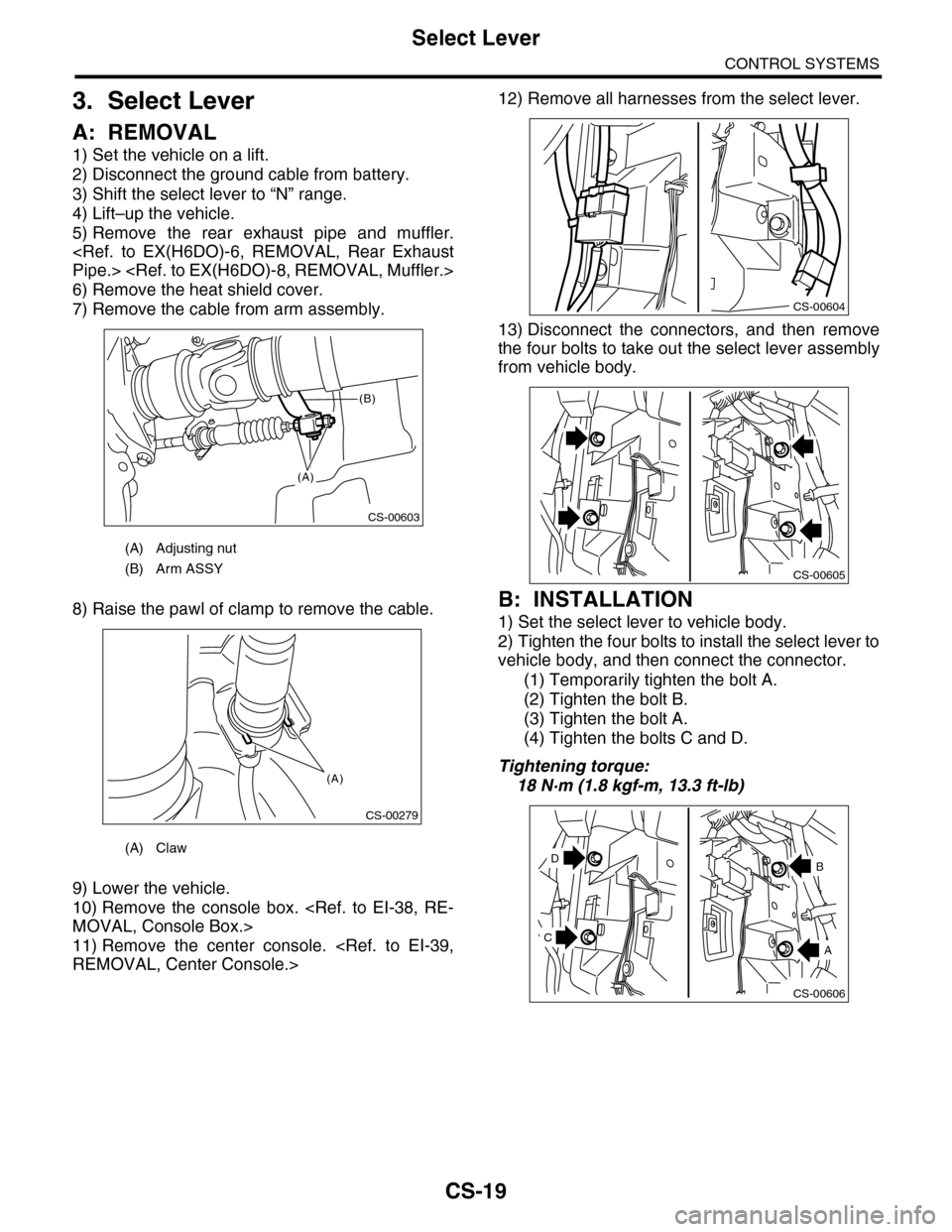
A: REMOVAL
1) Set the vehicle on a lift.
2) Disconnect the ground cable from battery.
3) Shift the select lever to “N” range.
4) Lift–up the vehicle.
5) Remove the rear exhaust pipe and muffler.
6) Remove the heat shield cover.
7) Remove the cable from arm assembly.
8) Raise the pawl of clamp to remove the cable.
9) Lower the vehicle.
10) Remove the console box.
11) Remove the center console.
12) Remove all harnesses from the select lever.
13) Disconnect the connectors, and then remove
the four bolts to take out the select lever assembly
from vehicle body.
B: INSTALLATION
1) Set the select lever to vehicle body.
2) Tighten the four bolts to install the select lever to
vehicle body, and then connect the connector.
(1) Temporarily tighten the bolt A.
(2) Tighten the bolt B.
(3) Tighten the bolt A.
(4) Tighten the bolts C and D.
Tightening torque:
18 N·m (1.8 kgf-m, 13.3 ft-lb)
(A) Adjusting nut
(B) Arm ASSY
(A) Claw
CS-00603
(A)
(B)
CS-00279
(A)
CS-00604
CS-00605
CS-00606
D
A
B
C
Page 2278 of 2453
CS-26
Select Cable
CONTROL SYSTEMS
4. Select Cable
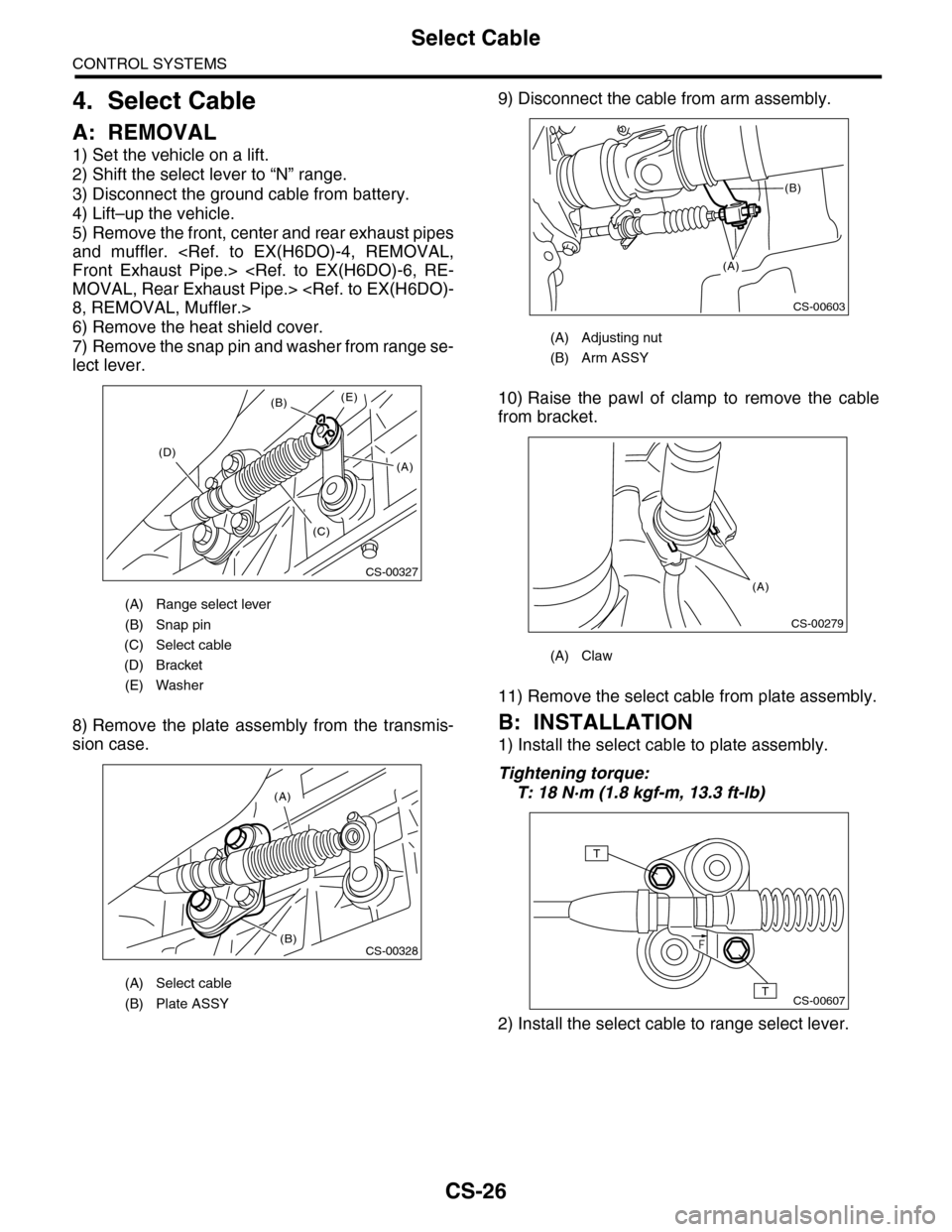
A: REMOVAL
1) Set the vehicle on a lift.
2) Shift the select lever to “N” range.
3) Disconnect the ground cable from battery.
4) Lift–up the vehicle.
5) Remove the front, center and rear exhaust pipes
and muffler.
6) Remove the heat shield cover.
7) Remove the snap pin and washer from range se-
lect lever.
8) Remove the plate assembly from the transmis-
sion case.
9) Disconnect the cable from arm assembly.
10) Raise the pawl of clamp to remove the cable
from bracket.
11) Remove the select cable from plate assembly.
B: INSTALLATION
1) Install the select cable to plate assembly.
Tightening torque:
T: 18 N·m (1.8 kgf-m, 13.3 ft-lb)
2) Install the select cable to range select lever.
(A) Range select lever
(B) Snap pin
(C) Select cable
(D) Bracket
(E) Washer
(A) Select cable
(B) Plate ASSY
CS-00327
(B)
(D)
(C)
(E)
(A)
(A)
(B)CS-00328
(A) Adjusting nut
(B) Arm ASSY
(A) Claw
CS-00603
(A)
(B)
CS-00279
(A)
CS-00607
T
T
Page 2283 of 2453
CS-31
AT Shift Lock Solenoid and “P” Range Switch
CONTROL SYSTEMS
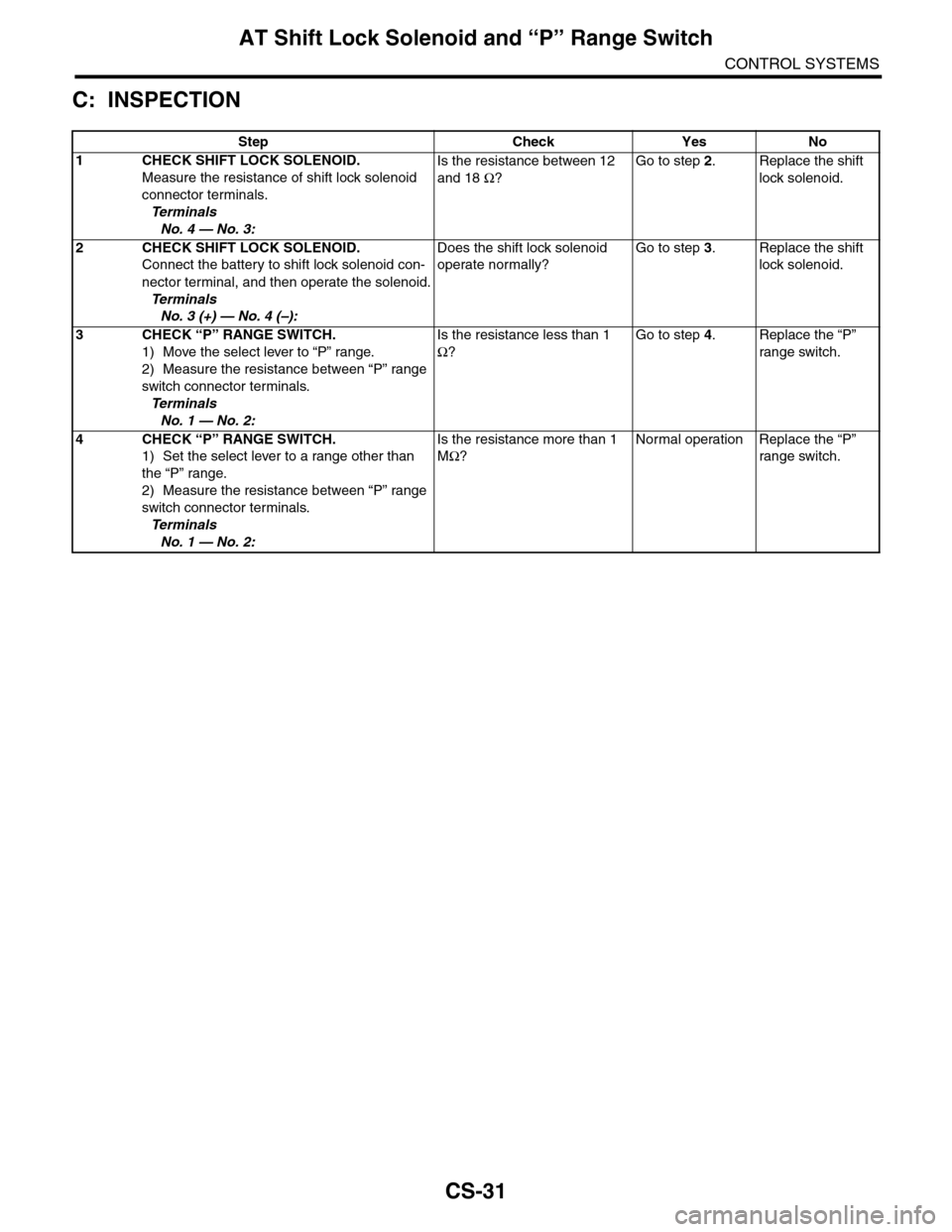
C: INSPECTION
Step Check Yes No
1CHECK SHIFT LOCK SOLENOID.
Measure the resistance of shift lock solenoid
connector terminals.
Te r m i n a l s
No. 4 — No. 3:
Is the resistance between 12
and 18 Ω?
Go to step 2.Replace the shift
lock solenoid.
2CHECK SHIFT LOCK SOLENOID.
Connect the battery to shift lock solenoid con-
nector terminal, and then operate the solenoid.
Te r m i n a l s
No. 3 (+) — No. 4 (–):
Does the shift lock solenoid
operate normally?
Go to step 3.Replace the shift
lock solenoid.
3CHECK “P” RANGE SWITCH.
1) Move the select lever to “P” range.
2) Measure the resistance between “P” range
switch connector terminals.
Te r m i n a l s
No. 1 — No. 2:
Is the resistance less than 1
Ω?
Go to step 4.Replace the “P”
range switch.
4CHECK “P” RANGE SWITCH.
1) Set the select lever to a range other than
the “P” range.
2) Measure the resistance between “P” range
switch connector terminals.
Te r m i n a l s
No. 1 — No. 2:
Is the resistance more than 1
MΩ?
Normal operation Replace the “P”
range switch.
Page 2287 of 2453
WI-3
Basic Diagnostic Procedure
WIRING SYSTEM
1. Basic Diagnostic Procedure
A: BASIC PROCEDURES
1. GENERAL DESCRIPTION
The most important purpose of diagnostics is to
quickly determine which part is malfunctioning, to
save time and labor.
2. IDENTIFICATION OF TROUBLE SYMP-
TOM
Determine what the problem is based on the symp-
tom.
3. PROBABLE CAUSE OF TROUBLE
Look at the wiring diagram and check the system’s
circuit. Then check the switch, relay, fuse, ground,
etc.
4. LOCATION AND REPAIR OF TROUBLE
1) Using the diagnostics, narrow down the causes.
2) If necessary, use a voltmeter, ohmmeter, etc.
3) Before replacing certain component parts
(switch, relay, etc.), check the power supply,
ground, for open wiring harness, poor connectors,
etc. If no problem is encountered, check the com-
ponent parts.
5. SYSTEM OPERATION CHECK
After repairing, ensure that the system operates
properly.
B: BASIC INSPECTION
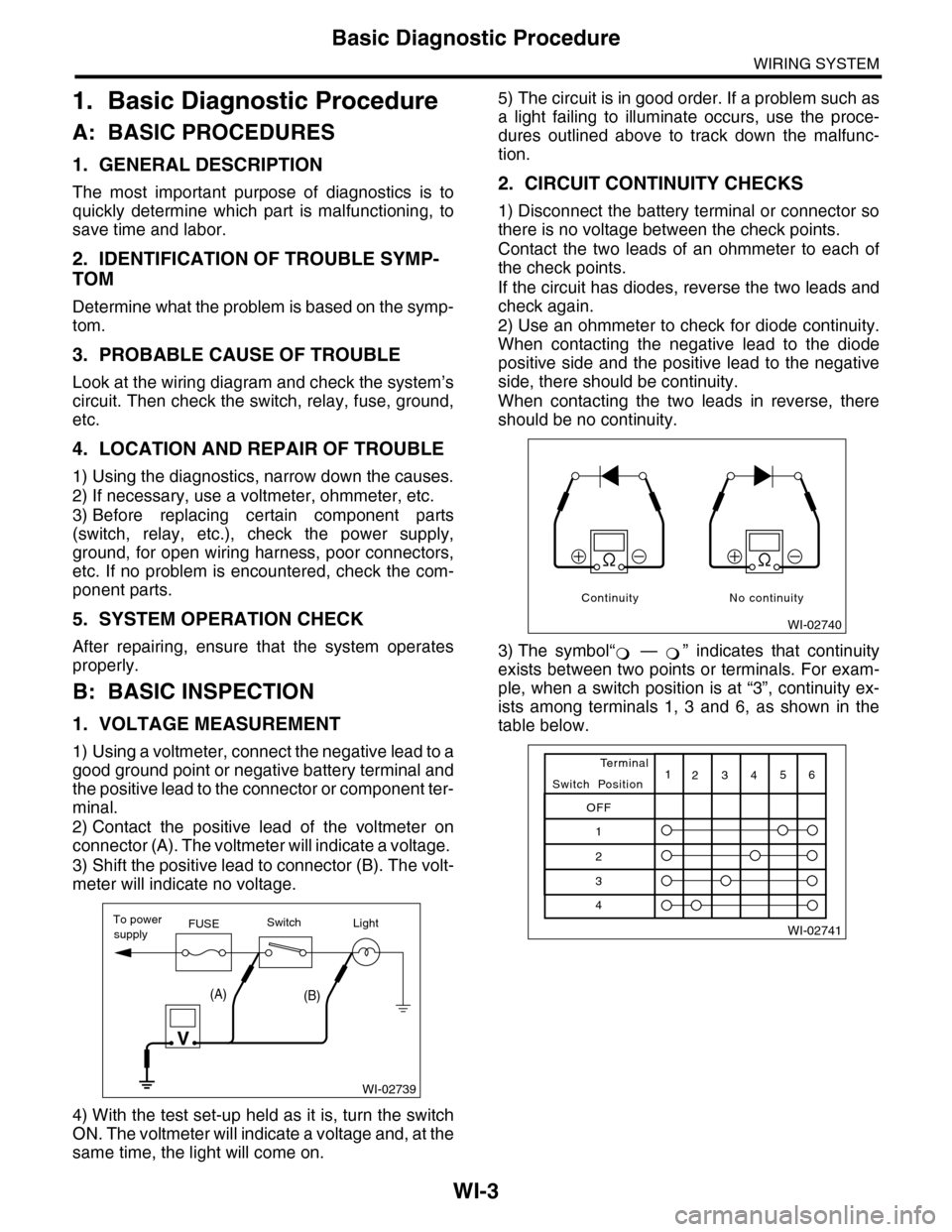
1. VOLTAGE MEASUREMENT
1) Using a voltmeter, connect the negative lead to a
good ground point or negative battery terminal and
the positive lead to the connector or component ter-
minal.
2) Contact the positive lead of the voltmeter on
connector (A). The voltmeter will indicate a voltage.
3) Shift the positive lead to connector (B). The volt-
meter will indicate no voltage.
4) With the test set-up held as it is, turn the switch
ON. The voltmeter will indicate a voltage and, at the
same time, the light will come on.
5) The circuit is in good order. If a problem such as
a light failing to illuminate occurs, use the proce-
dures outlined above to track down the malfunc-
tion.
2. CIRCUIT CONTINUITY CHECKS
1) Disconnect the battery terminal or connector so
there is no voltage between the check points.
Contact the two leads of an ohmmeter to each of
the check points.
If the circuit has diodes, reverse the two leads and
check again.
2) Use an ohmmeter to check for diode continuity.
When contacting the negative lead to the diode
positive side and the positive lead to the negative
side, there should be continuity.
When contacting the two leads in reverse, there
should be no continuity.
3) The symbol“ — ” indicates that continuity
exists between two points or terminals. For exam-
ple, when a switch position is at “3”, continuity ex-
ists among terminals 1, 3 and 6, as shown in the
table below.
WI-02739
To powerFUSEsupplySwitchLight
V
(A)(B)
WI-02740
Continuity No continuity
Page 2289 of 2453
WI-5
Basic Diagnostic Procedure
WIRING SYSTEM
C: HOW TO READ WIRING DIA-
GRAMS
1. WIRING DIAGRAM
The wiring diagram of each system is illustrated so
that you can understand the path through which the
electric current flows from the battery.
Sketches and codes are used in the diagrams.
They should read as follows:
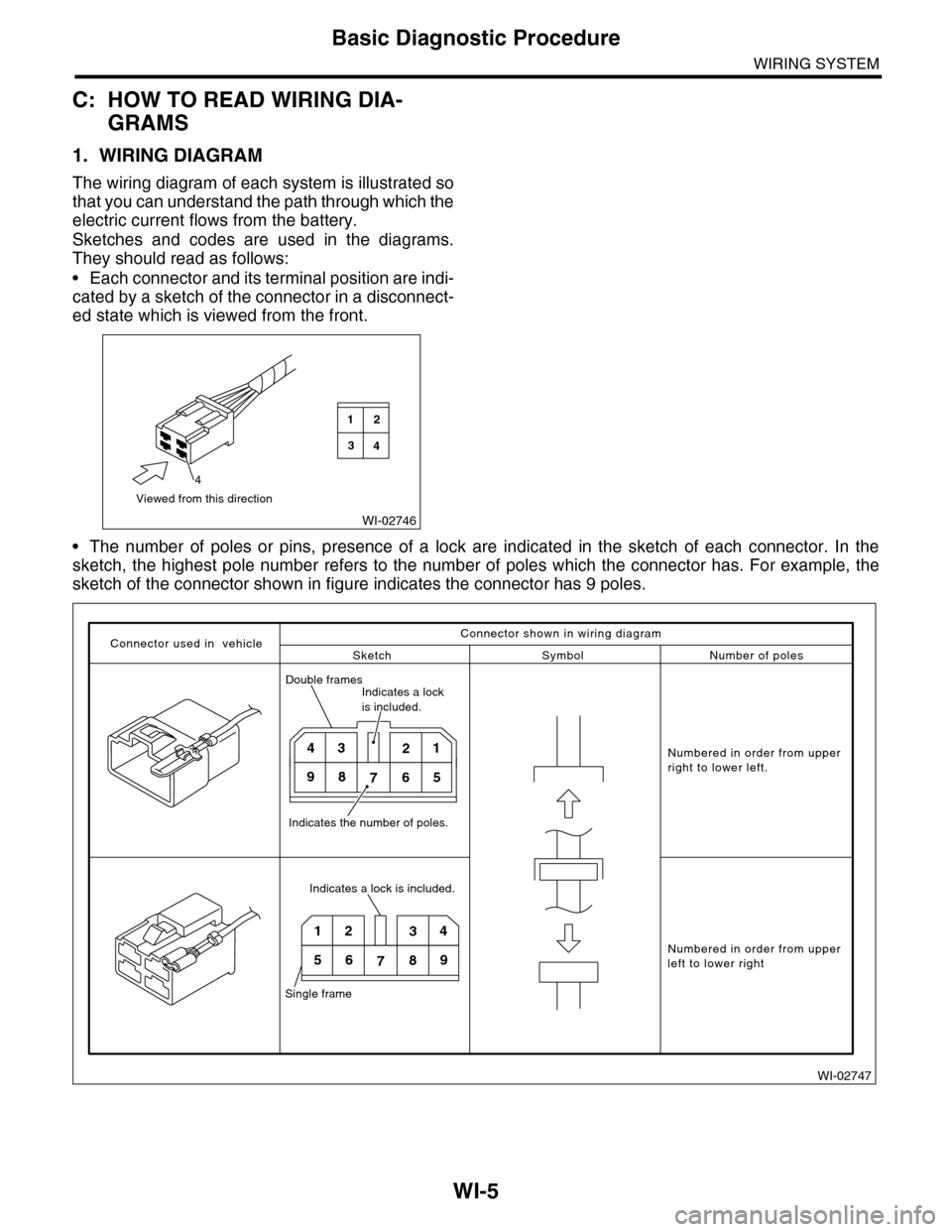
•Each connector and its terminal position are indi-
cated by a sketch of the connector in a disconnect-
ed state which is viewed from the front.
•The number of poles or pins, presence of a lock are indicated in the sketch of each connector. In the
sketch, the highest pole number refers to the number of poles which the connector has. For example, the
sketch of the connector shown in figure indicates the connector has 9 poles.
WI-02746
Viewed from this direction
4
2
4
1
3
WI-02747
Connector used in vehicleSketch Symbol Number of poles
Numbered in order from upperright to lower left.
Numbered in order from upperleft to lower right
Connector shown in wiring diagram
Double framesIndicates a lock is included.
Indicates the number of poles.
4321
98765
Indicates a lock is included.
Single frame
1234
56789
Page 2298 of 2453
WI-14
Working Precautions
WIRING SYSTEM
2. Working Precautions
A: PRECAUTIONS WHEN WORKING
WITH THE PARTS MOUNTED ON
THE VEHICLE
1) When working under a vehicle which is jacked-
up, always be sure to use rigid rack.
2) The parking brake must always be applied dur-
ing working. Also, in automatic transmission vehi-
cles, keep the select lever set to the P (Parking)
range.
3) Be sure the workshop is properly ventilated
when running the engine. Further, be careful not to
touch the belt or fan while the engine is operating.
4) Be careful not to touch hot metal parts, especial-
ly the radiator and exhaust system immediately af-
ter the engine has been turned off.
B: PRECAUTIONS IN TROUBLE DI-
AGNOSIS AND REPAIR OF ELEC-
TRIC PARTS
1) The battery cable must be disconnected from
the battery’s (–) terminal, and the ignition switch
must be set to the OFF position, unless otherwise
required by the diagnostics.
2) Securely fasten the wiring harness with clamps
and slips so that the harness does not interfere with
the body end parts or edges and bolts or screws.
3) When installing parts, be careful not to catch
them on the wiring harness.
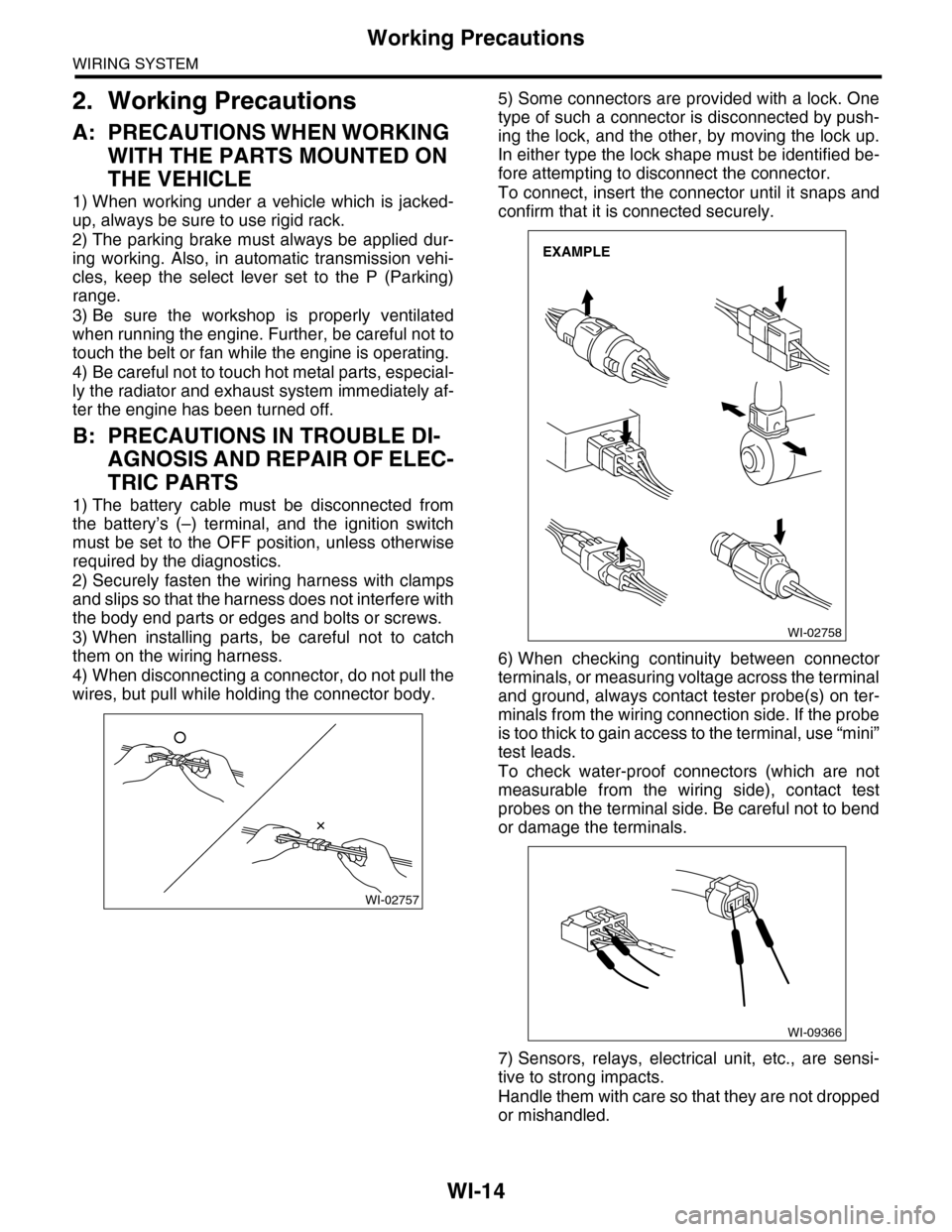
4) When disconnecting a connector, do not pull the
wires, but pull while holding the connector body.
5) Some connectors are provided with a lock. One
type of such a connector is disconnected by push-
ing the lock, and the other, by moving the lock up.
In either type the lock shape must be identified be-
fore attempting to disconnect the connector.
To connect, insert the connector until it snaps and
confirm that it is connected securely.
6) When checking continuity between connector
terminals, or measuring voltage across the terminal
and ground, always contact tester probe(s) on ter-
minals from the wiring connection side. If the probe
is too thick to gain access to the terminal, use “mini”
test leads.
To check water-proof connectors (which are not
measurable from the wiring side), contact test
probes on the terminal side. Be careful not to bend
or damage the terminals.
7) Sensors, relays, electrical unit, etc., are sensi-
tive to strong impacts.
Handle them with care so that they are not dropped
or mishandled.
WI-02757
WI-02758
EXAMPLE
WI-09366
Page 2300 of 2453
WI-16
Power Supply Circuit
WIRING SYSTEM
WI-08026
P-SUP-02P-SUP-02
WR
BR
WB21BR3
B14B7C10
GENERATOR
MAIN FUSE BOX(M/B)
BATTERY
MB-2
F26
MB-29MB-1MB-9MB-8MB-6
A7A9
A16
P-SUP-05B
P-SUP-05A
P-SUP-03C
NO. 4 25A
MAINSBF 120A
P-SUP-04I
P-SUP-04H
P-SUP-03D
NO. 2 25ANO. 8 20ANO. 3 25ANO. 5 20ANO. 1 30ANO. 16 7.5A
NO. 10 25A
SBF-1 50ASBF-8 50ASBF-6 50ASBF-3 50ASBF-2 50A
E5E6
RL
G7H8
GOrGB
WH4B19
ALT-1
B433B145G:
12
F26
123
B186H:(BROWN)B144D:(BLUE)F35C:
A:
12345678123456789101112
F37
F:
P-SUP-05G
P-SUP-05F
P-SUP-04E
MAIN FANRELAY 1
REAR DEFOGGER
RELAY
WW
F37A:
B143B:
F35C:
B144D:
F36E:
B433F:
B145G:
B186H:
LR
D9
G
D3
W
D2
R
D6E3D1
RY
D5
WR
D7B11
L
D8
MB-5
1234567
157628349
1234 5678910 11 12 13 14 15 16 17 18 19 20
B:B143
1234 5678910 11 12 13 14 15 16 17 18 19 20
CURRENT FROM IGNITIONSWITCH "IG" TERMINAL
OTHER CURRENT
BATTERY CURRENT
CURRENT FROM IGNITIONSWITCH "ACC" TERMINAL
GRLWLg
F36E:
(BROWN)