Page 325 of 2453
GW-30
Wiper Deicer System
GLASS/WINDOWS/MIRRORS
21.Wiper Deicer System
A: WIRING DIAGRAM
B: INSPECTION
Refer to “Rear Window Defogger” for inspection.
NOTE:
Wiper deicer system can be customized on the Subaru Select Monitor.
*: When one of the following conditions occurs, continuous operation is suspended and turned off after 15 min.
•Ambient temperature at 5°C (41°F) or more continues for 10 sec.
•Malfunction occurs on ambient sensor.
•Vehicle speed below 15 km/h (9 MPH) continues 15 min.
•Malfunction occurs in CAN communication.
C: REPAIR
Refer to “Rear Window Defogger” for repair.
Symptom Repair order
Wiper deicer does not operate.
1. Fuse (F/B No. 4, 9)
2. Wiper deicer relay
3. Wiper deicer switch
4. Wiring harness
5. Body integrated unit
System name Initial setting Customize setting
Wiper deicer timer OFF after 15 min. Continuous operation*
Page 376 of 2453

AC-50
General Diagnostic Table
HVAC SYSTEM (HEATER, VENTILATOR AND A/C)
29.General Diagnostic Table
A: INSPECTION
Symptom Repair order
Blower motor
Does not operate.
Fuse
Blower motor relay
Blower motor
Blower motor resistor
Blower switch
Wiring harness
Strange noiseBlower motor
Air conditioner filter
Compressor
Does not operate.
Refrigerant
Fuse
Air conditioning relay
Magnet clutch
Compressor
Pressure switch
A/C switch
Blower switch
Wiring harness
Strange noise
V- b e l t
Magnet clutch
Compressor
Belt tensioner
Cold air not emitted.
Refrigerant
V- b e l t
Magnet clutch
Compressor
Pressure switch
Expansion valve
A/C switch
Blower switch
Wiring harness
Heater duct
Heater vent duct
Te m p e r a t u r e c o n t r o l d o o r a c t u a t o r
Wa r m a ir n ot e mi t te d .
Engine coolant
Blower switch
Heater core
Te m p e r a t u r e c o n t r o l d o o r a c t u a t o r
Te m p e r a t u r e o f a i r f r o m v e n t s d o e s n o t c h a n g e .
Engine coolant
Air mix door actuator (Auto A/C)
Wire harness (Auto A/C)
Unable to switch blow vents.
Mode door actuator
Air flow switch
Wiring harness
Unable to switch suction vents.
Air inlet select switch
FRESH/RECIRC door actuator
Wiring harness
Page 377 of 2453
AC-51
General Diagnostic Table
HVAC SYSTEM (HEATER, VENTILATOR AND A/C)
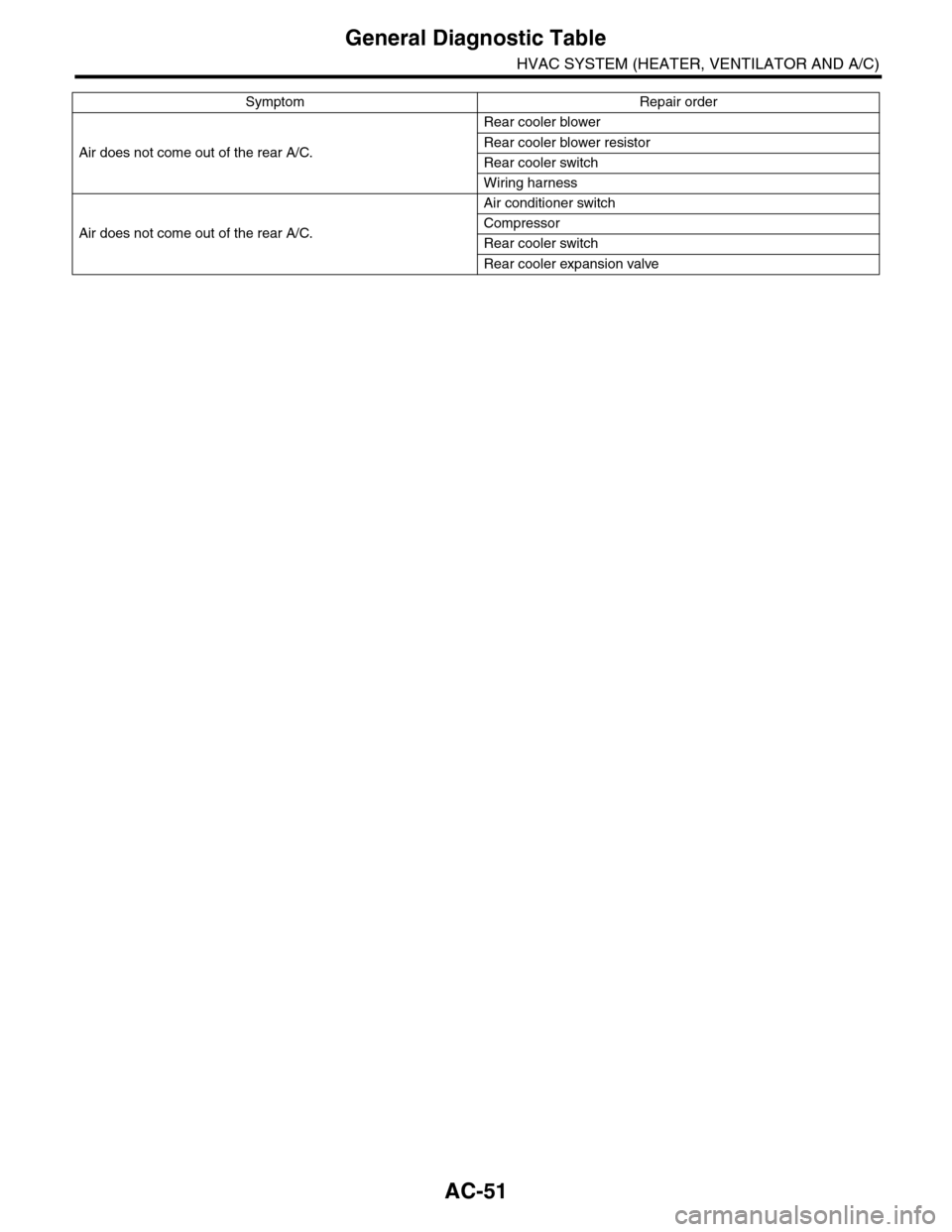
Air does not come out of the rear A/C.
Rear cooler blower
Rear cooler blower resistor
Rear cooler switch
Wiring harness
Air does not come out of the rear A/C.
Air conditioner switch
Compressor
Rear cooler switch
Rear cooler expansion valve
Symptom Repair order
Page 380 of 2453

AC(diag)-3
General Description
HVAC SYSTEM (AUTO A/C) (DIAGNOSTICS)
2. General Description
A: CAUTION
1) Never connect the battery in reverse polarity.
•Auto A/C control module may be destroyed in-
stantly.
2) Do not disconnect the battery terminals while the
engine is running.
•A large counter electromotive force will be gener-
ated in the generator, and this voltage may damage
electronic parts such as auto A/C control module
etc.
3) Before disconnecting the connectors of each
sensor and the auto A/C control module, be sure to
turn the ignition switch to OFF.
•Auto A/C control module may be damaged.
4) Every A/C-related part is a precision part. Do not
drop them.
5) Airbag system wiring harness is routed near the
A/C control panel and junction box.
CAUTION:
•For airbag system, yellow-colored wiring har-
ness and connectors are all used. Do not use
the electrical test equipment on these circuits.
•Be careful not to damage the airbag system
wiring harness when servicing the A/C control
panel and junction box.
B: INSPECTION
Before performing the diagnosis, check the follow-
ing items which might affect A/C system problems.
1. BATTERY
1) Measure the battery voltage and specific gravity
of electrolyte.
Standard voltage: 12 V
Specific gravity: 1.260 or more
2) Check the condition of the fuses for A/C system
power supply and other fuses.
3) Check the condition of harness and harness
connector connections.
2. ASPIRATOR HOSE
1) Turn the ignition switch to ON, and press the A/
C switch.
2) Turn the temperature control dial to maximum
hot position.
3) Turn the air flow control dial to “DEF” position.
4) Turn the fan speed control dial to 4th position.
5) Put a strip of paper close to the front side of in-
vehicle sensor suction port (A) located in the driv-
er’s side console side panel, and check that air is
being sucked into the port by seeing the paper
moving towards the port.
NOTE:
Be careful not to let the paper get sucked into the
port.
6) If the paper does not move at all, remove the
driver’s side console side panel
MOVAL, Center Console.> and check for improper
connection of the aspirator hose, in-vehicle sensor
and heater unit, and repair them if necessary.
3. A/C LINE
Check the connection for A/C line (A) and lower
side high-pressure pipe.
AC-01323
AC-01324
(A)
Page 419 of 2453
IM (diag)-3
General Description
IMMOBILIZER (DIAGNOSTICS)
2. General Description
A: CAUTION
CAUTION:
•The airbag system wiring harnesses and con-
nectors are yellow. Do not use electrical test
equipment on these circuits.
•Be careful not to damage the airbag system
wiring harness.
•While diagnostic items are being checked, do
not operate radios, portable telephones, etc.
which emit electromagnetic waves near or in-
side the vehicle.
•When turning the ignition switch to ON or
OFF while diagnostic items are being checked,
do not allow keys with different ID codes close
to the ignition switch. If the ignition key is in a
key holder, remove it from the holder before
carrying out diagnosis.
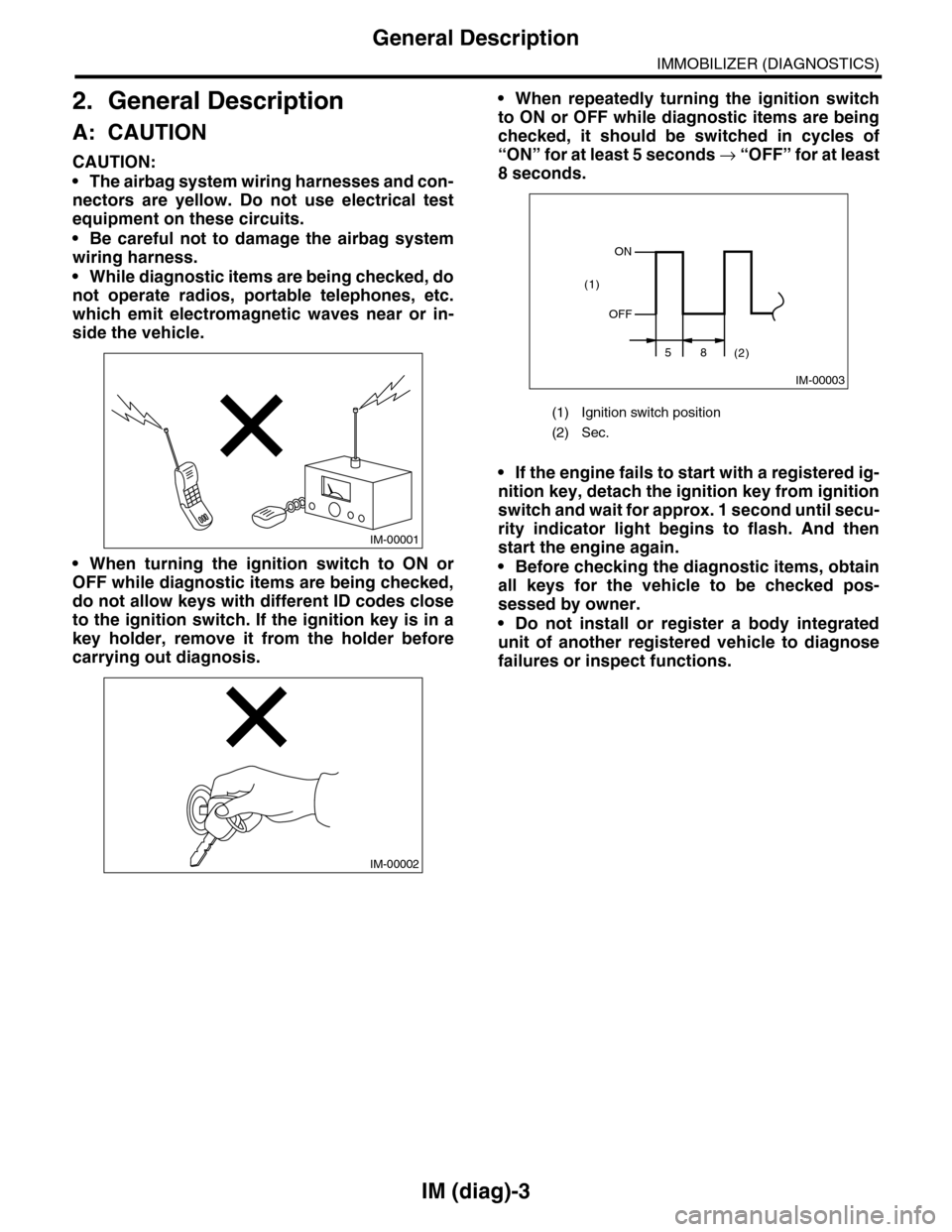
•When repeatedly turning the ignition switch
to ON or OFF while diagnostic items are being
checked, it should be switched in cycles of
“ON” for at least 5 seconds → “O F F ” fo r a t le a s t
8 seconds.
•If the engine fails to start with a registered ig-
nition key, detach the ignition key from ignition
switch and wait for approx. 1 second until secu-
rity indicator light begins to flash. And then
start the engine again.
•Before checking the diagnostic items, obtain
all keys for the vehicle to be checked pos-
sessed by owner.
•Do not install or register a body integrated
unit of another registered vehicle to diagnose
failures or inspect functions.
IM-00001
IM-00002
(1) Ignition switch position
(2) Sec.
IM-00003
ON
OFF
58(2)
(1)
Page 426 of 2453

IM (diag)-10
Diagnostics Chart for Security Indicator Light
IMMOBILIZER (DIAGNOSTICS)
8. Diagnostics Chart for Security Indicator Light
A: INSPECTION
1. CHECK SECURITY INDICATOR LIGHT CIRCUIT
WIRING DIAGRAM:
IM-00141
MAIN SBF
SBF-3
BATTERY
WARNING BOX
BODY INTEGRATED UNIT
i116
F/B NO.7
F/B NO.12
IGNITIONSWITCH
A33C2B7C9C8
2
1
E
A1
M/B NO.8
SBF-8
B22
i84A:
B280B:
B281C:
567821943102422 23 25111213141526 27281617181920 21
B281i84
1234567891011121314151617181920212223242526272829303132333435
5467821931022 231112131415242526 2716171828 29192021 30
B280A:C:B:
5i124
i102
i97
i98
SECURITYINDICATORLIGHT
JOINT CONNECTOR
i116
12345678910i98
i97
12345678910111213141516171819202122
: TERMINAL NO. OPTIONAL ARRANGEMENT AMONG 16, 17 AND 18
1*
1*
1*
Step Check Yes No
1CHECK SECURITY INDICATOR LIGHT.
1) Turn the ignition switch to OFF.
2) Disconnect the harness connector from
body integrated unit.
3) Connect the resistor (100 Ω) between body
integrated unit harness connector terminal
(i84) No. 33 and chassis ground.
Does the security indicator
light illuminate?
Go to step 2.Go to step 5.
Page 436 of 2453

IM (diag)-20
Diagnostic Procedure with Diagnostic Trouble Code (DTC)
IMMOBILIZER (DIAGNOSTICS)
D: DTC P1572 IMM CIRCUIT FAILURE (EXCEPT ANTENNA CIRCUIT)
DTC DETECTING CONDITION:
Communication failure between body integrated unit and ECM
WIRING DIAGRAM:
MAIN SBF
SBF-8
SBF-3BATTERYF/B NO.12
IGNITIONSWITCH
A1B28B18C9C2B7C8
E
F/B NO.7
M/B NO.8
BODY INTEGRATED UNIT
i84A:
B280B:
B281C:
B22
567821943102422 23 25111213141526 27281617181920 21
B281i84
1234567891011121314151617181920212223242526272829303132333435
5467821931022 231112131415242526 2716171828 29192021 30
B280A:C:B:B136C:
C26C34
B136C:ECM
IM-00142
16101112131415252430
9871718192028212223293231
123456
2726333435
Step Check Yes No
1CHECK BODY INTEGRATED UNIT POWER
SUPPLY CIRCUIT.
1) Turn the ignition switch to OFF.
2) Disconnect the harness connector from
body integrated unit.
3) Measure the voltage between body inte-
grated unit harness connector terminal and
chassis ground.
Connector & terminal
(B280) No. 7 (+) — Chassis ground (–):
(B281) No. 2 (+) — Chassis ground (–):
Is the voltage more than 10 V? Go to step 2.Check the harness
for open or shor t
circuit between
body integrated
unit and fuse.
2CHECK BODY INTEGRATED UNIT POWER
SUPPLY CIRCUIT.
1) Turn the ignition switch to ON.(Engine OFF)
2) Measure the voltage between body inte-
grated unit harness connector terminal and
chassis ground.
Connector & terminal
(i84) No. 1 (+) — Chassis ground (–):
Is the voltage more than 10 V? Go to step 3.Check the harness
for open or shor t
circuit between
body integrated
unit and ignition
switch.
Page 446 of 2453

IDI-7
Combination Meter System
INSTRUMENTATION/DRIVER INFO
3. SYMPTOM CHART
CAUTION:
When measuring the voltage and resistance of each control module or sensor, use a tapered pin with
a diameter of less than 0.64 mm (0.025 in) in order to avoid poor contact. Do not insert the pin more
than 2 mm (0.08 in).
4. CHECK POWER SUPPLY AND GROUND CIRCUIT
Symptom Repair order Note
Combination meter assembly does not
operate.
1. Power supply
2. Ground circuit
3. Combination meter
AND GROUND CIRCUIT, INSPECTION,
Combination Meter System.>
Speedometer does not operate. 1. VDCCM
2. Harness
3. Combination meter
INSPECTION, Combination Meter Sys-
tem.>
Ta c h o m e t e r d o e s n o t o p e r a t e . 1 . E C M
2. Harness
3. Combination meter
TROL MODULE (ECM), INSPECTION,
Combination Meter System.>
Fuel gauge does not operate. 1. Communication circuit
2. Fuel level sensor
3. Harness
4. Combination meter
SENSOR., INSPECTION, Combination
Meter System.>
Engine coolant temperature gauge does
not operate.
1. Communication circuit
2. Engine coolant temperature sensor
3. Harness
4. Combination meter
ANT TEMPERATURE SENSOR.,
INSPECTION, Combination Meter Sys-
tem.>
Error display is shown on the odo/trip
meter.
Communication circuit
ERROR DISPLAY, INSPECTION, Combi-
nation Meter System.>
Step Check Yes No
1CHECK POWER SUPPLY FOR COMBINA-
TION METER.
1) Remove the combination meter.
IDI-11, REMOVAL, Combination Meter.>
2) Disconnect the combination meter harness
connector.
3) Turn the ignition switch to ON.
4) Measure the voltage between combination
meter connector and chassis ground.
Connector & terminal
(i10) No. 3, 4 (+) — Chassis ground (–):
Is the voltage more than 10 V? Go to step 2.Check the harness
for open or shor t
between the igni-
tion switch and
combination
meter.
2CHECK POWER SUPPLY FOR COMBINA-
TION METER.
Measure the voltage between combination
meter connector and chassis ground.
Connector & terminal
(i10) No. 1, 2 (+) — Chassis ground (–):
Is the voltage more than 10 V? Go to step 3.Check the harness
for open or shor t
between the fuse
and combination
meter.
3CHECK GROUND CIRCUIT OF COMBINA-
TION METER.
1) Turn the ignition switch to OFF.
2) Measure the resistance of harness
between combination meter connector and
chassis ground.
Connector & terminal
(i10) No. 15, 16 — Chassis ground:
Is the resistance less than 10
Ω?
Replace the meter
case assembly.
Repair the wiring
harness.