2009 SUBARU TRIBECA wheel
[x] Cancel search: wheelPage 261 of 2453

EI-19
Mud Guard
EXTERIOR/INTERIOR TRIM
4. Mud Guard
A: REMOVAL
1) Remove the wheels.
2) Loosen the screws and clips to remove mud
guard.
•Front mud guard
•Rear mud guard
B: INSTALLATION
Install in the reverse order of removal.
EI-01266
EI-01267
Page 268 of 2453

EI-26
Front Bumper
EXTERIOR/INTERIOR TRIM
9Welding
Using a heater gun and PP welding rod, weld the beveled spot while melting both the rod and
damaged area.
(1) Welding rod
(2) Melt hatched area
(3) Section
NOTE:•Melt the sections indicated by hatched area.
•Do not melt the welding rod until it flows out, in order to provide strength.
•Always keep the heater gun 1 to 2 cm (0.4 to 0.8 in) away from the welding spot.
•Leave the welded spot unattended until it cools completely.
10 Sanding (II)
Remove excess part of weld with a putty knife. If a drill or disc wheel is used instead of the knife,
operate it at a rate lower than 1,500 rpm and grind the excess part little by little. A higher rpm will
cause the PP substrate to melt from the heat.
Sand the welded spot smooth with #240 sand paper.
11 MaskingMask the black substrate section using masking tape.
Recommended masking tape: Nichiban No. 533 or equivalent
12Cleaning/degreas-
ingCompletely clean the entire coated area, using solvent similar to that used in Procedure 4.
13 Primer coating
Apply a coat of primer to the repaired surface and its surrounding areas. Mask these areas, if
necessary.
Recommended primer: Mp/ 364 PP Primer
NOTE:Be sure to apply a coat of primer using a spray gun at a pressure of 245 — 343 kPa (2.5 — 3.5
kg/cm2, 36 — 50 psi).
14 Leave unattended
Leave the repaired area unattended at 20°C (68°F) for 10 to 15 minutes until primer is half-dry.
NOTE:If dirt or dust comes in contact with the coated area, wipe it off with a cloth dampened with alcohol.
(Do not use thinner since the coated area tends to melt.)
15Primer surfacer
coating
Apply primer surfacer to the repaired area two or three times at an interval of 3 - 5 minutes.
Recommended surfacer:
•UPS 300 Flex Primer
•No. 303 UPS 300 Exclusive hardener
•NPS 725 Exclusive Reducer (thinner)
•Mixture ratio:
2 : 1 (UPS 300 : No. 303)
•Viscosity: 12 — 14 sec./20°C (68°F)
• Coating film thickness: 40 — 50 µ
16 Drying Allow the coated surface to dry for 60 minutes at 20°C (68°F) [or 30 minutes at 60°C (140°F)].
17 Sanding (III) Sand the coated surface and its surrounding areas using #400 sand paper and water.
Process
No.Process name Job contents
(1)
(2)
(2)
(3)
EI-00237
EI-00042
Page 270 of 2453
EI-28
Rear Bumper
EXTERIOR/INTERIOR TRIM
7. Rear Bumper
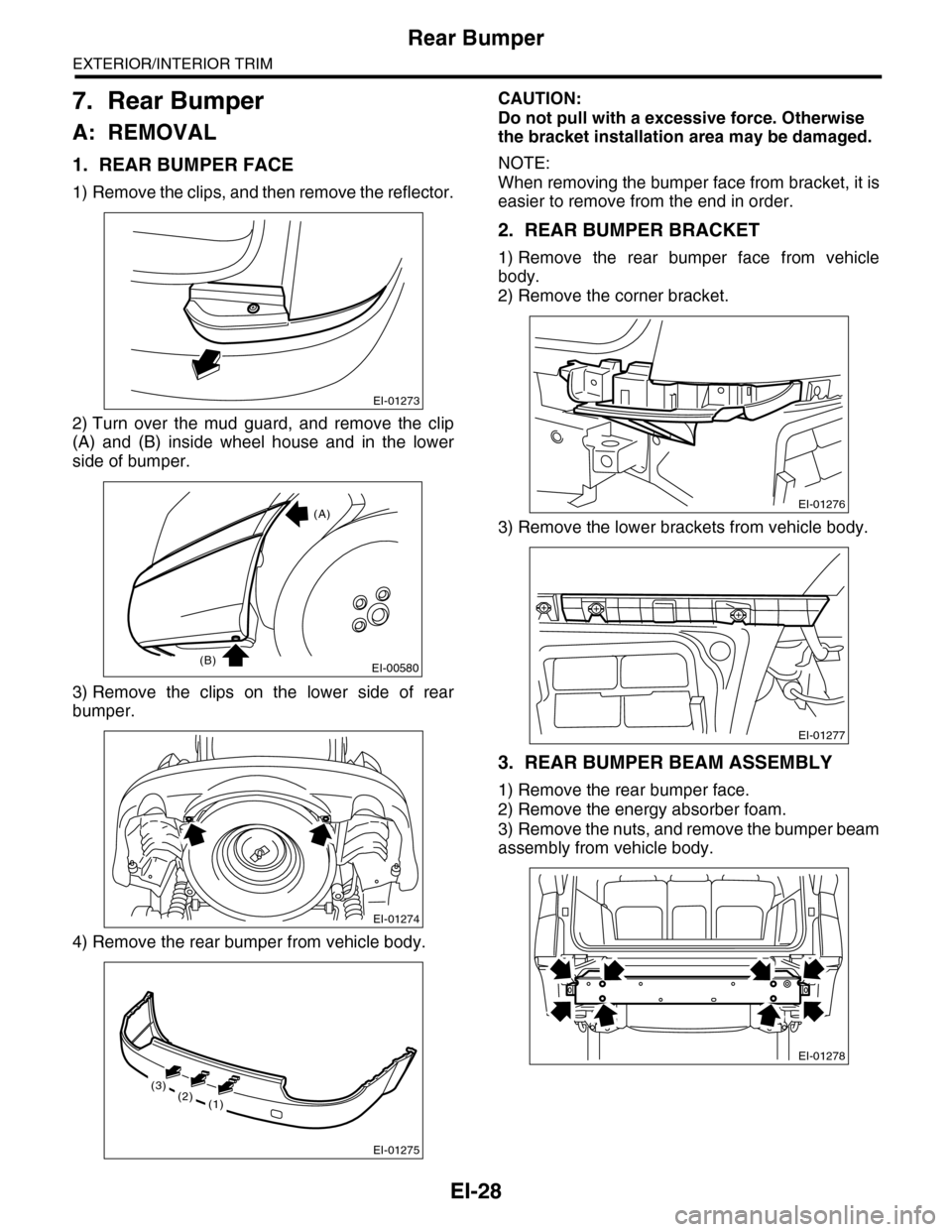
A: REMOVAL
1. REAR BUMPER FACE
1) Remove the clips, and then remove the reflector.
2) Turn over the mud guard, and remove the clip
(A) and (B) inside wheel house and in the lower
side of bumper.
3) Remove the clips on the lower side of rear
bumper.
4) Remove the rear bumper from vehicle body.
CAUTION:
Do not pull with a excessive force. Otherwise
the bracket installation area may be damaged.
NOTE:
When removing the bumper face from bracket, it is
easier to remove from the end in order.
2. REAR BUMPER BRACKET
1) Remove the rear bumper face from vehicle
body.
2) Remove the corner bracket.
3) Remove the lower brackets from vehicle body.
3. REAR BUMPER BEAM ASSEMBLY
1) Remove the rear bumper face.
2) Remove the energy absorber foam.
3) Remove the nuts, and remove the bumper beam
assembly from vehicle body.
EI-01273
EI-00580
(A)
(B)
EI-01274
EI-01275
(2)(3)
(1)
EI-01276
EI-01277
EI-01278
Page 447 of 2453

IDI-8
Combination Meter System
INSTRUMENTATION/DRIVER INFO
5. CHECK VDCCM.
6. CHECK ENGINE CONTROL MODULE (ECM)
Step Check Yes No
1CHECK VEHICLE SPEED SIGNAL.
1) Lift up the vehicle and support it with rigid
racks.
2) Drive the vehicle faster than 10 km/h (6
MPH).
WARNING:Be careful not to get caught in the running
wheels.
3) Measure the voltage between combination
meter connector and chassis ground.
Connector & terminal
(i10) No. 27 (+) — Chassis ground (–):
Is the voltage less than 1 V
←→ 5 V or more?
Replace the meter
case assembly.
Go to step 2.
2CHECK HARNESS BETWEEN VDCCM AND
COMBINATION METER.
1) Turn the ignition switch to OFF.
2) Disconnect the connector from VDCCM
and combination meter.
3) Measure the resistance between VDCCM
harness connector and combination meter har-
ness connector.
Connector & terminal
(B310) No. 33 — (i10) No. 27:
Is the resistance less than 10
Ω?
Check the
VDCCM.
Basic Diagnostic
Procedure.>
Repair the wiring
harness.
Step Check Yes No
1CHECK ECM SIGNAL.
1) Start the engine.
2) Measure the voltage between ECM con-
nector and chassis ground.
Connector & terminal
(B136) No. 11 (+) — Chassis ground (– ):
Is the voltage 0 ←→ 14 V or
more?
Go to step 2.Inspect the ECM.
2, Basic Diagnos-
tic Procedure.>
2CHECK HARNESS BETWEEN COMBINA-
TION METER AND ECM.
1) Turn the ignition switch to OFF.
2) Disconnect the connector from ECM and
combination meter.
3) Measure the resistance between ECM har-
ness connector and combination meter har-
ness connector.
Connector & terminal
(B136) No. 11 — (i10) No. 28:
Is the resistance less than 10
Ω?
Replace the meter
case assembly.
Repair the wiring
harness.
Page 449 of 2453

IDI-10
Combination Meter System
INSTRUMENTATION/DRIVER INFO
8. CHECK ENGINE COOLANT TEMPERATURE SENSOR.
9. COMMUNICATION ERROR DISPLAY
When the following error code is displayed in the
odo/trip meter, inspect the communication circuit
since the communication malfunction is generated
between each control module.
10.DTC DISPLAY MODE
When DTC display mode is operated, {ECM}, {TCM} is displayed repeatedly in this order by pressing the trip
knob. DTC is displayed in the following table according to type of control module, receiving DTC, DTC de-
tected, No DTC. If CAN communication has some trouble, “-----” is displayed.
Step Check Yes No
1CHECK COMMUNICATION ERROR DIS-
PLAY.
1) Turn the ignition switch to ON.
2) Check that the error code is displayed in
odo/trip meter.
Is the error code “Er xx” dis-
played in odo/trip meter?
Check the commu-
nication circuit.
TION ERROR
DISPLAY,
INSPECTION,
Combination
Meter System.>
Go to step 2.
2CHECK ENGINE COOLANT TEMPERATURE
SENSOR.
Check the engine coolant temperature sensor.
Is the engine coolant tempera-
ture sensor OK?
Replace the meter
case assembly.
Replace the
engine coolant
temperature sen-
sor.
IDI00188
Error code Description
Er IUMalfunction in integrated
module
Er ––
Simultaneous malfunction of
high/low speed CAN com-
munication
Er HCHigh speed CAN communi-
cation malfunction
Er LCMalfunction of low-speed
CAN communication
Er EGEGI Communication mal-
function
Er TCTCM Communication mal-
function
Er AbVDCCM communication
malfunction
Er SP
VDCCM DTC information
and vehicle speed pulse
malfunction
Er SSWheel speed data malfunc-
tion
Er bbVa c u u m p u m p s y s t e m m a l -
function
Control module Condition Display
ECM
Receiving DTC Trip “A” + “P (Blink)”
DTC detected Trip “A” + “P xxxx”
No DTC Trip “A” + “P ----”
TCM
Receiving DTC Trip “B” + “P (Blink)”
DTC detected Trip “B” + “P xxxx”
No DTC Trip “B” + “P ----”
When CAN communication error
is occurred—“-----”
Page 472 of 2453

LAN(diag)-16
Subaru Select Monitor
LAN SYSTEM (DIAGNOSTICS)
Immobilizer lamp output ON/OFFBody integrated unit output
valueOn when immobilizer pilot light blinks
Keyless operation 1 Registration/Nor malBody integrated unit input
value
Not supported by North American specifica-
tions
Keyless operation 2 Clear/Nor malBody integrated unit input
value
Not supported by North American specifica-
tions
CC Main Lamp On/Off CAN data input value
Cruise control switch on
Reception from ECM and transmission to
combination meter
CC Set Lamp On/Off CAN data input value
On when cruise control vehicle speed is set
Reception from ECM and transmission to
combination meter
SPORT Lamp On/Off CAN data input value
SPORT mode switch ON
Reception from TCM and transmission to
combination meter
SPORT Blink Blink/Off CAN data input value
TCM error signal reception ON
Reception from TCM and transmission to
combination meter
AT F Te m p e r a t u r e L a m p O n / O f f C A N d a t a i n p u t v a l u e
AT F o i l t e m p e r a t u r e r i s e O N
Reception from TCM and transmission to
combination meter
AT F B l i n k B l i n k / O f f C A N d a t a i n p u t v a l u eNot supported by North American specifica-
tions
Tire diameter abnormal 1 On/Off CAN data input valueNot supported by North American specifica-
tions
Tire diameter abnormal 2 Blink/Off CAN data input value
ON when difference in rotation between
front and rear wheels is 4% or more
Reception from TCM and transmission to
combination meter
SPORT Shift (UP) UP/OFFBody integrated unit input
valueON when shift lever can be operated up
SPORT Shift (DOWN) DOWN/OFFBody integrated unit input
valueON when shift lever can be operated down
SPORT Shift (buzzer 1) ON/OFF CAN data input valueReception from TCM and transmission to
combination meter
SPORT Shift (buzzer 2) ON/OFF CAN data input valueNot supported by North American specifica-
tions
ABS/VDC Judging ABS/VDC CAN data input valueTr a n s m i s s i o n f r o m v e h i c l e d y n a m i c c o n t r o l
(VDC) to high speed control module
ADA Existence Judging Yes/No CAN data input valueNot supported by North American specifica-
tions
Small light SW ON/OFFBody integrated unit input
valueOn when small light is illuminated
Headlight ON/OFFBody integrated unit output
value
Not supported by North American specifica-
tions
Headlight HI ON/OFFBody integrated unit output
value
Not supported by North American specifica-
tions
Tu r n s i g n a l L H O N / O F FBody integrated unit output
value
Not supported by North American specifica-
tions
Tu r n s i g n a l R H O N / O F FBody integrated unit output
value
Not supported by North American specifica-
tions
R defogger SW ON/OFFBody integrated unit output
valueRear defogger switch ON
Australia Judging Flag Australia/OthersBody integrated unit output
valueNorth American specifications have others
Large diameter tires Large diameter/othersBody integrated unit output
valueReception from combination meter
Items to be displayed Unit of measure Description Note
Page 507 of 2453

LAN(diag)-51
Diagnostic Procedure with Diagnostic Trouble Code (DTC)
LAN SYSTEM (DIAGNOSTICS)
2CHECK STEERING ANGLE SENSOR.
1) Disconnect the steering angle sensor con-
nector (B231).
2) Perform the clear memory mode of body
integrated unit.
Select Monitor.>
3) Read DTC of body integrated unit.
Is DTC (B0202) displayed? Go to step 3.Replace the steer-
ing angle sensor.
Steering Angle
Sensor.>
3CHECK YAW RATE SENSOR
1) Disconnect the yaw rate sensor connector
(B359).
2) Perform the clear memory mode of body
integrated unit.
3) Read DTC of body integrated unit.
Is DTC (B0202) displayed? Go to step 4.Replace the yaw
rate sensor.
REMOVAL, Yaw
Rate & Lateral G
Sensor.>
4CHECK THE BODY INTEGRATED UNIT.
1) Disconnect the body integrated unit con-
nector (B280).
2) Read the data between VDC/ABSCM and
ECM.
Check item:
•Engine speed
•Average front wheel speed (value on con-
stant driving)
Engine speed and front wheel
speed are correctly communi-
cated. (Appears same value)
Replace the body
integrated unit.
Unit.>
Go to step 5.
5CHECK HARNESS.
1) Disconnect the body integrated unit con-
nector (B280).
2) Measure the resistance between harness
connector terminals.
Connector & terminal
(B280) No. 20 — No. 30:
Is the resistance between 55
— 65 Ω?
Go to step 11.Go to step 6.
6CHECK HARNESS.
1) Disconnect the body integrated unit con-
nector (B280).
2) Measure the resistance between harness
connector terminals.
Connector & terminal
(B280) No. 20 — No. 30:
Is the resistance between 115
— 125 Ω?
Go to step 8.Go to step 7.
7CHECK HARNESS.
1) Disconnect the harness connector of body
integrated unit.
2) Measure the resistance between harness
connector terminals.
Connector & terminal
(B280) No. 20 — No. 30:
Is the resistance more than 30
MΩ?
Open circuit in
related line of body
integrated unit.
Repair the open
circuit of harness
or replace har-
ness.
Go to step 8.
8CHECK HARNESS.
1) Disconnect the VDC CM (B310) connector.
2) Measure the resistance between harness
connector terminals.
Connector & terminal
(B310) No. 13 — No. 29:
Is the resistance between 115
— 125 Ω?
Go to step 9.Go to step 10.
9CHECK VDC CM.
1) Disconnect the VDC CM (B310) connector.
2) Measure the resistance between VDC CM
terminals.
Connector & terminal
(B310) No. 20 — No. 34:
Is the resistance between 115
— 125 Ω?
Go to step 10.Open circuit in end
resistance of VDC
CM. Replace the
VDC CM.
trol Module &
Hydraulic Control
Unit (VDCCM&H/
U).>
Step Check Yes No
Page 543 of 2453

LI-10
Combination Base Switch Assembly
LIGHTING SYSTEM
9. Combination Base Switch
Assembly
A: REMOVAL
1) Remove the driver’s airbag module.
2) Remove the steering wheel.
3) Remove the screws and remove the steering
column lower cover.
4) Remove the combination switch.
5) Remove the four screws and remove the roll
connector.
6) Remove the three screws.
7) Disconnect the connector and remove the com-
bination base switch assembly.
B: INSTALLATION
1) Install in the reverse order of removal.
2) Before installing steering wheel, be sure to ad-
just the direction of roll connector with steering.
C: INSPECTION
1. COMBINATION BASE SWITCH ASSEM-
BLY
Inspect the combination base switch assembly and
roll connector for cracks or deformation. If any
damage is found, replace with a new part.
2. PARKING SWITCH
Measure the resistance between parking switch
terminals.
SL-00258
LI-00271
Switch position Terminal No. Standard
OFF 2 and 4 Less than 1 Ω
ON 1 and 4 Less than 1 Ω
LI-00183
1234