2008 INFINITI FX35 hood open
[x] Cancel search: hood openPage 909 of 3924
![INFINITI FX35 2008 Service Manual
VEHICLE SECURITY (THEFT WARNING) SYSTEMBL-175
< SERVICE INFORMATION >
C
DE
F
G H
J
K L
M A
B
BL
N
O PACTIVE TEST
Monitored Item Description
IGN ON SW Indicates [ON/OFF] condition of ignition switch.](/manual-img/42/57017/w960_57017-908.png "INFINITI FX35 2008 Service Manual
VEHICLE SECURITY (THEFT WARNING) SYSTEMBL-175
< SERVICE INFORMATION >
C
DE
F
G H
J
K L
M A
B
BL
N
O PACTIVE TEST
Monitored Item Description
IGN ON SW Indicates [ON/OFF] condition of ignition switch.")
VEHICLE SECURITY (THEFT WARNING) SYSTEMBL-175
< SERVICE INFORMATION >
C
DE
F
G H
J
K L
M A
B
BL
N
O PACTIVE TEST
Monitored Item Description
IGN ON SW Indicates [ON/OFF] condition of ignition switch.
ACC ON SW Indicates [ON/OFF] condition of ignition switch in ACC position.
KEY ON SW Indicates [ON/OFF] condition of key switch.
TRUNK OPNR SW This is displayed ev en when it is not equipped.
TRUNK CYL SW This is displayed ev en when it is not equipped.
TRUNK OPN MNTR This is displayed even when it is not equipped.
KEYLESS LOCK Indicates [ON/OFF] conditio n of lock signal from key fob.
KEYLESS UNLOCK Indicates [ON/O FF] condition of unlock signal from key fob.
KEYLESS TRUNK Indicates [ON/OFF] condition of trunk opener signal from key fob.
HOOD SW Indicates [ON/OFF] condition of hood switch.
DOOR SW-DR Indicates [ON/OFF] cond ition of front door switch LH.
DOOR SW-AS Indicates [ON/OFF] condition of front door switch RH.
DOOR SW-RR Indicates [ON/OFF] condition of rear door switch RH.
DOOR SW-RL Indicates [ON/OFF] condition of rear door switch LH.
BACK DOOR SW Indicates [ON/OFF] condition of back door switch.
KEY CYL LK SW Indicates [ON/OFF] condition of lock signal from key cylinder switch.
KEY CYL UN SW Indicates [ON/OFF] condition of unlock signal from key cylinder switch.
CDL LOCK SW Indicates [ON/OFF] condition of lock signal from door lock/unlock switch LH and RH.
CDL UNLOCK SW Indicates [ON/OFF] condition of unlock signal from door lock/unlock switch LH and RH.
Test Item Description
THEFT IND This test is able to check security indicator lamp operation. The lamp will be turned on when “ON”
on CONSULT-III screen is touched.
ANTI THEFT HORN This test is able to check vehicle security horn operation. The horns will be activated for 0.5 sec-
onds after “ON” on CONSULT-III screen is touched.
HEADLAMP(HI) This test is able to check vehicle security lamp operation. The headlamps will be activated for 0.5
seconds after “ON” on CONSULT-III screen is touched.
3AA93ABC3ACD3AC03ACA3AC03AC63AC53A913A773A893A873A873A8E3A773A983AC73AC93AC03AC3
3A893A873A873A8F3A773A9D3AAF3A8A3A8C3A863A9D3AAF3A8B3A8C
Page 912 of 3924

BL-178
< SERVICE INFORMATION >
VEHICLE SECURITY (THEFT WARNING) SYSTEM
*1: Make sure the system is in the armed phase.
Diagnosis Procedure 1INFOID:0000000001327916
1 – 1 CHECK DOOR SWITCH
First perform the “SELF-DIAG RESU LTS” in “BCM” with CONSULT-III, when pe rform the each trouble
diagnosis. Refer to BCS-13, "
U1000 CAN Communication Circuit".
1.CHECK DOOR SWITCH INPUT SIGNAL
With CONSULT-III
Check (“DOOR SW-DR”, “DOOR SW-AS”, “DOOR SW-RR” and “DOOR SW-RL”) in “DATA MONITOR” mode
with CONSULT-III.
Without CONSULT-III
Check voltage between BCM connector M3, B14 terminals and ground.
2 *1 Vehicle security
system does not
alarm when ···· Any door is opened.
Diagnostic Procedure 1 (Check door, hood and back door switch)
BL-178If the above systems are “OK”, replace BCM.BCS-13
3Vehicle security
alarm does not ac-
tivate. Horn alarm
Diagnostic Procedure 4 (Check vehicle security horn alarm)
BL-183
Check horn function. BL-72
If the above systems are “OK”, replace BCM.BCS-13
Head lamp alarmDiagnostic Procedure 5 (Check head lamp alarm)
BL-183If the above systems are “OK”, replace BCM.BCS-13
4Vehicle security
system cannot be
canceled by ···· Door outside key
Diagnostic Procedure 3 (Check door key cylinder switch)
BL-183
If the above systems are “OK”, check power window main switch. EI-36
Key fobCheck remote keyless entry function.
BL-50If the above systems are “OK”, replace BCM.BCS-13
Intelligent KeyCheck Intelligent Key
BL-78If the above systems are “OK”, replace BCM.BCS-13
Procedure
Diagnostic procedure Refer to page
Symptom
Monitor item Condition
DOOR SW-DR OPEN : ON
CLOSE : OFF
DOOR SW-AS OPEN : ON
CLOSE : OFF
DOOR SW-RR OPEN : ON
CLOSE : OFF
DOOR SW-RL OPEN : ON
CLOSE : OFF
Item Terminals (Wire color)
ConditionVoltage (V)
(Approx.)
(+) (–)
PIIA6223E
3AA93ABC3ACD3AC03ACA3AC03AC63AC53A913A773A893A873A873A8E3A773A983AC73AC93AC03AC3
3A893A873A873A8F3A773A9D3AAF3A8A3A8C3A863A9D3AAF3A8B3A8C
Page 913 of 3924

VEHICLE SECURITY (THEFT WARNING) SYSTEMBL-179
< SERVICE INFORMATION >
C
DE
F
G H
J
K L
M A
B
BL
N
O P
OK or NG
OK >> Door switch circuit is OK, and go to “1 – 2 HOOD SWITCH CHECK”.
NG >> GO TO 2.
2.CHECK HARNESS CONTINUITY
1. Turn ignition switch OFF.
2. Disconnect BCM and door switches connector.
3. Check continuity between BCM connector B14 terminals 62, 63 and door switch connector B26, B46 terminal 1, and ground.
4. Check continuity between BCM connector M3 terminals 12, 13 and door switch connector B36, B206 terminal 1, and ground.
OK or NG
OK >> GO TO 3.
NG >> Repair or replace harness.
3.CHECK DOOR SWITCH
Check continuity between each door switch terminal 1 and ground
part of door switch.
OK or NG
OK >> GO TO 4.
NG >> Replace malfunctioning door switch.
Front door switch
driver side 62 (W)
Ground OPEN 0
CLOSE Battery voltage
Front door switch
passenger side 12 (P/B) OPEN 0
CLOSE Battery voltage
Rear door switch
LH 63 (P) OPEN 0
CLOSE Battery voltage
Rear door switch
RH 13 (P/L) OPEN 0
CLOSE Battery voltage
BCM – Front door switch (driver side)
62 (W) – 1 (W) : Conti nuity should exist.
BCM – Rear door switch LH
63 (P) – 1 (P) : Conti nuity should exist.
BCM – Ground
62 (W) – Ground : Continui ty should not exist.
63 (P) – Ground : Continuity should not exist.
PIIA6225E
BCM – Front door switch (passenger side)
12 (P/B) – 1 (SB) : Cont inuity should exist.
BCM – Rear door switch RH
13 (P/L) – 1 (P) : Cont inuity should exist.
BCM – Ground
12 (P/B) – Ground : Conti nuity should not exist.
13 (P/L) – Ground : Continuity should not exist.
PIIA6224E
Terminal Condition Continuity
1 Ground part of
door switch Pushed No
Released Yes
PIIA3351E
3AA93ABC3ACD3AC03ACA3AC03AC63AC53A913A773A893A873A873A8E3A773A983AC73AC93AC03AC3
3A893A873A873A8F3A773A9D3AAF3A8A3A8C3A863A9D3AAF3A8B3A8C
Page 914 of 3924
BL-180
< SERVICE INFORMATION >
VEHICLE SECURITY (THEFT WARNING) SYSTEM
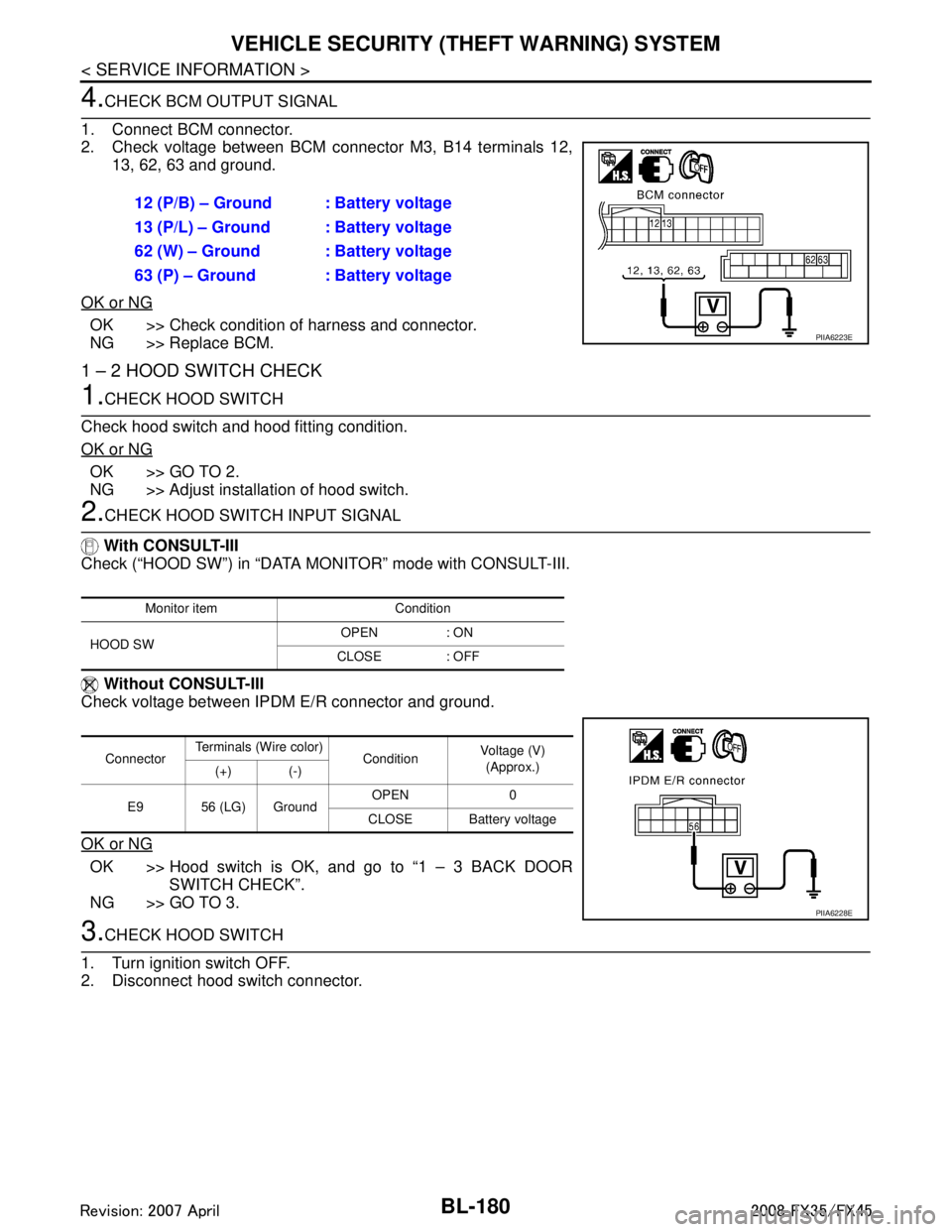
4.CHECK BCM OUTPUT SIGNAL
1. Connect BCM connector.
2. Check voltage between BCM connector M3, B14 terminals 12, 13, 62, 63 and ground.
OK or NG
OK >> Check condition of harness and connector.
NG >> Replace BCM.
1 – 2 HOOD SWITCH CHECK
1.CHECK HOOD SWITCH
Check hood switch and hood fitting condition.
OK or NG
OK >> GO TO 2.
NG >> Adjust installation of hood switch.
2.CHECK HOOD SWITCH INPUT SIGNAL
With CONSULT-III
Check (“HOOD SW”) in “DATA MONITOR” mode with CONSULT-III.
Without CONSULT-III
Check voltage between IPDM E/R connector and ground.
OK or NG
OK >> Hood switch is OK, and go to “1 – 3 BACK DOOR SWITCH CHECK”.
NG >> GO TO 3.
3.CHECK HOOD SWITCH
1. Turn ignition switch OFF.
2. Disconnect hood switch connector. 12 (P/B) – Ground : Battery voltage
13 (P/L) – Ground : Battery voltage
62 (W) – Ground : Battery voltage
63 (P) – Ground : Battery voltage
PIIA6223E
Monitor item Condition
HOOD SW OPEN : ON
CLOSE : OFF
Connector Terminals (Wire color)
ConditionVoltage (V)
(Approx.)
(+) (-)
E9 56 (LG) Ground OPEN 0
CLOSE Battery voltage
PIIA6228E
3AA93ABC3ACD3AC03ACA3AC03AC63AC53A913A773A893A873A873A8E3A773A983AC73AC93AC03AC3
3A893A873A873A8F3A773A9D3AAF3A8A3A8C3A863A9D3AAF3A8B3A8C
Page 915 of 3924

VEHICLE SECURITY (THEFT WARNING) SYSTEMBL-181
< SERVICE INFORMATION >
C
DE
F
G H
J
K L
M A
B
BL
N
O P
3. Check continuity between hood switch terminals 1 and 2.
OK or NG
OK >> GO TO 4.
NG >> Replace hood switch.
4.CHECK IPDM E/R OUTPUT SIGNAL
Check voltage between IPDM E/R connector and ground.
OK or NG
OK >> Check the following. Hood switch ground circuit.
Harness for open or short between hood switch andIPDM E/R.
NG >> Replace IPDM E/R
1 – 3 BACK DOOR SWITCH CHECK
1.CHECK BACK DOOR SWITCH INPUT SIGNAL
With CONSULT-III
Check (“BACK DOOR SW”) in “DATA MONITOR” mode with CONSULT-III.
Without CONSULT-III
Check voltage between BCM connector and ground.
OK or NG
OK >> Back door switch circuit is OK.
NG >> GO TO 2.
2.CHECK HARNESS CONTINUITY
1. Turn ignition switch OFF.
2. Disconnect BCM and back door closure motor connector.
Terminals Condition Continuity
1 2 Pressed No
Released Yes
PIIA2498E
56 (LG) – Ground : Battery voltage
PIIA6228E
Monitor item Condition
BACK DOOR SW OPEN : ON
CLOSE : OFF
Connector Terminals (Wire color)
ConditionVoltage (V)
(Approx.)
(+) (–)
B14 58 (L) Ground OPEN 0
CLOSE 9
PIIA6229E
3AA93ABC3ACD3AC03ACA3AC03AC63AC53A913A773A893A873A873A8E3A773A983AC73AC93AC03AC3
3A893A873A873A8F3A773A9D3AAF3A8A3A8C3A863A9D3AAF3A8B3A8C
Page 1320 of 3924
![INFINITI FX35 2008 Service Manual
EC-80
< SERVICE INFORMATION >[VQ35DE]
BASIC SERVICE PROCEDURE
BASIC SERVICE PROCEDURE
Basic InspectionINFOID:0000000001325919
1.INSPECTION START
1. Check service records for any recent repairs that m](/manual-img/42/57017/w960_57017-1319.png "INFINITI FX35 2008 Service Manual
EC-80
< SERVICE INFORMATION >[VQ35DE]
BASIC SERVICE PROCEDURE
BASIC SERVICE PROCEDURE
Basic InspectionINFOID:0000000001325919
1.INSPECTION START
1. Check service records for any recent repairs that m")
EC-80
< SERVICE INFORMATION >[VQ35DE]
BASIC SERVICE PROCEDURE
BASIC SERVICE PROCEDURE
Basic InspectionINFOID:0000000001325919
1.INSPECTION START
1. Check service records for any recent repairs that ma y indicate a related malfunction, or a current need for
scheduled maintenance.
2. Open engine hood and check the following:
- Harness connectors for improper connections
- Wiring harness for improper connections, pinches and cut
- Vacuum hoses for splits, kinks and improper connections
- Hoses and ducts for leaks
- Air cleaner clogging
- Gasket
3. Confirm that electrical or mechanical loads are not applied.
- Headlamp switch is OFF.
- Air conditioner switch is OFF.
- Rear window defogger switch is OFF.
- Steering wheel is in the straight-ahead position, etc.
4. Start engine and warm it up until engine coolant temperature indicator points the middle of gauge.
Ensure engine stays below 1,000 rpm.
5. Run engine at about 2,000 rpm for about 2 minutes under no load.
6. Make sure that no DTC is displayed with CONSULT-III or GST.
OK or NG
OK >> GO TO 3.
NG >> GO TO 2.
2.REPAIR OR REPLACE
Repair or replace components as necessary according to corresponding Diagnostic Procedure.
>> GO TO 3.
3.CHECK TARGET IDLE SPEED
With CONSULT-III
1. Run engine at about 2,000 rpm for about 2 minutes under no-load.
SEF983U
SEF976U
SEF977U
3AA93ABC3ACD3AC03ACA3AC03AC63AC53A913A773A893A873A873A8E3A773A983AC73AC93AC03AC3
3A893A873A873A8F3A773A9D3AAF3A8A3A8C3A863A9D3AAF3A8B3A8C
Page 1367 of 3924
![INFINITI FX35 2008 Service Manual
TROUBLE DIAGNOSISEC-127
< SERVICE INFORMATION > [VQ35DE]
C
D
E
F
G H
I
J
K L
M A
EC
NP
O
2. Connect GST to data link connector, which is located under LH
dash panel near the hood opener handle.
3. Tu](/manual-img/42/57017/w960_57017-1366.png "INFINITI FX35 2008 Service Manual
TROUBLE DIAGNOSISEC-127
< SERVICE INFORMATION > [VQ35DE]
C
D
E
F
G H
I
J
K L
M A
EC
NP
O
2. Connect GST to data link connector, which is located under LH
dash panel near the hood opener handle.
3. Tu")
TROUBLE DIAGNOSISEC-127
< SERVICE INFORMATION > [VQ35DE]
C
D
E
F
G H
I
J
K L
M A
EC
NP
O
2. Connect GST to data link connector, which is located under LH
dash panel near the hood opener handle.
3. Turn ignition switch ON.
4. Enter the program according to instruction on the screen or in the operation manual.
(*: Regarding GST screens in this section, sample screens are
shown.)
5. Perform each diagnostic mode according to each service proce- dure.
For further information, see th e GST Operation Manual of
the tool maker.
CONSULT-III Reference Val ue in Data Monitor ModeINFOID:0000000001325938
Remarks:
● Specification data are reference values.
● Specification data are output/input values which ar e detected or supplied by the ECM at the connector.
* Specification data may not be directly relat ed to their components signals/values/operations.
i.e. Adjust ignition timing with a timi ng light before monitoring IGN TIMING, because the monitor may show the specification data in spite of the
ignition timing not being adjusted to the s pecification data. This IGN TIMING monitors the data calculated by the ECM according to the signals
input from the camshaft position sensor an d other ignition timing related sensors.
PBIB1570E
SEF398S
SEF416S
MONITOR ITEM CONDITION SPECIFICATION
ENG SPEED Run engine and compare CONSULT-III value with the tachometer indica-
tion. Almost the same speed as the
tachometer indication.
MAS A/F SE-B1 See EC-131
.
B/FUEL SCHDL See EC-131
.
A/F ALPHA-B1
A/F ALPHA-B2 See
EC-131
.
COOLAN TEMP/S Engine: After warming up More than 70 °C (158 °F)
A/F SEN1 (B1)
A/F SEN1 (B2) Engine: After warming up Maintaining engine speed at 2,000 rpm Fluctuates around 1.5 V
3AA93ABC3ACD3AC03ACA3AC03AC63AC53A913A773A893A873A873A8E3A773A983AC73AC93AC03AC3
3A893A873A873A8F3A773A9D3AAF3A8A3A8C3A863A9D3AAF3A8B3A8C
Page 1486 of 3924
![INFINITI FX35 2008 Service Manual
EC-246
< SERVICE INFORMATION >[VQ35DE]
DTC P0137, P0157 HO2S2
1. Turn ignition switch ON and select “DATA MONITOR” mode with CONSULT-III.
2. Start engine and warm it up to the normal operating te](/manual-img/42/57017/w960_57017-1485.png "INFINITI FX35 2008 Service Manual
EC-246
< SERVICE INFORMATION >[VQ35DE]
DTC P0137, P0157 HO2S2
1. Turn ignition switch ON and select “DATA MONITOR” mode with CONSULT-III.
2. Start engine and warm it up to the normal operating te")
EC-246
< SERVICE INFORMATION >[VQ35DE]
DTC P0137, P0157 HO2S2
1. Turn ignition switch ON and select “DATA MONITOR” mode with CONSULT-III.
2. Start engine and warm it up to the normal operating temperature.
3. Turn ignition switch OFF and wait at least 10 seconds.
4. Start engine and keep the engine speed between 3,500 and 4,000 rpm for at least 1 minute under no load.
5. Let engine idle for 1 minute.
6. Make sure that “COOLAN TEMP/S” indicates more than 70
°C (158 °F).
If not, warm up engine and go to next step when “C OOLAN TEMP/S” indication reaches to 70°C (158 °F).
7. Open engine hood.
8. Select “HO2S2 (B1) P1147” (for DTC P0137) or “HO2S2 (B2) P1167” (for DTC P0157) of “HO2S2” in
“DTC WORK SUPPORT” mode with CONSULT-III.
9. Start engine and following the instruction of CONSULT-III. NOTE:
It will take at most 10 minutes until “COMPLETED” is displayed.
10. Make sure that “OK” is display ed after touching “SELF-DIAG RESULTS”.
If “NG” is displayed, refer to EC-250, "
Diagnosis Procedure".
If “CAN NOT BE DIAG NOSED” is displayed, perform the following.
a. Turn ignition switch OFF and leave the vehi cle in a cool place (soak the vehicle).
b. Return to step 1.
Overall Function CheckINFOID:0000000001326078
Use this procedure to check the overall function of the heated oxygen sensor 2 circuit. During this check, a 1st
trip DTC might not be confirmed.
WITH GST
1. Start engine and warm it up to the normal operating temperature.
2. Turn ignition switch OFF and wait at least 10 seconds.
3. Start engine and keep the engine speed between 3,500 and 4,000 rpm for at least 1 minute under no load.
4. Let engine idle for 1 minute.
5. Set voltmeter probes between ECM terminal 74 [HO2S2 (B1) signal] or 55\
[HO2S2 (B2) signal] and ground.
6. Check the voltage when revving up to 4,000 rpm under no load at least 10 times.
(Depress and release accelerator pedal as soon as possible.)
The voltage should be above 0. 68V at least once during this
procedure.
If the voltage can be confirmed in step 6, step 7 is not nec-
essary.
7. Keep vehicle at idling for 10 minutes, then check the voltage. Or check the voltage when coasting from 80 km/h (50 MPH) in D
position.
The voltage should be above 0. 68V at least once during this
procedure.
8. If NG, go to EC-250, "
Diagnosis Procedure".
PBIB1607E
3AA93ABC3ACD3AC03ACA3AC03AC63AC53A913A773A893A873A873A8E3A773A983AC73AC93AC03AC3
3A893A873A873A8F3A773A9D3AAF3A8A3A8C3A863A9D3AAF3A8B3A8C