2008 AUDI TT ROADSTER lock
[x] Cancel search: lockPage 71 of 316
Clear vision
Lights
Switching the headlights on and off ·'t!-·
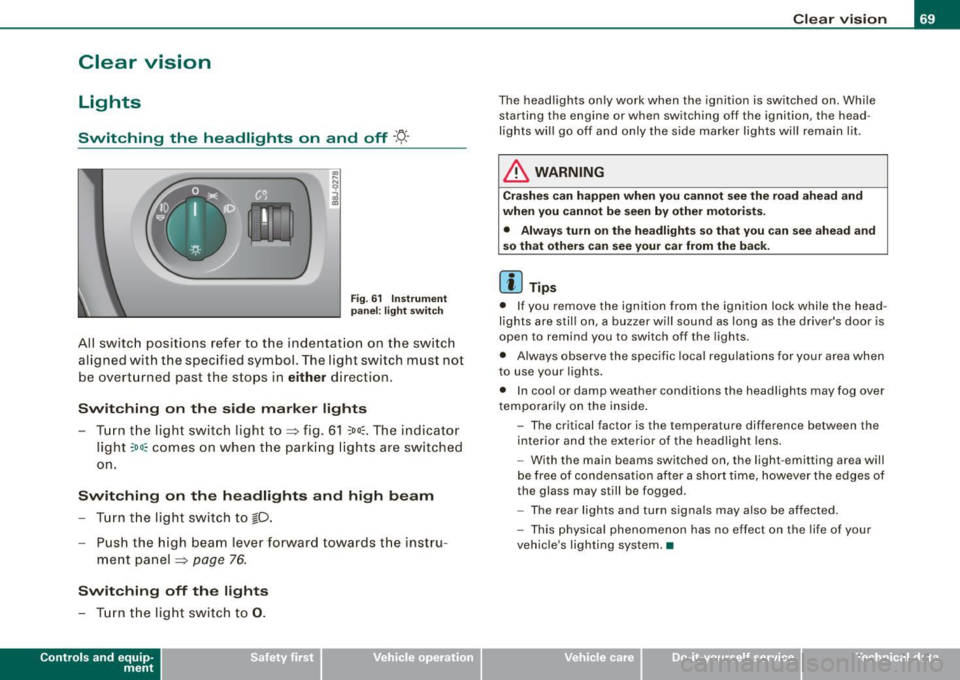
Fig. 6 1 Ins trum ent
p ane l: lig ht sw itch
All sw itc h positions refer to the indentat ion on the switch
aligned with the specified symbol. The light switch must not
be overturned past the stops in
either direction .
Switching on the side marker lights
-Tur n t he light switch ligh t to ==> fig. 61 ;oo; . The indi ca tor
light
; oo ~ comes o n when t he park ing lig hts are sw itched
on .
Switching on the headlights and high beam
- Turn t he light switch to lD.
- Push the high beam leve r fo rward towards t he instru -
ment panel ==> page
76.
Switching off the lights
-Tur n t he lig ht switch to 0 .
Con tro ls and eq uip
ment
Clear vision
The headlights only work when the ignition is switched on . While
starting the engine or when switching off the ignition, the head
lights will go off and only the side marker lights will remain lit .
& WARNING
Crashe s can happen when you cannot see the road ahead and
when you c annot be seen by other motori sts.
• Always tu rn on the headlight s so th at you can see ahead and
so that others can see your ca r from the ba ck.
[ i ] Tips
• I f you remove the ignition from the ignition lock wh ile the head
lights are still on, a buzzer will sound as long as the driver's doo r is
open to remind you to switch off the lights .
• Always observe the spec ific local regulations for your area when
to use your lights .
• I n coo l or damp weather conditions the headlights may fog over
tempo ra rily on the inside .
- The critical factor is the t emperature diff erence between the
interior and the ex te rior of the headlight lens .
- With the main beams switched on, the light -emitting area will
be free o f condensation after a short time, however the edges of
the glass may still be fogged .
- The rear lights and turn signa ls may also be affected.
- This physical phenomenon has no effect on the life of your
vehicle 's lighting system. •
Vehicle care I I irechnical data
Page 72 of 316

Clear vision
Ap plies to vehicles: with light senso r package
Sensor activated head and tail light control
In the "AU TO" position light sensors swit ch the he ad and
t a il lights on and off.
F ig . 62 Instru ment
pan el: light switch in
AUTO po siti on
T he se nsor-activated low beams have the same c haracteris
t ics as the headlig hts=>
page 69.
Activating
- Tur n th e lig ht s witch => fig. 62 t o p ositi on AUTO.
Deactivating
- Turn t he light swi tch to position 0 .
In the switch position AUTO the automatic head -and taillight
control
i s activated . The correspo nding symbol on the light swi tch
is lit .
With automatic head lights, the high -beam function is also avai lab le,
bu t with one restrict io n: If you have not switched the h ig h beams
back to low beams during automatic headlight operation (for
example, afte r driving through a tun nel), on ly the low beams come
on the next time automatic headlights are switched on. To use the
h igh beams, you first have to pull the high beam lever back and then
push the lever forward again. Parking
lights, headlights, fog lights and the rear fog light can be
swi tch ed on manually using the ligh t switch ~
page 69.
Light sensors located in the inside mirror housing and stem
constantly check the light conditions surrounding the vehicle. If
am bie nt brightness falls below a facto ry set value (e.g. wh en driv ing
into a tunnel), the head -and tai llights inc luding the license p late
ill um inat ion are automatica lly t urn ed on. When ambient br ightness
increases again, the external lights are turned off again~&.
Light sens or malfunction
If there is a light sensor malfunct ion, the symbol comes on in the
display . For sa fety reasons, the low beams are turned on perma
nent ly with the switch in
AUTO . However, you can continue to turn
the lights on and o ff using the light swi tch . Have the light sensor
checked as soon as possible at a dealership .
& WARNING
• Automatic head- and taillight control is only intended to ass ist
the driver . This feature doe s not relieve the dr iver of hi s re spon si
bil ity to check the headlights and to turn them on manually
ac cording to the current light and vi sibility conditions. For
e x ample , fog and rain cannot be detected by the light sensors .
Con sequently , always switch the headlights
io on under thes e
weather conditions and when driving
in the dark .
• Crashe s can happen when you cannot see the road ahead and
when you cannot be seen by other motor ists .
• Alway s turn on the headlights so that you can see ahead and
so that others can see your car from the ba ck .
[ i ] Tips
• I n the AUTO mode, the low beams are turned off when the igni
t ion is turned o ff. The remaining lights are turned o ff when the key
is taken out of the ignition lock. _.,
Page 76 of 316

Clear vision
Coming home situation
In
darkness, the activated system will turn on the headlights, side
marker lights , rear side marker lights , tail lights, and rear license
plate light as soon as the driver's door is opened from inside.
As long as one of the doors or the rear lid remains open, the set of
external lights will keep burning for about four minutes maximum.
To provide light for departure, the set of vehicle lights will keep
burning for about another 30 seconds after all doors and the rear lid
have been closed.
The factory-set time of 30 seconds until the lights are switched off can be adjusted if you prefer a longer or shorter duration. Have the
adjustment done by your authorized Audi dealer or a qualified work
shop. The system can be adjusted to keep the lights burning for a
maximum of 60 seconds.
Leaving home situation
As soon as the vehicle is unlocked by pressing the
ti button on your
remot e control, the set of external l ights is switched on .
The external lights are switched off as soon as the driver's door is
opened from outside . Even if you had the system readjusted to keep
the lights burning for an extended time for coming home, the
external lights will be turned off if you do not open the driver's door
within 60 seconds after unlocking. See chapter "Opening and
Closing" in your Owner's Manual. If the lights are switched off
before you reach the driver's door, press the
a button once more to
turn them on again.
[ i] Tips
• Do not attach any stickers to the windshield in front of the two
light sensors, as this would interfere with both the automatic oper
ation of the headlights and the automatic dimming of the inside
mirror(s). • If
the vehicle is remotely unlocked and locked three times in
succession, leaving home will not turn on the lights a fourth time to
safeguard the battery and lights.
• If you wish to use the coming home/leaving home function regu
larly, you can leave it activated at all times without risking perma
nent strain on the electrical system. As the system is controlled by
light sensors, it will only be energized in darkness .
• Frequent use of the coming home/leaving home function for
approaching and departing a vehicle parked in the dark will strain
the battery. This applies particularly if only short distances are
driven between stops . Occasionally drive longer distances to make
sure the battery is recharged sufficiently.
• If the fog lights have been switched on by the coming
home/leaving home function, they will always be switched off when
you switch on the ignition. •
Instrument panel illumination
The illumination of the instruments, displays and the
center console can be adjusted.
Fig. 67 Instrument
panel illumination
You regulate the brightness of the instruments with the left
thumbwheel
C J=> fig. 67. ~
Page 79 of 316
Interior lights
Interior lights
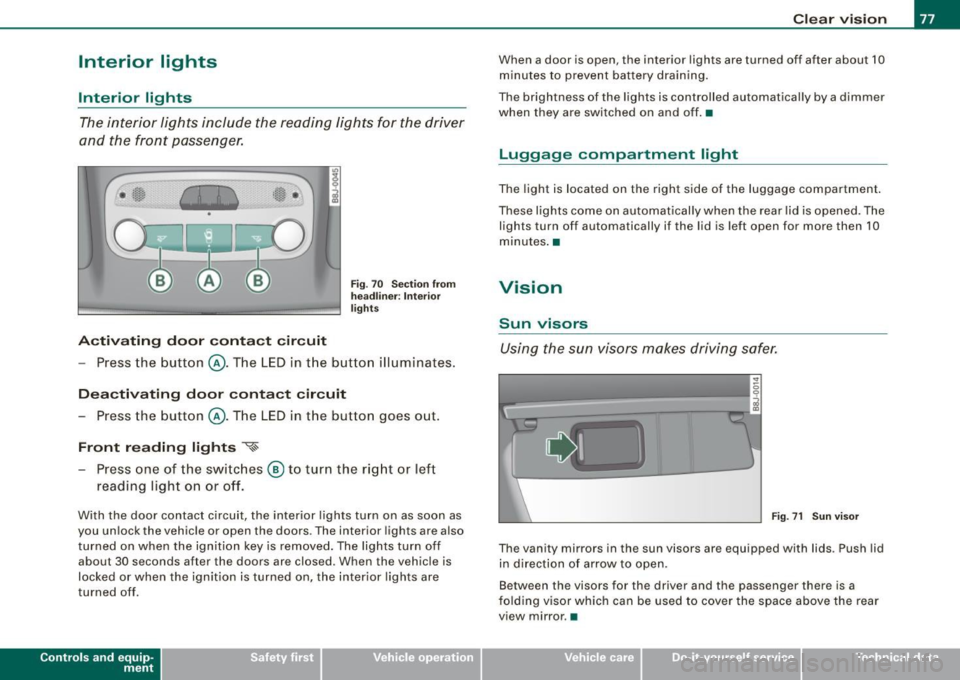
The interior lights include the reading lights for the driver
and the front passenger.
Activating door contact circuit
Fig. 70 Section from
headliner: Interior
lights
- Press the button @. The LED in the button illuminates.
Deactivating door contact circuit
- Press the button @. The LED in the button goes out.
Front reading lights ~
- Press one of the switches @ to turn the right or left
reading light on or off.
With the door contact circuit, the interior lights turn on as soon as
you unlock the vehicle or open the doors. The interior lights are also
turned on when the ignition key is removed. The lights turn off
about 30 seconds after the doors are closed. When the vehicle is
locked or when the ignition is turned on, the interior lights are
turned off .
Contro ls and eq uip
ment
Clear vision
When a door is open, the interior lights are turned off after about 10
minutes to prevent battery draining.
The brightness of the lights is controlled automatically by a dimmer
when they are switched on and off. •
Luggage compa rtm ent light
The light is located on the right side of the luggage compartment.
These lights come on automatically when the rear lid is opened. The
lights turn off automatically if the lid is left open for more then 10
minutes. •
Vision
Sun visors
Using the sun visors makes driving safer.
•
Fig. 71 Sun visor
The vanity mirrors in the sun visors are equipped with lids . Push lid
in direction of arrow to open.
Between the visors for the driver and the passenger there is a
folding visor which can be used to cover the space above the rear
view mirror .•
Vehicle care I I irechnical data
Page 95 of 316
Luggage compartment
Applies to vehicles: with pass-through and removable ski bag
Pass-through with Ski Bag
Using the pass-through and the removable ski bag, you
can transport long objects (e.g. skis) neatly and without
damaging the interior.
Loading
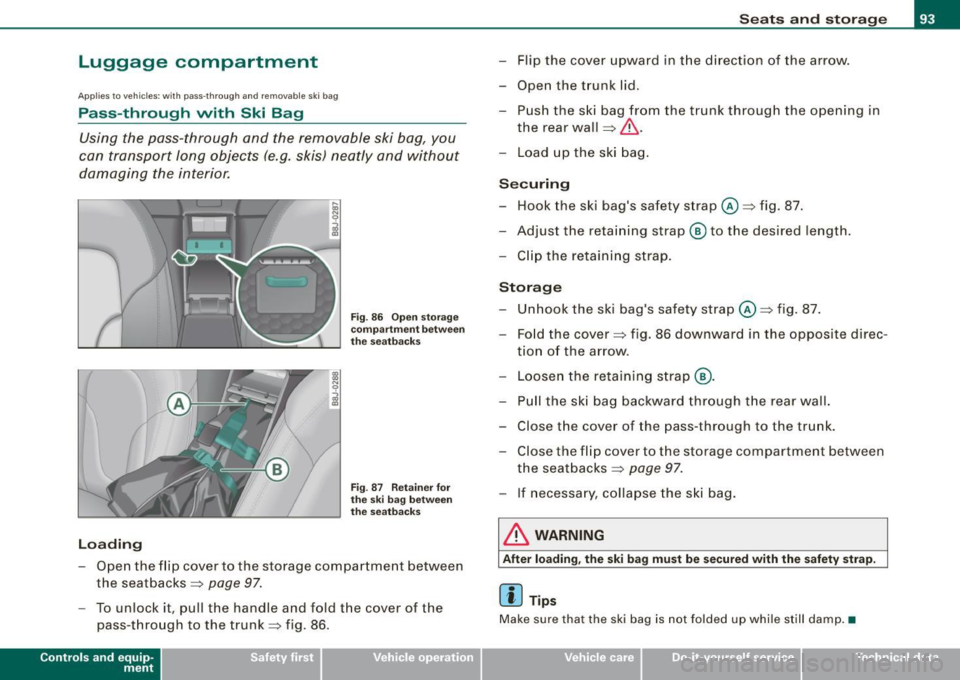
Fig . 86 Open storage
compartment between
the seatbacks
Fig . 87 Retainer for
the ski bag between
the seatbacks
-Open the flip cover to the storage compartment between
the seatbacks => page
97.
-To unlock it, pull the handle and fold the cover of the
pass -through to the trunk=> fig. 86.
Contro ls and eq uip
ment
Seats and storage
- Flip the cover upward in the direction of the arrow.
- Open the trunk lid.
- Push the ski bag from the trunk through the opening in
the rear wall
=> &, .
- Load up the ski bag.
Securing
Hook the ski bag's safety strap @=>fig. 87.
Adjust the retaining strap® to the desired length.
- Clip the retaining strap.
Storage
- Unhook the ski bag's safety strap@=> fig. 87.
- Fold the cover => fig. 86 downward in the opposite direc-
tion of the arrow .
- Loosen the retaining strap @.
Pull the ski bag backward through the rear wall.
- Close the cover of the pass-through to the trunk.
- Close the flip cover to the storage compartment between
the seatbacks => page
97.
- If necessary , collapse the ski bag.
& WARNING
After loading, the ski bag must be secured w ith the safety strap.
[ i] Tips
Mak e sure that the ski bag is not folded up while still damp. •
Vehicle care
I I irechnical data
Page 98 of 316
Seats and storage
& WARNING (continued)
when accelerating or when applying the brakes or when driving
around a corner.
• When you are driving make sure that anything you may have
placed in the center console or other storage locations cannot fall
out into the footwells . In case of sudden braking you would not be
able to brake, depress the clutch or accelerate. •
Glove compartment
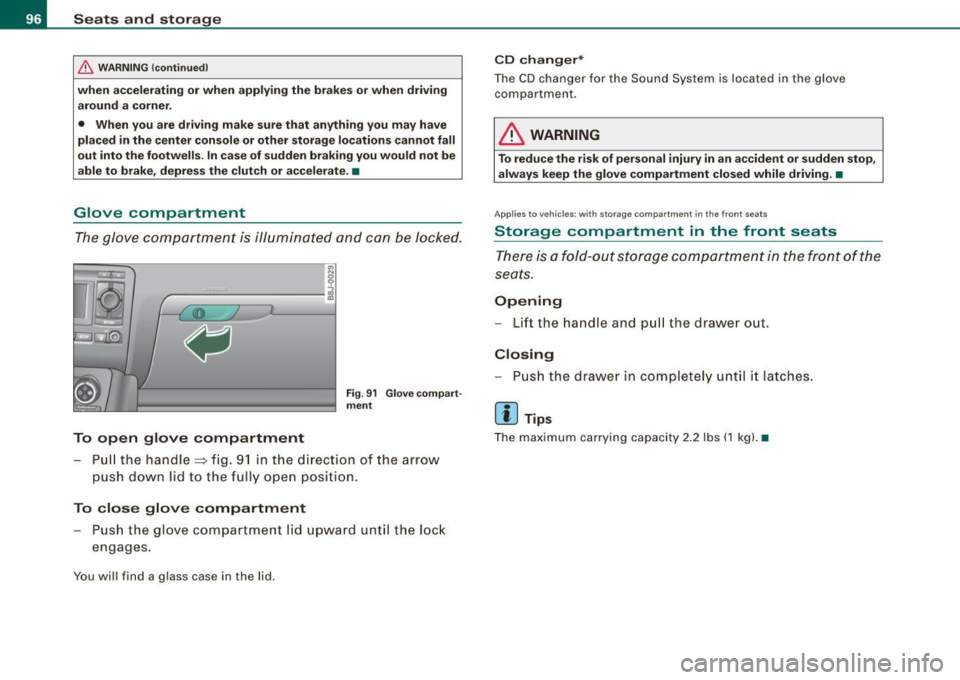
The glove compartment is illuminated and can be locked .
To open glove compartment
Fig. 91 Glove compart
ment
- Pull the handle=> fig. 91 in the direct ion of the arrow
push down lid to the fully open position.
To close glove compartment
Push the glove compartment lid upward until the lock
engages.
You will find a glass case in the lid .
CD changer*
The CD changer for the Sound System is located in the glove
compartmen t.
LJ}. WARNING
To reduce the risk of personal injury in an accident or sudden stop,
always keep the glove compartment closed while driving. •
App lies to veh icle s: w ith sto ra ge co mpart ment in the front seats
Storage compartment in the front seats
There is a fold-out storage compartment in the front of the
seats.
Opening
- Lift the handle and pull the drawer ou t.
Closing
- Push the drawer in completely until it latches.
[ i ] Tips
The maximum carrying capacity 2.2 lbs (1 kg). •
Page 107 of 316

___________________________________________________ O _n_ t_h :.... e:.....:. r_:o :.... a:.:. d ..:.:.___,J"'
On the road
Steering
Adjusting the steering wheel column
The steering wheel position can be continuously adjusted
in height and distance.
First, adjust the driver's seat correctly.
Fig. 100 Lever under
the steering column
-Push the lever~ fig. 100 -Arrow-~ /.1 .
- Move the steering wheel to the desired position.
Pu sh the lever against the steering column until it locks.
T here must be at least 10 inches (25 cm) between your chest and the
center of the steering wheel. If you cannot sit more than 10 inches
(25 cm) from the steering wheel, see if adaptive equipment is avail
able to help you reach the pedals and increase the distance from the
steering wheel.
For detailed information on how to ad just the driver's seat, see
=> page 89.
Contro ls and eq uip
ment
& WARNING
Improper use of steering wheel adjustment and improper seating
position can cause serious personal injury.
• Adjust the steering wheel column only when the vehicle is not
moving to prevent loss of vehicle control.
• Adjust the driver's seat or steering wheel so that there is a
minimum of 10 inches (25 cm) between your chest and the
steering wheel
=> page 130, fig. 118 . If you cannot maintain this
minimum distance , the airbag system cannot protect you prop
erly .
• If physical limitations prevent you from sitting 10 inches (25
cm) or more from the steering wheel, check with your authorized
Audi dealer to see if adaptive equipment is available.
• If the steering wheel is aligned with your face, the supple
mental driver's airbag cannot provide as much protection in an
accident. Always make sure that the steering wheel is aligned with
your chest .
• Always hold the steering wheel with your hands at the 9 o'clock
and 3 o'clock positions to reduce the risk of personal injury if the
driver's airbag deploys .
• Never hold the steering wheel at the 12 o'clock position or with
your hands inside the steering wheel rim or on the steering wheel
hub . Holding the steering wheel the wrong way can cause serious
injuries to the hands , arms and head if the driver's airbag
deploys .•
Vehicle care
I I irechnical data
Page 108 of 316
• ..__O_ n_ t_h _ e_ r_ o_ a_ d ____________________________________________________ _
Ignition lock and ignition switch
Ignition lock
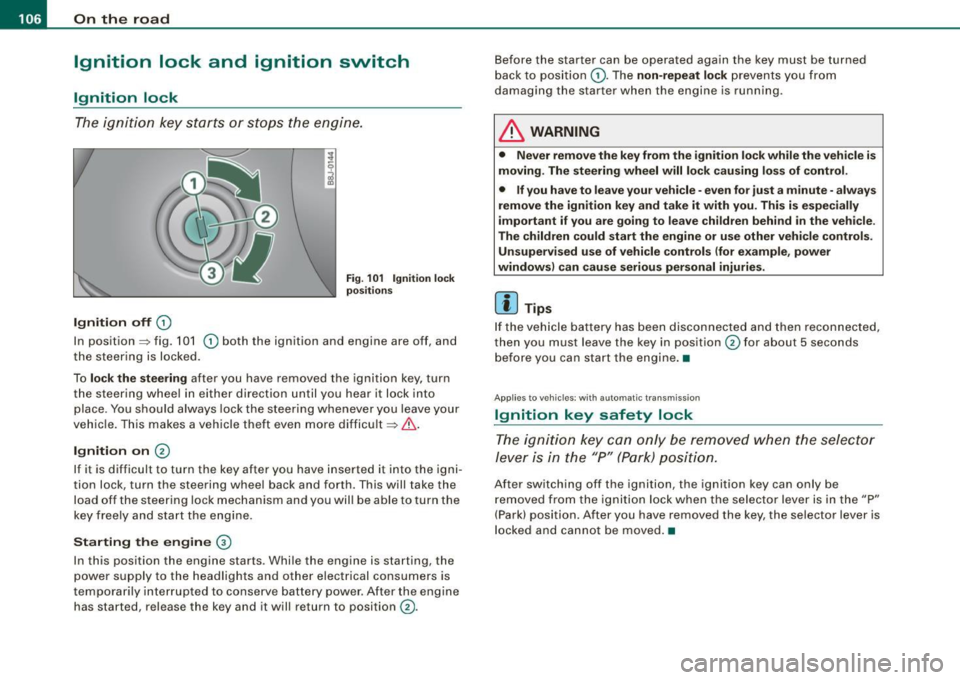
The igniti on key starts or s tops the eng ine.
Ignition off G)
Fi g. 1 01 Ign it io n lock
po sition s
In posit ion => fig. 101 G) both the ignition and engine are off, and
t he steering is locked.
To
lo ck the steering after you have removed the ignition key, turn
the steering whee l in either direction until you hear it lock into
place . You should always lock the steering whenever you leave your
vehic le. This makes a vehicle theft even more difficult =>& .
Ignition on 0
If it is difficult to turn the key after you have inserted it into the igni
tion lock, turn the steering wheel back and forth. This will take the
load off the steering lock mechanism and you wil l be able to turn the
key freely and start the engine.
Starting the engine ®
In this position the engine starts . Whi le the engine is starting, the
power supply to the headlights and other electrical consumers is
temporari ly interrupted to conserve battery power . After the engine
has started, release the key and it will return to position
G) .
Before the starter can be operated again the key must be turned
back to posi tion
G) . The non -repeat lock prevents you from
damaging the starter when the engine is running.
& WARNING
• Never remove the key from the ignition lo ck while the veh icle is
moving. The steering wheel will lo ck causing lo ss of control .
• If you have to leave your vehicle -even for just a minute -always
remove the ign ition key and take it with you . This i s especially
i mportant if you are going to l eave children behind in the vehi cle .
The children could start the eng ine or u se other vehi cle control s.
Unsupe rv ised use of vehicle controls (for e xample , power
window s) can cau se serious per sonal injurie s.
[ i ] Tips
If the veh icle ba ttery has been disconnected a nd then reconnected,
then you must leave the key in position
G) for about 5 seconds
bef ore you can start the engine .•
Appl ies to vehicles: with automat ic trans miss io n
Ignition key safety lock
The ig nition ke y can only be rem oved when the selec tor
le ver i s in the "P" (Par k) p osition.
After switching off the ignition, the ignition key can only be
r emoved from the igni tio n lock w hen the se lector leve r is in the "P"
(Park) position . After you have removed the key, the selector lever is
l ocked and cannot be moved. •