2006 MERCEDES-BENZ SPRINTER display
[x] Cancel search: displayPage 250 of 2305
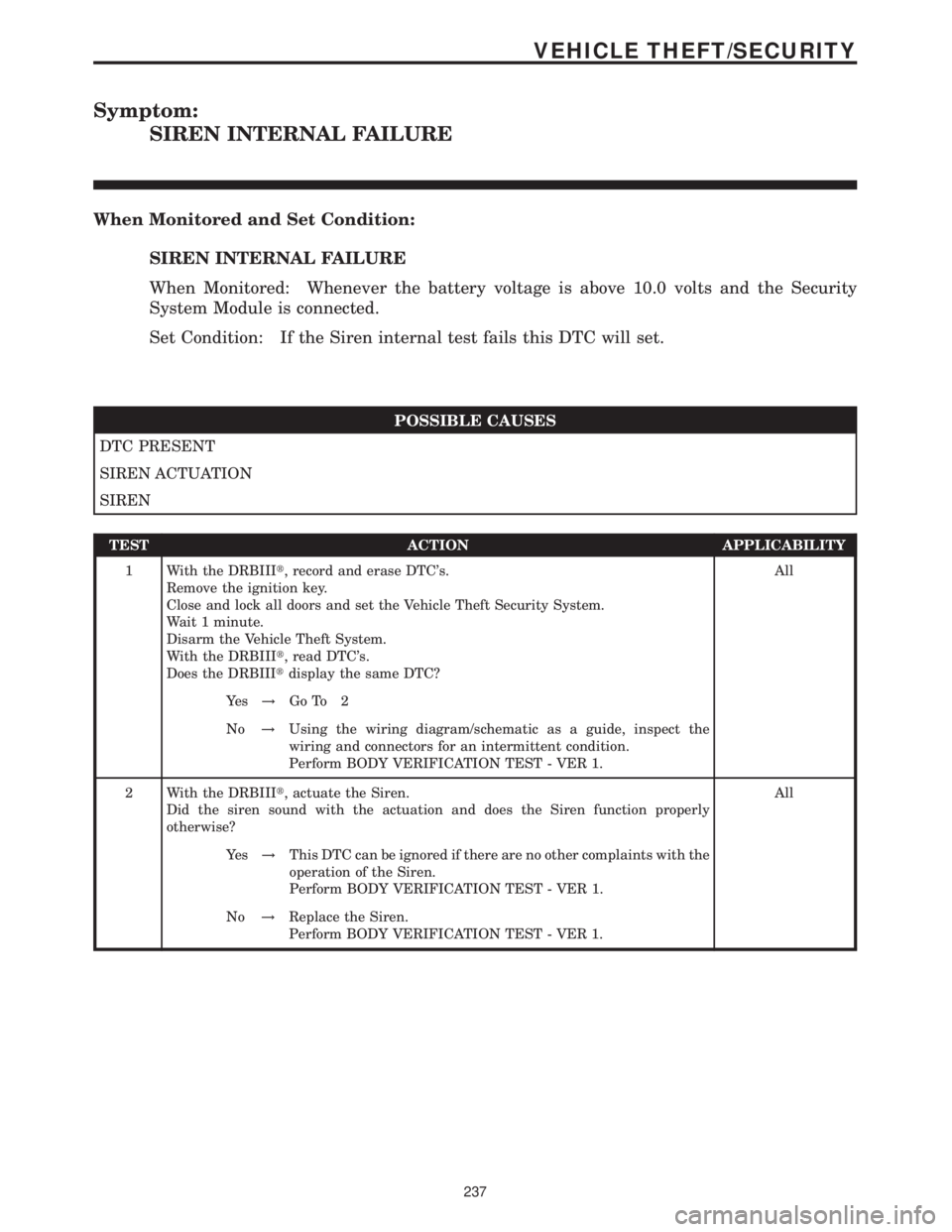
Symptom:
SIREN INTERNAL FAILURE
When Monitored and Set Condition:
SIREN INTERNAL FAILURE
When Monitored: Whenever the battery voltage is above 10.0 volts and the Security
System Module is connected.
Set Condition: If the Siren internal test fails this DTC will set.
POSSIBLE CAUSES
DTC PRESENT
SIREN ACTUATION
SIREN
TEST ACTION APPLICABILITY
1 With the DRBIIIt, record and erase DTC's.
Remove the ignition key.
Close and lock all doors and set the Vehicle Theft Security System.
Wait 1 minute.
Disarm the Vehicle Theft System.
With the DRBIIIt, read DTC's.
Does the DRBIIItdisplay the same DTC?All
Ye s!Go To 2
No!Using the wiring diagram/schematic as a guide, inspect the
wiring and connectors for an intermittent condition.
Perform BODY VERIFICATION TEST - VER 1.
2 With the DRBIIIt, actuate the Siren.
Did the siren sound with the actuation and does the Siren function properly
otherwise?All
Ye s!This DTC can be ignored if there are no other complaints with the
operation of the Siren.
Perform BODY VERIFICATION TEST - VER 1.
No!Replace the Siren.
Perform BODY VERIFICATION TEST - VER 1.
237
VEHICLE THEFT/SECURITY
Page 251 of 2305
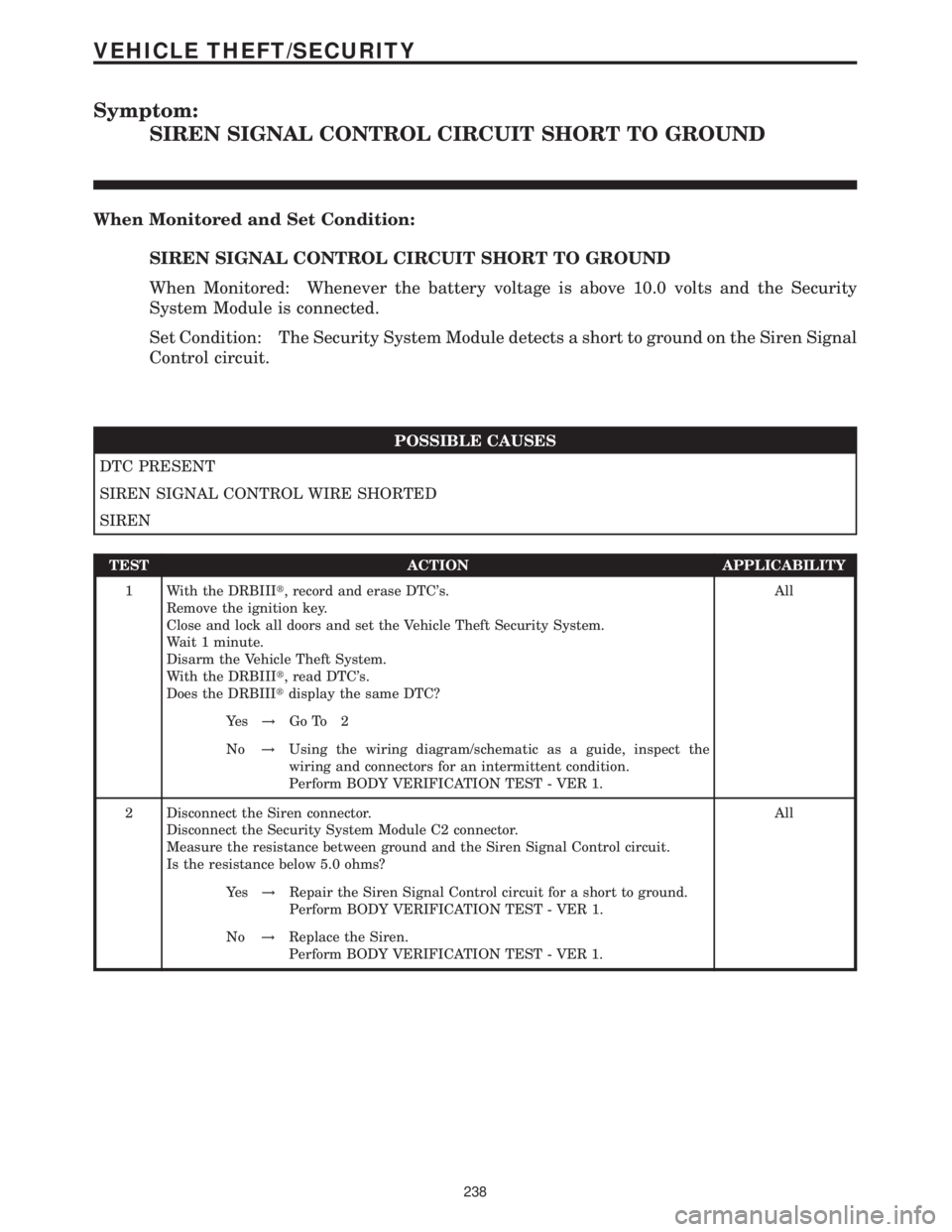
Symptom:
SIREN SIGNAL CONTROL CIRCUIT SHORT TO GROUND
When Monitored and Set Condition:
SIREN SIGNAL CONTROL CIRCUIT SHORT TO GROUND
When Monitored: Whenever the battery voltage is above 10.0 volts and the Security
System Module is connected.
Set Condition: The Security System Module detects a short to ground on the Siren Signal
Control circuit.
POSSIBLE CAUSES
DTC PRESENT
SIREN SIGNAL CONTROL WIRE SHORTED
SIREN
TEST ACTION APPLICABILITY
1 With the DRBIIIt, record and erase DTC's.
Remove the ignition key.
Close and lock all doors and set the Vehicle Theft Security System.
Wait 1 minute.
Disarm the Vehicle Theft System.
With the DRBIIIt, read DTC's.
Does the DRBIIItdisplay the same DTC?All
Ye s!Go To 2
No!Using the wiring diagram/schematic as a guide, inspect the
wiring and connectors for an intermittent condition.
Perform BODY VERIFICATION TEST - VER 1.
2 Disconnect the Siren connector.
Disconnect the Security System Module C2 connector.
Measure the resistance between ground and the Siren Signal Control circuit.
Is the resistance below 5.0 ohms?All
Ye s!Repair the Siren Signal Control circuit for a short to ground.
Perform BODY VERIFICATION TEST - VER 1.
No!Replace the Siren.
Perform BODY VERIFICATION TEST - VER 1.
238
VEHICLE THEFT/SECURITY
Page 255 of 2305

TEST ACTION APPLICABILITY
12NOTE: Ensure the Rain Sensor Module harness connector is reconnected.
Turn the ignition off.
Disconnect the wiper motor harness connector.
Connect a voltmeter between ground and the wiper motor harness connector cavity
2 (harness side).
Turn the ignition on.
While observing the voltmeter, move the wiper switch to the OFF, INTERMITTENT,
LOW and HIGH positions.
Does the voltmeter display above 10.0 volts for each of the wiper switch positions?All
Ye s!Go To 13
No!Repair circuit between Wiper Motor harness connector cavity 2
and Rain Sensor Module harness connector cavity C-2 for an
open, short to ground or short to voltage. If ok, Replace the Rain
Sensor Module.
13 Turn the ignition off.
Disconnect the wiper motor harness connector.
Connect a voltmeter between ground and the wiper motor harness connector cavity
5 (harness side).
Move the wiper switch to the OFF position.
Turn the ignition on.
While observing the voltmeter, move the wiper switch from the OFF position to the
INTERMITTENT position only.
Does the voltmeter display above 10.0 volts for both of the wiper switch positions?All
Ye s!Go To 14
No!Repair circuit between Wiper Motor harness connector cavity 5
and Rain Sensor Module harness connector cavity B-8 for an
open, short to ground or short to voltage. If ok, Replace the Rain
Sensor Module.
14 Turn the ignition off.
Disconnect the wiper motor harness connector.
Connect a voltmeter between ground and the wiper motor harness connector cavity
5 (harness side).
Move the wiper switch to the OFF position.
Turn the ignition on.
NOTE: The voltmeter should display above 10.0 volts for approximately 20
seconds then switch to 0.0 volts.
Does the voltmeter display above 10.0 volts then switch to 0.0 volts after 20 seconds?All
Ye s!Go To 15
No!Repair circuit between Wiper Motor harness connector cavity 5
and Rain Sensor Module harness connector cavity B-8 for an
open, short to ground or short to voltage. If ok, Replace the Rain
Sensor Module.
242
WINDSHIELD WIPER & WASHER
CHECKING THE RAIN SENSOR/WIPER OPERATION ÐContinued
Page 256 of 2305

TEST ACTION APPLICABILITY
15 Turn the ignition off.
Disconnect the wiper motor harness connector.
Connect a voltmeter between ground and the wiper motor harness connector cavity
6 (harness side).
Turn the ignition on.
While observing the voltmeter, move the wiper switch to the OFF, INTERMITTENT
and LOW positions.
Does the voltmeter display below 1.0 volt for each of the wiper switch positions?All
Ye s!Go To 16
No!Repair circuit between Wiper Motor harness connector cavity 6
and Rain Sensor Module harness connector cavity A-8 for an open,
short to ground or short to voltage. If ok, Replace the Rain Sensor
Module.
16 Turn the ignition off.
Disconnect the wiper motor harness connector.
Connect a voltmeter between ground and the wiper motor harness connector cavity
6 (harness side).
Move the wiper switch to the HIGH position.
Turn the ignition on.
NOTE: The voltmeter should display above 10.0 volts for approximately 20
seconds then switch to 0.0 volts.
Does the voltmeter display above 10.0 volts then switch to 0.0 volts after 20 seconds?All
Ye s!Replace the Wiper Motor in accordance with the Service Informa-
tion.
No!Repair circuit between Wiper Motor harness connector cavity 6
and Rain Sensor Module harness connector cavity A-8 for an open,
short to ground or short to voltage. If ok, Replace the Rain Sensor
Module.
243
WINDSHIELD WIPER & WASHER
CHECKING THE RAIN SENSOR/WIPER OPERATION ÐContinued
Page 260 of 2305

NAG1 TRANSMISSION VERIFICATION TEST - VER 1 APPLICABILITY
1. Reconnect any disconnected components.
2. Connect the DRBIIItto the Data Link Connector.
3. With the DRBIIIt, erase ABS DTCs.
4. With the DRBIIIt, erase ECM DTCs.
5. With the DRBIIIt, erase Transmission DTCs.
6. With the DRBIIIt, display Transmission Temperature. Start and run the engine until the
Transmission Temperature is HOT, above 43É C (110É F).
7. Check the Transmission fluid and adjust if necessary. Refer to the Service Information for the
proper Fluid Fill procedure.
8. NOTE: If internal repairs were performed and the shift quality is still poor, it may
be necessary to check the internal repair. Also check for any TSBs and/or Controller
Flash updates that may apply.
9. ROAD TEST PROCEDURE
10. Road test the vehicle. Make fifteen to twenty 1-2, 2-3, 3-4 and 4-5 upshifts.
11. Perform these shifts from a standing start to 72 km/h (45 MPH) with a constant throttle
opening of 20 to 25 degrees.
12. With speeds below 40 km/h (25 MPH), make five to eight wide open throttle kickdowns to
1st gear. Allow at least 5 seconds each in 2nd and 3rd gear between each kickdown.
13. With the DRBIIIt, read Transmission DTCs.
Were there any Diagnostic Trouble Codes set?All
Ye s!Repair is not complete, refer to appropriate symptom.
No!Repair is complete.
ROAD TEST VERIFICATION - VER-2 APPLICABILITY
1. Inspect the vehicle to ensure that all engine components are properly installed and
connected. Reassemble and reconnect components as necessary.
2. If this verification procedure is being performed after a non-DTC test, perform steps 3 and
4.
3. Check to see if the initial symptom still exists. If there are no trouble codes and the symptom
no longer exists, the repair was successful and testing is now complete.
4. If the initial or another symptom exists, the repair is not complete. Check all pertinent
Technical Service Bulletins (TSBs) and return to the Symptom List if necessary.
5. For previously read DTCs that have not been dealt with, return to the Symptom List and
follow the diagnostic path for that DTC; otherwise, continue.
6. If the Engine Control Module (ECM) has not been changed, perform steps 7 and 8, otherwise,
continue with step 9.
7. With the DRB IIIt, erase all diagnostic trouble codes (DTCs), then disconnect the DRB IIIt.
8. Turn the ignition off for at least 10 seconds.
9. If equipped with a Transfer Case Position Switch, perform step 10, otherwise, continue with
step 11.
10. With the ignition switch on, place the Transfer Case Shift Lever in each gear position,
stopping for 15 seconds in each position.
11. Ensure no DTCs remain by performing steps 12 through 15.
12. Road test the vehicle. For some of the road test, go at least 64 km/h (40 MPH). If this test
is for an A/C Relay Control Circuit, drive the vehicle for at least 5 minutes with the A/C on.
13. At some point, stop the vehicle and turn the engine off for at least 10 seconds, then restart
the engine and continue.
14. Upon completion of the road test, turn the engine off and check for DTCs with the DRB IIIt.
15. If the repaired DTC has set again, the repair is not complete. Check for any pertinent
Technical Service Bulletins (TSBs) and return to the Symptom List. If there are no DTCs, the
repair was successful and is now complete.
Are any DTCs or symptoms remaining?All
Ye s!Repair is not complete, refer to appropriate symptom.
No!Repair is complete.
247
VERIFICATION TESTS
Verification Tests ÐContinued
Page 318 of 2305

TABLE OF CONTENTS
1.0 INTRODUCTION.........................................................1
1.1SYSTEM COVERAGE...............................................1
1.2SIX-STEP TROUBLESHOOTING PROCEDURE..........................1
2.0 INDENTIFICATION OF SYSTEM............................................1
3.0 SYSTEM DESCRIPTION AND FUNCTIONAL OPERATION......................1
3.1ESP ..............................................................1
3.2ABS ..............................................................1
3.3BRAKE ASSIST SYSTEM (HBA).......................................2
3.4TCS (ASR).........................................................2
3.5ELECTRONIC BRAKE DISTRIBUTION (EBD)............................2
3.6VEHICLE CONTROLLING (FZR).......................................2
3.7SYSTEM COMPONENTS.............................................2
3.7.1ABS AND TCS (ASR) INDICATORS............................3
3.7.2CONTROLLER ANTILOCK BRAKE (CAB).......................3
3.7.3HYDRAULIC CONTROL UNIT (HCU)...........................3
3.7.4SWITCHES/SENSORS.......................................3
3.7.5SELF TESTS...............................................4
3.8USING THE DRBIIIT.................................................4
3.9DRBIIITERROR MESSAGES.........................................4
3.9.1DRBIIITDOES NOT POWER UP (BLANK SCREEN)...............5
3.9.2DISPLAY IS NOT VISIBLE....................................5
4.0 DISCLAIMERS, SAFETY, WARNINGS.......................................5
4.1DISCLAIMERS......................................................5
4.2SAFETY...........................................................5
4.2.1TECHNICIAN SAFETY INFORMATION..........................5
4.2.2VEHICLE PREPARATION FOR TESTING........................5
4.2.3SERVICING SUB-ASSEMBLIES...............................5
4.2.4DRBIIITSAFETY INFORMATION...............................6
4.3WARNING.........................................................6
4.3.1VEHICLE DAMAGE WARNINGS...............................6
4.3.2ROAD TESTING A COMPLAINT VEHICLE.......................6
4.4DIAGNOSIS........................................................6
5.0 REQUIRED TOOLS AND EQUIPMENT......................................7
6.0 GLOSSARY OF TERMS...................................................7
7.0 DIAGNOSTIC INFORMATION AND PROCEDURES............................9
BRAKES (CAB)
ANTI-LOCK BRAKE MODULE INTERNAL...................................10
CAB INTERNAL.........................................................10
BRAKE FLUID LEVEL....................................................13
BRAKE PRESSURE SENSOR CIRCUIT.....................................15
BRAKE SWITCH CIRCUIT................................................17
CAB CHECK SUM......................................................21
CAB OPTION...........................................................23
CAN COMMUNICATION ERROR..........................................25
i
Page 322 of 2305

1.0 INTRODUCTION
The procedures contained in this manual include
all the specifications, instructions, and graphics
needed to diagnose the Sprinter Chassis system
problems: Bosch 5.7 ABS/ESP/TCS (ASR) Braking
System. The diagnostics in this manual are based
on the failure condition or symptom being present
at time of diagnosis.
Please follow the recommendations below when
choosing your diagnostic path.
1. First make sure the DRBIIItis communicating
with the vehicle system being diagnosed. If the
DRBIIItdisplays a ``No Response'' condition, you
must diagnose that first.
2. Read DTC's (diagnostic trouble codes) with the
DRBIIIt.
3. If no DTC's are present, identify the customer
complaint.
4. Once the DTC or customer complaint is iden-
tified locate the matching test in the Table of
Contents and begin to diagnose the system.
All component location views are in Section 8.0.
All connector pinouts are in Section 9.0. All sche-
matics are in Section 10.0.
When repairs are required, refer to the appropri-
ate service manual for the proper removal and
repair procedure.
Diagnostic procedures change every year. New
diagnostic systems may be added; carryover sys-
tems maybe enhanced. READ THIS MANUAL BE-
FORE TRYING TO DIAGNOSE A VEHICLE DI-
AGNOSTIC TROUBLE CODE. It is recommended
that you review the entire manual to become famil-
iar with all new and changed diagnostic procedures.
This manual reflects many suggested changes
from readers of past issues. After using this man-
ual, if you have any comments or recommendations,
please fill out the form at the back of the manual
and mail it back.
1.1 SYSTEM COVERAGE
This diagnostic procedure manual covers the An-
tilock Braking System (ABS), the Electronic Stabil-
ity Program (ESP) and the Traction Control System
(TCS) found on the Sprinter.
1.2 SIX-STEP TROUBLESHOOTING
PROCEDURE
Diagnosis of the Antilock Brake Systems is done
in six basic steps:
²Verification of complaint
²Verification of any related symptoms
²Symptom analysis
²Problem isolation
²Repair of isolated problem
²Verification of proper operation
2.0 INDENTIFICATION OF
SYSTEM
The Bosch 5.7 system can be identified by the 42
way Controller Antilock Brake (CAB), Hydraulic
Control Unit (HCU) and Pump Motor being an
integral electronic/hydraulic unit mounted below
the Master Cylinder with four Wheel Speed Sen-
sors, one at each wheel.
Vehicles with the Traction Control System (TCS/
ASR) can be identified by the presence of the
Traction Control System Switch (TCCS) located on
the center instrument panel.
Vehicles with Electronic Stability Program (ESP)
can be identified by the presence of the Steering
Angle Sensor and the Lateral Acceleration/Yaw
Sensor.
3.0 SYSTEM DESCRIPTION AND
FUNCTIONAL OPERATION
3.1 ESP
The ESP system consists of the electronic control/
hydraulic unit, steering angle sensor, lateral
acceleration/yaw sensor and wheel speed sensors.
When the vehicle is in a turn, the ESP looks at the
steering wheel angle sensor value and monitors the
wheel speed of the inner and outer wheels to ensure
the values are plausible. The steering angle sensor
also measures the speed at which the steering
wheel is turned.
The ESP control module is very similar to the
ABS/ASR module. The ESP is comprised of several
other systems, namely theHBA, ABS, TCS (ASR),
EBDandFZRsystems.
3.2 ABS
The Controller Antilock Brake (CAB) is used to
monitor wheel speeds and modulates (controls) hy-
draulic pressure in each brake channel. The modu-
lated hydraulic pressure is used to prevent wheel
lock up during braking and maintain vehicle stabil-
ity. The CAB also provides a vehicle speed signal
(VSS) to the Electronic Control Module (ECM).
During a non-ABS stop, the system functions as a
standard braking system. The CAB uses special
sortware that monitors the wheel speed(s) and
when certain criteria are met, the software will
1
GENERAL INFORMATION
Page 325 of 2305

read opposite switch states.Note: The BS and
BLS are in the same switch housing.
BRAKE LAMP SWITCH (BLS):This switch pre-
pares the CAB for a possible antilock event. The
CAB uses an output state voltage from the BLS
when the brake pedal is either depressed/released.
The Fused Ignition Switch Output circuit supplies
12 volts to the BLS. A depressed brake pedal will
close the BLS circuit and the BLS Output circuit
supplies 12 volts at the CAB. When the driver
releases the brake pedal, the BLS Output circuit
voltage drops to 0 volts and the CAB senses the
brake pedal state. This tells the CAB what position
the brake pedal is currently in to make an ABS
event possible. When using the DRBIIItin Inputs/
Outputs, the BS and BLS will read opposite switch
states.Note: The BS and BLS are in the same
switch housing.
TRACTION CONTROL SYSTEM SWITCH
(TCSS):This switch signals the CAB to either turn
ON or OFF the TCS. The driver can toggle the
TCSS, which receives 12 volts from the D (+) Relay
Output circuit. Depending on the position of the
TCSS, open or closed, the CAB receives the TCSS
state voltage on the TCS Switch Sense circuit.
When 12 volts are applied to the TCS Switch Sense
circuit, the TCS is OFF. When no voltage is present,
the TCS is ON.
WHEEL SPEED SENSORS AND TONE
WHEELS:The Bosch 5.7 system uses one passive
WSS on each wheel. The sensor measures the wheel
speed by monitoring a rotating tone wheel. As the
teeth of the tone wheel move through the magnetic
field of the sensor an AC voltage and amperage is
generated. This signal frequency increases or de-
creases proportionally to the speed of the wheel.
The CAB monitors this signal to check for a sudden
change in single or multiple wheel decelerations. If
the deceleration of one or more wheels is not within
a predetermined amount, the CAB takes control for
antilock action through the HCU. Each WSS has a
magnetic inductive pick up coil (WSS) that is
mounted to a fixed component. There is an air gap
between the tone wheel and the speed sensor as-
sembly. Diagnostically, the coils of the Wheel Speed
Sensors have the same amount of resistance. When
measured across the CAB harness connector termi-
nals, the resistance should be between 1100 - 1800
ohms. Refer to service manual for WSS replacement
and air gap specifications.
Correct ABS operation is dependent on Tone
Wheel speed signal from the WSS. The vehicle
wheels and tires should all be the same size and
type to get accurate signals. In addition, all tires
should be at recommended tire pressures.3.7.5 SELF TESTS
The system software includes several self tests
that are performed every time the ignition is turned
on and the vehicle is driven. Some of the self tests
occur immediately, while others occur under normal
driving conditions while not in antilock operation.
The CAB checks continuously for a missing or
erratic WSS signals/circuits, tone wheels, solenoids,
pump motor or solenoid relay by performing several
tests such as: dynamic, static, ohmic, voltage drop,
and timed response. If any component exhibits a
fault during testing, the CAB will request to illumi-
nate the ABS and TCS warning indicators.
As an additional check of the ESP system, a road
test procedure is available on the DRBIIIt. This
test should be carried out when any ESP component
is replaced in order to ensure proper function. Since
the wheel speed sensors are required inputs to the
ESP, this test should also be performed if the wheel
speed sensors are replaced.
First, the brakes are applied with the vehicle
stationary. Then, the vehicle is driven at approxi-
mately 6 MPH. The driver has to make left and
right turns, with a minimum 90 degree steering
turning angle. If the indicator lamp goes out, every-
thing is in order. If the lamp remains illuminated,
the DRBIIItwill display the fault codes that are
causing the test to fail. The road test function is set
in the ESP control module, and can only be deacti-
vated once there are no more fault codes detected.
The Steering Angle Sensor must be initialized. A
procedure is carried out using the DRBIIItto
ensure that the module detects the exact position of
the sensor. The sensor must be calibrated any time
wheel alignment is changed, the steering column is
removed and re-installed, or the sensor is replaced.
3.8 USING THE DRBIIIT
Refer to the DRBIIItuser 's guide for instructions
and assistance with reading diagnostic trouble
codes, erasing diagnostic trouble codes and other
DRBIIItfunctions.
3.9 DRBIIITERROR MESSAGES
Under normal operation, the DRBIIItwill dis-
play one of only two error messages:
Ð User-Requested WARM Boot or User-Requested
COLD Boot.
If the DRBIIItshould display any other error
message, record the entire display and call the
STAR Center for information and assistance. This
is a sample of such an error message display:
4
GENERAL INFORMATION