2006 MERCEDES-BENZ SPRINTER clock
[x] Cancel search: clockPage 885 of 2305
DIAGNOSIS AND TESTING - GENERATOR DECOUPLER
CONDITION POSSIBLE CAUSES CORRECTION
Does not drive generator
(generator not charging)Internal failure Replace decoupler
Noise coming from decou-
plerInternal failure Replace decoupler
REMOVAL
The generator decoupler is used only with
certain engines.
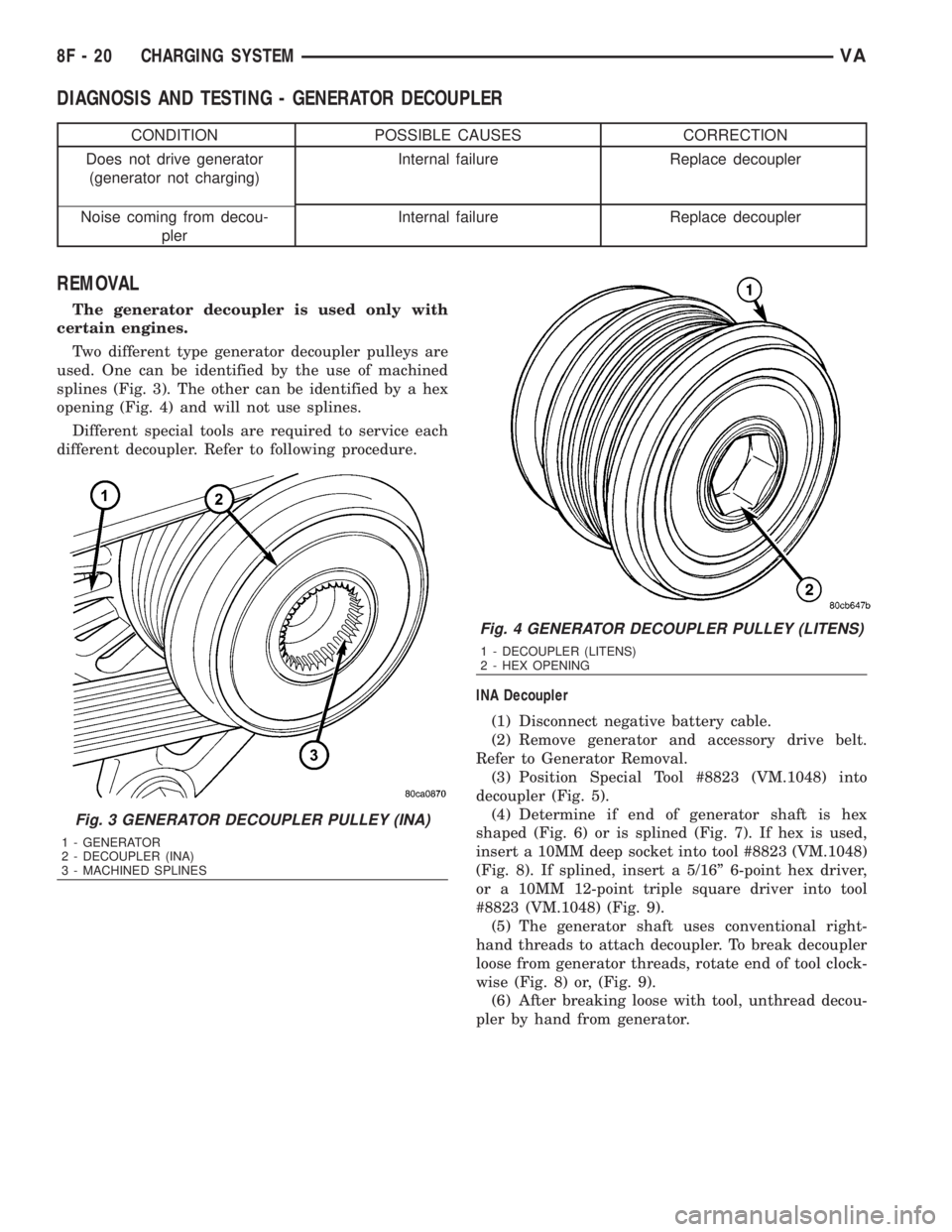
Two different type generator decoupler pulleys are
used. One can be identified by the use of machined
splines (Fig. 3). The other can be identified by a hex
opening (Fig. 4) and will not use splines.
Different special tools are required to service each
different decoupler. Refer to following procedure.
INA Decoupler
(1) Disconnect negative battery cable.
(2) Remove generator and accessory drive belt.
Refer to Generator Removal.
(3) Position Special Tool #8823 (VM.1048) into
decoupler (Fig. 5).
(4) Determine if end of generator shaft is hex
shaped (Fig. 6) or is splined (Fig. 7). If hex is used,
insert a 10MM deep socket into tool #8823 (VM.1048)
(Fig. 8). If splined, insert a 5/16º 6-point hex driver,
or a 10MM 12-point triple square driver into tool
#8823 (VM.1048) (Fig. 9).
(5) The generator shaft uses conventional right-
hand threads to attach decoupler. To break decoupler
loose from generator threads, rotate end of tool clock-
wise (Fig. 8) or, (Fig. 9).
(6) After breaking loose with tool, unthread decou-
pler by hand from generator.
Fig. 3 GENERATOR DECOUPLER PULLEY (INA)
1 - GENERATOR
2 - DECOUPLER (INA)
3 - MACHINED SPLINES
Fig. 4 GENERATOR DECOUPLER PULLEY (LITENS)
1 - DECOUPLER (LITENS)
2 - HEX OPENING
8F - 20 CHARGING SYSTEMVA
Page 887 of 2305
Litens Decoupler
(1) Disconnect negative battery cable.
(2) Remove generator and accessory drive belt.
Refer to Generator Removal.
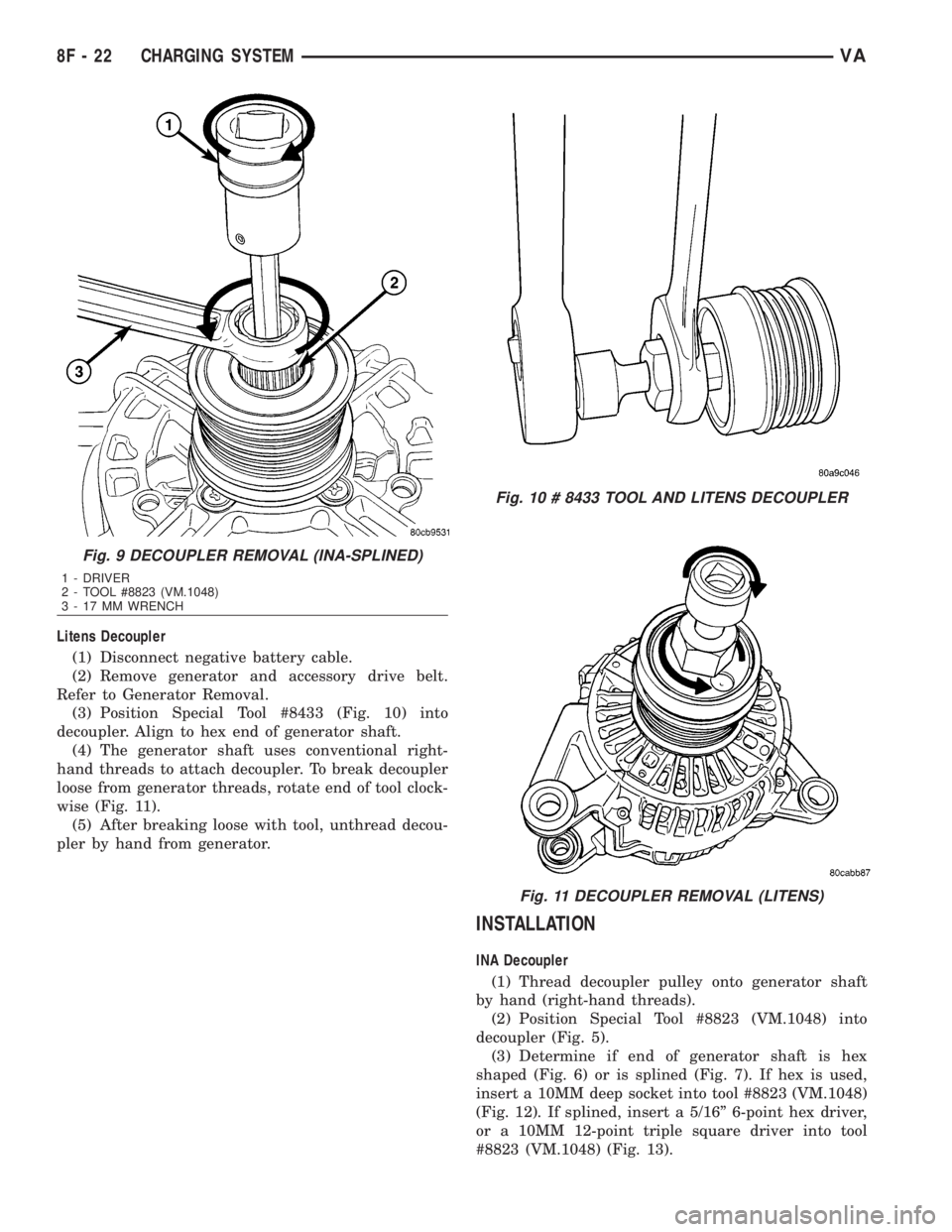
(3) Position Special Tool #8433 (Fig. 10) into
decoupler. Align to hex end of generator shaft.
(4) The generator shaft uses conventional right-
hand threads to attach decoupler. To break decoupler
loose from generator threads, rotate end of tool clock-
wise (Fig. 11).
(5) After breaking loose with tool, unthread decou-
pler by hand from generator.
INSTALLATION
INA Decoupler
(1) Thread decoupler pulley onto generator shaft
by hand (right-hand threads).
(2) Position Special Tool #8823 (VM.1048) into
decoupler (Fig. 5).
(3) Determine if end of generator shaft is hex
shaped (Fig. 6) or is splined (Fig. 7). If hex is used,
insert a 10MM deep socket into tool #8823 (VM.1048)
(Fig. 12). If splined, insert a 5/16º 6-point hex driver,
or a 10MM 12-point triple square driver into tool
#8823 (VM.1048) (Fig. 13).
Fig. 9 DECOUPLER REMOVAL (INA-SPLINED)
1 - DRIVER
2 - TOOL #8823 (VM.1048)
3 - 17 MM WRENCH
Fig. 10 # 8433 TOOL AND LITENS DECOUPLER
Fig. 11 DECOUPLER REMOVAL (LITENS)
8F - 22 CHARGING SYSTEMVA
Page 888 of 2305
(4)Do not use an adjustable, ratcheting
ªclick typeº torque wrench. Most ªclick typeº
wrenches will only allow torque to be applied
in a clockwise rotation. Use a dial-type or
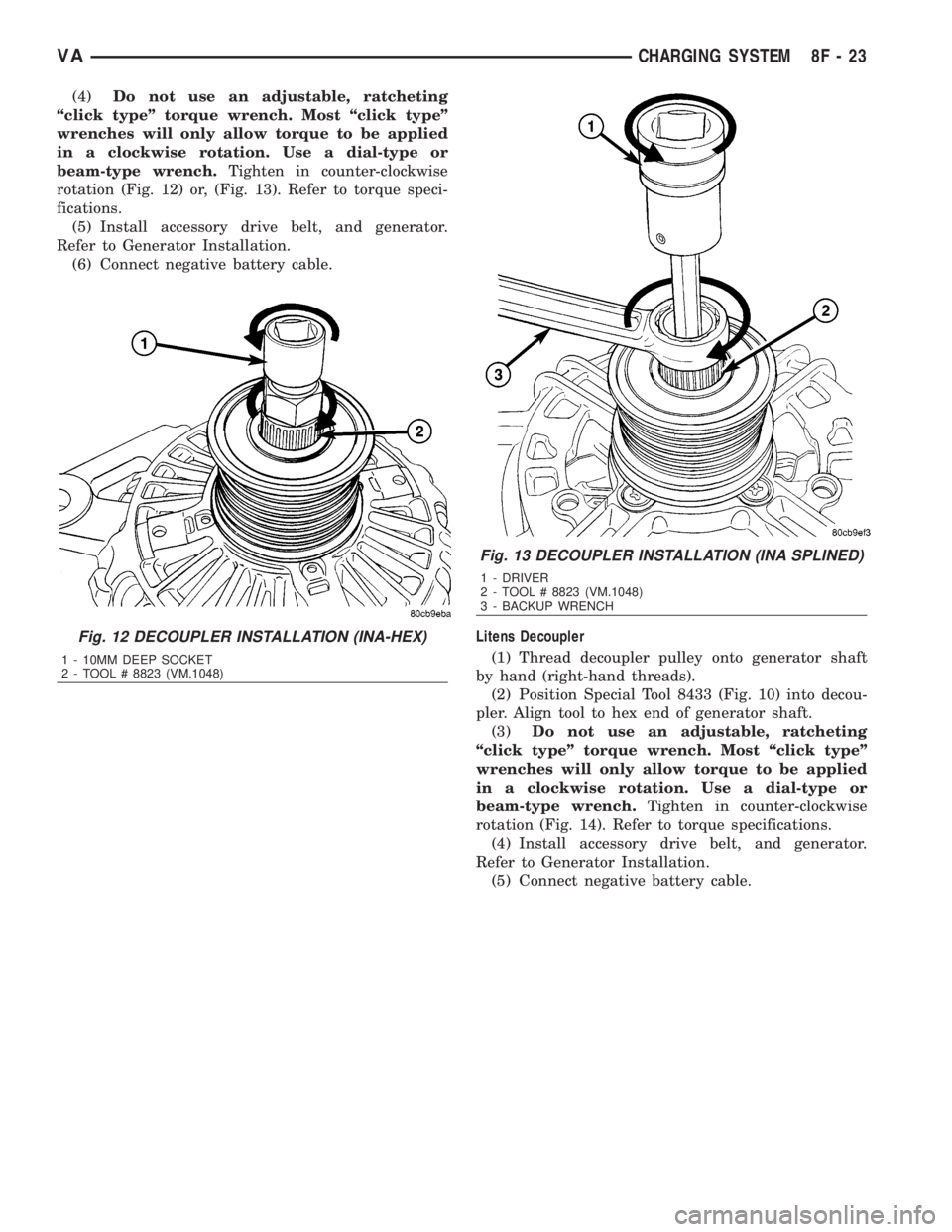
beam-type wrench.Tighten in counter-clockwise
rotation (Fig. 12) or, (Fig. 13). Refer to torque speci-
fications.
(5) Install accessory drive belt, and generator.
Refer to Generator Installation.
(6) Connect negative battery cable.
Litens Decoupler
(1) Thread decoupler pulley onto generator shaft
by hand (right-hand threads).
(2) Position Special Tool 8433 (Fig. 10) into decou-
pler. Align tool to hex end of generator shaft.
(3)Do not use an adjustable, ratcheting
ªclick typeº torque wrench. Most ªclick typeº
wrenches will only allow torque to be applied
in a clockwise rotation. Use a dial-type or
beam-type wrench.Tighten in counter-clockwise
rotation (Fig. 14). Refer to torque specifications.
(4) Install accessory drive belt, and generator.
Refer to Generator Installation.
(5) Connect negative battery cable.
Fig. 12 DECOUPLER INSTALLATION (INA-HEX)
1 - 10MM DEEP SOCKET
2 - TOOL # 8823 (VM.1048)
Fig. 13 DECOUPLER INSTALLATION (INA SPLINED)
1 - DRIVER
2 - TOOL # 8823 (VM.1048)
3 - BACKUP WRENCH
VACHARGING SYSTEM 8F - 23
Page 920 of 2305
INSTRUMENT CLUSTER
TABLE OF CONTENTS
page page
INSTRUMENT CLUSTER
DESCRIPTION..........................2
OPERATION............................5
DIAGNOSIS AND TESTING - INSTRUMENT
CLUSTER............................7
STANDARD PROCEDURE
CLUSTER PROGRAMMING...............7
REMOVAL.............................8
INSTALLATION..........................9
ABS INDICATOR
DESCRIPTION..........................9
OPERATION...........................10
ADR INDICATOR
DESCRIPTION.........................10
OPERATION...........................10
AIRBAG INDICATOR
DESCRIPTION.........................11
OPERATION...........................11
AMBIENT TEMPERATURE INDICATOR
DESCRIPTION.........................11
OPERATION...........................12
BRAKE INDICATOR
DESCRIPTION.........................12
OPERATION...........................12
BRAKE WEAR INDICATOR
DESCRIPTION.........................13
OPERATION...........................13
CHARGING INDICATOR
DESCRIPTION.........................14
OPERATION...........................14
CLOCK
DESCRIPTION.........................14
OPERATION...........................14
COOLANT LOW INDICATOR
DESCRIPTION.........................15
OPERATION...........................15
ENGINE TEMPERATURE GAUGE
DESCRIPTION.........................15
OPERATION...........................16
ESP INDICATOR
DESCRIPTION.........................16
OPERATION...........................16
FUEL FILTER CLOGGED INDICATOR
DESCRIPTION.........................17
OPERATION...........................17
FUEL GAUGE
DESCRIPTION.........................17
OPERATION...........................18
GEAR SELECTOR INDICATOR
DESCRIPTION.........................18
OPERATION...........................18HIGH BEAM INDICATOR
DESCRIPTION.........................19
OPERATION...........................19
LOW FUEL INDICATOR
DESCRIPTION.........................19
OPERATION...........................19
LOW OIL LEVEL INDICATOR
DESCRIPTION.........................20
OPERATION...........................20
MAINTENANCE INDICATOR
DESCRIPTION.........................20
OPERATION...........................21
MALFUNCTION INDICATOR LAMP (MIL)
DESCRIPTION.........................21
OPERATION...........................21
MULTI-FUNCTION INDICATOR
DESCRIPTION.........................22
OPERATION...........................22
ODOMETER
DESCRIPTION.........................22
OPERATION...........................23
PARK BRAKE INDICATOR
DESCRIPTION.........................23
OPERATION...........................24
SEATBELT INDICATOR
DESCRIPTION.........................24
OPERATION...........................24
SPEEDOMETER
DESCRIPTION.........................25
OPERATION...........................25
TACHOMETER
DESCRIPTION.........................25
OPERATION...........................25
TRACTION CONTROL INDICATOR
DESCRIPTION.........................26
OPERATION...........................26
TRACTION CONTROL MALFUNCTION
INDICATOR
DESCRIPTION.........................27
OPERATION...........................27
TURN SIGNAL INDICATOR
DESCRIPTION.........................27
OPERATION...........................27
WAIT-TO-START INDICATOR
DESCRIPTION.........................28
OPERATION...........................28
WASHER FLUID INDICATOR
DESCRIPTION.........................29
OPERATION...........................29
WATER-IN-FUEL INDICATOR
DESCRIPTION.........................29
OPERATION...........................29
VAINSTRUMENT CLUSTER 8J - 1
Page 921 of 2305
INSTRUMENT CLUSTER
DESCRIPTION
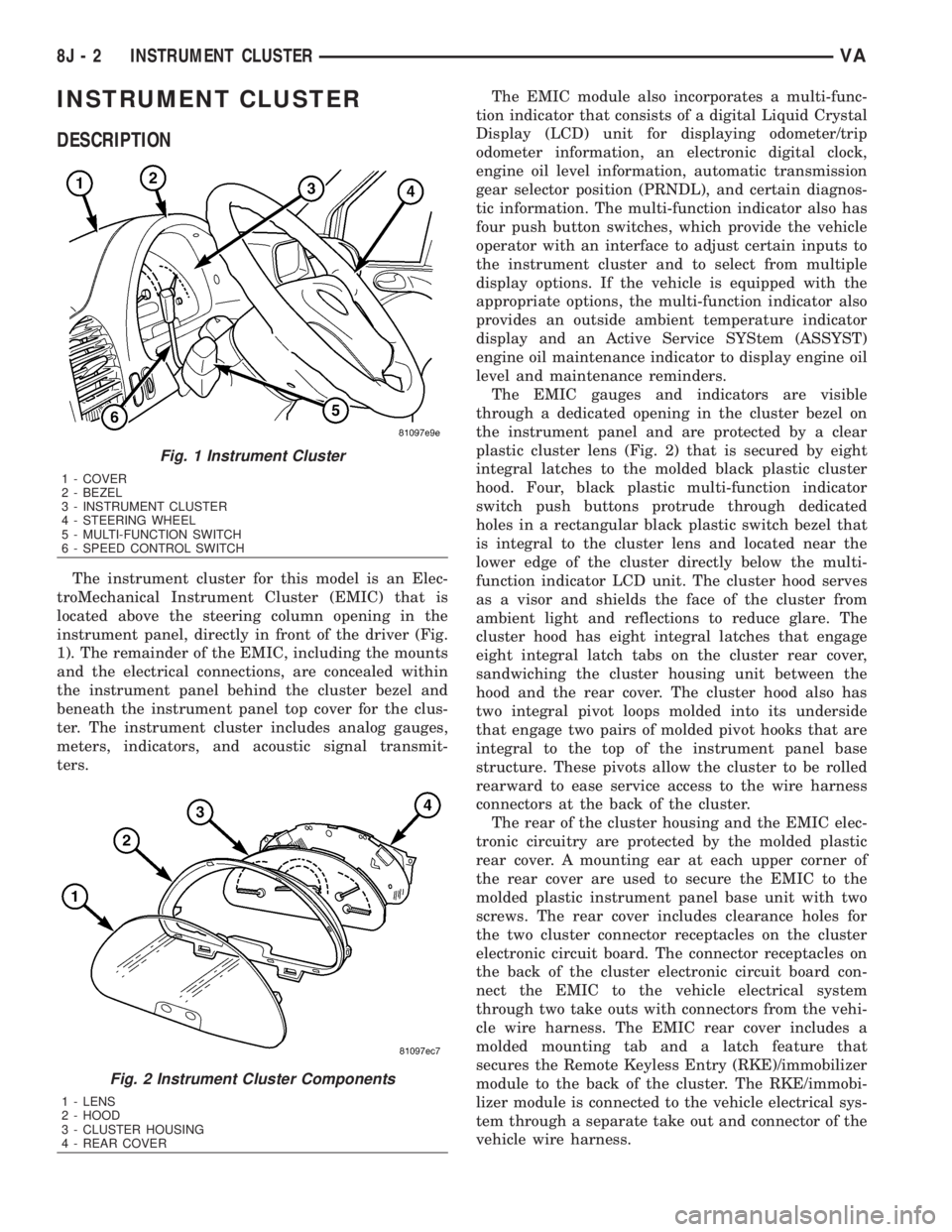
The instrument cluster for this model is an Elec-
troMechanical Instrument Cluster (EMIC) that is
located above the steering column opening in the
instrument panel, directly in front of the driver (Fig.
1). The remainder of the EMIC, including the mounts
and the electrical connections, are concealed within
the instrument panel behind the cluster bezel and
beneath the instrument panel top cover for the clus-
ter. The instrument cluster includes analog gauges,
meters, indicators, and acoustic signal transmit-
ters.The EMIC module also incorporates a multi-func-
tion indicator that consists of a digital Liquid Crystal
Display (LCD) unit for displaying odometer/trip
odometer information, an electronic digital clock,
engine oil level information, automatic transmission
gear selector position (PRNDL), and certain diagnos-
tic information. The multi-function indicator also has
four push button switches, which provide the vehicle
operator with an interface to adjust certain inputs to
the instrument cluster and to select from multiple
display options. If the vehicle is equipped with the
appropriate options, the multi-function indicator also
provides an outside ambient temperature indicator
display and an Active Service SYStem (ASSYST)
engine oil maintenance indicator to display engine oil
level and maintenance reminders.
The EMIC gauges and indicators are visible
through a dedicated opening in the cluster bezel on
the instrument panel and are protected by a clear
plastic cluster lens (Fig. 2) that is secured by eight
integral latches to the molded black plastic cluster
hood. Four, black plastic multi-function indicator
switch push buttons protrude through dedicated
holes in a rectangular black plastic switch bezel that
is integral to the cluster lens and located near the
lower edge of the cluster directly below the multi-
function indicator LCD unit. The cluster hood serves
as a visor and shields the face of the cluster from
ambient light and reflections to reduce glare. The
cluster hood has eight integral latches that engage
eight integral latch tabs on the cluster rear cover,
sandwiching the cluster housing unit between the
hood and the rear cover. The cluster hood also has
two integral pivot loops molded into its underside
that engage two pairs of molded pivot hooks that are
integral to the top of the instrument panel base
structure. These pivots allow the cluster to be rolled
rearward to ease service access to the wire harness
connectors at the back of the cluster.
The rear of the cluster housing and the EMIC elec-
tronic circuitry are protected by the molded plastic
rear cover. A mounting ear at each upper corner of
the rear cover are used to secure the EMIC to the
molded plastic instrument panel base unit with two
screws. The rear cover includes clearance holes for
the two cluster connector receptacles on the cluster
electronic circuit board. The connector receptacles on
the back of the cluster electronic circuit board con-
nect the EMIC to the vehicle electrical system
through two take outs with connectors from the vehi-
cle wire harness. The EMIC rear cover includes a
molded mounting tab and a latch feature that
secures the Remote Keyless Entry (RKE)/immobilizer
module to the back of the cluster. The RKE/immobi-
lizer module is connected to the vehicle electrical sys-
tem through a separate take out and connector of the
vehicle wire harness.
Fig. 1 Instrument Cluster
1 - COVER
2 - BEZEL
3 - INSTRUMENT CLUSTER
4 - STEERING WHEEL
5 - MULTI-FUNCTION SWITCH
6 - SPEED CONTROL SWITCH
Fig. 2 Instrument Cluster Components
1 - LENS
2 - HOOD
3 - CLUSTER HOUSING
4 - REAR COVER
8J - 2 INSTRUMENT CLUSTERVA
Page 923 of 2305
Except for the indications provided within the
multi-function indicator LCD unit, each indicator in
the EMIC is illuminated by a dedicated LED that is
soldered onto the EMIC electronic circuit board.
Cluster illumination is accomplished by dimmable
LED back lighting, which illuminates the gauges for
visibility when the exterior lighting is turned on. The
cluster general illumination LED units are also sol-
dered onto the EMIC electronic circuit board. The
LED units are not available for service replacement
and, if damaged or faulty, the entire EMIC must be
replaced.Hard wired circuitry connects the EMIC to the
electrical system of the vehicle. These hard wired cir-
cuits are integral to the vehicle wire harnesses,
which are routed throughout the vehicle and retained
by many different methods. These circuits may be
connected to each other, to the vehicle electrical sys-
tem and to the EMIC through the use of a combina-
tion of soldered splices, splice block connectors, and
many different types of wire harness terminal con-
nectors and insulators. Refer to the appropriate wir-
ing information. The wiring information includes
wiring diagrams, proper wire and connector repair
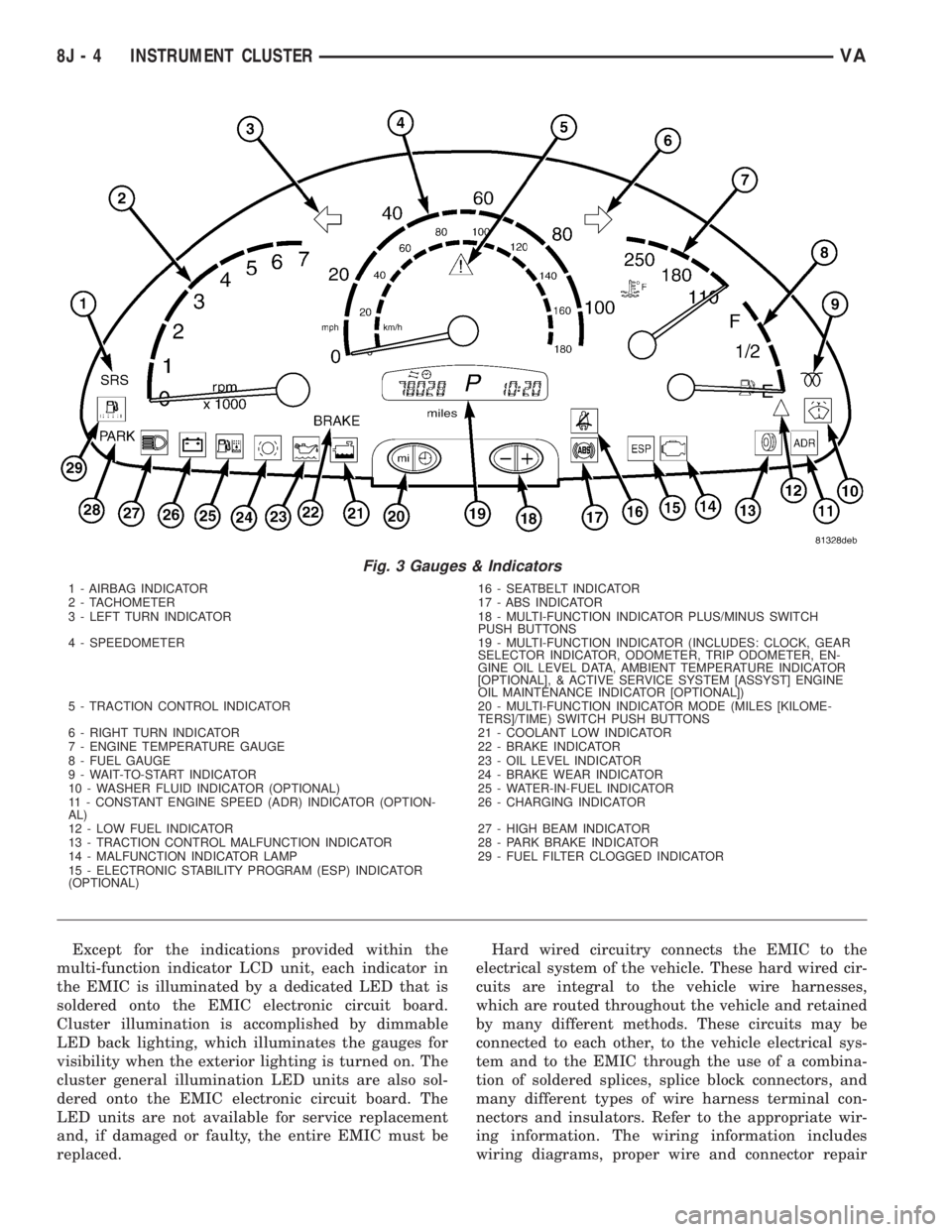
Fig. 3 Gauges & Indicators
1 - AIRBAG INDICATOR 16 - SEATBELT INDICATOR
2 - TACHOMETER 17 - ABS INDICATOR
3 - LEFT TURN INDICATOR 18 - MULTI-FUNCTION INDICATOR PLUS/MINUS SWITCH
PUSH BUTTONS
4 - SPEEDOMETER 19 - MULTI-FUNCTION INDICATOR (INCLUDES: CLOCK, GEAR
SELECTOR INDICATOR, ODOMETER, TRIP ODOMETER, EN-
GINE OIL LEVEL DATA, AMBIENT TEMPERATURE INDICATOR
[OPTIONAL], & ACTIVE SERVICE SYSTEM [ASSYST] ENGINE
OIL MAINTENANCE INDICATOR [OPTIONAL])
5 - TRACTION CONTROL INDICATOR 20 - MULTI-FUNCTION INDICATOR MODE (MILES [KILOME-
TERS]/TIME) SWITCH PUSH BUTTONS
6 - RIGHT TURN INDICATOR 21 - COOLANT LOW INDICATOR
7 - ENGINE TEMPERATURE GAUGE 22 - BRAKE INDICATOR
8 - FUEL GAUGE 23 - OIL LEVEL INDICATOR
9 - WAIT-TO-START INDICATOR 24 - BRAKE WEAR INDICATOR
10 - WASHER FLUID INDICATOR (OPTIONAL) 25 - WATER-IN-FUEL INDICATOR
11 - CONSTANT ENGINE SPEED (ADR) INDICATOR (OPTION-
AL)26 - CHARGING INDICATOR
12 - LOW FUEL INDICATOR 27 - HIGH BEAM INDICATOR
13 - TRACTION CONTROL MALFUNCTION INDICATOR 28 - PARK BRAKE INDICATOR
14 - MALFUNCTION INDICATOR LAMP 29 - FUEL FILTER CLOGGED INDICATOR
15 - ELECTRONIC STABILITY PROGRAM (ESP) INDICATOR
(OPTIONAL)
8J - 4 INSTRUMENT CLUSTERVA
Page 931 of 2305

equipped, the ambient temperature indication can be
toggled with the clock indication on the right side of
the multi-function indicator Liquid Crystal Display
(LCD) located near the lower edge of the instrument
cluster, directly below the speedometer. The ambient
temperature indication consists of a numeric value
with a ª+º (plus) or ª2º (minus) prefix, and the unit
of measure is identified with the characters ªÉCº
(Canadian vehicles only) or ªÉFº (United States vehi-
cles only) located directly above the temperature
indication. The indications of the ambient tempera-
ture indicator are not visible when the LCD is not
illuminated. When illuminated the indications
appear as dark characters and icons silhouetted
against an amber field. When the exterior lighting is
turned Off, the display is illuminated at maximum
brightness. When the exterior lighting is turned On
the display illumination level can be adjusted in con-
cert with the cluster general illumination lighting
using the ª+º (plus) and ª2º (minus) multi-function
indicator push buttons. The ambient temperature
indicator is serviced as a unit with the instrument
cluster.
OPERATION
The optional ambient temperature indicator gives
an indication to the vehicle operator of the outside
air temperature. This indicator is controlled by the
instrument cluster microprocessor based upon cluster
programming and a hard wired input received by the
cluster from the ambient temperature sensor. The
ambient temperature indicator is completely con-
trolled by the instrument cluster logic circuit, and
that logic will allow this indicator to operate when-
ever the multi-function indicator Liquid Crystal Dis-
play (LCD) is activated. Therefore, the ambient
temperature indicator remains functional regardless
of the ignition switch position.
The vehicle operator can choose to have the ambi-
ent temperature indicator displayed instead of the
clock information, but the clock and ambient temper-
ature indicator cannot be displayed at the same time.
The clock or ambient temperature indicator display
option is selected using the multi-function indicator
clock switch on the instrument cluster circuit board.
This switch is actuated manually by depressing the
clock switch push button that extends through the
lower edge of the cluster lens below the left end of
the multi-function indicator. Actuating this switch
momentarily will toggle the display between the
clock and ambient temperature indicator modes.
Actuating this switch twice within about one second
will cause the display to toggle, but then automati-
cally revert to the originally selected mode after
about twenty seconds.
The ambient temperature sensor located below the
front bumper is a Negative Temperature Coefficient
(NTC) thermistor. The internal resistance of the sen-sor is reduced as the ambient temperature rises. The
instrument cluster continually monitors the resis-
tance through the sensor to determine the tempera-
ture value to be displayed. The current value is
displayed immediately after the LCD is activated.
The display value will remain static regardless of
decreases in the sensor resistance (temperature ris-
ing) below vehicle speeds of 10 to 15 kilometers-per-
hour (6 to 9 miles-per-hour). Decreases in the sensor
resistance above 15 kilometers-per-hour (9 miles-per-
hour) and increases the sensor resistance (tempera-
ture falling) regardless of vehicle speed are displayed
subject to a sixty second delay.
The ambient temperature sensor is connected to
the instrument cluster in series between the ambient
temperature sensor return and sense circuits. The
ambient temperature sensor and the return and
sense circuits to the instrument cluster can be diag-
nosed using conventional diagnostic tools and meth-
ods. For proper diagnosis of the instrument cluster
circuitry that controls the ambient temperature indi-
cator, a diagnostic scan tool is required. Refer to the
appropriate diagnostic information.BRAKE INDICATOR
DESCRIPTION
A brake indicator is standard equipment on all
instrument clusters. The brake indicator is located
near the lower edge of the instrument cluster, to the
left of the multi-function indicator display. In vehi-
cles built for the United States market, the brake
indicator consists of a stencil-like cutout of the word
ªBRAKEº in the opaque layer of the instrument clus-
ter overlay. In vehicles built for the Canadian mar-
ket, the brake indicator consists of the International
Control and Display Symbol icon for ªBrake Failureº
imprinted within a rectangular cutout in the opaque
layer of the instrument cluster overlay. In either
case, the dark outer layer of the overlay prevents the
indicator from being clearly visible when it is not
illuminated. A red Light Emitting Diode (LED)
behind the cutout in the opaque layer of the overlay
causes the ªBRAKEº text to appear in red, or the
icon to appear silhouetted against a red field through
the translucent outer layer of the overlay when the
indicator is illuminated from behind by the LED,
which is soldered onto the instrument cluster elec-
tronic circuit board. The brake indicator is serviced
as a unit with the instrument cluster.
OPERATION
The brake indicator gives an indication to the vehi-
cle operator when there are certain brake hydraulic
system malfunctions as indicated by a low brake
hydraulic fluid level condition, or when there is a
problem in the electronic brake force distribution
8J - 12 INSTRUMENT CLUSTERVA
Page 933 of 2305

or until the ignition switch is turned to the Off posi-
tion, whichever occurs first.
A brake wear sensor located at each wheel provides
a hard wired ground input to the instrument cluster
circuitry through the brake wear sense circuit when-
ever the brake linings for that wheel have exceeded
their wear limits. The four normally open brake wear
sensors are connected in parallel between ground and
instrument cluster. The brake wear sensors and their
input circuit to the instrument cluster can be diag-
nosed using conventional diagnostic tools and meth-
ods. For proper diagnosis of the instrument cluster
circuitry that controls the brake wear indicator, a
diagnostic scan tool is required. Refer to the appro-
priate diagnostic information.
CHARGING INDICATOR
DESCRIPTION
A charging indicator is standard equipment on all
instrument clusters. The charging indicator is located
near the lower edge of the instrument cluster, to the
left of the multi-function indicator display. The
charging indicator consists of the International Con-
trol and Display Symbol icon for ªBattery Charging
Conditionº imprinted within a rectangular cutout in
the opaque layer of the instrument cluster overlay.
The dark outer layer of the overlay prevents the indi-
cator from being clearly visible when it is not illumi-
nated. A red Light Emitting Diode (LED) behind the
cutout in the opaque layer of the overlay causes the
icon to appear silhouetted against a red field through
the translucent outer layer of the overlay when the
indicator is illuminated from behind by the LED,
which is soldered onto the instrument cluster elec-
tronic circuit board. The charging indicator is ser-
viced as a unit with the instrument cluster.
OPERATION
The charging indicator gives an indication to the
vehicle operator when the electrical system voltage is
too low. This indicator is controlled by a transistor on
the instrument cluster circuit board based upon clus-
ter programming and a hard wired input from the
generator. The charging indicator Light Emitting
Diode (LED) is completely controlled by the instru-
ment cluster logic circuit, and that logic will only
allow this indicator to operate when the instrument
cluster detects that the ignition switch is in the On
position. Therefore, the LED will always be off when
the ignition switch is in any position except On. The
LED only illuminates when it is provided a path to
ground by the instrument cluster transistor. The
instrument cluster will turn on the charging indica-
tor for the following reasons:
²Bulb Test- Each time the ignition switch is
turned to the On position with the engine not run-ning the charging indicator is illuminated by the
instrument cluster as a bulb test.
²Generator Input- Each time the cluster
detects that the voltage of the generator input is 12.7
volts or lower while the engine is running, the charg-
ing indicator will be illuminated. The indicator
remains illuminated until the cluster detects that the
voltage of the generator input is above 12.7 volts, or
until the ignition switch is turned to the Off position,
whichever occurs first.
The generator provides a hard wired input to the
instrument cluster circuitry on the engine running
(D+) circuit. If the instrument cluster turns on the
indicator while the engine is running, it may indicate
that the charging system requires service. The gener-
ator input circuit to the instrument cluster can be
diagnosed using conventional diagnostic tools and
methods. For proper diagnosis of the charging sys-
tem, or the instrument cluster circuitry that controls
the charging indicator, a diagnostic scan tool is
required. Refer to the appropriate diagnostic infor-
mation.
CLOCK
DESCRIPTION
An electronic digital clock is standard equipment
on all instrument clusters. In vehicles equipped with
the optional ambient temperature indicator, the clock
indication can be toggled with the ambient tempera-
ture indication on the right side of the multi-function
indicator Liquid Crystal Display (LCD) located near
the lower edge of the instrument cluster, directly
below the speedometer. The clock provides a 12 hour-
based, digital indication of the current hours and
minutes. The indications of the clock are not visible
when the LCD is not illuminated. When illuminated
the indications appear as dark characters silhouetted
against an amber field. When the exterior lighting is
turned Off, the display is illuminated at maximum
brightness. When the exterior lighting is turned On
the display illumination level can be adjusted in con-
cert with the cluster general illumination lighting
using the ª+º (plus) and ª2º (minus) multi-function
indicator push buttons. The clock is serviced as a
unit with the instrument cluster.
OPERATION
The clock gives an indication to the vehicle opera-
tor of the current time. The electronic digital clock is
controlled by the instrument cluster microprocessor
based upon cluster programming. The clock display is
completely controlled by the instrument cluster logic
circuit, and that logic will only allow this indication
to be viewed when the multi-function indicator Liq-
uid Crystal Display (LCD) is activated. However, the
8J - 14 INSTRUMENT CLUSTERVA