2006 LAND ROVER FRELANDER 2 ad blue
[x] Cancel search: ad bluePage 2920 of 3229

Fuses
200
L
Fuse number Rating (Amps) Fuse co lour Circuits protected
F1 5 tan Rain sensor
F2 10 red SRS
F3 5 tan ABS
F4 5 tan Instrument pack - Accelerator pedal - Light
Switch Module
F5 - - -
F6 15 blue Audio unit
F7 7.5 brown Steering wheel controls
F8 5 tan Instrument pack
F9 15 blue Headlamp main beam
F10 15 blue Sunroof
F11 7.5 brown Reverse lights and interior mirror dip
F12 - - -
F13 15 blue Front fog lamps
F14 15 blue Screen wash
F15 - - -
F16 - - -
F17 7.5 brown Interior lighting
F18 - - -
F19 5 tan Electric seat adjustment
F20 15 blue Rear wiper
F21 5 tan Alarm
F22 20 yellow Fuel pump
F23 20 yellow Steering column lock
F24 - - -
F25 10 red Tailgate - Fuel filler flap
F26 5 tan Diagnostic socket and alarm
F27 5 tan Start button and climate control
F28 5 tan Brake lights
Page 2922 of 3229

Fuses
202
L
Fuse number Rating (Amps) Fuse co lour Circuits protected
FA1 25 clear Driver door controls
FA2 25 clear Passenger door controls
FA3 25 clear Rear left door controls
FA4 25 clear Rear right door controls
FA5 - - -
FA6 15 blue Rear accessory socket
FA7 30 green Heated rear screen
FA8 - - -
FA9 15 blue Trailer power
FA10 30 green Driver electric seat
FA11 40 green Trailer power
FA12 - - - FB1 10 red Park distance control
FB2 - - -
FB3 15 blue Driver's seat heater
FB4 15 blue Front passenger's seat heater
FB5 15 blue Caravan fridge
FB6 15 blue Electronic centre differential
FB7 - - -
FB8 - - -
FB9 30 green Passenger electric seat
FB10 - - -
FB11 - - -
FB12 - - -
FD1 10 red Audio sy stem and touch
screen
FD2 - - -
FD3 10 red DAB
FD4 5 tan Bluetooth telephone
FD5 - - -
FD6 10 red Audio unit
Page 2974 of 3229
Telephone
254
L
TelephoneGENERAL INFORMATION
Note: The vehicle tele phone system is
designed to function with a wide variety of
Bluetooth telephones. As these telephones
have a wide range of audio and echo
performance characteristics, it may take a few
seconds for the vehicl e telephone system to
adapt and deliver optimum audio performance.
It may be necessary to reduce the in-vehicle
volume slightly to fully optimise audio
performance and reduce echo. Note:
The vehicle's Bluetooth telephone
system can be used with an appropriate
Bluetooth-equipped mobile telephone.
Note: Please refer to your Land Rover
Dealer/Authorised Repairer for a list of
compatible telephones.
Telephone networks
The Telephone netw ork standard allows you to
use your telephone in many countries.
However, telephone reception may be poor or
unavailable in remote re gions. This may be due
to the inadequate power of the transmitter,
which results in a weak signal or incomplete
coverage.
WARNINGS
Using the telephone ne ar the car: do not
telephone inside a garage or near an
open car bonnet. The air may contain fuel
vapours and the tele phone could produce
sparks and start a fire.
Unusual ambient conditions: Switch off
the telephone in areas where high
explosives are being used. High frequency
remote controls could be interfered with and
cause an explosion. Switch off your telephone
in areas with a high explosion risk. This
includes filling stations, fuel storage areas or
chemical factories, as well as places where the
air contains fuel vapour, chemicals or metal
dust. The telephone might possibly produce
sparks and cause a fire or explosion.
Medical equipment: The functioning of
cardiac pacemakers or hearing aids
may be impaired when the phone is in use.
Check with a doctor or manufacturer whether
any such devices you or your passengers are
using are sufficiently protected against
high-frequency energy.
Always stow your mobile phone
securely. In an accident loose items can
cause injury.
Page 2976 of 3229
Telephone
256
L
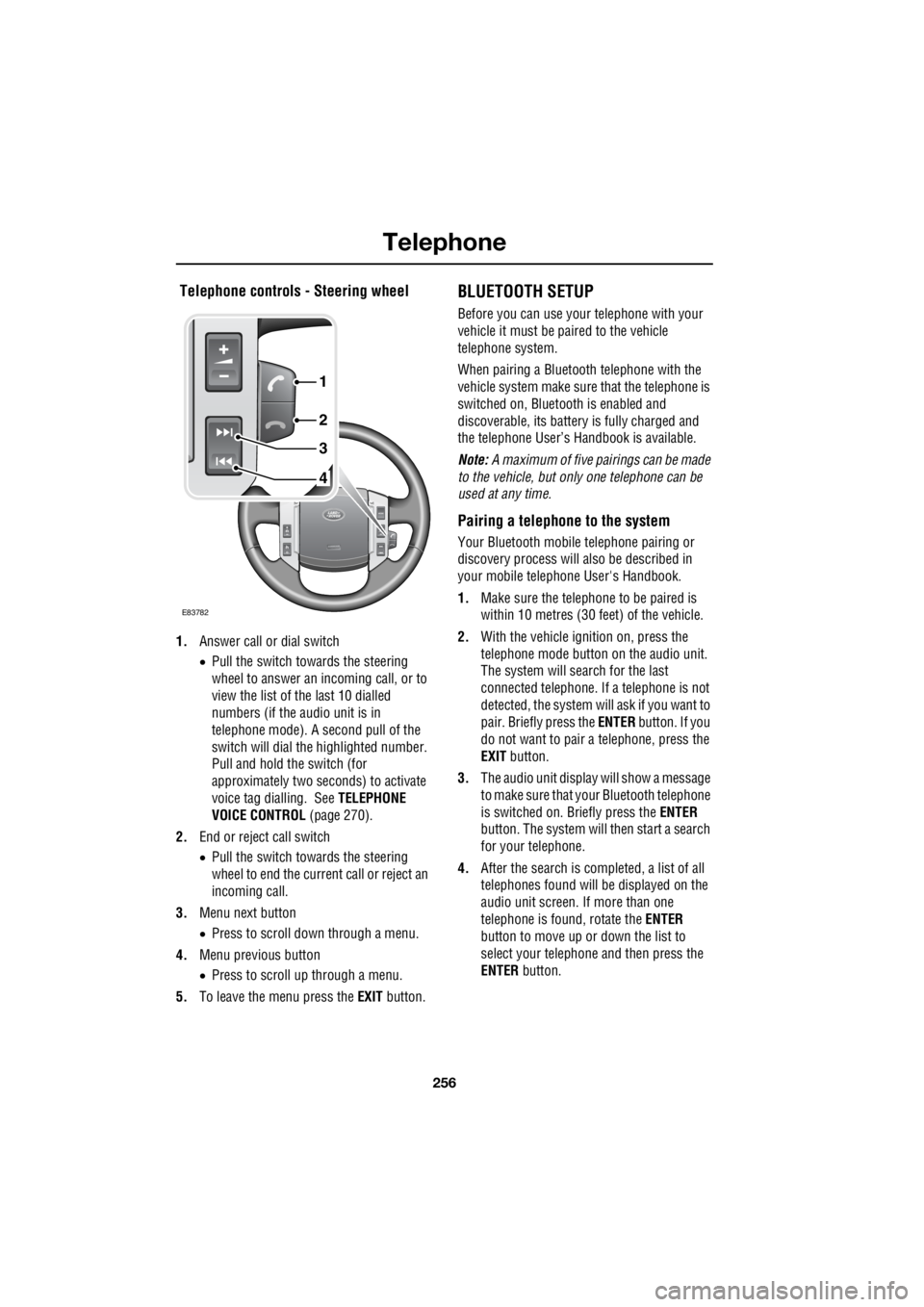
Telephone controls - Steering wheel
1. Answer call or dial switch
• Pull the switch towards the steering
wheel to answer an incoming call, or to
view the list of the last 10 dialled
numbers (if the audio unit is in
telephone mode). A second pull of the
switch will dial th e highlighted number.
Pull and hold the switch (for
approximately two seconds) to activate
voice tag dialling. See TELEPHONE
VOICE CONTROL (page 270).
2. End or reject call switch
• Pull the switch towards the steering
wheel to end the current call or reject an
incoming call.
3. Menu next button
• Press to scroll down through a menu.
4. Menu previous button
• Press to scroll up through a menu.
5. To leave the menu press the EXIT button.
BLUETOOTH SETUP
Before you can use your telephone with your
vehicle it must be paired to the vehicle
telephone system.
When pairing a Bluet ooth telephone with the
vehicle system ma ke sure that the telephone is
switched on, Bluetooth is enabled and
discoverable, its battery is fully charged and
the telephone User’s Handbook is available.
Note: A maximum of five pairings can be made
to the vehicle, but only one telephone can be
used at any time.
Pairing a telephone to the system
Your Bluetooth mobile telephone pairing or
discovery process will al so be described in
your mobile telephone User's Handbook.
1. Make sure the telephone to be paired is
within 10 metres (30 feet) of the vehicle.
2. With the vehicle ignition on, press the
telephone mode button on the audio unit.
The system will search for the last
connected tele phone. If a telephone is not
detected, the system w ill ask if you want to
pair. Briefly press the ENTER button. If you
do not want to pair a telephone, press the
EXIT button.
3. The audio unit display will show a message
to make sure that yo ur Bluetooth telephone
is switched on. Briefly press the ENTER
button. The system will then start a search
for your telephone.
4. After the search is completed, a list of all
telephones found will be displayed on the
audio unit screen. If more than one
telephone is found, rotate the ENTER
button to move up or down the list to
select your telephone and then press the
ENTER button.
4
3
2
1
E83782
Page 2977 of 3229

257
Telephone
R
5. The audio unit will now display a Bluetooth
access code numbe r which must be
entered into your telephone.
6. A message on the audio unit display will
confirm the system is connecting with
your telephone. When it is successfully
connected, the telephone will be paired
and connected with the vehicle and can
now be used with the vehicle telephone
system.
7. If the pairing fails, a message will appear
on the audio unit di splay; press the ENTER
button to retry or press the EXIT button
and restart the process.
8. The last connected telephone will be
available for use when the system and
telephone are switched on again.
9. If you wish to pair additional telephones,
repeat the process.
Adding or changing a telephone
1. Select the te lephone main menu. See
TELEPHONE SETUP (page 258).
2. Select Bluetooth , then select the option to
change a telephone .
3. Add new phone will appear at the top of
the list. Repeat the procedure for pairing a
telephone to the system.
If the maximum number of telephones are
already paired to the system, a message will be
displayed and you are given the option to
remove one. This must be carried out before a
new telephone can be paired.
Removing a telephone from the system
1.Select the te lephone main menu. See
TELEPHONE SETUP (page 258).
2. Select Bluetooth , then select the option to
remove a telephone . 3.
Select a telephone by rotating the ENTER
button, highlight the telephone to be
removed then press the ENTER button. A
confirmation message to remove a
telephone will appear on the audio unit
display, press the ENTER button.
4. The remove telephone screen will be
displayed, and if no further telephones are
to be removed, press the EXIT button.
Loss of Bluetooth link
If the link between the telephone and the
vehicle is lost, you have the choice to
reconnect or to exit fr om the telephone system.
To reconnect press the ENTER button. There
will be a short delay whilst the connection is
established and then y our telephone name will
be shown in the display.
Alternatively, press the EXIT button if you do
not wish to reconne ct your telephone.
Page 2978 of 3229
Telephone
258
L
TELEPHONE SETUP
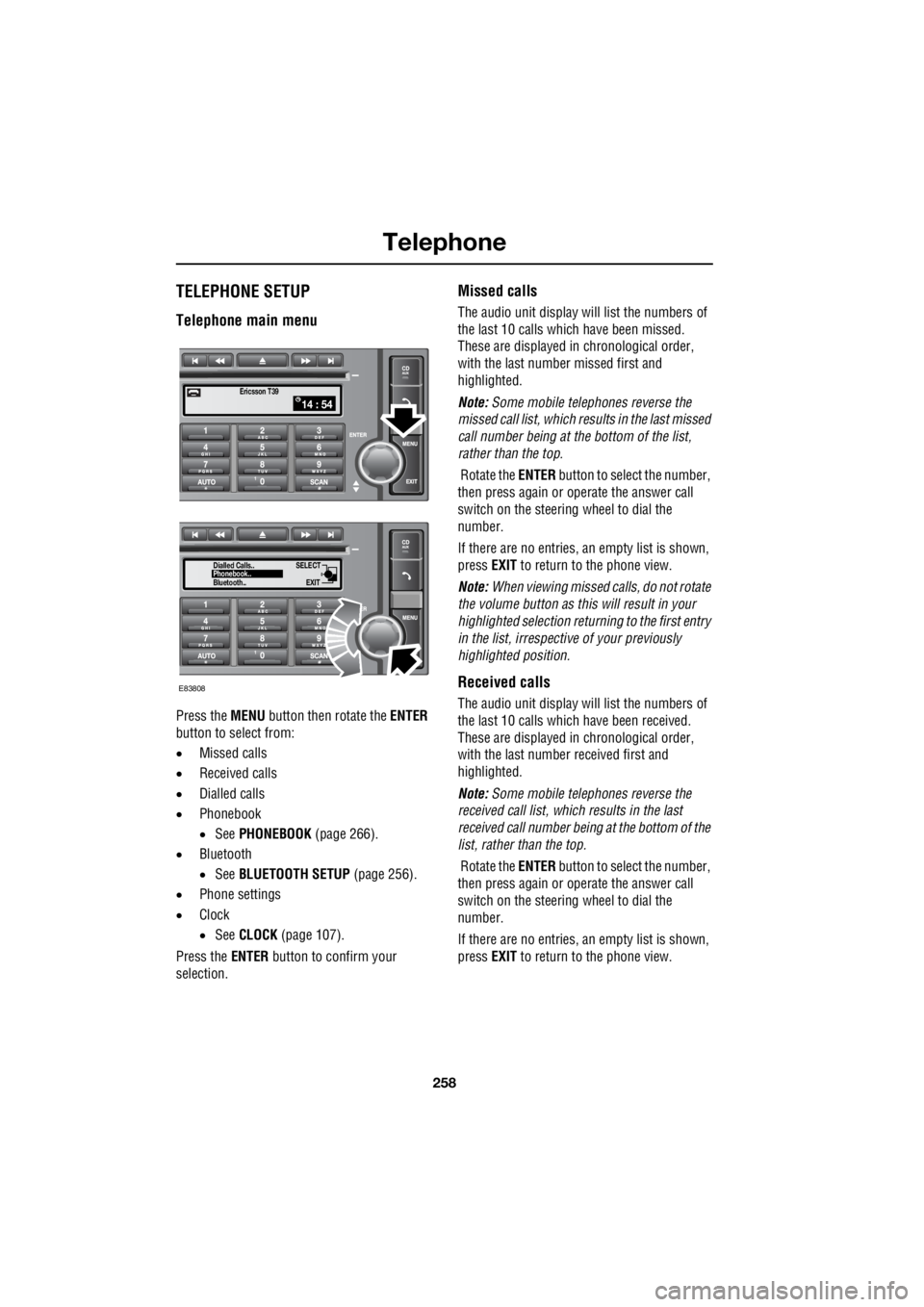
Telephone main menu
Press the MENU button then rotate the ENTER
button to select from:
• Missed calls
• Received calls
• Dialled calls
• Phonebook
• See PHONEBOOK (page 266).
• Bluetooth
• See BLUETOOTH SETUP (page 256).
• Phone settings
• Clock
• See CLOCK (page 107).
Press the ENTER button to confirm your
selection.
Missed calls
The audio unit display wi ll list the numbers of
the last 10 calls which have been missed.
These are displayed in chronological order,
with the last number missed first and
highlighted.
Note: Some mobile telephones reverse the
missed call list, which results in the last missed
call number being at the bottom of the list,
rather than the top.
Rotate the ENTER button to select the number,
then press again or operate the answer call
switch on the steering wheel to dial the
number.
If there are no entries, an empty list is shown,
press EXIT to return to the phone view.
Note: When viewing missed calls, do not rotate
the volume button as this will result in your
highlighted select ion returning to the first entry
in the list, irrespective of your previously
highlighted position.
Received calls
The audio unit display wi ll list the numbers of
the last 10 calls which have been received.
These are displayed in chronological order,
with the last number received first and
highlighted.
Note: Some mobile telephones reverse the
received call list, which results in the last
received call number be ing at the bottom of the
list, rather than the top.
Rotate the ENTER button to select the number,
then press again or operate the answer call
switch on the steering wheel to dial the
number.
If there are no entries, an empty list is shown,
press EXIT to return to the phone view.
14 : 54Ericsson T39
SELECT
EXITPhonebook..
Dialled Calls..
Bluetooth..
E83808
Page 2981 of 3229
261
Telephone
R
Another brief press of the ENTER button will
store the tone. If you press the EXIT button the
tone will not be stored and the ring tone menu
will remain visible. Press the EXIT button again
to return to the main menu or to the function
previously selected.
Note: Not all mobile telephones support
Mobile ring tone , in this case it will not be
possible to select and store the Mobile ring
tone setting in the vehicle system.
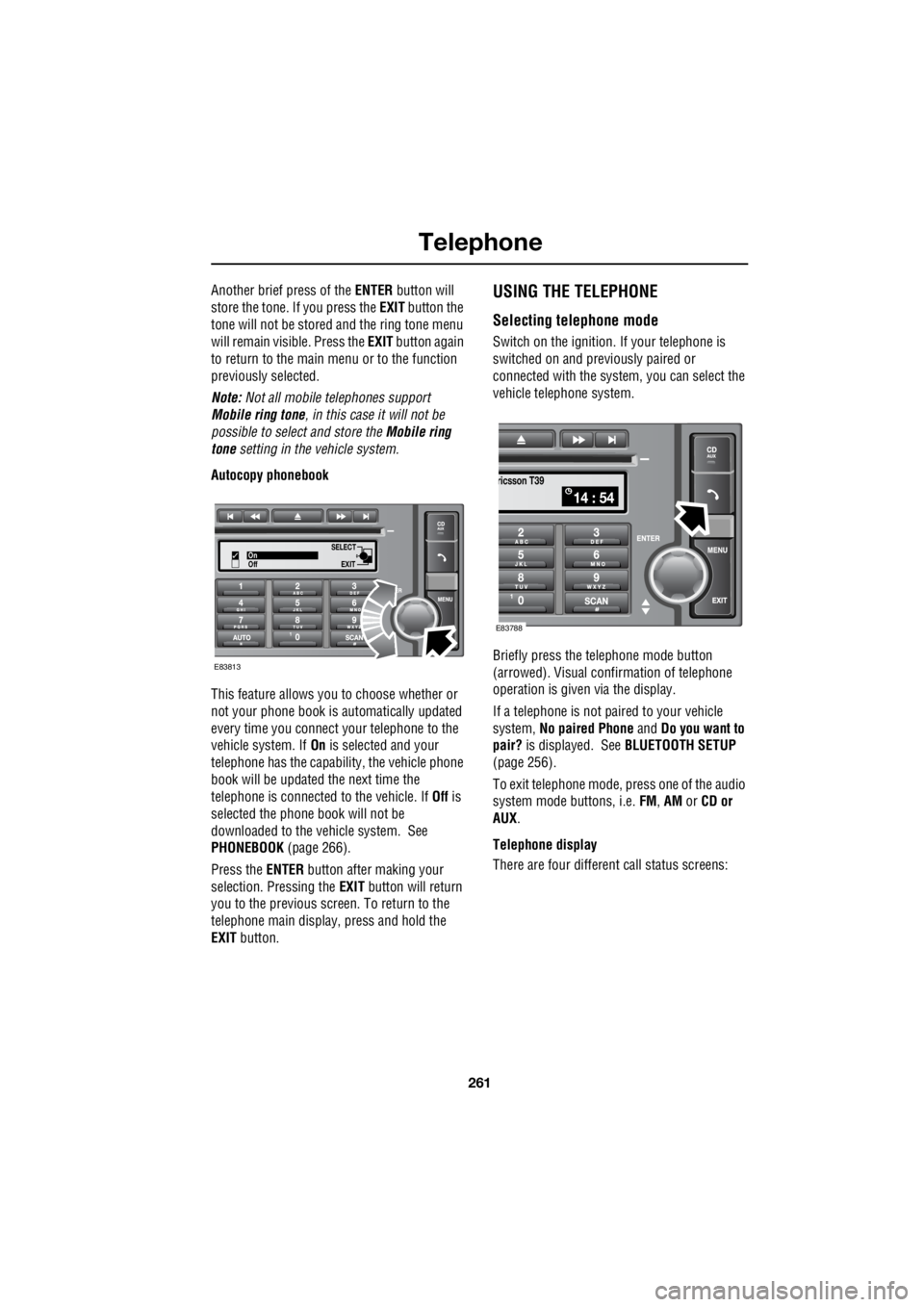
Autocopy phonebook
This feature allows you to choose whether or
not your phone book is automatically updated
every time you connect your telephone to the
vehicle system. If On is selected and your
telephone has the capabili ty, the vehicle phone
book will be updated the next time the
telephone is connected to the vehicle. If Off is
selected the phone book will not be
downloaded to the vehicle system. See
PHONEBOOK (page 266).
Press the ENTER button after making your
selection. Pressing the EXIT button will return
you to the previous screen. To return to the
telephone main display, press and hold the
EXIT button.USING THE TELEPHONE
Selecting telephone mode
Switch on the ignition. If your telephone is
switched on and previously paired or
connected with the system, you can select the
vehicle telephone system.
Briefly press the te lephone mode button
(arrowed). Visual conf irmation of telephone
operation is given via the display.
If a telephone is not paired to your vehicle
system, No paired Phone and Do you want to
pair? is displayed. See BLUETOOTH SETUP
(page 256).
To exit telephone mode, press one of the audio
system mode buttons, i.e. FM, AM or CD or
AUX .
Telephone display
There are four different call status screens:
SELECT
EXITOn
Off
E83813
14 : 54
ricsson T39
E83788
Page 2985 of 3229
265
Telephone
R
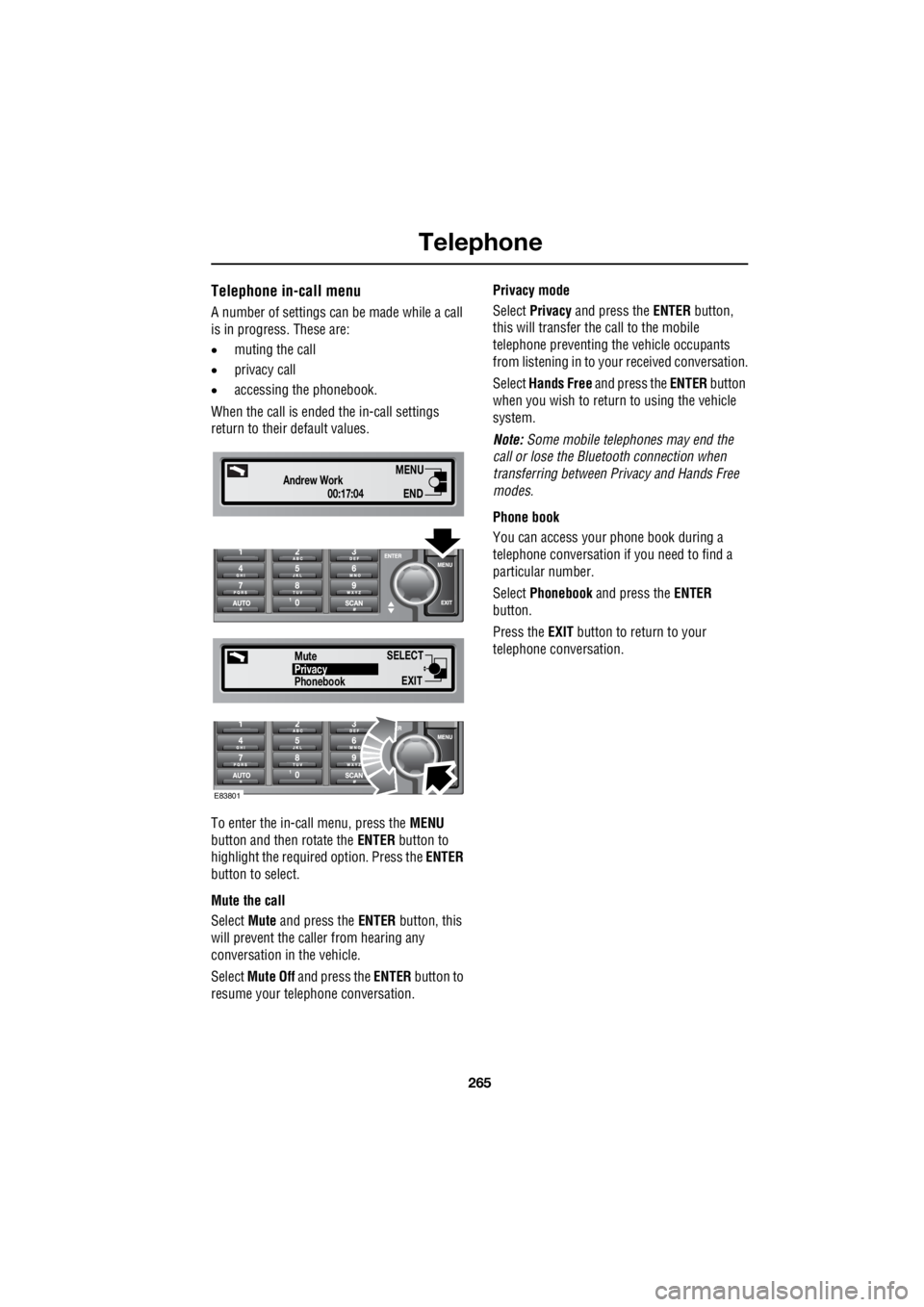
Telephone in-call menu
A number of settings can be made while a call
is in progress. These are:
• muting the call
• privacy call
• accessing the phonebook.
When the call is ende d the in-call settings
return to their default values.
To enter the in-call menu, press the MENU
button and then rotate the ENTER button to
highlight the required option. Press the ENTER
button to select.
Mute the call
Select Mute and press the ENTER button, this
will prevent the caller from hearing any
conversation in the vehicle.
Select Mute Off and press the ENTER button to
resume your telephone conversation. Privacy mode
Select Privacy and press the ENTER button,
this will transfer the call to the mobile
telephone preventing th e vehicle occupants
from listening in to your received conversation.
Select Hands Free and press the ENTER button
when you wish to return to using the vehicle
system.
Note: Some mobile tele phones may end the
call or lose the Bluetooth connection when
transferring between Pr ivacy and Hands Free
modes.
Phone book
You can access your phone book during a
telephone conversation if you need to find a
particular number.
Select Phonebook and press the ENTER
button.
Press the EXIT button to return to your
telephone conversation.
00:17:04
Andrew WorkEND
MENU
SELECT
EXITPhonebookPrivacy
Mute
E83801