Page 188 of 328

In short, once the light has turned ON, at least one tire may be under
inflated.
When your temporary spare tire is installed (if equipped)
When one of your road tires needs to be replaced with the temporary
spare (T-type spare/Mini spare or Dissimilar spare), the TPMS system
will continue to identify an issue to remind you that the damaged road
wheel/tire needs to be repaired and put back on your vehicle. During this
time, the low tire warning light can periodically return or stay on,
depending on the state of the damaged road wheel/tire. This will include
messages from the message center (if equipped).
To restore the full functionality of the Tire Pressure Monitoring System,
have the damaged road wheel/tire repaired and remounted on your
vehicle. For additional information, refer toChanging tires with TPMS
in this section.
When you believe your system is not operating properly
The main function of the Tire Pressure Monitoring System is to warn you
when your tires need air. It can also warn you in the event the system is
no longer capable of functioning as intended. Please refer to the
following chart for information concerning your Tire Pressure Monitoring
System:
Tires, Wheels and Loading
188
Page 189 of 328
Low Tire Pressure
Warning LightPossible cause Customer Action Required
Solid Warning Light Tire(s)
under-inflated1. Check your tire pressure to
ensure they are properly
inflated; refer toInflating
your tiresin this chapter. Ford
Motor Company recommends
the use of a digital or dial-type
tire pressure gauge rather than
a stick-type tire pressure gauge
for increased accuracy.
2. After inflating your tires to
the manufacturer's
recommended inflation
pressure shown on the Safety
Compliance Certification Label
(located on the edge of driver's
door or the B-Pillar) the
vehicle must be driven for at
least two minutes over 20 mph
(32 km/h) before the light will
turn OFF.
Spare tire in use Your temporary spare tire is in
use. Repair the damaged road
wheel/tire and reinstall it on
the vehicle to restore system
functionality. For a description
on how the system functions,
refer toChanging Tires with
TPMSin this section.
TPMS
malfunctionIf your tires are properly
inflated and your spare tire is
not in use and the light
remains ON, have the system
inspected by your authorized
dealer.
Tires, Wheels and Loading
189
Page 190 of 328

Low Tire Pressure
Warning LightPossible cause Customer Action Required
Flashing Warning
Light (flashes for 20
to 30 seconds either
at start-up or while
driving)Spare tire in use Your temporary spare tire is in
use. Repair the damaged road
wheel and re-mount it on the
vehicle to restore system
functionality. For a description
of how the system functions
under these conditions, refer to
Changing tires with TPMSin
this section.
TPMS
malfunctionIf your tires are properly
inflated and your spare tire is
not in use and a flashing TPMS
warning light is still present,
have the system inspected by
your authorized dealer.
When inflating your tires
When putting air into your tires (such as at a gas station or in your
garage), the Tire Pressure Monitoring System may not respond
immediately to the air added to your tires. Here are the details:
²The tire pressure sensors mounted in your wheels updates your
vehicle with tire pressure information only once every minute,
therefore it may take up to two minutes of driving over 20 mph (32
km/h) for the light to turn OFF after you have filled your tires to the
recommended tire pressure.
²If your vehicle has been parked for over 30 minutes, the sensors go
into a low power mode to conserve battery life and therefore only
transmit about once every 6 hours. If you inflate your tires under
these conditions, it may take up to two minutes of driving over 20
mph (32 km/h) for the light to turn OFF after you have filled your
tires to the recommended tire pressure.
For these reasons, the low tire pressure warning light is NOT a
substitute for using an accurate tire gauge when checking and filling
your tires.
Tires, Wheels and Loading
190
Page 191 of 328
How temperature affects your tire pressure
The Tire Pressure Monitoring System (TPMS) monitors tire pressure in
each pneumatic tire. The pressure in each tire is dependent upon several
factors, one of them being the contained air temperature (temperature of
the air inside the tire). As the contained air temperature increases, the
tire pressure also increases. While driving in a normal manner, a typical
passenger tire inflation pressure may increase approximately 2 to 4 psi
(14 to 28 kPa) from a cold start situation. This increase in tire pressure
is due to an increase in the contained air temperature. Contained air
temperature is dependent upon several factors such as rate of tire
rotation, tire deflection, amount of braking, etc. In a similar manner, the
tire pressure will decrease if the contained air temperature decreases.
For example, if the vehicle is stationary over night with the outside
temperature significantly lower than the daytime temperature, the tire
pressure may decrease approximately 3 psi (20.7 kPa) for a drop of 30É
F (16.6É C) in ambient temperature. This lower pressure value may be
detected by the TPMS as being significantly lower than the cold pressure
indicated on your vehicles Safety Compliance Certification Label, and
activate the TPMS warning for low tire pressure. If the low tire pressure
warning light is ON, visually check each tire to verify that no tire is flat.
If one or more tires are flat, repair as necessary. Check air pressure in
the road tires. If any tire is underinflated, carefully drive the vehicle to
the nearest location where air can be added to the tires. Turn the
ignition to the OFF position. Inflate all the tires to the recommended
inflation pressure.
The Tire Pressure Monitoring System is NOT a substitute for
manually checking tire pressure. The tire pressure should be
checked periodically (at least monthly) using an accurate tire gauge,
seeInspecting and inflating your tiresin this chapter. Failure to
properly maintain your tire pressure could increase the risk of tire
failure, loss of control, vehicle rollover and personal injury.
Tires, Wheels and Loading
191
Page 203 of 328
²Class III/IV receiver: 500 lb. (227 kg) (weight carrying); 740 lb. (336 kg)
(weight distributing)
Safety chains
Always connect the trailer's safety chains to the frame or hook retainers
of the vehicle hitch. To connect the trailer's safety chains, cross the
chains under the trailer tongue and allow slack for turning corners.
If you use a rental trailer, follow the instructions that the rental agency
gives to you.
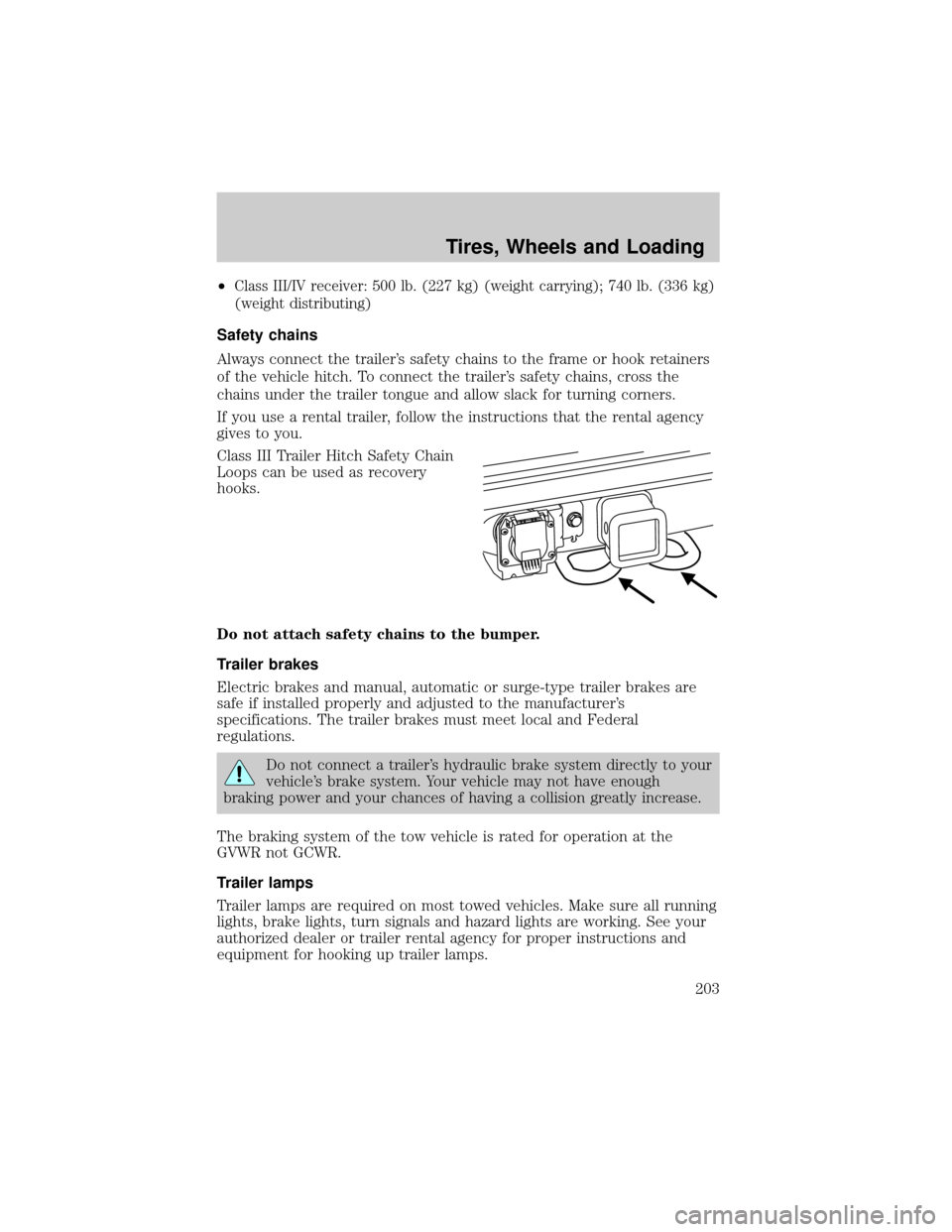
Class III Trailer Hitch Safety Chain
Loops can be used as recovery
hooks.
Do not attach safety chains to the bumper.
Trailer brakes
Electric brakes and manual, automatic or surge-type trailer brakes are
safe if installed properly and adjusted to the manufacturer's
specifications. The trailer brakes must meet local and Federal
regulations.
Do not connect a trailer's hydraulic brake system directly to your
vehicle's brake system. Your vehicle may not have enough
braking power and your chances of having a collision greatly increase.
The braking system of the tow vehicle is rated for operation at the
GVWR not GCWR.
Trailer lamps
Trailer lamps are required on most towed vehicles. Make sure all running
lights, brake lights, turn signals and hazard lights are working. See your
authorized dealer or trailer rental agency for proper instructions and
equipment for hooking up trailer lamps.
Tires, Wheels and Loading
203
Page 204 of 328
Never connect any trailer lighting to the vehicle's taillamp
circuits, because it may damage the electrical system resulting in
fire. Contact your authorized dealer for assistance in proper trailer tow
wiring installation. Additional electrical equipment may be required.
Driving while you tow
When towing a trailer:
²Keep your speed no faster than 70 mph (112 km/h) during the first
500 miles (800 km) of towing a trailer, and don't make full throttle
starts.
²Turn off the speed control. The speed control may shut off
automatically when you are towing on long, steep grades.
²Consult your local motor vehicle speed regulations for towing a trailer.
²To eliminate excessive shifting, use a lower gear. This will also assist
in transmission cooling. (For additional information, refer to the
Driving with an automatic transmissionsection in theDriving
chapter.)
²Under extreme conditions with large frontal trailers, high outside
temperatures and highway speeds, the coolant gauge may indicate
higher than normal coolant temperatures. If this occurs, reduce speed
until the coolant temperature returns to the normal range. Refer to
Engine coolant temperature gaugein theInstrument Cluster
chapter.
²Anticipate stops and brake gradually.
²Do not exceed the GCWR rating or transmission damage may occur.
Servicing after towing
If you tow a trailer for long distances, your vehicle will require more
frequent service intervals. Refer to yourScheduled Maintenance
Informationfor more information.
Trailer towing tips
²Practice turning, stopping and backing up before starting on a trip to
get the feel of the vehicle trailer combination. When turning, make
wider turns so the trailer wheels will clear curbs and other obstacles.
²Allow more distance for stopping with a trailer attached.
²If you are driving down a long or steep hill, shift to a lower gear. Do
not apply the brakes continuously, as they may overheat and become
less effective.
Tires, Wheels and Loading
204
Page 207 of 328

STARTING
Positions of the ignition
1. OFF/LOCK, shuts off the engine
and all accessories/locks the steering
wheel, gearshift lever and allows key
removal.
2. ACC, allows the electrical
accessories such as the radio to
operate while the engine is not
running. This position also unlocks
the steering wheel.
3. ON, all electrical circuits
operational. Warning lights illuminated. Key position when driving.
4. START, cranks the engine. Release the key as soon as the engine
starts.
Important safety precautions
When the engine starts, the idle RPM runs faster to warm the engine. If
the engine idle speed does not slow down automatically, have the vehicle
checked.
If the vehicle is operated in a heavy snow storm or blowing snow
conditions, the engine air induction may become partially clogged with
snow and/or ice. If this occurs the engine may experience a significant
reduction in power output. At the earliest opportunity, clear all snow
and/or ice away for the air induction inlet.
Before starting the vehicle:
1. Make sure all occupants buckle their safety belts. For more
information on safety belts and their proper usage, refer to theSeating
and Safety Restraintschapter.
Driving
207
Page 208 of 328
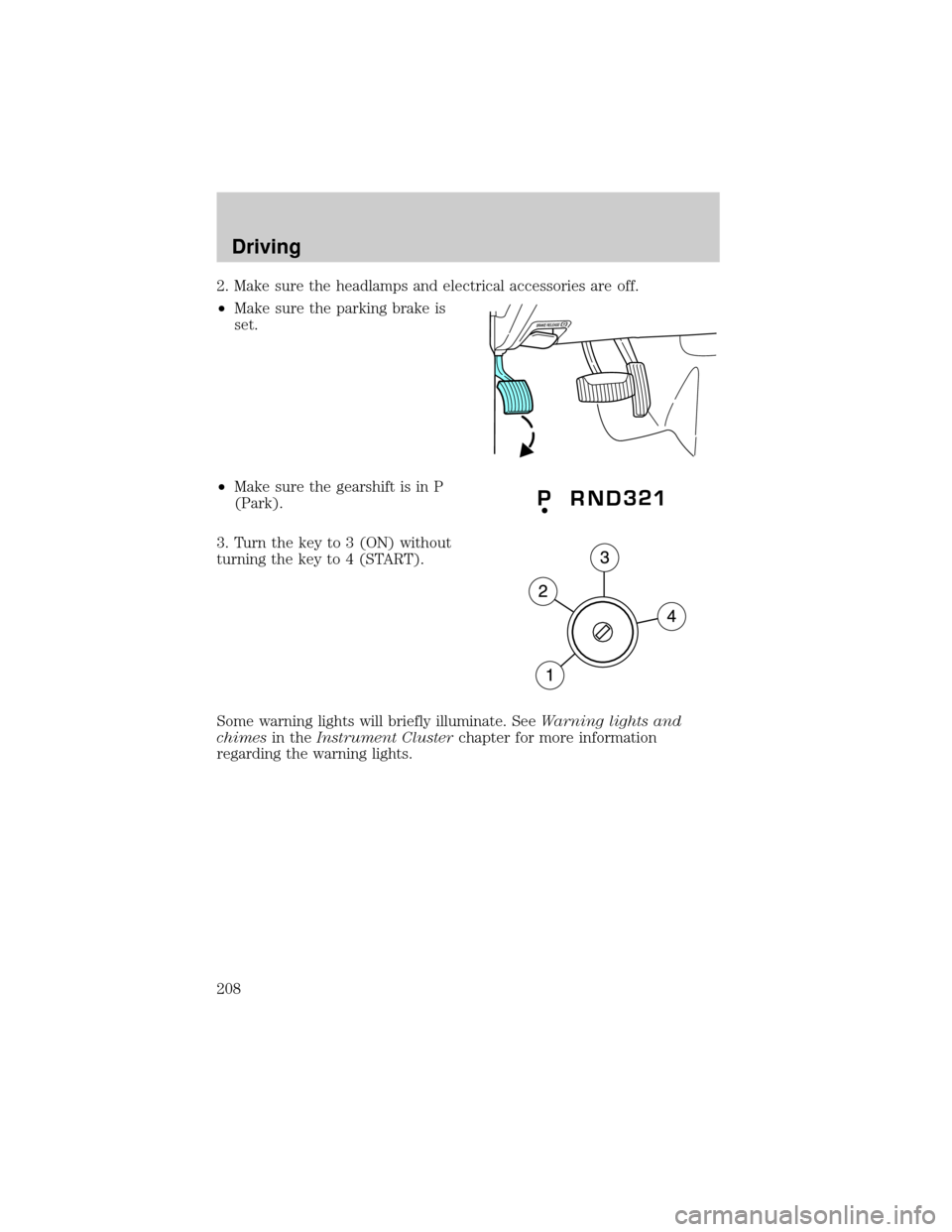
2. Make sure the headlamps and electrical accessories are off.
²Make sure the parking brake is
set.
²Make sure the gearshift is in P
(Park).
3. Turn the key to 3 (ON) without
turning the key to 4 (START).
Some warning lights will briefly illuminate. SeeWarning lights and
chimesin theInstrument Clusterchapter for more information
regarding the warning lights.
Driving
208