Page 100 of 3171
AT-92
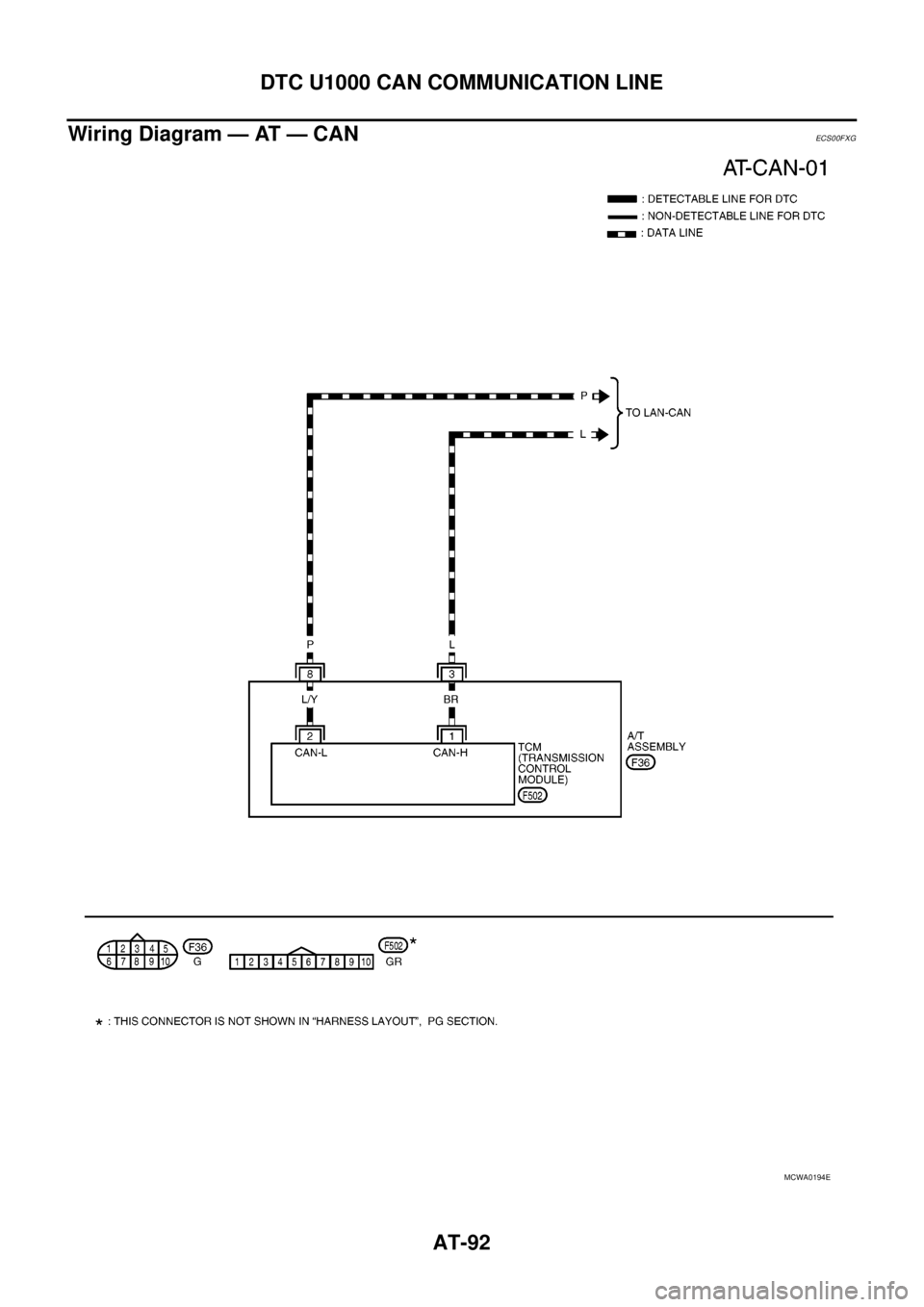
DTC U1000 CAN COMMUNICATION LINE
Wiring Diagram — AT — CAN
ECS00FXG
MCWA0194E
Page 103 of 3171
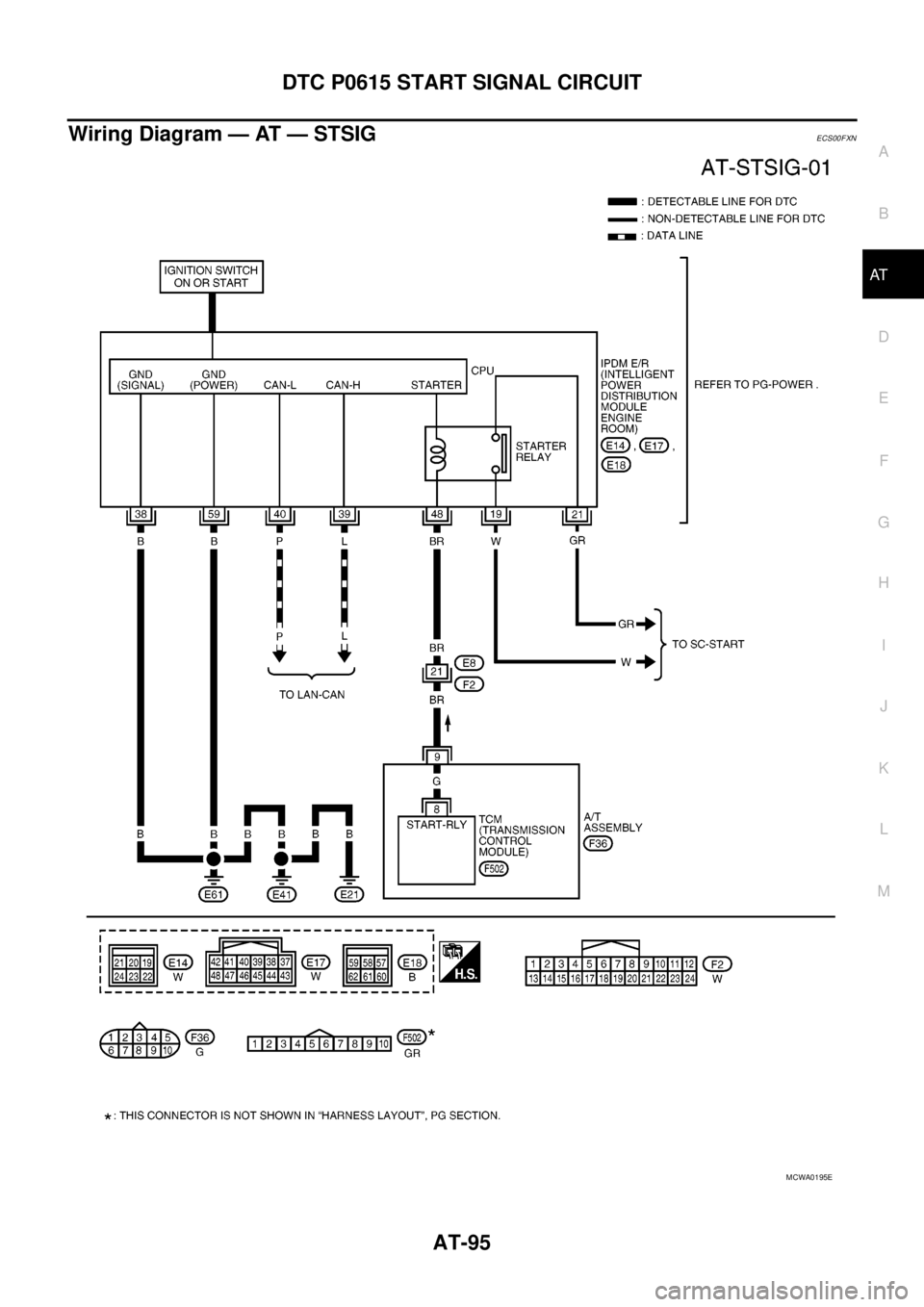
DTC P0615 START SIGNAL CIRCUIT
AT-95
D
E
F
G
H
I
J
K
L
MA
B
AT
Wiring Diagram — AT — STSIGECS00FXN
MCWA0195E
Page 108 of 3171
AT-100
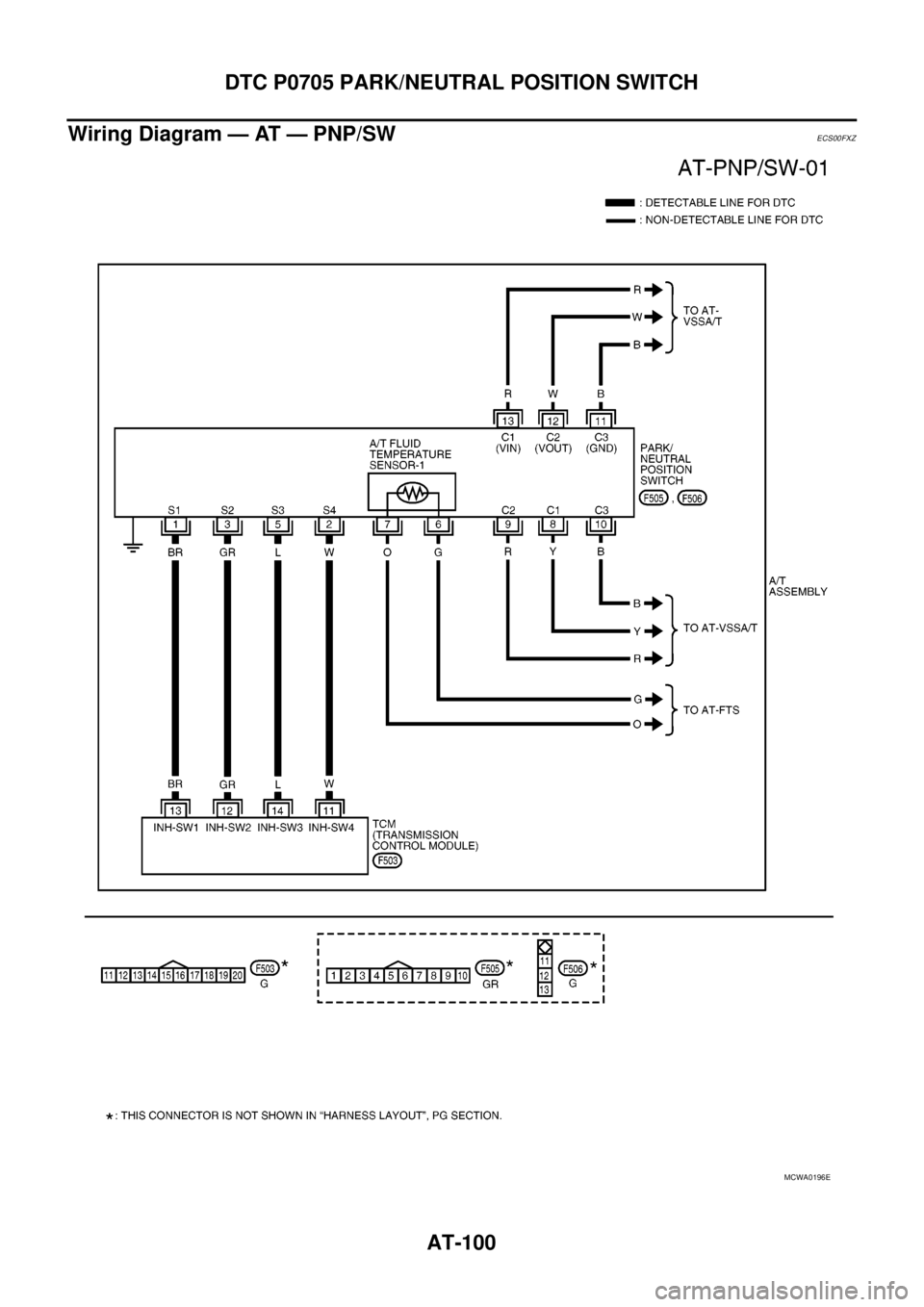
DTC P0705 PARK/NEUTRAL POSITION SWITCH
Wiring Diagram — AT — PNP/SW
ECS00FXZ
MCWA0196E
Page 113 of 3171
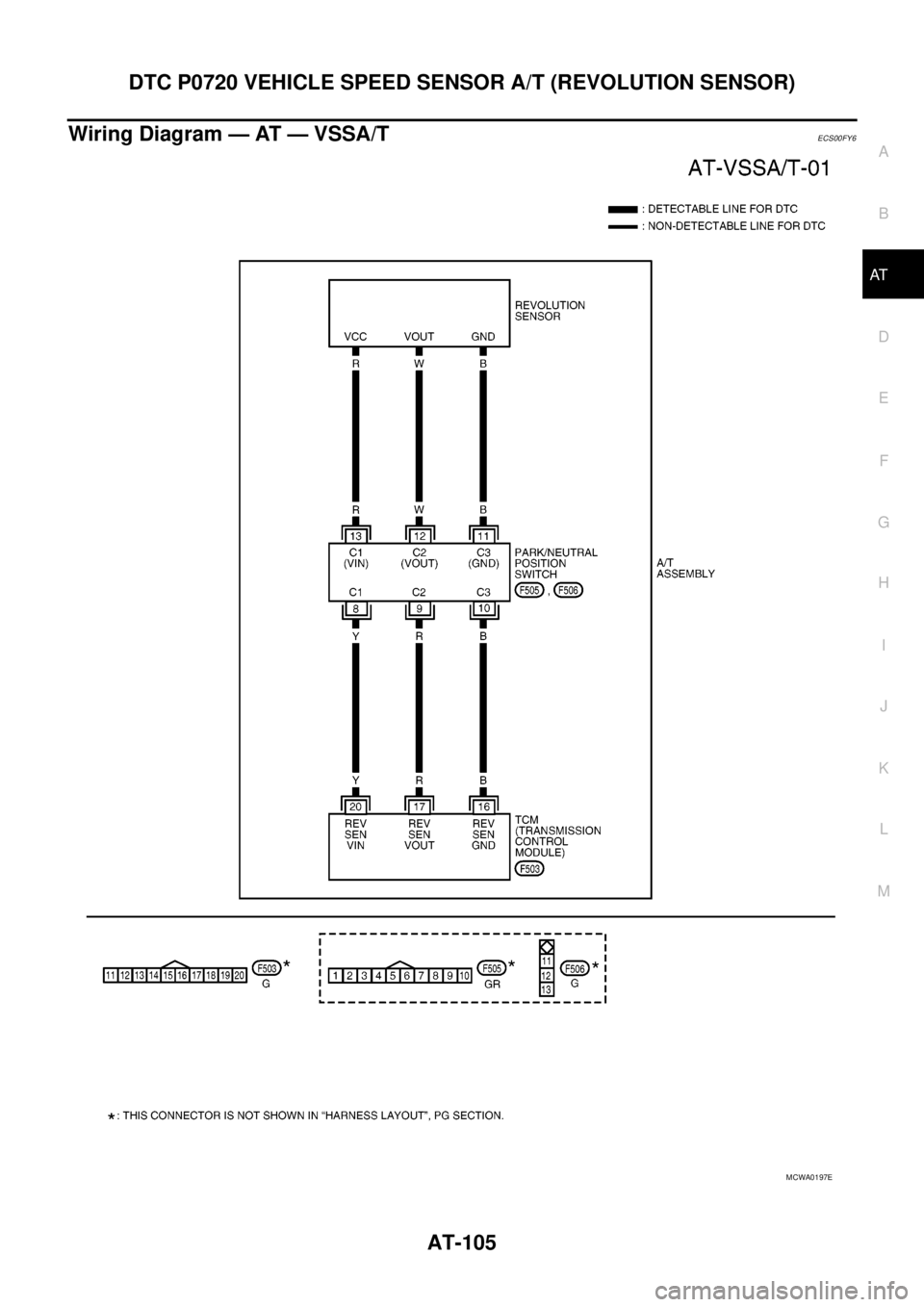
DTC P0720 VEHICLE SPEED SENSOR A/T (REVOLUTION SENSOR)
AT-105
D
E
F
G
H
I
J
K
L
MA
B
AT
Wiring Diagram — AT — VSSA/TECS00FY6
MCWA0197E
Page 127 of 3171
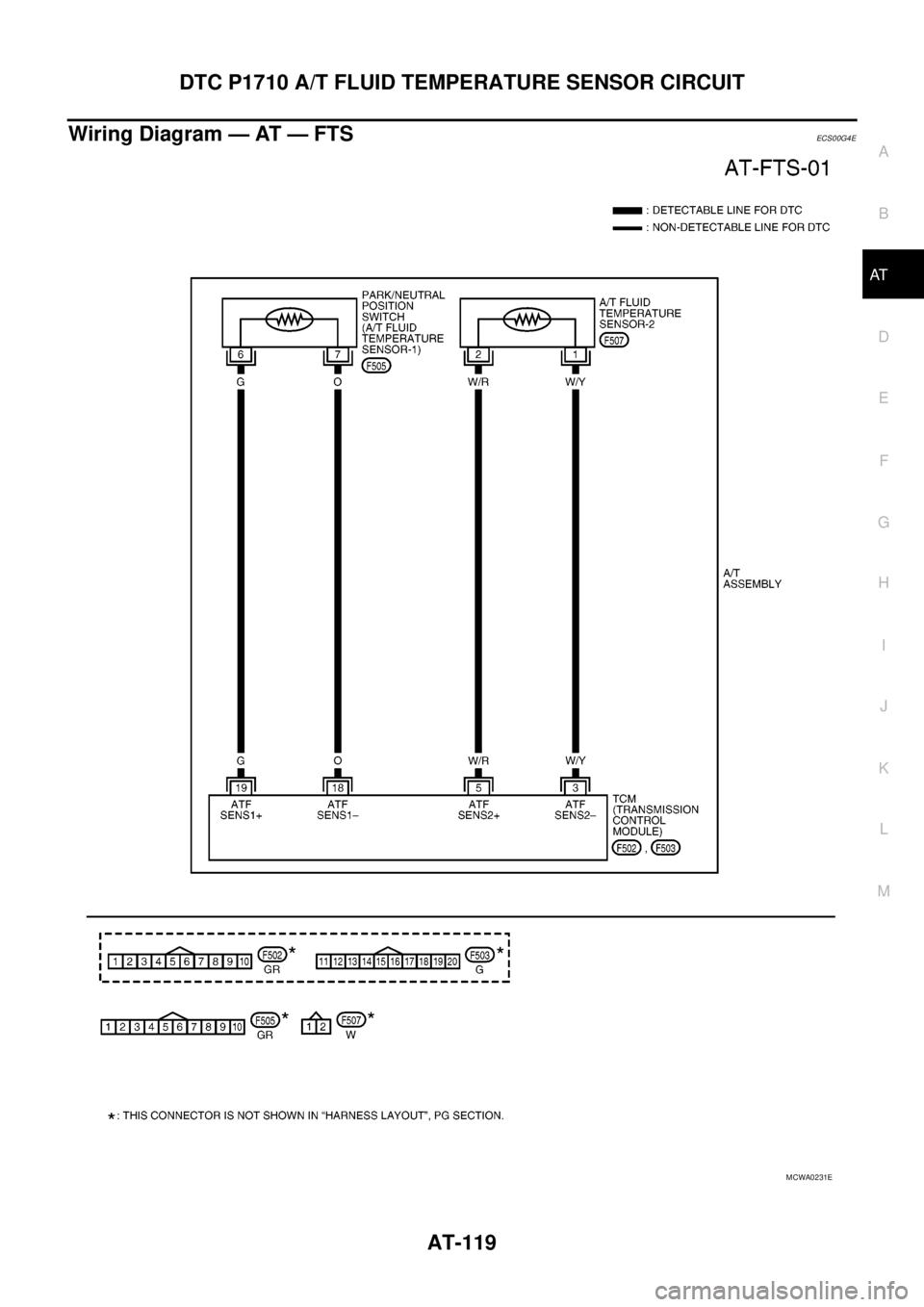
DTC P1710 A/T FLUID TEMPERATURE SENSOR CIRCUIT
AT-119
D
E
F
G
H
I
J
K
L
MA
B
AT
Wiring Diagram — AT — FTSECS00G4E
MCWA0231E
Page 172 of 3171
AT-164
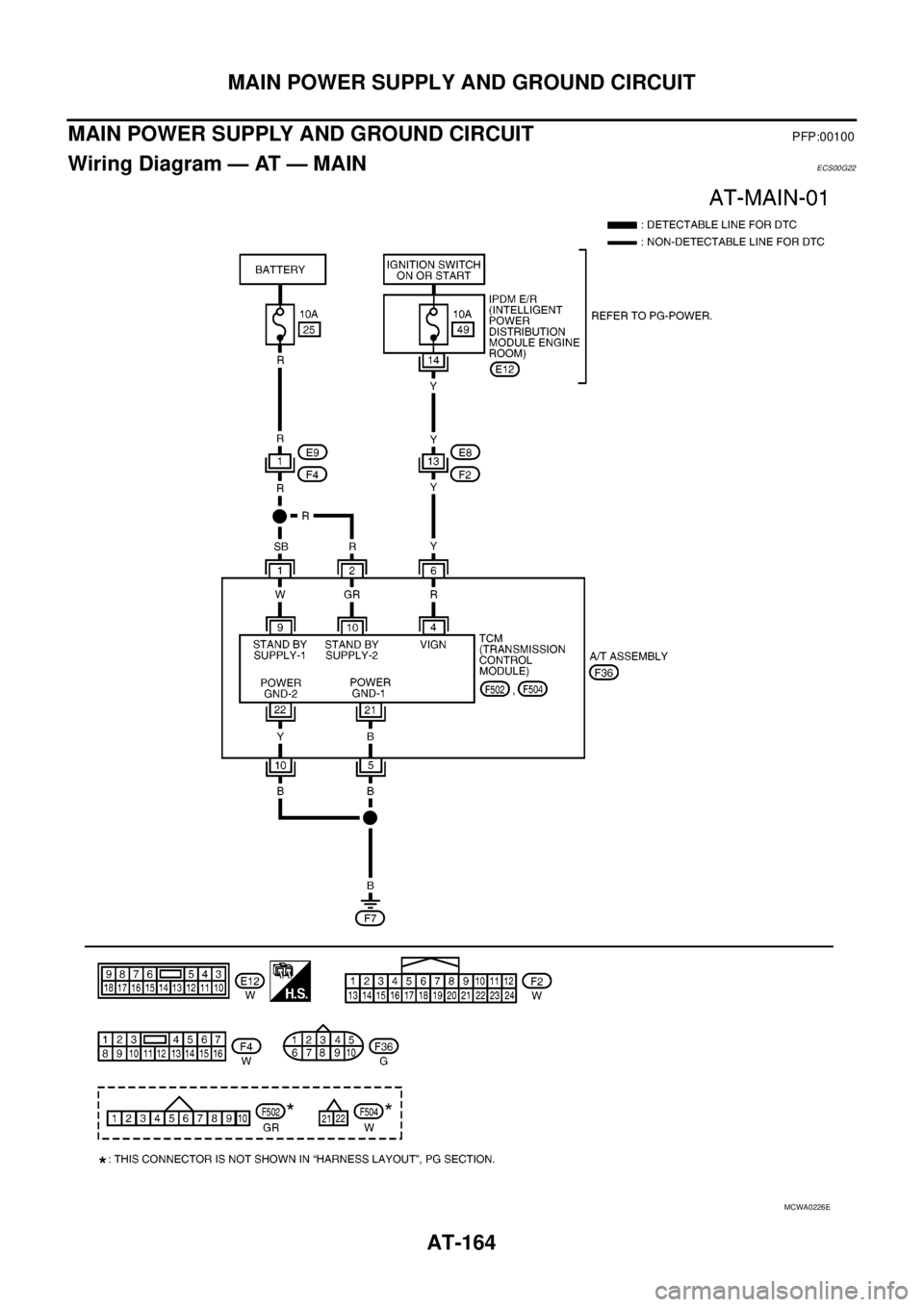
MAIN POWER SUPPLY AND GROUND CIRCUIT
MAIN POWER SUPPLY AND GROUND CIRCUIT
PFP:00100
Wiring Diagram — AT — MAINECS00G22
MCWA0226E
Page 177 of 3171

BRAKE SIGNAL CIRCUIT
AT-169
D
E
F
G
H
I
J
K
L
MA
B
AT
BRAKE SIGNAL CIRCUITPFP:25320
CONSULT-II Reference ValueECS00G26
Diagnostic ProcedureECS00G27
1.CHECK CAN COMMUNICATION LINE
Perform self-diagnosis. Refer toAT-80, "
SELF-DIAGNOSTIC RESULT MODE",AT-89, "Diagnostic Procedure
Without CONSULT-II".
Is a malfunction in the CAN communication indicated in the results?
YES >> Check CAN communication line. Refer toAT-91, "DTC U1000 CAN COMMUNICATION LINE".
NO >> GO TO 2.
2.CHECK STOP LAMP SWITCH CIRCUIT
With CONSULT-II
1. Turn ignition switch ON. (Do not start engine.)
2. Select “ECU INPUT SIGNALS” in “DATA MONITOR” mode for
“A/T” with CONSULT-II.
3. Read the ON/OFF switching action of “BRAKE SW”.
OK or NG
OK >>INSPECTION END
NG >> GO TO 3.
3.CHECK STOP LAMP SWITCH
Check continuity between stop lamp switch harness connector E109
terminals 1 and 2. Refer toAT- 1 7 4 , "
Wiring Diagram—AT—NON-
DTC".
Check stop lamp switch after adjusting brake pedal — refer to
BR-6, "
BRAKE PEDAL".
OK or NG
OK >> Check the following. If NG, repair or replace damaged
parts.
lHarness for short or open between battery and stop lamp switch.
lHarness for short or open between stop lamp switch and combination meter.
l10A fuse (No.20, located in fuse block).
NG >> Repair or replace stop lamp switch.
Item name Condition Display value
BRAKE SWDepressed brake pedal. ON
Released brake pedal. OFF
Item name Condition Display value
BRAKE SWDepressed brake pedal. ON
Released brake pedal. OFF
PCIA0070E
Condition Continuity
When brake pedal is depressed Yes
When brake pedal is released No
SCIA2144E
Page 178 of 3171
AT-170
1ST POSITION SWITCH
1ST POSITION SWITCH
PFP:31918
CONSULT-II Reference ValueECS00I5W
Diagnostic ProcedureECS00I5X
1.CHECK CAN COMMUNICATION LINE
Perform the self-diagnosis. Refer toAT-80, "
SELF-DIAGNOSTIC RESULT MODE".
Is any malfunction in the CAN communication indicated in the results?
YES >> Check CAN communication line. Refer toAT-91, "DTC U1000 CAN COMMUNICATION LINE".
NO >> GO TO 2.
2.CHECK 1ST POSITION SWITCH CIRCUIT
With CONSULT-II
1. Turn ignition switch ON.
2. Select “ECU INPUT SIGNALS” in “DATA MONITOR” mode for
“A/T” with CONSULT-II.
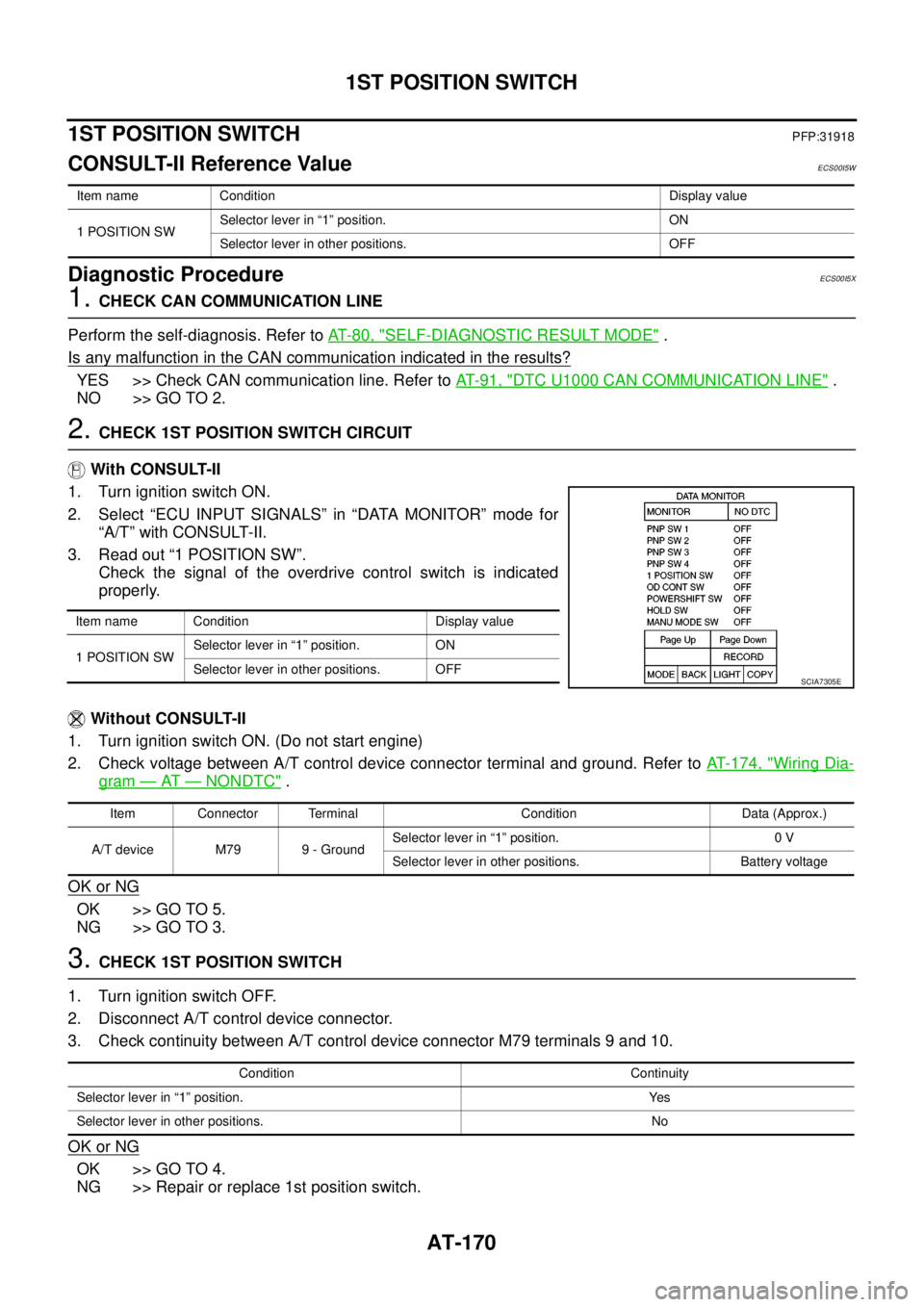
3. Read out “1 POSITION SW”.
Check the signal of the overdrive control switch is indicated
properly.
Without CONSULT-II
1. Turn ignition switch ON. (Do not start engine)
2. Check voltage between A/T control device connector terminal and ground. Refer toAT- 1 7 4 , "
Wiring Dia-
gram—AT—NONDTC".
OK or NG
OK >> GO TO 5.
NG >> GO TO 3.
3.CHECK 1ST POSITION SWITCH
1. Turn ignition switch OFF.
2. Disconnect A/T control device connector.
3. Check continuity between A/T control device connector M79 terminals 9 and 10.
OK or NG
OK >> GO TO 4.
NG >> Repair or replace 1st position switch.
Item name Condition Display value
1 POSITION SWSelector lever in “1” position. ON
Selector lever in other positions. OFF
Item name Condition Display value
1 POSITION SWSelector lever in “1” position. ON
Selector lever in other positions. OFF
SCIA7305E
Item Connector Terminal Condition Data (Approx.)
A/T device M79 9 - GroundSelector lever in “1” position. 0 V
Selector lever in other positions. Battery voltage
Condition Continuity
Selector lever in “1” position. Yes
Selector lever in other positions. No