2004 MITSUBISHI ENDEAVOR immobilizer
[x] Cancel search: immobilizerPage 1094 of 3870
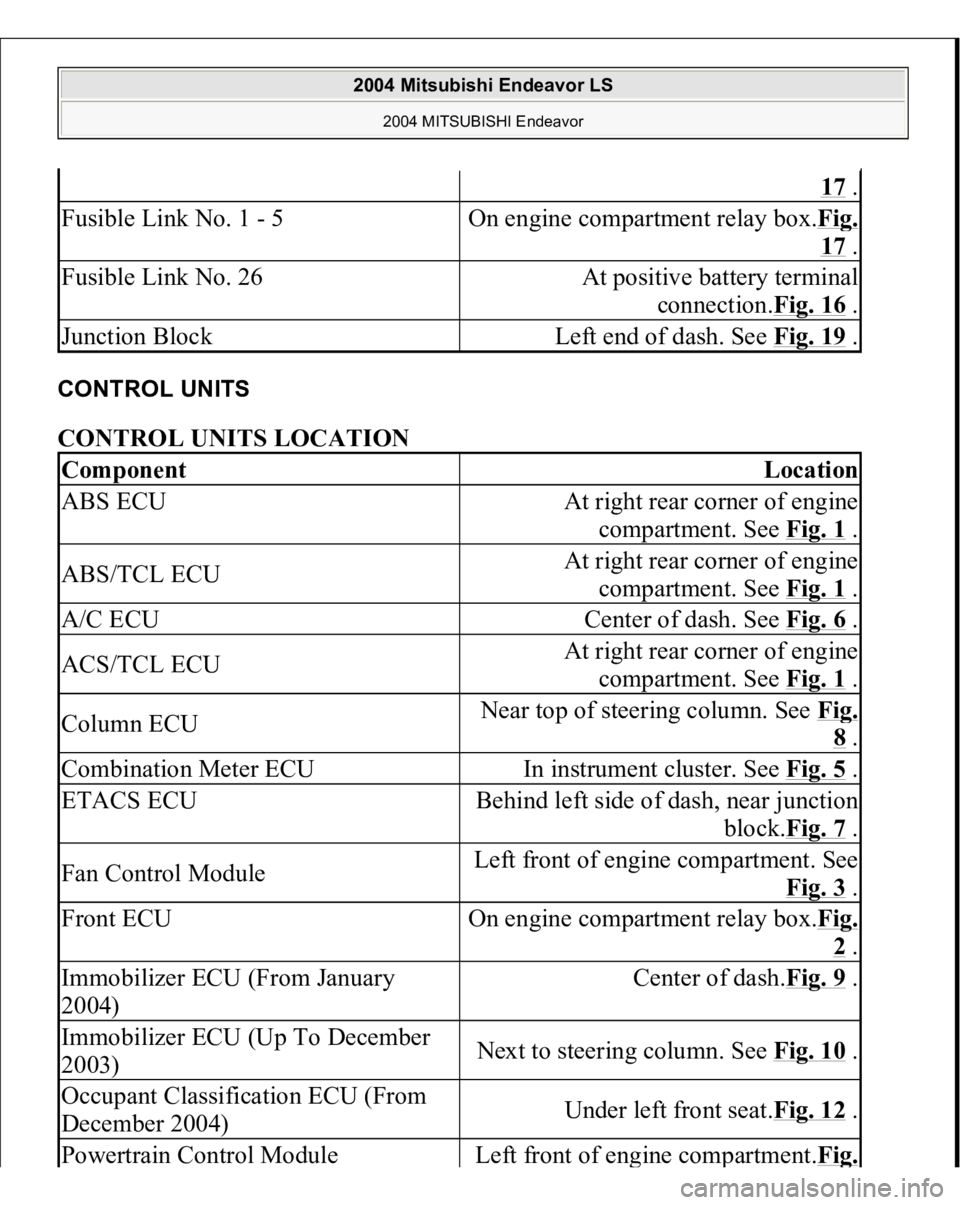
CONTROL UNITS CONTROL UNITS LOCATION
17 .
Fusible Link No. 1 - 5
On engine compartment relay box.Fi
g.
17 .
Fusible Link No. 26
At positive battery terminal
connection.Fig. 16
.
Junction Block
Left end of dash. See Fig. 19
.
Component
Location
ABS ECU
At right rear corner of engine
compartment. See Fig. 1
.
ABS/TCL ECU
At right rear corner of engine
compartment. See Fig. 1
.
A/C ECU
Center of dash. See Fig. 6
.
ACS/TCL ECU
At right rear corner of engine
compartment. See Fig. 1
.
Column ECU
Near top of steering column. See Fi
g. 8 .
Combination Meter ECU
In instrument cluster. See Fig. 5
.
ETACS ECU
Behind left side of dash, near junction
block.Fig. 7
.
Fan Control Module
Left front of engine compartment. See
Fig. 3
.
Front ECU
On engine compartment relay box.Fi
g. 2 .
Immobilizer ECU (From January
2004)
Center of dash.Fig. 9
.
Immobilizer ECU (Up To December
2003)
Next to steering column. See Fig. 10
.
Occupant Classification ECU (From
December 2004)
Under left front seat.Fig. 12
.
Powertrain Control Modul
e
Left front of en
gine com
partment.Fi
g.
2004 Mitsubishi Endeavor LS
2004 MITSUBISHI Endeavor
Page 2518 of 3870
2004 BODY & ACCESSORIES
Ignition Switch - Endeavor
IGNITION SWITCH GENERAL DESCRIPTION < UP TO DECEMBER 2003 > IGNITION KEY REMINDER TONE ALARM The ignition key reminder tone alarm will sound under the following condition, and
warn the driver to remove the ignition key.
The driver's door is opened when the ignition switch is at "LOCK" (OFF) or
"ACC" position without removing the ignition key.
However, the light reminder tone alarm will take precedence over this function.
DOOR LOCK PREVENTION FUNCTION If the key is left in the ignition switch while the driver's door opened or the assistant
door opened, all door are automatically unlock to prevent locking the ignition key
in the vehicle after door is locked. IMMOBILIZER SYSTEM The immobilizer system consists of the ignition key, the immobilizer-ECU with key
ring antenna, and the PCM. The ignition key has a built-in transponder. Only the
registered ignition key permits the engine to start, therefore, the engine can never be
started by means of a forged key or by connecting the ignition wiring directly. The
system is significantly safe and reliable against theft. In addition, the driver has only
to turn the ignition switch to the "ON" position to activate the immobilizer system.
If the requirements for starting the engine are not satisfied, the engine will be
immobilized. If a registered ignition key is lost, all your ignition keys need to be
registered again using scan tool MB991958 (MUT-III Sub Assembly) to ensure
security (Refer to ON
-VEHICLE SERVICE
). An additional ignition key can be
registered as follows (only if no ignition keys are lost):
Using scan tool MB991958 (MUT-III Sub Assembly) (Refer to ON
-
VEHICLE SERVICE
).
2004 Mitsubishi Endeavor LS
2004 BODY & ACCESSORIES Ignition Switch - Endeavor
2004 Mitsubishi Endeavor LS
2004 BODY & ACCESSORIES Ignition Switch - Endeavor
Page 2519 of 3870
By operating two ignition keys that have been already registered (Refer to ON
-
VEHICLE SERVICE
).
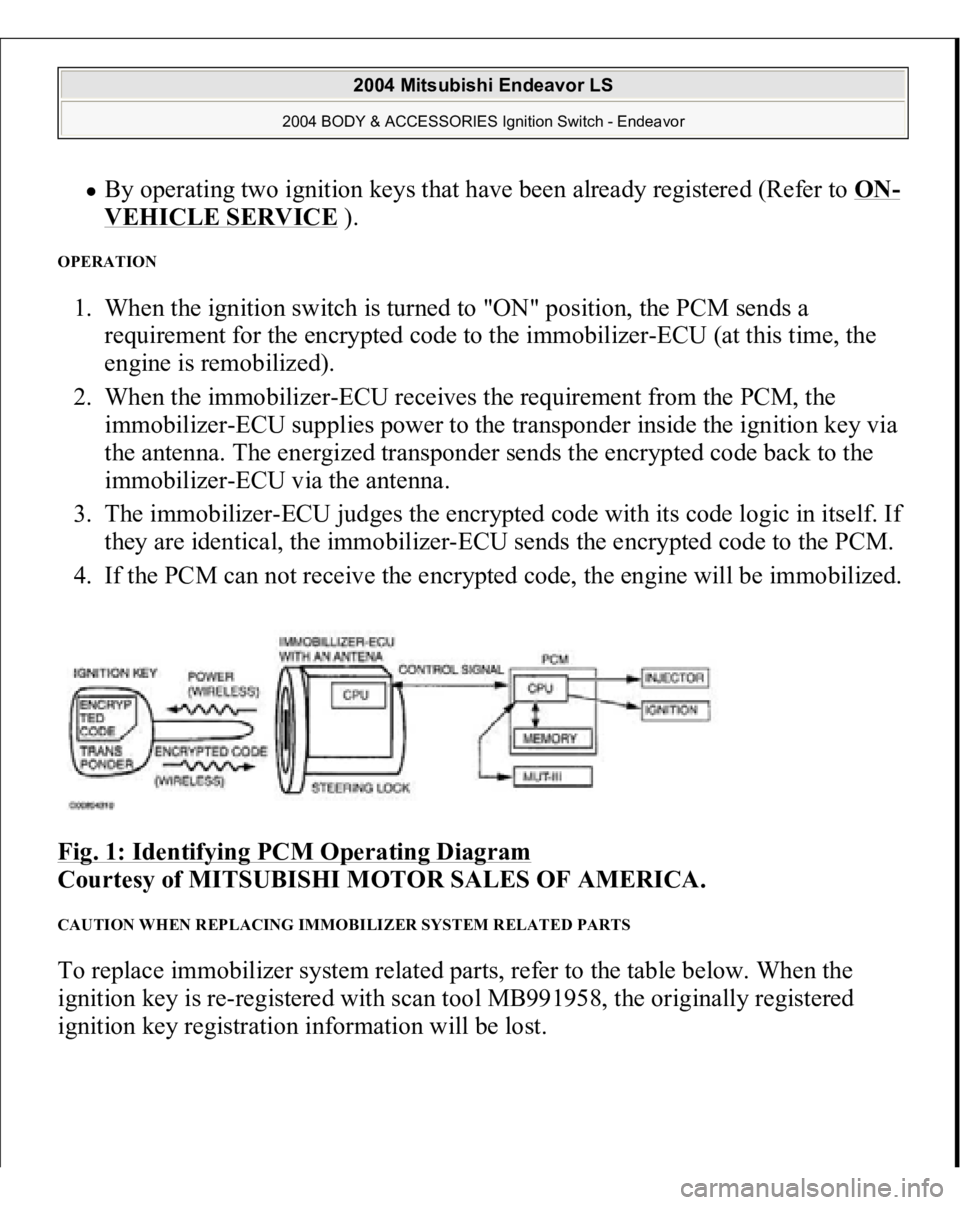
OPERATION 1. When the ignition switch is turned to "ON" position, the PCM sends a
requirement for the encrypted code to the immobilizer-ECU (at this time, the
engine is remobilized).
2. When the immobilizer-ECU receives the requirement from the PCM, the
immobilizer-ECU supplies power to the transponder inside the ignition key via
the antenna. The energized transponder sends the encrypted code back to the
immobilizer-ECU via the antenna.
3. The immobilizer-ECU judges the encrypted code with its code logic in itself. If
they are identical, the immobilizer-ECU sends the encrypted code to the PCM.
4. If the PCM can not receive the encrypted code, the engine will be immobilized.
Fig. 1: Identifying PCM Operating Diagram
Courtesy of MITSUBISHI MOTOR SALES OF AMERICA.
CAUTION WHEN REPLACING IMMOBILIZER SYSTEM RELATED PARTS To replace immobilizer system related parts, refer to the table below. When the
ignition key is re-registered with scan tool MB991958, the originally registered
ignition key registration information will be lost.
2004 Mitsubishi Endeavor LS
2004 BODY & ACCESSORIES Ignition Switch - Endeavor
Page 2520 of 3870
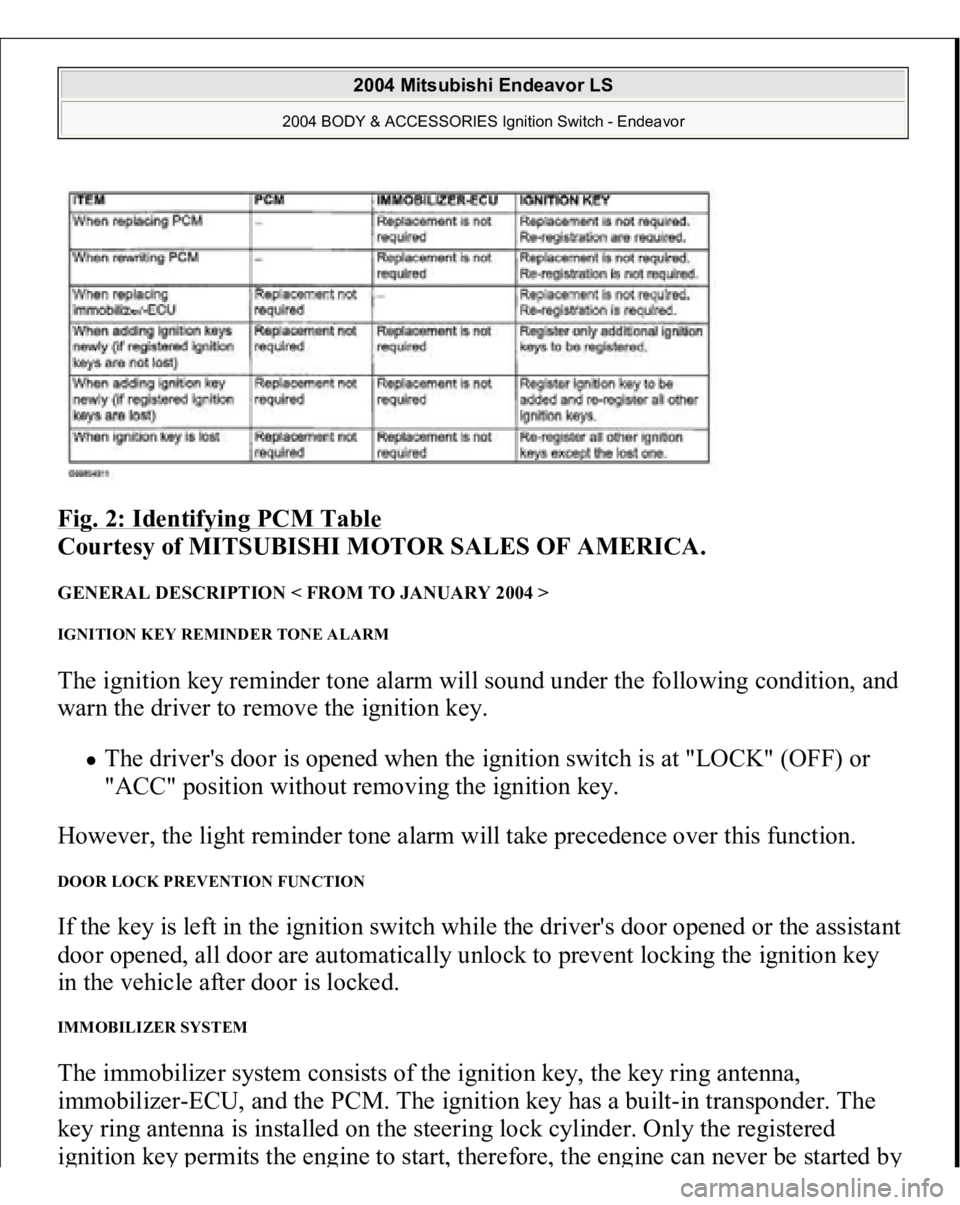
Fig. 2: Identifying PCM Table
Courtesy of MITSUBISHI MOTOR SALES OF AMERICA.
GENERAL DESCRIPTION < FROM TO JANUARY 2004 > IGNITION KEY REMINDER TONE ALARM The ignition key reminder tone alarm will sound under the following condition, and
warn the driver to remove the ignition key.
The driver's door is opened when the ignition switch is at "LOCK" (OFF) or
"ACC" position without removing the ignition key.
However, the light reminder tone alarm will take precedence over this function.
DOOR LOCK PREVENTION FUNCTION If the key is left in the ignition switch while the driver's door opened or the assistant
door opened, all door are automatically unlock to prevent locking the ignition key
in the vehicle after door is locked. IMMOBILIZER SYSTEM The immobilizer system consists of the ignition key, the key ring antenna,
immobilizer-ECU, and the PCM. The ignition key has a built-in transponder. The
key ring antenna is installed on the steering lock cylinder. Only the registered
ignition ke
y permits the en
gine to start
, therefore
, the en
gine can never be started b
y
2004 Mitsubishi Endeavor LS
2004 BODY & ACCESSORIES Ignition Switch - Endeavor
Page 2521 of 3870
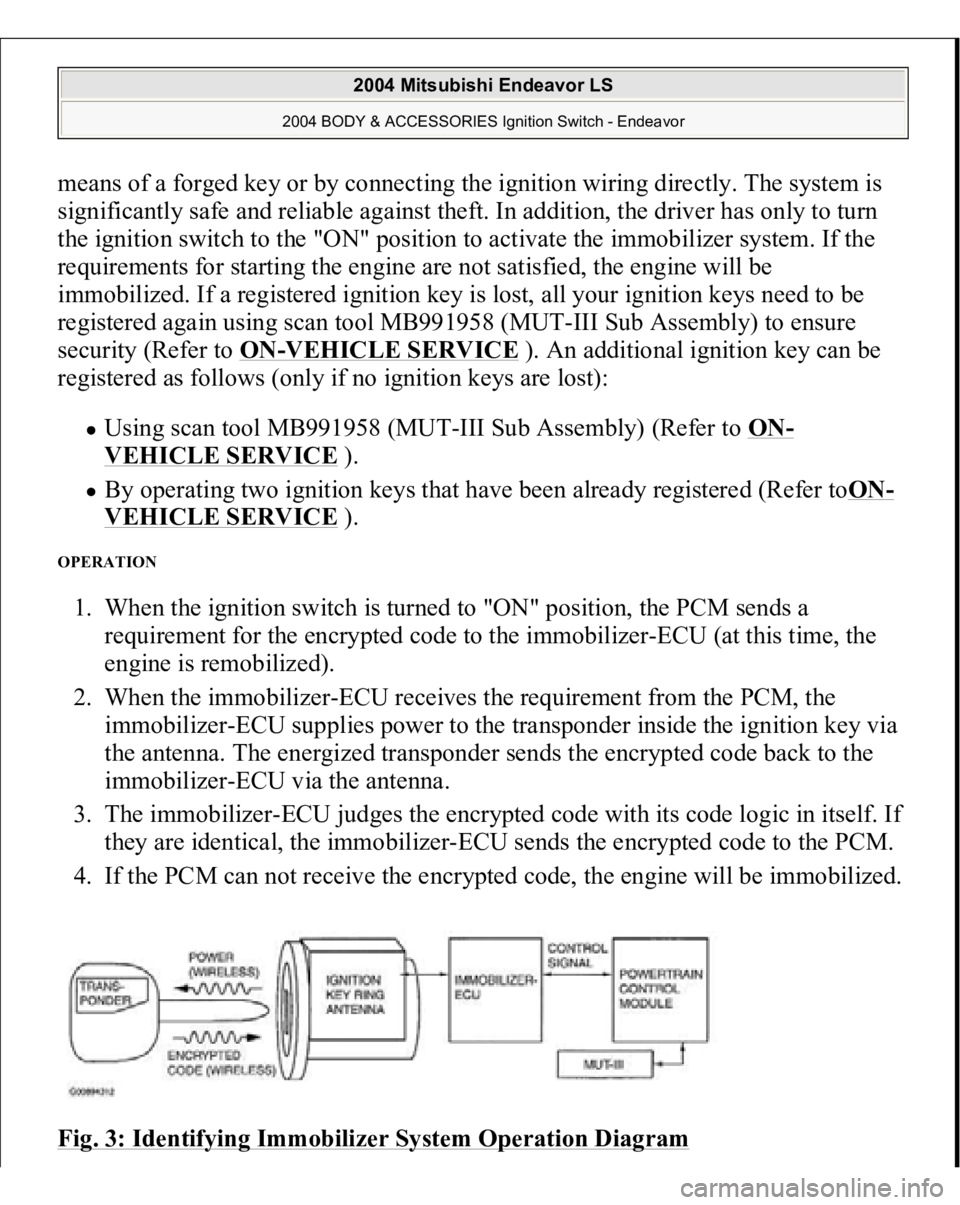
means of a forged key or by connecting the ignition wiring directly. The system is
significantly safe and reliable against theft. In addition, the driver has only to turn
the ignition switch to the "ON" position to activate the immobilizer system. If the
requirements for starting the engine are not satisfied, the engine will be
immobilized. If a registered ignition key is lost, all your ignition keys need to be
registered again using scan tool MB991958 (MUT-III Sub Assembly) to ensure
security (Refer to ON
-VEHICLE SERVICE
). An additional ignition key can be
registered as follows (only if no ignition keys are lost):
Using scan tool MB991958 (MUT-III Sub Assembly) (Refer to ON
-
VEHICLE SERVICE
).
By operating two ignition keys that have been already registered (Refer toON
-
VEHICLE SERVICE
).
OPERATION 1. When the ignition switch is turned to "ON" position, the PCM sends a
requirement for the encrypted code to the immobilizer-ECU (at this time, the
engine is remobilized).
2. When the immobilizer-ECU receives the requirement from the PCM, the
immobilizer-ECU supplies power to the transponder inside the ignition key via
the antenna. The energized transponder sends the encrypted code back to the
immobilizer-ECU via the antenna.
3. The immobilizer-ECU judges the encrypted code with its code logic in itself. If
they are identical, the immobilizer-ECU sends the encrypted code to the PCM.
4. If the PCM can not receive the encrypted code, the engine will be immobilized.
Fig. 3: Identifying Immobilizer System Operation Diagram
2004 Mitsubishi Endeavor LS
2004 BODY & ACCESSORIES Ignition Switch - Endeavor
Page 2522 of 3870
Courtesy of MITSUBISHI MOTOR SALES OF AMERICA
.
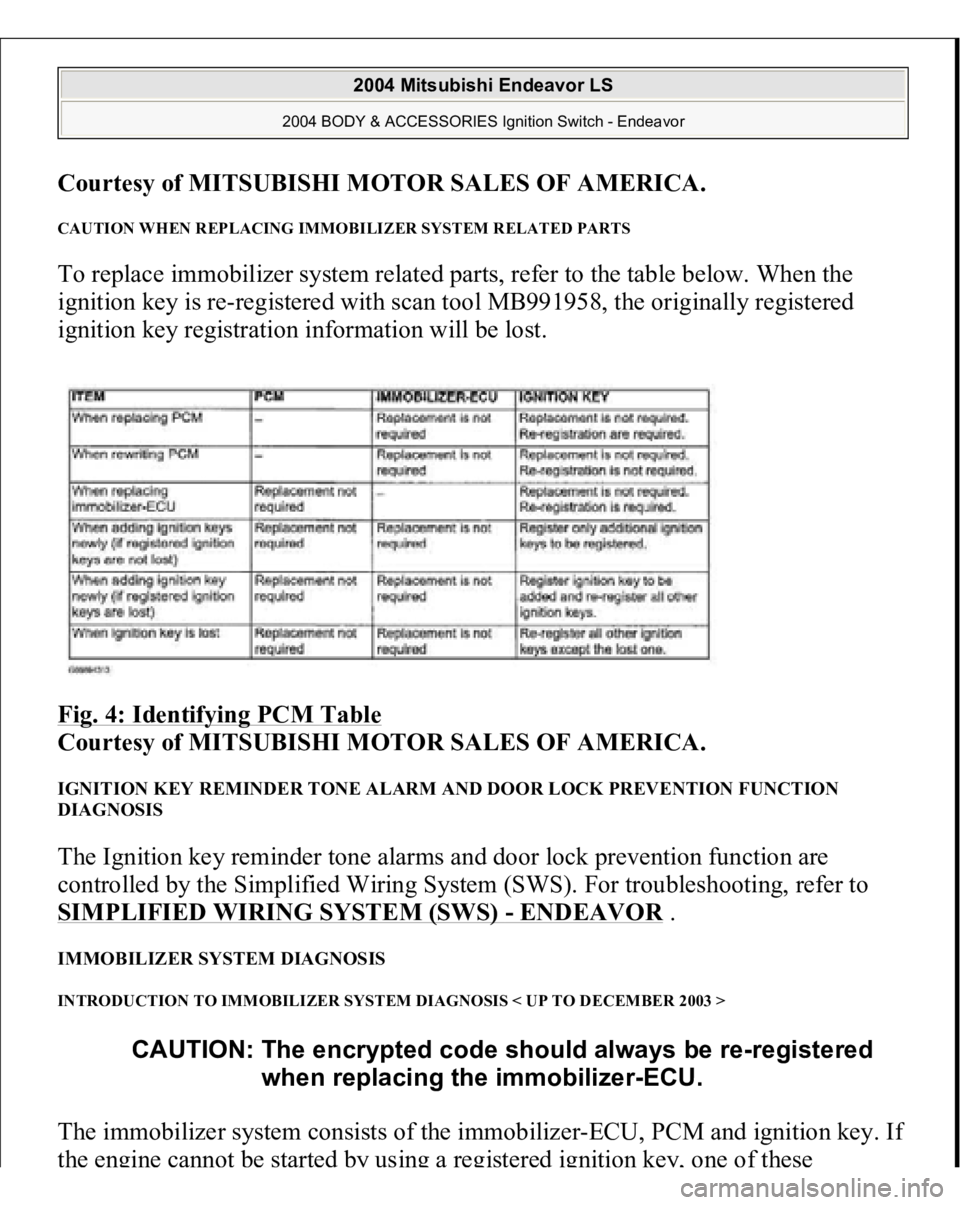
CAUTION WHEN REPLACING IMMOBILIZER SYSTEM RELATED PARTS To replace immobilizer system related parts, refer to the table below. When the
ignition key is re-registered with scan tool MB991958, the originally registered
ignition key registration information will be lost.
Fig. 4: Identifying PCM Table
Courtesy of MITSUBISHI MOTOR SALES OF AMERICA.
IGNITION KEY REMINDER TONE ALARM AND DOOR LOCK PREVENTION FUNCTION
DIAGNOSIS The Ignition key reminder tone alarms and door lock prevention function are
controlled by the Simplified Wiring System (SWS). For troubleshooting, refer to
SIMPLIFIED WIRING SYSTEM (SWS)
- ENDEAVOR
.
IMMOBILIZER SYSTEM DIAGNOSIS INTRODUCTION TO IMMOBILIZER SYSTEM DIAGNOSIS < UP TO DECEMBER 2003 > The immobilizer system consists of the immobilizer-ECU, PCM and ignition key. I
f
the engine cannot be sta
rted
by using a registe
red ignition k
ey,
one of these
CAUTION: The encrypted code should always be re-registered
when replacing the immobilizer-ECU.
2004 Mitsubishi Endeavor LS
2004 BODY & ACCESSORIES Ignition Switch - Endeavor
Page 2523 of 3870
components may be defective. If the immobilizer system has immobilized the
engine, MFI system DTC P0513 will be output. In this case, observe the
immobilizer system troubleshooting. INTRODUCTION TO IMMOBILIZER SYSTEM DIAGNOSIS < FROM TO JANUARY 2004 > The immobilizer system consists of the immobilizer-ECU, PCM, ignition key and
ignition key ring antenna. If the engine cannot be started by using a registered
ignition key, one of these components may be defective. If the immobilizer system
has immobilized the engine, MFI system DTC P0513 will be output. In this case,
observe the immobilizer system troubleshooting. IMMOBILIZER SYSTEM DIAGNOSTIC TROUBLESHOOTING STRATEGY Use the following steps to plan your diagnostic strategy.
1. Gather information about the problem from the customer.
2. Verify that the condition as described by the customer exists.
3. Check the vehicle for any immobilizer system DTCs.
4. If you cannot verify the condition and there are no immobilizer system DTCs,
the malfunction is intermittent. Refer to HOW TO COPE WITH
INTERMITTENT MALFUNCTIONS
.
5. If you can verify the condition but there are no immobilizer system DTCs, or
the system cannot communicate with scan tool MB991958, refer to
SYMPTOM CHART AND FIND THE FAULT
.
6. If there is an immobilizer system DTC, record the DTC, then erase it from the
memory using scan tool MB991958.
7. Recreate the immobilizer system DTC set conditions to see if the same
immobilizer system DTC will resets.
1. If the same immobilizer system DTC resets, perform the appropriate
diagnostic procedure. Refer to DIAGNOSTIC TROUBLE CODE
CHART
.
2. If the same immobilizer s
ystem DTC does not reset
, the malfunction is
CAUTION: The encrypted code should always be re-registered
when replacing the immobilizer-ECU.
2004 Mitsubishi Endeavor LS
2004 BODY & ACCESSORIES Ignition Switch - Endeavor
Page 2528 of 3870
2. Turn the ignition switch to "ON" position.
3. Select "Interactive Diagnosis" from the start-up screen.
4. Select "System select."
5. Choose "IMMOBILIZER" from the "POWER TRAIN" tab.
6. Select "Self-diagnosis."
7. If a DTC is set, it is shown.
8. Choose "Erase DTCs" to erase the DTC. HOW TO READ DATA LIST Required Special Tools:
MB991958: Scan Tool (MUT-III Sub Assembly)
MB991824: Vehicle Communication Interface (V.C.I.) MB991827: MUT-III USB Cable MB991910: MUT-III Main Harness A (Vehicles with CAN
communication system)
1. Connect scan tool MB991958 to the data link connec
tor.
CAUTION: To prevent damage to scan tool MB991958, always
turn the ignition switch to the "LOCK" (OFF) position
before connecting or disconnecting scan tool
MB991958.
2004 Mitsubishi Endeavor LS
2004 BODY & ACCESSORIES Ignition Switch - Endeavor