Page 1068 of 3870
2 .
3. Turn the ignition switch to the ON position and select BELT TENSION
MEASUREMENT from the menu screen on Scan Tool (MB991958).
4. Hold Microphone (part of Belt Drive Meter Set) (MB991668) near the center
of the drive belt between the pulleys away from the rear surface of the belt and
perpendicular to the belt (no more then 15 degrees in either direction). See Fi
g.
3 and Fig. 4
.
5. Gently tap the middle of the belt between the pulleys with your finger, and
check that the vibration frequency of the belt is within specification. See Fig. 3
and Fig. 4
. See DRIVE BELT ADJUSTMENT SPECIFICATIONS
table.
CAUTION: Temperature of the surface of the belt should be
as close possible to underhood temperature.
CAUTION: DO NOT let contaminants such as water or oil get
onto the microphone. If strong gusts of wind
blow against the microphone or if there are any
loud sources of noise nearby, the values
measured by the microphone may not
correspond to actual values. DO NOT take
measurement while engine is running.
2004 Mitsubishi Endeavor Limited
2004 ENGINE COOLING Specifications & Drive Belt Routing - Endeavor
Page 1303 of 3870
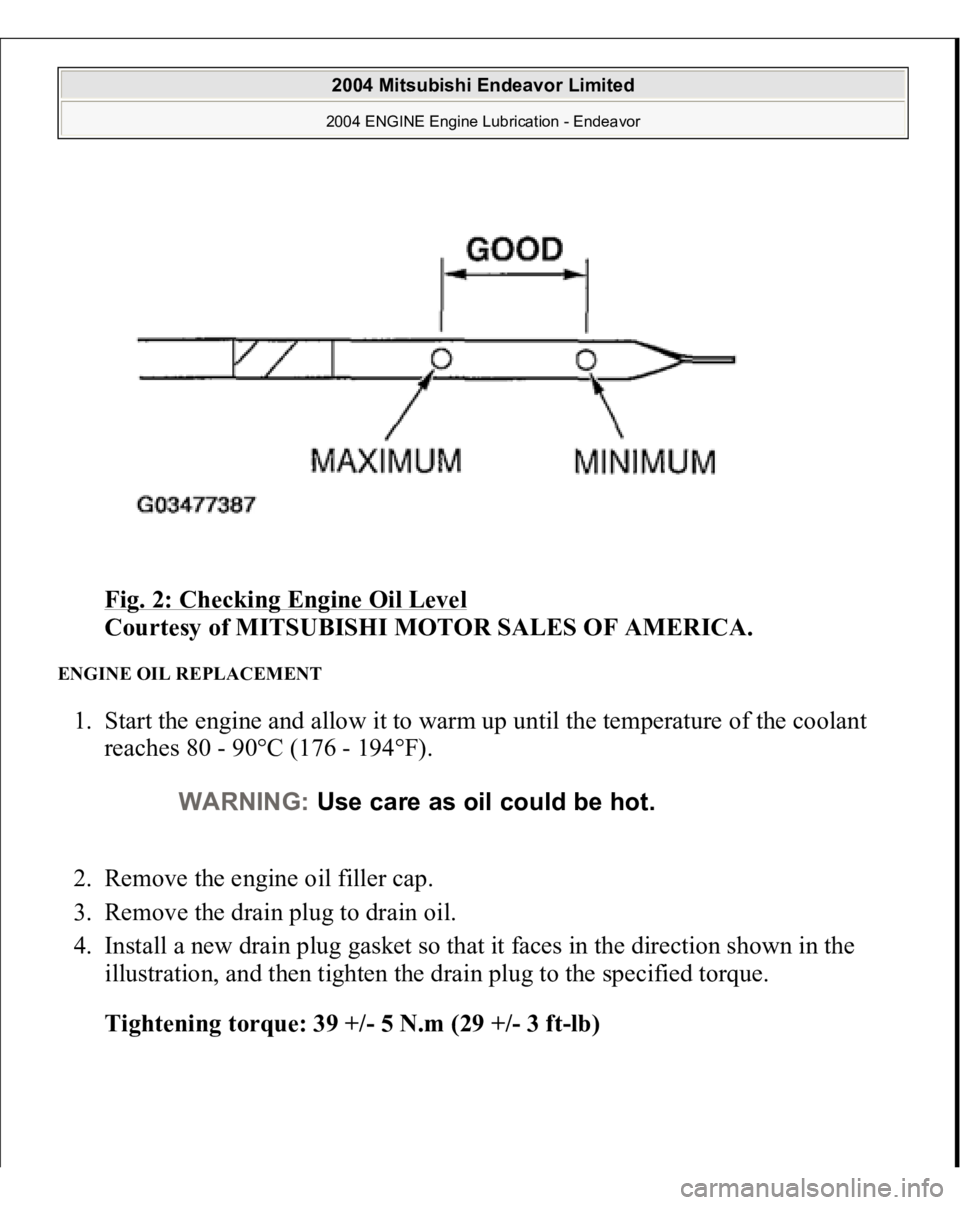
Fig. 2: Checking Engine Oil Level
Courtesy of MITSUBISHI MOTOR SALES OF AMERICA.
ENGINE OIL REPLACEMENT 1. Start the engine and allow it to warm up until the temperature of the coolant
reaches 80 - 90°C (176 - 194°F).
2. Remove the engine oil filler cap.
3. Remove the drain plug to drain oil.
4. Install a new drain plug gasket so that it faces in the direction shown in the
illustration, and then tighten the drain plug to the specified torque.
Tightening torque: 39 +/- 5 N.m (29 +/- 3 ft-lb)
WARNING:Use care as oil could be hot.
2004 Mitsubishi Endeavor Limited 2004 ENGINE Engine Lubrication - Endeavor
Page 1306 of 3870
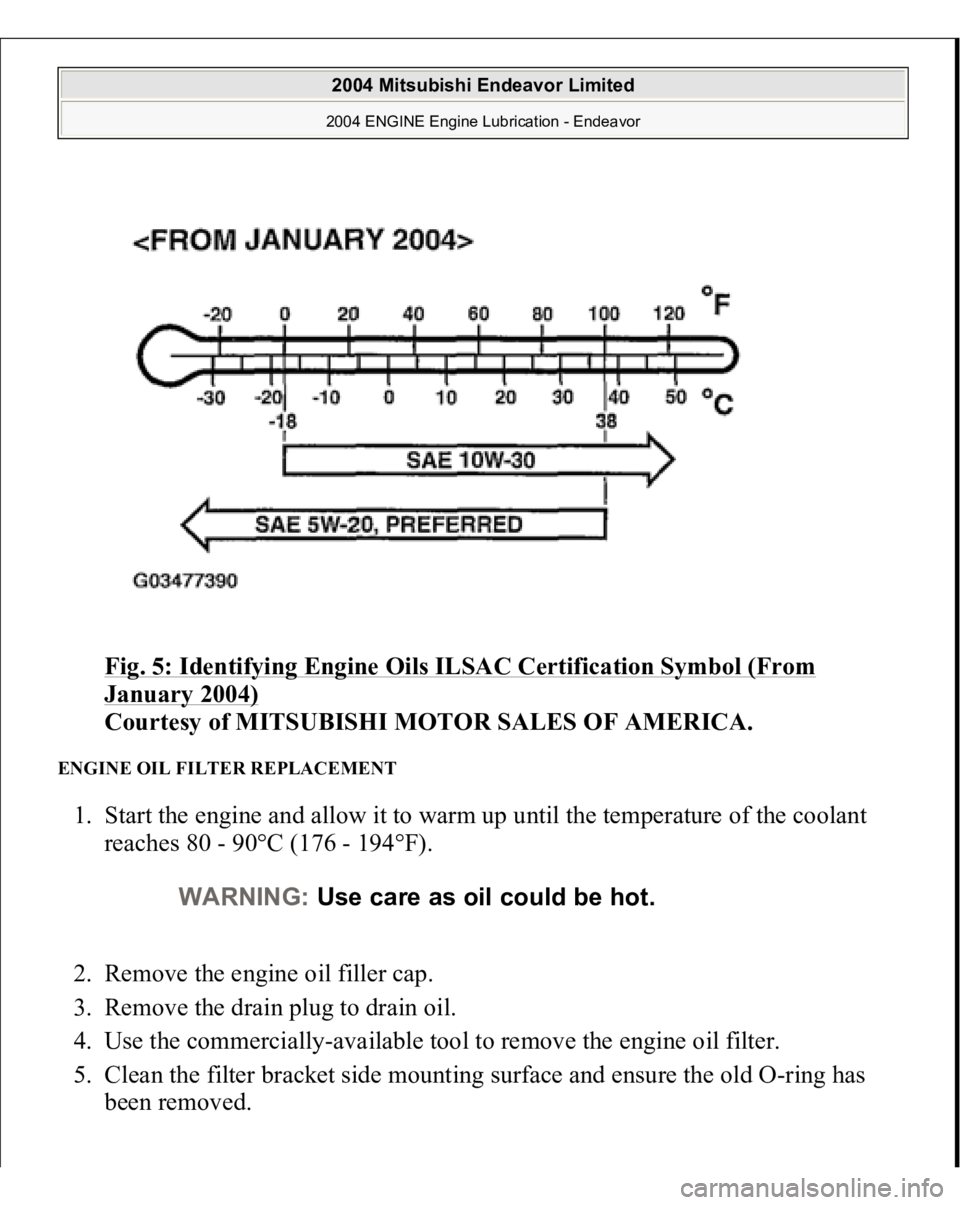
Fig. 5: Identifying Engine Oils ILSAC Certification Symbol (From January 2004)
Courtesy of MITSUBISHI MOTOR SALES OF AMERICA.
ENGINE OIL FILTER REPLACEMENT 1. Start the engine and allow it to warm up until the temperature of the coolant
reaches 80 - 90°C (176 - 194°F).
2. Remove the engine oil filler cap.
3. Remove the drain plug to drain oil.
4. Use the commercially-available tool to remove the engine oil filter.
5. Clean the filter bracket side mounting surface and ensure the old O-ring has
been removed.
WARNING:Use care as oil could be hot.
2004 Mitsubishi Endeavor Limited 2004 ENGINE Engine Lubrication - Endeavor
Page 1443 of 3870
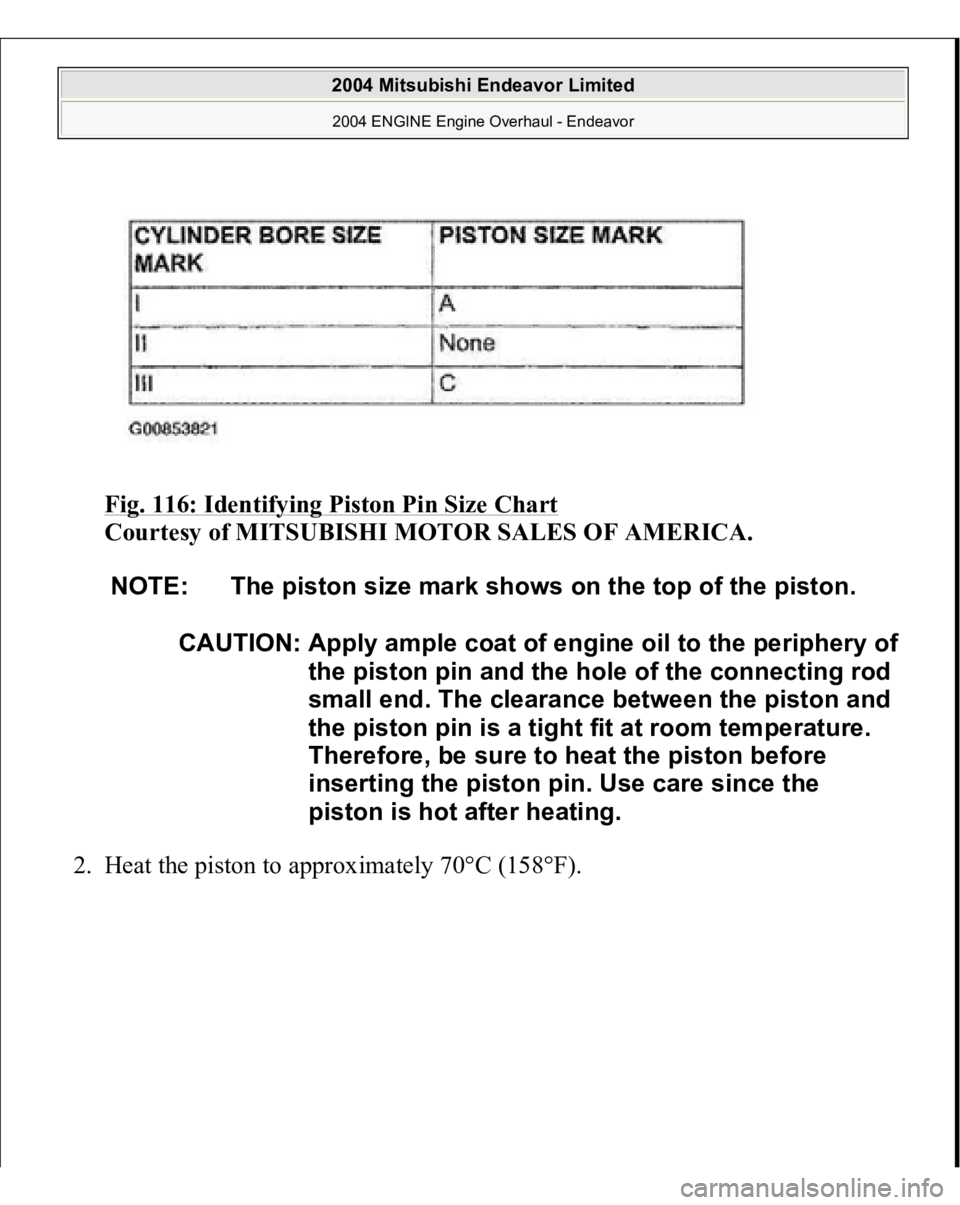
Fig. 116: Identifying Piston Pin Size Chart
Courtesy of MITSUBISHI MOTOR SALES OF AMERICA.
2. Heat the piston to approximately 70°C (158°F).
NOTE: The piston size mark shows on the top of the piston.
CAUTION: Appl
y ample coat of en
gine oil to the peripher
y of
the piston pin and the hole of the connecting rod
small end. The clearance between the piston and
the piston pin is a tight fit at room temperature.
Therefore, be sure to heat the piston before
inserting the piston pin. Use care since the
piston is hot after heating.
2004 Mitsubishi Endeavor Limited 2004 ENGINE Engine Overhaul - Endeavor
Page 1501 of 3870
Courtesy of MITSUBISHI MOTOR SALES OF AMERICA
.
2. Connect scan tool MB991958 to the data link connector.
3. Turn the ignition switch to the "ON" and select scan tool MB991958 "Belt
Tension Measurement" from the menu screen.
4. Hold special tool MB991668 (microphone) to the middle of the drive belt
between the pulleys (at the place indicated by the arrow), about 10 - 20 mm
(0.4 - 0.8 inch) away from the rear surface of the belt and so that it is
perpendicular to the belt (within an angle of +/-15 degree angle).
5. Gently tap the middle of the belt between the pulleys (the place indicated by
the arrow) with your finger as shown in the illustration, and check that the
vibration fre
quenc
y of the belt is within the stan
dard value.
CAUTION:
The temperature of the surface of the belt
should be as close as possible to underhood
temperature. Do not let an
y contaminants such as water or
oil get onto the microphone.
If strong gusts of wind blow against the
microphone or if there are any loud sources
of noise nearby, the values measured by the
microphone may not correspond to actual
values. If the microphone is touching the belt while
the measurement is being made, the values
measured by the microphone may not
correspond to actual values. Do not take the measurement while the
vehicle's engine is running.
2004 Mitsubishi Endeavor Limited
2004 ENGINE Engine - Endeavor
Page 1511 of 3870
Fig. 13: Connecting Special Tool MB991668 To Scan Tool MB99195
Courtesy of MITSUBISHI MOTOR SALES OF AMERICA.
2. Connect scan tool MB991958 to the data link connector.
3. Turn the ignition switch to the "ON" position and select "Belt Tension
Measurement" from the special tool MB991824 screen menu.
4. Hold special tool MB991668 (microphone) to the middle of the drive belt
between the pulleys (at the place indicated by the arrow), about 10 - 20 mm
(0.4 - 0.8 inch) away from the rear surface of the belt and so that it is
perpendicular to the belt (within an angle of+/-15 degree angle).
5. Gently tap the middle of the belt between the pulleys (the place indicated by
the arrow) with your finger as shown in the illustration, and check that the
vibration frequency of the belt is within the stan
dard value.
CAUTION:
The temperature of the surface of the belt
should be as close as possible to underhood
temperature. Do not let any contaminants such as water or
oil get onto the microphone. If strong gusts of wind blow against the
microphone or if there are any loud sources
of noise nearby, the values measured by the
microphone may not correspond to actual
values. If the microphone is touching the belt while
the measurement is being made, the values
measured by the microphone may not
correspond to actual values. Do not take the measurement while the
vehicle's engine is running.
2004 Mitsubishi Endeavor Limited
2004 ENGINE Engine - Endeavor
Page 1525 of 3870
MB991958: Scan Tool (MUT-III Sub Assembly)
MB991824: V.C.I. MB991827: MUT-III USB Cable MB991910: MUT-III Main Harness A
1. Before checks set the vehicle in the following condition:
Engine coolant temperature: 80 - 95°C (176 - 203°F) Lights and all accessories: OFF Transaxle: P range
2. Remove all of the ignition coils and spark plugs.
3. Disconnect the crankshaft position sensor connector.
NOTE: Vehicles for Canada, the headlight, taillight, etc. remain
lit even when the lighting switch is in "OFF" position
but this is no problem for checks.
NOTE: Doing this will prevent the engine control module from
carrying out ignition and fuel injection.
2004 Mitsubishi Endeavor Limited
2004 ENGINE Engine - Endeavor
Page 1997 of 3870
2004 HVAC
Heater Air Conditioning, Ventilation - Endeavor
GENERAL DESCRIPTION The heater and cooling units are combined in a single unit, which, with the mode
film damper and flow rate control valve in the heater unit, reduces ventilation
resistance, increases fan power, and decreases noise.
GENERAL SPECIFICATION SAFETY PRECAUTIONS Because R-134a refrigerant is a hydro fluorocarbon (HFC) which contains
hydrogen atoms in place of chlorine atoms, it will not cause damage to the ozone
layer.
Ozone filters out harmful radiation from the sun. To assist in protecting the ozone
layer, Mitsubishi Motors Corporation recommends an R-134a refrigerant recycling
device.
Refrigerant R-134a is transparent and colorless in both the liquid and vapor state.
Since it has a boiling point of -29.8°C (-21.64°F) at atmospheric pressure, it will be
a vapor at all normal temperatures and pressures. The vapor is heavier than air, non-
flammable, and non-explosive. The following precautions must be observed when
handlin
g R-134a.
ITEM
SPECIFICATION
Heater control assembly
Dial type
Compressor
MSC105CA
Compressor Model
Scroll type
Refrigerant and quantity g
(oz)
R-134a (HFC-134a), Approximately 560 - 600
(19.75 - 21.16)
WARNING:Wear safety goggles and gloves when servicing the
refrigeration system to prevent severe damage to
eyes and hands.
2004 Mitsubishi Endeavor LS
2004 HVAC Heater Air Conditioning, Ventilation - Endeavor
2004 Mitsubishi Endeavor LS
2004 HVAC Heater Air Conditioning, Ventilation - Endeavor