Page 2709 of 4323
A05095
1
248
6
3
5
9
7
10
A05094
Front
Painted
Mark90° 90°
A23371
Front Mark
(1 Cavity)
Front
LH
Piston
RH
PistonFront
Front Mark
(2 Cavities)
EM±122
± ENGINE MECHANICALCYLINDER BLOCK
2701 Author�: Date�:
2005 SEQUOIA (RM1146U)
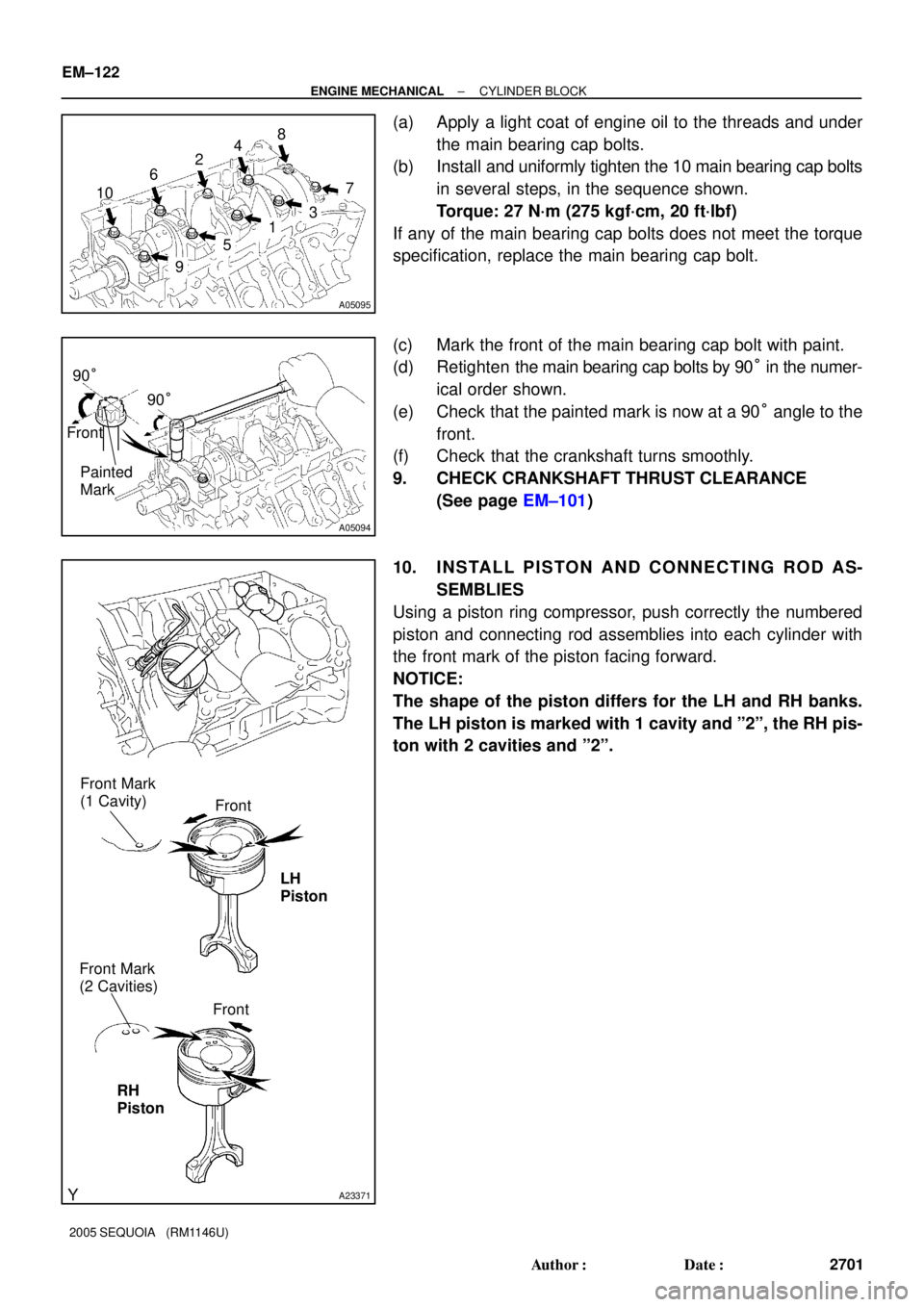
(a) Apply a light coat of engine oil to the threads and under
the main bearing cap bolts.
(b) Install and uniformly tighten the 10 main bearing cap bolts
in several steps, in the sequence shown.
Torque: 27 N´m (275 kgf´cm, 20 ft´lbf)
If any of the main bearing cap bolts does not meet the torque
specification, replace the main bearing cap bolt.
(c) Mark the front of the main bearing cap bolt with paint.
(d) Retighten the main bearing cap bolts by 90° in the numer-
ical order shown.
(e) Check that the painted mark is now at a 90° angle to the
front.
(f) Check that the crankshaft turns smoothly.
9. CHECK CRANKSHAFT THRUST CLEARANCE
(See page EM±101)
10. INSTALL PISTON AND CONNECTING ROD AS-
SEMBLIES
Using a piston ring compressor, push correctly the numbered
piston and connecting rod assemblies into each cylinder with
the front mark of the piston facing forward.
NOTICE:
The shape of the piston differs for the LH and RH banks.
The LH piston is marked with 1 cavity and º2º, the RH pis-
ton with 2 cavities and º2º.
Page 2710 of 4323
A05106
A05107A05108A05174
Front
Outside Mark
(Protrusion)
RH Bank LH Bank
Front
Outside Mark
(Protrusion)
A05101
A05099
Painted
Mark Front90°
90°
± ENGINE MECHANICALCYLINDER BLOCK
EM±123
2702 Author�: Date�:
2005 SEQUOIA (RM1146U)
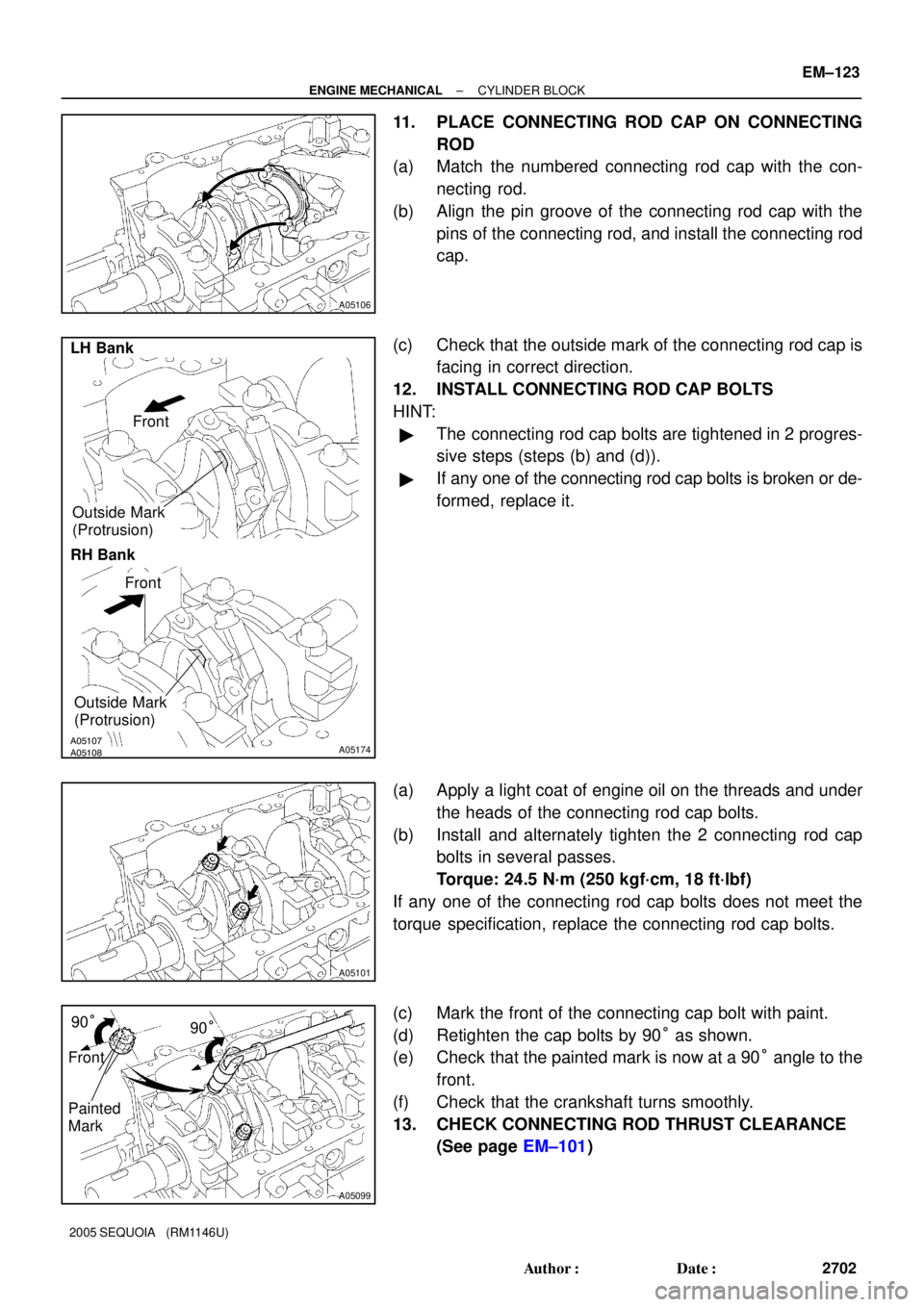
11. PLACE CONNECTING ROD CAP ON CONNECTING
ROD
(a) Match the numbered connecting rod cap with the con-
necting rod.
(b) Align the pin groove of the connecting rod cap with the
pins of the connecting rod, and install the connecting rod
cap.
(c) Check that the outside mark of the connecting rod cap is
facing in correct direction.
12. INSTALL CONNECTING ROD CAP BOLTS
HINT:
�The connecting rod cap bolts are tightened in 2 progres-
sive steps (steps (b) and (d)).
�If any one of the connecting rod cap bolts is broken or de-
formed, replace it.
(a) Apply a light coat of engine oil on the threads and under
the heads of the connecting rod cap bolts.
(b) Install and alternately tighten the 2 connecting rod cap
bolts in several passes.
Torque: 24.5 N´m (250 kgf´cm, 18 ft´lbf)
If any one of the connecting rod cap bolts does not meet the
torque specification, replace the connecting rod cap bolts.
(c) Mark the front of the connecting cap bolt with paint.
(d) Retighten the cap bolts by 90° as shown.
(e) Check that the painted mark is now at a 90° angle to the
front.
(f) Check that the crankshaft turns smoothly.
13. CHECK CONNECTING ROD THRUST CLEARANCE
(See page EM±101)
Page 2744 of 4323

FI2553
SST
B16498
New Gasket
SF±2
± SFISFI SYSTEM
2736 Author�: Date�:
2005 SEQUOIA (RM1146U)
(b) When installing the battery, be especially careful to cor-
rectly connect the positive (+) and negative (±) cables.
(c) Do not give a severe impact to the SFI parts during remov-
al or installation. Handle all SFI parts carefully, especially
the ECM.
(d) Be careful during troubleshooting. Numerous transistor
circuits are used and even slight terminal contact can
cause further trouble.
(e) Do not open the ECM cover.
(f) When inspecting during rainy weather, take care to pre-
vent entry of water. Also, when washing the engine
compartment, prevent water from getting into the SFI
parts and wiring connectors.
(g) Parts should be replaced as an assembly.
(h) Care should be taken when pulling out and inserting wir-
ing connectors.
(1) Release the lock and pull out the connector, pulling
on the connectors.
(2) Fully insert the connector and check that it is locked.
(i) Use SST for inspection or test of the injector or its wiring
connector.
SST 09842±30070
8. FUEL SYSTEM
(a) When disconnecting the high fuel pressure line, a large
amount of gasoline will spill out. Observe the following
procedures:
(1) Disconnect the circuit opening relay.
(2) Start the engine. After the engine has stopped on
its own, turn the ignition switch off.
(3) Put a container under the connecting part of the
pressure line.
(4) Slowly loosen the connection.
(5) Disconnect the high fuel pressure line.
(6) Reconnect the fuel pump connector.
(b) When connecting the union bolt (fuel pressure pulsation
damper) on the high pressure pipe union, observe the fol-
lowing procedures:
(1) Always use 2 new gaskets.
(2) Tighten the union bolt by hand.
Page 2781 of 4323
B17467
SF1XJ±01
D13872
Hand±Held Tester
DLC3
CAN VIM
± SFITHROTTLE BODY
SF±39
2773 Author�: Date�:
2005 SEQUOIA (RM1146U)
THROTTLE BODY
ON±VEHICLE INSPECTION
1. REMOVE THROTTLE BODY COVER
2. INSPECT SYSTEM OPERATION
(a) Inspect the throttle control motor for operating sound.
(1) Turn the ignition switch ON.
(2) When depressing the accelerator pedal, check the
running sound of the motor. Also, check that there
is no friction sound.
If operation is not as specified, check the throttle control motor
(see step 3), wiring and ECM.
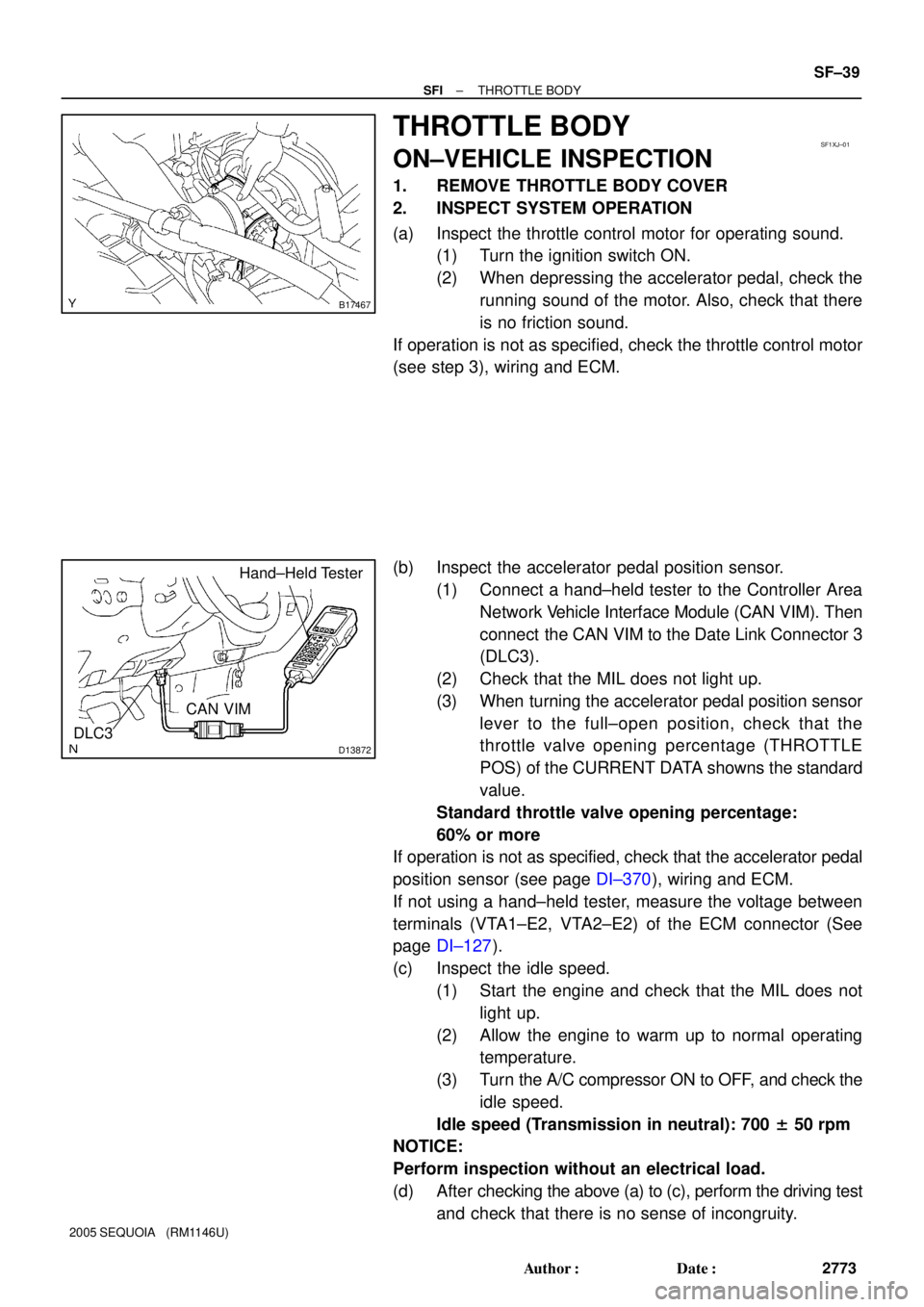
(b) Inspect the accelerator pedal position sensor.
(1) Connect a hand±held tester to the Controller Area
Network Vehicle Interface Module (CAN VIM). Then
connect the CAN VIM to the Date Link Connector 3
(DLC3).
(2) Check that the MIL does not light up.
(3) When turning the accelerator pedal position sensor
lever to the full±open position, check that the
throttle valve opening percentage (THROTTLE
POS) of the CURRENT DATA showns the standard
value.
Standard throttle valve opening percentage:
60% or more
If operation is not as specified, check that the accelerator pedal
position sensor (see page DI±370), wiring and ECM.
If not using a hand±held tester, measure the voltage between
terminals (VTA1±E2, VTA2±E2) of the ECM connector (See
page DI±127).
(c) Inspect the idle speed.
(1) Start the engine and check that the MIL does not
light up.
(2) Allow the engine to warm up to normal operating
temperature.
(3) Turn the A/C compressor ON to OFF, and check the
idle speed.
Idle speed (Transmission in neutral): 700 ± 50 rpm
NOTICE:
Perform inspection without an electrical load.
(d) After checking the above (a) to (c), perform the driving test
and check that there is no sense of incongruity.
Page 2813 of 4323
D13872
Hand±Held Tester
DLC3
CAN VIM
Rich Lean
Time14.6
3.3
Keep Engine Speed
(V)
B17513
Air±fuel
Ratio
± SFIAIR±FUEL RATIO (A/F) SENSOR
SF±71
2805 Author�: Date�:
2005 SEQUOIA (RM1146U)
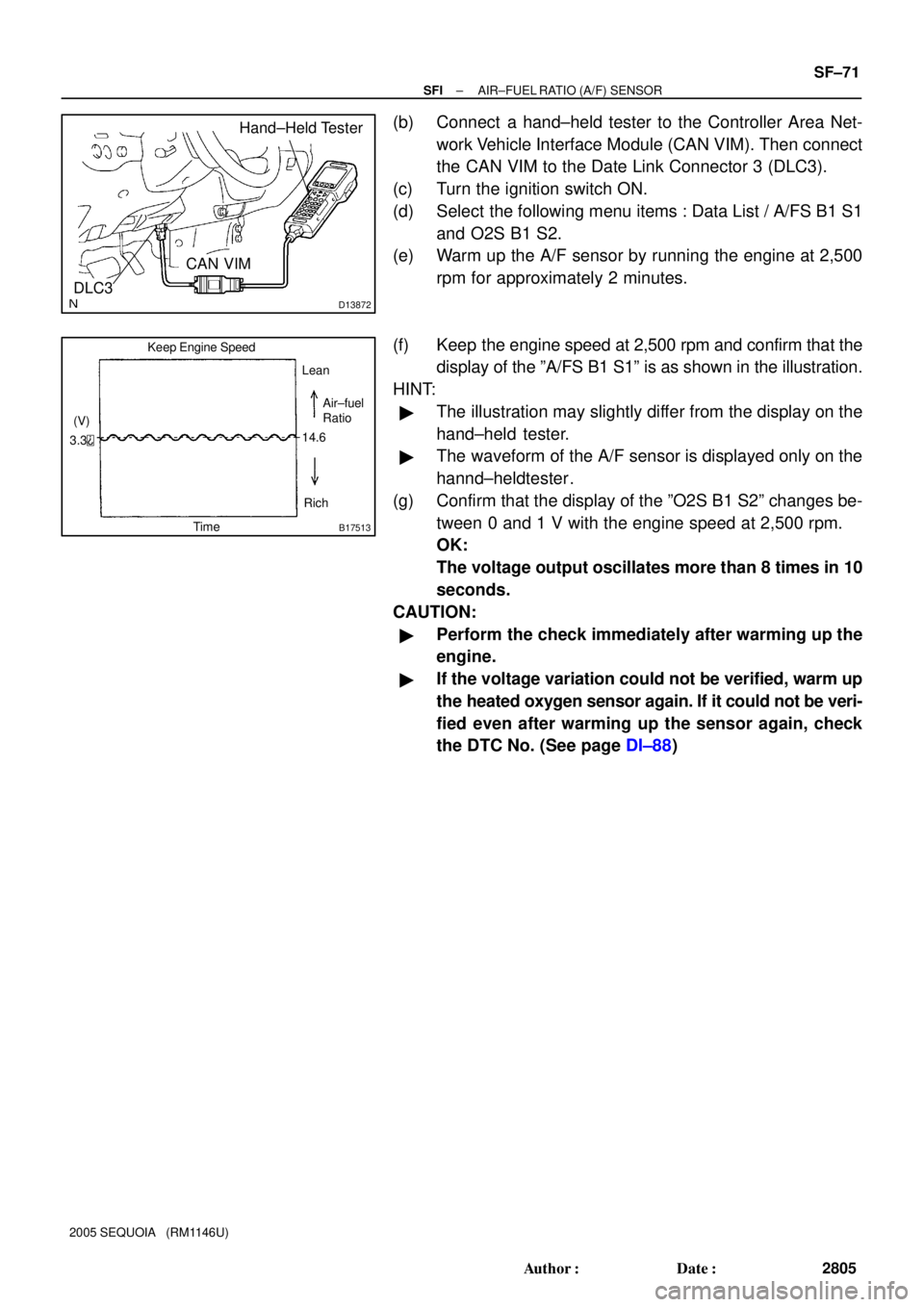
(b) Connect a hand±held tester to the Controller Area Net-
work Vehicle Interface Module (CAN VIM). Then connect
the CAN VIM to the Date Link Connector 3 (DLC3).
(c) Turn the ignition switch ON.
(d) Select the following menu items : Data List / A/FS B1 S1
and O2S B1 S2.
(e) Warm up the A/F sensor by running the engine at 2,500
rpm for approximately 2 minutes.
(f) Keep the engine speed at 2,500 rpm and confirm that the
display of the ºA/FS B1 S1º is as shown in the illustration.
HINT:
�The illustration may slightly differ from the display on the
hand±held tester.
�The waveform of the A/F sensor is displayed only on the
hannd±heldtester .
(g) Confirm that the display of the ºO2S B1 S2º changes be-
tween 0 and 1 V with the engine speed at 2,500 rpm.
OK:
The voltage output oscillates more than 8 times in 10
seconds.
CAUTION:
�Perform the check immediately after warming up the
engine.
�If the voltage variation could not be verified, warm up
the heated oxygen sensor again. If it could not be veri-
fied even after warming up the sensor again, check
the DTC No. (See page DI±88)
Page 2865 of 4323
LU08Z±10
B07332
New O±Ring
B07837
± LUBRICATIONOIL COOLER
LU±23
2857 Author�: Date�:
2005 SEQUOIA (RM1146U)
INSTALLATION
1. INSTALL OIL COOLER
(a) Clean the oil cooler contact surface on the cooler mount-
ing.
(b) Place a new O±ring to the oil cooler.
(c) Apply a light coat of engine oil on the threads and under
the head of the union bolt.
(d) Install the oil cooler and plate washer with the union bolt.
Torque: 68.6 N´m (700 kgf´cm, 51 ft´lbf)
(e) Connect the 2 oil cooler hoses to the oil cooler.
2. INSTALL OIL FILTER (See page LU±2)
3. FILL WITH ENGINE COOLANT
4. START ENGINE AND CHECK FOR ENGINE OIL
LEAKS
5. CHECK ENGINE OIL LEVEL
Page 2901 of 4323
CH0K7±03
B07241
Upper Level
Lower Level
B07242
Except Maintenance±Free Battery
± CHARGINGCHARGING SYSTEM
CH±1
2893 Author�: Date�:
2005 SEQUOIA (RM1146U)
CHARGING SYSTEM
ON±VEHICLE INSPECTION
CAUTION:
�Check that the battery cables are connected to the
correct terminals.
�Disconnect the battery cables when the battery is giv-
en a quick charge.
�Do not perform tests with a high voltage insulation re-
sistance tester.
�Never disconnect the battery while the engine is run-
ning.
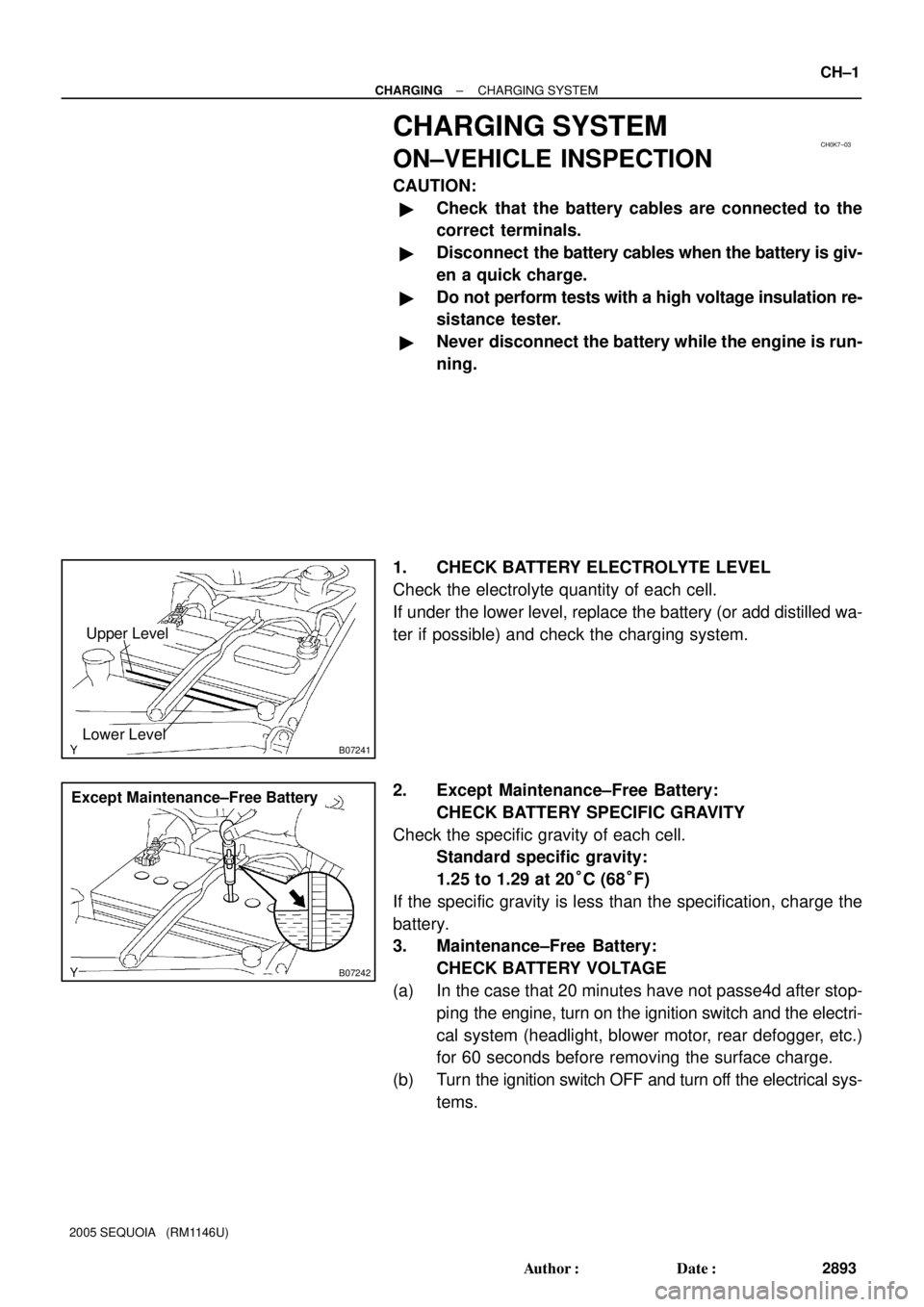
1. CHECK BATTERY ELECTROLYTE LEVEL
Check the electrolyte quantity of each cell.
If under the lower level, replace the battery (or add distilled wa-
ter if possible) and check the charging system.
2. Except Maintenance±Free Battery:
CHECK BATTERY SPECIFIC GRAVITY
Check the specific gravity of each cell.
Standard specific gravity:
1.25 to 1.29 at 20°C (68°F)
If the specific gravity is less than the specification, charge the
battery.
3. Maintenance±Free Battery:
CHECK BATTERY VOLTAGE
(a) In the case that 20 minutes have not passe4d after stop-
ping the engine, turn on the ignition switch and the electri-
cal system (headlight, blower motor, rear defogger, etc.)
for 60 seconds before removing the surface charge.
(b) Turn the ignition switch OFF and turn off the electrical sys-
tems.
Page 2903 of 4323

B00808
B
A
AC2024
CORRECT WRONG
Z03473
Ammeter
Disconnect Wire
from Terminal B
Battery
VoltmeterB
Generator
± CHARGINGCHARGING SYSTEM
CH±3
2895 Author�: Date�:
2005 SEQUOIA (RM1146U)
�Check that the arrow mark on the belt tensioner falls
within area A of the scale.
If it is outside area A, replace the drive belt.
HINT:
�When a new belt is installed, it should lie within area B. If
not, the drive belt is not correct.
�After installing a belt, check that it fits properly in the
ribbed grooves.
�Check by hand to confirm that the belt does not slipped
out of the groove on the bottom of the pulley.
6. REMOVE ENGINE UNDER COVER NO.1
7. VISUALLY CHECK GENERATOR WIRING AND LIS-
TEN FOR ABNORMAL NOISES
(a) Check that the wiring is in good condition.
(b) Check that there is no abnormal noise from the generator
while the engine is running.
8. CHECK CHARGE WARNING LIGHT CIRCUIT
(a) Warm up the engine and then turn it off.
(b) Switch off all accessories.
(c) Turn the ignition switch ON, and check that the charge
warning light comes on.
(d) Start the engine, and check that the light goes off.
If the light does not go off as specified, troubleshoot the charge
light circuit.
9. INSPECT CHARGING CIRCUIT WITHOUT LOAD
HINT:
If a battery/generator tester is available, connect the tester to
the charging circuit as per manufacturer's instructions.
(a) If a tester is not available, connect a voltmeter and amme-
ter to the charging circuit as follows:
�Disconnect the wire from terminal B of the genera-
tor, and connect it to the negative (±) tester probe
of the ammeter.
�Connect the positive (+) tester probe of the amme-
ter to terminal B of the generator.
�Connect the positive (+) tester probe of the voltme-
ter to terminal B of the generator.
�Ground the negative (±) tester probe of the voltme-
ter.
(b) Check the charging circuit as follows:
With the engine running from idling to 2,000 rpm, check
the reading on the ammeter and voltmeter.
Standard amperage: 10 A or less
Standard voltage: 13.2 to 14.0 V