Page 2904 of 4323
CH±4
± CHARGINGCHARGING SYSTEM
2896 Author�: Date�:
2005 SEQUOIA (RM1146U)
If the voltmeter reading is more than the standard voltage, re-
place the voltage regulator.
If the voltmeter reading is less than the standard voltage, check
the voltage regulator and generator.
10. INSPECT CHARGING CIRCUIT WITH LOAD
(a) With the engine running at 2,000 rpm, turn on the high
beam headlights and set the heater blower switch to HI.
(b) Check the reading on the ammeter.
Standard amperage: 30 A or more
If the ammeter reading is less than the standard amperage, re-
pair the generator.
HINT:
If the battery is fully charged, the indication will sometimes be
less than standard amperage.
11. REINSTALL ENGINE UNDER COVER
Page 2985 of 4323

TR09T±04
F19317
2WD/4HI Switch
F19318
Differential Lock Switch
± TRANSFERONE TOUCH 2±4 SELECTOR SYSTEM
TR±39
2977 Author�: Date�:
2005 SEQUOIA (RM1146U)
INSPECTION
NOTICE:
�4HI e 4LO: Stop the vehicle and apply the brake, then
first shift the transmission shift lever into the ºNº
position.
�Do not operate the four wheel drive control switch
and the differential lock switch at the same time.
�Do not change from 2WD to 4WD when vehicle speed
is 62 mph (100 km/h) or more.
1. INSPECT 2WD e 4HI (4WD and differential lock
ºFREEº) SHIFT
(a) Start the engine.
(b) Push the 2WD/4HI switch once.
(c) Check that the 4WD indicator light stays lit after blinking.
(The center differential lock indicator light blinks while be-
ing shifted.)
(d) Push the 2WD/4HI switch once again.
(e) Check that the 4WD indicator light goes off after blinking.
(The center differential lock indicator light blinks while be-
ing shifted.)
2. INSPECT 4HI (4WD and differential lock ºFREEº) e
4HI (4WD and differential lock ºLOCKº) SHIFT
(a) Start the engine.
(b) Push the 2WD/4HI switch once.
(c) Check that the 4WD indicator light stays lit after blinking.
(d) Push the differential lock switch once.
(e) Check that the center differential lock indicator light stays
lit after blinking.
(f) Push the differential lock switch once again.
(g) Check that the center differential lock indicator light goes
off after blinking.
3. INSPECT 4HI (4WD and differential lock ºLOCKº) e
2WD
(a) Start the engine.
(b) Push the 2WD/4HI once.
(c) Check that the 4WD indicator light stays lit after blinking.
(d) Push the differential lock switch once.
(e) Check that the center differential lock indicator light stays
lit after blinking.
Page 2986 of 4323

F19319
2WD/4HI Switch
F19320
4LO Switch
F19321
Differential Lock Switch
TR±40
± TRANSFERONE TOUCH 2±4 SELECTOR SYSTEM
2978 Author�: Date�:
2005 SEQUOIA (RM1146U)
(f) Push the 2WD/4HI switch once again.
(g) Check that the 4WD and center differential lock indicator
lights go off after blinking.
4. INSPECT 2WD e 4LO (4WD and differential lock
ºFREEº)
(a) Start the engine.
(b) Push the 4LO switch once.
(c) Check that the 4LO indicator light stays lit after blinking.
(The 4WD and center differential lock indicator lights blink
while shifting.)
(d) Push the 2WD/4HI switch once.
Check that the 4LO indicator light goes off after blinking.
(The 4WD and center differential lock indicator lights blink
while shifting.)
5. INSPECT 4LO (4WD and differential lock ºFREEº) e
4LO (4WD and differential lock ºLOCKº)
(a) Start the engine.
(b) Push the 4LO switch once.
(c) Check that the 4LO indicator light stays lit after blinking.
(d) Push the differential lock switch once.
(e) Check that the center differential lock indicator light stays
lit after blinking.
(f) Push the differential lock switch once again.
(g) Check that the center differential lock indicator light goes
off after blinking.
Page 2987 of 4323

F19322
4LO Switch
F19323
4LO Switch
± TRANSFERONE TOUCH 2±4 SELECTOR SYSTEM
TR±41
2979 Author�: Date�:
2005 SEQUOIA (RM1146U)
6. INSPECT 4HI (4WD and differential lock ºFREEº) e
4LO (4WD and differential lock ºFREEº)
(a) Start the engine.
(b) Push the 2WD/4HI switch once.
(c) Check that the 4WD indicator light stays lit after blinking.
(d) Push the 4LO switch once.
(e) Check that the 4WD indicator light goes off and the 4LO
indicator light stays lit after blinking.
(f) Push the 4LO switch once again.
(g) Check that the 4LO indicator light goes off after blinking
and the 4WD indicator light comes on.
7. INSPECT 4HI (4WD and differential lock ºLOCKº) e
4LO (4WD and differential lock ºLOCKº)
(a) Start the engine.
(b) Push the 2WD/4HI switch once.
(c) Check that the 4WD indicator light stays lit after blinking.
(d) Push the differential lock switch once.
(e) Check that the center differential lock indicator light stays
lit after blinking.
(f) Push the 4LO switch once.
(g) Check that the 4WD indicator light goes off and the 4LO
indicator light stays lit after blinking.
(h) Push the 4LO switch once again.
(i) Check that the 4LO indicator light goes off after blinking
and the 4WD indicator light comes on.
Page 2988 of 4323

F19324
2WD/4HI Switch
F19325
A GND
4LO
CPU 4WD
B TR±42
± TRANSFERONE TOUCH 2±4 SELECTOR SYSTEM
2980 Author�: Date�:
2005 SEQUOIA (RM1146U)
8. INSPECT 4LO (4WD and differential lock ºLOCKº) "
2WD
(a) Start the engine.
(b) Push the 4LO switch once.
(c) Check that the 4LO indicator light stays lit after blinking.
(d) Push the differential lock switch once.
(e) Check that the center differential lock indicator light stays
lit after blinking.
(f) Push the 2WD/4HI switch once.
(g) Check that the 4LO and center differential lock indicator
lights go off after the 4LO and 4WD indicators are blink-
ing.
9. INSPECT 2WD/4HI, 4LO AND DIFFERENTIAL LOCK
SWITCH CONTINUITY
(a) Remove the instrument panel finish lower panel.
(b) Inspect the continuity between each terminal.
Switch positionTester connectionSpecified condition
Diff. Lock OFFB±8 ± A±10No continuity
Diff. Lock Hold ONB±8 ± A±10Continuity
4LO OFFB±9 ± A±10No continuity
4LO Hold ONB±9 ± A±10Continuity
2WD/4HI OFFB±10 ± A±10No continuity
2WD/4HI Hold ONB±10 ± A±10Continuity
If continuity is not as specified, replace the instrument panel fin-
ish lower panel.
Page 3181 of 4323
F07754
Pedal Height Push Rod
BR107±04
R00085
Pedal Free Play BR±6
± BRAKEBRAKE PEDAL
3173 Author�: Date�:
2005 SEQUOIA (RM1146U)
BRAKE PEDAL
ON±VEHICLE INSPECTION
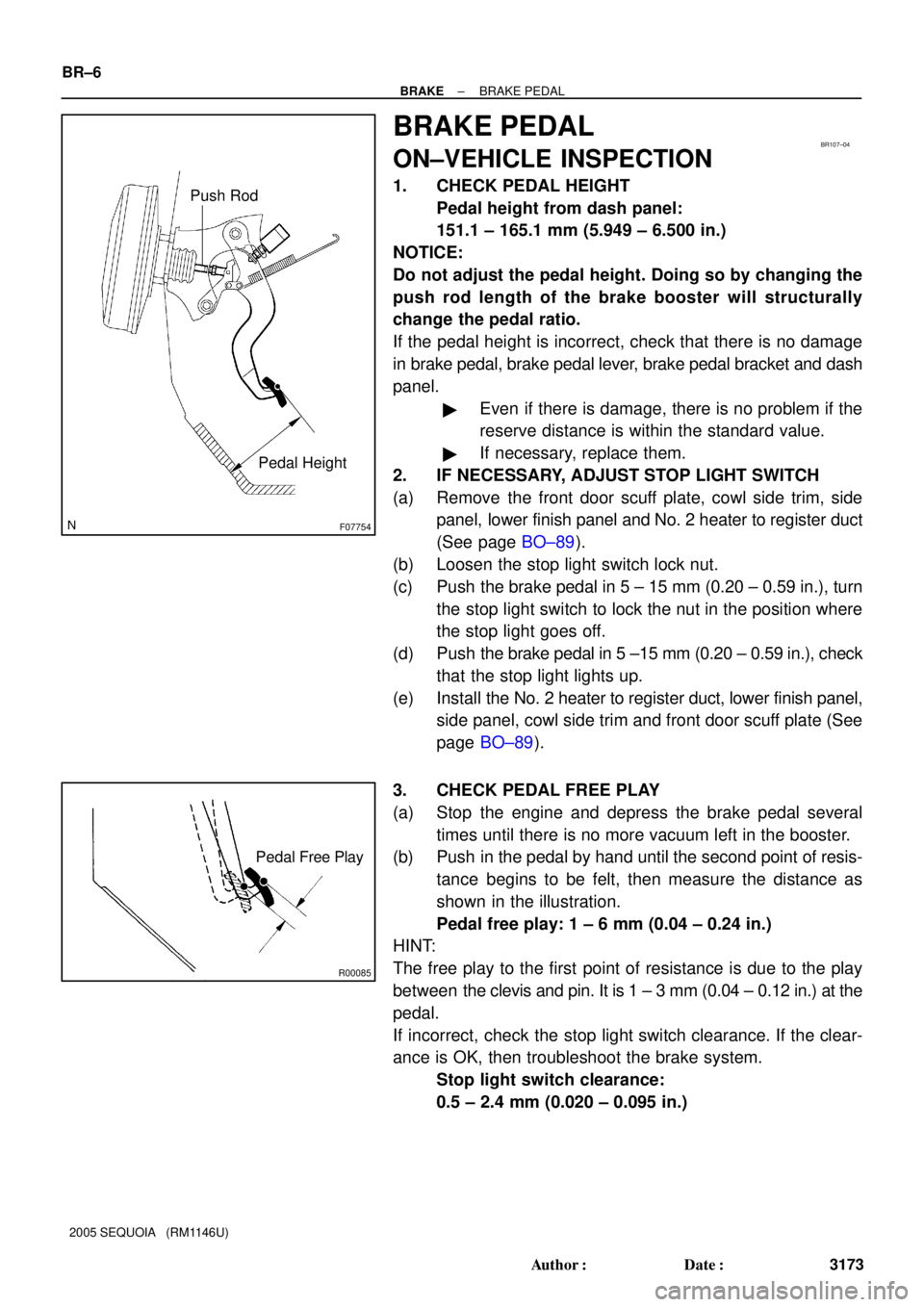
1. CHECK PEDAL HEIGHT
Pedal height from dash panel:
151.1 ± 165.1 mm (5.949 ± 6.500 in.)
NOTICE:
Do not adjust the pedal height. Doing so by changing the
push rod length of the brake booster will structurally
change the pedal ratio.
If the pedal height is incorrect, check that there is no damage
in brake pedal, brake pedal lever, brake pedal bracket and dash
panel.
�Even if there is damage, there is no problem if the
reserve distance is within the standard value.
�If necessary, replace them.
2. IF NECESSARY, ADJUST STOP LIGHT SWITCH
(a) Remove the front door scuff plate, cowl side trim, side
panel, lower finish panel and No. 2 heater to register duct
(See page BO±89).
(b) Loosen the stop light switch lock nut.
(c) Push the brake pedal in 5 ± 15 mm (0.20 ± 0.59 in.), turn
the stop light switch to lock the nut in the position where
the stop light goes off.
(d) Push the brake pedal in 5 ±15 mm (0.20 ± 0.59 in.), check
that the stop light lights up.
(e) Install the No. 2 heater to register duct, lower finish panel,
side panel, cowl side trim and front door scuff plate (See
page BO±89).
3. CHECK PEDAL FREE PLAY
(a) Stop the engine and depress the brake pedal several
times until there is no more vacuum left in the booster.
(b) Push in the pedal by hand until the second point of resis-
tance begins to be felt, then measure the distance as
shown in the illustration.
Pedal free play: 1 ± 6 mm (0.04 ± 0.24 in.)
HINT:
The free play to the first point of resistance is due to the play
between the clevis and pin. It is 1 ± 3 mm (0.04 ± 0.12 in.) at the
pedal.
If incorrect, check the stop light switch clearance. If the clear-
ance is OK, then troubleshoot the brake system.
Stop light switch clearance:
0.5 ± 2.4 mm (0.020 ± 0.095 in.)
Page 3195 of 4323
BR2237
BR0AK±07
BR2238
1st3rd
2nd
GOOD
NO GOOD BR±20
± BRAKEBRAKE BOOSTER ASSEMBLY
3187 Author�: Date�:
2005 SEQUOIA (RM1146U)
BRAKE BOOSTER ASSEMBLY
ON±VEHICLE INSPECTION
1. OPERATING CHECK
(a) Depress the brake pedal several times with the engine off
and check that there is no change in the pedal reserve
distance.
(b) Depress the brake pedal and start the engine. If the pedal
goes down slightly, operation is normal.
2. AIR TIGHTNESS CHECK
(a) Start the engine and stop it after 1 or 2 minutes. Depress
the brake pedal several times slowly.
If the pedal goes down farthest the 1st time, but gradually rises
after the 2nd or 3rd time, the booster is airtight.
(b) Depress the brake pedal while the engine is running, and
stop the engine with the pedal depressed. If there is no
change in the pedal reserve travel after holding the pedal
for 30 seconds, the booster is airtight.
Page 3417 of 4323
± BODY ELECTRICALTROUBLESHOOTING
BE±5
3409 Author�: Date�:
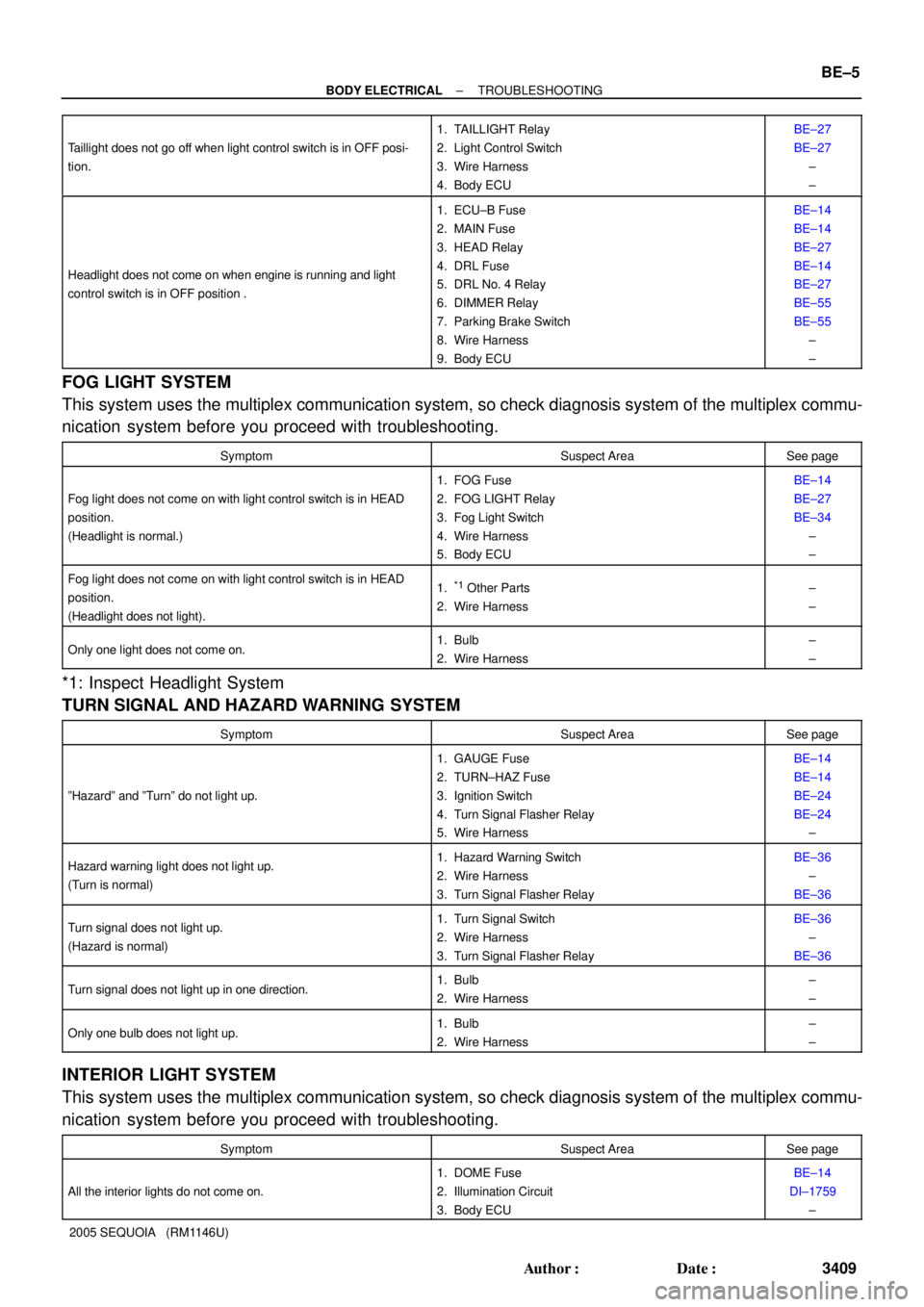
2005 SEQUOIA (RM1146U) Taillight does not go off when light control switch is in OFF posi-
tion.
1. TAILLIGHT Relay
2. Light Control Switch
3. Wire Harness
4. Body ECUBE±27
BE±27
±
±
Headlight does not come on when engine is running and light
control switch is in OFF position .
1. ECU±B Fuse
2. MAIN Fuse
3. HEAD Relay
4. DRL Fuse
5. DRL No. 4 Relay
6. DIMMER Relay
7. Parking Brake Switch
8. Wire Harness
9. Body ECUBE±14
BE±14
BE±27
BE±14
BE±27
BE±55
BE±55
±
±
FOG LIGHT SYSTEM
This system uses the multiplex communication system, so check diagnosis system of the multiplex commu-
nication system before you proceed with troubleshooting.
SymptomSuspect AreaSee page
Fog light does not come on with light control switch is in HEAD
position.
(Headlight is normal.)
1. FOG Fuse
2. FOG LIGHT Relay
3. Fog Light Switch
4. Wire Harness
5. Body ECUBE±14
BE±27
BE±34
±
±
Fog light does not come on with light control switch is in HEAD
position.
(Headlight does not light).1.*1 Other Parts
2. Wire Harness±
±
Only one light does not come on.1. Bulb
2. Wire Harness±
±
*1: Inspect Headlight System
TURN SIGNAL AND HAZARD WARNING SYSTEM
SymptomSuspect AreaSee page
ºHazardº and ºTurnº do not light up.
1. GAUGE Fuse
2. TURN±HAZ Fuse
3. Ignition Switch
4. Turn Signal Flasher Relay
5. Wire HarnessBE±14
BE±14
BE±24
BE±24
±
Hazard warning light does not light up.
(Turn is normal)1. Hazard Warning Switch
2. Wire Harness
3. Turn Signal Flasher RelayBE±36
±
BE±36
Turn signal does not light up.
(Hazard is normal)1. Turn Signal Switch
2. Wire Harness
3. Turn Signal Flasher RelayBE±36
±
BE±36
Turn signal does not light up in one direction.1. Bulb
2. Wire Harness±
±
Only one bulb does not light up.1. Bulb
2. Wire Harness±
±
INTERIOR LIGHT SYSTEM
This system uses the multiplex communication system, so check diagnosis system of the multiplex commu-
nication system before you proceed with troubleshooting.
SymptomSuspect AreaSee page
All the interior lights do not come on.
1. DOME Fuse
2. Illumination Circuit
3. Body ECUBE±14
DI±1759
±