Page 111 of 363
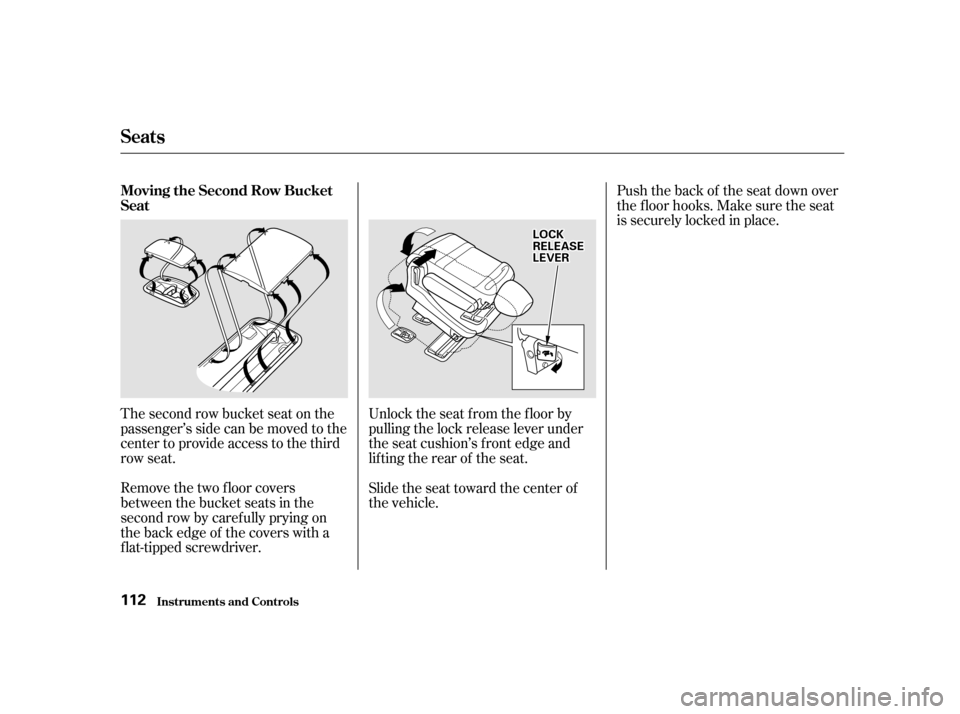
The second row bucket seat on the
passenger’s side can be moved to the
center to provide access to the third
row seat.
Remove the two floor covers
between the bucket seats in the
second row by caref ully prying on
the back edge of the covers with a
f lat-tipped screwdriver.Unlock the seat f rom the f loor by
pulling the lock release lever under
the seat cushion’s f ront edge and
lifting the rear of the seat.
Slide the seat toward the center of
the vehicle.Push the back of the seat down over
the f loor hooks. Make sure the seat
is securely locked in place.
Seats
Inst rument s and Cont rols
Moving the Second Row Bucket
Seat 112
LLOOCCKKRREELLEEAASSEELLEEVVEERR
Page 112 of 363
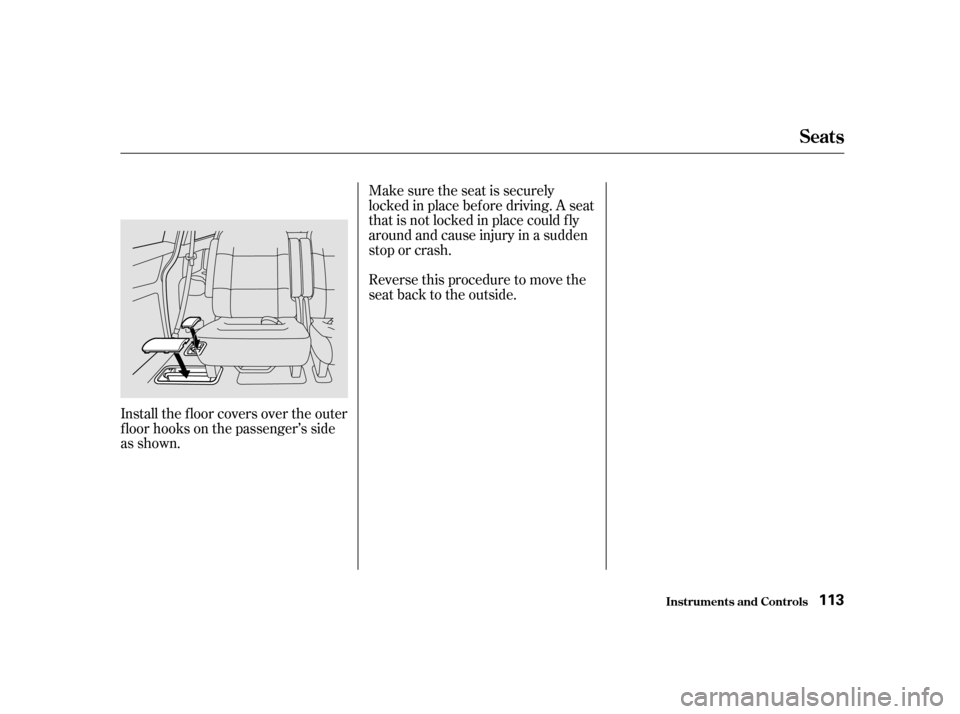
Install the f loor covers over the outer
f loor hooks on the passenger’s side
as shown.Make sure the seat is securely
locked in place bef ore driving. A seat
thatisnotlockedinplacecouldfly
around and cause injury in a sudden
stop or crash.
Reversethisproceduretomovethe
seat back to the outside.
Seats
Inst rument s and Cont rols
113
Page 113 of 363
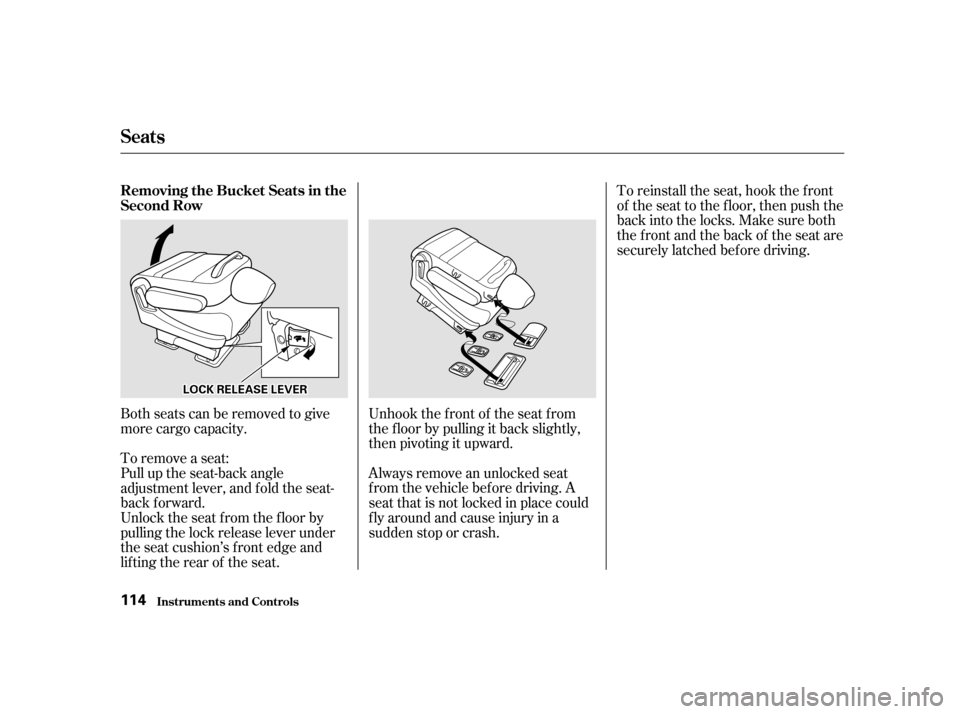
Unhook the f ront of the seat f rom
the f loor by pulling it back slightly,
then pivoting it upward.
Always remove an unlocked seat
f rom the vehicle bef ore driving. A
seat that is not locked in place could
f ly around and cause injury in a
sudden stop or crash.
Both seats can be removed to give
more cargo capacity.
To remove a seat:
Pull up the seat-back angle
adjustment lever, and fold the seat-
back f orward.
Unlock the seat f rom the f loor by
pulling the lock release lever under
the seat cushion’s f ront edge and
lifting the rear of the seat. To reinstall the seat, hook the f ront
of the seat to the f loor, then push the
backintothelocks.Makesureboth
the front and the back of the seat are
securely latched bef ore driving.
Seats
Inst rument s and Cont rols
Removing the Bucket Seats in the
Second Row 114
LLOOCCKKRREELLEEAASSEELLEEVVEERR
Page 115 of 363
Make sure the center shoulder belt
is stored in the holder and the outer
shoulder belts are positioned on each
hook whenever the third seat is
f olded.
Make sure all items in the cargo area
are secured. Loose items can f ly
f orward and cause injury if you have
to brake hard. See
on page .To return the seat to the upright
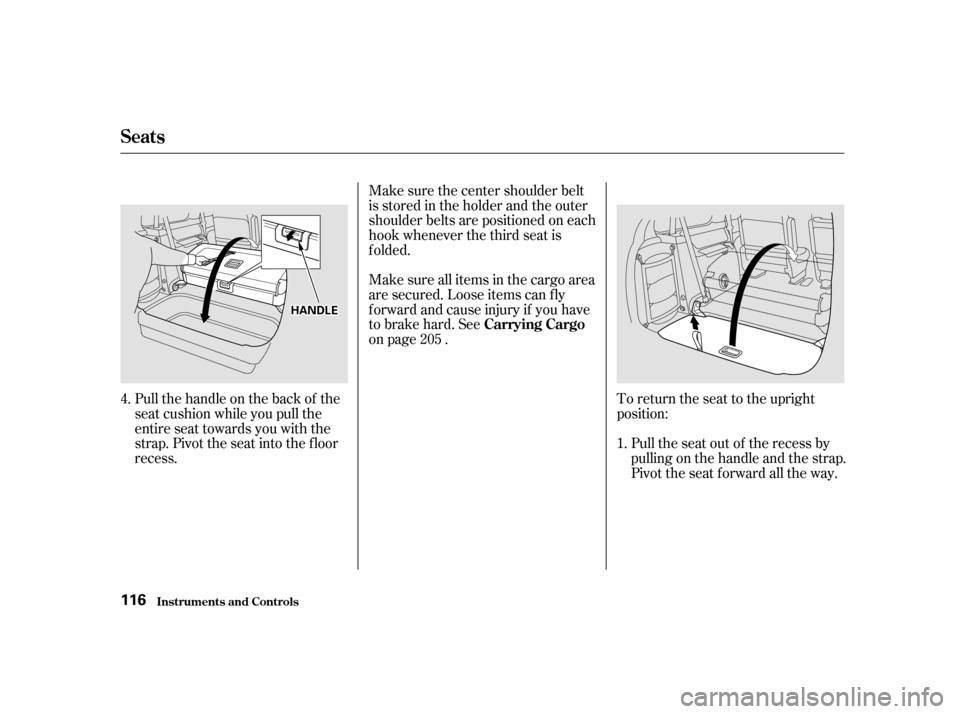
position:Pull the seat out of the recess by
pullingonthehandleandthestrap.
Pivot the seat forward all the way.
Pull the handle on the back of the
seat cushion while you pull the
entire seat towards you with the
strap. Pivot the seat into the f loor
recess.
4.
1.
205
Carrying Cargo
Seats
Inst rument s and Cont rols
116
HHAANNDDLLEE
Page 116 of 363
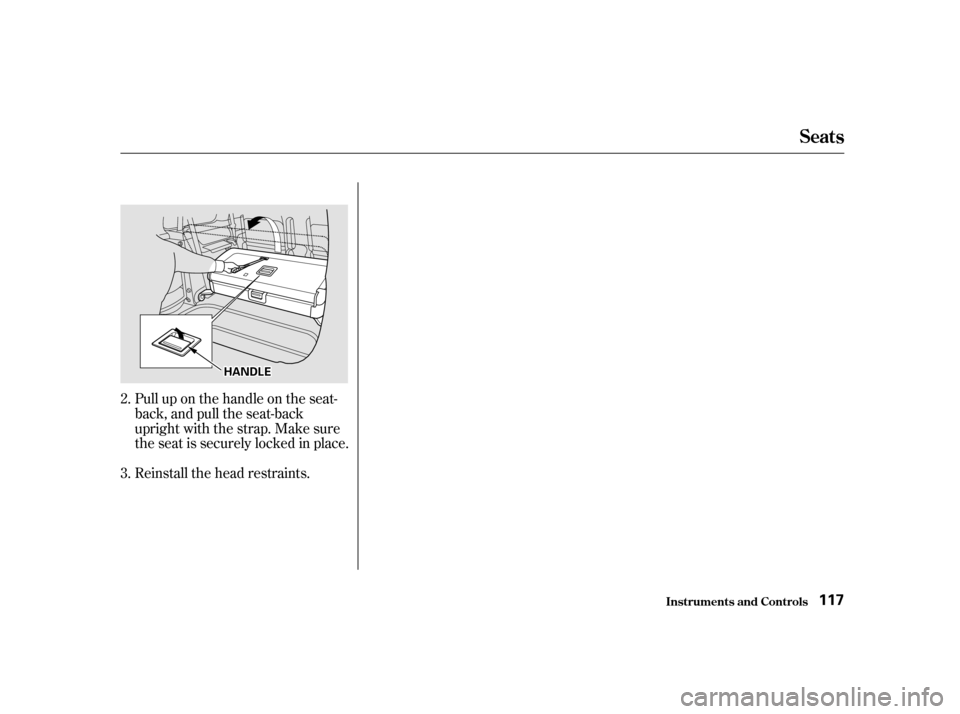
Pull up on the handle on the seat-
back, and pull the seat-back
upright with the strap. Make sure
the seat is securely locked in place.
Reinstall the head restraints.
2. 3.
Seats
Inst rument s and Cont rols
117
HHAANNDDLLEE
Page 134 of 363

The heating and air conditioning
systems in your Honda provide a
comf ortable driving environment in
all weather conditions.
The standard audio system has
many f eatures. This section de-
scribes those f eatures and how to
use them. (If you selected an
optional audio system, ref er to the
operating instructions that came
with it.)
Your Honda has an anti-thef t audio
system that requires a code number
to enable it......................
Heating and Cooling . 136
.........
What Each Control Does . 136
............
How to Use the System . 139
..........
To Turn Everything Of f . 143
...............
Climate Control System . 144
(EX model without Navigation
System)
.......
Fully-automatic Operation . 146
.......
Semi-automatic Operation . 148
(EX model with Navigation System)
.......
Fully-automatic Operation . 152
.......
Semi-automatic Operation . 153
Sunlight Sensor/
............
Temperature Sensor . 157
...........................
Rear A/C Unit . 158
.......................
Audio System (LX) . 161
AM/FM/Cassette Stereo
........................
Audio System . 161
.................
Operating the Radio . 162
.................
Adjusting the Sound . 165
............
Audio System Lighting . 166
Operating the Cassette
.....................................
Player . 166
............
Tape Search Functions . 166 Operating the Optional CD
....................
Player/Changer . 169
CD Changer Error
.............................
Indications . 172
.......................
Audio System (EX) . 173
....
AM/FM/CD Audio System . 173
.................
Operating the Radio . 174
.................
Adjusting the Sound . 178
............
Audio System Lighting . 179
....................
Radio Frequencies . 179
........................
Radio Reception . 179
.........
Operating the CD Player . 181
.....
Operating the CD Changer . 183
.......
Protecting Compact Discs . 184
....
CD Player Error Indications . 185
CD Changer Error
.............................
Indications . 186
Operating the Cassette
.....................................
Player . 187
............
Tape Search Functions . 188
Caring f or the Cassette
.....................................
Player . 190
...........
Remote Audio Controls . 191
.......................
Thef t Protection . 192
........................
Security System . 193
On EX model
Comf ort and Convenience Features
Comf ort and Convenience Feat ures 135
Page 181 of 363

�µ�µ
If you eject the disc, but do not
remove it from the slot, the system
will automatically reload the disc
af ter 15 seconds and put the CD
player in pause mode. To begin
playing the disc, press the CD button.
If you turn the system of f while a CD
is playing, either with the PWR/VOL
knob or by turning off the ignition,
the disc will stay in the drive. When
youturnthesystembackon,theCD
will begin playing where it lef t of f .
Press the eject button to remove the
disc f rom the drive.
You can switch to the radio while a
CD is playing by pressing the AM/
FM button. Press the CD button to
return to playing the CD. The CD
will begin playing where it lef t of f .
You can use the TUNE and SEEK/
SKIP bars while a disc is playing to
select passages and change tracks.
To move rapidly within a track, press
andholdtheTUNEbar.Pressthe
side to move forward. You will
seeCUEinthedisplay.Pressthe
side to move backward. You
will see REW displayed. Release the
bar when the system reaches the
point you want.
Each time you press and release the
side of the SEEK/SKIP bar,
the system skips forward to the
beginning of the next track. Press
the sidetoskipbackwardtothe
beginning of the current track. Press
it again to skip to the beginning of
the previous track. To activate the Repeat
f eature, press and release the RPT
button. You will see RPT in the
display. The system continuously
replays the current track. Press the
RPT button again to turn it off.
This feature,
when activated, plays the tracks on
the CD in random order, rather than
in the order they are recorded on the
CD. To activate Random Play, press
and release the A. SEL/RDM button.
You will see RDM in the display. The
system will then select and play
tracks randomly. This continues
until you deactivate Random Play by
pressing A. SEL/RDM again.
If the system is in Repeat mode, you
must turn it of f by pressing the RPT
button bef ore selecting Random Play.
Audio System
Comf ort and Convenience Feat ures REPEAT
RANDOM PLAY
182
Page 192 of 363
Once the security system is set,
opening any door (without using the
key or the remote transmitter), or
the hood, will cause it to alarm. It
also alarms if the radio is removed
f rom the dashboard or the wiring is
cut.Do not attempt to alter this system
or add other devices to it.
The security system helps to protect
your vehicle and valuables f rom thef t.
The horn sounds and a combination
of headlights, parking lights, side
marker lights and taillights f lashes if
someone attempts to break into your
vehicleorremovetheradio.This
alarm continues f or two minutes,
then the alarm stops. To reset an
alarming system before the two
minutes have elapsed, unlock either
f ront door with the key or the
remote transmitter.
The security system sets auto-
matically fifteen seconds after you
lock the doors, hood, and tailgate.
For the system to activate, you must
lock the doors f rom the outside with
the key, or remote transmitter. The
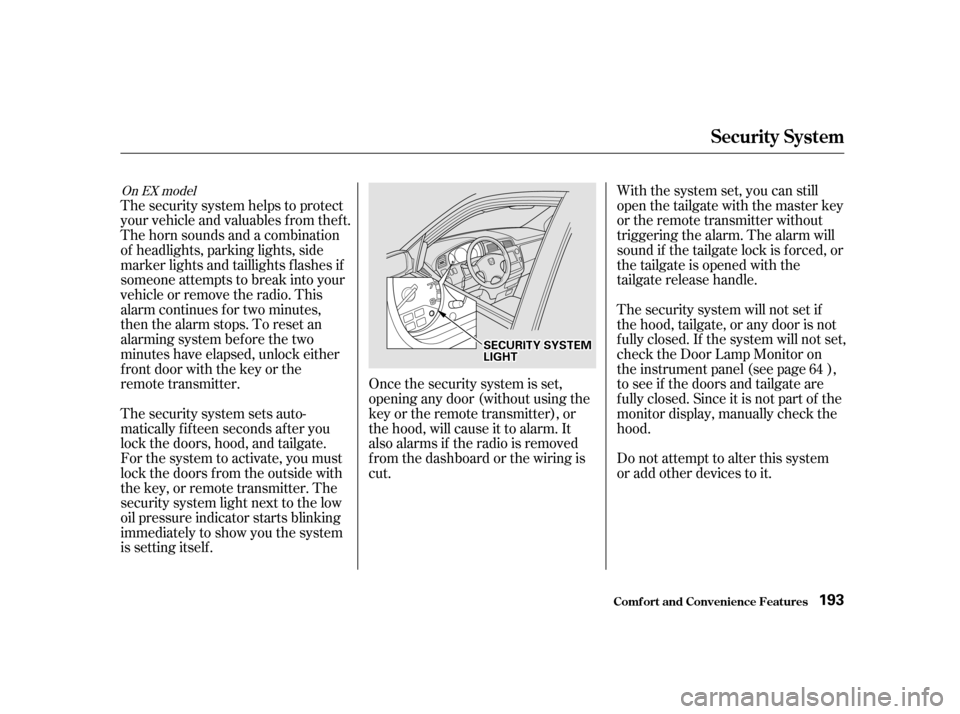
security system light next to the low
oil pressure indicator starts blinking
immediately to show you the system
is setting itself . With the system set, you can still
open the tailgate with the master key
or the remote transmitter without
triggering the alarm. The alarm will
sound if the tailgate lock is f orced, or
the tailgate is opened with the
tailgate release handle.
The security system will not set if
the hood, tailgate, or any door is not
f ully closed. If the system will not set,
check the Door Lamp Monitor on
the instrument panel (see page ),
to see if the doors and tailgate are
f ully closed. Since it is not part of the
monitor display, manually check thehood.
64
On EX model
Security System
Comf ort and Convenience Feat ures
193
SSEECCUURRIITTYYSSYYSSTTEEMMLLIIGGHHTT