Page 44 of 363
CONT INUED
Your vehicle has attachment points
for a tether-style child seat to be
installed on the second or third row
as shown.
Since a tether can provide additional
security, we recommend using a
tether whenever one is required or
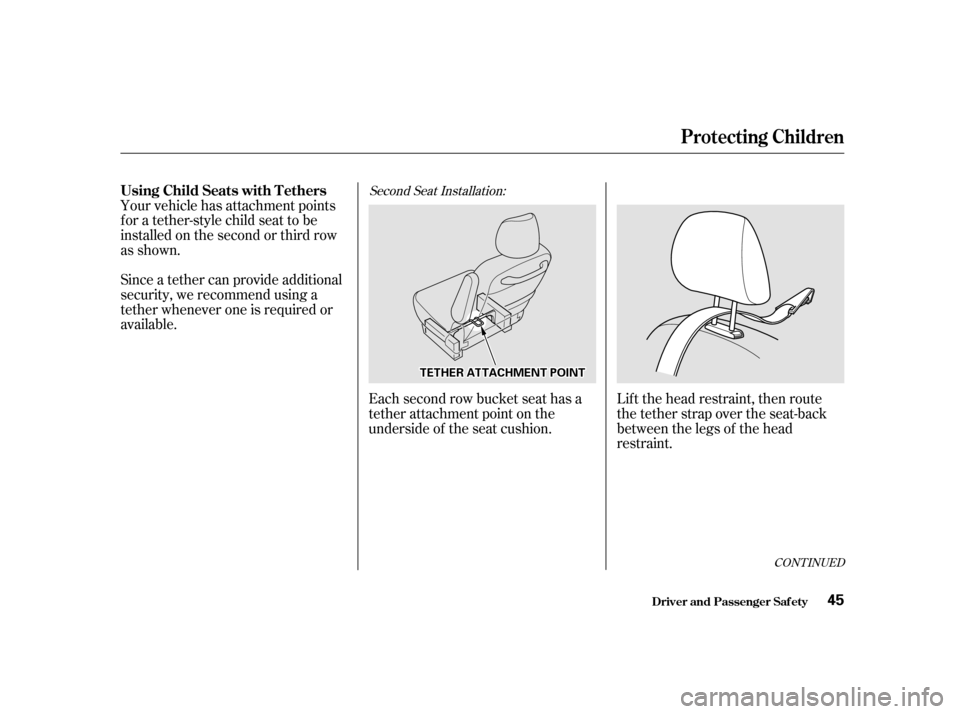
available.Each second row bucket seat has a
tether attachment point on the
underside of the seat cushion.Lift the head restraint, then route
the tether strap over the seat-back
between the legs of the head
restraint.
Second Seat Installation:
Driver and Passenger Saf ety
Protecting Children
Using Child Seats with T ethers
45
TTEETTHHEERRAATTTTAACCHHMMEENNTTPPOOIINNTT
Page 46 of 363
CONT INUED
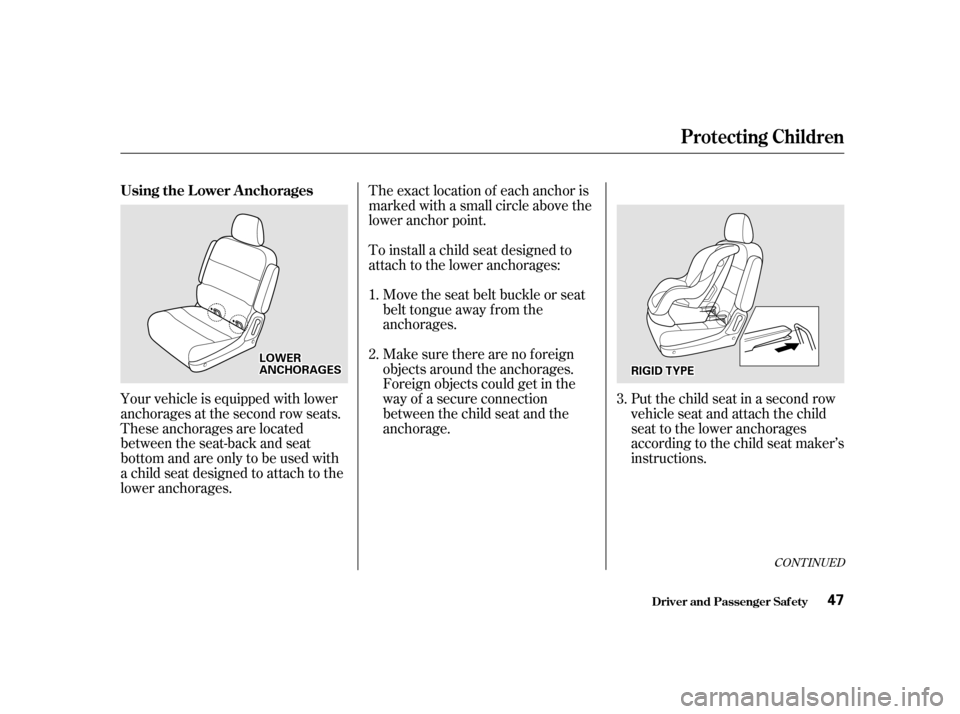
The exact location of each anchor is
marked with a small circle above the
lower anchor point.
To install a child seat designed to
attach to the lower anchorages:Move the seat belt buckle or seat
belt tongue away f rom the
anchorages.
Make sure there are no f oreign
objects around the anchorages.
Foreign objects could get in the
way of a secure connection
between the child seat and the
anchorage.
Your vehicle is equipped with lower
anchorages at the second row seats.
These anchorages are located
between the seat-back and seat
bottom and are only to be used with
a child seat designed to attach to the
lower anchorages. Put the child seat in a second row
vehicle seat and attach the child
seat to the lower anchorages
according to the child seat maker’s
instructions.
1. 2.
3.
Protecting Children
Driver and Passenger Saf ety
Using the L ower Anchorages
47
RRIIGGIIDDTTYYPPEELLOOWWEERRAANNCCHHOORRAAGGEESS
Page 47 of 363
Follow the child seat maker’s
instructions f or any additional
advice on adjusting or tightening
the fit.Push and pull the child seat
f orward and f rom side to side to
verif y that it is secure enough to
stay upright during normal driving
maneuvers.
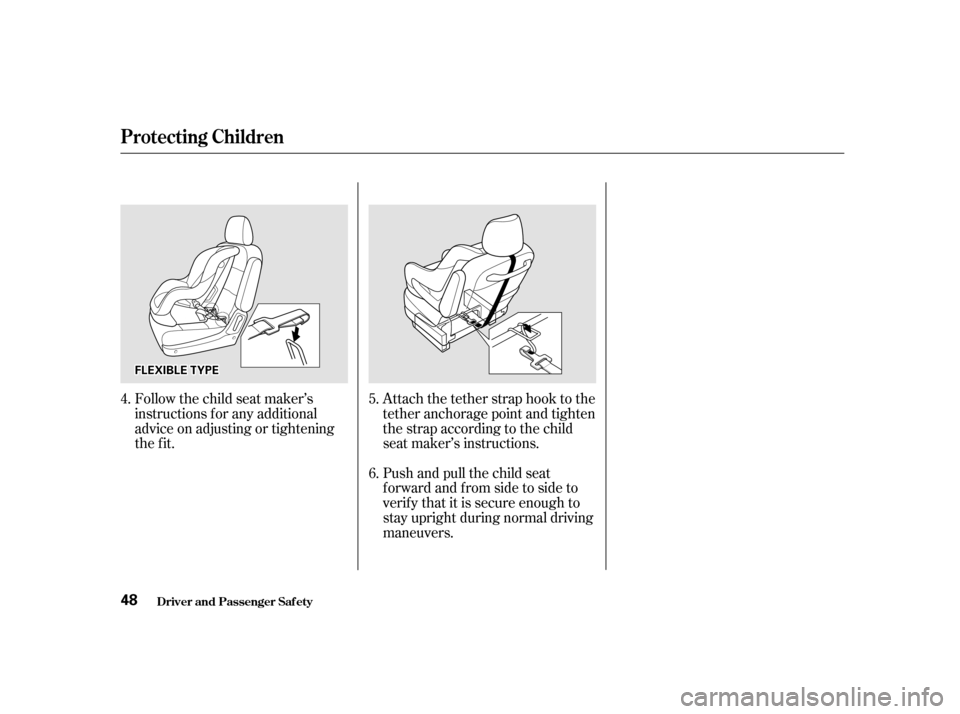
Attach the tether strap hook to the
tether anchorage point and tighten
the strap according to the child
seat maker’s instructions.
4.
5. 6.
Protecting Children
Driver and Passenger Saf ety
48
FFLLEEXXIIBBLLEETTYYPPEE
Page 49 of 363
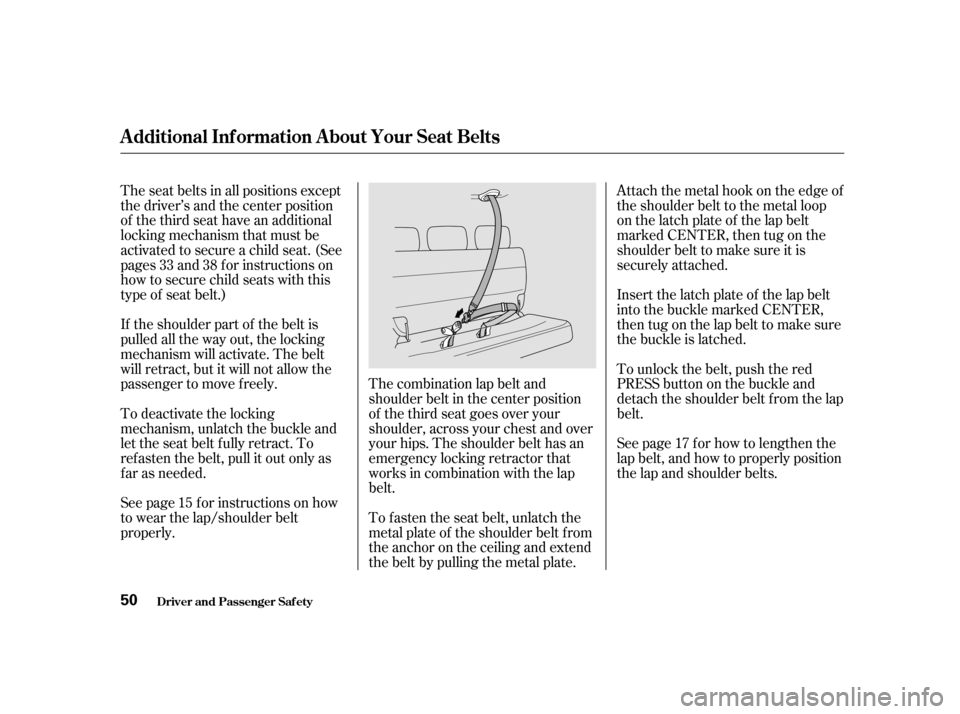
The combination lap belt and
shoulder belt in the center position
of the third seat goes over your
shoulder, across your chest and over
your hips. The shoulder belt has an
emergency locking retractor that
works in combination with the lap
belt.
The seat belts in all positions except
the driver’s and the center position
of the third seat have an additional
locking mechanism that must be
activated to secure a child seat. (See
pages and f or instructions on
how to secure child seats with this
type of seat belt.)
If the shoulder part of the belt is
pulled all the way out, the locking
mechanism will activate. The belt
will retract, but it will not allow the
passenger to move f reely.
To deactivate the locking
mechanism, unlatch the buckle and
let the seat belt f ully retract. To
ref asten the belt, pull it out only as
f ar as needed.
See page f or instructions on how
to wear the lap/shoulder belt
properly.
To f asten the seat belt, unlatch the
metal plate of the shoulder belt from
the anchor on the ceiling and extend
the belt by pulling the metal plate.Attach the metal hook on the edge of
the shoulder belt to the metal loop
on the latch plate of the lap belt
marked CENTER, then tug on the
shoulder belt to make sure it is
securely attached.
Insert the latch plate of the lap belt
into the buckle marked CENTER,
then tug on the lap belt to make sure
the buckle is latched.
To unlock the belt, push the red
PRESS button on the buckle and
detach the shoulder belt from the lap
belt.
See page f or how to lengthen the
lap belt, and how to properly position
the lap and shoulder belts.
15 17
33 38
Additional Inf ormation About Your Seat Belts
Driver and Passenger Saf ety
50
Page 75 of 363
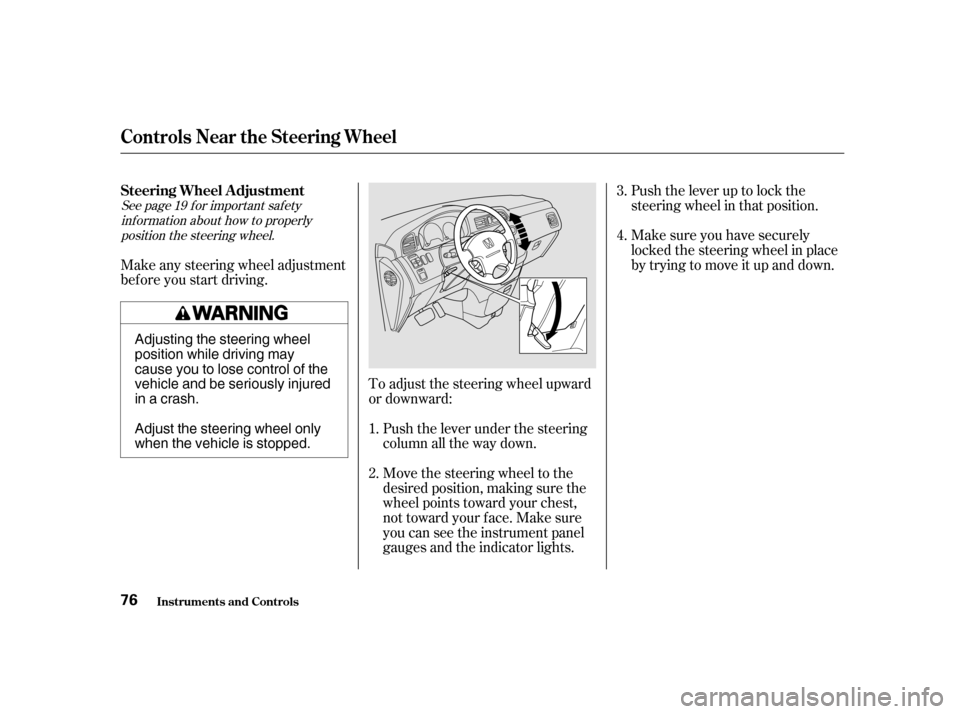
Push the lever up to lock the
steering wheel in that position.
Make sure you have securely
locked the steering wheel in place
by trying to move it up and down.
To adjust the steering wheel upward
or downward: Push the lever under the steering
column all the way down.
Move the steering wheel to the
desired position, making sure the
wheel points toward your chest,
not toward your f ace. Make sure
you can see the instrument panel
gauges and the indicator lights.
Make any steering wheel adjustment
bef ore you start driving.
3. 4.
1.2.
See page f or important saf ety inf ormation about how to properlyposition the steering wheel. 19
Controls Near the Steering Wheel
Inst rument s and Cont rols
Steering Wheel A djustment 76
Adjusting the steering wheel
position while driving may
cause you to lose control of the
vehicle and be seriously injured
inacrash.
Adjust the steering wheel only
when the vehicle is stopped.
Page 91 of 363
Your Honda is equipped with dual
sliding doors. Be sure all passengers
are clear of the sliding doors bef ore
closing them.
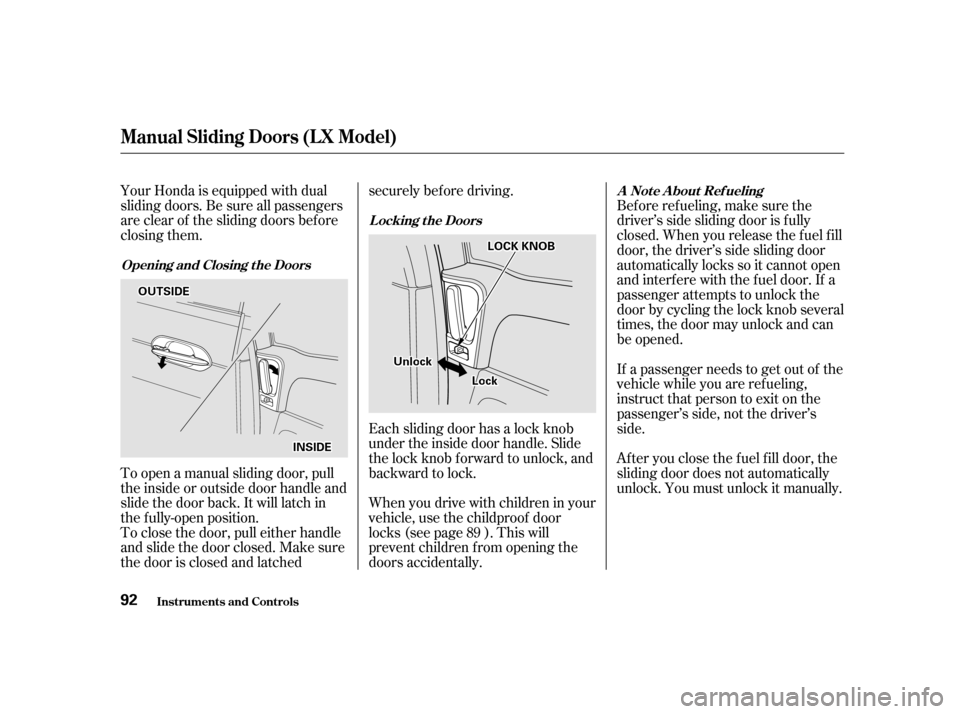
To open a manual sliding door, pull
the inside or outside door handle and
slide the door back. It will latch in
the f ully-open position.
To close the door, pull either handle
and slide the door closed. Make sure
the door is closed and latchedsecurely bef ore driving.
Each sliding door has a lock knob
under the inside door handle. Slide
the lock knob f orward to unlock, and
backward to lock.
Whenyoudrivewithchildreninyour
vehicle, use the childproof door
locks (see page ). This will
prevent children f rom opening the
doors accidentally.
Bef ore ref ueling, make sure the
driver’s side sliding door is f ully
closed. When you release the f uel f ill
door, the driver’s side sliding door
automatically locks so it cannot open
and interfere with the fuel door. If a
passenger attempts to unlock the
door by cycling the lock knob several
times, the door may unlock and can
be opened.
If a passenger needs to get out of the
vehicle while you are ref ueling,
instruct that person to exit on the
passenger’s side, not the driver’s
side.
Af ter you close the f uel f ill door, the
sliding door does not automatically
unlock. You must unlock it manually.
89
Manual Sliding Doors (L X Model)
Opening and Closing t he Doors L ocking t he Doors
A Not e A bout Ref ueling
Inst rument s and Cont rols
92
OOUUTTSSIIDDEE
IINNSSIIDDEE
UUnnlloocckk
LLoocckk
LLOOCCKKKKNNOOBB
Page 98 of 363

While training or using the
transmitter, make sure you have a
clear view of the garage door or gate,
and that no one will be injured by its
movement.
If you have problems with training
the HomeLink Universal
Transmitter, or would like
inf ormation on home products that
can be operated by the transmitter,
call (800) 355-3515. On the Internet,
go to www.homelink.jci.com. Always ref er to the operating
instructions and saf ety inf ormation
that came with your garage door
opener or other equipment you
intend to operate with the HomeLink
Universal Transmitter. If you do not
have this inf ormation, you should
contact the manuf acturer of the
equipment.
If you are training the transmitter to
operate a garage door or gate, it is
recommended that you unplug the
motor f or that device during training.
Repeatedly pressing the remote
control button could burn out the
motor.If your garage door opener was
manuf actured bef ore April 1982, you
may not be able to program the
HomeLink Universal Transmitter to
operate it. Garage door openers
manufactured before that date do
not have a safety feature that causes
them to stop and reverse if an
obstacle is detected during closing,
increasing the risk of injury. If you
have questions, call (800) 355-3515.
The HomeLink Universal Transmit-
ter built into your vehicle can be
programmed to operate remotely-
controlled devices around your home,
such as garage doors, lighting, or
home security systems. It can
replaceuptothreeremote
transmitters.
The HomeLink transmitter stores
the code in a permanent memory.
There should be no need to retrain
the transmitter if your vehicle’s
battery goes dead or is disconnected.
CONT INUED
Customer AssistanceImportant Saf ety Precautions
General Inf ormation
HomeL ink Universal T ransmitter
Inst rument s and Cont rols
99
Page 100 of 363

Canadian Owners:
The remote control you are training
from may stop transmitting after two
seconds. This is not long enough f or
the HomeLink transmitter to learn
thecode.Releaseandpressthe
button on the remote control every
two seconds until the transmitter has
learned the code.The red light in the transmitter
should begin f lashing. It will f lash
slowly at first, then rapidly.
When the red light f lashes rapidly,
release both buttons. The
transmitter should have learned
the code f rom the remote control.
Plug in the garage door opener
motor, then test the transmitter
button by pushing it. It should
operate the garage door.
If the button does not work, repeat
this procedure to train it again. If it still does not work, you may have a
variable or rolling code garage
door opener. Test this by pressing
and holding the HomeLink
transmitter button you just trained.
If the red light blinks f or two
seconds,thenstayson,youhavea
rolling code garage door opener.
You may be able to verify this with
the manufacturer’s documentation.
Go to ‘‘Training With a Rolling
Code System.’’
Repeat these steps to train the
other two transmitter buttons to
operate any other remotely-
controlled devices around your
home (lighting, automatic gate,
security system, etc.).
For security purposes, newer garage
door opening systems use a ‘‘rolling’’
or variable code. Inf ormation f rom
the remote control and the garage
door opener are needed bef ore the
HomeLink transmitter can operate
the garage door opener.
The‘‘Training the Transmitter’’
procedure trains the HomeLink
transmitter to the proper garage
door opener code. The f ollowing
procedure synchronizes the
HomeLink transmitter to the garage
door opener so they send and
receive the correct codes.
5. 6.
8.
7.
CONT INUED
T raining With a Rolling Code
System
HomeL ink Universal T ransmitter
Inst rument s and Cont rols 101