Page 6 of 363
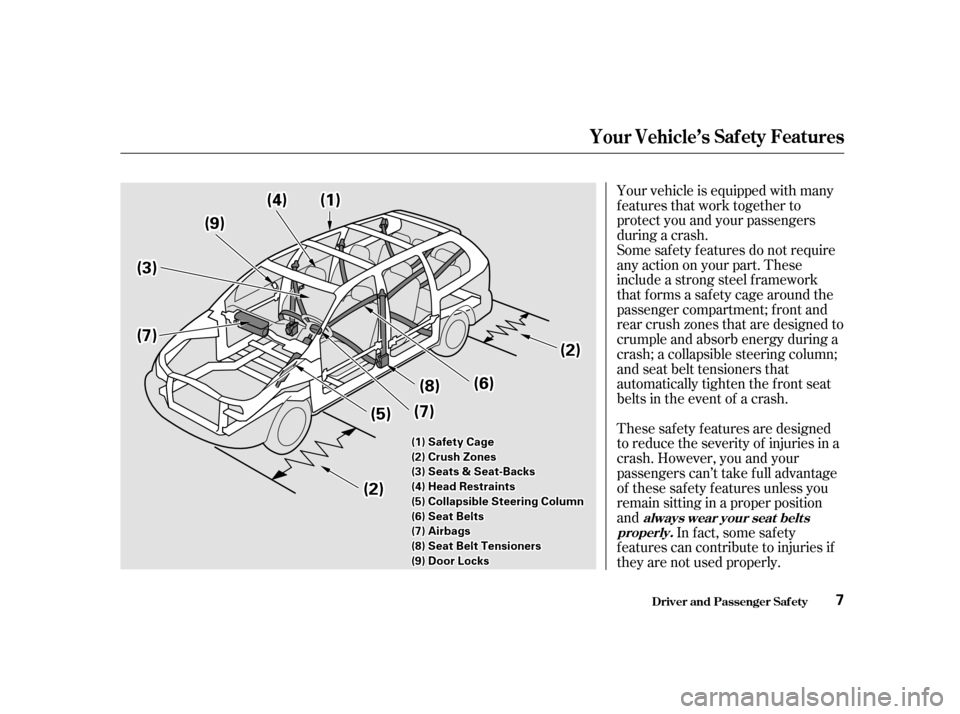
Your vehicle is equipped with many
features that work together to
protect you and your passengers
during a crash.
These saf ety f eatures are designed
to reduce the severity of injuries in a
crash. However, you and your
passengers can’t take f ull advantage
of these saf ety f eatures unless you
remain sitting in a proper position
andIn f act, some saf ety
f eatures can contribute to injuries if
they are not used properly.
Some saf ety f eatures do not require
anyactiononyourpart.These
include a strong steel f ramework
that forms a safety cage around the
passenger compartment; f ront and
rear crush zones that are designed to
crumple and absorb energy during a
crash; a collapsible steering column;
and seat belt tensioners that
automatically tighten the front seat
belts in the event of a crash.
Driver and Passenger Saf ety
Your Vehicle’s Saf ety Features
always wear your seat belts
properly.
7
((33))
((66))
((77))
((55))
((22))
((99))
((22))
((88))
((77))
((44))((11))
((11))SSaaffeettyyCCaaggee
((22))CCrruusshhZZoonneess
((33))SSeeaattss&&SSeeaatt--BBaacckkss
((44))HHeeaaddRReessttrraaiinnttss
((55))CCoollllaappssiibblleeSStteeeerriinnggCCoolluummnn
((66))SSeeaattBBeellttss
((77))AAiirrbbaaggss
((88))SSeeaattBBeellttTTeennssiioonneerrss
((99))DDoooorrLLoocckkss
Page 9 of 363

Head restraints can help protect you
f rom whiplash and other injuries. For
maximum protection, the back of
your head should rest against the
center of the head restraint.
Reclining a seat-back too f ar reduces
the seat belt’s ef f ectiveness and
increases the chance that the seat’s
occupant will slide under the seat
belt in a crash and be seriously
injured. Move the f ront
seats as far back as possible, and
keep adjustable seat-backs in an
upright position whenever the
vehicle is moving.
Your vehicle’s seats are designed to
keep you in a comf ortable, upright
position so you can take f ull
advantage of the protection offered
by seat belts and the energy
absorbing materials in the seats.
How you adjust your seats and seat-
backs can also affect your safety. For
example, sitting too close to the
steering wheel or dashboard
increases the risk of you or your
passenger being injured by striking
theinsideof thevehicle,orbyan
inf lating airbag. Keeping your doors locked reduces
thechanceof beingthrownoutof
the vehicle during a crash. It also
helps prevent occupants f rom
accidentally opening a door and
f alling out, and outsiders f rom
unexpectedly opening your doors.
Driver and Passenger Saf ety
Seats & Seat-Backs
Head RestraintsDoor L ocks
Your Vehicle’s Saf ety Features
What you should do:
10
Page 62 of 363

This light normally comes on f or a
f ew seconds when you turn the
ignition switch ON (II), and when
the ignition switch is turned to
START (III). If this light comes on at
any other time, there is a problem in
theABS.If thishappens,takethe
vehicle to your dealer to have it
checked. With the light on, your
vehicle still has normal braking
ability but no anti-lock. For complete
inf ormation, see page .This indicator comes on f or a f ew
seconds when you turn the ignition
switch ON (II). It will then go of f if
you have inserted a properly-coded
ignition key. If it is not a properly-
coded key, the indicator will blink
and the engine will not start (see
page ).
This indicator also blinks several
times when you turn the ignition
switch f rom ON (II) to ACCESSORY
(I) or LOCK (0).
This indicator has three f unctions:
Itcomesonasareminderthatyou
have turned off the Traction
Control System.
It f lashes when the TCS is
regulating wheelspin.
If itcomesonandstaysonwhen
the Traction Control System is on,
it indicates that there is a problem
in the TCS.
This light also comes on when you
turn the ignition ON (II) and goes off
af ter the engine starts. See page f or more inf ormation on the
TCS.
1. 2. 3.
219 81
221
Indicator L ights
Inst rument s and Cont rols
Traction Control System
(T CS) Indicator
Anti-lock Brake System
(A BS) Indicator Immobilizer System
Indicator
63
U.S. Canada
Page 83 of 363
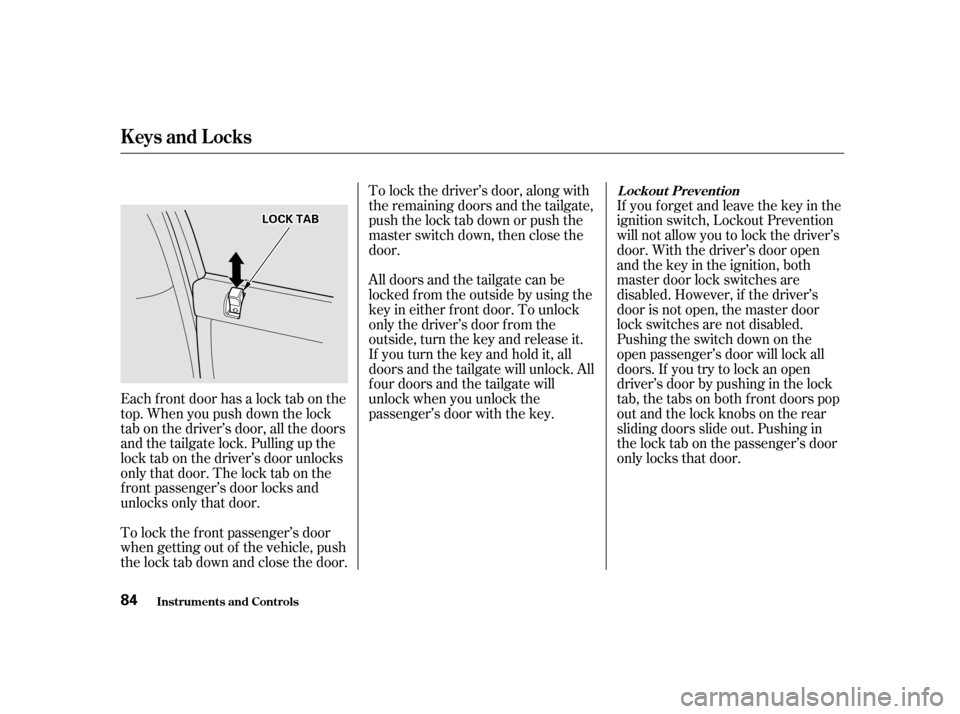
Each f ront door has a lock tab on the
top. When you push down the lock
tab on the driver’s door, all the doors
and the tailgate lock. Pulling up the
lock tab on the driver’s door unlocks
only that door. The lock tab on the
f ront passenger’s door locks and
unlocks only that door.If you f orget and leave the key in the
ignition switch, Lockout Prevention
will not allow you to lock the driver’s
door. With the driver’s door open
andthekeyintheignition,both
master door lock switches are
disabled. However, if the driver’s
door is not open, the master door
lock switches are not disabled.
Pushing the switch down on the
open passenger’s door will lock all
doors. If you try to lock an open
driver’s door by pushing in the lock
tab, the tabs on both f ront doors pop
out and the lock knobs on the rear
sliding doors slide out. Pushing in
the lock tab on the passenger’s door
only locks that door.
To lock the f ront passenger’s door
when getting out of the vehicle, push
the lock tab down and close the door. To lock the driver’s door, along with
the remaining doors and the tailgate,
push the lock tab down or push the
master switch down, then close the
door.
All doors and the tailgate can be
locked f rom the outside by using the
key in either f ront door. To unlock
only the driver’s door f rom the
outside, turn the key and release it.
If you turn the key and hold it, all
doors and the tailgate will unlock. All
f our doors and the tailgate will
unlock when you unlock the
passenger’s door with the key.
Inst rument s and Cont rols
Keys and Locks
L ockout Prevent ion
84
LLOOCCKKTTAABB
Page 114 of 363
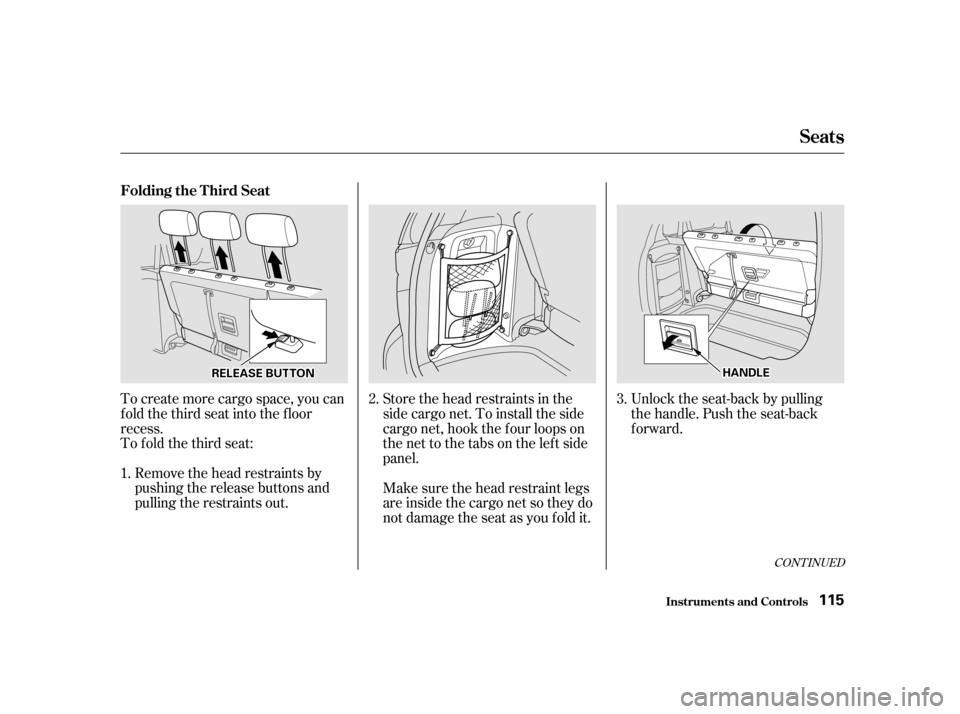
To create more cargo space, you can
fold the third seat into the floor
recess.
To fold the third seat:Remove the head restraints by
pushing the release buttons and
pulling the restraints out. Store the head restraints in the
sidecargonet.Toinstalltheside
cargo net, hook the f our loops on
the net to the tabs on the left side
panel.
Unlock the seat-back by pulling
the handle. Push the seat-back
forward.
Make sure the head restraint legs
areinsidethecargonetsotheydo
not damage the seat as you fold it.
1. 2.
3.
CONT INUED
Folding the T hird Seat
Seats
Inst rument s and Cont rols115
RREELLEEAASSEEBBUUTTTTOONNHHAANNDDLLEE
Page 206 of 363
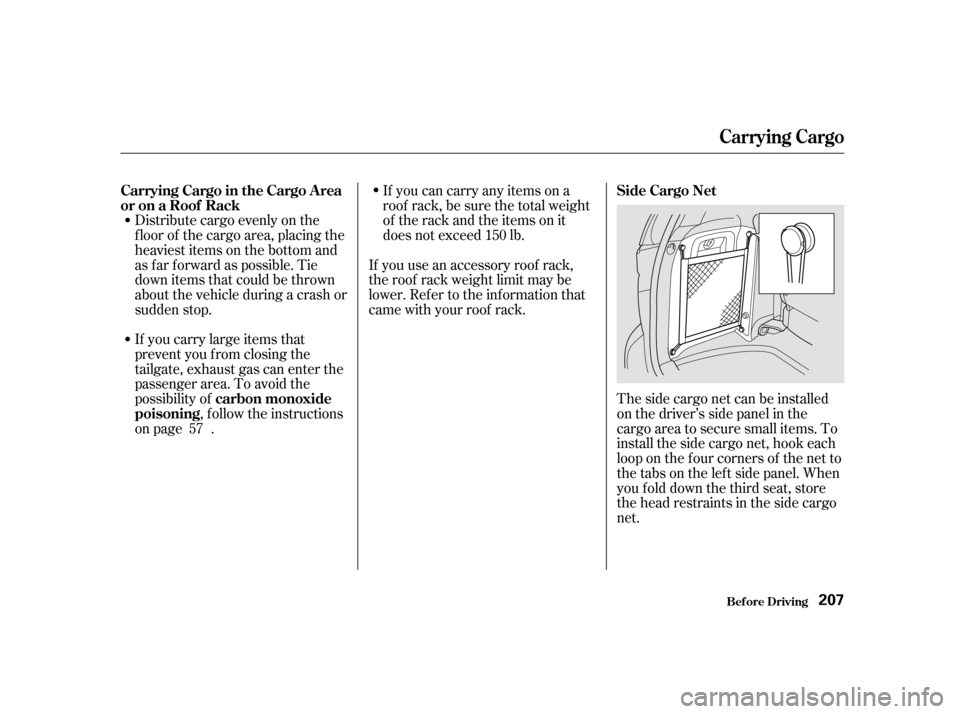
Distribute cargo evenly on the
f loor of the cargo area, placing the
heaviest items on the bottom and
as far forward as possible. Tie
down items that could be thrown
about the vehicle during a crash or
sudden stop.
If you carry large items that
prevent you f rom closing the
tailgate, exhaust gas can enter the
passenger area. To avoid the
possibility of, f ollow the instructions
on page . The side cargo net can be installed
on the driver’s side panel in the
cargo area to secure small items. To
install the side cargo net, hook each
loop on the f our corners of the net to
the tabs on the lef t side panel. When
youfolddownthethirdseat,store
the head restraints in the side cargo
net.
If you can carry any items on a
roof rack,besurethetotalweight
of the rack and the items on it
does not exceed 150 lb.
If you use an accessory roof rack,
the roof rack weight limit may be
lower. Ref er to the inf ormation that
came with your roof rack.
57
Carrying Cargo in the Cargo A rea
or on a Roof Rack
carbon monoxide
poisoning Side Cargo Net
Carrying Cargo
Bef ore Driving
207
Page 207 of 363
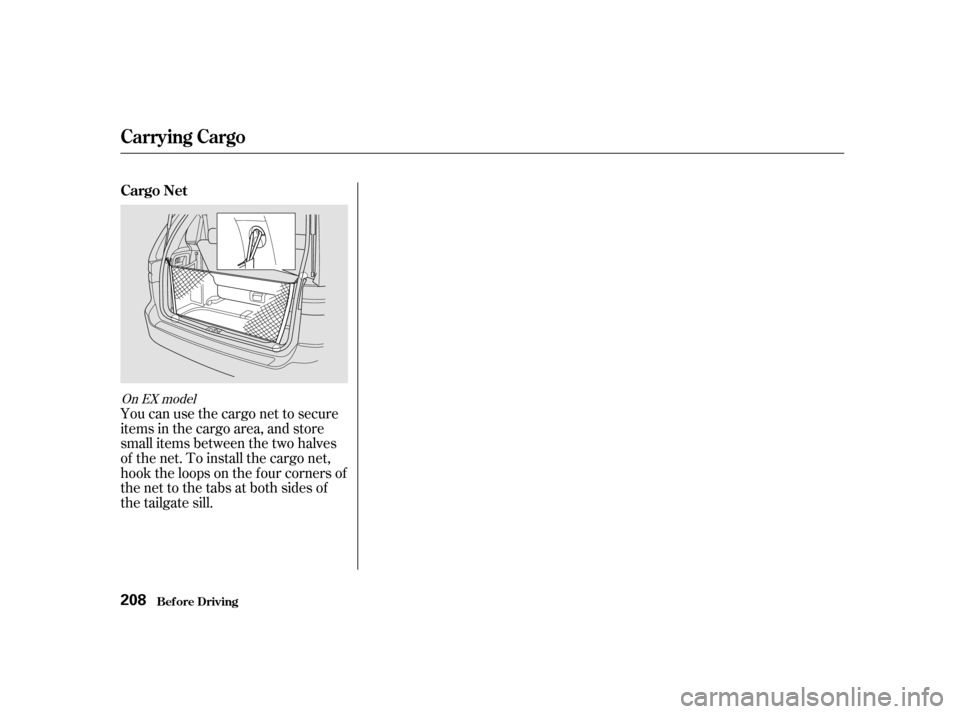
You can use the cargo net to secure
items in the cargo area, and store
small items between the two halves
of the net. To install the cargo net,
hook the loops on the f our corners of
the net to the tabs at both sides of
the tailgate sill.
On EX model
Carrying Cargo
Cargo NetBef ore Driving
208
Page 208 of 363

This section gives you tips on
starting the engine under various
conditions, and how to operate the
automatic transmission. It also
includes important inf ormation on
parking your vehicle, the braking
system, the Traction Control System,
and f acts you need if you are
planning to tow a trailer.........................
Preparing to Drive . 210
.......................
Starting the Engine . 211
Starting in Cold Weather ....................
at High Altitude . 211
..............
Automatic Transmission . 212
.
Shif t Lever Position Indicator . 212
................
Shif t Lever Positions . 213
..............
Engine Speed Limiter . 215
....................
Shif t Lock Release . 215
...........................................
Parking . 217
.....................
The Braking System . 218
.............
Brake Wear Indicators . 218
...............
Brake System Design . 219
.......................
Anti-lock Brakes . 219
Important Saf ety .........................
Reminders . 220
........................
ABS Indicator . 220
..............
Traction Control System . 221
...............
TCS ON/OFF Switch . 222
............................
TCS Indicator . 223
...............
Driving in Bad Weather . 224
...........................
Towing a Trailer . 226
Driving
Driving 209