2000 TOYOTA CAMRY lock
[x] Cancel search: lockPage 4424 of 4770
PORT INSTALLED RS3000 TVIP TRUNK COURTESY CONNECTION ± AX003±00 March 31, 2000
Page 2 of 2
New Location:
These steps below are to be followed to
locate the new trunk courtesy connection
when servicing Camry vehicles equipped
with the PIO RS3000 TVIP.
1. Remove the negative battery cable.
2. Remove the driver's step cover.
3. Remove the driver's cowl cover (1
nut).
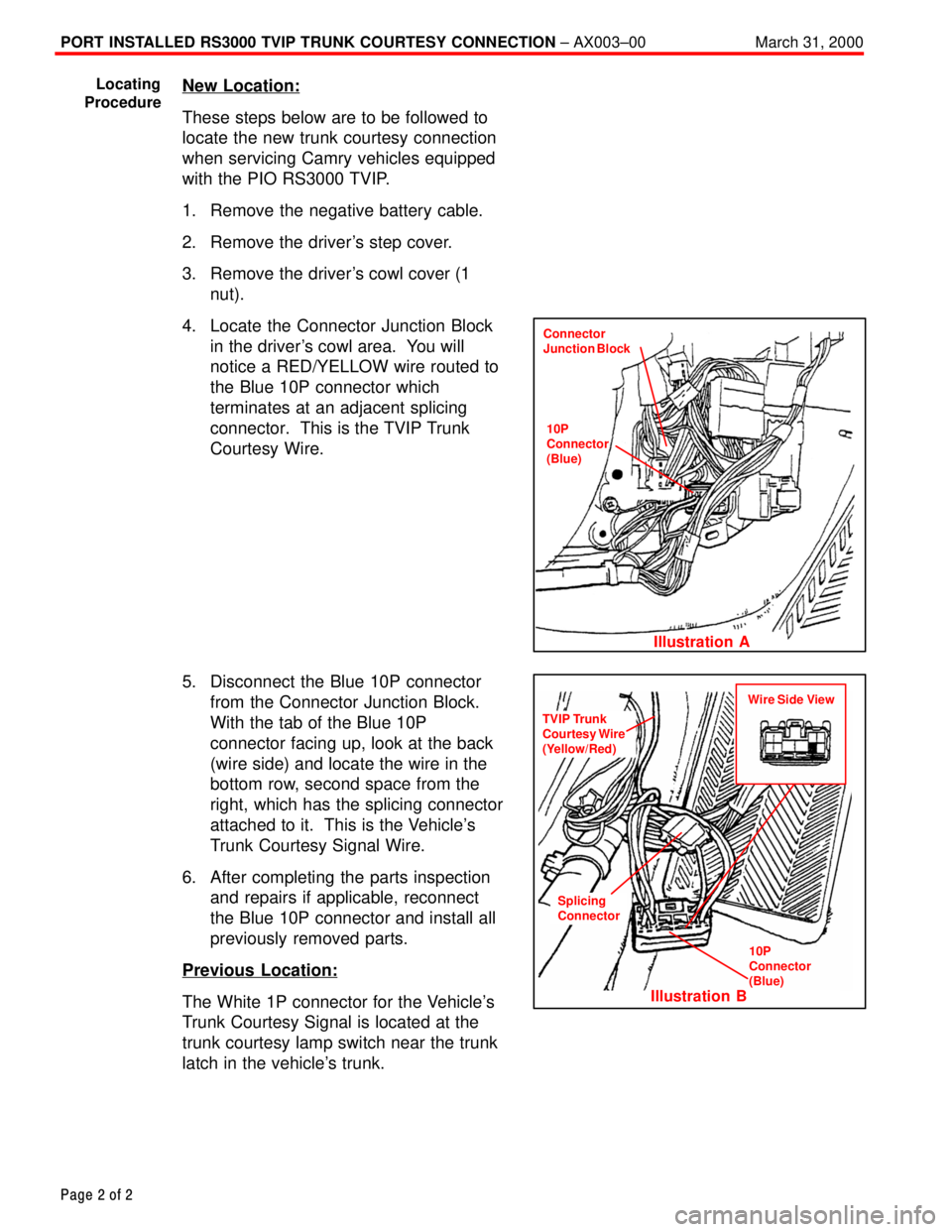
4. Locate the Connector Junction Block
in the driver's cowl area. You will
notice a RED/YELLOW wire routed to
the Blue 10P connector which
terminates at an adjacent splicing
connector. This is the TVIP Trunk
Courtesy Wire.
5. Disconnect the Blue 10P connector
from the Connector Junction Block.
With the tab of the Blue 10P
connector facing up, look at the back
(wire side) and locate the wire in the
bottom row, second space from the
right, which has the splicing connector
attached to it. This is the Vehicle's
Trunk Courtesy Signal Wire.
6. After completing the parts inspection
and repairs if applicable, reconnect
the Blue 10P connector and install all
previously removed parts.
Previous Location:
The White 1P connector for the Vehicle's
Trunk Courtesy Signal is located at the
trunk courtesy lamp switch near the trunk
latch in the vehicle's trunk.
Locating
Procedure
Connector
Junction Block
Illustration A
10P
Connector
(Blue)
TVIP Trunk
Courtesy Wire
(Yellow/Red)
Illustration B
Splicing
Connector
10P
Connector
(Blue)
Wire Side View
Page 4431 of 4770
Toyota Supports ASE CertificationPage 1 of 2
AX005±00Title:
RS3000 TVIP AUTOMATIC DOOR LOCK
FEATURE PROGRAMMING
Models:
All Models
Technical Service
BULLETIN
April 14, 2000
As a convenience feature, the RS3000 TVIP system is programmed to automatically lock
all of the vehicle's doors (for vehicles equipped with power door locks) when the ignition
key is turned to ªONº or ªSTARTº, and unlock them when the key is turned back to ªACCº
or ªLOCKº. The initial factory setting of this programmable feature is ªONº. For some
customers however, this feature is not desirable due to instances of passenger lockout
when the driver enters the vehicle first and starts the ignition.
For vehicles equipped with RS3000 TVIP, this bulletin advises the dealers to
communicate the following information to the customers at vehicle delivery:
1. Inform the customers of the RS3000 system's automatic (ignition controlled) door
lock/unlock feature.
2. Inquire about the customers' preference for it to be set ªONº or ªOFFº.
3. Reprogram the feature's setting according to the customer's preference.
To change the feature's operation mode, follow the programming procedures on page 2.
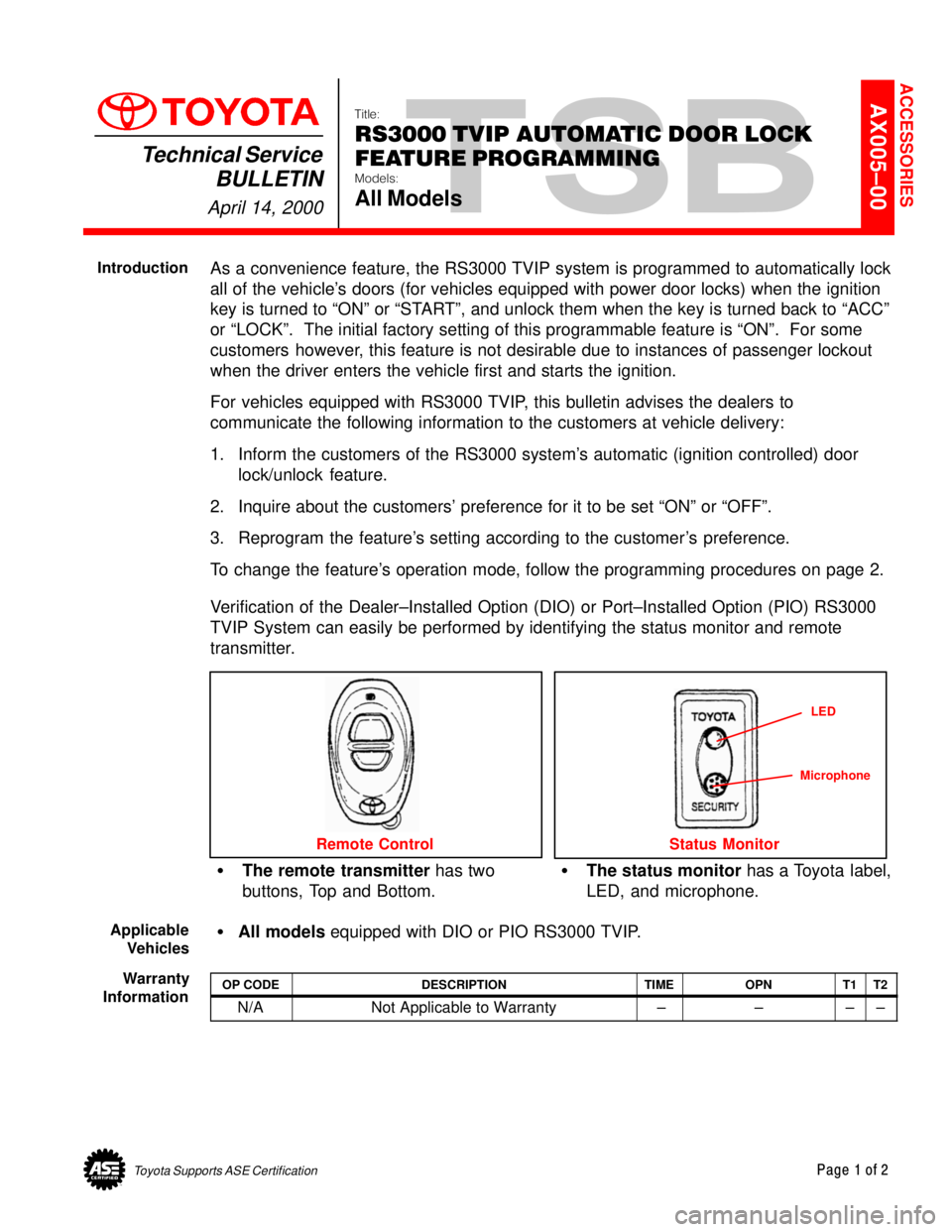
Verification of the Dealer±Installed Option (DIO) or Port±Installed Option (PIO) RS3000
TVIP System can easily be performed by identifying the status monitor and remote
transmitter.
The remote transmitter has two
buttons, Top and Bottom.The status monitor has a Toyota label,
LED, and microphone.
Remote Control
LED
Status Monitor
Microphone
All models equipped with DIO or PIO RS3000 TVIP.
OP CODEDESCRIPTIONTIMEOPNT1T2
N/ANot Applicable to Warranty ±±±±
ACCESSORIES
Introduction
Applicable
Vehicles
Warranty
Information
Page 4432 of 4770
RS30000 TVIP AUTOMATIC DOOR LOCK FEATURE PROGRAMMING ± AX005±00 April 14, 2000
Page 2 of 2
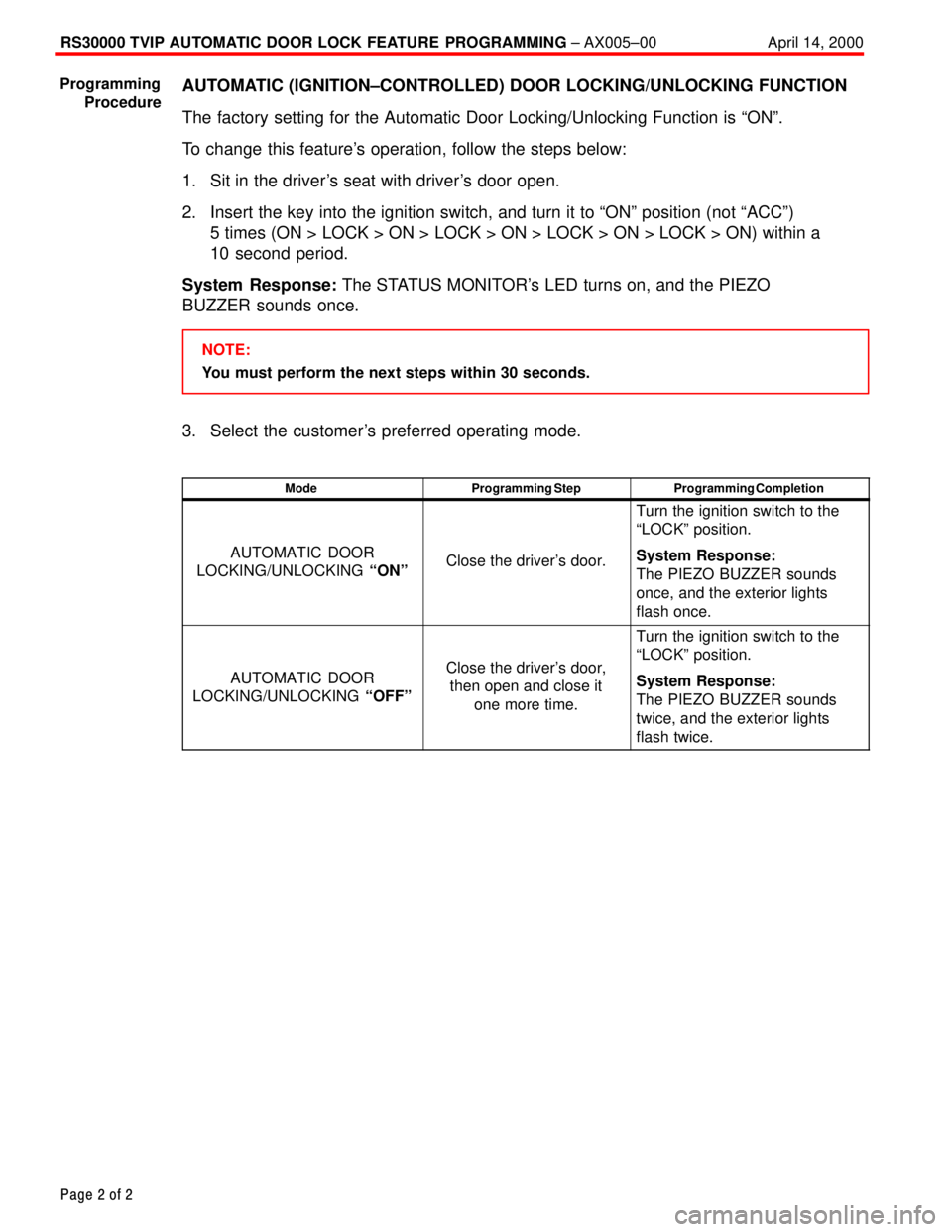
AUTOMATIC (IGNITION±CONTROLLED) DOOR LOCKING/UNLOCKING FUNCTION
The factory setting for the Automatic Door Locking/Unlocking Function is ªONº.
To change this feature's operation, follow the steps below:
1. Sit in the driver's seat with driver's door open.
2. Insert the key into the ignition switch, and turn it to ªONº position (not ªACCº)
5 times (ON > LOCK > ON > LOCK > ON > LOCK > ON > LOCK > ON) within a
10 second period.
System Response: The STATUS MONITOR's LED turns on, and the PIEZO
BUZZER sounds once.
NOTE:
You must perform the next steps within 30 seconds.
3. Select the customer's preferred operating mode.
ModeProgramming StepProgramming Completion
AUTOMATIC DOOR
LOCKING/UNLOCKING ªONºClose the driver's door.
Turn the ignition switch to the
ªLOCKº position.
System Response:
The PIEZO BUZZER sounds
once, and the exterior lights
flash once.
AUTOMATIC DOOR
LOCKING/UNLOCKING ªOFFºClose the driver's door,
then open and close it
one more time.
Turn the ignition switch to the
ªLOCKº position.
System Response:
The PIEZO BUZZER sounds
twice, and the exterior lights
flash twice.
Programming
Procedure
Page 4434 of 4770
RS3000 TVIP PROGRAMMING CHANGES FOR GBS ± AX006±99 April 23, 1999
Page 2 of 2
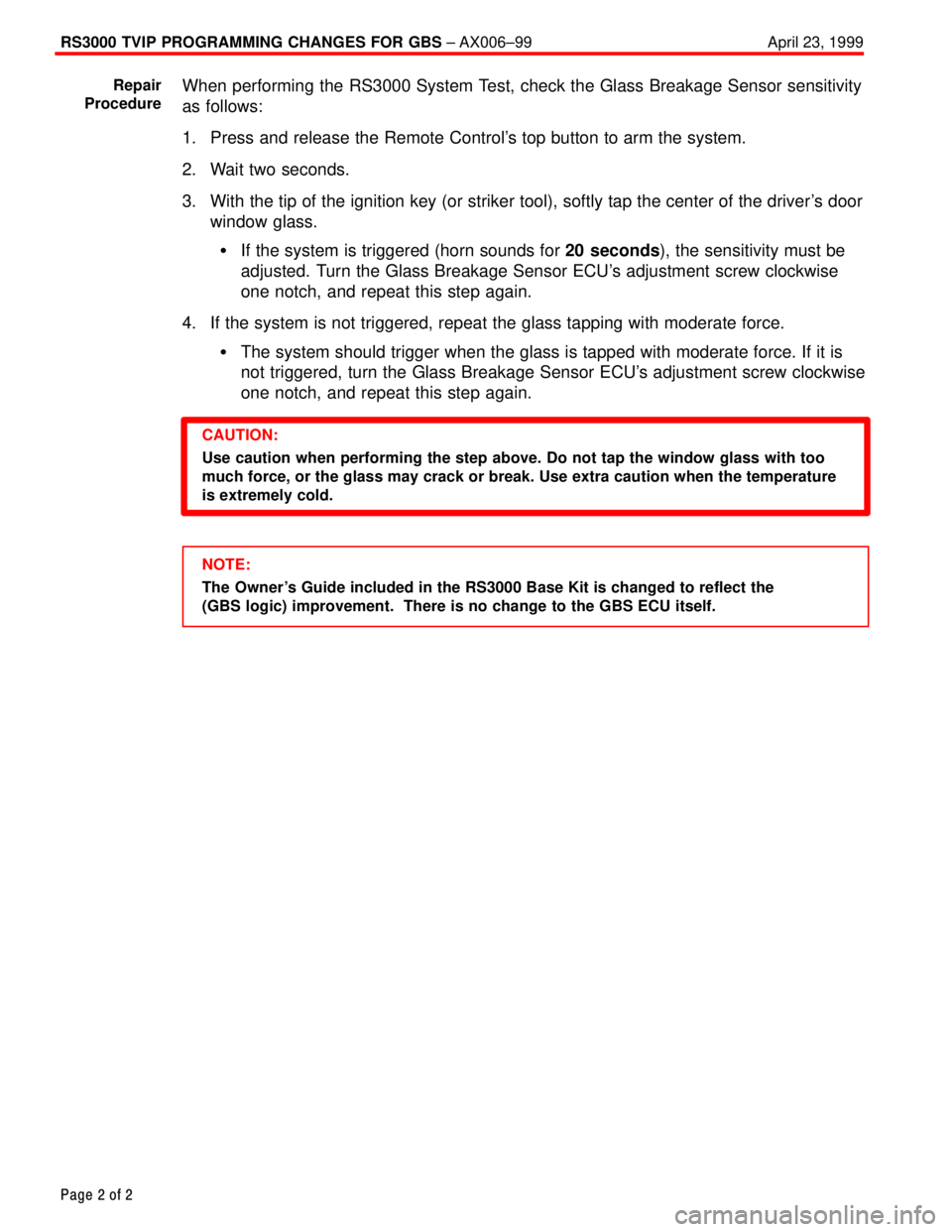
When performing the RS3000 System Test, check the Glass Breakage Sensor sensitivity
as follows:
1. Press and release the Remote Control's top button to arm the system.
2. Wait two seconds.
3. With the tip of the ignition key (or striker tool), softly tap the center of the driver's door
window glass.
If the system is triggered (horn sounds for 20 seconds), the sensitivity must be
adjusted. Turn the Glass Breakage Sensor ECU's adjustment screw clockwise
one notch, and repeat this step again.
4. If the system is not triggered, repeat the glass tapping with moderate force.
The system should trigger when the glass is tapped with moderate force. If it is
not triggered, turn the Glass Breakage Sensor ECU's adjustment screw clockwise
one notch, and repeat this step again.
CAUTION:
Use caution when performing the step above. Do not tap the window glass with too
much force, or the glass may crack or break. Use extra caution when the temperature
is extremely cold.
NOTE:
The Owner's Guide included in the RS3000 Base Kit is changed to reflect the
(GBS logic) improvement. There is no change to the GBS ECU itself. Repair
Procedure
Page 4441 of 4770
SEAT BELT EXTENDER: '98 ± '00 ± BO002±00 January 21, 2000
Page 6 of 7
Failure to follow the recommendations indicated below could result in less effectiveness
of the seat belt restraint system in case of vehicle collision, causing personal injury.
The Seat Belt Extender must not be used:
A. By anyone other than for whom it was provided (name recorded on seat belt
extender).
B. In any vehicle and/or seat position other than the one for which it was provided.
C. When the Seat Belt Extender is provided for rear seat positions (with automatic
locking retractor), make sure the retractor is locked when in use.
If your seat belt cannot be fastened securely because it is not long enough, a
personalized seat belt extender is available from your Toyota dealer free of charge.
Please contact your local Toyota dealer so that the dealer can order the proper required
length for the extender. Bring the heaviest coat you expect to wear for proper
measurement and selection of length. Additional ordering information is available at your
Toyota dealer.
CAUTION:
When using the seat belt extender, observe the following. Failure to follow these
instructions could result in less effectiveness of the seat belt restraint system in case
of vehicle accident, increasing the chance of personal injury.
Never use the Seat Belt Extender if you can COMFORTABLY fasten the seat belt
without it.
The Seat Belt Extender must never be used with any child safety seats.
Remember that the extender provided for you may not be safe when used on a
different vehicle, or for another person or at a different seating position than the
one originally intended for.
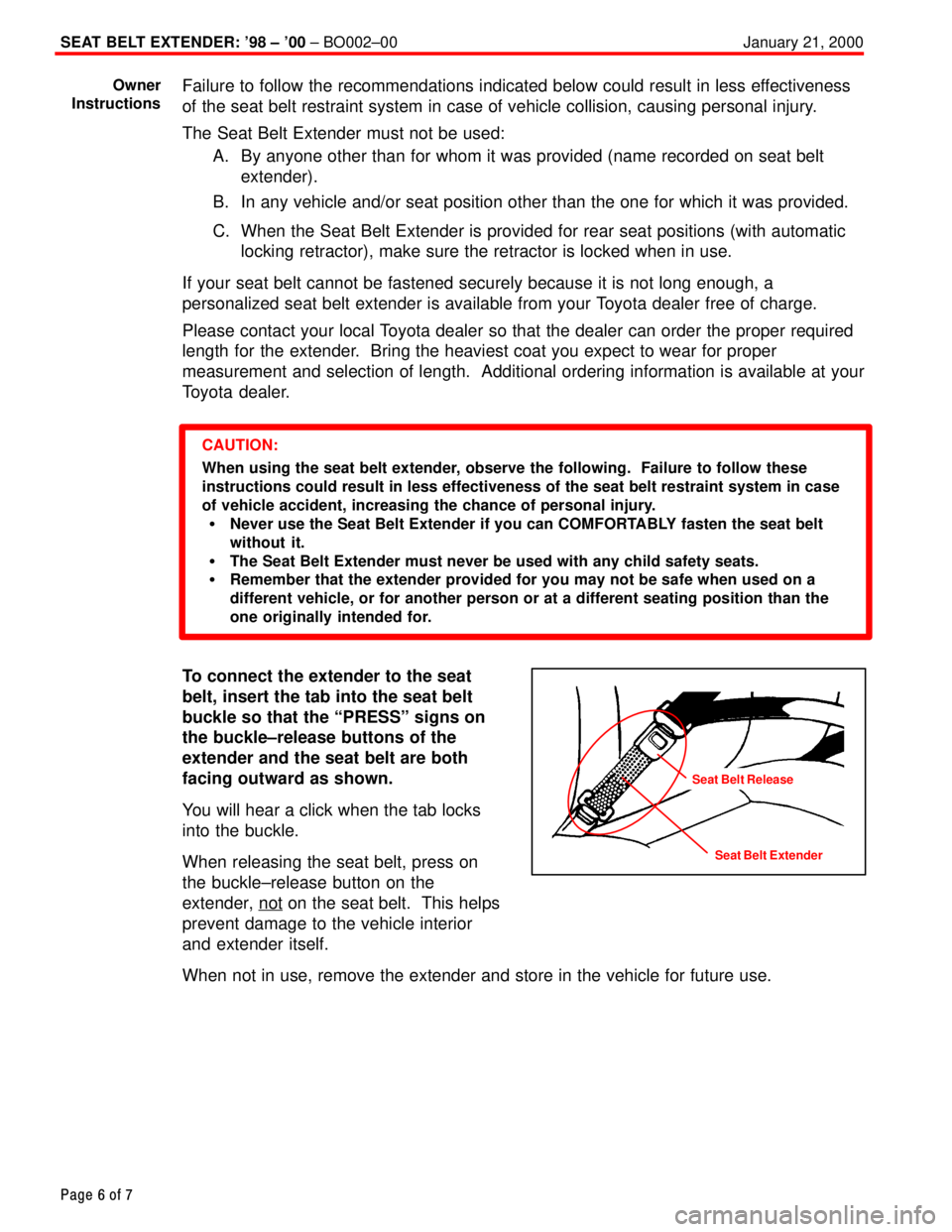
To connect the extender to the seat
belt, insert the tab into the seat belt
buckle so that the ªPRESSº signs on
the buckle±release buttons of the
extender and the seat belt are both
facing outward as shown.
You will hear a click when the tab locks
into the buckle.
When releasing the seat belt, press on
the buckle±release button on the
extender, not
on the seat belt. This helps
prevent damage to the vehicle interior
and extender itself.
When not in use, remove the extender and store in the vehicle for future use.
Owner
Instructions
Seat Belt Extender
Seat Belt Release
Page 4442 of 4770
SEAT BELT EXTENDER: '98 ± '00 ± BO002±00 January 21, 2000
Page 7 of 7
SEAT BELT EXTENDER WORKSHEET
PLEASE COPY THIS ORIGINAL WORKSHEET FOR EACH EXTENDER NEEDED
CAUTIONS:
To minimize the chance and/or severity of injury in an accident, the seat belt
extender must only be used:
1 By the person for whom it was provided
2 In the seat position for which it was provided
The seat belt extender must never be used with any child safety seats.
When the seat belt extender is provided for rear seat positions (with automatic
locking retractor), make sure the retractor is locked when extender belt is in use.
DEALERSEAT BELT EXTENDER APPLICATIONAPPLICANT
DEALER CODEDEALER NAMEAPPLICANT NAME
ADDRESSADDRESS
CITY & STATEZIPCITY & STATEZIPPHONE
EMPLOYEE NAMEMODEL YEARBODY TYPESEATING POSITIONVEHICLE IDENTIFICATION NUMBER
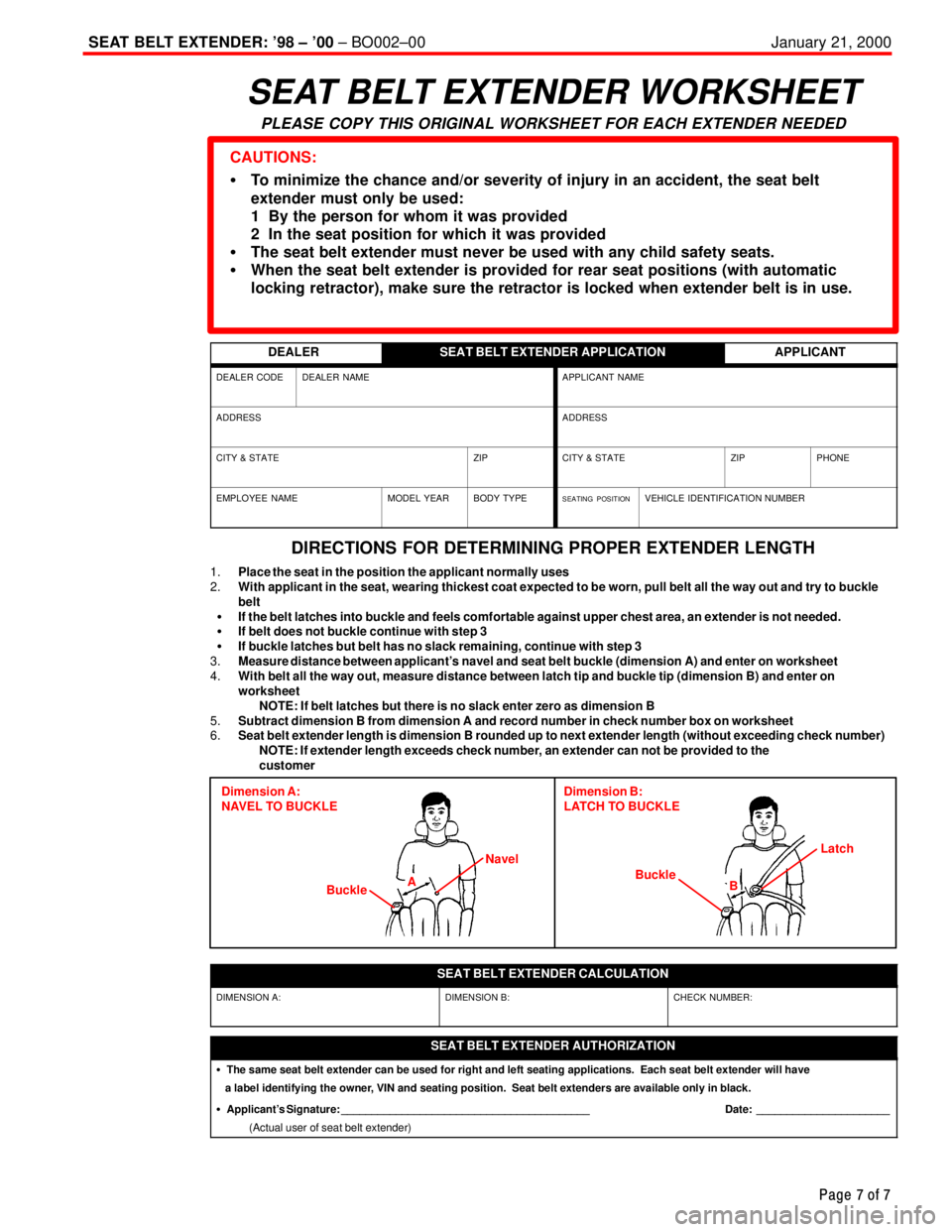
DIRECTIONS FOR DETERMINING PROPER EXTENDER LENGTH
1.Place the seat in the position the applicant normally uses
2.With applicant in the seat, wearing thickest coat expected to be worn, pull belt all the way out and try to buckle
belt
If the belt latches into buckle and feels comfortable against upper chest area, an extender is not needed.
If belt does not buckle continue with step 3
If buckle latches but belt has no slack remaining, continue with step 3
3.Measure distance between applicant's navel and seat belt buckle (dimension A) and enter on worksheet
4.With belt all the way out, measure distance between latch tip and buckle tip (dimension B) and enter on
worksheet
NOTE: If belt latches but there is no slack enter zero as dimension B
5.Subtract dimension B from dimension A and record number in check number box on worksheet
6.Seat belt extender length is dimension B rounded up to next extender length (without exceeding check number)
NOTE: If extender length exceeds check number, an extender can not be provided to the
customer
Dimension A:
NAVEL TO BUCKLEDimension B:
LATCH TO BUCKLE
BuckleBuckle NavelLatch
A
B
SEAT BELT EXTENDER CALCULATION
DIMENSION A:DIMENSION B:CHECK NUMBER:
SEAT BELT EXTENDER AUTHORIZATION
The same seat belt extender can be used for right and left seating applications. Each seat belt extender will have
a label identifying the owner, VIN and seating position. Seat belt extenders are available only in black.
Applicant's Signature: _________________________________________ Date: ______________________
(Actual user of seat belt extender)
Page 4448 of 4770
SEAT BELT EXTENDER: '99±'01 MODEL YEAR ± BO002-01 January 26, 2001
Page 6 of 7
Failure to follow the recommendations indicated below could result in reduced
effectiveness of the seat belt restraint system in case of vehicle collision, causing
personal injury.
The Seat Belt Extender must not be used:
a. By anyone other than for whom it was provided (name recorded on seat belt
extender).
b. In any vehicle and/or seat position other than the one for which it was provided.
c. When the Seat Belt Extender is provided for rear seat positions (with automatic
locking retractor), make sure the retractor is locked when in use.
If your seat belt cannot be fastened securely because it is not long enough, a
personalized Seat Belt Extender is available from your Toyota dealer free of charge.
Please contact your local Toyota dealer so that the dealer can order the proper required
length for the extender. Bring the heaviest coat you expect to wear for proper
measurement and selection of length. Additional ordering information is available at your
Toyota dealer.
CAUTION:
When using the Seat Belt Extender, observe the following. Failure to follow these
instructions could result in reduced effectiveness of the seat belt restraint system in
case of vehicle accident, increasing the chance of personal injury.
Never use the Seat Belt Extender if you can COMFORTABLY fasten the seat belt
without it.
The Seat Belt Extender must never be used with any child safety seats.
Remember that the extender provided for you may not be safe when used on a
different vehicle, or for another person or at a different seating position than the
one originally intended for.
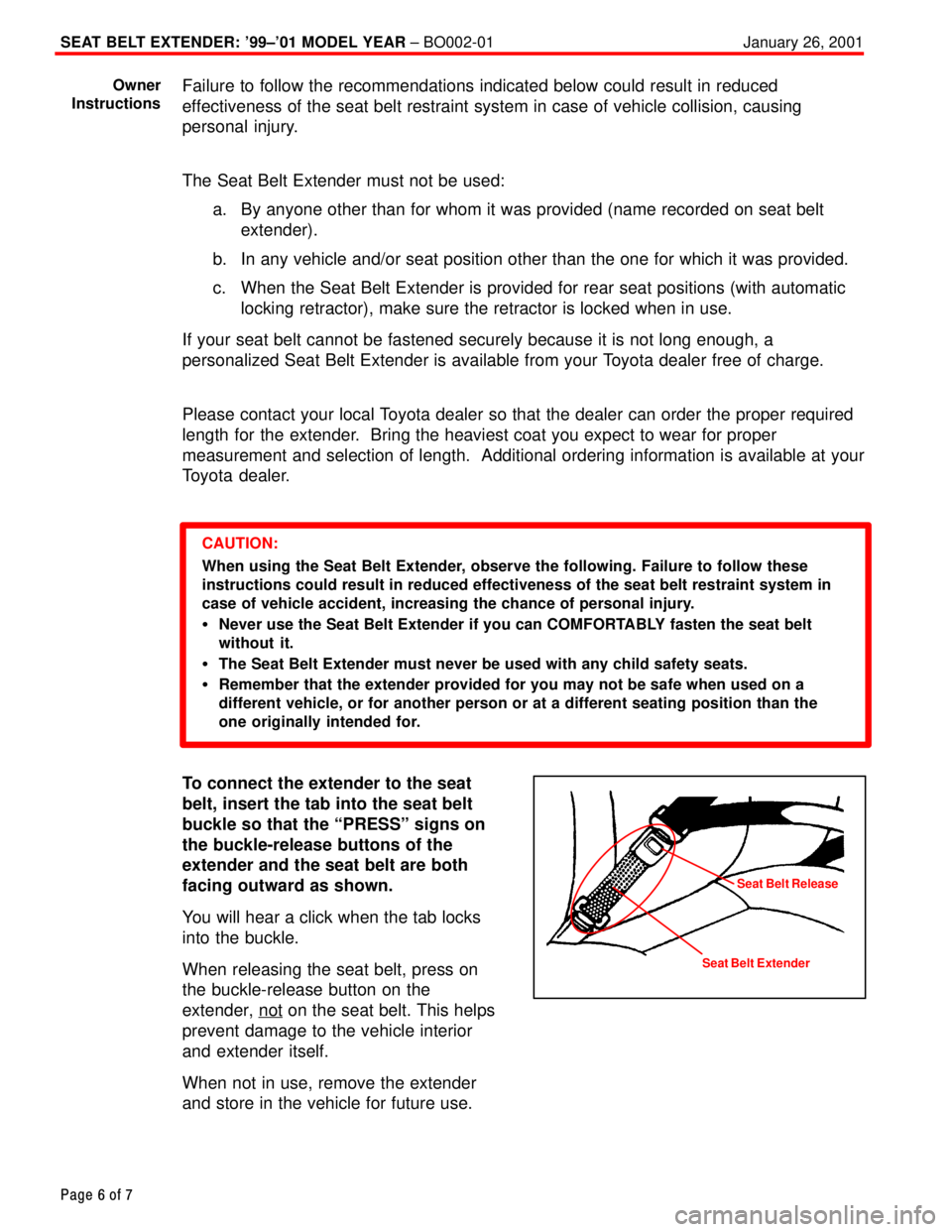
To connect the extender to the seat
belt, insert the tab into the seat belt
buckle so that the ªPRESSº signs on
the buckle-release buttons of the
extender and the seat belt are both
facing outward as shown.
You will hear a click when the tab locks
into the buckle.
When releasing the seat belt, press on
the buckle-release button on the
extender, not
on the seat belt. This helps
prevent damage to the vehicle interior
and extender itself.
When not in use, remove the extender
and store in the vehicle for future use.
Owner
Instructions
Seat Belt ExtenderSeat Belt Release
Page 4449 of 4770
Page 7 of 7
PLEASE COPY THIS ORIGINAL WORKSHEET FOR EACH EXTENDER NEEDED
CAUTIONS:
To minimize the chance and/or severity of injury in an accident, the Seat Belt Extender must only be used:
1 By the person for whom it was provided.
2 In the seat position for which it was provided.
The Seat Belt Extender must never be used with any child safety seats.
When the Seat Belt Extender is provided for rear seat positions (with automatic locking retractor),
make sure the retractor is locked when extender belt is in use.
DEALER
SEAT BELT EXTENDER APPLICATIONAPPLICANT
DEALER
CODEDEALER
NAMEAPPLICANT
NAME
ADDRESSADDRESS
CITY
&
STATEZIPCITY
&
STATEZIPPHONE
EMPLOYEE
NAMEMODEL
YEARBODY
TYPESEATING
POSITIONVEHICLE
IDENTIFICATION
NUMBER
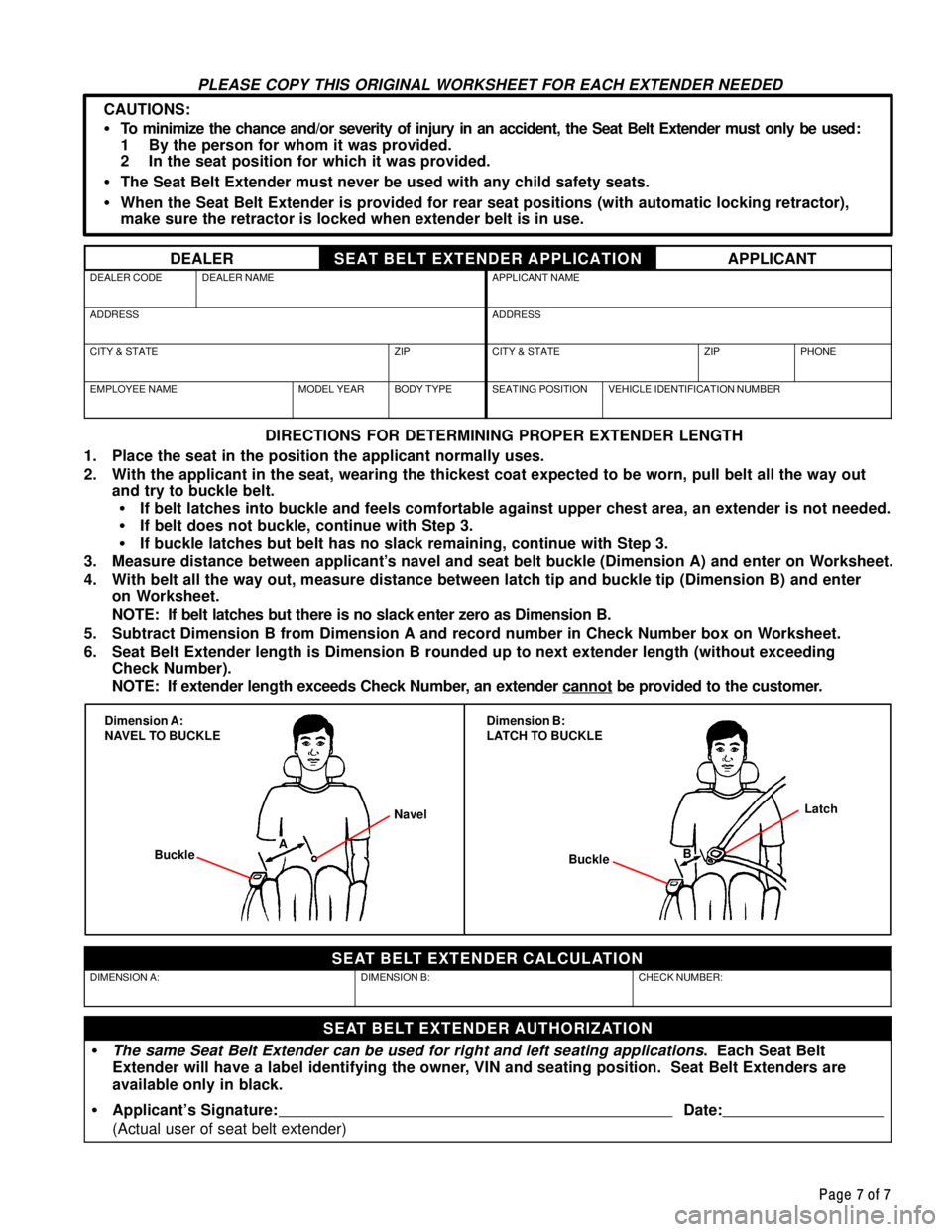
DIRECTIONS FOR DETERMINING PROPER EXTENDER LENGTH
1. Place the seat in the position the applicant normally uses.
2. With the applicant in the seat, wearing the thickest coat expected to be worn, pull belt all the way out
and try to buckle belt.
If belt latches into buckle and feels comfortable against upper chest area, an extender is not needed.
If belt does not buckle, continue with Step 3.
If buckle latches but belt has no slack remaining, continue with Step 3.
3. Measure distance between applicant's navel and seat belt buckle (Dimension A) and enter on Worksheet.
4. With belt all the way out, measure distance between latch tip and buckle tip (Dimension B) and enter
on Worksheet.
NOTE: If belt latches but there is no slack enter zero as Dimension B.
5. Subtract Dimension B from Dimension A and record number in Check Number box on Worksheet.
6. Seat Belt Extender length is Dimension B rounded up to next extender length (without exceeding
Check Number).
NOTE: If extender length exceeds Check Number, an extender cannot
be provided to the customer.
Dimension A:
NAVEL TO BUCKLEDimension B:
LATCH TO BUCKLE
BuckleNavel
ABuckle
Latch
B
SEAT BELT EXTENDER CALCULATION
DIMENSION
A:DIMENSION
B:CHECK
NUMBER:
SEAT BELT EXTENDER AUTHORIZATION
The same Seat Belt Extender can be used for right and left seating applications. Each Seat Belt
Extender will have a label identifying the owner, VIN and seating position. Seat Belt Extenders are
available only in black.
Applicant's Signature:
Date:
(Actual user of seat belt extender)