Page 174 of 2267
ABS ACTUATOR AND ELECTRIC UNIT
The ABS actuator and electric unit contains:
lAn electric motor and pump
lTwo relays
lEight solenoid valves, each inlet and outlet for
Ð LH front
Ð RH front
Ð Rear LH/RH
lABS control unit
This component controls the hydraulic circuit and increases,
holds or decreases hydraulic pressure to all or individual wheels.
The ABS actuator and electric unit can not be disassembled and
has to be serviced as an assembly.
ABS actuator operation
Inlet solenoid
valveOutlet solenoid
valve
Normal brake operation OFF (Open) OFF (Closed)Master cylinder brake fluid pressure is directly transmit-
ted to wheel cylinder via the inlet solenoid valve.
ABS operationPressure hold ON (Closed) OFF (Closed)Hydraulic circuit is shut off to hold the wheel cylinder
brake fluid pressure.
Pressure
decreaseON (Closed) ON (Open)Wheel cylinder brake fluid is sent to reservoir via the
outlet solenoid valve. Then it is pushed up to the mas-
ter cylinder by pump.
Pressure
increaseOFF (Open) OFF (Closed)Master cylinder brake fluid pressure is transmitted to
wheel cylinder.
NBR297 ABS control
unit harness
connectorABS
control unit
.ABS actuator
ANTI-LOCK BRAKE SYSTEM
System Description (Cont'd)
BR-52
Page 175 of 2267
Removal and Installation
CAUTION:
Be careful not to damage sensor edge and sensor rotor
teeth.
When removing the front or rear wheel hub assembly, dis-
connect the ABS wheel sensor from the assembly and move
it away. Failure to do so may result in damage to the sensor
or wiring making it inoperative.
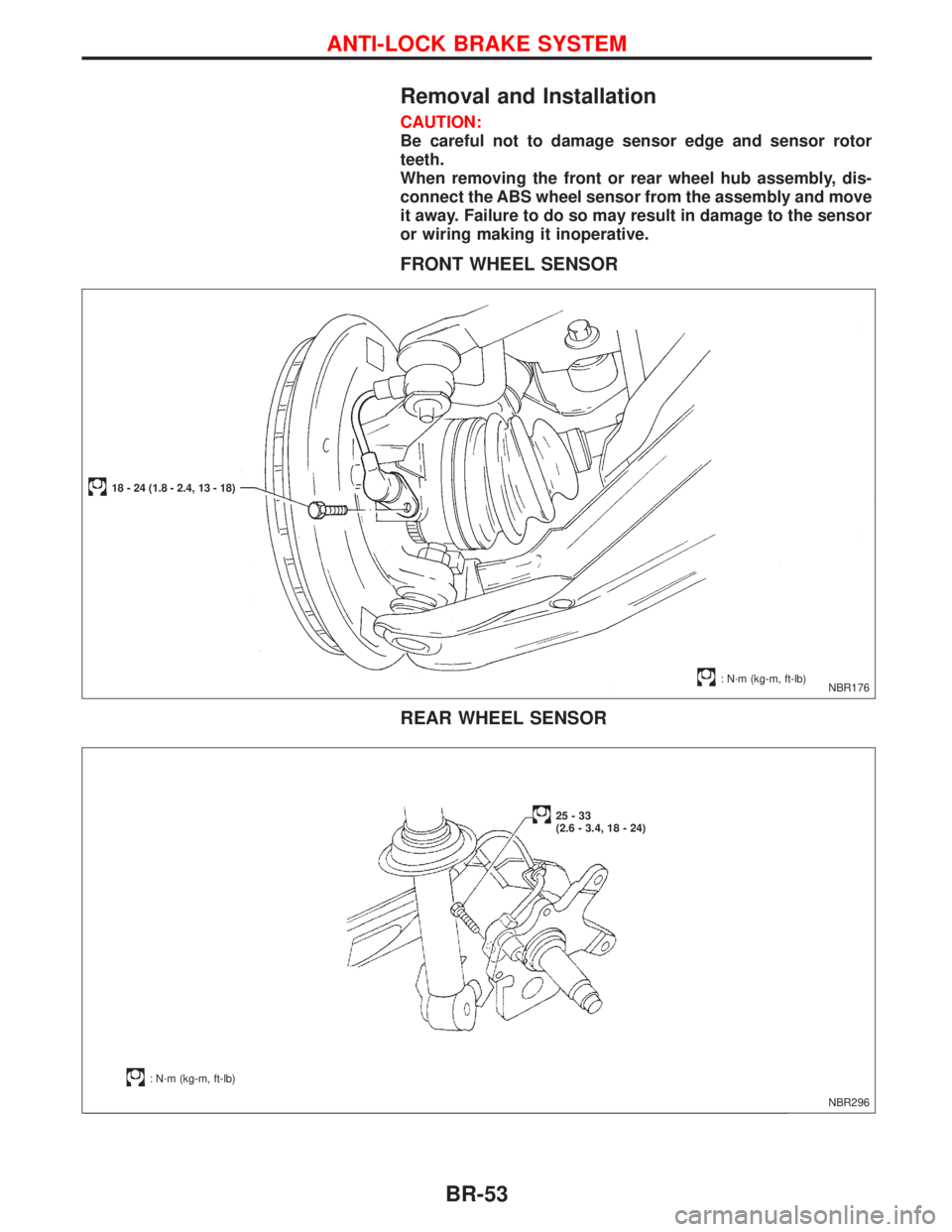
FRONT WHEEL SENSOR
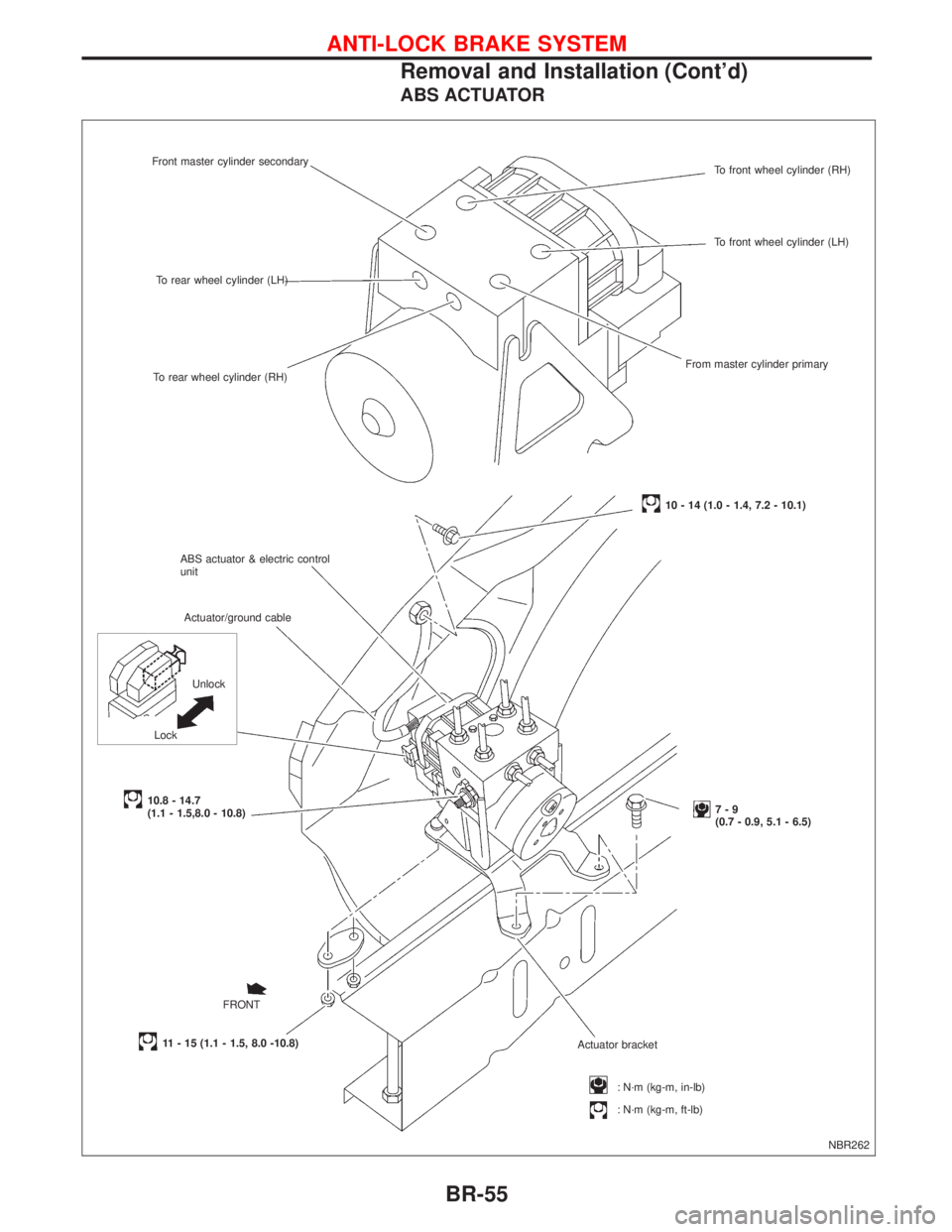
REAR WHEEL SENSOR
NBR176
18 - 24 (1.8 - 2.4, 13 - 18)
: N´m (kg-m, ft-lb)
NBR296
: N´m (kg-m, ft-lb)
25-33
(2.6 - 3.4, 18 - 24)
ANTI-LOCK BRAKE SYSTEM
BR-53
Page 176 of 2267
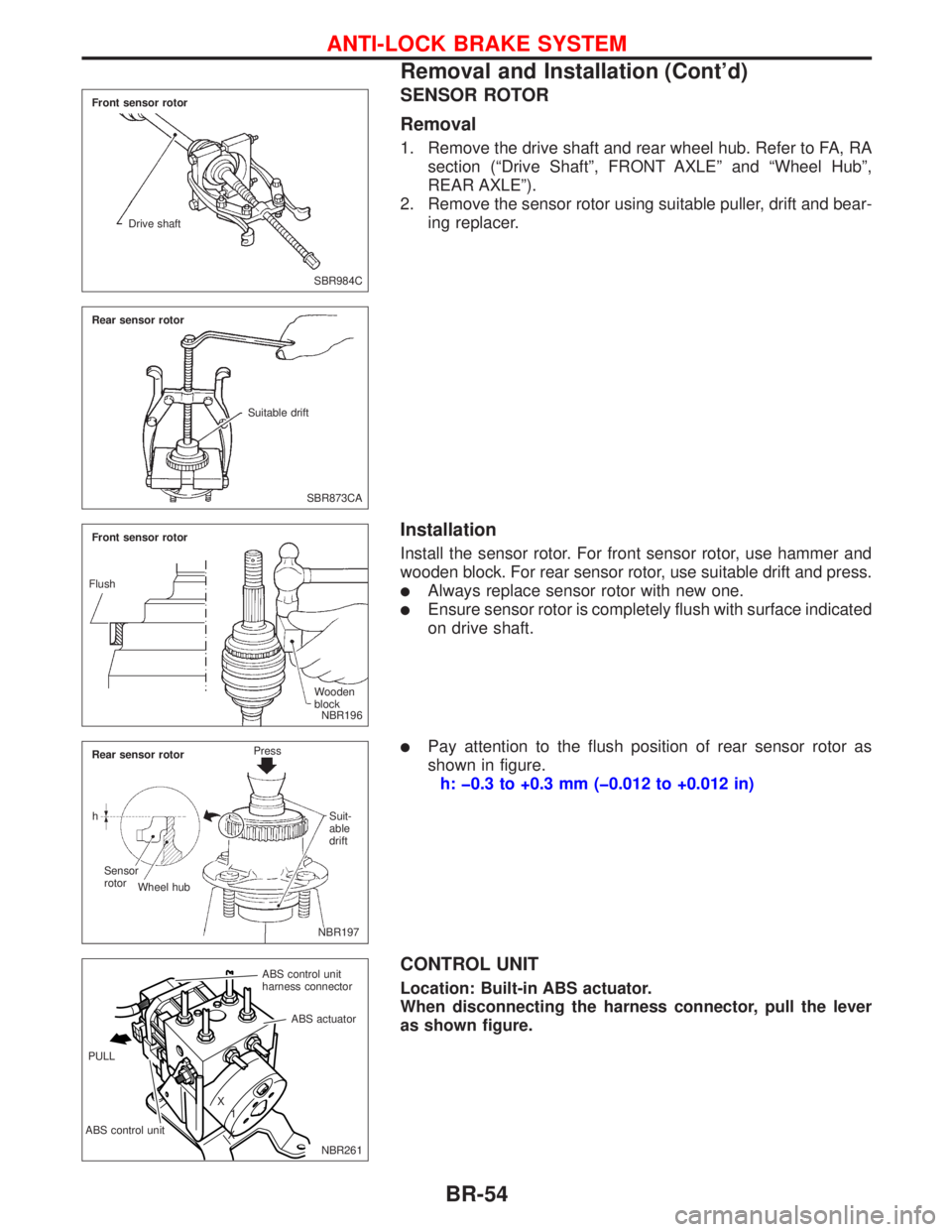
SENSOR ROTOR
Removal
1. Remove the drive shaft and rear wheel hub. Refer to FA, RA
section (ªDrive Shaftº, FRONT AXLEº and ªWheel Hubº,
REAR AXLEº).
2. Remove the sensor rotor using suitable puller, drift and bear-
ing replacer.
Installation
Install the sensor rotor. For front sensor rotor, use hammer and
wooden block. For rear sensor rotor, use suitable drift and press.
lAlways replace sensor rotor with new one.
lEnsure sensor rotor is completely flush with surface indicated
on drive shaft.
lPay attention to the flush position of rear sensor rotor as
shown in figure.
h: þ0.3 to +0.3 mm (þ0.012 to +0.012 in)
CONTROL UNIT
Location: Built-in ABS actuator.
When disconnecting the harness connector, pull the lever
as shown figure.
SBR984C Front sensor rotor
Drive shaft
SBR873CA Rear sensor rotor
Suitable drift
NBR196 Front sensor rotor
Wooden
block Flush
.NBR197 Rear sensor rotorPress
Suit-
able
drift
Sensor
rotor
Wheel hub h
NBR261 ABS control unit
harness connector
ABS control unitABS actuator
X
1
X PULL
ANTI-LOCK BRAKE SYSTEM
Removal and Installation (Cont'd)
BR-54
Page 177 of 2267
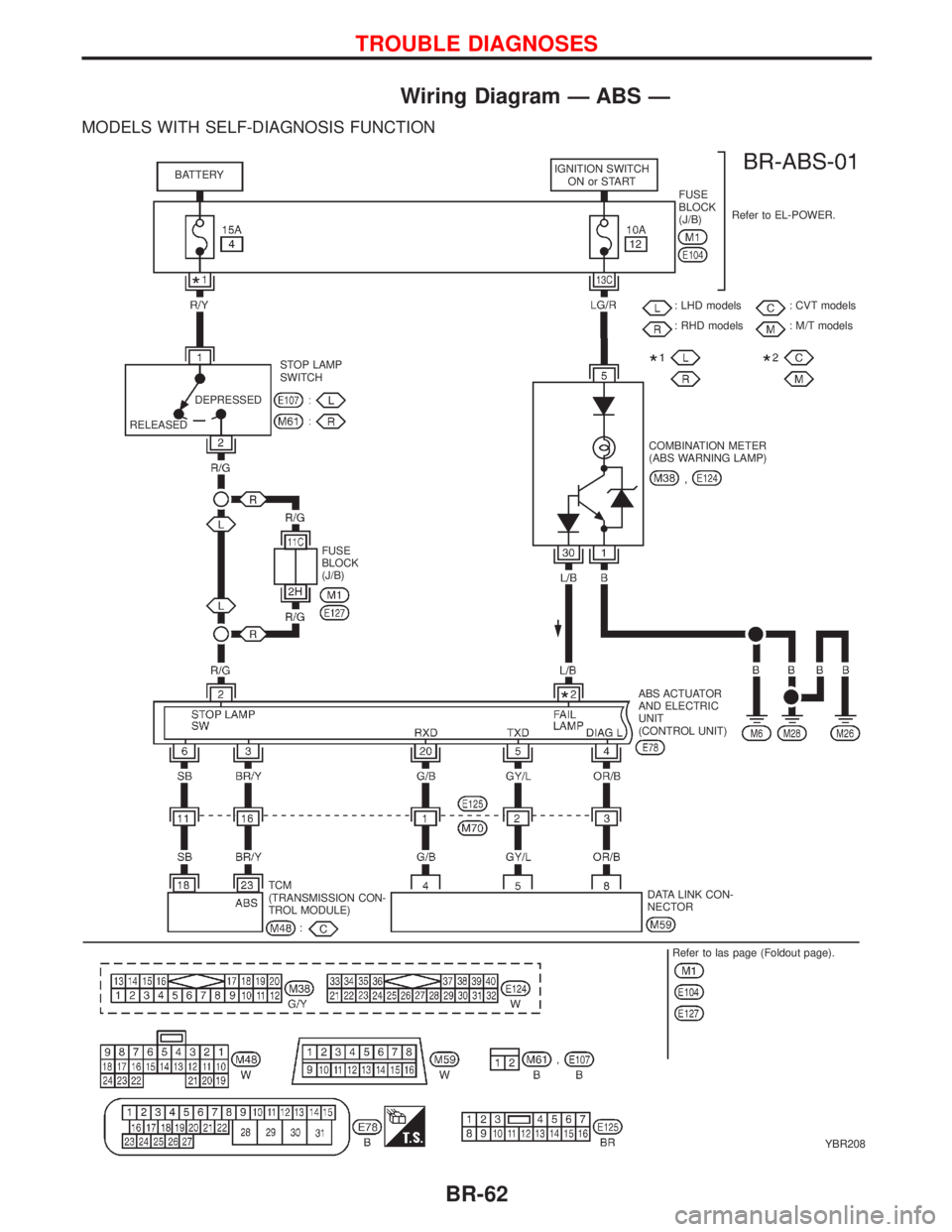
ABS ACTUATOR
NBR262 Front master cylinder secondary
To rear wheel cylinder (LH)
To rear wheel cylinder (RH)
Actuator/ground cable
10.8 - 14.7
(1.1 - 1.5,8.0 - 10.8)
: N´m (kg-m, in-lb)
: N´m (kg-m, ft-lb) Actuator bracket7-9
(0.7 - 0.9, 5.1 - 6.5) ABS actuator & electric control
unit
11 - 15 (1.1 - 1.5, 8.0 -10.8)To front wheel cylinder (RH)
To front wheel cylinder (LH)
From master cylinder primary
10 - 14 (1.0 - 1.4, 7.2 - 10.1)
FRONT LockUnlock
ANTI-LOCK BRAKE SYSTEM
Removal and Installation (Cont'd)
BR-55
Page 178 of 2267
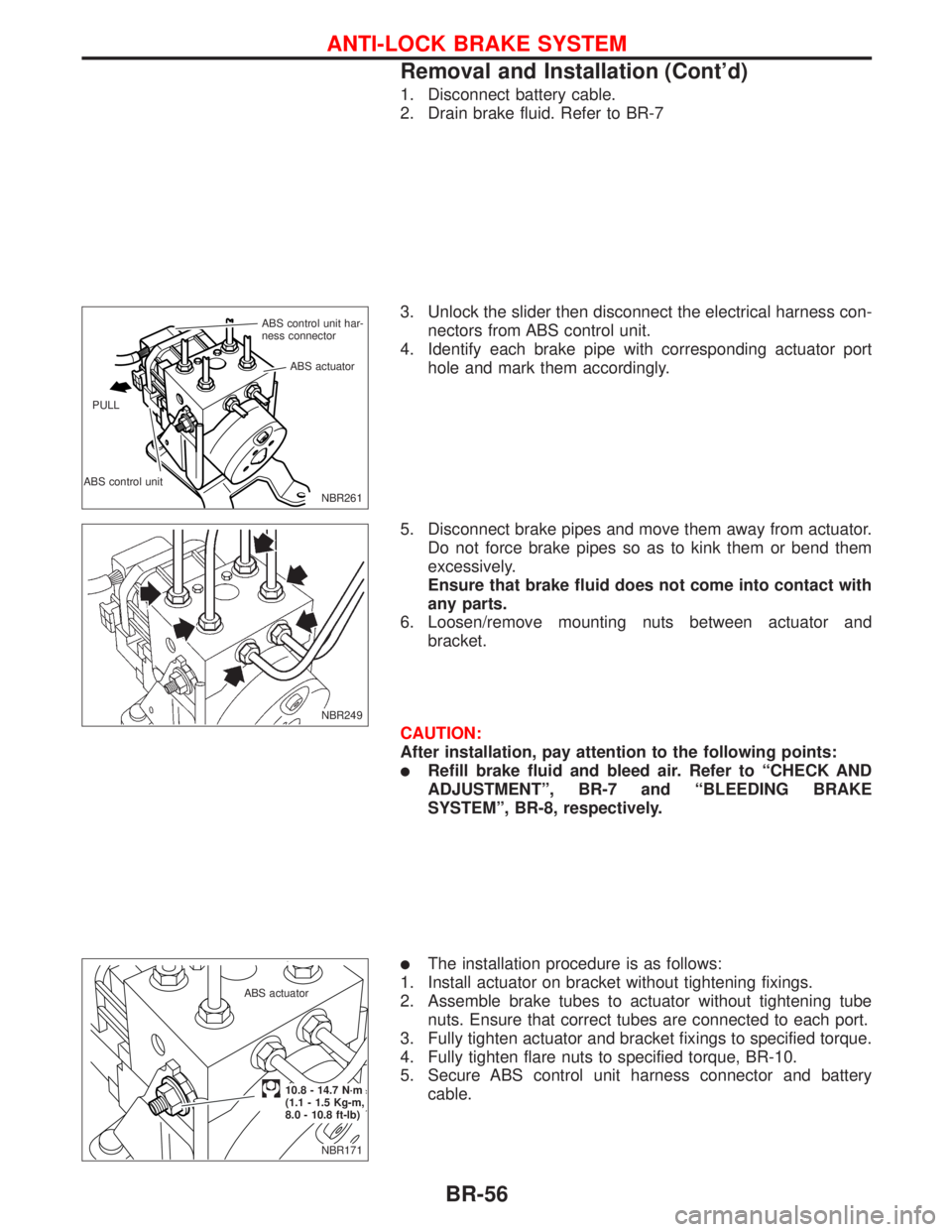
1. Disconnect battery cable.
2. Drain brake fluid. Refer to BR-7
3. Unlock the slider then disconnect the electrical harness con-
nectors from ABS control unit.
4. Identify each brake pipe with corresponding actuator port
hole and mark them accordingly.
5. Disconnect brake pipes and move them away from actuator.
Do not force brake pipes so as to kink them or bend them
excessively.
Ensure that brake fluid does not come into contact with
any parts.
6. Loosen/remove mounting nuts between actuator and
bracket.
CAUTION:
After installation, pay attention to the following points:
lRefill brake fluid and bleed air. Refer to ªCHECK AND
ADJUSTMENTº, BR-7 and ªBLEEDING BRAKE
SYSTEMº, BR-8, respectively.
lThe installation procedure is as follows:
1. Install actuator on bracket without tightening fixings.
2. Assemble brake tubes to actuator without tightening tube
nuts. Ensure that correct tubes are connected to each port.
3. Fully tighten actuator and bracket fixings to specified torque.
4. Fully tighten flare nuts to specified torque, BR-10.
5. Secure ABS control unit harness connector and battery
cable.
NBR261 ABS control unit har-
ness connector
ABS control unitABS actuator
PULL
NBR249
NBR171 ABS actuator
.10.8 - 14.7 N´m
(1.1 - 1.5 Kg-m,
8.0 - 10.8 ft-lb)
ANTI-LOCK BRAKE SYSTEM
Removal and Installation (Cont'd)
BR-56
Page 184 of 2267
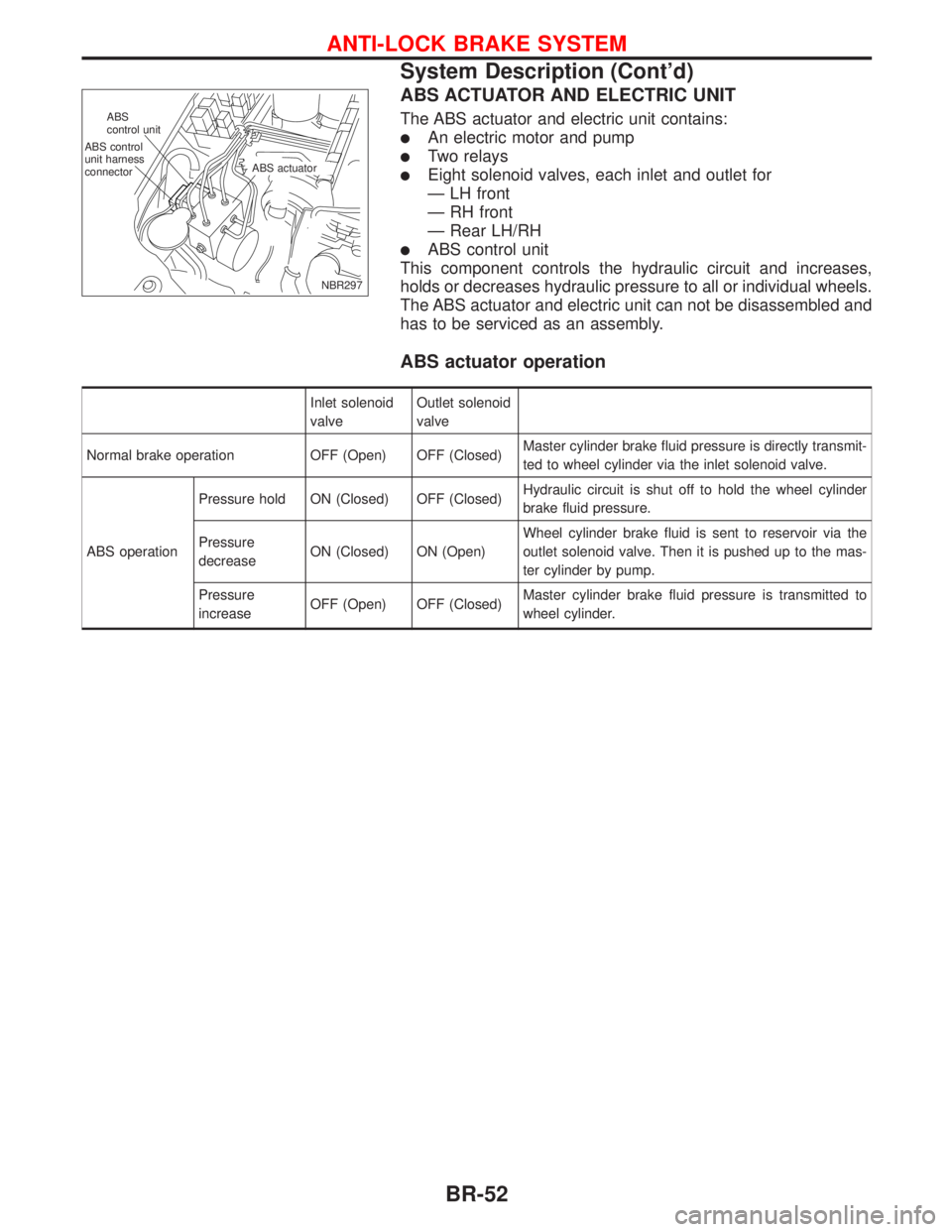
Wiring Diagram Ð ABS Ð
MODELS WITH SELF-DIAGNOSIS FUNCTION
YBR208 BATTERYIGNITION SWITCH
ON or START
FUSE
BLOCK
(J/B)Refer to EL-POWER.
: LHD models
: RHD models: CVT models
: M/T models
RELEASEDDEPRESSEDSTOP LAMP
SWITCH
FUSE
BLOCK
(J/B)COMBINATION METER
(ABS WARNING LAMP)
ABS ACTUATOR
AND ELECTRIC
UNIT
(CONTROL UNIT)
TCM
(TRANSMISSION CON-
TROL MODULE)DATA LINK CON-
NECTOR
Refer to las page (Foldout page).
TROUBLE DIAGNOSES
BR-62
Page 189 of 2267
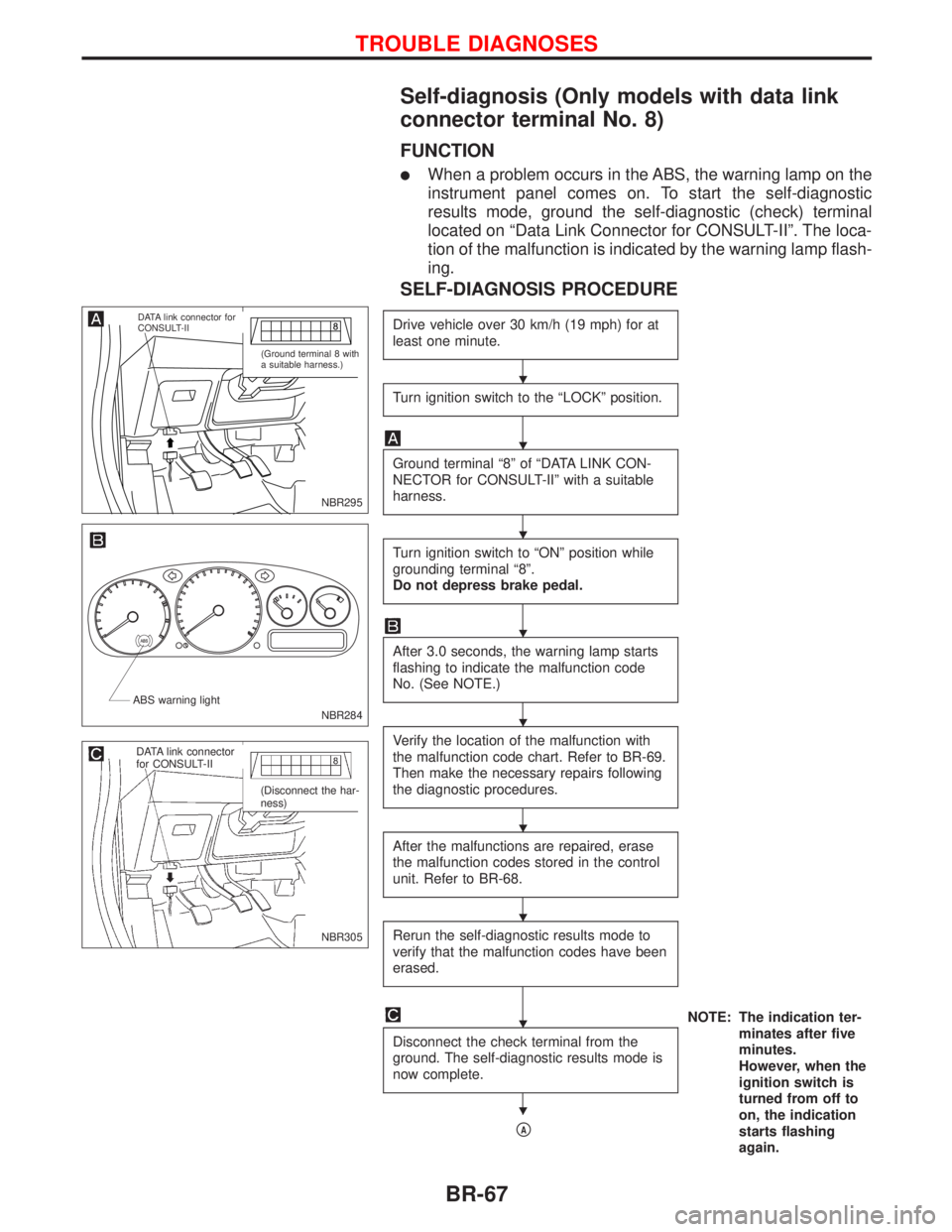
Self-diagnosis (Only models with data link
connector terminal No. 8)
FUNCTION
lWhen a problem occurs in the ABS, the warning lamp on the
instrument panel comes on. To start the self-diagnostic
results mode, ground the self-diagnostic (check) terminal
located on ªData Link Connector for CONSULT-IIº. The loca-
tion of the malfunction is indicated by the warning lamp flash-
ing.
SELF-DIAGNOSIS PROCEDURE
Drive vehicle over 30 km/h (19 mph) for at
least one minute.
Turn ignition switch to the ªLOCKº position.
Ground terminal ª8º of ªDATA LINK CON-
NECTOR for CONSULT-IIº with a suitable
harness.
Turn ignition switch to ªONº position while
grounding terminal ª8º.
Do not depress brake pedal.
After 3.0 seconds, the warning lamp starts
flashing to indicate the malfunction code
No. (See NOTE.)
Verify the location of the malfunction with
the malfunction code chart. Refer to BR-69.
Then make the necessary repairs following
the diagnostic procedures.
After the malfunctions are repaired, erase
the malfunction codes stored in the control
unit. Refer to BR-68.
Rerun the self-diagnostic results mode to
verify that the malfunction codes have been
erased.
NOTE: The indication ter-
minates after five
minutes.
However, when the
ignition switch is
turned from off to
on, the indication
starts flashing
again. Disconnect the check terminal from the
ground. The self-diagnostic results mode is
now complete.
pA
NBR295
.DATA link connector for
CONSULT-II
(Ground terminal 8 with
a suitable harness.)
NBR284 ABS warning light
NBR305
.DATA link connector
for CONSULT-II
(Disconnect the har-
ness)
H
H
H
H
H
H
H
H
H
TROUBLE DIAGNOSES
BR-67
Page 192 of 2267
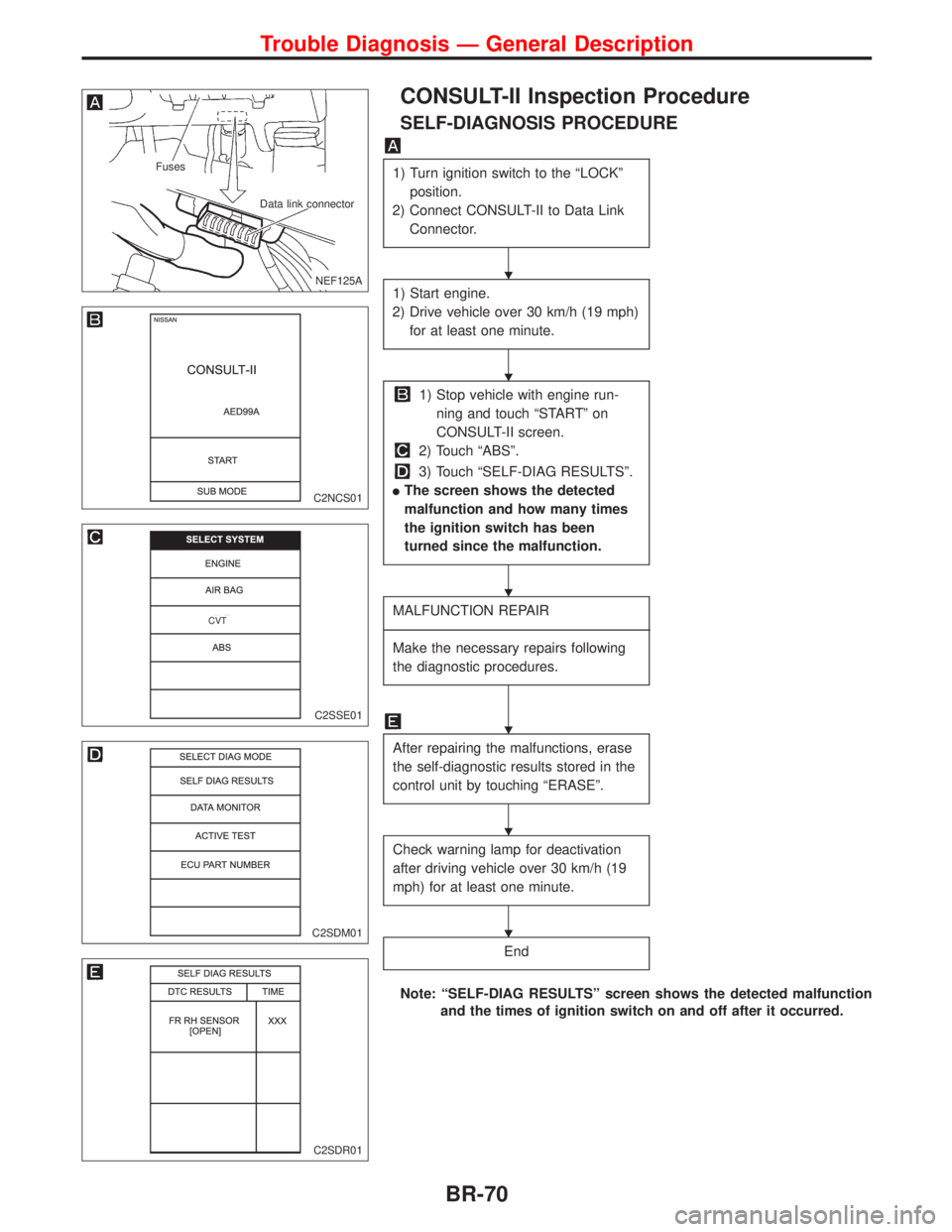
CONSULT-II Inspection Procedure
SELF-DIAGNOSIS PROCEDURE
1) Turn ignition switch to the ªLOCKº
position.
2) Connect CONSULT-II to Data Link
Connector.
1) Start engine.
2) Drive vehicle over 30 km/h (19 mph)
for at least one minute.
1) Stop vehicle with engine run-
ning and touch ªSTARTº on
CONSULT-II screen.
2) Touch ªABSº.
3) Touch ªSELF-DIAG RESULTSº.
lThe screen shows the detected
malfunction and how many times
the ignition switch has been
turned since the malfunction.
MALFUNCTION REPAIR
----------------------------------------------------------------------------------------------------------------------------------------------------------------------------------------------------------------------------------------------------------------------------------------------------------
Make the necessary repairs following
the diagnostic procedures.
After repairing the malfunctions, erase
the self-diagnostic results stored in the
control unit by touching ªERASEº.
Check warning lamp for deactivation
after driving vehicle over 30 km/h (19
mph) for at least one minute.
End
Note: ªSELF-DIAG RESULTSº screen shows the detected malfunction
and the times of ignition switch on and off after it occurred.
.NEF125A
Fuses
Data link connector
C2NCS01
C2SSE01
.CVT
C2SDM01
C2SDR01
H
H
H
H
H
H
Trouble Diagnosis Ð General Description
BR-70