1982 CHEVROLET CAMARO tow
[x] Cancel search: towPage 112 of 875

GM – CAMARO 1982-1992 – Repair Guide (Checked by WxMax) 112
4. Position a C-clamp a
nd tighten until the piston bottoms in the base of the
caliper housing. Make sure 1 end of the C-clamp rests on the inlet fitting bolt
and the other against the outboard disc brake pad.
It is not necessary to remove the parki ng brake caliper lever return spring to
replace the disc brake pads.
5. Remove the upper caliper guide pin bolt and discard.
6. Rotate the caliper housing. Be careful not to strain the hose or cable conduit.
7. Remove the disc brake pads.
To install:
8. Clean all residue from the pad guide surfaces on the mounting bracket and
caliper housing. Inspect the guide pins for free movement in the mounting
bracket. Replace the guide pins or boot s, if they are corroded or damaged.
9. Install the disc brake pads. The out board pad with insulator is installed
toward the caliper housing. The inboard pad with the w ear sensor is installed
nearest the caliper piston. The wear sens or must be in the trailing position
with forward wheel rotation.
10. Rotate the caliper housing into it 's operating position. The springs on the
outboard brake pad must not stick through the inspection hole in the caliper
housing. If the springs are sticking thr ough the inspection hole in the caliper
housing, lift the caliper housing and make the necessary corrections to the
outboard brake pad positions.
11. Install a new upper cali per guide pin bolt and tight en to 26 ft. lbs. (35 Nm).
Tighten the lower caliper guide pin bolt to 16 ft. lbs. (22 Nm).
12. With the engine runni ng, pump the brake pedal slo wly and firmly to seat the
brake pads.
13. Check the caliper parking brake levers to make sure they are against the
stops on the caliper housing. If the leve rs are not on their stops, check the
parking brake adjustment.
14. Remove the 2 wheel nuts from t he rotor and install the wheel and tire
assembly.
15. Lower the vehicle, che ck the master cylinder fluid level and road test the
vehicle.
BRAKE CALIPER
REMOVAL & INSTALLATION
CAUTION - Brake pads contain asbestos, which has been determined to be a
cancer causing agent. Never clean the brake surfaces with compressed air!
Avoid inhaling any dust from any brake surface! When cleaning brake surfaces,
use a commercially available brake cleaning fluid.
1982-88 MODELS
Page 113 of 875

GM – CAMARO 1982-1992 – Repair Guide (Checked by WxMax) 113
1. Remove 2/3 of the brake fluid from the ma
ster cylinder. Raise the car.
Remove the wheel. Reinstall a wheel nut, with the flat side toward the rotor,
to hold the rotor in place.
2. Loosen the parking brake cable at the equalizer. At the caliper, remove the
parking brake cable, damper and spring from the lever.
3. Hold the parking brake lever and re move the lock nut. Remove the lever,
seal and anti-friction washer.
4. Position a C-clamp ov er the caliper and force the piston into its bore.
Remove the C-clamp. Rein stall the lever, seal and nut to the caliper.
5. Loosen the brake tube nut and disc onnect the brake tube from the caliper.
Plug the tube to prevent t he loss of brake fluid.
At the right rear wheel, it may be necessary to remove the rear bolt from the
lower control arm to allow the lower caliper mounting bolt to be removed.
6. Remove the mounting bolts using a
3/8 in. Allen head socket. Remove the
caliper and inspect the mounting bolts for corrosion. If necessary, replace
the mounting bolts.
To install:
7. Place the caliper onto the rotor and install the m ounting bolts. Torque the
mounting bolts to 30-45 ft . lbs. (40.7-61 Nm).
8. Install a new anti-friction washer and lubricate the lever with silicone brake
lube. Install the lever on the actuator with the lever pointing down. Rotate the
lever toward the front of the car and hol d while installing the nut. Torque the
nut to 30-40 ft. lbs. (40.7-54.2 Nm), then rotate the lever back against the
stop on the caliper.
9. Install damper and spring. Connect the parking brake cable. Tighten the
cable at the equalizer until the lever starts to move off the stop on the
caliper, then loosen the adjustment unt il the lever moves back against the
stop.
10. Remove the nut holding the rotor in place and install the wheel. Lower the
car and fill the master cylin der with brake fluid.
1989-92 MODELS
1. Raise and safely support the vehicle.
2. Loosen the parking brake cable at the equalizer.
3. Remove the wheel and tire assembly. Inst all 2 wheel nuts to retain the rotor.
4. Remove the bolt, inlet fitting and was hers from the caliper housing. Plug the
holes in the caliper housing and inlet fitting.
5. Remove the caliper lever return spri ng only if it is defective. Discard the
spring if the coils are opened.
6. Disconnect the parking brake cable from the caliper lever and caliper
bracket.
7. Remove the 2 caliper guide pin holes.
8. Remove the caliper housing from the rotor and mounting bracket.
To install:
Page 124 of 875

GM – CAMARO 1982-1992 – Repair Guide (Checked by WxMax) 124
BRAKE LEVER
REMOVAL & INSTALLATION
1982-89 MODELS
1. Raise and safely support the vehicle.
2. Remove the adjusting nut
at the equalizer and remove the front cable from
the equalizer and bracket.
3. Lower the vehicle.
4. Remove the upper console and lower c onsole rear screws. Lift the rear of
the lower console to gain access to the parking brake control.
5. Remove the pin and retainer from t he control assembly and front cable.
6. Remove the cable and casing from the control assembly and bracket then
remove the cable and grommet from the vehicle. Remove the parking brake
lever mounting bolts and remove the assembly.
7. Installation is the reverse of t he removal procedure. Adjust the parking
brake.
1990-92 MODELS
1. Remove the carpet finish molding.
2. Remove the console assembly.
3. With the parking brake lever in the do wn position, rotate the arm toward the
front of the vehicle until a 3mm metal pen can be inserted into the hole.
Insert the metal pin into the hole, locking out the self adjuster.
4. Raise and safely support the vehicle.
5. Disconnect the rear cables from the equalizer.
6. Lower the vehicle.
7. Remove the barrel-shaped butt on from the adjuster track.
8. Remove the parking brake lever mounting bolts.
9. Remove the front cable and casing from the control assembly using a
fabricated parking brake cable retainer compressor tool.
10. Installation is the reverse of the removal procedure. Cycle the lever to set
the parking lever and cables in there proper location.
Page 136 of 875

GM – CAMARO 1982-1992 – Repair Guide (Checked by WxMax) 136
accidental grounding. It is al
so advisable to include a standard automotive fuse
in any jumper wire. This is commonly referred to as a "fused jumper". By
inserting an in-line fuse holder between a set of test leads, a fused jumper wire
can be used for bypassing open circuits. Use a 5 amp fuse to provide protection
against voltage spikes.
Jumper wires are used primarily to locate open electrical circuits, on either the
ground (—) side of the circuit or on the power (+) side. If an electrical
component fails to operate, connect t he jumper wire between the component
and a good ground. If the component operates only with the jumper installed,
the ground circuit is open. If the ground circuit is good, but the component does
not operate, the circuit between the power feed and component may be open.
By moving the jumper wire successively back from the component toward the
power source, you can isolate the area of the circuit where the open is located.
When the component stops func tioning, or the power is cut off, the open is in
the segment of wire between the jumper and the point previously tested.
You can sometimes connect the jumper wir e directly from the battery to the
"hot" terminal of the component, but firs t make sure the component uses 12
volts in operation. Some electrical components, such as fuel injectors or
sensors, are designed to operate on about 4 to 5 volts, and running 12 volts
directly to these components will cause damage.
TEST LIGHTS
Fig. 1: A 12 volt test light is used to detect the presence of voltage in a circuit
The test light is used to check circuits and components while electrical current is
flowing through them. It is used for volt age and ground tests. To use a 12 volt
test light, connect the ground clip to a good ground and probe wherever
necessary with the pick. The test light will illuminate when voltage is detected.
This does not necessarily mean that 12 volts (or any particular amount of
Page 137 of 875

GM – CAMARO 1982-1992 – Repair Guide (Checked by WxMax) 137
voltage) is present; it only means that so
me voltage is present. It is advisable
before using the test light to touch its ground clip and probe across the battery
posts or terminals to make sure the light is operating properly.
WARNING - Do not use a test light to probe electronic ignition, spark plug or
coil wires. Never use a pick-type test light to probe wiring on computer
controlled systems unless spec ifically instructed to do so. Any wire insulation
that is pierced by the test light pr obe should be taped and sealed with silicone
after testing
Like the jumper wire, the 12 volt test li ght is used to isolate opens in circuits.
But, whereas the jumper wire is used to bypass the open to operate the load,
the 12 volt test light is us ed to locate the presence of voltage in a circuit. If the
test light illuminates, there is power up to t hat point in the circuit; if the test light
does not illuminate, there is an open circui t (no power). Move the test light in
successive steps back toward the power source until the light in the handle
illuminates. The open is between the pr obe and a point which was previously
probed.
The self-powered test light is similar in design to the 12 volt test light, but
contains a 1.5 volt penlight battery in the handle. It is most often used in place
of a multimeter to check for open or shor t circuits when power is isolated from
the circuit (continuity test).
The battery in a self-powered test light does not provide much current. A weak
battery may not provide enough power to illuminate the test light even when a
complete circuit is made (especially if there is high resistance in the circuit).
Always make sure that the test battery is strong. To check the battery, briefly
touch the ground clip to the pr obe; if the light glows brightly, the battery is strong
enough for testing.
A self-powered test light should not be used on any co mputer controlled system
or component. The small amount of electr icity transmitted by the test light is
enough to damage many electr onic automotive components.
MULTIMETERS
Multimeters are an extremely useful tool for troubleshooting electrical problems.
They can be purchased in either analog or digital form and have a price range
to suit any budget. A multimeter is a voltmeter, ammeter and ohmmeter (along
with other features) combined into one instrument. It is often used when testing
solid state circuits because of its hi gh input impedance (usually 10 megaohms
or more). A brief description of the mult imeter main test functions follows:
• Voltmeter - the voltmeter is used to measure voltage at any point in a
circuit, or to measure the voltage drop across any part of a circuit.
Voltmeters usually have various scales and a selector switch to allow the
reading of different volt age ranges. The voltmeter has a positive and a
negative lead. To avoid damage to the meter, always connect the
negative lead to the negative (—) side of the circ uit (to ground or nearest
Page 140 of 875
GM – CAMARO 1982-1992 – Repair Guide (Checked by WxMax) 140
TESTING
OPEN CIRCUITS
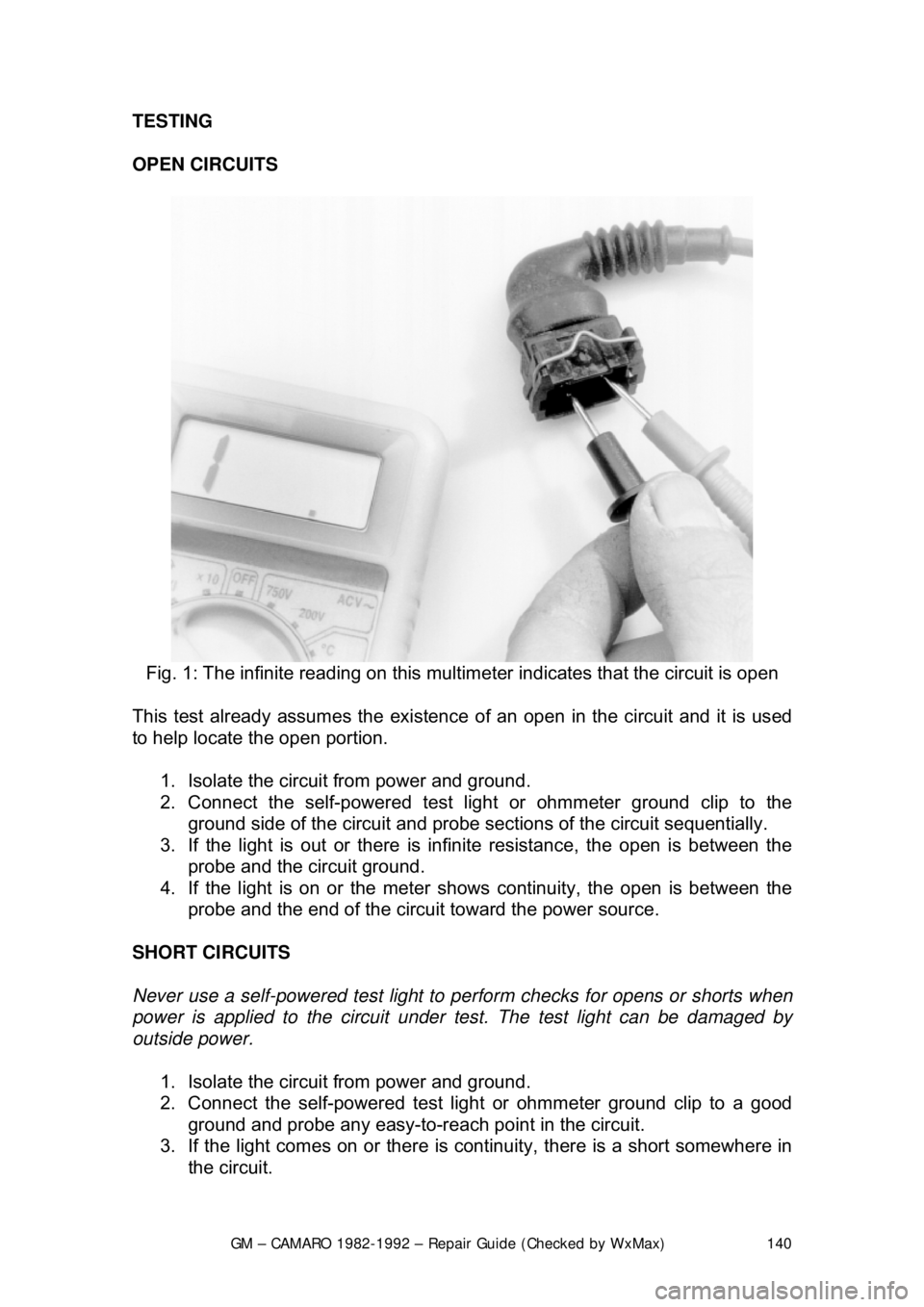
Fig. 1: The infinite reading on this mult imeter indicates that the circuit is open
This test already assumes the existence of an open in the circuit and it is used
to help locate the open portion.
1. Isolate the circuit from power and ground.
2. Connect the self-powered test light or ohmmeter ground clip to the
ground side of the circuit and probe sect ions of the circuit sequentially.
3. If the light is out or there is infinite resistanc e, the open is between the
probe and the circuit ground.
4. If the light is on or the meter s hows continuity, the open is between the
probe and the end of the circuit toward the power source.
SHORT CIRCUITS
Never use a self-powered test light to per form checks for opens or shorts when
power is applied to the circuit under te st. The test light can be damaged by
outside power.
1. Isolate the circuit from power and ground.
2. Connect the self-powered test light or ohmmeter ground clip to a good
ground and probe any easy-to-reach point in the circuit.
3. If the light comes on or there is cont inuity, there is a short somewhere in
the circuit.
Page 174 of 875

GM – CAMARO 1982-1992 – Repair Guide (Checked by WxMax) 174
Fig. 9: Servo mounting on 1991-1992 Tuned Port Injection engines
ADJUSTMENTS
Do not stretch cables or chains to make pins fit or holes align. This will prevent
the engine from returning to idle.
CABLE TYPE 1. Check that the cable is properly installed and that the throttle is closed to
the idle position.
2. Pull the servo end of the cable towa rd the linkage bracket of the servo.
Place the servo connector in one of the 6 holes in the bracket which
allows the least amount of slack and does not move the throttle linkage.
3. Install the retainer clip. Check that the throttle linkage is still in the idle
position.
ROD WITH SCREW ADJUSTER 1. Inspect the rod assembly for proper attachment to the servo and throttle\
stud. Make certain the throttle is at idle.
2. Adjust the slotted bra cket or the rod to obtain a clearance of 0.02-0.04 in.
(0.5-1.0mm) between the throttle stud and the end of the bracket slot.
3. Install the retainer clip; make certain the throttle is still at idle.
ROD WITH ADJUSTMENT HOLES 1. Inspect the rod to be sure it is securely connected to the servo and
throttle linkage; make certain the throttle is at idle.
2. Install the retainer pin in the hole which provides the least slack between
the servo bracket and the retainer.
3. Check the throttle; it must still be in the idle position.
Page 181 of 875
GM – CAMARO 1982-1992 – Repair Guide (Checked by WxMax) 181
SPEAKERS
REMOVAL & INSTALLATION
FRONT
1. Remove the instrument panel pad.
2. Remove the speaker attaching screws.
3. Remove the speaker and disconnect the electrical connector.
4. Installation is the reverse of removal.
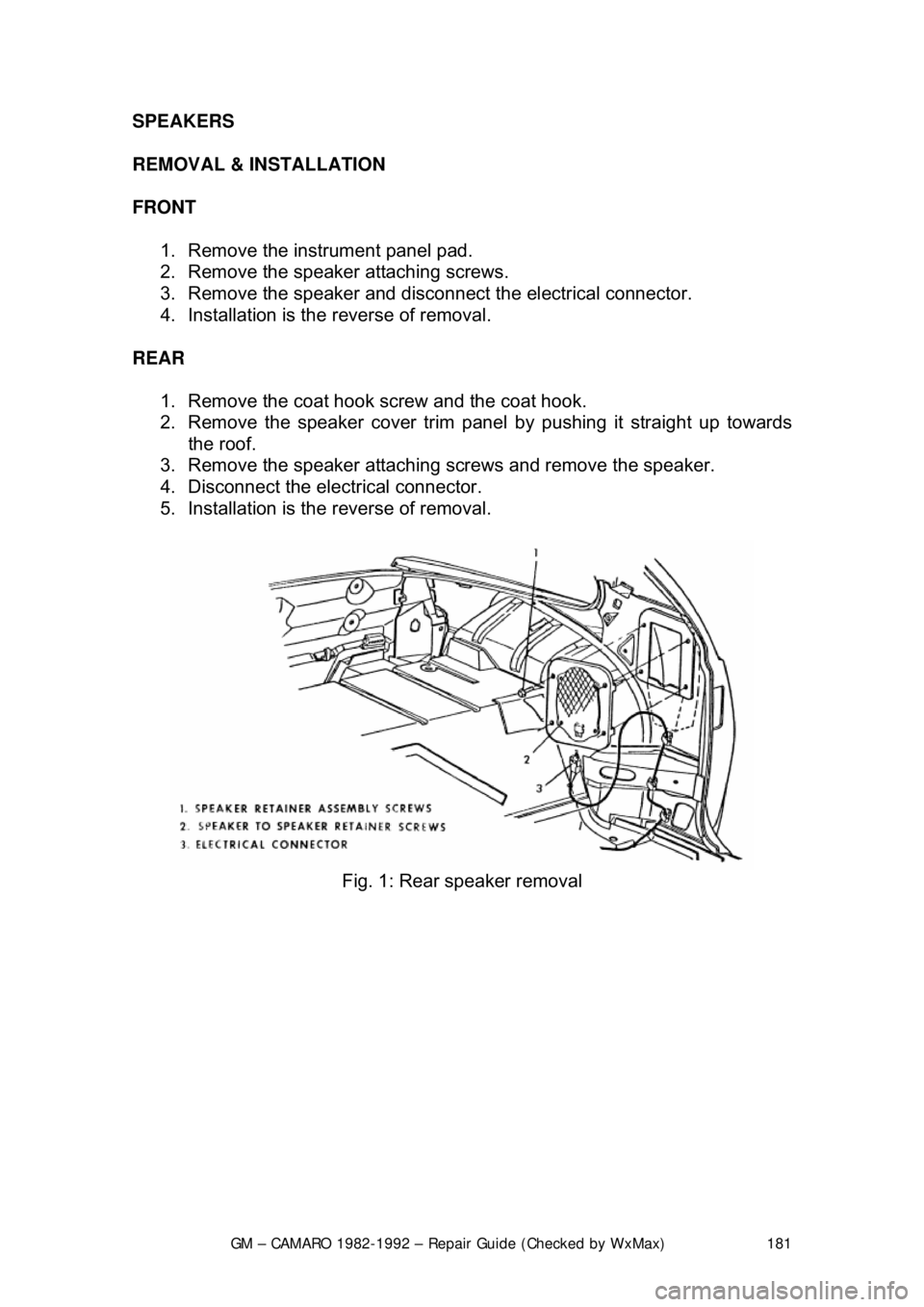
REAR 1. Remove the coat hook screw and the coat hook.
2. Remove the speaker cover trim panel by pushing it straight up towards
the roof.
3. Remove the speaker attaching screws and remove the speaker.
4. Disconnect the electrical connector.
5. Installation is the reverse of removal.
Fig. 1: Rear speaker removal