1982 CHEVROLET CAMARO air condition
[x] Cancel search: air conditionPage 151 of 875

GM – CAMARO 1982-1992 – Repair Guide (Checked by WxMax) 151
ARMING THE SYSTEM
1. Turn the ignition key to the LO CK position and remove the key.
2. On vehicles with a passenger side ai r bag, reconnect the yellow two-way
connector assembly located near the yellow 24-way DERM harness
connector. Install the glov e box door assembly.
3. Connect the yellow two-way connector assembly at the base of the
steering column.
Always be sure to reinstall the Connec tor Position Assurance (CPA) device.
4. Install the left side trim panel and rein stall the fuse in the fuse block.
5. Turn the ignition key to the RUN posit ion and verify that the warning lamp
flashes seven to nine times and then turn s OFF. If it does not operate as
described, have the system repair ed by a qualified technician.
HEATING AND AIR CONDITIONING
BLOWER MOTOR
REMOVAL & INSTALLATION 1. Disconnect the negative battery cable. If necessary, remove the diagonal
fender brace at the right rear corner of the engine compartment to gain
access to the blower motor.
2. Disconnect the electrical wiring fr om the blower motor. If equipped with
air conditioning, remove the blower relay and bracket as an assembly
and swing them aside.
3. Remove the blower motor cooling tube.
4. Remove the blower mo tor retaining screws.
5. Remove the blower motor and fan as an assembly from the case.
To install: 6. Position the blower motor into pl ace and install the retaining screws.
7. Install the blower motor cooling tube.
8. Connect all the electrical connections.
9. Connect the negative battery cable.
Page 159 of 875
GM – CAMARO 1982-1992 – Repair Guide (Checked by WxMax) 159
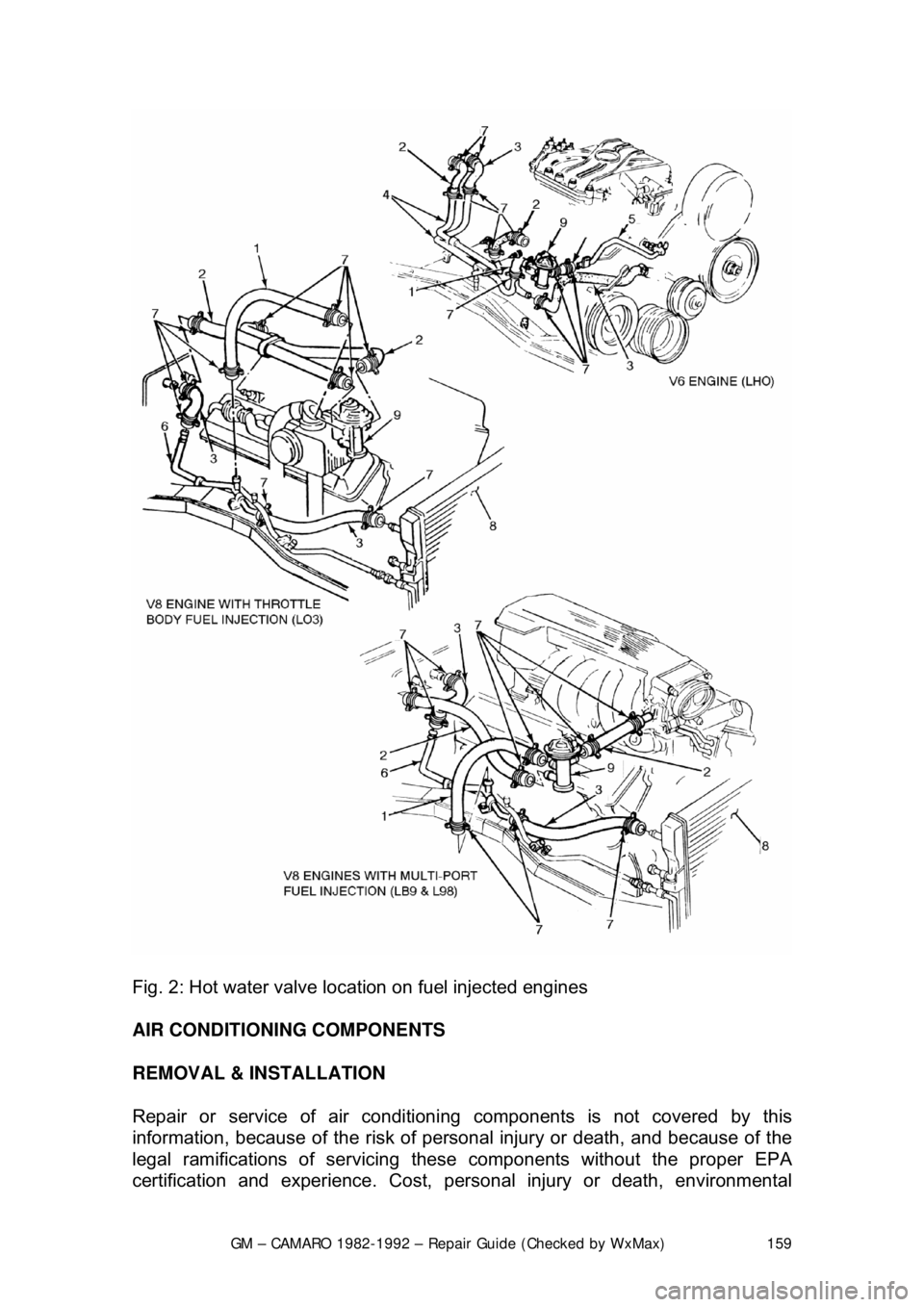
Fig. 2: Hot water valve location on fuel injected engines
AIR CONDITIONING COMPONENTS
REMOVAL & INSTALLATION
Repair or service of air conditioni ng components is not covered by this
information, because of the risk of personal injury or death, and because of the
legal ramifications of servicing these components without the proper EPA
certification and experience. Cost, perso nal injury or death, environmental
Page 160 of 875

GM – CAMARO 1982-1992 – Repair Guide (Checked by WxMax) 160
damage, and legal considerations (such as t
he fact that it is a federal crime to
vent refrigerant into the atmosphere), dictate that the A/C components on your
vehicle should be serviced only by a Motor Vehicle Air Conditioning (MVAC)
trained, and EPA certified aut omotive technician.
If your vehicle's A/C system uses R-12 re frigerant and is in need of recharging,
the A/C system can be c onverted over to R-134a refrigerant (less
environmentally harmful and expensive). Refer to General Information &
Maintenance for additional information on R- 12 to R-134a conversions, and for
additional considerations dealing with your vehicle's A/C system.
CONTROL CABLES
REMOVAL & INSTALLATION
Some of the following cables will not be used on all models and model years.
Left and Right Air Vent Cables 1. Remove the left and right sound insulators.
2. Remove the screws attaching the cabl es to the steering column cover.
3. Disengage the cable clamps at the vent ducts.
4. Disengage the Z-shaped c able ends from the vent valve levers.
5. Remove the air vent cables notin g their positions for installation.
To install: 6. Place the cables in posi tion under the instrument panel.
7. Engage the Z-shaped cable ends to the vent valve levers.
8. Snap the cable clamps into the slot of the bracket formed on the vent
ducts.
9. Attach the air vent cables at the steering column cover.
10. Install the sound insulators and test cable operation.
Fig. 1: Cable attachment at the steering column cover
Page 165 of 875
GM – CAMARO 1982-1992 – Repair Guide (Checked by WxMax) 165
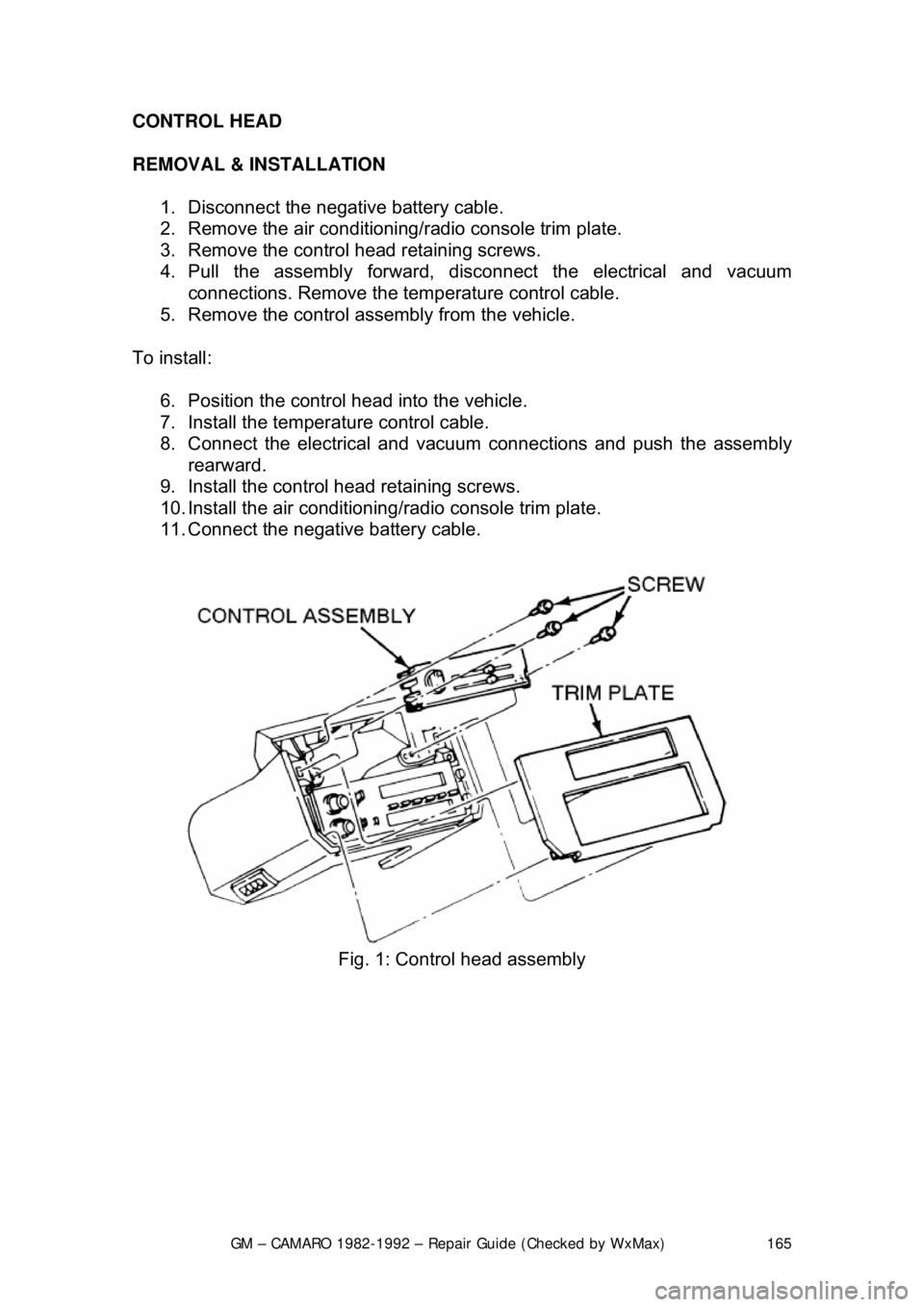
CONTROL HEAD
REMOVAL & INSTALLATION
1. Disconnect the negative battery cable.
2. Remove the air conditioning/ radio console trim plate.
3. Remove the control head retaining screws.
4. Pull the assembly forward, di sconnect the electrical and vacuum
connections. Remove the tem perature control cable.
5. Remove the control assembly from the vehicle.
To install: 6. Position the control head into the vehicle.
7. Install the temperat ure control cable.
8. Connect the electrical and vacuum connections and push the assembly rearward.
9. Install the control head retaining screws.
10. Install the air conditioning/ radio console trim plate.
11. Connect the negative battery cable.
Fig. 1: Control head assembly
Page 167 of 875

GM – CAMARO 1982-1992 – Repair Guide (Checked by WxMax) 167
BLOWER SWITCH
With the control head removed from t
he vehicle, the blower switch may be
removed by pulling the blower switch knob off and removing the retaining clip or
retaining screws.
VACUUM MOTORS
OPERATION
Used on certain heating and air condition ing systems, the vacuum actuators
operate the air doors determining the differ ent modes. The actuator consists of
a spring loaded diaphragm connec ted to a lever. When vacuum is applied to the
diaphragm, the lever moves t he control door to its appropriate position. When
the lever on the control panel is moved to another position, vacuum is cut off
and the spring returns the actuator lever to its normal position.
TESTING 1. Disconnect the vacuum line from the actuator.
2. Attach a hand held vacuum pump to the actuator.
3. Apply vacuum to the actuator.
4. The actuator lever should move to its engaged position and remain there
while vacuum is applied.
5. When vacuum is released it should move back to its normal position.
6. The lever should operat e smoothly and not bind.
REMOVAL & INSTALLATION 1. Remove the vacuum li nes from the actuator.
2. Disconnect the linkage from the actuator.
3. Remove the hardware attaching the actuator.
4. Remove the actuator.
To install: 5. Install the actuator and attaching hardware.
6. Connect the linkage to the actuator.
7. Connect the vacuum lines to the actuator.
8. Test system to confirm proper functioning of the actuator.
Page 200 of 875

GM – CAMARO 1982-1992 – Repair Guide (Checked by WxMax) 200
9. Lubricate the speedometer cable
with an appropriate lubricant, being
sure to cover the lower thirds of the cable.
10. Insert the cable into the casi ng, then connect the cable and casing
assembly to the speedometer.
11. Install the instrument cluster, then install the cluster attaching screws.
12. Install the instrument cluster trim plate.
13. On models without cruise control, connect the speedometer cable strap
at the power brake booste r. On models with cruise control, connect the
speedometer cable at the cr uise control transducer.
14. Connect the negative battery cable at the battery.
WIPER SWITCH
REMOVAL & INSTALLATION
The wiper switch is part of the multi-function lever, located on the steering
wheel column.
1. Disconnect the electrical connector of the multi-function lever, located
under the instrument panel.
2. Remove the protective cover from the wire.
3. Grasp the lever firmly, twist and pull (the tang on the lever must align
with the socket) the lever straight out.
4. Pull the wire through the steering column.
To install: 5. Slide a music wire tool through the steering column and connect the
lever wire to the tool wire; pull t he wire through the steering column.
6. Push the control lever into the sp ring loaded socket (be sure to align the
tang).
7. Install the protective cover to the wire.
8. Connect the electrical connector of the multi-function lever.
HEADLIGHT SWITCH
REMOVAL & INSTALLATION 1. Disconnect the negative batte ry cable at the battery.
2. Remove the four screws from insi de the defroster duct (instrument panel
pad securing screws).
3. Remove the screws which are under the lip of the instrument panel pad.
4. Remove the instrument panel pad.
5. On models equipped with air condition ing, remove the instrument panel
cluster bezel and the cluster.
6. Remove the radio speaker bracket.
7. Pull the headlamp switch knob to the ON position, depress the locking
button for the knob and shaft (locat ed on the switch), and remove the
knob and shaft.
8. Remove the switch bezel (retainer).
Page 201 of 875
GM – CAMARO 1982-1992 – Repair Guide (Checked by WxMax) 201
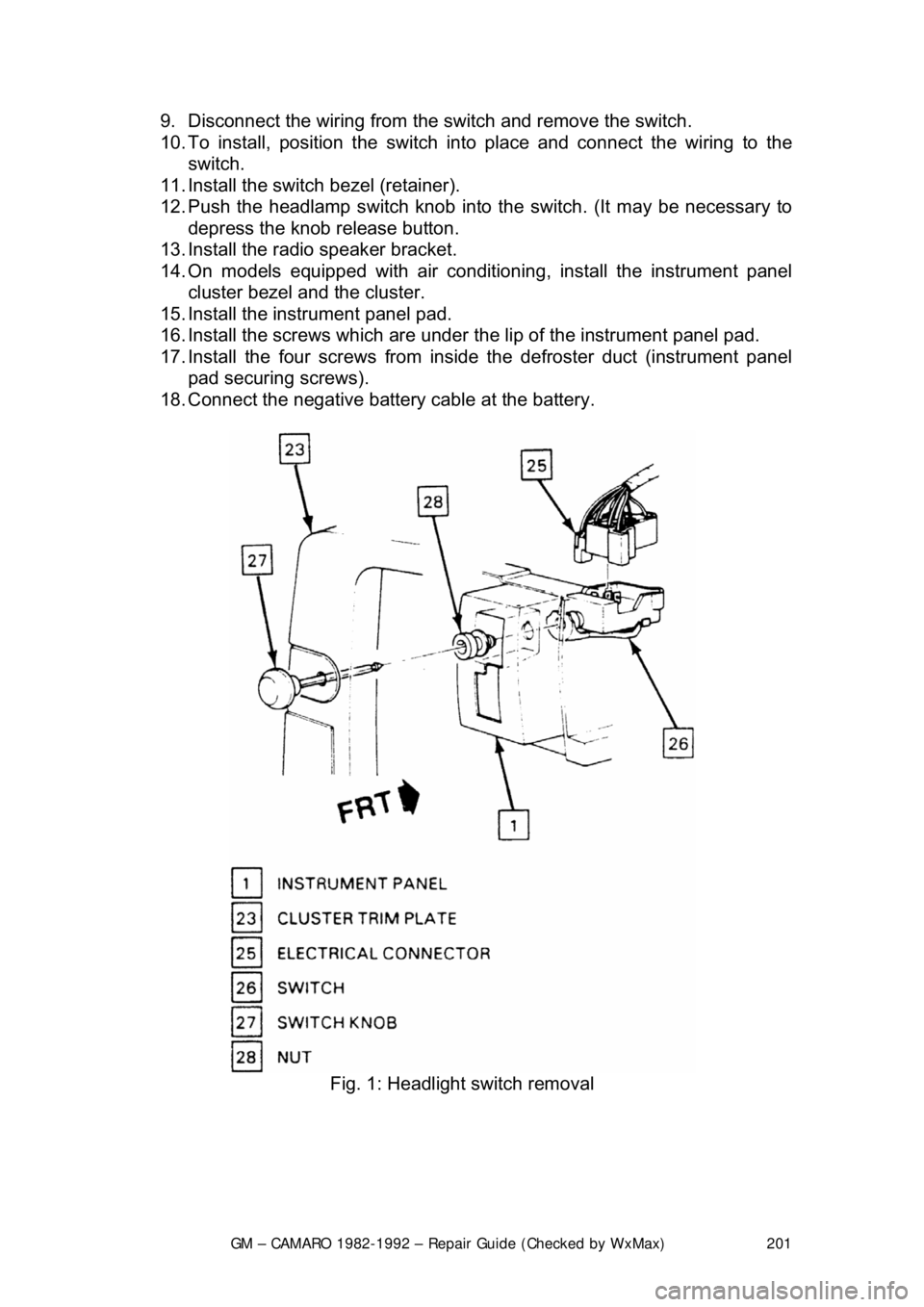
9. Disconnect the wiring from the
switch and remove the switch.
10. To install, position t he switch into place and connect the wiring to the
switch.
11. Install the switch bezel (retainer).
12. Push the headlamp switch knob into the switch. (It may be necessary to
depress the knob release button.
13. Install the radio speaker bracket.
14. On models equipped with air conditioni ng, install the instrument panel
cluster bezel and the cluster.
15. Install the inst rument panel pad.
16. Install the screws which are under t he lip of the instrument panel pad.
17. Install the four screw s from inside the defroster duct (instrument panel
pad securing screws).
18. Connect the negative battery cable at the battery.
Fig. 1: Headlight switch removal
Page 302 of 875

GM – CAMARO 1982-1992 – Repair Guide (Checked by WxMax) 302
7. To install, reverse the removal
procedures. Torque the master cylinder-
to-cowl brace nuts to 10-15 ft. lbs. (14-20 Nm). Fill master cylinder with
new hydraulic fluid conforming to DO T 3 specifications. Bleed and check
the hydraulic clutch system for leaks.
OVERHAUL 1. Remove the filler cap and drain fl uid from the master cylinder.
2. Remove the reservoir and seal from the master cylinder. Pull back the
dust cover and remove the snapring.
3. Remove the push rod assembly. Usi ng a block of wood, tap the master
cylinder on it to eject the plunger a ssembly from the cylinder bore.
4. Remove the seal (carefully) from the front of the plunger assembly,
ensuring no damage occurs to the plunger surfaces.
5. From the rear of t he plunger assembly, remove the spring, the support,
the seal and the shim.
6. Using clean brake fluid, clean all of the parts.
7. Inspect the cylinder bore and t he plunger for ridges, pitting and/or
scratches, the dust cover for wear and cracking; replace the parts if any
of the conditions exist.
To assemble: 8. Use new seals, lubric ate all of the parts in clean brake fluid, fit the
plunger seal to the plunger and reve rse the disassembly procedures.
9. Insert the plunger assembly, va lve end leading into the cylinder bore
(easing the entrance of the plunger seal).
10. Position the push rod assembly into the cylinder bore, then install a new
snapring to retain the push rod. Install dust cover onto the master
cylinder. Lubricate the inside of t he dust cover with Girling® Rubber
Grease or equivalent.
Be careful not to use any lubricant that will deteriorate rubber dust covers or
seals.
SLAVE CYLINDER
On vehicles equipped with a hydraulic clutch release mechanism, the slave
cylinder is located on the left side of the bellhousing and controls the clutch
release fork operation.
REMOVAL & INSTALLATION
1. Disconnect the negative battery cable.
2. Raise and safely support the front of the vehicle on jackstands.
3. Disconnect the hydraulic line from clutch master cylinder. Remove the
line-to-chassis screw and the c lip from the chassis.
Be sure to plug the line opening to k eep dirt and moisture out of the system.